
linux 安装与启动nginx
linux系统为Centos 64位
一、去http://nginx.org/download/上下载相应的版本下载nginx-1.8.0.tar.gz(注:还有更高版本的)。
二、解压 tar -zxvf nginx-1.8.0.tar.gz
三、进入nginx-1.8.0/文件夹,设置一下配置信息 ./configure --prefix=/usr/local/nginx(安装后的文件存放路径)。
四、配置的时候可能会出现类似这样的信息
./configure: error: the HTTP rewrite module requires the PCRE library.
You can either disable the module by using --without-http_rewrite_module
option, or install the PCRE library into the system, or build the PCRE library
statically from the source with nginx by using --with-pcre=<path> option.
安装pcre-devel解决问题
yum -y install pcre-devel
安装完成后再执行./configure --prefix=/usr/local/nginx
执行完后还有可能会出现这样的问题:
checking for PCRE JIT support ... not found
checking for system md library ... not found
checking for system md5 library ... not found
checking for OpenSSL md5 crypto library ... not found
checking for sha1 in system md library ... not found
checking for OpenSSL sha1 crypto library ... not found
checking for zlib library ... found
解决办法:
yum -y install openssl openssl-devel
安装完成后再执行./configure --prefix=/usr/local/nginx
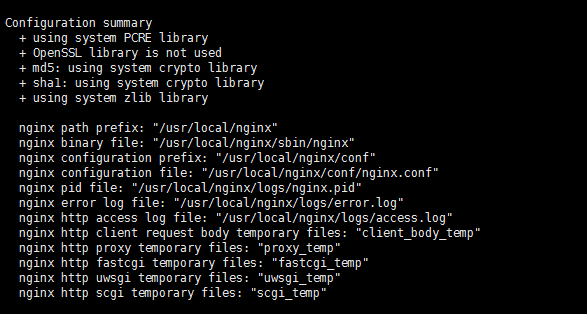
出现这个说明,配置成功了!!~
五、make && make install
出现类似这样的就表示安装成功了
cp conf/nginx.conf '/usr/local/nginx/conf/nginx.conf.default'
test -d '/usr/local/nginx/logs' || mkdir -p '/usr/local/nginx/logs'
test -d '/usr/local/nginx/logs' || mkdir -p '/usr/local/nginx/logs'
test -d '/usr/local/nginx/html' || cp -R html '/usr/local/nginx'
test -d '/usr/local/nginx/logs' || mkdir -p '/usr/local/nginx/logs'
make[1]: Leaving directory `/root/setup/nginx/nginx-1.8.0'
安装完后/usr/local/nginx 后出现几个文件夹conf、html、logs、sbin
启动nginx:
./usr/nginx/sbin/nginx
查看端口:
netstat -antp
Active Internet connections (servers and established)
Proto Recv-Q Send-Q Local Address Foreign Address State PID/Program name
tcp 0 0 0.0.0.0:80 0.0.0.0:* LISTEN 19031/nginx
tcp 0 0 0.0.0.0:21 0.0.0.0:* LISTEN 2771/vsftpd
tcp 0 0 0.0.0.0:22 0.0.0.0:* LISTEN 906/sshd
tcp 0 0 0.0.0.0:3306 0.0.0.0:* LISTEN 2263/mysqld
nginx的80端口启动了。
访问安装nginx的服务器地址,出现如下图,说明成功了。
linux 安装与启动nginx的更多相关文章
- Linux安装ElasticSearch启动报错的解决方法
Linux安装ElasticSearch后,ElasticSearch是不能用root用户启动的,以root用户启动会报错Refer to the log for complete error det ...
- linux centos-7.2-64bit 安装配置启动nginx
1.安装依赖包yum -y install openssl openssl-develyum install pcre*yum install openssl*yum install zlib yum ...
- Linux 安装及配置 Nginx + ftp 服务器
Nginx 安装及配置 一.Nginx 简介: Nginx("engine x") 是一款是由俄罗斯的程序设计师 Igor Sysoev 所开发高性能的 Web和 反向代理服务器, ...
- linux 安装jdk以及nginx详细过程
一.安装jdk 1:首先下载jdk到本地,然后通过git 上传到linux服务器上 2:进入目录usr,并创建目录java,将jdk的压缩文件移动到该目录下 cd /usr mkdir java mv ...
- linux安装jdk tomcat nginx 以及常用命令
linux: 操作系统,应用服务器上 常用命令: cd 切换命令 cd / cd ~ cd ../../ cd xx ll 展示所有的文件 ll -h 友好的展示 mkdir 创建目录 mkdir 目 ...
- linux下docker启动nginx无法访问80端口
问题: Linux安装了docker,docker启动了一个nginx容器,通过 80 端口无法正常访问 故障排查: 1.检查 nginx 容器启动的命令或者yaml文件,查看是否有跟本机端口进行绑定 ...
- mac系统下安装和启动nginx
1.在线安装 localhost:nginx-1.17.1 mhx$ sudo brew install nginx 2.查看是否安装成功 localhost:nginx-1.17.1 mhx$ ng ...
- Linux 普通用户启动nginx
众所周知,apache的80端口为系统保留端口,如果通过其他非root用户启动,会报错如下: ()Permission denied: make_sock: could not bind to add ...
- Linux 安装、启动和卸载SSH
卸载SSH: 先停掉SSH服务:sudo stop ssh 检查SSH是否停止:ssh localhost 检查SSH是否启动: ps -e|grep ssh 卸载SSH:apt-get --purg ...
随机推荐
- STM32驱动ht1621b显示LCD
这几天在写ht1621b显示LCD的程序,主芯片是Stm32f10的芯片.对于stm32和ht1621b的运用和操作本人是新手,属于赶鸭子上架,通过查看datasheet等资料和网上查看前人写的程序终 ...
- CUDA开发存储器运用(包括存储器之间的转存)
主机端内存(host memory) 主机端叶锁定内存(pinned memory) 显存 寄存器(register) 局部存储器(local memory) 共享存储器(shared memory) ...
- shell-逐行读取文件
代码: #!/bin/bash echo 方法1 while read line do echo $line; done < testdata echo "" echo 方法 ...
- Pelican搭建静态博客
前言 一直以来都希望拥有属于自己的个人博客,随性发点信息,写点技术感想,记录自己的生活,重要的是不受广告的影响.不被河蟹.不会担心有一天被莫名其妙地消失. 之前看过一篇文章:"像黑客一样写博 ...
- Objective-C Runtime 运行时之一:类与对象(转载)
Objective-C语言是一门动态语言,它将很多静态语言在编译和链接时期做的事放到了运行时来处理.这种动态语言的优势在于:我们写代码时更具灵活性,如我们可以把消息转发给我们想要的对象,或者随意交换一 ...
- 10s后自动跳转
<div class="jf_register"> <h2>您好,欢迎光临<fmt:message key="b2cShowName&quo ...
- 织梦dedecms文章发布日期时间调用标签大全
dedecms首页时间标签: 1.12-27 样式 [field:pubdate function='strftime("%m-%d",@me)'/] 2.May 15, 2012 ...
- 当今Web应用的主要技术
WWW是World Wide Web的简称,缩写为W3C,称为万维网,也简称为Web.目前Internet已经普及到整个社会,其中Web应用已经称为Internet上最受欢迎的应用之一,正是由于它的出 ...
- OvS: ovs-ofctl adding parameters analysis
if using dpdk, then OvS' datapath folder is ignored. Only OvS' userspace code are in use. According ...
- linux: 几个常用makefile模板
不才,总结个人常用makefile模板,以备后用. 1.编译动态库 ############################################################# # Ma ...