
转载:jsp九大内置对象和四大作用域
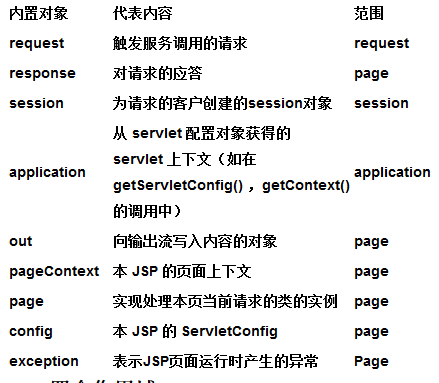
摘要: JSP的九大内置对象: page,application,session,request,response,out,exception,config,pageContext. JSP的四个作用域:application,session,request,page.
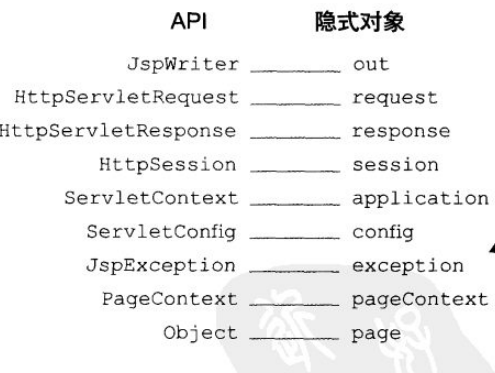
//附上jsp转换成servlet后的java代码

package org.apache.jsp;

import javax.servlet.*;

import javax.servlet.http.*;

import javax.servlet.jsp.*;

import java.util.*;

public final class index_jsp extends org.apache.jasper.runtime.HttpJspBase

    implements org.apache.jasper.runtime.JspSourceDependent {

   int count = 0;


   int getCount(){

   int num = 100;

   return num = 100*count;


   }


  private static final JspFactory _jspxFactory = JspFactory.getDefaultFactory();

  private static java.util.List _jspx_dependants;

  private javax.el.ExpressionFactory _el_expressionfactory;

  private org.apache.AnnotationProcessor _jsp_annotationprocessor;

  public Object getDependants() {

    return _jspx_dependants;

  }

  public void _jspInit() {

    _el_expressionfactory = _jspxFactory.getJspApplicationContext(getServletConfig().getServletContext()).getExpressionFactory();

    _jsp_annotationprocessor = (org.apache.AnnotationProcessor) getServletConfig().getServletContext().getAttribute(org.apache.AnnotationProcessor.class.getName());

  }

  public void _jspDestroy() {

  }

  public void _jspService(HttpServletRequest request, HttpServletResponse response)

        throws java.io.IOException, ServletException {

    PageContext pageContext = null;

    HttpSession session = null;

    ServletContext application = null;

    ServletConfig config = null;

    JspWriter out = null;

    Object page = this;

    JspWriter _jspx_out = null;

    PageContext _jspx_page_context = null;

    try {

      response.setContentType("text/html;charset=ISO-8859-1");

      pageContext = _jspxFactory.getPageContext(this, request, response,

                  null, true, 8192, true);

      _jspx_page_context = pageContext;

      application = pageContext.getServletContext();

      config = pageContext.getServletConfig();

      session = pageContext.getSession();

      out = pageContext.getOut();

      _jspx_out = out;

      out.write('\r');

      out.write('\n');

String path = request.getContextPath();

String basePath = request.getScheme()+"://"+request.getServerName()+":"+request.getServerPort()+path+"/";

      out.write("\r\n");

      out.write("\r\n");

      out.write("<!DOCTYPE HTML PUBLIC \"-//W3C//DTD HTML 4.01 Transitional//EN\">\r\n");

      out.write("<html>\r\n");

      out.write("  <head>\r\n");

      out.write("    <base href=\"");

      out.print(basePath);

      out.write("\">\r\n");

      out.write("    \r\n");

      out.write("    <title>My JSP 'index.jsp' starting page</title>\r\n");

      out.write("\t<meta http-equiv=\"pragma\" content=\"no-cache\">\r\n");

      out.write("\t<meta http-equiv=\"cache-control\" content=\"no-cache\">\r\n");

      out.write("\t<meta http-equiv=\"expires\" content=\"0\">    \r\n");

      out.write("\t<meta http-equiv=\"keywords\" content=\"keyword1,keyword2,keyword3\">\r\n");

      out.write("\t<meta http-equiv=\"description\" content=\"This is my page\">\r\n");

      out.write("  </head>\r\n");

      out.write("  \r\n");

      out.write("  <body>\r\n");

      out.write("  ");


      out.write("\r\n");

      out.write("   \r\n");

      out.write("   ");

      out.write("\r\n");

      out.write("  \r\n");

      out.write("  ");

      out.print(++count );

      out.write("\r\n");

      out.write("  ");

      out.print( getCount() );

      out.write("\r\n");

      out.write("  <form action=\"test.do\" method=\"post\">\r\n");

      out.write("  <select name =\"color\">\r\n");

      out.write("  <option>White</option>\r\n");

      out.write("  <option>Red</option>\r\n");

      out.write("  <option>Yellow</option>\r\n");

      out.write("  <option>Blue</option>\r\n");

      out.write("  </select>\r\n");

      out.write("  \r\n");

      out.write("  <input type=\"checkbox\" name=\"hobby\" value=\"football\">football<br>\r\n");

      out.write("  <input type=\"checkbox\" name=\"hobby\" value=\"football\">basketball<br>\r\n");

      out.write("  <input type=\"checkbox\" name=\"hobby\" value=\"football\">baseball<br>\r\n");

      out.write("  \r\n");

      out.write("  <input type=\"submit\">\r\n");

      out.write("  </form>\r\n");

      out.write("  </body>\r\n");

      out.write("</html>\r\n");

    } catch (Throwable t) {

      if (!(t instanceof SkipPageException)){

        out = _jspx_out;

        if (out != null && out.getBufferSize() != 0)

          try { out.clearBuffer(); } catch (java.io.IOException e) {}

        if (_jspx_page_context != null) _jspx_page_context.handlePageException(t);

      }

    } finally {

      _jspxFactory.releasePageContext(_jspx_page_context);

    }

  }

}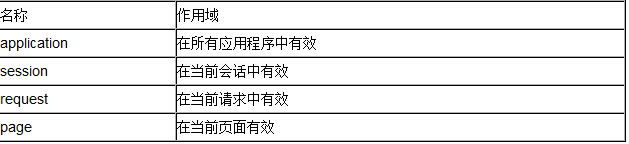
application作用域就是服务器启动到关闭的整段时间,在这个作用域内设置的信息可以被所有应用程序使用。application作用域上的信息传递是通过ServletContext实现的.
session作用域比较容易理解,同一浏览器对服务器进行多次访问,在这多次访问之间传递信息,就是session作用域的体现,
一个HTTP请求的处理可能需要多个Servlet合作,而这几个Servlet之间可以通过某种方式传递信息,但这个信息在请求结束后就无效了。Servlet之间的信息共享是通过HttpServletRequest接口的两个方法来实现的。
page对象的作用范围仅限于用户请求的当前页面,对于page对象的引用将在响应返回给客户端之后被释放,或者在请求被转发到其他地方后被释放。对page对象的引用通常存储在pageContext对象中。
转载:jsp九大内置对象和四大作用域的更多相关文章
- JSP九大内置对象和四大作用域和Servlet的三大作用域对象
一.JSP九大内置对象:内置对象(又叫隐含对象,有9个内置对象):不需要预先声明就可以在脚本代码和表达式中随意使用 内置对象特点: 由JSP规范提供,不用编写者实例化. 通过Web容器实现和管理 所有 ...
- jsp九大内置对象和四大作用域
看到网上一些Jsp内置对象介绍的都不是很全,今天我把各位大神的整理了一下. JSP九大对象:内置对象(又叫隐含对象,有9个内置对象):不需要预先声明就可以在脚本代码和表达式中随意使用. 一.reque ...
- JavaWeb中jsp九大内置对象 和四大作用域
九大内置对象为 page request response session exception config application out pageContext no 内置对象 类型 1 pag ...
- servlet的三大作用域对象和jsp的九大内置对象及其四大作用域对象
servlet的三大作用域对象: request(HttpServletRequest) session(HttpSession): application(ServletContext):tomca ...
- Jsp (Java Server Pages)相关知识九大内置对象和四大作用域
一.初识JSP Jsp页面的组成:静态内容.指令.表达式.小脚本.声明.标准动作.注释等元素构成 Url:统一资源定位符 Url组成:协议.主机名(包括端口号).路径 1.注释的方式: 1.HTML注 ...
- Jsp语法九大内置对象和四大作用域
一.JSP 原理:JSP其实就是一个servlet. Servlet负责业务逻辑处理,JSP只负责显示.开发中,JSP中不能有一行JAVA代码 二.JSP语法 1. JSP模板元素:JSP中HTML标 ...
- jsp的九大内置对象和四大作用域(转)
定义:可以不加声明就在JSP页面脚本(Java程序片和Java表达式)中使用的成员变量 JSP共有以下9种基本内置组件(可与ASP的6种内部组件相对应): 1.request对象(作用域) 客户端的 ...
- jsp的九大内置对象和四大作用域
定义:可以不加声明就在JSP页面脚本(Java程序片和Java表达式)中使用的成员变量? JSP共有以下9种基本内置组件(可与ASP的6种内部组件相对应):? 1.request对象(作用域)? 客户 ...
- AJPFX详解jsp的九大内置对象和四大作用域
定义:可以不加声明就在JSP页面脚本(Java程序片和Java表达式)中使用的成员变量 JSP共有以下9种基本内置组件(可与ASP的6种内部组件相对应): 1.request对象(作用域) 客户端的请 ...
随机推荐
- Google Dataflow
十分钟了解分布式计算:Google Dataflow 介绍 Google Cloud Dataflow是一种构建.管理和优化复杂数据处理流水线的方法,集成了许多内部技术,如用于数据高效并行化处理的Fl ...
- SpringMVC数据绑定
SpringMVC学习系列(5) 之 数据绑定-2 在系列(4)中我们介绍了如何用@RequestParam来绑定数据,下面我们来看一下其它几个数据绑定注解的使用方法. 1.@PathVariab ...
- 网页启动Windows服务
如何在网页启动Windows服务 由于公司有许多windows服务进行业务的处理,所谓对服务的维护也是一个比较头痛的问题,因为自己也不知道服务什么时候自动停了,而且更主要的原因是服务都是由运维部门 ...
- 32位Windows7
32位Windows7 利用多余的不能识别的电脑内存 RAMDISK5.5教程 32位Windows7 利用多余的不能识别的电脑内存 RAMDISK5.5教程 环境:Windows7 32位 Ul ...
- 解决Timer回调方法重复调用的问题
如果Timer的回调方法的执行时间很长,计时器可能在上个回调方法还没有完成的时候再次触发,如果我们只是想让一个回调方法执行完后再执行下一个回调方法,可以这样: private static Timer ...
- [转]About the security content of iOS 8
Source:http://support.apple.com/kb/HT6441 For the protection of our customers, Apple does not disclo ...
- 获取时间SQL函数语句
1.获取时间 获取当天的数据 where DATEDIFF (DD, 数据库中时间的字段 ,GETDATE())=0 查询24小时内的 where DATEDIFF (HH, 数据库中时间的字段 ...
- IOS学习之路五(SpriteKit 开发飞机大战小游戏一)
参考SpriteKit 创建游戏的教程今天自己动手做了一下,现在记录一下自己怎么做的,今天之做了第一步,一共有三个部分. 第一步,项目搭建. 项目所用图片资源:点击打开链接 1.在Xcode打开之后, ...
- Jekyll报'Tag was never closed'错误
使用jekyll的代码高亮功能.但是发现有时总是很恼人的出现错误,报告说'Tag was never closed'.可是我很确定的关闭了标签啊,真是令人恼怒啊.解决方案式什么哪?如果你对此有兴趣,请 ...
- 判断BigDecimal是否可以转为Integer或Double
一句话,BigDecimal转为字符串,匹配正则表达式,so easy; 不废话,代码: import java.math.BigDecimal; import java.util.regex.Pat ...