
【转】CXF+Spring+Eclipse简明示例
Eclipse+CXF+Spring共同开发的示例,供大家赏鉴。
多系统(异构系统)进行交互时,一种良好的方式便是调用Web Service,本示例基于Apache组织的CXF,为了方便起见特将服务端和客户端写在同一个工程下,实际项目中是不可能的,但是客户端却依赖于服务端的Web Service接口,那么可以通过导出jar的方式。
环境:
Eclipse Mars.1 Release (4.5.1)
JDK 1.7.0_15
Tomcat 7
CXF 2.1.3
Spring3
示例项目结构图:
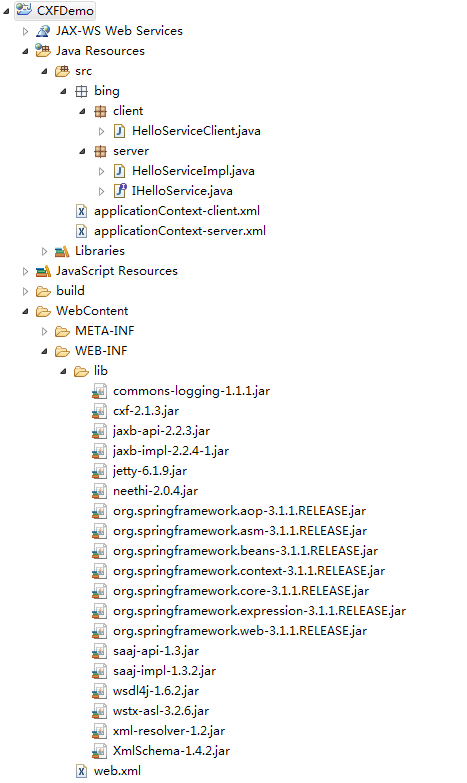
如上图所示,全部依赖的第三方库都在lib中,下面贴出全部代码。
IHelloService.java
package bing.server;

import javax.jws.WebService;

/**

 * <p>

 * WebService接口

 * </p>

 *

 * @author IceWee

 * @date 2012-7-6

 * @version 1.0

 */

@WebService

public interface IHelloService {

    public String sayHello(String username);

}
HelloServiceImpl.java
package bing.server;

import javax.jws.WebService;

/**

 * <p>

 * WebService实现类

 * </p>

 *

 * @author IceWee

 * @date 2012-7-6

 * @version 1.0

 */

@WebService(endpointInterface = "bing.server.IHelloService", serviceName = "helloService")

public class HelloServiceImpl implements IHelloService {

    @Override

    public String sayHello(String username) {

        return "hello, " + username;

    }

}
HelloServiceClient.java
package bing.client;

import org.springframework.context.ApplicationContext;

import org.springframework.context.support.ClassPathXmlApplicationContext;

import bing.server.IHelloService;

/**

 * <p>

 * WebService调用方-客户端

 * </p>

 *

 * @author IceWee

 * @date 2012-7-6

 * @version 1.0

 */

public class HelloServiceClient {

    public static void main(String[] args) {

        ApplicationContext context = new ClassPathXmlApplicationContext("applicationContext-client.xml");

        IHelloService helloService = (IHelloService) context.getBean("client");

        String response = helloService.sayHello("Peter");

        System.out.println(response);

    }

}
applicationContext-server.xml
 <?xml version="1.0" encoding="UTF-8"?>

 <beans xmlns="http://www.springframework.org/schema/beans"

     xmlns:xsi="http://www.w3.org/2001/XMLSchema-instance" xmlns:jaxws="http://cxf.apache.org/jaxws"

     xsi:schemaLocation="http://www.springframework.org/schema/beans

                        http://www.springframework.org/schema/beans/spring-beans.xsd

                        http://cxf.apache.org/jaxws http://cxf.apache.org/schemas/jaxws.xsd">

     <!-- ***注意*** 手动添加的内容: xmlns:jaxws="http://cxf.apache.org/jaxws" http://cxf.apache.org/jaxws

         http://cxf.apache.org/schemas/jaxws.xsd" -->

     <import resource="classpath:META-INF/cxf/cxf.xml" />

     <import resource="classpath:META-INF/cxf/cxf-extension-soap.xml" />

     <import resource="classpath:META-INF/cxf/cxf-servlet.xml" />

     <jaxws:endpoint id="helloService" implementor="bing.server.HelloServiceImpl"

         address="/helloService" />

 </beans>
applicationContext-client.xml
<?xml version="1.0" encoding="UTF-8"?>

<beans xmlns="http://www.springframework.org/schema/beans"

    xmlns:xsi="http://www.w3.org/2001/XMLSchema-instance" xmlns:jaxws="http://cxf.apache.org/jaxws"

    xsi:schemaLocation="http://www.springframework.org/schema/beans

                       http://www.springframework.org/schema/beans/spring-beans.xsd

                       http://cxf.apache.org/jaxws http://cxf.apache.org/schemas/jaxws.xsd">

    <!-- ***注意*** 手动添加的内容: xmlns:jaxws="http://cxf.apache.org/jaxws" http://cxf.apache.org/jaxws

        http://cxf.apache.org/schemas/jaxws.xsd" -->

    <import resource="classpath:META-INF/cxf/cxf.xml" />

    <import resource="classpath:META-INF/cxf/cxf-extension-soap.xml" />

    <import resource="classpath:META-INF/cxf/cxf-servlet.xml" />

    <bean id="client" class="bing.server.IHelloService" factory-bean="clientFactory"

        factory-method="create" />

    <bean id="clientFactory" class="org.apache.cxf.jaxws.JaxWsProxyFactoryBean">

        <property name="serviceClass" value="bing.server.IHelloService" />

        <property name="address"

            value="http://localhost:8082/CXFDemo/ws/helloService" />

    </bean>

</beans>
web.xml
<?xml version="1.0" encoding="UTF-8"?>

<web-app version="3.0" xmlns="http://java.sun.com/xml/ns/javaee"

    xmlns:xsi="http://www.w3.org/2001/XMLSchema-instance"

    xsi:schemaLocation="http://java.sun.com/xml/ns/javaee

    http://java.sun.com/xml/ns/javaee/web-app_3_0.xsd">

    <display-name>CXFDemo</display-name>

    <context-param>

        <param-name>contextConfigLocation</param-name>

        <param-value>classpath:applicationContext-server.xml</param-value>

    </context-param>

    <listener>

        <listener-class>org.springframework.web.context.ContextLoaderListener</listener-class>

    </listener>

    <servlet>

        <servlet-name>CXFServlet</servlet-name>

        <servlet-class>org.apache.cxf.transport.servlet.CXFServlet</servlet-class>

        <load-on-startup>1</load-on-startup>

    </servlet>

    <servlet-mapping>

        <servlet-name>CXFServlet</servlet-name>

        <url-pattern>/ws/*</url-pattern>

    </servlet-mapping>

    <welcome-file-list>

        <welcome-file>index.jsp</welcome-file>

    </welcome-file-list>

</web-app>
所有项目都已配置完成,可以发布到Tomcat了,在浏览器中输入:http://localhost:8082/CXFDemo/ws,返回如图:
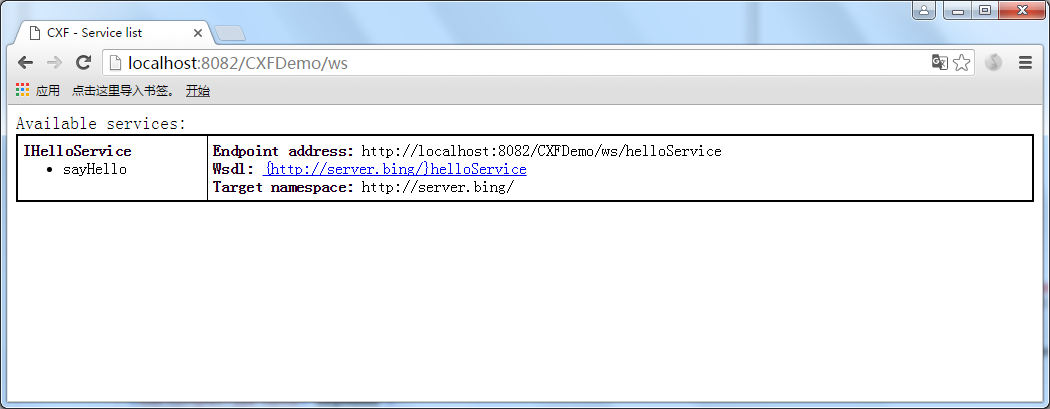
从上图中可以看到我们对外发布的WebService接口,点击蓝色超链接,返回如图:
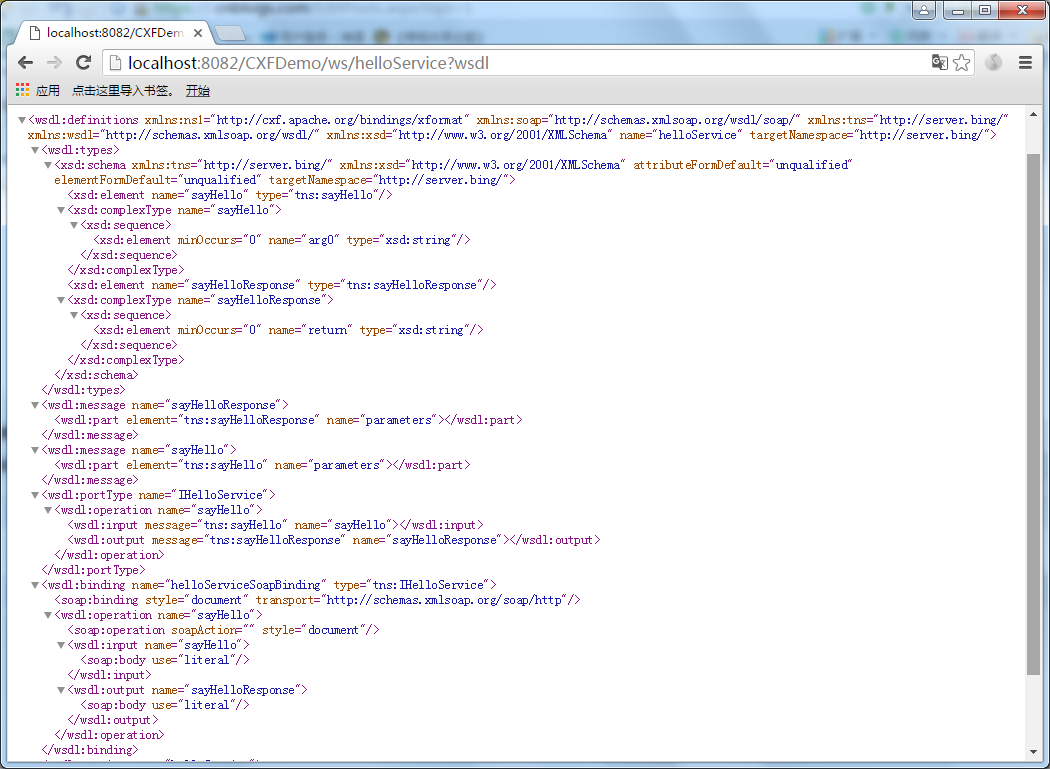
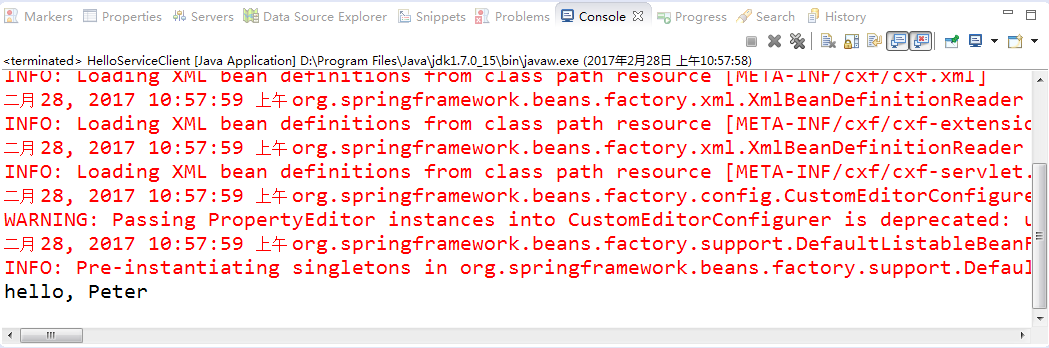
到此,证明我们的Web Service已经发布成功,可以进行调用测试了。运行HelloServiceClient,返回如图:
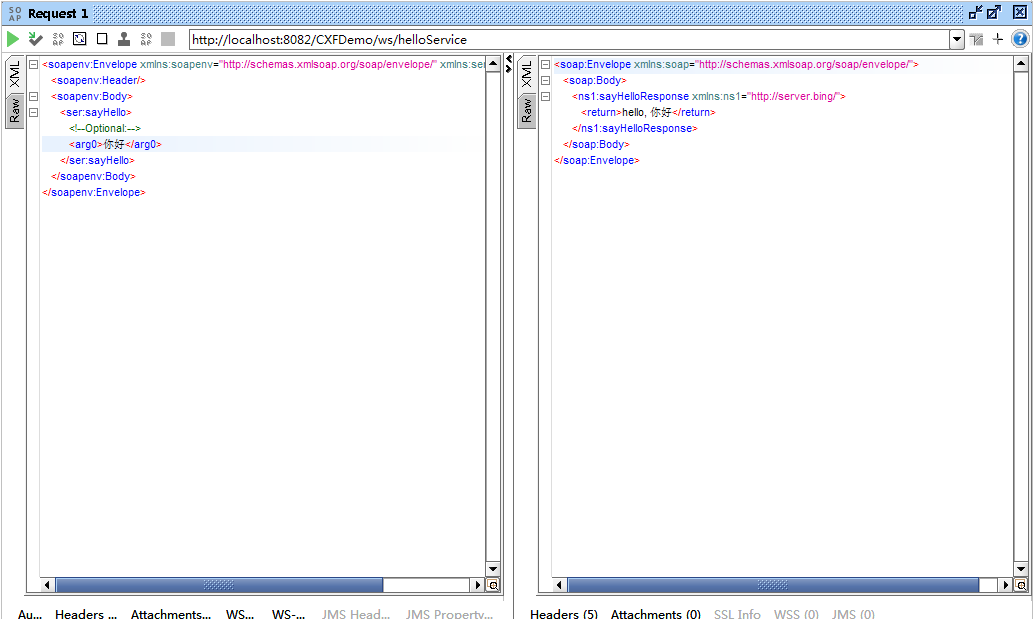
使用SoapUI运行结果如下:
声明:本文转载自http://www.blogjava.net/icewee/archive/2012/07/06/382399.html 对其中遇到的一些报错问题做了改进,亲测可以完美运行
【转】CXF+Spring+Eclipse简明示例的更多相关文章
- 使用CXF+Spring发布WebService,启动报错
使用CXF+Spring发布WebService,启动报错,日志如下: 五月 12, 2017 9:01:37 下午 org.apache.tomcat.util.digester.SetProper ...
- cxf spring restful 问题解决(jar包冲突)
SEVERE: Context initialization failedorg.springframework.beans.factory.BeanCreationException: Error ...
- 解决cxf+spring发布的webservice,types,portType和message以import方式导入
用cxf+spring发布了webservice,发现生成的wsdl的types,message和portType都以import的方式导入的.. 原因:命名空间问题 我想要生成的wsdl在同个文件中 ...
- [llvm] LLVM 核心类简明示例 : llvm::Value && llvm::Type && llvm::Constant
LLVM 核心类简明示例 : llvm::Value && llvm::Type && llvm::Constant llvm核心类位于 include/llvm/IR ...
- Spring MVC 项目示例
Spring MVC是Spring Framework的一部分,是基于Java实现MVC的轻量级Web框架.Spring的web框架围绕DispatcherServlet设计, 作用是将请求分发到不同 ...
- 本人亲测-SSM环境搭建(使用eclipse作为示例,过程挺全的,可作为参考)
本人亲测-SSM环境搭建(使用eclipse作为示例,过程挺全的,可作为参考) 本人亲测-SSM环境搭建(使用eclipse作为示例,过程挺全的,可作为参考) 本人亲测-SSM环境搭建(使用eclip ...
- Spring松耦合示例(转)& IOC
Spring松耦合示例 轻松学习Spring<一> IoC容器和Dependency Injection模式 最近公司需要,项目中要用到Spring和Ibatis.趁着过年好好学习学习.I ...
- Spring+CXF的WebServices简单示例
本文就最简单的WebServices示例来演示Spring和CXF的整合. 使用Maven创建webapp项目,pom如下 <properties> <cxf.version> ...
- CXF Spring开发WebService,基于SOAP和REST方式 【转】
官网示例 http://cxf.apache.org/docs/writing-a-service-with-spring.html http://cxf.apache.org/docs/jax-rs ...
随机推荐
- java制作图片水印
1.创建缓存图片对象 2.创建Java绘图工具对象 3.将原图绘制到缓存图片对象 4.使用工具将水印绘制到缓存图片对象 5.创建图片编码工具类 6.输出缓存图片对象到目标图片文件 BufferedIm ...
- SQL数据库置疑修复
SQL数据库置疑修复 首先分析数据库置疑的原因,查明原因分析数据库置疑修复的方法,解决置疑后,考虑数据库置疑的预防方案. 数据库置疑产生的原因: 1.sql所在分区空间是否够?数据库文件大小是否达 ...
- ora-12154
64位oracle,32位pl/sql pl/sql配置完之后,一直报错: ora-12154 配置环境变量ORACLE_HOME:D:\softInstrall\oracle\product\11. ...
- 【蓝牙数据采集模块】-01-Sensor Controller 功能介绍
一. CC2650芯片内部的结构框图如图,内部包含: 一个Cortex-M3主控制器,用来做整个芯片的功能与任务实现 一个Cortex-M0射频控制器,用来驱动RF相关电路 一个Sensor Cont ...
- UIStackView属性解释
Distribution 分布: Fill:填充,会根据优先级来压缩或伸长元素 Fill Equal:全都相等,并且都填充满 Fill Proportionally:按比例填充,根据元素的内容多少的比 ...
- violin 结构介绍
参考:http://www.iqiyi.com/w_19rt9yvv9p.html 主要结构有:琴身.指板.腮托.琴马.琴弦.琴轴
- Html 和 Css 的杂乱总结
1. input 中可以设置 maxLength 属性,控制输入的文字数量,中英文字节数一样,但是没有验证兼容性 2.客户端中的页面禁止右键,复制等 <body scroll="no& ...
- @pathvariable 注解
1.4. @PathVariable 注解 带占位符的 URL 是 Spring3.0 新增的功能,该功能在SpringMVC 向 REST 目标挺进发展过程中具有里程碑的意义 通过 @PathVar ...
- Microsoft Office 2016 简体中文 Vol 版镜像下载(Pro Plus、Visio、Project 下载)
在使用上,零售版和批量授权版并没有区别,只是授权方式方面的区别,相对而言,VOL 版的更容易激活一些,其他并没有什么区别了. 有需要的可以在下面下载:(以下均是 VL 版) 版本:Office 201 ...
- iOS 获取公历、农历日期的年月日
iOS 获取公历.农历日期的年月日 介绍三种方法获取 Date (NSDate) 的年月日. 用 date 表示当前日期.测试日期为公历 2017 年 2 月 5 日,农历丁酉年,鸡年,正月初九. l ...