
SNMP学习笔记之SNMP树形结构介绍
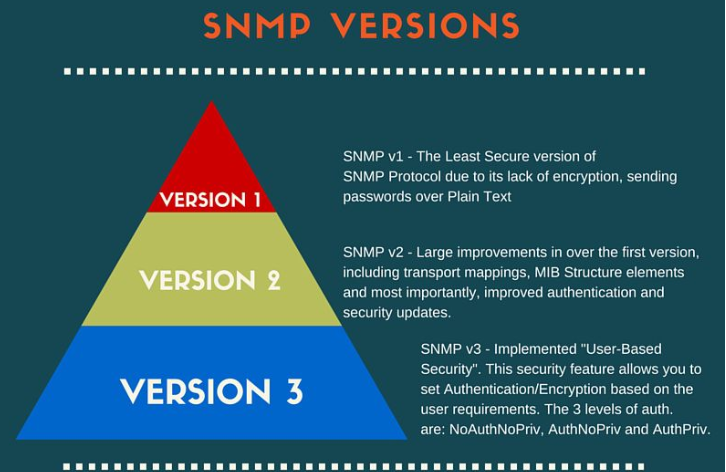
Basic command of SNMP:
- GET: The GET operation is a request sent by the manager to the managed device. It is performed to retrieve one or more values from the managed device.
- GET NEXT: This operation is similar to the GET. The significant difference is that the GET NEXT operation retrieves the value of the next OID in the MIB tree.
- GET BULK: The GETBULK operation is used to retrieve voluminous data from large MIB table.
- SET: This operation is used by the managers to modify or assign the value of the Managed device.
- TRAPS: Unlike the above commands which are initiated from the SNMP Manager, TRAPS are initiated by the Agents. It is a signal to the SNMP Manager by the Agent on the occurrence of an event.
- INFORM: This command is similar to the TRAP initiated by the Agent, additionally INFORM includes confirmation from the SNMP manager on receiving the message.
- RESPONSE: It is the command used to carry back the value(s) or signal of actions directed by the SNMP Manager.
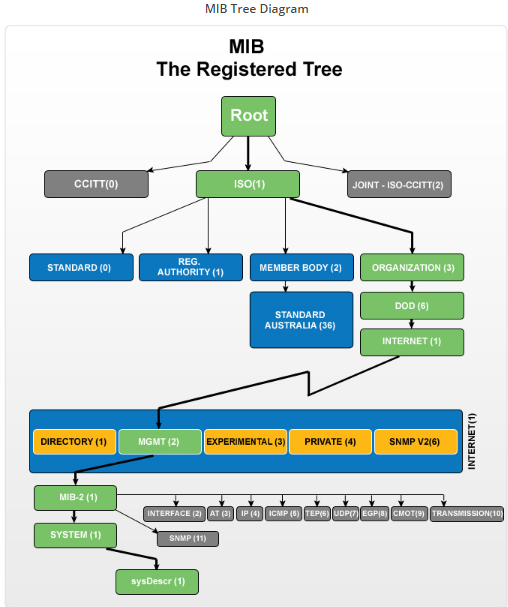

- 1.3.6.1.2.1.1 - SNMP MIB-2 System
- 1.3.6.1.2.1.2 - SNMP MIB-2 Interfaces
- 1.3.6.1.2.1.3 - at
- 1.3.6.1.2.1.4 - ip
- 1.3.6.1.2.1.5 - icmp
- 1.3.6.1.2.1.6 - tcp
- 1.3.6.1.2.1.7 - udp
- 1.3.6.1.2.1.8 - egp
- 1.3.6.1.2.1.9 - cmot
- 1.3.6.1.2.1.10 - transmission
- 1.3.6.1.2.1.11 - snmp
- 1.3.6.1.2.1.14 - OSPF Version 2 MIB
- 1.3.6.1.2.1.15 - BGPv4
- 1.3.6.1.2.1.16 - Managed Objects for Bridges
- 1.3.6.1.2.1.17 - Bridge Mib
- 1.3.6.1.2.1.22 - rptrHealth
- 1.3.6.1.2.1.25 - HOST-RESOURCES-MIB, from RFC 1514
- 1.3.6.1.2.1.26 - Ethernet MAU mib
- 1.3.6.1.2.1.27 - Application MIB module
- 1.3.6.1.2.1.28 - MTA MIB module
- 1.3.6.1.2.1.29 - X.500 Directory MIB module
- 1.3.6.1.2.1.31 - ifMib
- 1.3.6.1.2.1.33 - upsMIB
- 1.3.6.1.2.1.34 - snaNode
- 1.3.6.1.2.1.38 - mdmMib
- 1.3.6.1.2.1.41 - sdlcStatus
- 1.3.6.1.2.1.43 - Printer-MIB
- 1.3.6.1.2.1.47 - entity-mib
- 1.3.6.1.2.1.69 - docsDev
- 1.3.6.1.2.1.92 - notificationLogMIB
OID:
This is a sample structure of OD:
Iso(1).org(3).dod(6).internet(1).private(4).transition(868).products(2).chassis(4).card(1).slotCps(2)-cpsSlotSummary(1).cpsModuleTable(1).cpsModuleEntry(1).cpsModuleModel(3).3562.3
or just:
1.3.6.1.4.868.2.4.1.2.1.1.1.3.3562.3
Private OID:
Many manufactures can supply custom MIB files for their hardware ,such as temperature , fan speed.
The MIB file is hard to read, they are only meant to be imported, or "compiled " by a Management Station.
Below is an example of Cisco MIB file for environment monitoring.
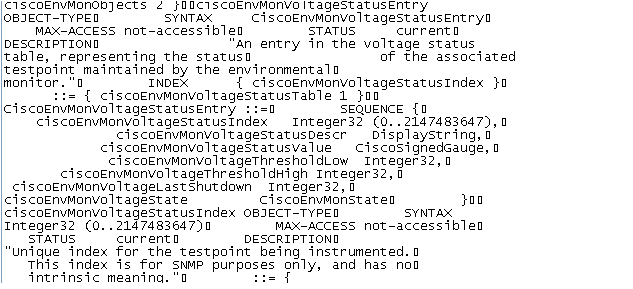
Cisco MIB information:
http://snmp.cloudapps.cisco.com/Support/SNMP/do/BrowseMIB.do?local=en&step=2
Load MIB file:
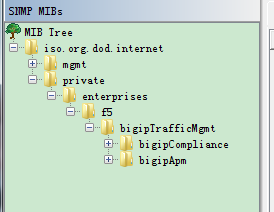
The files below is F5 MIB file.
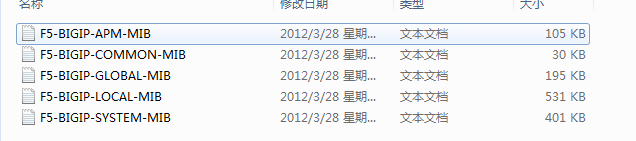
We can use MIB Browser to load these file ,and you can see the F5 private OID in the picture.
参考
SNMP学习笔记之SNMP树形结构介绍的更多相关文章
- SNMP学习笔记之SNMP介绍,OID及MIB库
1.1. SNMP概览 SNMP的基本知识介绍简单网络管理协议(SNMP-Simple Network Management Protocol)是一个与网络设备交互的简单方法.该规范是由IETF ...
- SNMP学习笔记之SNMP 原理与实战详解
原文地址:http://freeloda.blog.51cto.com/2033581/1306743 原创作品,允许转载,转载时请务必以超链接形式标明文章 原始出处 .作者信息和本声明.否则将追究法 ...
- SNMP学习笔记之SNMP简单概述
0x00 SNMP简单概述 0.1.什么是Snmp SNMP是英文"Simple Network Management Protocol"的缩写,中文意思是"简单网络管理 ...
- SNMP学习笔记之SNMP TRAP简介、流程以及使用Python实现接受Trap信息
0x00 SNMP TRAP简介 SNMP(Simple Network Management Protocol) trap是一种很有用,但是也容易让人难以理解的协议. 虽然名字叫做简单网络管理协议, ...
- SNMP学习笔记之SNMP的安装及Python的调用
0x00 概述 本文是介绍SNMP在Windows和Linux(Ubuntu)下的安装,以及通过Python调用其接口的文章. 0x01 开发环境 Python 3.5.1 Windows 10 64 ...
- SNMP学习笔记之SNMP报文以及不同版本(SNMPv1、v2c、v3)的区别
本篇文章将重点分析SNMP报文,并对不同版本(SNMPv1.v2c.v3)进行区别! 四.SNMP协议数据单元 在SNMP管理中,管理站(NMS)和代理(Agent)之间交换的管理信息构成了SNMP报 ...
- SNMP学习笔记之SNMP报文协议详解
0x00 简介 简单网络管理协议(SNMP)是TCP/IP协议簇的一个应用层协议.在1988年被制定,并被Internet体系结构委员会(IAB)采纳作为一个短期的网络管理解决方案:由于SNMP的简单 ...
- DeepLearning.ai学习笔记(三)结构化机器学习项目--week2机器学习策略(2)
一.进行误差分析 很多时候我们发现训练出来的模型有误差后,就会一股脑的想着法子去减少误差.想法固然好,但是有点headlong~ 这节视频中吴大大介绍了一个比较科学的方法,具体的看下面的例子 还是以猫 ...
- java之jvm学习笔记十三(jvm基本结构)
java之jvm学习笔记十三(jvm基本结构) 这一节,主要来学习jvm的基本结构,也就是概述.说是概述,内容很多,而且概念量也很大,不过关于概念方面,你不用担心,我完全有信心,让概念在你的脑子里变成 ...
随机推荐
- TFS二次开发06——签入(CheckIn)
一个Item 就是一个文件或文件夹 using Microsoft.TeamFoundation.Client; using Microsoft.TeamFoundation.VersionContr ...
- java基础/一个类A继承了类B,那么A就叫做B的派生类或子类,B就叫基类或超类。
类重复,pulic class demo1 和class demo1 重复 无主类, 在cmd中输入命令: SET CLASSPATH=. (等号后为英文点符号),即可设置解释的路径为当前路径. 再次 ...
- Circular reference 循环引用 第二联系人
A circular reference is a series of references where the last object references the first, resulting ...
- Mybatis 代码自动生成[myeclipse版]
使用环境说明: OS:windows 7 64位 myeclipse: 2017 CI 1.安装 打开myeclipse--help---Install from catalog--选择eclipse ...
- 【pyqt5】QdateTimeEdit(日期时间)
返回当前日期和时间设置 from PyQt5 import QtCore, QtWidgets class Ui_Dialog(object): def setupUi(self, Dialog): ...
- HTML5 web 存储
简介: HTML5 web 存储,一个比cookie更好的本地存储方式. 首先我们先了解一下: 什么是 HTML5 Web 存储? 使用html5可以在本地存储用户的浏览数据. 早些时候,本地存储使用 ...
- SQL Server表分区-水平分区
SQL Server表分区,sql server水平分区 转自:http://www.cnblogs.com/knowledgesea/p/3696912.html 根据时间的,直接上T-SQL代码 ...
- MySQL完全卸载方法
1.在控制面板里把Mysql正常卸载 2.C:\Documents and Settings\All Users\Application Data\MySQL 这里还有MySQL的文件,必须要删除 注 ...
- css 常用的属性
box-shadow: 10px 10px 5px #000000; //给元素添加阴影 使用伪元素after要注意加上content属性 例如:.log:after{ content:" ...
- study mysql
SELECT CONCAT(`_`.`drop_default`,`_`.`alter_default`,`_`.`update_default`) AS `sql` FROM ( -- 设置默认值 ...