
关于thymeleaf+layout布局的使用方式,spring boot 访问页面(静态页面及jsp页面)
- 首先建立相同部分的html,这里我命名为layout.html,放在了`templates/layout'文件夹下,这个路径以后是会用到的,以下是我的layout的代码,比较粗糙.
但是应该会更好的帮助理解.
要提到几个重要的部分
<!DOCTYPE html>
<html xmlns:th="http://www.thymeleaf.org"
xmlns:layout="http://www.ultraq.net.nz/web/thymeleaf/layout">
<head>
<meta http-equiv="Content-Type" content="text/html; charset=UTF-8" />
<meta name="viewport" content="width=device-width, initial-scale=1.0" />
<style>
* {font-family: Microsoft YaHei, Tahoma, Helvetica, Arial, sans-serif;}
.header {background-color: #f5f5f5;padding: 20px;}
.header a {padding: 0 20px;}
.container {padding: 20px;margin:20px auto;}
.footer {height: 40px;background-color: #f5f5f5;border-top: 1px solid #ddd;padding: 20px;}
</style>
</head>
<body>
<header class="header">
<div>
测试接口Demo
</div>
</header>
<div class="container" layout:fragment="content"></div>
<footer class="footer">
<div>
<p style="float: left">©TestS</p>
</div>
</footer> </body>
</html>
- 然后建立新的html,这里我建立的是一个简单的添加用户的界面add.html,代码如下
要提到的几个重要的部分
<html lang="zh-CN"
      xmlns="http://www.w3.org/1999/xhtml"
      xmlns:th="http://www.thymeleaf.org"
      xmlns:layout="http://www.ultraq.net.nz/thymeleaf/layout"
      layout:decorator="demolayout/layout1">
前边我们提到的路径,这个就是你layout.html文件的位置.
- <div layout:fragment="content" > 设置div content 然后就可以将你需要更改的内容写在这个位置
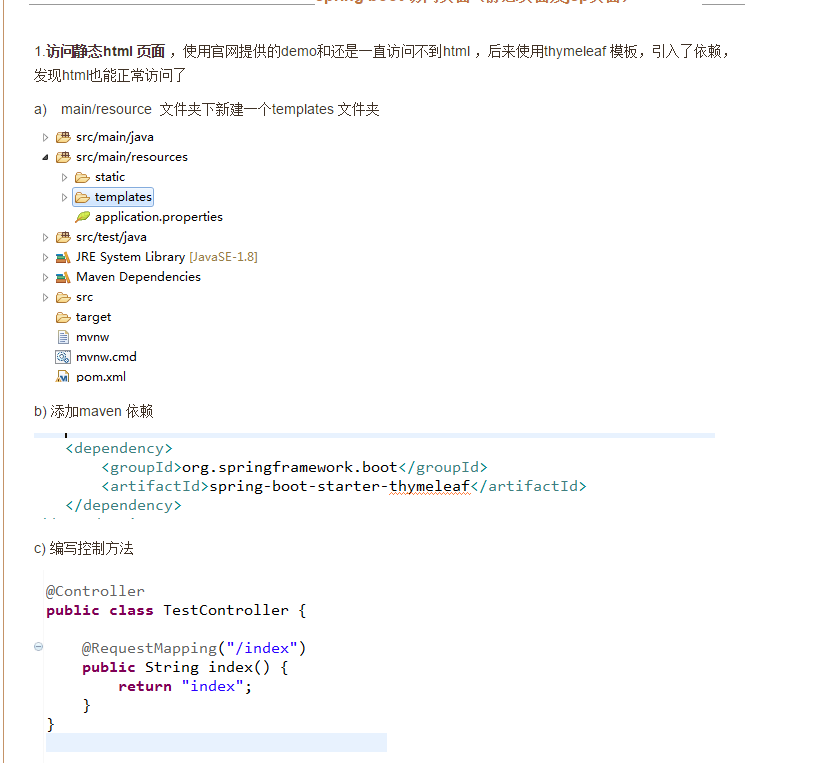
- 之前在写到这的时候就直接跑程序了 ,发现不好用,但是感觉写的没有问题 ,最后找到了问题所在,在meaven中没有配置thmeleaf,
所以在meaven中添加如下代码
        <dependency>

            <groupId>org.springframework.boot</groupId>

            <artifactId>spring-boot-starter-thymeleaf</artifactId>

        </dependency>

        <dependency>

            <groupId>nz.net.ultraq.thymeleaf</groupId>

            <artifactId>thymeleaf-layout-dialect</artifactId>

        </dependency>
参考:https://www.jianshu.com/p/3b5ebc545a99
关于thymeleaf+layout布局的使用方式,spring boot 访问页面(静态页面及jsp页面)的更多相关文章
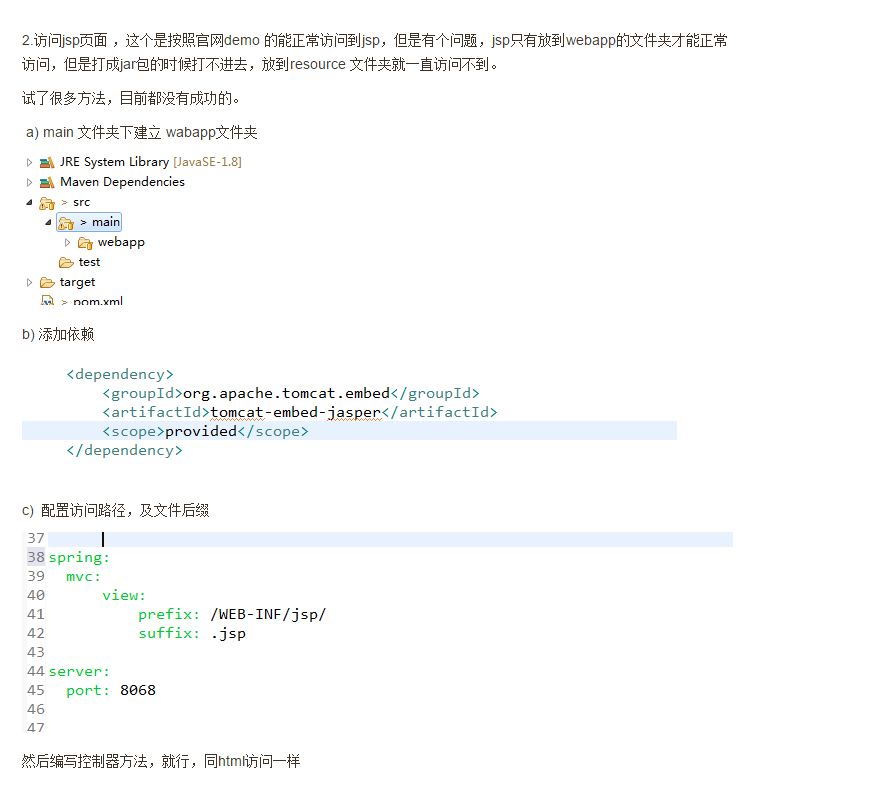
- Spring Boot项目跳转不到jsp页面是怎么回事
SpringBoot访问不了JSP但却能进入后台 一直报错: 解决方法: 改成下面的
- 解决thymeleaf layout布局不生效
今天使用thymeleaf layout布局时总是不生效,特此把解决问题的步骤和几个关键点记录下来备忘. 一.检查依赖 1.thymeleaf必备maven依赖: <dependency> ...
- Spring Boot 中的静态资源到底要放在哪里?
当我们使用 SpringMVC 框架时,静态资源会被拦截,需要添加额外配置,之前老有小伙伴在微信上问松哥Spring Boot 中的静态资源加载问题:"松哥,我的HTML页面好像没有样式?& ...
- Spring Boot2 系列教程(十一)Spring Boot 中的静态资源配置
当我们使用 SpringMVC 框架时,静态资源会被拦截,需要添加额外配置,之前老有小伙伴在微信上问松哥 Spring Boot 中的静态资源加载问题:"松哥,我的 HTML 页面好像没有样 ...
- Spring Boot实战:静态资源处理
前两章我们分享了Spring boot对Restful 的支持,不过Restful的接口通常仅仅返回数据.而做web开发的时候,我们往往会有很多静态资源,如html.图片.css等.那如何向前端返回静 ...
- 使用spring boot访问mongodb数据库
一. spring boot中传参的方法 1.自动化配置 spring Boot 对于开发人员最大的好处在于可以对 Spring 应用进行自动配置.Spring Boot 会根据应用中声明的第三方依赖 ...
- 【spring boot】7.静态资源和拦截器处理 以及继承WebMvcConfigurerAdapter类进行更多自定义配置
开头是鸡蛋,后面全靠编!!! ======================================================== 1.默认静态资源映射路径以及优先顺序 Spring B ...
- 【spring boot】5.spring boot 创建web项目并使用jsp作前台页面
贼烦的是,使用spring boot 创建web项目,然后我再idea下创建的,but 仅仅启动spring boot的启动类,就算整个项目都是好着的,就算是能够进入controller中,也不能成功 ...
- Spring Boot - 访问外部接口最全总结
Spring Boot - 访问外部接口 在Spring-Boot项目开发中,存在着本模块的代码需要访问外面模块接口,或外部url链接的需求, 比如调用外部的地图API或者天气API. Spring ...
随机推荐
- Java本地运行中文正常,部署到Weblogic中文乱码
在使用一个加密解密工具类的时候,在本地Main方法中运行正常,不会出现中文乱码,将其部署到Weblogic之后,控制台,Servlet中中出现中文乱码. 在Main方法运行时获取本地编码方式为UTF8 ...
- ngx_http_upstream_keepalive
链接:http://wiki.nginx.org/HttpUpstreamKeepaliveModule 今天看了一些代码: upstream b_memc2 { server ; keepalive ...
- python 爬虫 爬取序列博客文章列表
python中写个爬虫真是太简单了 import urllib.request from pyquery import PyQuery as PQ # 根据URL获取内容并解码为UTF-8 def g ...
- cmder、cmd、python 中文乱码问题
cmd下echo中文没有问题,但是进入python模式后就中文乱码,cmder更是echo也乱码 其实是要配置默认code page, cmd默认是ansi的编码,中文自然乱码 CMD chcp 65 ...
- Multitenant Architecture---PDB与CDB
一.多租户框架 多租户技术(英语:multi-tenancy technology)或称多重租赁技术,是一种软件架构技术,它是在探讨与实现如何于多用户的环境下共用相同的系统或程序组件,并且仍可确保各用 ...
- ODI Studio拓扑结构的创建与配置(MySQL)
拓扑结构的创建与配置 一.概念解释 Topology Manager主要用来管理下面5类任务,并将信息存储在主资料库中,供所有模块共享使用. 物理体系结构: 定义各种技术及其数据服务器.物理架构.物理 ...
- OpenCV学习代码记录——Hough线段检测
很久之前学习过一段时间的OpenCV,当时没有做什么笔记,但是代码都还在,这里把它贴出来做个记录. 代码放在码云上,地址在这里https://gitee.com/solym/OpenCVTest/tr ...
- navicat-mysql-linux工具
navicat强大的数据库图形化家族,基本都是支持跨平台的!navicat-mysql-linux在Linux是通过Wine工具执行exe文件,默认15天的免费试用时间! 1. 下载 云上下载:htt ...
- OpenWRT/LEDE长期运行记录截图
哈哈, 发图留念. 待会儿要把它换到别处去了. 在Newifi Y1上稳定运行了95天的自编译OpenWrt, Y1这个型号的特点是5G信号强度比2.4G的强 Update 2017-11-27 在W ...
- asyncsocket的用法
更多参考文章 http://blog.csdn.net/zltianhen/article/details/6560322 http://www.cnblogs.com/bucengyongyou/a ...