
【Spring】Spring+struts2+Hibernate框架的搭建
1.搭建过程
首先需要引入Spring、Struts2、Hibernate的开发包,已经数据库的驱动包。
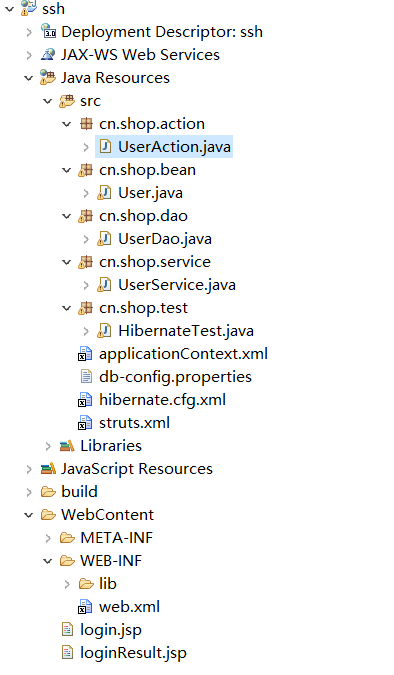
UserAction.java文件
package cn.shop.action;

import java.io.IOException;

import java.util.List;

import javax.annotation.Resource;

import org.apache.struts2.convention.annotation.Action;

import org.apache.struts2.convention.annotation.Namespace;

import org.apache.struts2.convention.annotation.ParentPackage;

import org.springframework.context.annotation.Scope;

import org.springframework.stereotype.Controller;

import org.apache.struts2.convention.annotation.Result;

import cn.shop.bean.User;

import cn.shop.service.UserService;

@ParentPackage("struts-default")

@Namespace("/")

@Controller

@Scope("prototype")

public class UserAction {

    @Resource

    private UserService userService;

    private String username;//接受参数

    private String password;//接受参数

    private String message;

    public String getMessage() {

        return message;

    }

    public void setMessage(String message) {

        this.message = message;

    }

    public String getUsername() {

        return username;

    }

    public void setUsername(String username) {

        this.username = username;

    }

    public String getPassword() {

        return password;

    }

    public void setPassword(String password) {

        this.password = password;

    }

    @Action(value="userlogin",results={

            @Result(name="result",location="/loginResult.jsp",type="dispatcher")

    })

    public String execute() throws IOException{

        List<User> userinfo=userService.userlogin(username, password);

        if(userinfo.size()!=0){

            message="登录成功";

        }else{

            message="登录失败";

        }

        return "result";

    }

}
UserAction.java
User.java文件
package cn.shop.bean;

import javax.persistence.Column;

import javax.persistence.Entity;

import javax.persistence.Id;

import javax.persistence.Table;

import org.springframework.context.annotation.Scope;

@Entity

@Table(name="user")

public class User {

    @Id

    @Column(name="uid")

    private int id;

    @Column(name="uname")

    private String name;

    @Column(name="upass")

    private String password;

    public int getId() {

        return id;

    }

    public void setId(int id) {

        this.id = id;

    }

    public String getName() {

        return name;

    }

    public void setName(String name) {

        this.name = name;

    }

    public String getPassword() {

        return password;

    }

    public void setPassword(String password) {

        this.password = password;

    }

}
User.java
UserDao.java文件
package cn.shop.dao;

import java.util.List;

import javax.annotation.Resource;

import org.springframework.orm.hibernate4.HibernateTemplate;

import org.springframework.stereotype.Repository;

import cn.shop.bean.User;

@Repository("userDao")

public class UserDao {

    @Resource

    private HibernateTemplate template;

    public List findUserById(String name,String password){

        return template.find("from User where name=? and password=?",name,password);

    }

}
UserDao.java
UserService.java文件
package cn.shop.service;

import java.util.List;

import javax.annotation.Resource;

import org.springframework.stereotype.Service;

import cn.shop.bean.User;

import cn.shop.dao.UserDao;

@Service

public class UserService {

    @Resource

    private UserDao userDao;

    public List<User> userlogin(String username, String password) {

        return userDao.findUserById(username, password);

    }

}
UserService.java
applicationContext.xml文件
<?xml version="1.0" encoding="UTF-8"?>

<beans xmlns="http://www.springframework.org/schema/beans"

    xmlns:xsi="http://www.w3.org/2001/XMLSchema-instance"

    xmlns:context="http://www.springframework.org/schema/context"

    xmlns:jdbc="http://www.springframework.org/schema/jdbc"

    xmlns:jee="http://www.springframework.org/schema/jee"

    xmlns:tx="http://www.springframework.org/schema/tx"

    xmlns:aop="http://www.springframework.org/schema/aop"

    xmlns:mvc="http://www.springframework.org/schema/mvc"

    xmlns:util="http://www.springframework.org/schema/util"

    xmlns:jpa="http://www.springframework.org/schema/data/jpa"

    xsi:schemaLocation="

        http://www.springframework.org/schema/beans http://www.springframework.org/schema/beans/spring-beans-4.1.xsd

        http://www.springframework.org/schema/context http://www.springframework.org/schema/context/spring-context-4.1.xsd

        http://www.springframework.org/schema/jdbc http://www.springframework.org/schema/jdbc/spring-jdbc-4.1.xsd

        http://www.springframework.org/schema/jee http://www.springframework.org/schema/jee/spring-jee-4.1.xsd

        http://www.springframework.org/schema/tx http://www.springframework.org/schema/tx/spring-tx-4.1.xsd

        http://www.springframework.org/schema/data/jpa http://www.springframework.org/schema/data/jpa/spring-jpa-1.3.xsd

        http://www.springframework.org/schema/aop http://www.springframework.org/schema/aop/spring-aop-4.1.xsd

        http://www.springframework.org/schema/mvc http://www.springframework.org/schema/mvc/spring-mvc-4.1.xsd

        http://www.springframework.org/schema/util http://www.springframework.org/schema/util/spring-util-4.1.xsd">

    <context:component-scan base-package="cn.shop"></context:component-scan>

  <bean id="config" class="org.springframework.beans.factory.config.PropertyPlaceholderConfigurer">

     <property name="locations">

       <list>

         <value>classpath:db-config.properties</value>

       </list>

   </property>

   </bean>

    <bean id="c3p0" class="com.mchange.v2.c3p0.ComboPooledDataSource">

        <property name="user" value="${db.username}"></property>

        <property name="password" value="${db.password}"></property>

        <property name="driverClass" value="${db.dirverClass}"></property>

        <property name="jdbcUrl" value="${db.url}"></property>

    </bean>

    <!-- 配置hibernatetemplate -->

    <bean id="template" class="org.springframework.orm.hibernate4.HibernateTemplate">

        <!-- 注入一个SqlSessionFactory对象 -->

        <property name="sessionFactory" ref="sessionFactory">

        </property>

    </bean>

    <bean id="sessionFactory" class="org.springframework.orm.hibernate4.LocalSessionFactoryBean">

        <!-- 指定hibernate.cfg.xml -->

        <property name="configLocations" value="classpath:hibernate.cfg.xml">

        </property>

        <property name="dataSource" ref="c3p0"></property>

    </bean>

</beans>
applicationContext.xml
db-config.properties文件
db.url=jdbc:mysql://localhost:3306/test?useUnicode=true&characterEncoding=utf8

db.username=root

db.password=517839

db.dirverClass=com.mysql.jdbc.Driver
db-config.properties
hibernate.cfg.xml文件
<?xml version='1.0' encoding='UTF-8'?>

<!DOCTYPE hibernate-configuration PUBLIC

          "-//Hibernate/Hibernate Configuration DTD 3.0//EN"

          "http://hibernate.sourceforge.net/hibernate-configuration-3.0.dtd">

<!-- Generated by MyEclipse Hibernate Tools.                   -->

<hibernate-configuration>

    <session-factory>

        <property name="dialect">

            org.hibernate.dialect.MySQLDialect

        </property>

        <!-- 加载映射描述信息 -->

        <mapping class="cn.shop.bean.User" />

    </session-factory>

</hibernate-configuration>
hibernate.cfg.xml文件
struts.xml文件
<?xml version="1.0" encoding="UTF-8" ?>

<!DOCTYPE struts PUBLIC

    "-//Apache Software Foundation//DTD Struts Configuration 2.1.7//EN"

    "http://struts.apache.org/dtds/struts-2.1.7.dtd">

<struts>

      <!--Struts默认只会通过.action和无后缀的请求,我们可以通过指定extension来使得Struts只通过.do的URL的请求。-->

      <constant name="struts.action.extension" value="do"/>

</struts>
struts.xml
web.xml文件
<?xml version="1.0" encoding="UTF-8"?>

<web-app xmlns:xsi="http://www.w3.org/2001/XMLSchema-instance" xmlns="http://java.sun.com/xml/ns/javaee" xsi:schemaLocation="http://java.sun.com/xml/ns/javaee http://java.sun.com/xml/ns/javaee/web-app_3_0.xsd" version="3.0">

  <display-name>ssh</display-name>

  <welcome-file-list>

    <welcome-file>index.html</welcome-file>

  </welcome-file-list>

  <filter>

    <filter-name>struts</filter-name>

    <filter-class>org.apache.struts2.dispatcher.ng.filter.StrutsPrepareAndExecuteFilter</filter-class>

  </filter>

  <filter-mapping>

    <filter-name>struts</filter-name>

    <url-pattern>*</url-pattern>

  </filter-mapping>

  <context-param>

    <param-name>contextConfigLocation</param-name>

    <param-value>classpath:applicationContext.xml</param-value>

  </context-param>

  <listener>

    <listener-class>

      org.springframework.web.context.ContextLoaderListener

      </listener-class>

  </listener>

</web-app>
web.xml
login.jsp文件
<%@ page language="java" contentType="text/html; charset=utf-8"

    pageEncoding="utf-8"%>

<!DOCTYPE html PUBLIC "-//W3C//DTD HTML 4.01 Transitional//EN" "http://www.w3.org/TR/html4/loose.dtd">

<html>

<head>

<meta http-equiv="Content-Type" content="text/html; charset=utf-8">

<title>Insert title here</title>

</head>

<body>

<form action="userlogin.do" method="post">

用户名:<input type="text" name="username"/><br/>

密码:<input type="password" name="password"/><br/>

<input type="submit" value="提交">

</form>

</body>

</html>
login.jsp
loginResult.jsp文件
<%@ page language="java" contentType="text/html; charset=utf-8"

    pageEncoding="utf-8"%>

<!DOCTYPE html PUBLIC "-//W3C//DTD HTML 4.01 Transitional//EN" "http://www.w3.org/TR/html4/loose.dtd">

<html>

<head>

<meta http-equiv="Content-Type" content="text/html; charset=utf-8">

<title>登录结果</title>

</head>

<body>

登录结果是:${message}

</body>

</html>
loginResult.jsp
2.常见错误
问题一:
HTTP Status 500 - cn.xdl.entity.Dept$$javassist_0 cannot be cast to javassist.util.proxy.Proxy
解决方法: javassist.jar 包冲突,去除低版本的。
问题二:
org.hibernate.LazyInitializationException: could not initialize proxy - no Session
解决方法:使用了延迟加载方法,但是 HibernateTemplate 默认方法结束就会关闭 session. 需要追加 OpenSessioninViewFilter 过滤器(必须放到struts的过滤器之前,否则不会有效果),在 JSP 解析后关
闭 session.
    <filter>

        <filter-name>opensession</filter-name>

        <filter-class>

    org.springframework.orm.hibernate4.support.OpenSessionInViewFilter

        </filter-class>

    </filter>

    <filter-mapping>

        <filter-name>opensession</filter-name>

        <url-pattern>/*</url-pattern>

    </filter-mapping>

//...StrutsPrepareAndExecuteFilter的过滤器配置
【Spring】Spring+struts2+Hibernate框架的搭建的更多相关文章
- Spring整合Struts2,Hibernate的xml方式
作为一个学习中的码农,一直学习才是我们的常态,所以最近学习了SSH(Spring,Struts2,Hibernate)整合,数据库用的MySQL. 写了一个简单的例子,用的工具是IntelliJ Id ...
- Struts2+Hibernate框架探险
写这篇文章的目的 了解 JavaWeb 开发的人都知道SSH和SSM框架,前段时间开始接触 JavaWeb 开发,看了几个教学视频后就想上手构建一个小型 Web项目,可在跟着视频敲代码当中,使用 St ...
- 【Hibernate】hibernate框架的搭建
1, Hibernate 是什么 Hibernate是java应用程序与数据库交互的开发的框架. Hibernate是一个开源,轻量级的ORM(对象关系映射)工具. 2,Hibernate框架的优点 ...
- 简单Spring+Struts2+Hibernate框架搭建
使用Maven+Spring+Struts2+Hibernate整合 pom文件 <project xmlns="http://maven.apache.org/POM/4.0.0&q ...
- Spring+Struts2+Hibernate框架整合流程
一:基本步骤 新建Maven项目,导入相关依赖(推荐) 在WEB-INF的web.xml中进行配置 ————–Hibernate配置 —————- 创建entity包,创建数据库相关实体类 根据实体类 ...
- spring整合struts2,hibernate
1.导包 struts2包(不需要导入,之前学习struts2时已经导入) hibernate包(不需要导入,之前学习hibernate时已经导入) Spring包 整合hibernate的没有hib ...
- Spring+SpringMVC+Mybatis(SSM)框架集成搭建
Spring+SpringMVC+Mybatis框架集成搭建教程 一.背景 最近有很多同学由于没有过SSM(Spring+SpringMvc+Mybatis , 以下简称SSM)框架的搭建的经历,所以 ...
- Hibernate框架_搭建第一个Hibernate框架
一.eclipse搭建 A.创建动态web项目 New-->Dynamic web project(web project) B.导入jar包 1.数据库驱动包 2.hibernate开发必须j ...
- (01)hibernate框架环境搭建及测试
---恢复内容开始--- 1.创建javaweb项目 2.导包 hibernate包 hibernate\lib\required\*.jar 数据库驱动包 mysql-connector-java- ...
随机推荐
- 转:利用Eclipse CDT 阅读C/C++代码
转自: https://www.oschina.net/question/234345_41419 排版与说明都很不错,推荐一看.
- Docker创建虚机和swarm
创建虚机: First, quickly create a virtual switch for your virtual machines (VMs) to share, so they will ...
- Downloading jQuery 3.2.1
Downloading jQuery Compressed and uncompressed copies of jQuery files are available. The uncompresse ...
- @TargetAPI + 版本判断实现高低API版本兼容
安卓开发中,在低版本SDK使用高版本的API会报错.一般处理方法是换一种实现方法,或者在高版本SDK中使用高版本API,低版本SDK中使用效果可能会差点的折衷方案:后者可以用如下技巧来实现. 步骤 S ...
- Shell 字符串分割
入门级别 入门级别:类似1,2,3,4,5这样的字符串 #!/bin/bash var="1,2,3,4,5" var=${var//,/ } for i in $var; do ...
- postman发送post请求
在地址栏里输入请求url:http://127.0.0.1:8081/getuser 选择“POST”方式, 点击''body", ''form-data", 添加key:user ...
- hadoop-处理小文件
一个Hadoop程序的优化过程 – 根据文件实际大小实现CombineFileInputFormat http://www.rigongyizu.com/hadoop-job-optimize-com ...
- MongoDB内存管理机制
目前,MongoDB使用的是内存映射存储引擎,它会把磁盘IO操作转换成内存操作,如果是读操作,内存中的数据起到缓存的作用,如果是写操作,内存还可以把随机的写操作转换成顺序的写操作,总之可以大幅度提升性 ...
- Run Test Case on Spark
今天有哥们问到怎样对Spark进行单元測试.如今将Sbt的測试方法写出来,例如以下: 对Spark的test case进行測试的时候能够用sbt的test命令: 一.測试所有t ...
- mysql从时间字符串中取出日期数据
addtime='2016-09-03 18:12:44' substr(addtime,1,10) as 创建日期 SUBSTR(string, string charcter, number o ...