
【Python练习】文件引用用户名密码登录系统
一、通过txt文件引入用户名密码
 1 #coding=utf-8

 from selenium import webdriver

 #from selenium.common.exceptions import NosuchElementException

 import unittest,os,time

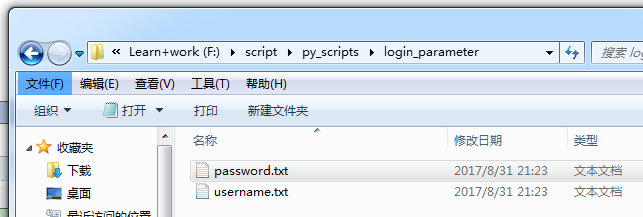
 source=open("F:\\script\\py_scripts\\login_parameter\\username.txt","r")#用户名文件

 un = source.read()#读取用户名

 source.close()

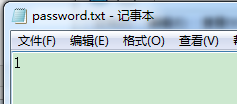
 source2=open("F:\\script\\py_scripts\\login_parameter\\password.txt","r")#用户名文件

 pw = source2.read()#读取用户名

 source2.close()

 def login():

     #driver=self.driver

     #driver.maximize_window()

     driver.find_element_by_id("username").clear()

     driver.find_element_by_id("username").send_keys(un)

     print(un)

     driver.find_element_by_id("password").clear()

     driver.find_element_by_id("password").send_keys(pw)

     print(pw)

     driver.find_element_by_id("loginbtn").click()

     time.sleep(3)

 driver=webdriver.Chrome()

 driver.get("http://cloud.pingnanlearning.com/test/login/index.php")

 login()

二、通过字典引入用户名密码
login_parameter.py
1 #coding=utf-8

 from selenium import webdriver

 #from selenium.common.exceptions import NosuchElementException

 import unittest,os,time

 import userinfo

 '''

 source=open("F:\\script\\py_scripts\\login_parameter\\username.txt","r")#用户名文件

 un = source.read()#读取用户名

 source.close()

 source2=open("F:\\script\\py_scripts\\login_parameter\\password.txt","r")#用户名文件

 pw = source2.read()#读取用户名

 source2.close()

 '''

 def login(un,pw):

     driver.find_element_by_id("username").clear()

     driver.find_element_by_id("username").send_keys(un)

     print(un)

     driver.find_element_by_id("password").clear()

     driver.find_element_by_id("password").send_keys(pw)

     print(pw)

     driver.find_element_by_id("loginbtn").click()

     time.sleep(3)

 info=userinfo.zidian()

 for un,pw in info.items():

     driver=webdriver.Chrome()

     driver.get("http://cloud.pingnanlearning.com/test/login/index.php")

     login(un,pw)
 #userinfo.py

 def zidian():

     data={'candy':'','candy1':''}

     print("success reader username and password!")

     return data
【Python练习】文件引用用户名密码登录系统的更多相关文章
- Python用户名密码登录系统(MD5加密并存入文件,三次输入错误将被锁定)及对字符串进行凯撒密码加解密操作
# -*- coding: gb2312 -*- #用户名密码登录系统(MD5加密并存入文件)及对字符串进行凯撒密码加解密操作 #作者:凯鲁嘎吉 - 博客园 http://www.cnblogs.co ...
- pyhton学习,day1作业,用户名密码登录模块
要求,通过用户名密码登录,登录错误3次,锁定用户名 # coding=utf-8 # Author: RyAn Bi import os, sys #调用系统自己的库 accounts_file = ...
- cassandra根据用户名密码登录cqlsh
修改conf目录下cassandra.yaml文件 authenticator: PasswordAuthenticator //将authenticator修改为PasswordAuthentic ...
- 用户名密码登录小程序及input与raw_input区别。
一.此次程序需要实现: 1.设定固定的用户名密码 2.用户名密码输入正确打印登录正确信息 3.仅仅运行三次登录 二.本次使用的python版本为: Windows下版本号: C:\Users\dais ...
- Python之简单的用户名密码验证
题目要求: 输入用户名密码 认证成功后显示欢迎信息 输错三次后锁定 #要求使用文件存储用户名和密码,每次从文件读入用户名和密码用来验证,如果输错三次密码该账户会被锁定,并讲锁定的用户名写入文件 # ...
- Spring Security之用户名+密码登录
自定义用户认证逻辑 处理用户信息获取逻辑 实现UserDetailsService接口 @Service public class MyUserDetailsService implements Us ...
- SpringSecurity实现用户名密码登录(Token)
传统的应用是将Session放在应用服务器上,而将生成的JSESSIONID放在用户浏览器的Cookie中,而这种模式在前后端分离中就会出现以下问题 1,开发繁琐. 2,安全性和客户体验差 3,有些前 ...
- 【转】IIS网站浏览时提示需要用户名密码登录-解决方法
打开iis,站点右键----属性----目录安全性----编辑----允许匿名访问钩选 IIS连接127.0.0.1要输入用户名密码的解决办法原因很多,请尝试以下操作: 1.查看网站属性——文档看看启 ...
- MongoDB 用户名密码登录
Mongodb enable authentication MongoDB 默认直接连接,无须身份验证,如果当前机器可以公网访问,且不注意Mongodb 端口(默认 27017)的开放状态,那么Mon ...
随机推荐
- tts文本转语音服务
1. 谷歌tts http://translate.google.cn/translate_tts?ie=UTF-8&tl=zh-CN&q=谷歌 2. 百度tts http://tts ...
- apache使某目录下的文件能够列表显示出来
想要使web目录下,某目录下的文件列表显示而不是显示"You don't have permission to access / on this server" 需要在httpd. ...
- springboot---->springboot中的校验器(一)
这里面我们简单的学习一下springboot中关于数据格式化的使用.冬天花败,春暖花开,有人离去,有人归来. springboot中的校验器 我们的测试环境是springboot,对请求的person ...
- 题目1010:A + B(字符串转数字)
题目链接:http://ac.jobdu.com/problem.php?pid=1010 详解链接:https://github.com/zpfbuaa/JobduInCPlusPlus 参考代码: ...
- Cordova 3.3 开发环境搭建(视频)
图文文章参见: http://www.cnblogs.com/mlzs/p/3332199.html 视频共享链接 百度:http://pan.baidu.com/s/1c0EHfqC
- 织梦导航条dropdown.js的改进(2013-7-10)
可以设置一个一直都显示的二级菜单,修复了没有二级菜单时鼠标移上去仍然显示上一个二级菜单的问题.支持一级菜单鼠标离开事件 html代码 <!DOCTYPE html PUBLIC "-/ ...
- PHP服务器访问优化
常规的优化措施: 磁盘写入,网络安全,证书加密,CPU,内存,DNS解析,数据库优化,页面gzip压缩 PHP gzip压缩打开: 打开php目录下的php.ini文件,找到zlib.output_c ...
- vs 的git插件
在vs2013上Tfs提供的git管理完全无法理解他的管理方式,还是 Git Source Control Provider 好用用. 下载地址: [http://gitscc.codeplex.co ...
- windows桌面通知区域不显示音量图标的解决方法
在windows系统桌面通知区域一般都是显示的输入法.电源.网络.音量及托盘的应用程序等内容 通知区域图标显示与否与控制面板的通知区域图标的设置有关,我们有时会遇到通知区域不显示个别图标的情况,如不显 ...
- gzip: stdin:unexpected end of file
原因是文件下载的不完整,重新下载就好了,