
ios开发之--tableview单选/多选实现(非tableview的editing状态)及默认选中
实现思路比较简单,这里仅做记录:
直接上代码:
1,实现didSelectRowAtIndexPath方法
-(void)tableView:(UITableView *)tableView didSelectRowAtIndexPath:(NSIndexPath *)indexPath

{

    [[NSUserDefaults standardUserDefaults]setValue:[array objectAtIndex:indexPath.row] forKey:APP_CHANGEVOICE];

    [_sextTableView reloadData];

    [tableView deselectRowAtIndexPath:indexPath animated:YES];

}
在cellForRowAtIndexPath里面实现方法
-(UITableViewCell *)tableView:(UITableView *)tableView cellForRowAtIndexPath:(NSIndexPath *)indexPath

{

    static NSString *CellTableIdentifier = @"CellTableIdentifier";

    hPublickCell *cell = [tableView cellForRowAtIndexPath:indexPath];

    if (cell == nil)

    {

        cell = [[hPublickCell alloc] initWithStyle:UITableViewCellStyleValue1 reuseIdentifier:CellTableIdentifier];

        cell.selectionStyle = UITableViewCellSelectionStyleNone;

    }

    cell.textsLabel.text = array[indexPath.row];

    cell.selectionStyle=UITableViewCellSelectionStyleGray;

    //选择状态的存储

    if ([[[NSUserDefaults standardUserDefaults]valueForKey:APP_CHANGEVOICE] isEqualToString:[array objectAtIndex:indexPath.row]])

    {

        cell.accessoryType = UITableViewCellAccessoryCheckmark;

    }

    else

    {

        cell.accessoryType = UITableViewCellAccessoryNone;

    }

    return cell;

}
这里面的array是数据源数组。效果图如下:
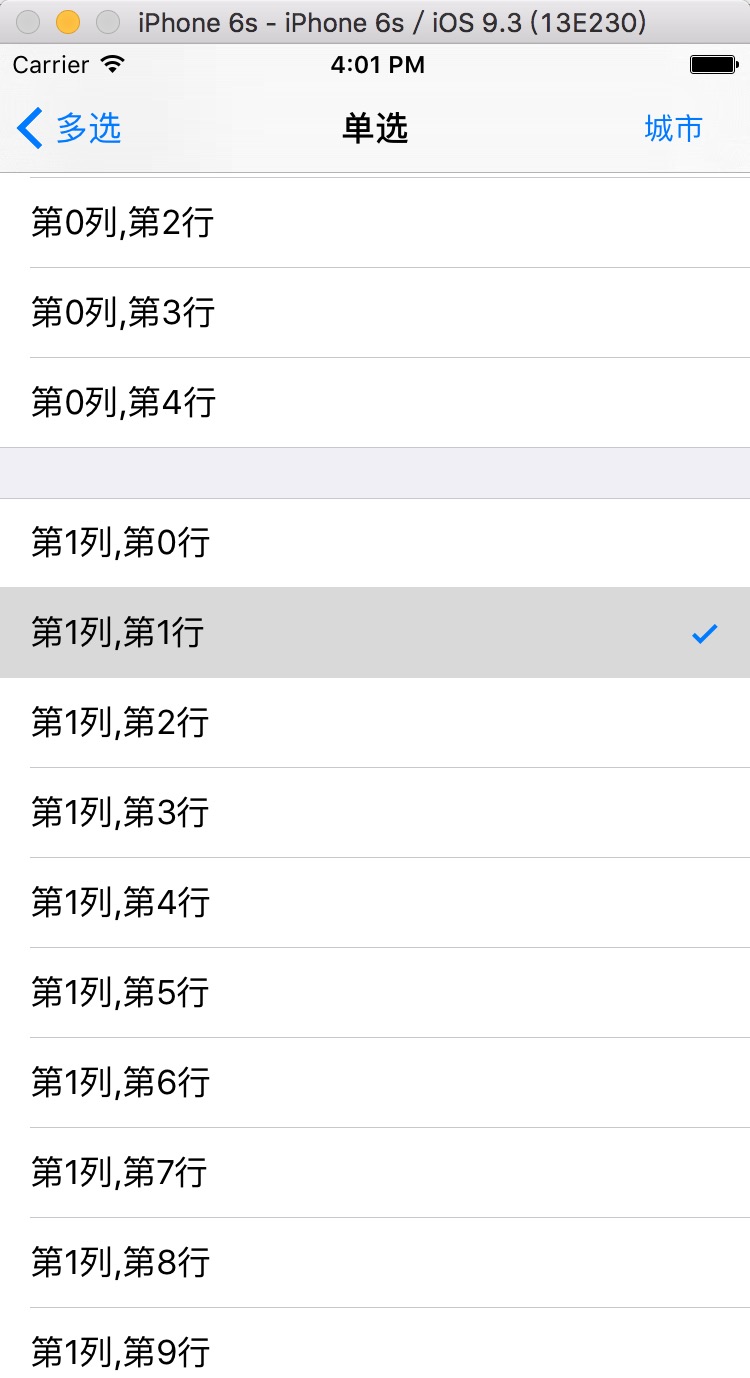
2,上面这种是系统的选中样式,下面是自定义的:
代码如下:
-(UITableViewCell *)tableView:(UITableView *)tableView cellForRowAtIndexPath:(NSIndexPath *)indexPath

{

    ShippingAddressCell *cell = [tableView dequeueReusableCellWithIdentifier:@"ShippingAddressCell"];

    if (!cell) {

        cell = [[ShippingAddressCell alloc]initWithStyle:UITableViewCellStyleDefault reuseIdentifier:@"ShippingAddressCell"];

    }

    if (self.lastIndexPath == indexPath)

    {

        cell.selectedImg.image = [UIImage imageNamed:@"clicked"];

    }else

    {

        cell.selectedImg.image = [UIImage imageNamed:@"unClick"];

    }

    return cell;

}

-(void)tableView:(UITableView *)tableView didSelectRowAtIndexPath:(NSIndexPath *)indexPath

{

    //之前选中的,取消选择

    ShippingAddressCell *celled = [tableView cellForRowAtIndexPath:_lastIndexPath];

    celled.selectedImg.image = [UIImage imageNamed:@"unClick"];

    //记录当前选中的位置索引

    _lastIndexPath = indexPath;

    //当前选择的打勾

    ShippingAddressCell *cell = [tableView cellForRowAtIndexPath:indexPath];

    cell.selectedImg.image = [UIImage imageNamed:@"clicked"];

}
这样就可以实现了,截图如下:
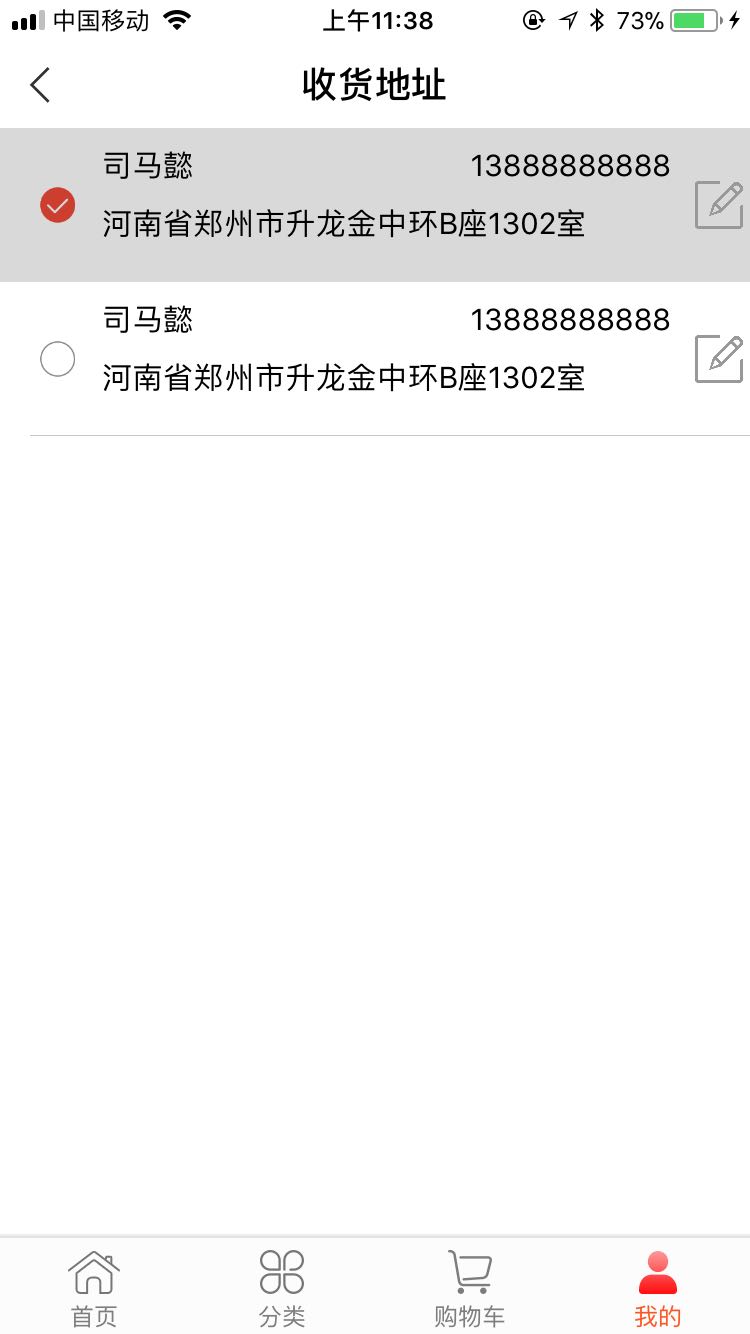
多选的有空再完善!代码可以直接粘贴使用!
多选,这里我这个单选,没有使用编辑模式,很简单,在这里记录下,demo就不附了,我把代码都粘出来,
我的tableview是拖的xib,不想写,代码如下:
1,自定义cell,我是在最左边有一个imageView,如下图:

2,相关代码:
a 声明
@property (weak, nonatomic) IBOutlet UITableView *startTableView;

@property (strong, nonatomic) NSMutableArray  *selectIndexs; //多选选中的行
b viewDidLoad里面
_selectIndexs = [[NSMutableArray alloc]initWithCapacity:];

    for (int i = ; i < dataAry.count; i ++) {

        [_selectIndexs addObject:@""];

    }
c tableview的相关代理方法:
-(NSInteger)tableView:(UITableView *)tableView numberOfRowsInSection:(NSInteger)section

{

    return dataAry.count;

}

-(UITableViewCell *)tableView:(UITableView *)tableView cellForRowAtIndexPath:(NSIndexPath *)indexPath

{

    StartReachedCell *cell = [tableView dequeueReusableCellWithIdentifier:@"StartReachedCell"];

    if (!cell) {

        cell = [[StartReachedCell alloc]initWithStyle:UITableViewCellStyleDefault reuseIdentifier:@"StartReachedCell"];

    }

    cell.descLab.text = dataAry[indexPath.row];

    if ([_selectIndexs[indexPath.row] isEqualToString:@""]) {

        cell.selImg.image = [UIImage imageNamed:@"unsel"];

    }else

    {

        cell.selImg.image = [UIImage imageNamed:@"sel"];

        cell.tintColor = BLUECOLOR;

    }

    return cell;

}

-(void)tableView:(UITableView *)tableView didSelectRowAtIndexPath:(NSIndexPath *)indexPath

{

    StartReachedCell *cell = [tableView cellForRowAtIndexPath:indexPath];

    NSString *stateStr = _selectIndexs[indexPath.row];

    //连续点击的时候,两种状态进行切换

    NSString *picName = [stateStr isEqualToString:@""]? @"sel":@"unsel";

    NSString *changeStateStr = [stateStr isEqualToString:@""]?@"":@"";

    cell.selImg.image = [UIImage imageNamed:picName];

    [_selectIndexs replaceObjectAtIndex:indexPath.row withObject:changeStateStr];

}
效果如下图:
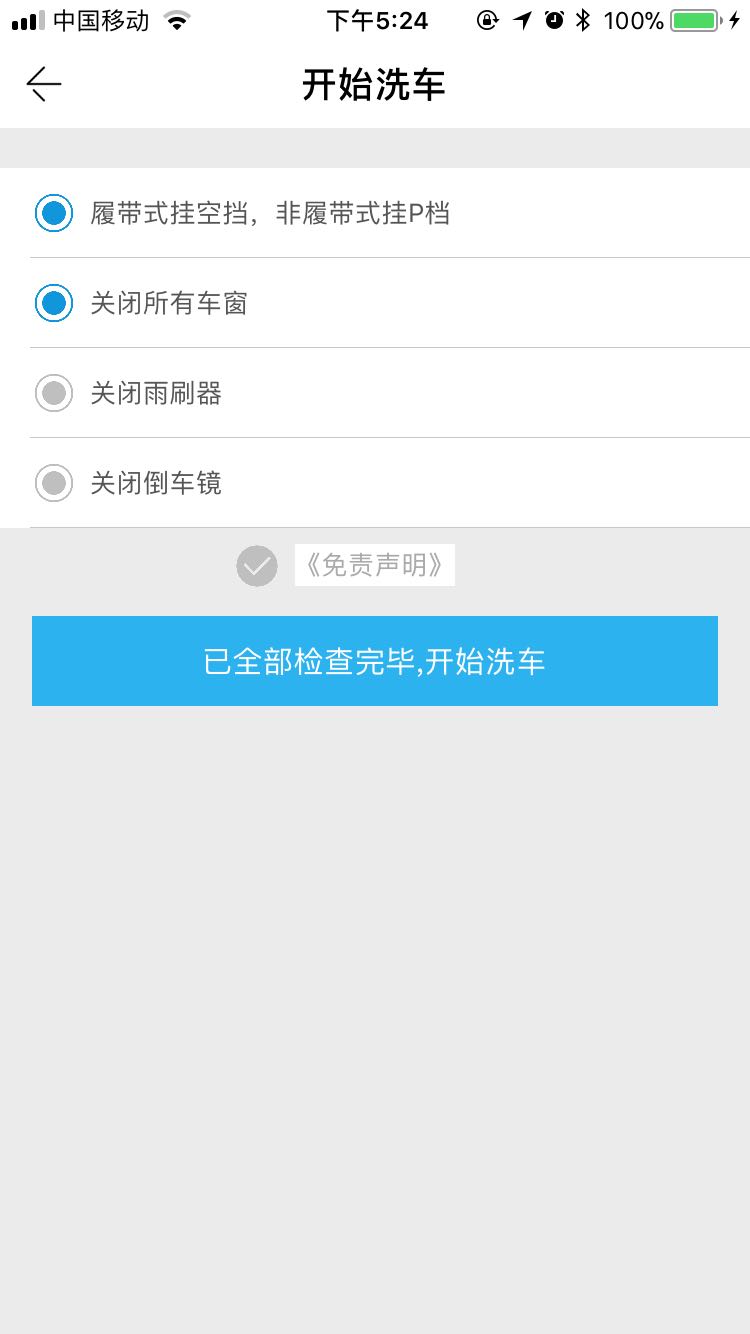
基本的逻辑是,声明一个空的数组,里面存放我自定义的状态:"0"和"1",第一次进去的时候,是没有状态1的,只有0,在cell的初始化方法里面直接判断展示即可,在进行过点击操作后,在didSelectRowAtIndexPath方法里面把选中所产生的新状态替换掉原来数组里面的老状态,一次循环展示即可。如果想要下次进去是上一次默认的选中,直接把数组存起来即可。
网上有很多的编辑状态,确实很好用,也很简单,有空我会更新下,把单选、复选、多选,全部都更新出来,我这种短小精悍。大家有什么好的写法,可以留言!
默认选中:
- (void)viewWillAppear:(BOOL)animated

{

    [super viewWillAppear:animated];

    [self.tableView selectRowAtIndexPath:self.lastIndexPath animated:YES scrollPosition:UITableViewScrollPositionTop];

    NSIndexPath *path = [NSIndexPath indexPathForItem: inSection:];

    [self tableView:self.tableView didSelectRowAtIndexPath:path];

}
ios开发之--tableview单选/多选实现(非tableview的editing状态)及默认选中的更多相关文章
- iOS开发之--storyboary下,拖拽一个tableview/collectionView/view 等,顶端下沉64个像素的处理方法
大家可能会发现,在sb或者xib里面拖拽一个tableview/collectionview/view的,顶端会自动下沉64个像素,也就是说,运行在模拟器上去,自导航下面又自动下沉了64个像素, 那是 ...
- 【iOS开发-68】APP下载案例:利用tableView自带的cell布局+缓存池cell复用时注意button状态的检查
(1)效果 (2)源码与资源下载 http://pan.baidu.com/s/1pJLo2PP (3)总结 --核心是利用UITableView里面自带的cell来制作样式同样的cell. 与之对应 ...
- iOS开发——网络篇——数据安全(MD5),HTTPS,检测网络状态
一.数据安全 1.提交用户的隐私数据一定要使用POST请求提交用户的隐私数据GET请求的所有参数都直接暴露在URL中请求的URL一般会记录在服务器的访问日志中服务器的访问日志是黑客攻击的重点对象之一 ...
- (转)iOS 开发,工程中混合使用 ARC 和非ARC
[前提知识] ARC:Automatic Reference Counting,自动引用计数 在开发 iOS 3 以及之前的版本的项目时我们要自己负责使用引用计数来管理内存,比如要手动 retain. ...
- iOS 开发,工程中混合使用 ARC 和非ARC(转)
[前提知识] ARC:Automatic Reference Counting,自动引用计数 在开发 iOS 3 以及之前的版本的项目时我们要自己负责使用引用计数来管理内存,比如要手动 retain. ...
- 【iOS开发】在ARC项目中使用非ARC文件
ARC的出现应该说是开发者的一大福利,苹果是推荐使用的,但是因为之前没有ARC机制,好多比较好的类库都是使用的非ARC,或是有些大牛还是不喜欢用ARC,封装的类也是非ARC的,想要在自己的ARC项目中 ...
- iOS开发——常见BUG——导航控制器中的子控制器设置StatusBar状态失效的问题
iOS9之前控制StatusBar的两种方式: 第一种方式:全局控制StatusBar 1. 在项目的Info.plist文件里设置UIViewControllerBasedStatusBarAppe ...
- iOS 开发总结(上)
来源:蝴蝶之梦天使 链接:http://www.jianshu.com/p/d333cf6ae4b0 在iOS开发中经常需要使用的或不常用的知识点的总结,几年的收藏和积累(踩过的坑). 一. iPho ...
- iOS开发-UITableView单选多选/复选实现1
TableView怎样实现单选或者多选呢? 我们的直接思路是改动某一个Cell的样式就可以, 那么改动样式须要通过改动相应的数据, 从这里能够判断我们须要给Cell相应的数据设置一个标志位, 当选中的 ...
随机推荐
- Flutter 1.0 正式版: Google 的便携 UI 工具包
Flutter 1.0 正式版: Google 的便携 UI 工具包 文 / Tim Sneath,Google Dart & Flutter 产品组产品经理 Flutter 是 Google ...
- Sword protobuf学习一
protobuf简介 Protocol Buffers,是Google公司开发的一种数据描述语言,类似于XML能够将结构化数据序列化,可用于数据存储.通信协议等方面. 它不依赖于语言和平台并且可扩展性 ...
- I/O多路复用和Socket
由于IO操作涉及到系统调用,涉及到用户空间和内核空间的切换,所以理解系统的IO模型,对于需要进入到系统调用层面进行编程来说是很重要的. 阻塞IO和非阻塞IO 从程序编写的角度来看,I/O就是调用一个或 ...
- 关于Unity中的特殊文件目录和资源管理(专题四)
编辑器扩展目录: 1: Editor目录 Editor文件夹可以在根目录下,也可以在子目录里,夹就可以; Editor下面放的所有资源文件或者脚本文件都不会被打进发布包中,并且脚本也只能在编辑时使用; ...
- 【转】【Centos】centos 安装libtorrent/rtorrent
1.下载编译时需要的软件 yum install gcc gcc-c++ m4 make automake libtool pkgconfig perl openssl-devel ncurses-d ...
- matlab中的常用的函数——在稀疏表示中学习到的
1, 矩阵的逆: inv()函数: 2. 矩阵的伪逆: pinv()函数: 3. 矩阵的克罗内克尔积: kron()函数: 4. 得到一个dct变换的字典: dctmtx()函数, 它可以得到一个 n ...
- NetBeans IDE集成Maven
NetBeans6.7更新版本已经内置对Maven支持.如遇以前的版本,Maven插件在插件管理器中可用.我们正在使用NetBeans在这个例子中使用6.9. 在NetBeans一些特点如下 您可以从 ...
- e742. 加入标签的可拖动能力
This example demonstrates how to modify a label component so that its text can be dragged and droppe ...
- Python——eventlet.wsgi
eventlet 的 wsgi 模块提供了一种启动事件驱动的WSGI服务器的简洁手段,可以将其作为某个应用的嵌入web服务器,或作为成熟的web服务器,一个这样的web服务器的例子就是 Spawnin ...
- 联想服务器X3850 X6 配置RAID5
实验环境: 1. 服务器型号 联想 System X3850 X6 2. 四块300G SAS硬盘 实验目的: 配置RAID 5 ,搭建公司重要文件共享服务器使用. 标注:本教程四块硬盘全做RA ...