
ios开发之--tableview单选/多选实现(非tableview的editing状态)及默认选中
实现思路比较简单,这里仅做记录:
直接上代码:
1,实现didSelectRowAtIndexPath方法
-(void)tableView:(UITableView *)tableView didSelectRowAtIndexPath:(NSIndexPath *)indexPath

{

    [[NSUserDefaults standardUserDefaults]setValue:[array objectAtIndex:indexPath.row] forKey:APP_CHANGEVOICE];

    [_sextTableView reloadData];

    [tableView deselectRowAtIndexPath:indexPath animated:YES];

}
在cellForRowAtIndexPath里面实现方法
-(UITableViewCell *)tableView:(UITableView *)tableView cellForRowAtIndexPath:(NSIndexPath *)indexPath

{

    static NSString *CellTableIdentifier = @"CellTableIdentifier";

    hPublickCell *cell = [tableView cellForRowAtIndexPath:indexPath];

    if (cell == nil)

    {

        cell = [[hPublickCell alloc] initWithStyle:UITableViewCellStyleValue1 reuseIdentifier:CellTableIdentifier];

        cell.selectionStyle = UITableViewCellSelectionStyleNone;

    }

    cell.textsLabel.text = array[indexPath.row];

    cell.selectionStyle=UITableViewCellSelectionStyleGray;

    //选择状态的存储

    if ([[[NSUserDefaults standardUserDefaults]valueForKey:APP_CHANGEVOICE] isEqualToString:[array objectAtIndex:indexPath.row]])

    {

        cell.accessoryType = UITableViewCellAccessoryCheckmark;

    }

    else

    {

        cell.accessoryType = UITableViewCellAccessoryNone;

    }

    return cell;

}
这里面的array是数据源数组。效果图如下:
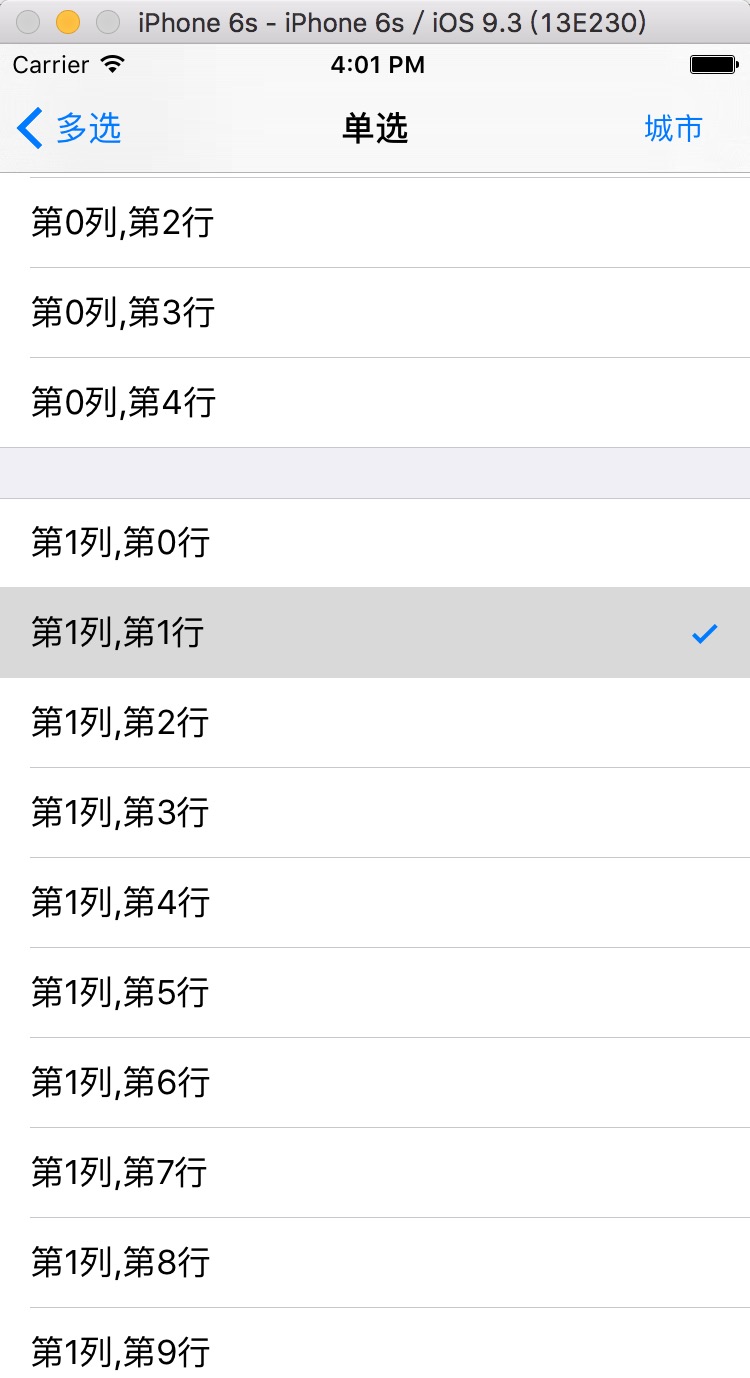
2,上面这种是系统的选中样式,下面是自定义的:
代码如下:
-(UITableViewCell *)tableView:(UITableView *)tableView cellForRowAtIndexPath:(NSIndexPath *)indexPath

{

    ShippingAddressCell *cell = [tableView dequeueReusableCellWithIdentifier:@"ShippingAddressCell"];

    if (!cell) {

        cell = [[ShippingAddressCell alloc]initWithStyle:UITableViewCellStyleDefault reuseIdentifier:@"ShippingAddressCell"];

    }

    if (self.lastIndexPath == indexPath)

    {

        cell.selectedImg.image = [UIImage imageNamed:@"clicked"];

    }else

    {

        cell.selectedImg.image = [UIImage imageNamed:@"unClick"];

    }

    return cell;

}

-(void)tableView:(UITableView *)tableView didSelectRowAtIndexPath:(NSIndexPath *)indexPath

{

    //之前选中的,取消选择

    ShippingAddressCell *celled = [tableView cellForRowAtIndexPath:_lastIndexPath];

    celled.selectedImg.image = [UIImage imageNamed:@"unClick"];

    //记录当前选中的位置索引

    _lastIndexPath = indexPath;

    //当前选择的打勾

    ShippingAddressCell *cell = [tableView cellForRowAtIndexPath:indexPath];

    cell.selectedImg.image = [UIImage imageNamed:@"clicked"];

}
这样就可以实现了,截图如下:

多选的有空再完善!代码可以直接粘贴使用!
多选,这里我这个单选,没有使用编辑模式,很简单,在这里记录下,demo就不附了,我把代码都粘出来,
我的tableview是拖的xib,不想写,代码如下:
1,自定义cell,我是在最左边有一个imageView,如下图:

2,相关代码:
a 声明
@property (weak, nonatomic) IBOutlet UITableView *startTableView;

@property (strong, nonatomic) NSMutableArray  *selectIndexs; //多选选中的行
b viewDidLoad里面
_selectIndexs = [[NSMutableArray alloc]initWithCapacity:];

    for (int i = ; i < dataAry.count; i ++) {

        [_selectIndexs addObject:@""];

    }
c tableview的相关代理方法:
-(NSInteger)tableView:(UITableView *)tableView numberOfRowsInSection:(NSInteger)section

{

    return dataAry.count;

}

-(UITableViewCell *)tableView:(UITableView *)tableView cellForRowAtIndexPath:(NSIndexPath *)indexPath

{

    StartReachedCell *cell = [tableView dequeueReusableCellWithIdentifier:@"StartReachedCell"];

    if (!cell) {

        cell = [[StartReachedCell alloc]initWithStyle:UITableViewCellStyleDefault reuseIdentifier:@"StartReachedCell"];

    }

    cell.descLab.text = dataAry[indexPath.row];

    if ([_selectIndexs[indexPath.row] isEqualToString:@""]) {

        cell.selImg.image = [UIImage imageNamed:@"unsel"];

    }else

    {

        cell.selImg.image = [UIImage imageNamed:@"sel"];

        cell.tintColor = BLUECOLOR;

    }

    return cell;

}

-(void)tableView:(UITableView *)tableView didSelectRowAtIndexPath:(NSIndexPath *)indexPath

{

    StartReachedCell *cell = [tableView cellForRowAtIndexPath:indexPath];

    NSString *stateStr = _selectIndexs[indexPath.row];

    //连续点击的时候,两种状态进行切换

    NSString *picName = [stateStr isEqualToString:@""]? @"sel":@"unsel";

    NSString *changeStateStr = [stateStr isEqualToString:@""]?@"":@"";

    cell.selImg.image = [UIImage imageNamed:picName];

    [_selectIndexs replaceObjectAtIndex:indexPath.row withObject:changeStateStr];

}
效果如下图:
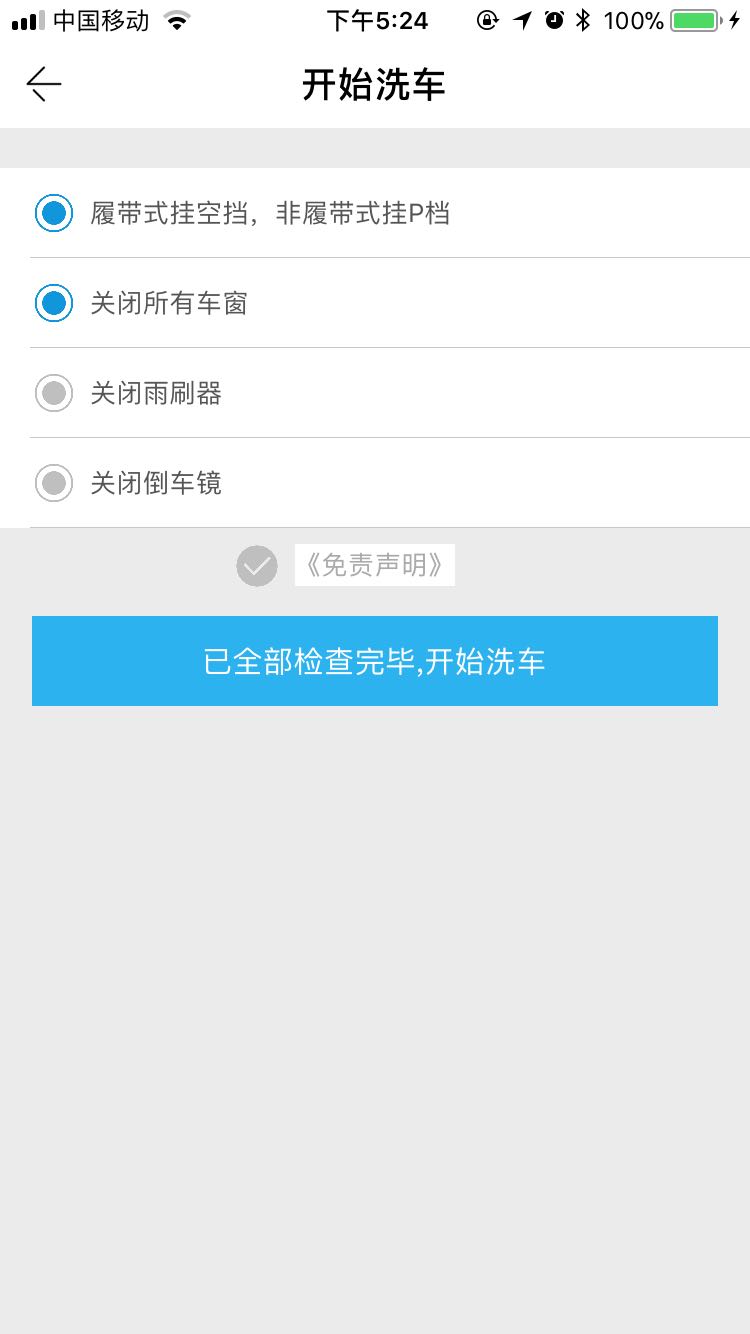
基本的逻辑是,声明一个空的数组,里面存放我自定义的状态:"0"和"1",第一次进去的时候,是没有状态1的,只有0,在cell的初始化方法里面直接判断展示即可,在进行过点击操作后,在didSelectRowAtIndexPath方法里面把选中所产生的新状态替换掉原来数组里面的老状态,一次循环展示即可。如果想要下次进去是上一次默认的选中,直接把数组存起来即可。
网上有很多的编辑状态,确实很好用,也很简单,有空我会更新下,把单选、复选、多选,全部都更新出来,我这种短小精悍。大家有什么好的写法,可以留言!
默认选中:
- (void)viewWillAppear:(BOOL)animated

{

    [super viewWillAppear:animated];

    [self.tableView selectRowAtIndexPath:self.lastIndexPath animated:YES scrollPosition:UITableViewScrollPositionTop];

    NSIndexPath *path = [NSIndexPath indexPathForItem: inSection:];

    [self tableView:self.tableView didSelectRowAtIndexPath:path];

}
ios开发之--tableview单选/多选实现(非tableview的editing状态)及默认选中的更多相关文章
- iOS开发之--storyboary下,拖拽一个tableview/collectionView/view 等,顶端下沉64个像素的处理方法
大家可能会发现,在sb或者xib里面拖拽一个tableview/collectionview/view的,顶端会自动下沉64个像素,也就是说,运行在模拟器上去,自导航下面又自动下沉了64个像素, 那是 ...
- 【iOS开发-68】APP下载案例:利用tableView自带的cell布局+缓存池cell复用时注意button状态的检查
(1)效果 (2)源码与资源下载 http://pan.baidu.com/s/1pJLo2PP (3)总结 --核心是利用UITableView里面自带的cell来制作样式同样的cell. 与之对应 ...
- iOS开发——网络篇——数据安全(MD5),HTTPS,检测网络状态
一.数据安全 1.提交用户的隐私数据一定要使用POST请求提交用户的隐私数据GET请求的所有参数都直接暴露在URL中请求的URL一般会记录在服务器的访问日志中服务器的访问日志是黑客攻击的重点对象之一 ...
- (转)iOS 开发,工程中混合使用 ARC 和非ARC
[前提知识] ARC:Automatic Reference Counting,自动引用计数 在开发 iOS 3 以及之前的版本的项目时我们要自己负责使用引用计数来管理内存,比如要手动 retain. ...
- iOS 开发,工程中混合使用 ARC 和非ARC(转)
[前提知识] ARC:Automatic Reference Counting,自动引用计数 在开发 iOS 3 以及之前的版本的项目时我们要自己负责使用引用计数来管理内存,比如要手动 retain. ...
- 【iOS开发】在ARC项目中使用非ARC文件
ARC的出现应该说是开发者的一大福利,苹果是推荐使用的,但是因为之前没有ARC机制,好多比较好的类库都是使用的非ARC,或是有些大牛还是不喜欢用ARC,封装的类也是非ARC的,想要在自己的ARC项目中 ...
- iOS开发——常见BUG——导航控制器中的子控制器设置StatusBar状态失效的问题
iOS9之前控制StatusBar的两种方式: 第一种方式:全局控制StatusBar 1. 在项目的Info.plist文件里设置UIViewControllerBasedStatusBarAppe ...
- iOS 开发总结(上)
来源:蝴蝶之梦天使 链接:http://www.jianshu.com/p/d333cf6ae4b0 在iOS开发中经常需要使用的或不常用的知识点的总结,几年的收藏和积累(踩过的坑). 一. iPho ...
- iOS开发-UITableView单选多选/复选实现1
TableView怎样实现单选或者多选呢? 我们的直接思路是改动某一个Cell的样式就可以, 那么改动样式须要通过改动相应的数据, 从这里能够判断我们须要给Cell相应的数据设置一个标志位, 当选中的 ...
随机推荐
- 【javascript】js 检验密码强度
最近一直在做通行证项目,里面的注册模块中输入密码需要显示密码强度(低中高).今天就把做的效果给大家分享下,代码没有网上搜索的那么复杂,能够满足一般的需求. html 代码如下: <!DOCTYP ...
- 找回IntelliJ IDEA中 丢失的Run Dashboard 视图
一般有时候创建springboot项目的时候右下角可以提示你打开Run Dashboard,但是如果不提醒就需要自己配置了. 找到项目中.idea文件下的workspace.xml开打 接下来找到 & ...
- TiDB 源码阅读系列文章(一)序
原创: 申砾 PingCAP 2018-02-28 在 TiDB DevCon2018 上,我们对外宣布了 TiDB 源码阅读分享活动,承诺对外发布一系列文章以及视频帮助大家理解 TiDB 源码.大 ...
- javascript 学习记录
关于牛B的Jquery源头 (function(){ //这里省略jQuery所有实现 })(); :无论你怎么去定义你的函数 JS解释器都会把它翻译成一个 Function对象 :那什么是Funct ...
- 自然语言交流系统 phxnet团队 创新实训 个人博客 (五)
有关我们这个项目:智能自然语言交流系统,所借鉴的技术有: 第一:我们使用了科大讯飞的在线语音转换,涉及的有文本传给云端服务器的文字转换成语音和本地的语音上传给服务器转换成文字. 涉及的相关的代码有: ...
- 关于Unity中LOD和渲染队列----渲染通道通用指令(一)
每个shader里面有很多的subshader,如果所以的subshader都不执行的话就,就执行fallback.每个subshader都可以设置一个LOD,整个shader也有一个LOD. 系统就 ...
- Homebrew替换源
https://www.zhihu.com/question/31360766/answer/74155248 以及 https://www.zhihu.com/question/31360766
- Android hide Navigation bar
最近一个app需要隐藏Navigation bar导航栏. 参考文档 http://blog.csdn.net/zwlove5280/article/details/52823128 http://j ...
- Spring JDBC NamedParameterJdbcTemplate类示例
org.springframework.jdbc.core.NamedParameterJdbcTemplate类是一个具有基本JDBC操作的模板类,允许使用命名参数而不是传统的’?‘占位符. 这个类 ...
- Oracle表明明存在SQL查询数据提示表不存在异常
今天同事遇到一个很奇怪的问题,恢复了一个数据库,表明明存在,用PLSQL和sqlplus都试过了,SQL语句select * from 表名,查询数据,却提示表名不存在异常 然而,使用select * ...