
Microsoft Dynamics CRM 2011 面向Internet部署 (IFD) CRM 登录出现会话超时的解决办法
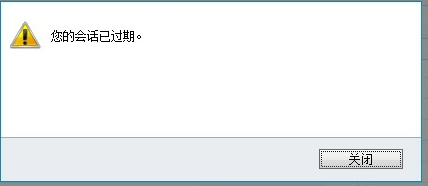
一、IFD 登录的时候,过了一段时间,会马上出现“您的会话已过期”,怎么解决这个问题呢,可以通过改变这个时间。具体图如二
Link to Dynamics CRM Wiki Home Page
二、Setting the ADFS Timeout for CRM 2011 Internet Facing Deployments (IFD)
Once you deploy ADFS in a functional environment, the users will generally receive timeout requests, or requests to log back in, which can quickly become an issue within an 8 hour shift (480 minutes).
The solution is to set the ADFS Timeout. The ADFS timeout determines how long the claims token will live in the system before requiring a re-authentication or signin from the user. This can be set on the internal and external sides of ADFS. You will need to know the names of your ADFS relying party trusts.
To begin, open the ADFS Management Console:

Open the left hand navigation, expand relying parting trusts to find the display names:
Now, run the Windows Powershell from the machine with ADFS installed.

Now from the powershell, start the PSSnapin for ADFS:
说明:注意大小写空格Add-PSSnapin Microsoft.Adfs.Powershell

Using the Internal Relying Party Trust Display Name from the ADFS wizard above, enter this command where the dev.mydomain.com is the name of your internalcrm ADFS Relying Party Trust Display Name.
注意:Get-ADFSRelyingPartyTrust –Name "dev.mydomain.com": dev为组织名,后面的为域名。

The last line of the results specific TokenLifetime will say how long the current time out is set.

Set the timeout to 480 for 8 hours ( minute increments). Example below is (240).
Set-ADFSRelyingPartyTrust -TargetName "dev.mydomain.com" -TokenLifetime 240(分钟)

Now, set the timeout is set. You can follow the same steps to review or set your external timeout as well. It's not a good security practice to set your external lifetime greater than 1 hour, as somebody who logins in remotely and forgets to logout, the session will be active until that timeout period is reached.
If you find my support topics interesting, please read more on www.cognettacloud.com  .
.
Microsoft Dynamics CRM 2011 面向Internet部署 (IFD) CRM 登录出现会话超时的解决办法的更多相关文章
- Microsoft Dynamics CRM 2011 面向Internet部署 (IFD) ADFS虚拟机环境搭建的步骤(CRM与ADFS装在同一台服务器上) 摘自网络
1: 安装windows server 2008 R2 中文版 (过程略) 安装完成后设置机器名和IP地址, 本过程机器名 crm5dev,192.168.0.110 dns: 192.168.0.1 ...
- 20190713_(转)IIS上部署MVC网站,打开后ExtensionlessUrlHandler-Integrated-4.0解决办法 (转)
此文为转载; 原文链接地址: https://www.cnblogs.com/mrma/p/3529859.html ----------------------------------------- ...
- 未能加载文件或程序集"Microsoft.Web.Infrastructure, Version=1.0.0.0, Culture=neutral, PublicKeyToken=31bf3856ad的真正解决办法
未能加载文件或程序集"Microsoft.Web.Infrastructure, Version=1.0.0.0, Culture=neutral, PublicKeyToken=31bf3 ...
- Dynamics Customer Engagement V9版本配置面向Internet的部署时候下一步按钮不可点击的解决办法
微软动态CRM专家罗勇 ,回复299或者20190120可方便获取本文,同时可以在第一间得到我发布的最新博文信息,follow me!我的网站是 www.luoyong.me . Dynamics 3 ...
- 为做了面向互联网部署(IFD)的Dynamics 365定制登录账号格式
我是微软Dynamics 365 & Power Platform方面的工程师罗勇,也是2015年7月到2018年6月连续三年Dynamics CRM/Business Solutions方面 ...
- IIS上部署MVC网站,打开后ExtensionlessUrlHandler-Integrated-4.0解决办法
IIS上部署MVC网站,打开后ExtensionlessUrlHandler-Integrated-4.0解决方法 IIS上部署MVC网站,打开后500错误:处理程序“ExtensionlessUrl ...
- struts2使用Convention Plugin在weblogic上以war包部署时,找不到Action的解决办法
环境: struts 2.3.16.3 + Convention Plugin 2.3.16.3 实现零配置 现象:以文件夹方式部署在weblogic(10.3.3)上时一切正常,换成war包部署,运 ...
- Microsoft Dynamics CRM 2011 配置好的IFD环境 怎么制作证书?
一.CRM2011 IFD怎么制作证书? 配置好的IFD环境里面:打开开始—运行 1.输入: mmc(微软管理控制台) 出现: 2. 出现: 3.添加/删除管理单元,如图: 4.添加证书 5. 6. ...
- 在IIS下部署Thinkphp项目,验证码不能显示的解决办法
由于公司租用的是虚拟空间,而且用的是IIS服务器,所以部署PHP的时候就出现很多问题:比如昨天就碰到这个问题:在IIS下部署Thinkphp项目,验证码不能显示 这是生成验证码的方法: // 制作专门 ...
随机推荐
- Visual C++ 使用纪要
1.取消在查找中标记的蓝色小方块 Ctrl+Shift+F2 取消所有标记 2.出现LINK错误 : fatal error LNK1168: cannot open Debug/x.exe for ...
- svn: E200009: 'lib/systemd/system/dropbear@.service': a peg revision is not allowed here problem
case: svn add lib/systemd/system/dropbear@.service svn: E200009: 'lib/systemd/system/dropbear@.servi ...
- SQL*Loader 详解
在 Oracle 数据库中,我们通常在不同数据库的表间记录进行复制或迁移时会用以下几种方法: 1. A 表的记录导出为一条条分号隔开的 insert 语句,然后执行插入到 B 表中2. 建立数据库间的 ...
- 什么是REST API?
REST指一组架构约束条件和原则,满足约束条件和原则的应用程序设计.架构,软件体系结构分为三部分:构建,用于描述计算机:连接器,用于描述构建的链接部分:配置将构建和连接器组成有机整体.web基本技术: ...
- Java——多线程小例子
body, table{font-family: 微软雅黑; font-size: 10pt} table{border-collapse: collapse; border: solid gray; ...
- MyEclipse 2017 CI 10 发布(附下载)
挑战全年最低价!MyEclipse线上狂欢仅剩最后3天!立即抢购>> 2017 CI 10主要是一个错误修复版本,这个版本为Angular和TypeScript工具提供了重要的修复,并为I ...
- ESET免费申请
Eset 免费试用30天申请地址 http://www.comss.info/list.php?c=NOD32 https://secure.eset.ie/msv/evaluate/evaluate ...
- Ubuntu 搭建Ghost1.0博客系统
最近想使用Ghost搭建自己的博客网站,网上搜索了下大多都是1.0之前版本搭建的文章,但是Ghost1.0版本已经可用好一段时间了,所以决定根据官方文档搭建Ghost1.0版本的博客系统. 下面开始一 ...
- 关于XCode 的agvtool命令行
简介:用agvtool如何来自动更新版本号和bulid version agvtool是一个命令行工具,允许你自动递增到下一个最高的数量或具体的数字这些数字.本文档提供了更新您的构建和版本号码使用 ...
- WARN NativeCodeLoader: Unable to load native-hadoop library for your platform... using builtin-java classes where applicable(spark加载hadoop本地库的时候出现不能加载的情况要怎么解决呢?)
原文地址: https://www.zhihu.com/question/23974067/answer/26267153 原文内容: 我64位机器,当时hadoop启动的时候出现这个问题是因为had ...