
github客户端上传代码
在window下安装github客户端上传代码
第一步:创建Github新账户
第二步:新建仓库
第三步:安装Github shell程序,地址:http://windows.github.com/
第四步:打开Git Shell,输入以下命令生成密钥来验证身份
$ ssh-keygen -C 'your@email.address' -t rsa
连续三个回车之后会在windows当前用户目录下生成.ssh文件夹,和linux一样。
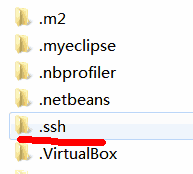
第五步:在Git Shell下输入命令测试刚才的公钥是否认证正确。
$ ssh -T git@github.com
第六步:clone刚才新建的repository 到本地,输入命令:
git clone https://github.com/XXXXX/XXXXXX.git
第七步:将想上传的代码目录拷贝到此文件夹下:

第八步:切换到Git shell 命令行下,输入命令:
git init
git add .
git commit -m 'xxxxxx'
git remote add origin https://github.com/xxxxx/xxxxx.git
git push origin master
(1)如果执行git remote add origin https://github.com/xxxxx/xxxxx.git,出现错误:
fatal:remote origin already exists
则执行以下语句:
git remote rm origin
再往后执行git remote add origin https://github.com/xxxxx/xxxxx.git即可。
(2)在执行git push origin master时,报错:
$ git push origin master
To https://github.com/qq20707/DesignPatterns.git
! [rejected] master -> master (fetch first)
error: failed to push some refs to 'https://github.com/qq20707/DesignPatterns.git'
hint: Updates were rejected because the remote contains work that you do
hint: not have locally. This is usually caused by another repository pushing
hint: to the same ref. You may want to first integrate the remote changes
hint: (e.g., 'git pull ...') before pushing again.
hint: See the 'Note about fast-forwards' in 'git push --help' for details.
error:failed to push som refs to .....
则执行以下语句:git pull --rebase origin master
(3)如果出现错误 “refusing to merge unrelated histories”
git pull origin master --allow-unrelated-histories
先把远程服务器github上面的文件拉先来,再push 上去。
github客户端上传代码的更多相关文章
- 本地项目通过github客户端上传到github网站上
一.github客户端上传步骤 一.github客户端上传步骤1.百度搜索关键字: GitHub 离线安装包 ==> Github_3.3.4.0版本链接:https://pan.baidu.c ...
- Github如何上传代码?
Github如何上传代码? 第一步:创建Github新账户 第二步:新建仓库 第三部:填写名称,简介(可选),勾选Initialize this repository with a README选项, ...
- github从上传代码到发布静态网站
1.上传代码 第一步:建立git仓库 cd到你的本地项目根目录下,执行git命令 git init 第二步:将项目的所有文件添加到仓库中 git add . 如果想添加某个特定的文件,只需把.换成特定 ...
- 使用github客户端上传文件(瓜皮教程)
因为栋哥的课才接触道github这个东西,离第一次接触大概有一年左右了吧,记得不是太清楚了,但是,直到前几天前我还是不知道如何配置,利用git上传文件,之前也是叫同学帮忙弄得,但是这次软工实践要频繁用 ...
- 201709012工作日记--一台电脑创建两个Github账户上传代码
1. 在一台主机上面使用多个GitHub账号 有时候,我们需要将个人账号和公司账号区分,这时候我们就会需要在一台电脑上使用2个不同的git账号. 2. 上传文件 http://blog.csdn.ne ...
- github如何上传代码
别人写的太好了,没必要重写.备份给自己参看. 1.https://www.cnblogs.com/zlxbky/p/7727895.html 2.https://blog.csdn.net/pql92 ...
- windows上传代码到github
上传代码到github上有很多种方法,在这里我介绍一种比较简单的一种.工具嘛,越简单越好用啊. 1.首先下载github在windows下的客户端 下载地址:https://desktop.githu ...
- Git安装与上传代码至Github
转载请注明出处:http://www.cnblogs.com/cnwutianhao/p/6642887.html 这篇文章应该是全网最新,最全,最靠谱的Github安装到上传代码的流程. 1.Git ...
- 如何用git上传代码到github详细步骤
注册账户 这个小菜鸟带着心跳写的第一篇博客! 还请大家多多提点! 想使用github,第一步肯定是要注册github账号,有了账号就是直接登录啦 可以直接打开http://github.com页面注册 ...
随机推荐
- remove unusable kernel in linux.
dpkg --get-selections | grep linux-image 1933 sudo apt-get remove linux-image-extra-4.4.0-57-generi ...
- Borg Maze---poj3026最小生成树+bfs
题目链接:http://poj.org/problem?id=3026 题意:可以理解为给你一个地图上面有S和A的表示一个一个的点,#表示墙,所以需要我们用bfs来计算各点之间的距离: b[i][j] ...
- RSA原理说明
长度,建议至少1024.模数n(常取默认65537)两边都要用. 指数e,和n一起就是公钥. 指数d,和n一起就是私钥. 质数p和q用于生成密钥对,然后就丢弃不公开. 一.密钥对的生成步骤 1.随机选 ...
- WordPress 3.8 后台仪表盘将重新设计
WordPress 3.8 的后台仪表盘界面将会重新设计 概况(RightNow) -> 改为网站内容(SiteContent) 快速发布(QuickPress) -> 改为快速草稿(Qu ...
- utf8 与 utf-8区别
在使用中常常遇到 utf-8 和 utf8,现在终于弄明白他们的使用不同之处了,现在来和大家分享一下,下面我们看一下 utf8 和 UTF-8 有什么区别. "UTF-8" 是标准 ...
- (转)Elasticsearch分析聚合
Elasticsearch不仅仅适合做全文检索,分析聚合功能也很好用.下面通过实例来学习. 一.准备数据 {"index":{ "_index": " ...
- web.xml中对post请求的乱码问题解决
直接在web.xml中添加如下代码: <filter> <filter-name>encodingFilter</filter-name> <filter-c ...
- np.repeat 与 np.tile
1.Numpy的 tile() 函数,就是将原矩阵横向.纵向地复制.tile 是瓷砖的意思,顾名思义,这个函数就是把数组像瓷砖一样铺展开来. 举个例子,原矩阵: import numpy as np ...
- Redis 十分钟快速入门
本教程是一个快速入门教程,所以Redis的命令只是简单介绍了几个常用的,如果有其他需求请求官网查看API 使用. 1. Redis简介 Redis 是完全开源免费的,遵守BSD协议,是一个高性能的ke ...
- Webform和MVC,为什么MVC更好一些?(转)
转自http://www.admin10000.com/document/5277.html 前言 如果你看了最近微软的议程,你会发现他们现在的焦点除了MVC,还是MVC.问题在于为什么微软如此热衷于 ...