
js 实现vue—引入子组件props传参
参考:https://www.cnblogs.com/xiaohuochai/p/7388866.html
效果
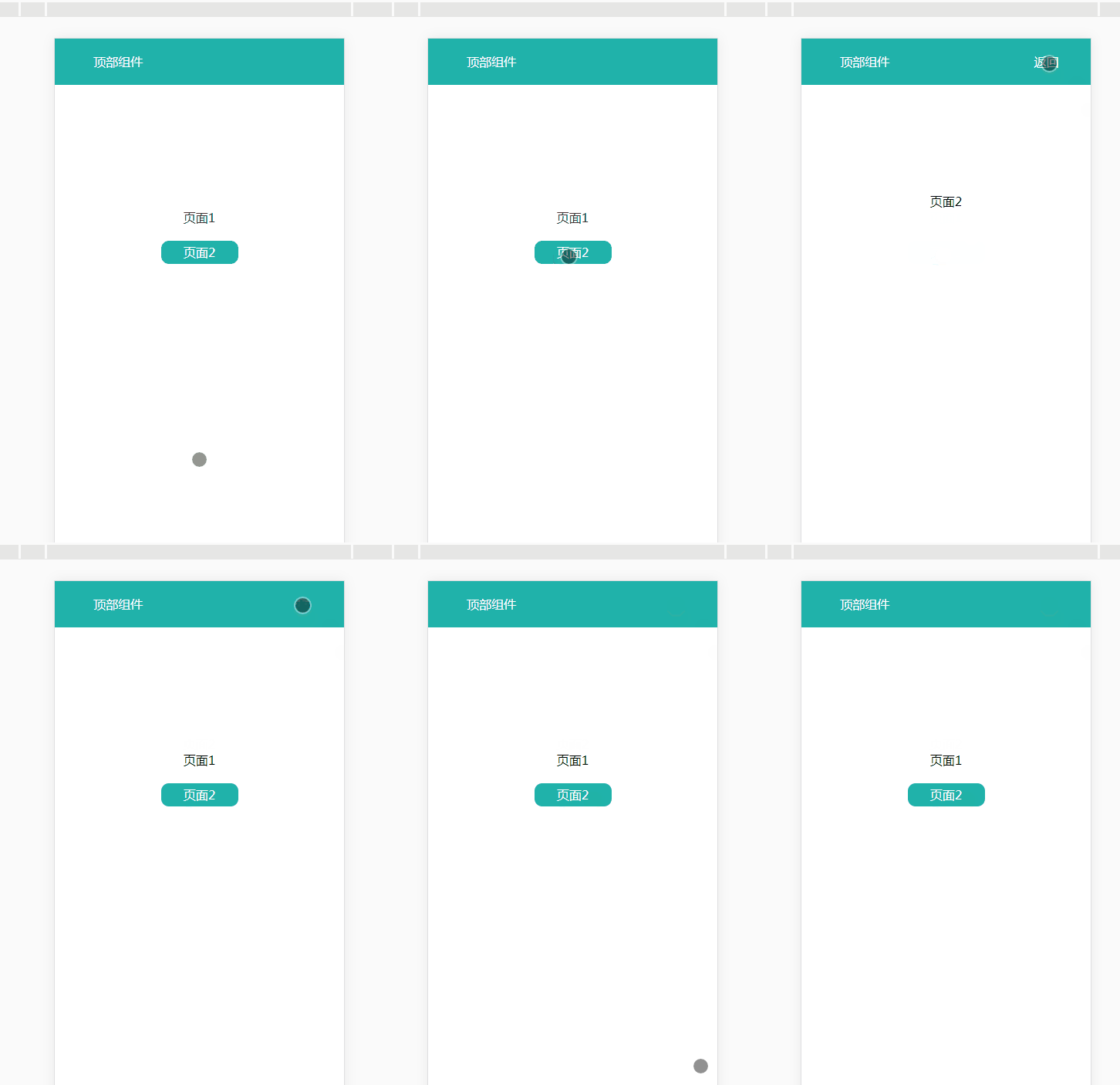
html
<!DOCTYPE html>

<html>

    <head>

        <meta charset="utf-8">

        <meta name="viewport" content="width=device-width, initial-scale=1.0, maximum-scale=1.0, user-scalable=0">

        <title>js实现vue—引入子组件props传参</title>

        <link rel="stylesheet" href="css/1.css">

        <script type="text/javascript" src="js/jquery.js"></script>

        <script src="https://cdn.staticfile.org/vue/2.4.2/vue.min.js"></script>

        <script src="https://cdn.staticfile.org/vue-router/2.7.0/vue-router.min.js"></script>

        <script src="https://cdn.staticfile.org/axios/0.18.0/axios.min.js"></script>

        <script src="js/1.js"></script>

    </head>

    <body>

        <div id="app">

            <keep-alive>

                <router-view class="child-view" v-if="$route.meta.keepAlive"></router-view>

            </keep-alive>

            <router-view class="child-view" v-if="!$route.meta.keepAlive"></router-view>

        </div>

        <script type="text/x-template" id="page1">

            <div>

                <TopNav :show-btn="ifShow"></TopNav>,

                <!-- 对于props声明的属性来说,在父级HTML模板中,属性名需要使用中划线写法 -->

                <p class="content">页面1</p>

                <router-link to="/page2" tag="span" class="btnRouter">页面2</router-link>

                <BlankPage id="BlankPage1"></BlankPage>

                <!-- 多个组件引入同一组件改变显示/隐藏状态时,需绑定指定id,否则多个组件会混乱 -->

            </div>

        </script>

        <script type="text/x-template" id="page2">

            <div>

                <TopNav :show-btn="ifShow"></TopNav>

                <p class="content">页面2</p>

                <BlankPage id="BlankPage2"></BlankPage>

            </div>

        </script>

    </body>

</html>
1.js
$(document).ready(function() {

    Vue.prototype.$show = function(obj) { //全局函数1

        var o = $(obj);

        o.css('display', 'block');

    };

    Vue.prototype.$hide = function(obj) { //全局函数2

        var o = $(obj);

        o.css('display', 'none');

    };

    Vue.use(VueRouter);

    // 顶部组件  start

    var TopNav = Vue.extend({

        data() {

            return {

                showBtn: false

            }

        },

        props: ['showBtn'],

        watch: {

            showBtn: function(newVal, oldVal) {

                this.showBtn = newVal;

            }

        },

        template: "<p class='title'> " +

            "<span>顶部组件</span>" +

            "<span v-show='showBtn' class='btnBack' @click='$router.back(-1)'>返回</span>" +

            "</p>"

    })

    /* 子级props属性声明时,使用小驼峰或者中划线写法都可以;

       而子级模板使用从父级传来的变量时,需要使用对应的小驼峰写法

    */

    // 顶部组件  end

    // 正在加载组件  start

    var BlankPage = Vue.extend({

        template: "<div class='BlankPage'>" +

            "<div class='loadingDiv'>" +

            "<p class='loadingIcon'>" +

            "<img src='img/load.gif' alt=''>" +

            "</p>" +

            "<p class='loadingTxt'>正在加载...</p>" +

            "</div>" +

            "</div>"

    })

    // 正在加载组件  end

    // 页面1  start

    var Page1 = Vue.extend({

        data() {

            return {

                ifShow: false

            }

        },

        template: "#page1",

        // 局部注册子组件

        components: {

            TopNav,

            BlankPage

        }

    })

    //页面1  end

    //页面2  start

    var Page2 = Vue.extend({

        data() {

            return {

                ifShow: true

            }

        },

        template: "#page2",

        components: {

            TopNav,

            BlankPage

        }

    })

    //页面2  end

    var router = new VueRouter({

        routes: [{

                path: '/',

                name: 'Page1',

                meta: {

                    index: 0,

                    keepAlive: true,

                    title: '页面1'

                },

                component: Page1

            },

            {

                path: '/page2',

                name: 'Page2',

                meta: {

                    index: 1,

                    keepAlive: false,

                    title: '页面2'

                },

                component: Page2

            }

        ]

    })

    router.beforeEach((to, from, next) => {

        var toDepth = to.meta.index;

        var fromDepth = from.meta.index;

        if (to.meta.title) {

            document.title = to.meta.title;

        }

        if (toDepth == 'undefined' || toDepth == undefined) {

            if (true) {

                //这个可以关闭安卓系统的手机

                document.addEventListener('WeixinJSBridgeReady', function() {

                    WeixinJSBridge.call('closeWindow');

                }, false);

                //这个可以关闭ios系统的手机

                WeixinJSBridge.call('closeWindow');

                // wx.closeWindow();

            }

            return;

        } else if (toDepth < fromDepth) { //返回

            from.meta.keepAlive = false;

            to.meta.keepAlive = true;

        }

        next()

    })

    var app = new Vue({

        el: '#app',

        router

    }).$mount('#app')

})
1.css
@CHARSET "UTF-8";

body {

    width: 100%;

    height: 100%;

}

body,

div,

p {

    margin: 0;

    padding: 0;

    text-align: center;

}

.content {

    margin-top: 200px;

}

.title {

    position: fixed;

    top: 0;

    left: 0;

    width: 100%;

    height: 60px;

    padding-left: 50px;

    line-height: .60px;

    display: flex;

    align-items: center;

    color: #fff;

    background-color: lightseagreen;

    z-index: 1;

}

.btnBack {

    margin-left: 50%;

}

.btnRouter {

    width: 100px;

    height: 30px;

    line-height: 30px;

    margin-top: 20px;

    display: inline-block;

    background-color: lightseagreen;

    color: #fff;

    border-radius: 10px;

}

.NoMore {

    font-size: 14px;

    color: #888;

    margin-top: 30px;

    text-align: center

}

#NoMore1,

#NoMore2 {

    display: none;

}

.NoMoreTxt:before {

    content: "";

    width: 100px;

    height: 1px;

    display: inline-block;

    margin-bottom: 5px;

    margin-right: 1px;

    background-color: #dadada;

}

.NoMoreTxt:after {

    content: "";

    width: 100px;

    height: 1px;

    display: inline-block;

    background-color: #dadada;

    margin-bottom: 5px;

    margin-left: 10px;

}

#BlankPage1,

#BlankPage2 {

    display: none;

}

.BlankPage {

    width: 100%;

    height: 100%;

    font-size: 14px;

    color: #fff;

    background-color: #fff;

    -webkit-transition: all .2s ease-out;

    transition: all .5s ease-out;

    transition: all .5s ease-out;

    transition: all .5s ease-out;

    position: fixed;

    top: 0;

    z-index: 12;

}

.loadingDiv {

    position: fixed;

    top: 45%;

    left: 50%;

    transform: translate(-50%, -50%);

    width: 120px;

    height: 50px;

}

.loadingTxt {

    font-size: 14px;

    color: #666;

    text-align: center;

}

.loadingIcon {

    text-align: center;

}

.loadingIcon img {

    display: inline-block;

    width: 40%;

    height: 48px;

}
js 实现vue—引入子组件props传参的更多相关文章
- 40.VUE学习之--组件之间的数据传参父组件向子组件里传参,props的使用实例操作
父组件向子组件里传参,props的使用实例 <!DOCTYPE html> <html> <head> <meta charset="utf-8&q ...
- vue非父子组件间传参问题
最近在使用vue进行开发,遇到了组件之间传参的问题,此处主要是针对非父子组件之间的传参问题进行总结,方法如下:一.如果两个组件用友共同的父组件,即 FatherComponent.vue代码 < ...
- Vue.js父与子组件之间传参
父向子组件传参 例子:App.vue为父,引入componetA组件之后,则可以在template中使用标签(注意驼峰写法要改成componet-a写法,因为html对大小写不敏感,component ...
- 【Angular】父组件监听子组件事件(传参)
Angular官方文档Demo地址:>component-interaction#parent-listens-for-child-event 举一个自己在写的项目
- Vue的组件及传参
目录 Vue的组件及传参 Vue组件的概念 根组件 子组件(局部组件) 父组件向子组件传值 子组件向父组件传值 Vue的组件及传参 Vue组件的概念 我们首先要知道组件的概念,实际上每一个组件都是一个 ...
- react第六单元(react组件通信-父子组件通信-子父组件通信-跨级组件的传参方式-context方式的传参)
第六单元(react组件通信-父子组件通信-子父组件通信-跨级组件的传参方式-context方式的传参) #课程目标 1.梳理react组件之间的关系 2.掌握父子传值的方法 3.掌握子父传值的方法 ...
- Vue 给子组件传递参数
Vue 给子组件传递参数 首先看个例子吧 原文 html <div class="container" id="app"> <div clas ...
- vue:页面跳转和传参(页面之间,父传子,子传父)
1.返回上一个页面: A.<a @click="$router.back(-1)" class="btn">重新加载</a> B.thi ...
- Vue 给子组件绑定v-model
父组件使用子组件时,使用v-model指令,在子组件中使用value获取props的值 父组件 <template> <div style="margin:20px;dis ...
随机推荐
- MTT:任意模数NTT
MTT:任意模数NTT 概述 有时我们用FFT处理的数据很大,而模数可以分解为\(a\cdot 2^k+1\)的形式.次数用FFT精度不够,用NTT又找不到足够大的模数,于是MTT就应运而生了. MT ...
- NX二次开发-UFUN打开信息窗口UF_UI_open_listing_window()
NX9+VS2012 #include <uf.h> #include <uf_ui.h> UF_initialize(); //方法1(uc1601) uc1601();// ...
- Java-Class-C:org.springframework.http.MediaType
ylbtech-Java-Class-C:org.springframework.http.MediaType 1.返回顶部 1.1. /* * Copyright 2002-2018 the ori ...
- solr +zookeeper+tomcat 集群搭建
最近需要搭建一个cloudSolr集群,写下记录.基础环境是在centos6.5 64bit 3个下载地址: 1. 下载Solr-4.x http://lucene.apache.org/solr/d ...
- DRF的视图组件
目录 DRF的视图组件 两大视图类 六大视图工具类 九大工具视图类 两大视图集基类 DRF的视图组件 DRF的视图组件大概分以下几类 两大视图类 APIView.GenericAPIView from ...
- C4D中python初探
use_name = input('请输入账号') password = input('请输入密码') if use_name == 'alex' and password == 'alex3714' ...
- opencv remap 函数
remap 查看:https://blog.csdn.net/yangfengman/article/details/52769716 remap 其实就是一个坐标到另一个坐标的映射,比如经常用在鱼眼 ...
- 使用<script>标签在HTML网页中插入JavaScript代码
新朋友你在哪里(如何插入JS) 我们来看看如何写入JS代码?你只需一步操作,使用<script>标签在HTML网页中插入JavaScript代码.注意, <script>标签要 ...
- Leetcode973. K Closest Points to Origin最接近原点的K个点
我们有一个由平面上的点组成的列表 points.需要从中找出 K 个距离原点 (0, 0) 最近的点. (这里,平面上两点之间的距离是欧几里德距离.) 你可以按任何顺序返回答案.除了点坐标的顺序之外, ...
- System.arraycopy复制数组方法解释
**/* * @param src the source array.源数组 * @param srcPos starting position in the source array.源数组要复制的 ...