
记录下sparkStream的做法(scala)
一直用storm做实时流的开发,之前系统学过spark但是一直没做个模版出来用,国庆节有时间准备做个sparkStream的模板用来防止以后公司要用。(功能模拟华为日常需求,db入库hadoop环境)
1.准备好三台已经安装好集群环境的的机器,在此我用的是linux red hat,集群是CDH5.5版本(公司建议用华为FI和cloudera manager这种会比较稳定些感觉)
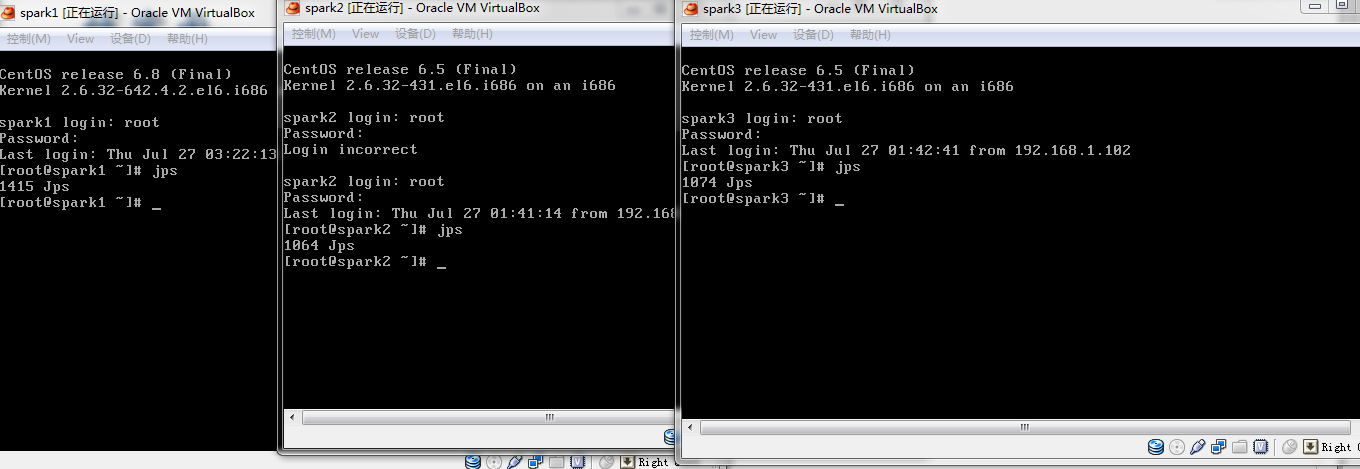
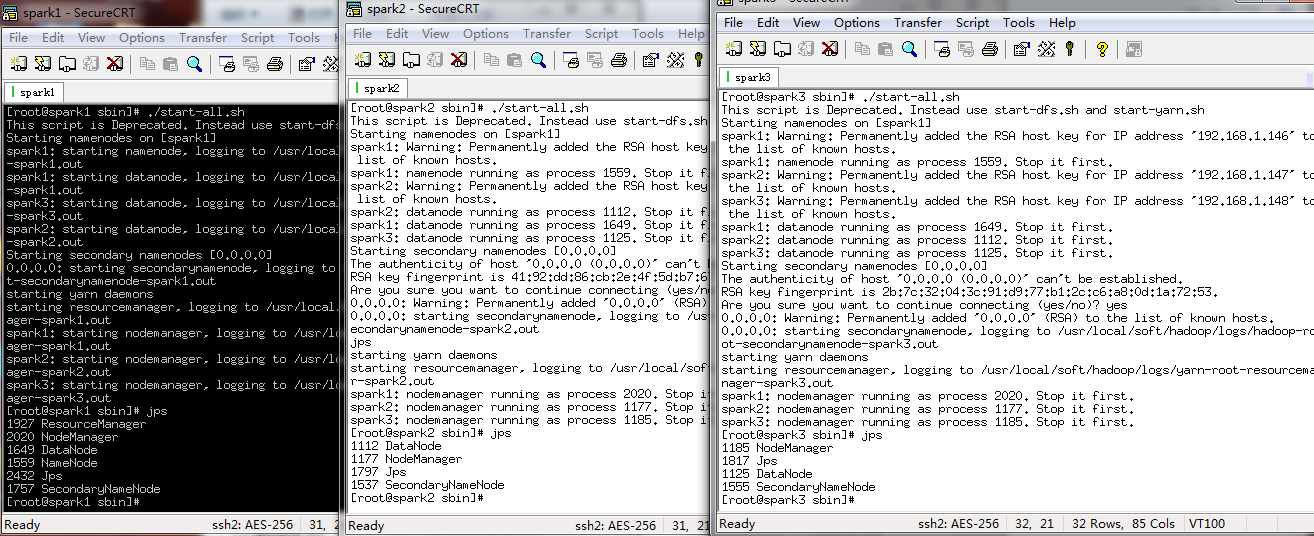
2.CRT工具链接上集群环境,启动hadoop集群,本人是一个master两个salve结构(one namenode two datanode)
3.因为spark依赖与ZK,继续启动ZK,此时会选举出一个leader两个follower

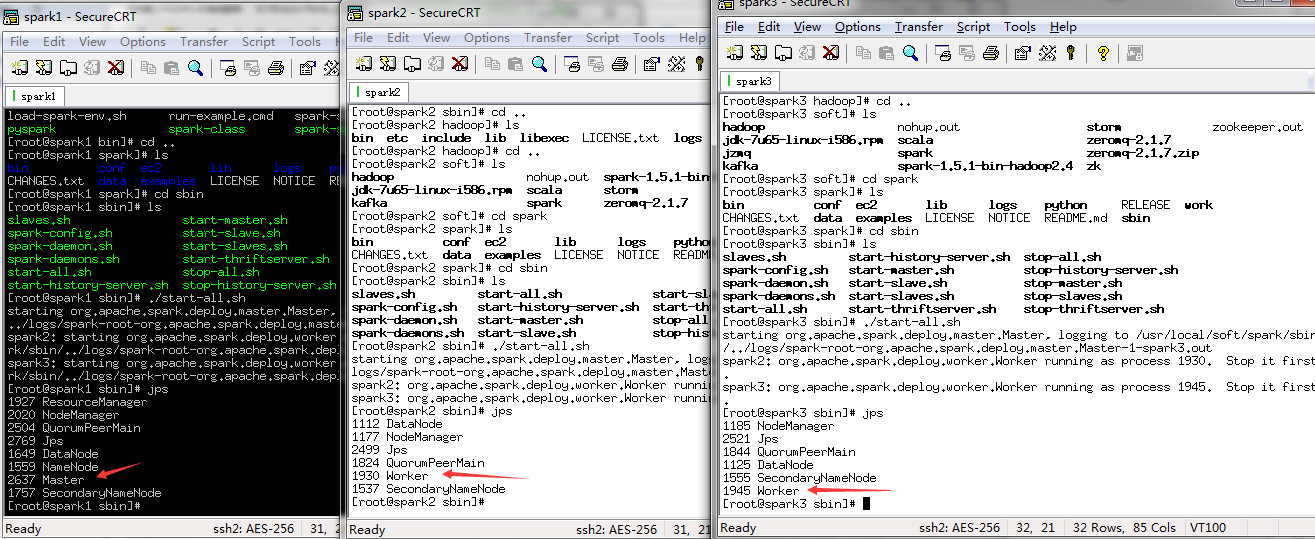
4.启动spark,会有一个master两个worder
5.添加kafka代码,分别是生产者,消费者,配置(config)
 /**

  * Licensed to the Apache Software Foundation (ASF) under one or more

  * contributor license agreements.  See the NOTICE file distributed with

  * this work for additional information regarding copyright ownership.

  * The ASF licenses this file to You under the Apache License, Version 2.0

  * (the "License"); you may not use this file except in compliance with

  * the License.  You may obtain a copy of the License at

  *

  *    http://www.apache.org/licenses/LICENSE-2.0

  *

  * Unless required by applicable law or agreed to in writing, software

  * distributed under the License is distributed on an "AS IS" BASIS,

  * WITHOUT WARRANTIES OR CONDITIONS OF ANY KIND, either express or implied.

  * See the License for the specific language governing permissions and

  * limitations under the License.

  */

 package kafka.examples;

 import java.util.Properties;

 import kafka.producer.KeyedMessage;

 import kafka.producer.ProducerConfig;

 public class Producer extends Thread {

     private final kafka.javaapi.producer.Producer<Integer, String> producer;

     private final String topic;

     private final Properties props = new Properties();

     public Producer(String topic) {

         props.put("serializer.class", "kafka.serializer.StringEncoder");// 字符串消息

         props.put("metadata.broker.list",

                 "spark1:9092,spark2:9092,spark3:9092");

         // Use random partitioner. Don't need the key type. Just set it to

         // Integer.

         // The message is of type String.

         producer = new kafka.javaapi.producer.Producer<Integer, String>(

                 new ProducerConfig(props));

         this.topic = topic;

     }

     public void run() {

         for (int i = 0; i < 500; i++) {

             String messageStr = new String("Message ss" + i);

             System.out.println("product:"+messageStr);

             producer.send(new KeyedMessage<Integer, String>(topic, messageStr));

         }

     }

     public static void main(String[] args) {

         Producer producerThread = new Producer(KafkaProperties.topic);

         producerThread.start();

     }

 }
消费者:(实际上消费者应该是下游的storm或者spark streaming)
/**

 * Licensed to the Apache Software Foundation (ASF) under one or more

 * contributor license agreements.  See the NOTICE file distributed with

 * this work for additional information regarding copyright ownership.

 * The ASF licenses this file to You under the Apache License, Version 2.0

 * (the "License"); you may not use this file except in compliance with

 * the License.  You may obtain a copy of the License at

 *

 *    http://www.apache.org/licenses/LICENSE-2.0

 *

 * Unless required by applicable law or agreed to in writing, software

 * distributed under the License is distributed on an "AS IS" BASIS,

 * WITHOUT WARRANTIES OR CONDITIONS OF ANY KIND, either express or implied.

 * See the License for the specific language governing permissions and

 * limitations under the License.

 */

package kafka.examples;

import java.util.HashMap;

import java.util.List;

import java.util.Map;

import java.util.Properties;

import kafka.consumer.ConsumerConfig;

import kafka.consumer.ConsumerIterator;

import kafka.consumer.KafkaStream;

import kafka.javaapi.consumer.ConsumerConnector;

public class Consumer extends Thread {

	private final ConsumerConnector consumer;

	private final String topic;

	public Consumer(String topic) {

		consumer = kafka.consumer.Consumer

				.createJavaConsumerConnector(createConsumerConfig());//创建kafka时传入配置文件

		this.topic = topic;

	}

	//配置kafka的配置文件项目

	private static ConsumerConfig createConsumerConfig() {

		Properties props = new Properties();

		props.put("zookeeper.connect", KafkaProperties.zkConnect);

		props.put("group.id", KafkaProperties.groupId);//相同的kafka groupID会给同一个customer消费

		props.put("zookeeper.session.timeout.ms", "400");

		props.put("zookeeper.sync.time.ms", "200");

		props.put("auto.commit.interval.ms", "60000");//

		return new ConsumerConfig(props);

	}

// push消费方式,服务端推送过来。主动方式是pull

	public void run() {

		Map<String, Integer> topicCountMap = new HashMap<String, Integer>();

		topicCountMap.put(topic, new Integer(1));//先整体存到Map中

		Map<String, List<KafkaStream<byte[], byte[]>>> consumerMap = consumer

				.createMessageStreams(topicCountMap);//用consumer创建message流然后放入到consumerMap中

		KafkaStream<byte[], byte[]> stream = consumerMap.get(topic).get(0);//再从流里面拿出来进行迭代

		ConsumerIterator<byte[], byte[]> it = stream.iterator();

		while (it.hasNext()){

			//逻辑处理

			System.out.println(new String(it.next().message()));

		}

	}

	public static void main(String[] args) {

		Consumer consumerThread = new Consumer(KafkaProperties.topic);

		consumerThread.start();

	}

}
配置:
/**

 * Licensed to the Apache Software Foundation (ASF) under one or more

 * contributor license agreements.  See the NOTICE file distributed with

 * this work for additional information regarding copyright ownership.

 * The ASF licenses this file to You under the Apache License, Version 2.0

 * (the "License"); you may not use this file except in compliance with

 * the License.  You may obtain a copy of the License at

 *

 *    http://www.apache.org/licenses/LICENSE-2.0

 *

 * Unless required by applicable law or agreed to in writing, software

 * distributed under the License is distributed on an "AS IS" BASIS,

 * WITHOUT WARRANTIES OR CONDITIONS OF ANY KIND, either express or implied.

 * See the License for the specific language governing permissions and

 * limitations under the License.

 */

package kafka.examples;

public interface KafkaProperties

{

  final static String zkConnect = "spark1:2181,spark2:2181,spark3:2181";

  final static  String groupId = "group1";

  final static String topic = "tracklog";

//  final static String kafkaServerURL = "localhost";

//  final static int kafkaServerPort = 9092;

//  final static int kafkaProducerBufferSize = 64*1024;

//  final static int connectionTimeOut = 100000;

//  final static int reconnectInterval = 10000;

//  final static String topic2 = "topic2";

//  final static String topic3 = "topic3";

//  final static String clientId = "SimpleConsumerDemoClient";

}
6.在idea(我使用的写scala工具)sparkStream本地测试代码,local测试消费kafka
import org.apache.spark.streaming.StreamingContext
import org.apache.spark.SparkConf
import org.apache.spark.streaming.Seconds
import org.apache.spark.streaming.kafka.KafkaUtils
import kafka.serializer.StringDecoder
object kafkaStream2 {
def main(args:Array[String]):Unit =
{
val conf = new SparkConf()
.setMaster("local")
.setAppName("kafkaStream2");
var sc:StreamingContext = new StreamingContext(conf,Seconds(5));
var kafkaParms = Map{"metadata.broker.list"-> "spark1:9092,spark2:9092,spark3:9092"}
val topic = Set("tracklog");
KafkaUtils.createDirectStream[String,String,StringDecoder,StringDecoder](sc, kafkaParms, topic)
.map(t => t._2)
.flatMap(_.split(" "))
.map((_,1))
.reduceByKey(_ + _)
sc.start();
sc.awaitTermination();
}
}
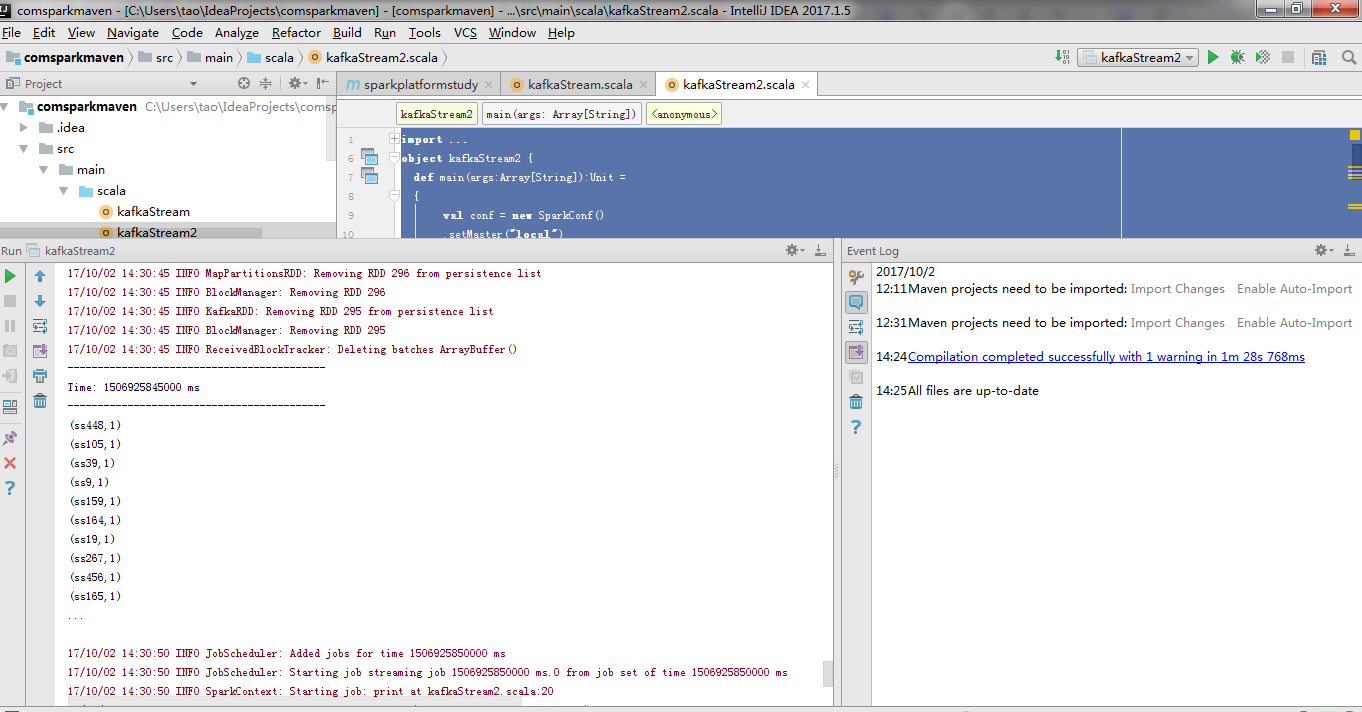
此时看到消费已经成功,可以试着写scala逻辑上传到spark集群做测试。我们目地是把kafka 一类MQ流同步到HDFS环境(hbase或者hive HDFS文件等),所以此时我们先选择固定HDFS目录存成文件块。而且spark机器的提交模式有Standalone模式,yarn Client模式,yarn cluster。我们采取默认local模式避免使用过多资源机器卡死(我的三年前老机器还是比较烂的。。。如果提交--master机器内存马上就光了)
6.编写scala sparkStream 逻辑代码
 import org.apache.spark.streaming.StreamingContext

 import org.apache.spark.SparkConf

 import org.apache.spark.streaming.Seconds

 import org.apache.spark.streaming.kafka.KafkaUtils

 import kafka.serializer.StringDecoder

 import org.apache.hadoop.io.IntWritable

 import org.apache.hadoop.io.Text

 import org.apache.hadoop.mapred.{JobConf, TextOutputFormat}

 object kafkaStream2 {

   def main(args:Array[String]):Unit =

   {

     val conf = new SparkConf()

      .setMaster("local")

       .setAppName("kafkaStream2");

     var sc:StreamingContext = new StreamingContext(conf,Seconds(5));

     var kafkaParms = Map{"metadata.broker.list" -> "spark1:9092,spark2:9092,spark3:9092"}

     val topic = Set("tracklog");

     val rdd_resukt =  KafkaUtils.createDirectStream[String,String,StringDecoder,StringDecoder](sc, kafkaParms, topic)

       .map(t => t._2)

       .flatMap(_.split(" "))

       .map((_,1))

       .reduceByKey(_ + _)

     rdd_resukt.print

     // if(rdd_resukt.isEmpty)

     // rdd_resukt.saveAsTextFiles("D:\\sparkSaveFile.txt")

 //    var jobConf = new JobConf()

 //    jobConf.setOutputFormat(TextOutputFormat[Text,IntWritable])

 //    jobConf.setOutputKeyClass(classOf[Text])

 //    jobConf.setOutputValueClass(classOf[IntWritable])

 //    jobConf.set("mapred.output.dir","/tmp/lxw1234/")

 //    rdd_resukt.saveAsHadoopDataset(jobConf)

     rdd_resukt.saveAsHadoopFiles("/tmp/lxw1234/","test",classOf[Text],classOf[IntWritable],classOf[TextOutputFormat[Text,IntWritable]])

     sc.start();

     sc.awaitTermination();

   }

 }
对应的maven(本人用IDEA,IDEA应该也可以打jar依赖包(kafka需要加入sparkkafka依赖包。)但是这样就失去了maven的本身意义了。因此这里用maven打入依赖)
<?xml version="1.0" encoding="UTF-8"?>

<project xmlns="http://maven.apache.org/POM/4.0.0"

         xmlns:xsi="http://www.w3.org/2001/XMLSchema-instance"

         xsi:schemaLocation="http://maven.apache.org/POM/4.0.0 http://maven.apache.org/xsd/maven-4.0.0.xsd">

    <modelVersion>4.0.0</modelVersion>

    <groupId>com.ganymede</groupId>

    <artifactId>sparkplatformstudy</artifactId>

    <version>1.0-SNAPSHOT</version>

    <properties>

        <project.build.sourceEncoding>UTF-8</project.build.sourceEncoding>

        <spark.version>1.5.0</spark.version>

        <scala.version>2.10</scala.version>

        <hadoop.version>2.5.0</hadoop.version>

    </properties>

    <dependencies>

        <dependency>

            <groupId>org.apache.spark</groupId>

            <artifactId>spark-core_${scala.version}</artifactId>

            <version>${spark.version}</version>

        </dependency>

        <dependency>

            <groupId>org.apache.spark</groupId>

            <artifactId>spark-sql_${scala.version}</artifactId>

            <version>${spark.version}</version>

        </dependency>

        <dependency>

            <groupId>org.apache.spark</groupId>

            <artifactId>spark-hive_${scala.version}</artifactId>

            <version>${spark.version}</version>

        </dependency>

        <dependency>

            <groupId>org.apache.spark</groupId>

            <artifactId>spark-streaming_${scala.version}</artifactId>

            <version>${spark.version}</version>

        </dependency>

        <dependency>

            <groupId>org.apache.hadoop</groupId>

            <artifactId>hadoop-client</artifactId>

            <version>2.5.0</version>

        </dependency>

        <dependency>

            <groupId>org.apache.spark</groupId>

            <artifactId>spark-streaming-kafka_${scala.version}</artifactId>

            <version>${spark.version}</version>

        </dependency>

        <dependency>

            <groupId>org.apache.hadoop</groupId>

            <artifactId>hadoop-common</artifactId>

            <version>2.4.1</version>

        </dependency>

        <dependency>

            <groupId>org.apache.kafka</groupId>

            <artifactId>kafka_2.10</artifactId>

            <version>0.8.1.1</version>

        </dependency>

        <dependency>

            <groupId>com.yammer.metrics</groupId>

            <artifactId>metrics-core</artifactId>

            <version>2.2.0</version>

        </dependency>

    </dependencies>

    <!-- maven官方 http://repo1.maven.org/maven2/  或 http://repo2.maven.org/maven2/ (延迟低一些) -->

    <repositories>

        <repository>

            <id>central</id>

            <name>Maven Repository Switchboard</name>

            <layout>default</layout>

            <url>http://repo2.maven.org/maven2</url>

            <snapshots>

                <enabled>false</enabled>

            </snapshots>

        </repository>

    </repositories>

    <build>

        <sourceDirectory>src/main/scala</sourceDirectory>

        <testSourceDirectory>src/test/scala</testSourceDirectory>

        <plugins>

            <plugin>

                <!-- MAVEN 编译使用的JDK版本 -->

                <groupId>org.apache.maven.plugins</groupId>

                <artifactId>maven-compiler-plugin</artifactId>

                <version>3.3</version>

                <configuration>

                    <source>1.7</source>

                    <target>1.7</target>

                    <encoding>UTF-8</encoding>

                </configuration>

            </plugin>

            <plugin>

                <groupId>org.apache.maven.plugins</groupId>

                <artifactId>maven-shade-plugin</artifactId>

                <version>2.1</version>

                <executions>

                    <execution>

                        <phase>package</phase>

                        <goals>

                            <goal>shade</goal>

                        </goals>

                        <configuration>

                            <artifactSet>

                                <includes>

                                    <include>cz.mallat.uasparser:uasparser</include>

                                    <include>net.sourceforge.jregex:jregex</include>

                                    <include>org.apache.spark:spark-streaming-kafka_${scala.version}</include>

                                    <include>org.apache.hadoop:hadoop-common</include>

                                    <include>org.apache.hadoop:hadoop-client</include>

                                    <include>org.apache.kafka:kafka_2.10</include>

                                    <include>com.yammer.metrics:metrics-core</include>

                                </includes>

                            </artifactSet>

                        </configuration>

                    </execution>

                </executions>

            </plugin>

        </plugins>

    </build>

</project>
spark sumbit.sh的配置
[root@spark1 kafka]# cat spark_kafka.sh

/usr/local/soft/spark-1.5.1-bin-hadoop2.4/bin/spark-submit \

--class kafkaStream2 \

--num-executors 3 \

--driver-memory 100m \

--executor-memory 100m \

--executor-cores 3 \

/usr/local/spark-study/scala/streaming/kafka/kafkaStream.jar \
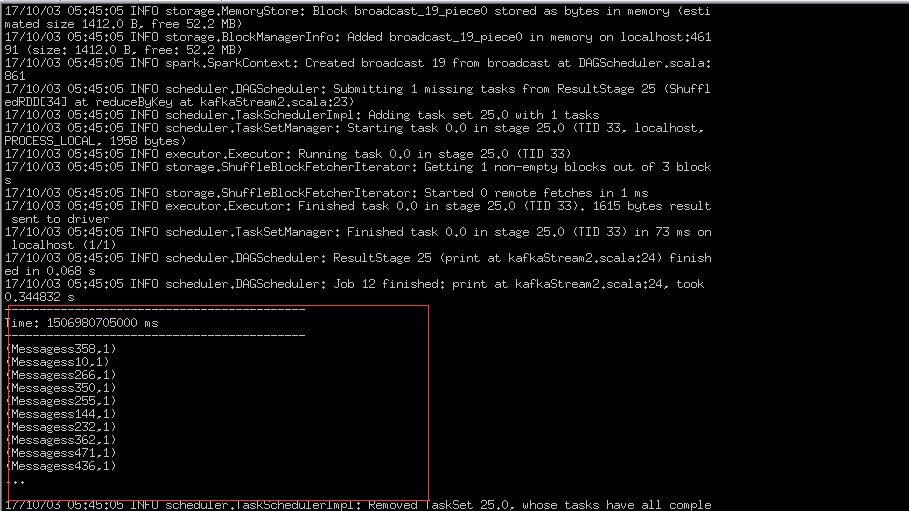
此处可以看到生产数据后在集群中已经消费到了数据。
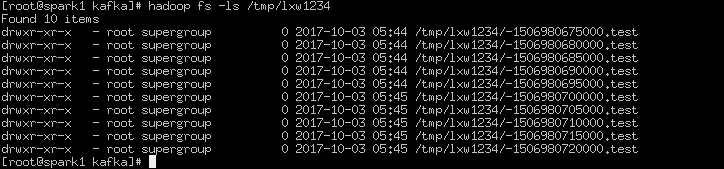
产生的hdfs文件块如下:(因为spark Stream本质上和storm还是很大区别的,属于batch流,所以每个batch会被收集起来做在scala中做相应的逻辑运算。如果时间断很短会产生大量的hdfs细碎文件,这种暂时想到两种解决方案,每个batch都用fileSystem去写文件,可以参考stormHDFS思路。或者另开线程进行定时压缩合并操作)
好了,到这里关于scala下的sparkStream就练习完了。写的过程用自己集群还是莫名其妙问题比较多(比如重启集群环境就好了,可能开太久集群断开了,maven库下载过久的一些问题,大多百度可以解决。20171003笔记)
记录下sparkStream的做法(scala)的更多相关文章
- 随便记录下系列 - node->express
随便记录下系列 - node->express 文章用啥写?VsCode. 代码用啥写?VsCode. 编辑器下载:VsCode 一.windows下安装node.js环境: 下载地址 相比以前 ...
- 记录下UIButton的图文妙用和子控件的优先显示
UIButton的用处特别多,这里只记录下把按钮应用在图文显示的场景,和需要把图片作为按钮的背景图片显示场景: 另外记录下在父控件的子控件优先显示方法(控件置于最前面和置于最后面). 先上效果图: 1 ...
- 记录下ECharts的一些功能
用到ECharts记录下一些功能免得以后找文档找不到. 这个博客对ECharts讲解很全面 http://www.stepday.com/my.stepday/?echarts // 使用 requi ...
- C#值类型以及默认值记录下
C#的值类型有bool,byte,sbyte,decimal,double,float,int,uint,long,string等 如果我们擅长使用默认值,可以帮助我们减少带来赋值及代码编写. 比如我 ...
- 记录下mybatis中#{}和${}传参的区别
最近在用mybatis,之前用过ibatis,总体来说差不多,不过还是遇到了不少问题,再次记录下, 比如说用#{},和 ${}传参的区别, 使用#传入参数是,sql语句解析是会加上"&quo ...
- 记录下url拼接的多条件筛选js
本着为提高工作效率百度或者google这些代码发现拿过来的都不好用,然后自己写了个,写的一般但记录下以后再优化 <html> <head> <script> $(f ...
- 记录下Webapi签名机制
首先,写这篇文章的原因是因为最近某一个项目中的接口被人为调用了,导致了数据库数据被串改.虽然是内部人无意点的,但还是引起了我的担忧,所有整理了下关于Webapi的相关签名机制. 一.我们在开发接口时, ...
- 记录下项目中常用到的JavaScript/JQuery代码二(大量实例)
记录下项目中常用到的JavaScript/JQuery代码一(大量实例) 1.input输入框监听变化 <input type="text" style="widt ...
- 记录下项目中常用到的JavaScript/JQuery代码一(大量实例)
一直没有系统学习Javascript和Jquery,每次都是用到的时候去搜索引擎查,感觉效率挺低的.这边把我项目中用的的记录下,想到哪写哪,有时间再仔细整理. 当然,由于我主要是写后端java开发,而 ...
随机推荐
- 单独编译和使用webrtc音频降噪模块(附完整源码+测试音频文件)
单独编译和使用webrtc音频增益模块(附完整源码+测试音频文件) 单独编译和使用webrtc音频回声消除模块(附完整源码+测试音频文件) webrtc的音频处理模块分为降噪ns,回音消除aec,回声 ...
- MYSQL - database 以及 table 的增删改查
MYSQL - database 以及 table 的增删改查 MySQL的相关概念介绍 MySQL 为关系型数据库(Relational Database Management System), 这 ...
- jenkins实现不同角色查看不同视图
1.安装插件Role-based Authorization Strategy 2.开启插件 系统管理>>>全局安全配置 3.创建角色和用户 4.登陆查看,只能看到travel开头的 ...
- Delphi 窗口置顶的方法
有几种窗口置顶的方法,简单的有: ShowWindow(窗口句柄,sw_ShowNormal); SetWindowPos(窗口句柄,HWND_NOTOPMOST,0,0,0,0,SWP_NOMOV ...
- HttpURLConnection与HttpClient浅析AAAA
. GET请求与POST请求 HTTP协议是现在Internet上使用得最多.最重要的协议了,越来越多的Java应用程序需要直接通过HTTP协议来访问网络资源. 在介绍HttpURLConnectio ...
- JS while 循环
while循环:只要条件成立,就重复不断的执行循环体代码 while(条件判断) { 如果条件为true,则执行循环体代码 } while循环结构说明: 在循环开始前,必须要对变量初始化(声明变量 ...
- PAT甲级——A1137 Final Grading【25】
For a student taking the online course "Data Structures" on China University MOOC (http:// ...
- vue-router路由跳转判断用户是否存在
router.beforeEach((to, from, next) => { //console.log("to:", (to)); //console.log(" ...
- hudson通过ant自动编译、启动、停止java的jar
set ANT_PATH=E:\soft\apache_ant\bine:cd E:\data\codex\server\trunk\serversvn up @echo.@echo.@echo &q ...
- Loadrunner学习---脚本编写(1)
Loadrunner学习---脚本编写(1) 中午看了两集<奋斗>发现越看越想看,但是想到好不容易没上班,在家还是赶紧学习下LR的知识吧.下面这个网页的文章原来也是看过的,但发现没几天就忘 ...