
Hyperparameter tuning
超参数调整
详细可以参考官方文档
定义
在拟合模型之前需要定义好的参数
适用
- Linear regression: Choosing parameters
- Ridge/lasso regression: Choosing alpha
- k-Nearest Neighbors: Choosing n_neighbors
- Parameters like alpha and k: Hyperparameters
- Hyperparameters cannot be learned by tting the model
GridsearchCV
sklearn.model_selection.GridSearchCV
- 超参数自动搜索模块
- 网格搜索+交叉验证
- 指定的参数范围内,按步长依次调整参数,利用调整的参数训练学习器,从所有的参数中找到在验证集上精度最高的参数,这其实是一个训练和比较的过程
class sklearn.model_selection.GridSearchCV(estimator, param_grid, scoring=None, n_jobs=None, iid='deprecated', refit=True, cv=None, verbose=0, pre_dispatch='2*n_jobs', error_score=nan, return_train_score=False
参数
- estimator:模型对象
- param_grid:dict or list of dictionaries,字典类型的参数,定义一个字典然后都放进去
- scoring:string, callable, list/tuple, dict or None, default: None,就是metrics,损失函数定义rmse,mse等
- Number of jobs to run in parallel. None means 1 unless in a joblib.parallel_backend context. -1 means using all processors. See Glossary for more details.控制cop,core并行运行数量
-cv:int, cross-validation generator or an iterable, optional,k折交叉验证数,默认5折- Determines the cross-validation splitting strategy. Possible inputs for cv are:
- None, to use the default 5-fold cross validation,integer, to specify the number of folds in a (Stratified)KFold,CV splitter,
- An iterable yielding (train, test) splits as arrays of indices.
- For integer/None inputs, if the estimator is a classifier and y is either binary or multiclass, StratifiedKFold is used. In all other cases, KFold is used.
- verbose:控制输出信息的详细程度,愈高输出越多。
属性
常见:
- cv_results_dict of numpy (masked) ndarrays输出交叉验证的每一个结果
- best_estimator_:最好的估计器
- best_params_:dict
- 返回最优模型参数
- Parameter setting that gave the best results on the hold out data.
- For multi-metric evaluation, this is present only if refit is specified.
- best_score_:float
- 返回最优模型参数的得分
- Mean cross-validated score of the best_estimator
- For multi-metric evaluation, this is present only if refit is specified.
- This attribute is not available if refit is a function.
复现
# Import necessary modules

from sklearn.model_selection import GridSearchCV

from sklearn.linear_model import LogisticRegression

# Setup the hyperparameter grid

# 创建一个参数集

c_space = np.logspace(-5, 8, 15)

# 这里是创建一个字典保存参数集

param_grid = {'C': c_space}

# Instantiate a logistic regression classifier: logreg

# 针对回归模型进行的超参数调整

logreg = LogisticRegression()

# Instantiate the GridSearchCV object: logreg_cv

logreg_cv = GridSearchCV(logreg, param_grid, cv=5)

# Fit it to the data

logreg_cv.fit(X,y)

# Print the tuned parameters and score

# 得到最好的模型

print("Tuned Logistic Regression Parameters: {}".format(logreg_cv.best_params_))

# 得到最好的模型的最好的结果

print("Best score is {}".format(logreg_cv.best_score_))

<script.py> output:

    Tuned Logistic Regression Parameters: {'C': 3.727593720314938}

    Best score is 0.7708333333333334
GridSearchCV can be computationally expensive, especially if you are searching over a large hyperparameter space and dealing with multiple hyperparameters. A solution to this is to use RandomizedSearchCV, in which not all hyperparameter values are tried out. Instead, a fixed number of hyperparameter settings is sampled from specified probability distributions.
grid相当于一个for循环,会遍历每一个参数,因此,当调参很多的时候,会导致计算量非常的大,因此,使用随机抽样的随机搜索会好一些
RandomizedSearchCV的使用方法其实是和GridSearchCV一致的,但它以随机在参数空间中采样的方式代替了GridSearchCV对于参数的网格搜索,在对于有连续变量的参数时,RandomizedSearchCV会将其当作一个分布进行采样这是网格搜索做不到的,它的搜索能力取决于设定的n_iter参数,同样的给出代码
csdn
RandomizedSearchCV
- 随机搜索法
- 不是每一个参数都被选取,而是从指定概率分布的参数中,抽取一定量的参数
我还是没太能明白?
可以比较一下时间
比较网格搜索而言,参数略有不同
算了,还是都列一下常见的吧,剩下的可以参照官方文档
比Grid 多了一个属性
- .cv_results_,可以交叉验证的每一轮的结果
复现
# Import necessary modules

from scipy.stats import randint

from sklearn.tree import DecisionTreeClassifier

from sklearn.model_selection import RandomizedSearchCV

# Setup the parameters and distributions to sample from: param_dist

# 以决策树为例,注意定一个字典的形式哦

param_dist = {"max_depth": [3, None],

              "max_features": randint(1, 9),

              "min_samples_leaf": randint(1, 9),

              "criterion": ["gini", "entropy"]}

# Instantiate a Decision Tree classifier: tree

tree = DecisionTreeClassifier()

# Instantiate the RandomizedSearchCV object: tree_cv

tree_cv = RandomizedSearchCV(tree, param_dist, cv=5)

# Fit it to the data

tree_cv.fit(X,y)

# Print the tuned parameters and score

print("Tuned Decision Tree Parameters: {}".format(tree_cv.best_params_))

print("Best score is {}".format(tree_cv.best_score_))

<script.py> output:

    Tuned Decision Tree Parameters: {'criterion': 'gini', 'max_depth': 3, 'max_features': 5, 'min_samples_leaf': 2}

    Best score is 0.7395833333333334
Limits of grid search and random search
调参的限制点
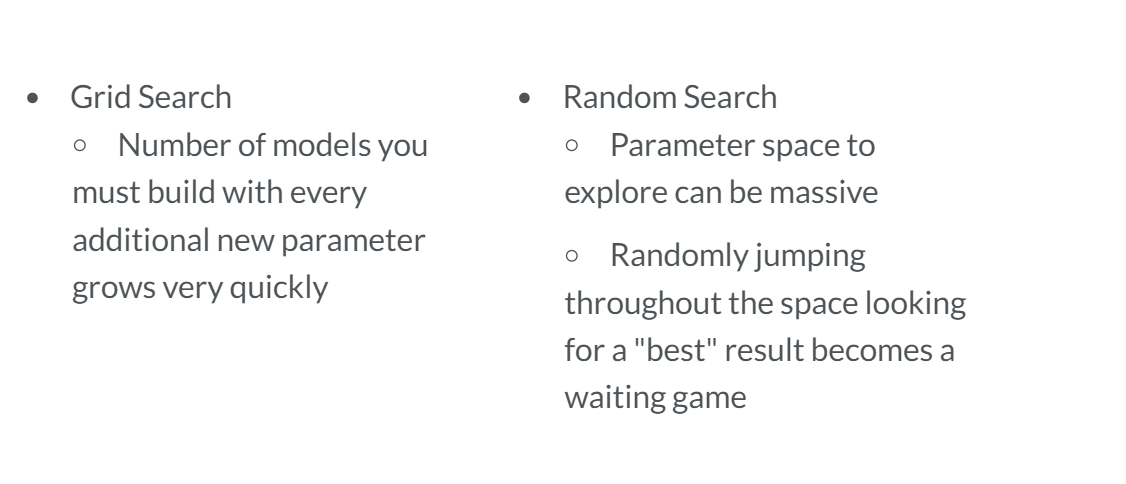
- grid:
-random:
Hyperparameter tuning的更多相关文章
- 论文笔记系列-Multi-Fidelity Automatic Hyper-Parameter Tuning via Transfer Series Expansion
论文: Multi-Fidelity Automatic Hyper-Parameter Tuning via Transfer Series Expansion 我们都知道实现AutoML的基本思路 ...
- How to Evaluate Machine Learning Models, Part 4: Hyperparameter Tuning
How to Evaluate Machine Learning Models, Part 4: Hyperparameter Tuning In the realm of machine learn ...
- [C2W3] Improving Deep Neural Networks : Hyperparameter tuning, Batch Normalization and Programming Frameworks
第三周:Hyperparameter tuning, Batch Normalization and Programming Frameworks 调试处理(Tuning process) 目前为止, ...
- [C4] Andrew Ng - Improving Deep Neural Networks: Hyperparameter tuning, Regularization and Optimization
About this Course This course will teach you the "magic" of getting deep learning to work ...
- 《Improving Deep Neural Networks:Hyperparameter tuning, Regularization and Optimization》课堂笔记
Lesson 2 Improving Deep Neural Networks:Hyperparameter tuning, Regularization and Optimization 这篇文章其 ...
- Coursera Deep Learning 2 Improving Deep Neural Networks: Hyperparameter tuning, Regularization and Optimization - week3, Hyperparameter tuning, Batch Normalization and Programming Frameworks
Tuning process 下图中的需要tune的parameter的先后顺序, 红色>黄色>紫色,其他基本不会tune. 先讲到怎么选hyperparameter, 需要随机选取(sa ...
- Coursera Deep Learning 2 Improving Deep Neural Networks: Hyperparameter tuning, Regularization and Optimization - week2, Assignment(Optimization Methods)
声明:所有内容来自coursera,作为个人学习笔记记录在这里. 请不要ctrl+c/ctrl+v作业. Optimization Methods Until now, you've always u ...
- 课程二(Improving Deep Neural Networks: Hyperparameter tuning, Regularization and Optimization),第二周(Optimization algorithms) —— 2.Programming assignments:Optimization
Optimization Welcome to the optimization's programming assignment of the hyper-parameters tuning spe ...
- Coursera Deep Learning 2 Improving Deep Neural Networks: Hyperparameter tuning, Regularization and Optimization - week1, Assignment(Regularization)
声明:所有内容来自coursera,作为个人学习笔记记录在这里. Regularization Welcome to the second assignment of this week. Deep ...
随机推荐
- 为什么用上了HTTPS,还是被流量劫持?
广告再临 “老周,有人找你” 一大早,361杀毒公司的老周就被吵醒. 今天的阳光很明媚,老周伸了伸懒腰,这才踱步走向工作室. “是谁一大早的就来吵吵,坏了我的瞌睡”,听得出来,老周有点不太高兴. “咚 ...
- SNMP协议交互学习-获取udp的udpindatagrams
MIB的组织结构,如下左图,对于udp来说1.3.6.1.2.1.7,组织如下右图,包括4个标量和1个表格 udp节点在LwIP中的定义如下: ] = { , , , , }; ] = { (stru ...
- HTTP下帐号密码的截取
用到工具: arpspoof -->>IP欺骗 ettercap -->>抓包 攻击者:192.168.100.110 kali 实验者:192.168.100 ...
- JavaScript——基础知识,开始我们的js编程之旅吧!
JavaScript基础第01天 1. 编程语言 编程语言: 可以通过类似于人类语言的"语言"来控制计算机,让计算机为我们做事情,这样的语言就叫做编程语言(Programming ...
- laravel web server设置远程访问及原理
laravel中可以用命令行php artisan serve 启动web server,并通过localhost:8000访问项目. 但是因为开发环境为虚拟机部署项目,然后通过端口访问,所以开启服务 ...
- SharePoint 开发另存文档库中文档
前言 最近碰到这样一个问题,用前端框架读取SharePoint文档库中文档的时候,如果是PDF/TXT等类型的文档,不会出现另存为的操作,而是在浏览器中在线打开,这样用户是无法接受的. 解决方法 通过 ...
- mysql随机抽取数据
-- 慢 ; -- 较慢 SELECT * FROM `table` WHERE id >= (SELECT floor( RAND() * ((SELECT MAX(id) FROM `t ...
- 使用 linux kernel +busybox 定制linux系统
目的: 了解linux的启动过程 主要内容: 1.grub 是启动程序的bootloader 2.linux-kernel 是linux的开源内核 3.busybox 是linux的工具集合 启动顺序 ...
- MySQL 当记录不存在时插入(insert if not exists、dual )
INSERT INTO clients(client_id, client_name, client_type)SELECT 10345, ’IBM’, ’advertising’FROM dualW ...
- cra
const paths = require('react-scripts/config/paths'); paths.appBuild = path.join(path.dirname(paths.a ...