
ProxySQL初体验
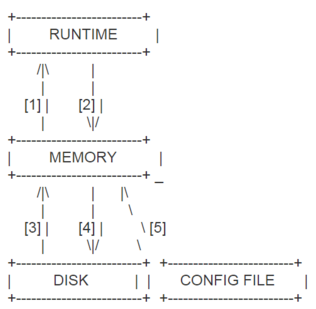
- LOAD MYSQL object FROM MEMORY or LOAD MYSQL object TO RUNTIME
- SAVE MYSQL object TO MEMORY or SAVE MYSQL object FROM RUNTIME
- LOAD MYSQL object TO MEMORY or LOAD MYSQL object FROM DISK
- SAVE MYSQL object FROM MEMORY or SAVE MYSQL object TO DISK
- LOAD MYSQL object FROM CONFIG
 [root@zlm2 :: ~]

 #wget https://github.com/sysown/proxysql/releases/download/v1.4.10/proxysql-1.4.10-1-centos7.x86_64.rpm

 ---- ::--  https://github.com/sysown/proxysql/releases/download/v1.4.10/proxysql-1.4.10-1-centos7.x86_64.rpm

 Resolving github.com (github.com)... 13.229.188.59, 52.74.223.119, 13.250.177.223

 Connecting to github.com (github.com)|13.229.188.59|:... connected.

 HTTP request sent, awaiting response...  Found

 Location: https://github-production-release-asset-2e65be.s3.amazonaws.com/27358084/305d1618-9a5b-11e8-9b04-df8e3393a6b4?X-Amz-Algorithm=AWS4-HMAC-SHA256&X-Amz-Credential=AKIAIWNJYAX4CSVEH53A%2F20180810%2Fus-east-1%2Fs3%2Faws4_request&X-Amz-Date=20180810T060119Z&X-Amz-Expires=300&X-Amz-Signature=f4f676653d4cd4f34f4b75b2a4e7dfeaee8bf9d8e35dc91938f41961123a9c9f&X-Amz-SignedHeaders=host&actor_id=0&response-content-disposition=attachment%3B%20filename%3Dproxysql-1.4.10-1-centos7.x86_64.rpm&response-content-type=application%2Foctet-stream [following]

 ---- ::--  https://github-production-release-asset-2e65be.s3.amazonaws.com/27358084/305d1618-9a5b-11e8-9b04-df8e3393a6b4?X-Amz-Algorithm=AWS4-HMAC-SHA256&X-Amz-Credential=AKIAIWNJYAX4CSVEH53A%2F20180810%2Fus-east-1%2Fs3%2Faws4_request&X-Amz-Date=20180810T060119Z&X-Amz-Expires=300&X-Amz-Signature=f4f676653d4cd4f34f4b75b2a4e7dfeaee8bf9d8e35dc91938f41961123a9c9f&X-Amz-SignedHeaders=host&actor_id=0&response-content-disposition=attachment%3B%20filename%3Dproxysql-1.4.10-1-centos7.x86_64.rpm&response-content-type=application%2Foctet-stream

 Resolving github-production-release-asset-2e65be.s3.amazonaws.com (github-production-release-asset-2e65be.s3.amazonaws.com)... 54.231.32.91

 Connecting to github-production-release-asset-2e65be.s3.amazonaws.com (github-production-release-asset-2e65be.s3.amazonaws.com)|54.231.32.91|:... connected.

 HTTP request sent, awaiting response...  OK

 Length:  (5.7M) [application/octet-stream]

 Saving to: ‘proxysql-1.4.--centos7.x86_64.rpm’

 %[===========================================================================================================>] ,,   .12MB/s   in 12s

 -- :: ( KB/s) - ‘proxysql-1.4.--centos7.x86_64.rpm’ saved [/]

 [root@zlm2 :: ~]

 #ls -l|grep proxysql

 -rw-r--r--    root root     Aug   : proxysql-1.4.--centos7.x86_64.rpm

 [root@zlm2 :: ~]

 #yum -y localinstall proxysql-1.4.--centos7.x86_64.rpm

 Loaded plugins: fastestmirror

 Examining proxysql-1.4.--centos7.x86_64.rpm: proxysql-1.4.-.x86_64

 Marking proxysql-1.4.--centos7.x86_64.rpm to be installed

 Resolving Dependencies

 --> Running transaction check

 ---> Package proxysql.x86_64 :1.4.- will be installed

 --> Finished Dependency Resolution

 Dependencies Resolved

 =====================================================================================================================================================

  Package                      Arch                       Version                         Repository                                             Size

 =====================================================================================================================================================

 Installing:

  proxysql                     x86_64                     1.4.-                        /proxysql-1.4.--centos7.x86_64                       M

 Transaction Summary

 =====================================================================================================================================================

 Install   Package

 Total size:  M

 Installed size:  M

 Downloading packages:

 Running transaction check

 Running transaction test

 Transaction test succeeded

 Running transaction

   Installing : proxysql-1.4.-.x86_64                                                                                                          /

   Verifying  : proxysql-1.4.-.x86_64                                                                                                          /

 Installed:

   proxysql.x86_64 :1.4.-

 Complete!
 [root@zlm2 :: ~]

 #rpm -ql proxysql

 /etc/init.d/proxysql

 /etc/proxysql.cnf //This is the configuration file of ProxySQL.

 /usr/bin/proxysql

 /usr/share/proxysql/tools/proxysql_galera_checker.sh //This is the script to check the status of hostgroups.

 /usr/share/proxysql/tools/proxysql_galera_writer.pl

 [root@zlm2 :: ~]

 #cat /etc/proxysql.cnf

 #file proxysql.cfg

 ########################################################################################

 # This config file is parsed using libconfig , and its grammar is described in:

 # http://www.hyperrealm.com/libconfig/libconfig_manual.html#Configuration-File-Grammar

 # Grammar is also copied at the end of this file

 ########################################################################################

 ########################################################################################

 # IMPORTANT INFORMATION REGARDING THIS CONFIGURATION FILE:

 ########################################################################################

 # On startup, ProxySQL reads its config file (if present) to determine its datadir.

 # What happens next depends on if the database file (disk) is present in the defined

 # datadir (i.e. "/var/lib/proxysql/proxysql.db").

 #

 # If the database file is found, ProxySQL initializes its in-memory configuration from

 # the persisted on-disk database. So, disk configuration gets loaded into memory and

 # then propagated towards the runtime configuration.

 #

 # If the database file is not found and a config file exists, the config file is parsed

 # and its content is loaded into the in-memory database, to then be both saved on-disk

 # database and loaded at runtime.

 #

 # IMPORTANT: If a database file is found, the config file is NOT parsed. In this case

 #            ProxySQL initializes its in-memory configuration from the persisted on-disk

 #            database ONLY. In other words, the configuration found in the proxysql.cnf

 #            file is only used to initial the on-disk database read on the first startup.

 #

 # In order to FORCE a re-initialise of the on-disk database from the configuration file

 # the ProxySQL service should be started with "service proxysql initial".

 #

 ########################################################################################

 datadir="/var/lib/proxysql" //This is the position of SQLite database of ProxySQL.

 admin_variables=

 {

     admin_credentials="admin:admin" //The default user/password is admin/admin.

 #    mysql_ifaces="127.0.0.1:6032;/tmp/proxysql_admin.sock"

     mysql_ifaces="0.0.0.0:6032" //The default admin port is 6032.

 #    refresh_interval=

 #    debug=true

 }

 mysql_variables=

 {

     threads=

     max_connections=

     default_query_delay=

     default_query_timeout=

     have_compress=true

     poll_timeout=

 #    interfaces="0.0.0.0:6033;/tmp/proxysql.sock"

     interfaces="0.0.0.0:6033" //The default service port is 6033.

     default_schema="information_schema"

     stacksize=

     server_version="5.5.30"

     connect_timeout_server=

 # make sure to configure monitor username and password

 # https://github.com/sysown/proxysql/wiki/Global-variables#mysql-monitor_username-mysql-monitor_password

     monitor_username="monitor"

     monitor_password="monitor"

     monitor_history=

     monitor_connect_interval=

     monitor_ping_interval=

     monitor_read_only_interval=

     monitor_read_only_timeout=

     ping_interval_server_msec=

     ping_timeout_server=

     commands_stats=true

     sessions_sort=true

     connect_retries_on_failure=

 }

 # defines all the MySQL servers

 mysql_servers =

 (

 #    {

 #        address = "127.0.0.1" # no default, required . If port is  , address is interpred as a Unix Socket Domain

 #        port =            # no default, required . If port is  , address is interpred as a Unix Socket Domain

 #        hostgroup =             # no default, required

 #        status = "ONLINE"     # default: ONLINE

 #        weight =             # default:

 #        compression =        # default:

 #   max_replication_lag =   # default  . If greater than  and replication lag passes such threshold, the server is shunned

 #    },

 #    {

 #        address = "/var/lib/mysql/mysql.sock"

 #        port =

 #        hostgroup =

 #    },

 #    {

 #        address="127.0.0.1"

 #        port=

 #        hostgroup=

 #        max_connections=

 #    },

 #    { address="127.0.0.2" , port= , hostgroup=, max_connections= },

 #    { address="127.0.0.1" , port= , hostgroup= },

 #    { address="127.0.0.1" , port= , hostgroup= }

 #    { address="127.0.0.2" , port= , hostgroup= },

 #    { address="127.0.0.3" , port= , hostgroup= },

 #    { address="127.0.0.4" , port= , hostgroup= },

 #    { address="/var/lib/mysql/mysql.sock" , port= , hostgroup= }

 )

 # defines all the MySQL users

 mysql_users:

 (

 #    {

 #        username = "username" # no default , required

 #        password = "password" # default: ''

 #        default_hostgroup =  # default:

 #        active =             # default:

 #    },

 #    {

 #        username = "root"

 #        password = ""

 #        default_hostgroup =

 #        max_connections=

 #        default_schema="test"

 #        active =

 #    },

 #    { username = "user1" , password = "password" , default_hostgroup =  , active =  }

 )

 #defines MySQL Query Rules

 mysql_query_rules:

 (

 #    {

 #        rule_id=

 #        active=

 #        match_pattern="^SELECT .* FOR UPDATE$"

 #        destination_hostgroup=

 #        apply=

 #    },

 #    {

 #        rule_id=

 #        active=

 #        match_pattern="^SELECT"

 #        destination_hostgroup=

 #        apply=

 #    }

 )

 scheduler=

 (

 #  {

 #    id=

 #    active=

 #    interval_ms=

 #    filename="/var/lib/proxysql/proxysql_galera_checker.sh"

 #    arg1=""

 #    arg2=""

 #    arg3=""

 #    arg4=""

 #    arg5="/var/lib/proxysql/proxysql_galera_checker.log"

 #  }

 )

 mysql_replication_hostgroups=

 (

 #        {

 #                writer_hostgroup=

 #                reader_hostgroup=

 #                comment="test repl 1"

 #       },

 #       {

 #                writer_hostgroup=

 #                reader_hostgroup=

 #                comment="test repl 2"

 #        }

 )

 # http://www.hyperrealm.com/libconfig/libconfig_manual.html#Configuration-File-Grammar

 #

 # Below is the BNF grammar for configuration files. Comments and include directives are not part of the grammar, so they are not included here.

 #

 # configuration = setting-list | empty

 #

 # setting-list = setting | setting-list setting

 #

 # setting = name (":" | "=") value (";" | "," | empty)

 #

 # value = scalar-value | array | list | group

 #

 # value-list = value | value-list "," value

 #

 # scalar-value = boolean | integer | integer64 | hex | hex64 | float

 #                | string

 #

 # scalar-value-list = scalar-value | scalar-value-list "," scalar-value

 #

 # array = "[" (scalar-value-list | empty) "]"

 #

 # list = "(" (value-list | empty) ")"

 #

 # group = "{" (setting-list | empty) "}"

 #

 # empty =
 [root@zlm2 :: ~]

 #service proxysql start

 Starting ProxySQL: -- :: [INFO] Using config file /etc/proxysql.cnf

 DONE!

 [root@zlm2 :: ~]

 #ps aux|grep proxysql

 root        0.0  0.5     ?        S    :   : proxysql -c /etc/proxysql.cnf -D /var/lib/proxysql

 root        0.3  1.8   ?        Sl   :   : proxysql -c /etc/proxysql.cnf -D /var/lib/proxysql

 root        0.0  0.0     pts/    R+   :   : grep --color=auto proxysql

 [root@zlm2 :: ~]

 #cd /var/lib/proxysql

 [root@zlm2 :: /var/lib/proxysql]

 #ls -l

 total

 -rw-------  root root  Aug  : proxysql.db

 -rw-------  root root    Aug  : proxysql.log

 -rw-r--r--  root root       Aug  : proxysql.pid

 -rw-------  root root  Aug  : proxysql_stats.db

 -rw-r--r--  root root       Aug  : reload

 [root@zlm2 :: /var/lib/proxysql]

 #mysql -uadmin -padmin -h127.0.0. -P6032

 mysql: [Warning] Using a password on the command line interface can be insecure.

 Welcome to the MySQL monitor.  Commands end with ; or \g.

 Your MySQL connection id is

 Server version: 5.5. (ProxySQL Admin Module)

 Copyright (c) - Percona LLC and/or its affiliates

 Copyright (c) , , Oracle and/or its affiliates. All rights reserved.

 Oracle is a registered trademark of Oracle Corporation and/or its

 affiliates. Other names may be trademarks of their respective

 owners.

 Type 'help;' or '\h' for help. Type '\c' to clear the current input statement.

 (admin@127.0.0.1 )[(none)]>show databases;

 +-----+---------------+-------------------------------------+

 | seq | name          | file                                |

 +-----+---------------+-------------------------------------+

 |    | main          |                                     |

 |    | disk          | /var/lib/proxysql/proxysql.db       |

 |    | stats         |                                     |

 |    | monitor       |                                     |

 |    | stats_history | /var/lib/proxysql/proxysql_stats.db |

 +-----+---------------+-------------------------------------+

  rows in set (0.00 sec)

 //There's five databases in all in PorxySQL database.In the previous version,there's no stats_history database;

 (admin@127.0.0.1 )[(none)]>show tables from main;

 +--------------------------------------------+

 | tables                                     |

 +--------------------------------------------+

 | global_variables                           | //It contains all the variables of ProxySQL.

 | mysql_collations                           |

 | mysql_group_replication_hostgroups         |

 | mysql_query_rules                          | //It contains all the query rules we'd like to use.

 | mysql_query_rules_fast_routing             |

 | mysql_replication_hostgroups               |

 | mysql_servers                              | //It contains the information of all servers relevant with MySQL.

 | mysql_users                                | //It contains the information of all users relevant with MySQL.

 | proxysql_servers                           | //It contains the information of all servers relevant with ProxySQL.

 | runtime_checksums_values                   |

 | runtime_global_variables                   |

 | runtime_mysql_group_replication_hostgroups |

 | runtime_mysql_query_rules                  |

 | runtime_mysql_query_rules_fast_routing     |

 | runtime_mysql_replication_hostgroups       |

 | runtime_mysql_servers                      |

 | runtime_mysql_users                        |

 | runtime_proxysql_servers                   |

 | runtime_scheduler                          |

 | scheduler                                  |

 +--------------------------------------------+

  rows in set (0.00 sec)

 //All the "runtime" prefixed tables in "main" database contain the current configuration in runtime mode.The other tables can be modified in memory mode.

 (admin@127.0.0.1 )[(none)]>show tables from disk;

 +------------------------------------+

 | tables                             |

 +------------------------------------+

 | global_variables                   |

 | mysql_collations                   |

 | mysql_group_replication_hostgroups |

 | mysql_query_rules                  |

 | mysql_query_rules_fast_routing     |

 | mysql_replication_hostgroups       |

 | mysql_servers                      |

 | mysql_users                        |

 | proxysql_servers                   |

 | scheduler                          |

 +------------------------------------+

  rows in set (0.00 sec)

 //All the tables contains the relevant data which we have saved in disk by "SAVE MYSQL xxx TO DISK;" command.

 //All the tables have the the same structure as those in "main" database.

 (admin@127.0.0.1 )[(none)]>show tables from monitor;

 +------------------------------------+

 | tables                             |

 +------------------------------------+

 | mysql_server_connect_log           |

 | mysql_server_group_replication_log |

 | mysql_server_ping_log              |

 | mysql_server_read_only_log         |

 | mysql_server_replication_lag_log   |

 +------------------------------------+

  rows in set (0.00 sec)

 (admin@127.0.0.1 )[(none)]>show tables from stats;

 +--------------------------------------+

 | tables                               |

 +--------------------------------------+

 | global_variables                     |

 | stats_memory_metrics                 |

 | stats_mysql_commands_counters        |

 | stats_mysql_connection_pool          |

 | stats_mysql_connection_pool_reset    |

 | stats_mysql_global                   |

 | stats_mysql_prepared_statements_info |

 | stats_mysql_processlist              |

 | stats_mysql_query_digest             |

 | stats_mysql_query_digest_reset       |

 | stats_mysql_query_rules              |

 | stats_mysql_users                    |

 | stats_proxysql_servers_checksums     |

 | stats_proxysql_servers_metrics       |

 | stats_proxysql_servers_status        |

 +--------------------------------------+

  rows in set (0.00 sec)
 (admin@127.0.0.1 )[main]>show create table mysql_replication_hostgroups\G

 *************************** . row ***************************

        table: mysql_replication_hostgroups

 Create Table: CREATE TABLE mysql_replication_hostgroups (

     writer_hostgroup INT CHECK (writer_hostgroup>=) NOT NULL PRIMARY KEY,

     reader_hostgroup INT NOT NULL CHECK (reader_hostgroup<>writer_hostgroup AND reader_hostgroup>),

     comment VARCHAR NOT NULL DEFAULT '', UNIQUE (reader_hostgroup))

  row in set (0.00 sec)

 (admin@127.0.0.1 )[main]>insert into mysql_replication_hostgroups(writer_hostgroup,reader_hostgroup,comment) values(,,'Test of ProxySQL');

 Query OK,  row affected (0.00 sec)

 (admin@127.0.0.1 )[main]>select * from mysql_replication_hostgroups;

 +------------------+------------------+------------------+

 | writer_hostgroup | reader_hostgroup | comment          |

 +------------------+------------------+------------------+

 |                |                | Test of ProxySQL |

 +------------------+------------------+------------------+

  row in set (0.00 sec)

 (admin@127.0.0.1 )[main]>select * from main.runtime_mysql_replication_hostgroups;

 Empty set (0.00 sec)

 (admin@127.0.0.1 )[main]>select * from disk.mysql_replication_hostgroups;

 Empty set (0.00 sec)

 (admin@127.0.0.1 )[main]>load mysql servers to runtime;save mysql servers to disk;

 Query OK,  rows affected (0.00 sec)

 Query OK,  rows affected (0.04 sec)

 (admin@127.0.0.1 )[main]>select * from main.runtime_mysql_replication_hostgroups;

 +------------------+------------------+------------------+

 | writer_hostgroup | reader_hostgroup | comment          |

 +------------------+------------------+------------------+

 |                |                | Test of ProxySQL |

 +------------------+------------------+------------------+

  row in set (0.00 sec)

 (admin@127.0.0.1 )[main]>select * from disk.mysql_replication_hostgroups;

 +------------------+------------------+------------------+

 | writer_hostgroup | reader_hostgroup | comment          |

 +------------------+------------------+------------------+

 |                |                | Test of ProxySQL |

 +------------------+------------------+------------------+

  row in set (0.00 sec)
 (admin@127.0.0.1 )[main]>show create table mysql_servers\G

 *************************** . row ***************************

        table: mysql_servers

 Create Table: CREATE TABLE mysql_servers (

     hostgroup_id INT CHECK (hostgroup_id>=) NOT NULL DEFAULT ,

     hostname VARCHAR NOT NULL,

     port INT NOT NULL DEFAULT ,

     status VARCHAR CHECK (UPPER(status) IN ('ONLINE','SHUNNED','OFFLINE_SOFT', 'OFFLINE_HARD')) NOT NULL DEFAULT 'ONLINE',

     weight INT CHECK (weight >= ) NOT NULL DEFAULT ,

     compression INT CHECK (compression >= AND compression <= ) NOT NULL DEFAULT ,

     max_connections INT CHECK (max_connections >=) NOT NULL DEFAULT ,

     max_replication_lag INT CHECK (max_replication_lag >=  AND max_replication_lag <= ) NOT NULL DEFAULT ,

     use_ssl INT CHECK (use_ssl IN(,)) NOT NULL DEFAULT ,

     max_latency_ms INT UNSIGNED CHECK (max_latency_ms>=) NOT NULL DEFAULT ,

     comment VARCHAR NOT NULL DEFAULT '',

     PRIMARY KEY (hostgroup_id, hostname, port) )

  row in set (0.00 sec)

 (admin@127.0.0.1 )[main]>insert into mysql_servers(hostgrop_id,hostname,port,max_connections,max_replication_lag,max_latency_ms) values(,'192.168.1.101',,,,),(,'192.168.1.102',,,,),(,'192.168.1.103',,,,);

 Query OK,  row affected (0.01 sec)

 (admin@127.0.0.1 )[main]>select * from mysql_servers;

 +--------------+---------------+------+--------+--------+-------------+-----------------+---------------------+---------+----------------+---------+

 | hostgroup_id | hostname      | port | status | weight | compression | max_connections | max_replication_lag | use_ssl | max_latency_ms | comment |

 +--------------+---------------+------+--------+--------+-------------+-----------------+---------------------+---------+----------------+---------+

 |            | 192.168.1.101 |  | ONLINE |       |            |               |                   |        |            |         |

 |            | 191.168.1.102 |  | ONLINE |       |            |               |                   |        |            |         |

 |            | 192.168.1.103 |  | ONLINE |       |            |               |                   |        |            |         |

 +--------------+---------------+------+--------+--------+-------------+-----------------+---------------------+---------+----------------+---------+

  rows in set (0.00 sec)

 (admin@127.0.0.1 )[main]>select * from runtime_mysql_servers;

 Empty set (0.00 sec)

 (admin@127.0.0.1 )[main]>select * from disk.mysql_servers;

 Empty set (0.00 sec)

 (admin@127.0.0.1 )[main]>load mysql servers to runtime;save mysql servers to disk;

 Query OK,  rows affected (0.01 sec)

 Query OK,  rows affected (0.03 sec)

 (admin@127.0.0.1 )[main]>select * from runtime_mysql_servers;

 +--------------+---------------+------+---------+--------+-------------+-----------------+---------------------+---------+----------------+---------+

 | hostgroup_id | hostname      | port | status  | weight | compression | max_connections | max_replication_lag | use_ssl | max_latency_ms | comment |

 +--------------+---------------+------+---------+--------+-------------+-----------------+---------------------+---------+----------------+---------+

 |            | 191.168.1.102 |  | SHUNNED |       |            |               |                   |        |            |         |

 |            | 192.168.1.101 |  | ONLINE  |       |            |               |                   |        |            |         |

 |            | 192.168.1.103 |  | ONLINE  |       |            |               |                   |        |            |         |

 +--------------+---------------+------+---------+--------+-------------+-----------------+---------------------+---------+----------------+---------+

  rows in set (0.00 sec)

 (admin@127.0.0.1 )[main]>select * from disk.mysql_servers;

 +--------------+---------------+------+--------+--------+-------------+-----------------+---------------------+---------+----------------+---------+

 | hostgroup_id | hostname      | port | status | weight | compression | max_connections | max_replication_lag | use_ssl | max_latency_ms | comment |

 +--------------+---------------+------+--------+--------+-------------+-----------------+---------------------+---------+----------------+---------+

 |            | 192.168.1.101 |  | ONLINE |       |            |               |                   |        |            |         |

 |            | 191.168.1.102 |  | ONLINE |       |            |               |                   |        |            |         |

 |            | 192.168.1.103 |  | ONLINE |       |            |               |                   |        |            |         |

 +--------------+---------------+------+--------+--------+-------------+-----------------+---------------------+---------+----------------+---------+

  rows in set (0.00 sec)
 [root@zlm2 :: /var/lib/proxysql]

 #ls -l

 total

 -rw-------  root root  Aug  : proxysql.db

 -rw-------  root root  Aug  : proxysql.log

 -rw-r--r--  root root       Aug  : proxysql.pid

 -rw-------  root root  Aug  : proxysql_stats.db

 -rw-r--r--  root root       Aug  : reload

 [root@zlm2 :: /var/lib/proxysql]

 #tail proxysql.log

 -- :: MySQL_Monitor.cpp::monitor_read_only_thread(): [ERROR] Timeout on read_only check for 192.168.1.101: after 0ms. Unable to create a connection. If the server is overload, increase mysql-monitor_connect_timeout. Error: timeout on creating new connection: Access denied for user 'monitor'@'192.168.1.101' (using password: YES).

 -- :: MySQL_Monitor.cpp::monitor_read_only_thread(): [ERROR] Server 192.168.1.101: missed  read_only checks. Assuming read_only=

 -- :: MySQL_Monitor.cpp::monitor_read_only_thread(): [ERROR] Timeout on read_only check for 192.168.1.103: after 1ms. Unable to create a connection. If the server is overload, increase mysql-monitor_connect_timeout. Error: timeout on creating new connection: Access denied for user 'monitor'@'192.168.1.101' (using password: YES).

 -- :: MySQL_Monitor.cpp::monitor_read_only_thread(): [ERROR] Server 192.168.1.103: missed  read_only checks. Assuming read_only=

 -- :: MySQL_Monitor.cpp::monitor_read_only_thread(): [ERROR] Timeout on read_only check for 192.168.1.101: after 0ms. Unable to create a connection. If the server is overload, increase mysql-monitor_connect_timeout. Error: timeout on creating new connection: Access denied for user 'monitor'@'192.168.1.101' (using password: YES).

 -- :: MySQL_Monitor.cpp::monitor_read_only_thread(): [ERROR] Server 192.168.1.101: missed  read_only checks. Assuming read_only=

 -- :: MySQL_Monitor.cpp::monitor_read_only_thread(): [ERROR] Timeout on read_only check for 192.168.1.101: after 0ms. Unable to create a connection. If the server is overload, increase mysql-monitor_connect_timeout. Error: timeout on creating new connection: Access denied for user 'monitor'@'192.168.1.101' (using password: YES).

 -- :: MySQL_Monitor.cpp::monitor_read_only_thread(): [ERROR] Server 192.168.1.101: missed  read_only checks. Assuming read_only=

 -- :: MySQL_Monitor.cpp::monitor_read_only_thread(): [ERROR] Timeout on read_only check for 192.168.1.103: after 1ms. Unable to create a connection. If the server is overload, increase mysql-monitor_connect_timeout. Error: timeout on creating new connection: Access denied for user 'monitor'@'192.168.1.101' (using password: YES).

 -- :: MySQL_Monitor.cpp::monitor_read_only_thread(): [ERROR] Server 192.168.1.103: missed  read_only checks. Assuming read_only=

 [root@zlm2 :: /data/mysql/mysql3308/data]

 #tail error.log

 --10T09::09.757619+:  [Note] Access denied for user 'monitor'@'192.168.1.101' (using password: YES)

 --10T09::11.248093+:  [Note] Access denied for user 'monitor'@'192.168.1.101' (using password: YES)

 --10T09::12.748305+:  [Note] Access denied for user 'monitor'@'192.168.1.101' (using password: YES)

 --10T09::14.253693+:  [Note] Access denied for user 'monitor'@'192.168.1.101' (using password: YES)

 --10T09::15.753818+:  [Note] Access denied for user 'monitor'@'192.168.1.101' (using password: YES)

 --10T09::17.274359+:  [Note] Access denied for user 'monitor'@'192.168.1.101' (using password: YES)

 --10T09::18.754761+:  [Note] Access denied for user 'monitor'@'192.168.1.101' (using password: YES)

 --10T09::19.177448+:  [Note] Access denied for user 'monitor'@'192.168.1.101' (using password: YES)

 --10T09::19.386483+:  [Note] Access denied for user 'monitor'@'192.168.1.101' (using password: YES)

 --10T09::20.270737+:  [Note] Access denied for user 'monitor'@'192.168.1.101' (using password: YES)

 //The user "monitor" has no privileges to connect in MySQL instance yet.

 //Add monitor user "monitor" in the MySQL instance and grant privileges.

 (root@localhost mysql3308.sock)[(none)]>grant all privileges on *.* to monitor@'%' identified by 'monitor';

 Query OK,  rows affected,  warning (0.02 sec)

 (root@localhost mysql3308.sock)[(none)]>select user,host from mysql.user;

 +---------------+-------------+

 | user          | host        |

 +---------------+-------------+

 | monitor       | %           |

 | repl          | 192.168..% |

 | zlm           | 192.168..% |

 | mysql.session | localhost   |

 | mysql.sys     | localhost   |

 | root          | localhost   |

 | sst           | localhost   |

 +---------------+-------------+

  rows in set (0.00 sec)

 [root@zlm2 :: /var/lib/proxysql]

 #tail - proxysql.log

 -- :: [INFO] New mysql_replication_hostgroups table

 writer_hostgroup:  , reader_hostgroup: , Test of ProxySQL

 -- :: [INFO] New mysql_group_replication_hostgroups table

 -- :: [INFO] Dumping current MySQL Servers structures for hostgroup ALL

 HID:  , address: 192.168.1.103 , port:  , weight:  , status: ONLINE , max_connections:  , max_replication_lag:  , use_ssl:  , max_latency_ms:  , comment:

 HID:  , address: 192.168.1.101 , port:  , weight:  , status: ONLINE , max_connections:  , max_replication_lag:  , use_ssl:  , max_latency_ms:  , comment:

 HID:  , address: 191.168.1.102 , port:  , weight:  , status: ONLINE , max_connections:  , max_replication_lag:  , use_ssl:  , max_latency_ms:  , comment:

 HID:  , address: 192.168.1.103 , port:  , weight:  , status: ONLINE , max_connections:  , max_replication_lag:  , use_ssl:  , max_latency_ms:  , comment:

 HID:  , address: 192.168.1.101 , port:  , weight:  , status: ONLINE , max_connections:  , max_replication_lag:  , use_ssl:  , max_latency_ms:  , comment:

 -- :: [INFO] Dumping mysql_servers

 +--------------+---------------+------+--------+--------+-------------+-----------------+---------------------+---------+----------------+---------+-----------------+

 | hostgroup_id | hostname      | port | weight | status | compression | max_connections | max_replication_lag | use_ssl | max_latency_ms | comment | mem_pointer     |

 +--------------+---------------+------+--------+--------+-------------+-----------------+---------------------+---------+----------------+---------+-----------------+

 |            | 192.168.1.103 |  |       |       |            |               |                   |        |            |         |  |

 |            | 192.168.1.101 |  |       |       |            |               |                   |        |            |         |  |

 |            | 192.168.1.103 |  |       |       |            |               |                   |        |            |         |  |

 |            | 191.168.1.102 |  |       |       |            |               |                   |        |            |         |  |

 |            | 192.168.1.101 |  |       |       |            |               |                   |        |            |         |  |

 +--------------+---------------+------+--------+--------+-------------+-----------------+---------------------+---------+----------------+---------+-----------------+

 -- :: MySQL_Monitor.cpp::monitor_ping(): [ERROR] Server 191.168.1.102: missed  heartbeats, shunning it and killing all the connections. Disabling other checks until the node comes back online.

 //Now,the monitor user "monitor" of ProxySQL can get the monitor information.

 //Continue to configure the product user which we need to connect in MySQL instance.

 (admin@127.0.0.1 )[main]>show create table mysql_users\G

 *************************** . row ***************************

        table: mysql_users

 Create Table: CREATE TABLE mysql_users (

     username VARCHAR NOT NULL,

     password VARCHAR,

     active INT CHECK (active IN (,)) NOT NULL DEFAULT ,

     use_ssl INT CHECK (use_ssl IN (,)) NOT NULL DEFAULT ,

     default_hostgroup INT NOT NULL DEFAULT ,

     default_schema VARCHAR,

     schema_locked INT CHECK (schema_locked IN (,)) NOT NULL DEFAULT ,

     transaction_persistent INT CHECK (transaction_persistent IN (,)) NOT NULL DEFAULT ,

     fast_forward INT CHECK (fast_forward IN (,)) NOT NULL DEFAULT ,

     backend INT CHECK (backend IN (,)) NOT NULL DEFAULT ,

     frontend INT CHECK (frontend IN (,)) NOT NULL DEFAULT ,

     max_connections INT CHECK (max_connections >=) NOT NULL DEFAULT ,

     PRIMARY KEY (username, backend),

     UNIQUE (username, frontend))

  row in set (0.00 sec)

 (admin@127.0.0.1 )[main]>insert into mysql_users(username,password,active,default_hostgroup,default_schema) values('zlm','zlmzlm',,,'zlm');

 Query OK,  row affected (0.00 sec)

 (admin@127.0.0.1 )[main]>select * from mysql_users;

 +----------+----------+--------+---------+-------------------+----------------+---------------+------------------------+--------------+---------+----------+-----------------+

 | username | password | active | use_ssl | default_hostgroup | default_schema | schema_locked | transaction_persistent | fast_forward | backend | frontend | max_connections |

 +----------+----------+--------+---------+-------------------+----------------+---------------+------------------------+--------------+---------+----------+-----------------+

 | zlm      | zlmzlm   |       |        |                 | zlm            |              |                       |             |        |         |            |

 +----------+----------+--------+---------+-------------------+----------------+---------------+------------------------+--------------+---------+----------+-----------------+

  row in set (0.00 sec)

 (admin@127.0.0.1 )[main]>load mysql users to runtime;save mysql users to disk;

 Query OK,  rows affected (0.00 sec)

 Query OK,  rows affected (0.01 sec)

 (admin@127.0.0.1 )[main]>select * from runtime_mysql_users;

 +----------+-------------------------------------------+--------+---------+-------------------+----------------+---------------+------------------------+--------------+---------+----------+-----------------+

 | username | password                                  | active | use_ssl | default_hostgroup | default_schema | schema_locked | transaction_persistent | fast_forward | backend | frontend | max_connections |

 +----------+-------------------------------------------+--------+---------+-------------------+----------------+---------------+------------------------+--------------+---------+----------+-----------------+

 | zlm      | *512FB3FAA6F522E351929CAC70AD8EBB0F5901B6 |       |        |                 | zlm            |              |                       |             |        |         |            |

 | zlm      | *512FB3FAA6F522E351929CAC70AD8EBB0F5901B6 |       |        |                 | zlm            |              |                       |             |        |         |            |

 +----------+-------------------------------------------+--------+---------+-------------------+----------------+---------------+------------------------+--------------+---------+----------+-----------------+

  rows in set (0.00 sec)

 (admin@127.0.0.1 )[main]>select * from disk.mysql_users;

 +----------+----------+--------+---------+-------------------+----------------+---------------+------------------------+--------------+---------+----------+-----------------+

 | username | password | active | use_ssl | default_hostgroup | default_schema | schema_locked | transaction_persistent | fast_forward | backend | frontend | max_connections |

 +----------+----------+--------+---------+-------------------+----------------+---------------+------------------------+--------------+---------+----------+-----------------+

 | zlm      | zlmzlm   |       |        |                 | zlm            |              |                       |             |        |         |            |

 +----------+----------+--------+---------+-------------------+----------------+---------------+------------------------+--------------+---------+----------+-----------------+

  row in set (0.00 sec)
 (admin@127.0.0.1 )[main]>show create table mysql_query_rules\G

 *************************** . row ***************************

        table: mysql_query_rules

 Create Table: CREATE TABLE mysql_query_rules (

     rule_id INTEGER PRIMARY KEY AUTOINCREMENT NOT NULL,

     active INT CHECK (active IN (,)) NOT NULL DEFAULT ,

     username VARCHAR,

     schemaname VARCHAR,

     flagIN INT NOT NULL DEFAULT ,

     client_addr VARCHAR,

     proxy_addr VARCHAR,

     proxy_port INT,

     digest VARCHAR,

     match_digest VARCHAR,

     match_pattern VARCHAR,

     negate_match_pattern INT CHECK (negate_match_pattern IN (,)) NOT NULL DEFAULT ,

     re_modifiers VARCHAR DEFAULT 'CASELESS',

     flagOUT INT,

     replace_pattern VARCHAR,

     destination_hostgroup INT DEFAULT NULL,

     cache_ttl INT CHECK(cache_ttl > ),

     reconnect INT CHECK (reconnect IN (,)) DEFAULT NULL,

     timeout INT UNSIGNED,

     retries INT CHECK (retries>= AND retries <=),

     delay INT UNSIGNED,

     next_query_flagIN INT UNSIGNED,

     mirror_flagOUT INT UNSIGNED,

     mirror_hostgroup INT UNSIGNED,

     error_msg VARCHAR,

     OK_msg VARCHAR,

     sticky_conn INT CHECK (sticky_conn IN (,)),

     multiplex INT CHECK (multiplex IN (,,)),

     log INT CHECK (log IN (,)),

     apply INT CHECK(apply IN (,)) NOT NULL DEFAULT ,

     comment VARCHAR)

  row in set (0.00 sec)

 (admin@127.0.0.1 )[main]>insert into mysql_query_rules(active,username,match_pattern,schemaname,destination_hostgroup,apply) values(,'zlm','^select','zlm',,);

 Query OK,  row affected (0.00 sec)

 (admin@127.0.0.1 )[main]>select active,username,match_pattern,schemaname,destination_hostgroup,apply from mysql_query_rules;

 +--------+----------+---------------+------------+-----------------------+-------+

 | active | username | match_pattern | schemaname | destination_hostgroup | apply |

 +--------+----------+---------------+------------+-----------------------+-------+

 |       | zlm      | ^select       | zlm        |                     |      |

 +--------+----------+---------------+------------+-----------------------+-------+

  row in set (0.00 sec)

 (admin@127.0.0.1 )[main]>load mysql query rules to runtime;save mysql query rules to disk;

 Query OK,  rows affected (0.00 sec)

 Query OK,  rows affected (0.02 sec)

 (admin@127.0.0.1 )[main]>select active,username,match_pattern,schemaname,destination_hostgroup,apply from runtime_mysql_query_rules;

 +--------+----------+---------------+------------+-----------------------+-------+

 | active | username | match_pattern | schemaname | destination_hostgroup | apply |

 +--------+----------+---------------+------------+-----------------------+-------+

 |       | zlm      | ^select       | zlm        |                     |      |

 +--------+----------+---------------+------------+-----------------------+-------+

  row in set (0.00 sec)

 (admin@127.0.0.1 )[main]>select active,username,match_pattern,schemaname,destination_hostgroup,apply from disk.mysql_query_rules;

 +--------+----------+---------------+------------+-----------------------+-------+

 | active | username | match_pattern | schemaname | destination_hostgroup | apply |

 +--------+----------+---------------+------------+-----------------------+-------+

 |       | zlm      | ^select       | zlm        |                     |      |

 +--------+----------+---------------+------------+-----------------------+-------+

  row in set (0.00 sec)
 //Connect with port 6033 to use the query rule of ProxySQL.

 [root@zlm2 :: /data/mysql/mysql3308/data]

 #mysql -uzlm -pzlmzlm -h192.168.1. -P6033

 mysql: [Warning] Using a password on the command line interface can be insecure.

 Welcome to the MySQL monitor.  Commands end with ; or \g.

 Your MySQL connection id is

 Server version: 5.5. (ProxySQL)

 Copyright (c) - Percona LLC and/or its affiliates

 Copyright (c) , , Oracle and/or its affiliates. All rights reserved.

 Oracle is a registered trademark of Oracle Corporation and/or its

 affiliates. Other names may be trademarks of their respective

 owners.

 Type 'help;' or '\h' for help. Type '\c' to clear the current input statement.

 (zlm@192.168.1.101 )[(none)]>show tables; //The default database automatically became zlm although I have't specify which database to use.

 +---------------+

 | Tables_in_zlm |

 +---------------+

 | t1            |

 | t2            |

 +---------------+

  rows in set (0.00 sec)

 (zlm@192.168.1.101 )[(none)]>select * from t1;

 +----+------------+

 | id | name       |

 +----+------------+

 |   | MySQL      |

 |   | Oracle     |

 |   | PostgreSQL |

 |   | Redis      |

 +----+------------+

  rows in set (0.00 sec)

 (zlm@192.168.1.101 )[(none)]>insert into t1 values(,'MongoDB');

 Query OK,  row affected (0.01 sec)

 (zlm@192.168.1.101 )[(none)]>select * from t1;

 +----+------------+

 | id | name       |

 +----+------------+

 |   | MySQL      |

 |   | Oracle     |

 |   | PostgreSQL |

 |   | Redis      |

 |   | MongoDB    |

 +----+------------+

  rows in set (0.00 sec)

 //Check the stats we've catched in "stats_mysql_query_digest" table of "stats" database of ProxySQL.

 (admin@127.0.0.1 )[main]>use stats;

 Reading table information for completion of table and column names

 You can turn off this feature to get a quicker startup with -A

 Database changed

 (admin@127.0.0.1 )[stats]>show tables; //Notice,if you don't specify "from xxx",it will show tables of "main" database.

 +--------------------------------------------+

 | tables                                     |

 +--------------------------------------------+

 | global_variables                           |

 | mysql_collations                           |

 | mysql_group_replication_hostgroups         |

 | mysql_query_rules                          |

 | mysql_query_rules_fast_routing             |

 | mysql_replication_hostgroups               |

 | mysql_servers                              |

 | mysql_users                                |

 | proxysql_servers                           |

 | runtime_checksums_values                   |

 | runtime_global_variables                   |

 | runtime_mysql_group_replication_hostgroups |

 | runtime_mysql_query_rules                  |

 | runtime_mysql_query_rules_fast_routing     |

 | runtime_mysql_replication_hostgroups       |

 | runtime_mysql_servers                      |

 | runtime_mysql_users                        |

 | runtime_proxysql_servers                   |

 | runtime_scheduler                          |

 | scheduler                                  |

 +--------------------------------------------+

  rows in set (0.00 sec)

 (admin@127.0.0.1 )[stats]>show tables from stats; //Speicify the target database to be "stats".

 +--------------------------------------+

 | tables                               |

 +--------------------------------------+

 | global_variables                     |

 | stats_memory_metrics                 |

 | stats_mysql_commands_counters        |

 | stats_mysql_connection_pool          |

 | stats_mysql_connection_pool_reset    |

 | stats_mysql_global                   |

 | stats_mysql_prepared_statements_info |

 | stats_mysql_processlist              |

 | stats_mysql_query_digest             |

 | stats_mysql_query_digest_reset       |

 | stats_mysql_query_rules              |

 | stats_mysql_users                    |

 | stats_proxysql_servers_checksums     |

 | stats_proxysql_servers_metrics       |

 | stats_proxysql_servers_status        |

 +--------------------------------------+

  rows in set (0.00 sec)

 (admin@127.0.0.1 )[stats]>select hostgroup,schemaname,username,substr(digest_text,,-),count_star from stats_mysql_query_digest;

 +-----------+------------+----------+----------------------------------+------------+

 | hostgroup | schemaname | username | substr(digest_text,,-)     | count_star |

 +-----------+------------+----------+----------------------------------+------------+

 |         | zlm        | zlm      | select * from t1                 |           |

 |         | zlm        | zlm      | insert into t1 values(?,?)       |           |

 |         | zlm        | zlm      | select USER()                    |           |

 |         | zlm        | zlm      | show tables                      |           |

 |         | zlm        | zlm      | select @@version_comment limit ? |           |

 +-----------+------------+----------+----------------------------------+------------+

  rows in set (0.00 sec)

 //It's due to I've set "default_hostgroup" with "20".Actually it should be set with "10" of writer_hostgroup.

 (admin@127.0.0.1 )[stats]>select * from mysql_users;

 +----------+----------+--------+---------+-------------------+----------------+---------------+------------------------+--------------+---------+----------+-----------------+

 | username | password | active | use_ssl | default_hostgroup | default_schema | schema_locked | transaction_persistent | fast_forward | backend | frontend | max_connections |

 +----------+----------+--------+---------+-------------------+----------------+---------------+------------------------+--------------+---------+----------+-----------------+

 | zlm      | zlmzlm   |       |        |                 | zlm            |              |                       |             |        |         |            |

 +----------+----------+--------+---------+-------------------+----------------+---------------+------------------------+--------------+---------+----------+-----------------+

  row in set (0.00 sec)

 (admin@127.0.0.1 )[stats]>update mysql_users set default_hostgroup=;

 Query OK,  row affected (0.00 sec)

 (admin@127.0.0.1 )[stats]>select * from mysql_users;

 +----------+----------+--------+---------+-------------------+----------------+---------------+------------------------+--------------+---------+----------+-----------------+

 | username | password | active | use_ssl | default_hostgroup | default_schema | schema_locked | transaction_persistent | fast_forward | backend | frontend | max_connections |

 +----------+----------+--------+---------+-------------------+----------------+---------------+------------------------+--------------+---------+----------+-----------------+

 | zlm      | zlmzlm   |       |        |                 | zlm            |              |                       |             |        |         |            |

 +----------+----------+--------+---------+-------------------+----------------+---------------+------------------------+--------------+---------+----------+-----------------+

  row in set (0.00 sec)

 (admin@127.0.0.1 )[stats]>load mysql users to runtime;save mysql users to disk;

 Query OK,  rows affected (0.00 sec)

 Query OK,  rows affected (0.05 sec)

 (admin@127.0.0.1 )[stats]>select  * from runtime_mysql_users;

 +----------+-------------------------------------------+--------+---------+-------------------+----------------+---------------+------------------------+--------------+---------+----------+-----------------+

 | username | password                                  | active | use_ssl | default_hostgroup | default_schema | schema_locked | transaction_persistent | fast_forward | backend | frontend | max_connections |

 +----------+-------------------------------------------+--------+---------+-------------------+----------------+---------------+------------------------+--------------+---------+----------+-----------------+

 | zlm      | *512FB3FAA6F522E351929CAC70AD8EBB0F5901B6 |       |        |                 | zlm            |              |                       |             |        |         |            |

 | zlm      | *512FB3FAA6F522E351929CAC70AD8EBB0F5901B6 |       |        |                 | zlm            |              |                       |             |        |         |            |

 +----------+-------------------------------------------+--------+---------+-------------------+----------------+---------------+------------------------+--------------+---------+----------+-----------------+

  rows in set (0.00 sec)

 (admin@127.0.0.1 )[stats]>select  * from disk.mysql_users;

 +----------+----------+--------+---------+-------------------+----------------+---------------+------------------------+--------------+---------+----------+-----------------+

 | username | password | active | use_ssl | default_hostgroup | default_schema | schema_locked | transaction_persistent | fast_forward | backend | frontend | max_connections |

 +----------+----------+--------+---------+-------------------+----------------+---------------+------------------------+--------------+---------+----------+-----------------+

 | zlm      | zlmzlm   |       |        |                 | zlm            |              |                       |             |        |         |            |

 +----------+----------+--------+---------+-------------------+----------------+---------------+------------------------+--------------+---------+----------+-----------------+

  row in set (0.00 sec)

 //Clear the statistic data of table "stats_mysql_query_digest".

 (admin@127.0.0.1 )[stats]>select * from stats_mysql_query_digest_reset;

 +-----------+------------+----------+--------------------+----------------------------------+------------+------------+------------+----------+----------+----------+

 | hostgroup | schemaname | username | digest             | digest_text                      | count_star | first_seen | last_seen  | sum_time | min_time | max_time |

 +-----------+------------+----------+--------------------+----------------------------------+------------+------------+------------+----------+----------+----------+

 |         | zlm        | zlm      | 0x3765930C7143F468 | select * from t1                 |           |  |  |       |       |       |

 |         | zlm        | zlm      | 0x3CE4C46484576DFD | insert into t1 values(?,?)       |           |  |  |     |     |     |

 |         | zlm        | zlm      | 0x594F2C744B698066 | select USER()                    |           |  |  |         |         |         |

 |         | zlm        | zlm      | 0x99531AEFF718C501 | show tables                      |           |  |  |      |      |      |

 |         | zlm        | zlm      | 0x226CD90D52A2BA0B | select @@version_comment limit ? |           |  |  |         |         |         |

 +-----------+------------+----------+--------------------+----------------------------------+------------+------------+------------+----------+----------+----------+

  rows in set (0.01 sec)

 (admin@127.0.0.1 )[stats]>select * from stats_mysql_query_digest;

 Empty set (0.00 sec)

 //Do the dml operations again.

 (zlm@192.168.1.101 )[(none)]>show tables;

 +---------------+

 | Tables_in_zlm |

 +---------------+

 | t1            |

 | t2            |

 +---------------+

  rows in set (0.00 sec)

 (zlm@192.168.1.101 )[(none)]>select * from t2;

 +----+------------+

 | id | name       |

 +----+------------+

 |   | MySQL      |

 |   | Oracle     |

 |   | SQL Server |

 |   | Redis      |

 |   | MongoDB    |

 |   | PostgreSQL |

 +----+------------+

  rows in set (0.01 sec)

 (zlm@192.168.1.101 )[(none)]>insert into t2 values(,'Hadoop');

 Query OK,  row affected (0.01 sec)

 //Check the diagnostic data in table "stats_mysql_query_digest" again.

 (admin@127.0.0.1 )[stats]>select active,username,match_pattern,schemaname,destination_hostgroup,apply from mysql_query_rules;

 +--------+----------+---------------+------------+-----------------------+-------+

 | active | username | match_pattern | schemaname | destination_hostgroup | apply |

 +--------+----------+---------------+------------+-----------------------+-------+

 |       | zlm      | ^select       | zlm        |                     |      |

 +--------+----------+---------------+------------+-----------------------+-------+

  row in set (0.00 sec)

 (admin@127.0.0.1 )[stats]>select hostgroup,schemaname,username,substr(digest_text,,-),count_star from stats_mysql_query_digest;

 +-----------+------------+----------+------------------------------+------------+

 | hostgroup | schemaname | username | substr(digest_text,,-) | count_star |

 +-----------+------------+----------+------------------------------+------------+

 |         | zlm        | zlm      | insert into t2 values(?,?)   |           |

 |         | zlm        | zlm      | select * from t2             |           |

 |         | zlm        | zlm      | show tables                  |           |

 +-----------+------------+----------+------------------------------+------------+

  rows in set (0.00 sec)

 //It still doesn't take effect.What's wrong with it?
ProxySQL初体验的更多相关文章
- .NET平台开源项目速览(15)文档数据库RavenDB-介绍与初体验
不知不觉,“.NET平台开源项目速览“系列文章已经15篇了,每一篇都非常受欢迎,可能技术水平不高,但足够入门了.虽然工作很忙,但还是会抽空把自己知道的,已经平时遇到的好的开源项目分享出来.今天就给大家 ...
- Xamarin+Prism开发详解四:简单Mac OS 虚拟机安装方法与Visual Studio for Mac 初体验
Mac OS 虚拟机安装方法 最近把自己的电脑升级了一下SSD固态硬盘,总算是有容量安装Mac 虚拟机了!经过心碎的安装探索,尝试了国内外的各种安装方法,最后在youtube上找到了一个好方法. 简单 ...
- Spring之初体验
Spring之初体验 Spring是一个轻量级的Java Web开发框架,以IoC(Inverse of Control 控制反转)和 ...
- Xamarin.iOS开发初体验
aaarticlea/png;base64,iVBORw0KGgoAAAANSUhEUgAAAKwAAAA+CAIAAAA5/WfHAAAJrklEQVR4nO2c/VdTRxrH+wfdU84pW0
- 【腾讯Bugly干货分享】基于 Webpack & Vue & Vue-Router 的 SPA 初体验
本文来自于腾讯bugly开发者社区,非经作者同意,请勿转载,原文地址:http://dev.qq.com/topic/57d13a57132ff21c38110186 导语 最近这几年的前端圈子,由于 ...
- 【Knockout.js 学习体验之旅】(1)ko初体验
前言 什么,你现在还在看knockout.js?这货都已经落后主流一千年了!赶紧去学Angular.React啊,再不赶紧的话,他们也要变out了哦.身旁的90后小伙伴,嘴里还塞着山东的狗不理大蒜包, ...
- 在同一个硬盘上安装多个 Linux 发行版及 Fedora 21 、Fedora 22 初体验
在同一个硬盘上安装多个 Linux 发行版 以前对多个 Linux 发行版的折腾主要是在虚拟机上完成.我的桌面电脑性能比较强大,玩玩虚拟机没啥问题,但是笔记本电脑就不行了.要在我的笔记本电脑上折腾多个 ...
- 百度EChart3初体验
由于项目需要在首页搞一个订单数量的走势图,经过多方查找,体验,感觉ECharts不错,封装的很细,我们只需要看自己需要那种类型的图表,搞定好自己的json数据就OK.至于说如何体现出来,官网的教程很详 ...
- Python导出Excel为Lua/Json/Xml实例教程(二):xlrd初体验
Python导出Excel为Lua/Json/Xml实例教程(二):xlrd初体验 相关链接: Python导出Excel为Lua/Json/Xml实例教程(一):初识Python Python导出E ...
随机推荐
- 4519: [Cqoi2016]不同的最小割
4519: [Cqoi2016]不同的最小割 Time Limit: 20 Sec Memory Limit: 512 MB Submit: 489 Solved: 301 [Submit][Stat ...
- 访问google的若干解决办法
据悉,海外谷歌持续被屏蔽,所有海外服务均无法访问,也无法使用google搜索,之前DNS域名污染系统攻击造成google本身故障的假象,但是现在,谷歌服务器IP的屏蔽以及443端口的屏蔽,大陆用户将无 ...
- Android学习笔记_23_服务Service之AIDL和远程服务实现进程通信以及进程间传递自定义类型参数
一.了解AIDL语言: 在Android中, 每个应用程序都有自己的进程,当需要在不同的进程之间传递对象时,该如何实现呢? 显然, Java中是不支持跨进程内存共享的.因此要传递对象, 需要把对象解析 ...
- PAT1064. Complete Binary Search Tree
1064. Complete Binary Search Tree 题目大意 给定一个序列, 求其 生成Complete BST 的层序遍历. 思路 最开始把这个题想复杂了, 还想着建立结构体, 其实 ...
- docker官方文档翻译5
转载请标明出处: https://blog.csdn.net/forezp/article/details/80244682 本文出自方志朋的博客 堆栈(Stacks) 准备工作 安装Docker 1 ...
- CTRL+F5 和F5 两种刷新有什么区别
- linux 中$ 意思
grep -n sh$ text.txt 查找文件内容中以 Sh 结尾. grep -n ^a text.txt 文件文件内容中以 a 开头. grep -n ^$ text.txt ...
- 对象API
遍历对象里的每个元素 var obj ={ a:32, b:12, c :342 } for (const key of obj){ if(obj.hasOwnProperty(key)){ cons ...
- 2018 Wannafly summer camp Day2--New Game!
New Game! 描述 题目描述: Eagle Jump公司正在开发一款新的游戏.泷本一二三作为其员工,获得了提前试玩的机会.现在她正在试图通过一个迷宫. 这个迷宫有一些特点.为了方便描述,我们对这 ...
- 【acl-访问控制列表】
配置acl访问控制列表{ firewall enable:开启路由器防火墙功能 fire default {permit || deny}:设置防火墙的默认行为: acl number[2000,29 ...