
最好用的数据存储Easy Save2讲解
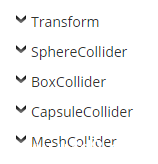
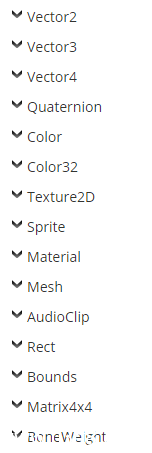
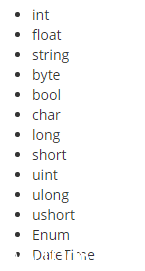
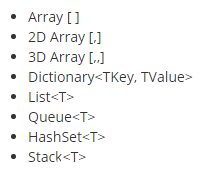
|
1
2
|
ES2.Save(data, "C:/Users/User/myFile.txt"); // 这里myFile.txt只存储dataES2.Save(transform.position, "C:/Users/User/myFile.txt?tag=myPosition"); // 在myFile.txt文件里插入key:myPosition对应value:transform.positiontransform.position = ES2.Load<Vector3>("C:/Users/User/myFile.txt?tag=myPosition"); //从myFile.txt文件里读取key:myPosition的value |
|
01
02
03
04
05
06
07
08
09
10
11
12
13
14
15
16
17
18
19
20
21
22
23
24
25
26
27
28
29
30
31
32
33
34
35
36
37
38
39
40
41
42
43
44
|
public IEnumerator UploadMesh(Mesh mesh, string tag){ // Create a URL and add parameters to the end of it. string myURL = "http://www.server.com/ES2.php"; myURL += "?webfilename=myFile.txt&webusername=user&webpassword=pass"; // Create our ES2Web object. ES2Web web = new ES2Web(myURL + "&tag=" + tag); // Start uploading our data and wait for it to finish. yield return StartCoroutine(web.Upload(mesh)); if (web.isError) { // Enter your own code to handle errors here. Debug.LogError(web.errorCode + ":" + web.error); }}public IEnumerator DownloadMesh(string tag){ // Create a URL and add parameters to the end of it. string myURL = "http://www.server.com/ES2.php"; myURL += "?webfilename=myFile.txt&webusername=user&webpassword=pass"; // Create our ES2Web object. ES2Web web = new ES2Web(myURL + "&tag=" + tag); // Start downloading our data and wait for it to finish. yield return StartCoroutine(web.Download()); if (web.isError) { // Enter your own code to handle errors here. Debug.LogError(web.errorCode + ":" + web.error); } else { // We could save our data to a local file and load from that. web.SaveToFile("myFile.txt"); // Or we could just load directly from the ES2Web object. this.GetComponent<MeshFilter>().mesh = web.Load<Mesh>(tag); }} |
|
001
002
003
004
005
006
007
008
009
010
011
012
013
014
015
016
017
018
019
020
021
022
023
024
025
026
027
028
029
030
031
032
033
034
035
036
037
038
039
040
041
042
043
044
045
046
047
048
049
050
051
052
053
054
055
056
057
058
059
060
061
062
063
064
065
066
067
068
069
070
071
072
073
074
075
076
077
078
079
080
081
082
083
084
085
086
087
088
089
090
091
092
093
094
095
096
097
098
099
100
101
102
103
104
105
106
107
108
109
110
111
112
113
|
using UnityEngine;using System.Collections;using System.Collections.Generic;using UnityEngine.UI; public class SaveTest : MonoBehaviour { public Image image; public void Save() { ES2.Save(123, "IntData"); ES2.Save(1.23f, "FloatData"); ES2.Save(true, "BoolData"); ES2.Save("abc", "StringData"); ES2.Save(new Vector3(10, 20, 30), "Vector3Data"); // 存储transform GameObject go = new GameObject(); go.transform.localPosition = new Vector3(10, 20, 30); go.transform.localScale = new Vector3(3, 3, 3); ES2.Save(go.transform, "TransformData"); // 存储数组 int[] intArray = new int[3] { 3, 2, 1 }; ES2.Save(intArray, "IntArrayData"); // 存储集合 List<string> stringList = new List<string>(); stringList.Add("stringlist1"); stringList.Add("stringlist2"); stringList.Add("stringlist3"); ES2.Save(stringList, "StringListData"); // 存储字典 Dictionary<int, string> stringDict = new Dictionary<int, string>(); stringDict.Add(1, "a"); stringDict.Add(2, "b"); ES2.Save(stringDict, "StringDictData"); // 存储栈 Stack<string> stringStack = new Stack<string>(); stringStack.Push("aaa"); stringStack.Push("bbb"); ES2.Save(stringStack, "StringStackData"); ES2.SaveImage(image.sprite.texture, "MyImage.png"); } public void Load() { int loadInt = ES2.Load<int>("IntData"); Debug.Log("读取的int:" + loadInt); float loadFloat = ES2.Load<float>("FloatData"); Debug.Log("读取的float:" + loadFloat); bool loadBool = ES2.Load<bool>("BoolData"); Debug.Log("读取的bool:" + loadBool); string loadString = ES2.Load<string>("StringData"); Debug.Log("读取的string:" + loadString); Vector3 loadVector3 = ES2.Load<Vector3>("Vector3Data"); Debug.Log("读取的vector3:" + loadVector3); Transform loadTransform = ES2.Load<Transform>("TransformData"); Debug.Log("读取的transform: 坐标" + loadTransform.localPosition + " 缩放" + loadTransform.localScale); // 读取数组格式存储 int[] loadIntArray = ES2.LoadArray<int>("IntArrayData"); foreach (int i in loadIntArray) { Debug.Log("读取的数组:" + i); } // 读取集合格式存储 List<string> loadStringList = ES2.LoadList<string>("StringListData"); foreach (string s in loadStringList) { Debug.Log("读取的集合数据:" + s); } // 读取字典格式存储 Dictionary<int, string> loadStringDict = ES2.LoadDictionary<int, string>("StringDictData"); foreach (var item in loadStringDict) { Debug.Log("读取的字典数据: key" + item.Key + " value" + item.Value); } Stack<string> loadStringStack = ES2.LoadStack<string>("StringStackData"); foreach (string ss in loadStringStack) { Debug.Log("读取的栈内数据:" + ss); } Texture2D tex = ES2.LoadImage("MyImage.png"); Sprite temp = Sprite.Create(tex, new Rect(0, 0, tex.width, tex.height), new Vector2(0, 0)); image.sprite = temp; // 判断是否有该存储key Debug.Log(ES2.Exists("IntData")); // 删除存储key ES2.Delete("IntData"); } } |
附上下载链接:链接:http://pan.baidu.com/s/1gfAd0uJ 密码:3qd1
最好用的数据存储Easy Save2讲解的更多相关文章
- Android中数据存储(一)
国庆没有给国家添堵,没有勾搭妹子,乖乖的写着自己的博客..... 本文将为大家介绍Android中数据存储的五种方式,数据存储可是非常重要的知识哦. 一,文件存储数据 ①在ROM存储数据 关于在ROM ...
- Android数据存储五种方式总结
本文介绍Android平台进行数据存储的五大方式,分别如下: 1 使用SharedPreferences存储数据 2 文件存储数据 3 SQLite数据库存储数据 4 使用Cont ...
- android 数据存储Ⅱ
本章继续讲解在Android开发中,数据的存储与管理.涉及知识点:SQLite,SwipeRefreshLayout控件刷新. 1.功能需求 练习使用SQLite 做一个登录界面,数据库字段包含用户名 ...
- 使用SharedPreferences进行数据存储
使用SharedPreferences进行数据存储 很多时候我们开发的软件需要向用户提供软件参数设置功能,例如我们常用的QQ,用户可以设置是否允许陌生人添加自己为好友.对于软件配置参数的保存,如果是w ...
- Android实现数据存储技术
转载:Android实现数据存储技术 本文介绍Android中的5种数据存储方式. 数据存储在开发中是使用最频繁的,在这里主要介绍Android平台中实现数据存储的5种方式,分别是: 1 使用Shar ...
- Base-Android快速开发框架(二)--数据存储之SharedPreferences
对于App开发者,抽象来说,其实就是将数据以各种各样的方式展示在用户面前以及采集用户的数据.采集用户的数据包括用户的输入.触摸.传感器等,展示的数据通过网络来源于各业务系统,以及用户的 输入数据.在这 ...
- 数据存储简单了解(NSUserDefaults)
数据存储-使用NSUserDefaults 两个类介绍: NSUserDefaults适合存储轻量级的本地数据,比如要保存一个登陆界面的数据,用户名.密码之类的,个人觉得使用NSUserDefault ...
- Android数据存储三剑客——SharedPreferences、File、SQLite
Android中常用的数据存储一般有三种方式:SharedPreferences.文件和SQLite数据库,用来保存需要长时间保存的数据.本文将通过几个具体的小实例来讲解这三种方式的具体实现. 数据存 ...
- android的数据存储方式
数据存储在开发中是使用最频繁的,在这里主要介绍Android平台中实现数据存储的5种方式,分别是: 1 使用SharedPreferences存储数据 2 文件存储数据 3 SQLite数据库存储数据 ...
随机推荐
- 【转】android 手势识别和VelocityTracker
参考地址: http://jcodecraeer.com/a/anzhuokaifa/androidkaifa/2012/1020/448.html http://www.jcodecraeer.co ...
- 一个数组:1,1,2,3,5,8,13,21...+m,求第30位数是多少?用递归实现;(常考!!!)
using System; using System.Collections.Generic; using System.Linq; using System.Text; namespace Cons ...
- SqlServer删除重复数据的方法
方法一 declare @max integer,@id integer open cur_rows fetch cur_rows into @id,@max begin set rowcount @ ...
- 从头开始学eShopOnContainers——开发环境要求
一.简介 eShopOnContainers是一个简化版的基于.NET Core和Docker等技术开发的面向微服务架构的参考应用,是一个简化版的在线商城/电子商务应用,其包含基于浏览器的Web应用. ...
- ASP.NET Core依赖注入最佳实践,提示&技巧
分享翻译一篇Abp框架作者(Halil İbrahim Kalkan)关于ASP.NET Core依赖注入的博文. 在本文中,我将分享我在ASP.NET Core应用程序中使用依赖注入的经验和建议. ...
- 「BZOJ1000」A+B Problem
写这个主要是为了凑\(BZOJ\)题解用的,不用在意.跳过即可 \(Code\) #include<bits/stdc++.h> using namespace std; int main ...
- ZooKeeper的部署和测试
一背景 zookeeper是一个开源的分布式应用程序协调服务,是Apache Hadoop 的一个子项目.它是一个为分布式应用提供一致性服务的软件,提供的功能包括:配置维护.名字服务.分布式同步.组服 ...
- App Store Connect Operation Error ERROR ITMS-90032: "Invalid Image Path - No image found at the path referenced under key 'CFBundleIcons': 'AppIcon20x20'"
1.报错现象 应用提交新包出现报错,切换渠道没问题,但替换回原来的图片资源就出问题了. 明显原因出在图片资源上 2.解决办法 找到原始1024的图片,将图片打开,使用截图工具截图,不要使用另存为的方式 ...
- 有关unixODBC:Data source name not found, and no default driver specified的问题
还是昨天测试postgresql的有关Mirroring Controller的功能时出的问题(真TM是个坑). 首先说下环境: 操作系统平台:RHEL6 x86_64 unixODBC版本:2.3. ...
- 如何查看Centos版本
使用命令 cat /etc/centos-release 查看效果如下图 当然,你也可以查看红帽的版本 cat /etc/redhat-release 郴州软件开发培训 郴州软件培训 郴州java培训 ...