
46、PopWindow工具类
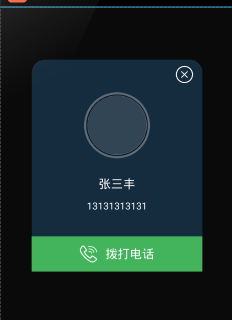
<?xml version="1.0" encoding="utf-8"?>

<shape xmlns:android="http://schemas.android.com/apk/res/android"

    android:shape="rectangle">

    <solid android:color="@color/home_00" />

    <corners

        android:bottomLeftRadius="20dp"

        android:bottomRightRadius="20dp"

        android:topLeftRadius="20dp"

        android:topRightRadius="20dp" />

    <stroke

        android:width="2dp"

        android:color="@color/home_00" />

</shape>
<RelativeLayout xmlns:android="http://schemas.android.com/apk/res/android"

    android:layout_width="match_parent"

    android:layout_height="match_parent"

    android:layout_centerHorizontal="true"

    android:layout_centerVertical="true">

    <RelativeLayout

        android:layout_width="280dp"

        android:layout_height="wrap_content"

        android:background="@drawable/pop_bg"

        android:orientation="vertical"

        android:id="@+id/pop_student"

        android:layout_centerVertical="true"

        android:layout_centerHorizontal="true">

        <ImageView

            android:id="@+id/img_pop_close"

            android:layout_width="wrap_content"

            android:layout_height="wrap_content"

            android:src="@drawable/student_close"

            android:layout_alignParentRight="true"

            android:layout_marginTop="10dp"

            android:layout_marginRight="15dp"

            android:layout_alignParentTop="true" />

        <LinearLayout xmlns:app="http://schemas.android.com/apk/res-auto"

            android:id="@+id/layout_head"

            android:background="@drawable/student_head_bg"

            android:layout_below="@id/img_pop_close"

            android:layout_marginTop="15dp"

            android:layout_width="wrap_content"

            android:layout_height="wrap_content"

            android:gravity="center"

            android:orientation="horizontal"

            android:layout_centerHorizontal="true">

            <com.jtx.iintroduce.widget.CircleImageView

                android:id="@+id/img_pop_head"

                android:layout_width="100dp"

                android:layout_height="100dp"

                android:src="@drawable/home_head"

                app:border_width="1dp" />

        </LinearLayout>

        <TextView

            android:id="@+id/txt_pop_name"

            android:layout_width="wrap_content"

            android:layout_height="wrap_content"

            android:layout_below="@id/layout_head"

            android:textColor="@color/white"

            android:layout_centerHorizontal="true"

            android:layout_marginTop="30dp"

            android:textSize="20sp"

            android:text="张三丰" />

        <TextView

            android:id="@+id/txt_pop_phone"

            android:layout_width="wrap_content"

            android:layout_height="wrap_content"

            android:layout_below="@id/txt_pop_name"

            android:textColor="@color/white"

            android:layout_centerHorizontal="true"

            android:layout_marginTop="15dp"

            android:textSize="16sp"

            android:text="13131313131" />

        <LinearLayout

            android:layout_width="match_parent"

            android:layout_height="wrap_content"

            android:layout_below="@id/txt_pop_phone"

            android:gravity="center"

            android:background="@drawable/pop_bg_button"

            android:paddingTop="5dp"

            android:paddingBottom="5dp"

            android:layout_marginTop="40dp">

            <Button

                android:id="@+id/btn_pop_call"

                android:layout_width="wrap_content"

                android:layout_height="wrap_content"

                android:background="@color/transparent"

                android:textColor="@color/white"

                android:textSize="20sp"

                android:text="拨打电话"

                android:drawablePadding="13dp"

                android:drawableLeft="@drawable/student_phone2" />

        </LinearLayout>

   </RelativeLayout>

</RelativeLayout>
 public class StudentPopWindow extends PopupWindow implements View.OnClickListener {

     private View popView = null;

     private BaseActivity act = null;

     private CircleImageView img_pop_head = null;

     private TextView txt_pop_name = null;

     private TextView txt_pop_phone = null;

     private String strPhone = null;

     public StudentPopWindow(BaseActivity act, String head, String name, String phone) {

         super(act);

         LayoutInflater inflater = (LayoutInflater) act

                 .getSystemService(Context.LAYOUT_INFLATER_SERVICE);

         popView = inflater.inflate(R.layout.pop_student, null);

         this.act = act;

         strPhone = phone;

         popView.findViewById(R.id.btn_pop_call).setOnClickListener(this);

         popView.findViewById(R.id.img_pop_close).setOnClickListener(this);

         img_pop_head = (CircleImageView) popView.findViewById(R.id.img_pop_head);

         txt_pop_name = (TextView) popView.findViewById(R.id.txt_pop_name);

         txt_pop_phone = (TextView) popView.findViewById(R.id.txt_pop_phone);

         act.mToolBitmap.display(img_pop_head, head);

         txt_pop_name.setText(name);

         txt_pop_phone.setText(phone);

         //设置SelectPicPopupWindow的View

         this.setContentView(popView);

         //设置SelectPicPopupWindow弹出窗体的宽

         this.setWidth(LayoutParams.MATCH_PARENT);

         //设置SelectPicPopupWindow弹出窗体的高

         this.setHeight(LayoutParams.MATCH_PARENT);

         //设置SelectPicPopupWindow弹出窗体可点击

         this.setFocusable(true);

         //设置SelectPicPopupWindow弹出窗体动画效果

         //this.setAnimationStyle(R.style.AnimBottom);

         //实例化一个ColorDrawable颜色为半透明

         ColorDrawable dw = new ColorDrawable(act.getResources().getColor(R.color.b_translucent));

         //设置SelectPicPopupWindow弹出窗体的背景

         this.setBackgroundDrawable(dw);

         //mMenuView添加OnTouchListener监听判断获取触屏位置如果在选择框外面则销毁弹出框

         /*popView.setOnTouchListener(new OnTouchListener() {

             public boolean onTouch(View v, MotionEvent event) {

                 int height = popView.findViewById(R.id.pop_student).getTop();

                 int y=(int) event.getY();

                 if (event.getAction() == MotionEvent.ACTION_UP) {

                     if (y < height) {

                         dismissPop();

                     }

                 }

                 return true;

             }

         });*/

     }

     @Override

     public void onClick(View v) {

         switch (v.getId()) {

             case R.id.img_pop_close:

                 dismissPop();

                 break;

             case R.id.btn_pop_call:

                 Intent intent = new Intent(Intent.ACTION_CALL, Uri.parse("tel://" + strPhone));

                 act.startActivity(intent);

                 break;

         }

     }

     private void dismissPop() {

         popView = null;

         act = null;

         img_pop_head = null;

         txt_pop_name = null;

         txt_pop_phone = null;

         strPhone = null;

         dismiss();

     }

 }
String strHead = listData.get(position).photo;

String strName = listData.get(position).name;

String strPhone = listData.get(position).phone;

popWindow = new StudentPopWindow(mActivity, strHead, strName, strPhone);

                popWindow.setHeight(ViewGroup.LayoutParams.MATCH_PARENT);

popWindow.setWidth(ViewGroup.LayoutParams.MATCH_PARENT);

//显示窗口

//设置layout在PopupWindow中显示的位置

popWindow.showAtLocation(view, Gravity.CENTER, 0, 0);
46、PopWindow工具类的更多相关文章
- Android 工作流提交审批填写审批意见PopWindow工具类
公司的项目中几乎都会有走工作流这个环节,为了提高效率,现在特意把弹出的填写审批意见PopWindow改转成工具类,提高效率,免得下次又得整.先看运行效果.
- Java 集合-Arrays工具类的介绍
2017-10-31 18:39:46 Arrrays工具类:此类包含用来操作数组(比如排序和搜索)的各种方法. 常用方法: 主要是数组的一些常用方法如: asList:将数组转成集合 binaryS ...
- Java常用类归纳(Object、System、Properties、包装类和工具类等等)
Object类 Object 是类层次结构的根类.每个类都使用 Object 作为超类,所有对象(包括数组)都实现这个类的方法.了解Object的方法是很有必要的. protected Object ...
- Android—关于自定义对话框的工具类
开发中有很多地方会用到自定义对话框,为了避免不必要的城府代码,在此总结出一个工具类. 弹出对话框的地方很多,但是都大同小异,不同无非就是提示内容或者图片不同,下面这个类是将提示内容和图片放到了自定义函 ...
- [转]Java常用工具类集合
转自:http://blog.csdn.net/justdb/article/details/8653166 数据库连接工具类——仅仅获得连接对象 ConnDB.java package com.ut ...
- .net使用正则表达式校验、匹配字符工具类
开发程序离不开数据的校验,这里整理了一些数据的校验.匹配的方法: /// <summary> /// 字符(串)验证.匹配工具类 /// </summary> public c ...
- Android 系统工具类SystemUtils
包含的功能有: 获取系统中所有APP应用.获取用户安装的APP应用.根据包名和Activity启动类查询应用信息.跳转到WIFI设置.WIFI网络开关.移动网络开关.GPS开关 当前若关则打开 当前若 ...
- App开发流程之加密工具类
科技优家 2016-09-08 18:10 从这篇记录开始,记录的都算是干货了,都是一些编程日常的积累. 我建议先将基础的工具加入项目,后续的开发效率会呈指数增长.如果在专注功能开发过程中,才发现缺少 ...
- Json与javaBean之间的转换工具类
/** * Json与javaBean之间的转换工具类 * * {@code 现使用json-lib组件实现 * 需要 * json-lib-2.4-jdk15.jar * ...
随机推荐
- 实现Xshell断开连接情况下Linux命令继续执行
1.将原命令语句改为:nohup 命令语句 & 2.回车执行,再回车,窗口中会显示一个进程号 3.如果中途想关闭,可执行:kill -9 进程号.如果想查看命令执行情况,可执行:cat noh ...
- JAVA加解密 -- 数字签名算法
数字签名 – 带有密钥的消息摘要算法 作用:验证数据完整性.认证数据来源.抗否认(OSI参考模型) 私钥签名,公钥验证 RSA 包含非对称算法和数字签名算法 实现代码: //1.初始化密钥 KeyPa ...
- 基于Spring开发的DUBBO服务接口测试
基于Spring开发的DUBBO服务接口测试 知识共享主要内容: 1. Dubbo相关概念和架构,以及dubbo服务程序开发步骤. 2. 基于Spring开发框架的dubbo服务接口测试相关配置. 3 ...
- Unity3D教程宝典之Web服务器篇:(第三讲)PHP的Hello World
转载自风宇冲Unity3D教程学院 引言:PHP是比较简单的编程语言,即使没接触过的也可以现学现用.PHP教程文档PHP100视频教程 Unity接 ...
- JSP--百度百科
JSP全名为Java Server Pages,中文名叫java服务器页面,其根本是一个简化的Servlet设计,它[1] 是由Sun Microsystems公司倡导.许多公司参与一起建立的一种动 ...
- iOS编程 手动忽略clang编译器警告
在iOS开发过程中, 我们可能会碰到一些系统方法弃用, weak.循环引用.不能运行之类的警告. 有代码洁癖的孩子们非常想消除他们, 今天就让我们来一次Fuck 警告.! 首先学会主要的语句 #pra ...
- jQuery 文档操作 - prependTo() ,appendTo()方法
其他jquery文档操作方法:http://www.w3school.com.cn/jquery/jquery_ref_manipulation.asp jQuery 参考手册 - 文档操作 appe ...
- <转>C++位运算详解
原文转自:http://www.crazycpp.com/?p=82 前言 以前收藏过一篇讲C++位操作的文章,这次博客搬家,以前的数据都没有保留,整理谷歌网站管理后台的时候,发现不时的还有网友有在查 ...
- JavaScript在IE浏览器和Firefox浏览器中的差异总结
JavaScript在IE浏览器和Firefox浏览器中存在一些差异,以下对这些差异部分进行了总结,以及解决方案: 1.HTML对象的 id 作为对象名的问题 IE:HTML 对象的 ID 可以作为 ...
- 集成学习1-Boosting
转自http://blog.csdn.net/lvhao92/article/details/51079018 集成学习大致分为两类,一类串行生成.如Boosting.一类为并行化.如Bagging和 ...