
kiwi installation
Mainly the installstion methods follow the url:
https://github.com/emolch/kiwi/wiki/Installation
there are some notices need to be mentioned:
1: fftw3 download fftw3 here
http://www.fftw.org/download.html
and then install it using
./configure

make

make install
2:libmseed
download libmseed.2.12 here:
https://github.com/iris-edu/libmseed/releases
then
make
and then
copy all its header files (*.h) to /usr/local/include and libmseed.a to /usr/local/lib
next
edit the .zshrc in home filefolder
#kiwi

export LIBRARY_PATH=${LIBRARY_PATH}:/usr/local/lib

export C_INCLUDE_PATH=${C_INCLUDE_PATH}:/usr/local/include
besides, change the makefile.local as belows:
##

##            --- Local build settings for Kiwi Core Tools ---

##

##   Copy this file to 'Makefile.local', so that it is included by Makefile.

##

## Fortran  compiler:

FORTRANC = gfortran

## Select compilation flag preset ('debug' and 'fast' are predefined for g95,

## gfortran and ifort.

#

 PRESET = fast

## The following could be used to create a custom preset:

#  PRESET = custom

#  CFLAGS_$(FORTRANC)_custom = ...

#  LDFLAGS_$(FORTRANC)_custom = ...

## Adjust if HDF5 is installed at a custom location

#

# INCHDF = -I/bonus/hdf5-$(FORTRANC)/include

# LIBHDF = -L/bonus/hdf5-$(FORTRANC)/lib -lhdf5_fortran -lhdf5 -lz

HDF5DIR = hdf5-1.8./hdf5

INCHDF = -I$(HDF5DIR)/include

LIBHDF = $(HDF5DIR)/lib/libhdf5_fortran.a $(HDF5DIR)/lib/libhdf5.a -ldl -lz

## Adjust if FFTW is installed at a custom location

#

 INCFFTW = -I/usr/include

 LIBFFTW = -L/usr -lfftw3f

## Uncomment to disable SAC IO support to not depend on libsacio

#

LIBSAC = -Ldummy_sacio -lsacio

## Installation prefix

#

# prefix = /usr/local
edit the makefile (the -lmseed is replaced with '/usr/local/lib/libmseed.a')
#

#                --- Makefile for Kiwi Core Tools ---

#

#          Override default settings in file 'Makefile.local'

#                   (see 'Makefile.local.example')

#

#### Basic settings ------------------------------------------------------------

SHELL = /bin/sh

MAKEDEPEND = ./fdepend.pl -g -d -i hdf5.mod -i omp_lib.mod -i kiwi_home.mod

OBJDEPEND = ./objdepend.pl

FORTRANC := gfortran

INSTALL := /usr/bin/install

#### Preset selection ----------------------------------------------------------

# Can use 'fast' or 'debug' with gfortran, g95 and ifort. You may have to create

# a custom preset when using a different compiler (see below and example in

# Makefile.local.example).

PRESET := fast

#### Installation prefixes -----------------------------------------------------

prefix = /usr/local

datarootdir= $(prefix)/share

datadir  = $(datarootdir)

exec_prefix = $(prefix)

bindir = $(exec_prefix)/bin

#### Default library includes and linker settings ------------------------------

INCDUMMYOMP = -Idummy_omp_lib

LIBDUMMYOMP = dummy_omp_lib/omp_lib.o

INCMSEED =

LIBMSEED = mseed/mseed_simple.o /usr/local/lib/libmseed.a

INCHDF = $(shell pkg-config hdf5 --cflags)

LIBHDF = $(shell pkg-config hdf5 --libs-only-L) -lhdf5_fortran -lhdf5 -lz

INCSAC =

LIBSAC = -lsacio

INCFFTW =

LIBFFTW = -lfftw3f

LIBSMINPACK = -Lsminpack -lsminpack

#### Compiler and linker flag defaults -----------------------------------------

CFLAGS =  $(INCMSEED) $(INCHDF) $(INCSAC) $(INCFFTW) \

	      $(CFLAGS_$(FORTRANC)_$(PRESET))  #

LDFLAGS = $(LIBMSEED) $(LIBSAC)  $(LIBHDF) $(LIBSMINPACK) $(LIBFFTW) \

          $(LDFLAGS_$(FORTRANC)_$(PRESET)) #

#### Compiler specific presets  ------------------------------------------------

CFLAGS_ifort_fast   = -openmp

LDFLAGS_ifort_fast  = -openmp

CFLAGS_ifort_debug  = -openmp -g -warn all -ftrapuv -debug all

LDFLAGS_ifort_debug = -openmp

CFLAGS_g95_fast     = $(INCDUMMYOMP) -O3

LDFLAGS_g95_fast    = $(LIBDUMMYOMP)

CFLAGS_g95_debug    = $(INCDUMMYOMP) -g -Wall -ftrace=full -fbounds-check

LDFLAGS_g95_debug   = $(LIBDUMMYOMP) -g -Wall -ftrace=full -fbounds-check

CFLAGS_gfortran_fast   = $(INCDUMMYOMP) -O3

LDFLAGS_gfortran_fast  = $(LIBDUMMYOMP)

CFLAGS_gfortran_debug  = $(INCDUMMYOMP) -g -Wall

LDFLAGS_gfortran_debug = $(LIBDUMMYOMP)

#### ---------------------------------------------------------------------------

MACHINE := $(shell ./hostinfo.pl --machine)

OS := $(shell ./hostinfo.pl --os)

-include Makefile.local

# communicate compiler settings to submake (for sminpack)

export FORTRANC

SRCS := $(shell ls *.f90)

TARGETS := eulermt source_info minimizer gfdb_build gfdb_extract gfdb_redeploy \

		  gfdb_info gfdb_specialextract gfdb_build_ahfull differential_azidist \

		  eikonal_benchmark crust ahfull

TESTS_SRCS := $(shell ls test_*.f90)

TESTS = $(TESTS_SRCS:.f90=)

.PHONY : clean clean-deps tests targets all check install uninstall

# reset make's default suffix list for implicit rules, set our own

.SUFFIXES :

.SUFFIXES : .f90 .o .d .mod

all : targets

$(TARGETS) $(TESTS) : .sminpackdone .mseedsimple .dummyomplib .dummysacio

kiwi_home.f90 :

	echo "module kiwi_home" > kiwi_home.f90

	echo "character (len=*), parameter :: kiwi_home_dir = \"$(datadir)/kiwi\"" >> kiwi_home.f90

	echo "end module" >> kiwi_home.f90

.sminpackdone :

	$(MAKE) -C sminpack/ && touch .sminpackdone

.mseedsimple :

	$(MAKE) -C mseed/ && touch .mseedsimple

.dummyomplib :

	$(MAKE) -C dummy_omp_lib/ && touch .dummyomplib

.dummysacio :

	$(MAKE) -C dummy_sacio/ && touch .dummysacio

targets : $(TARGETS)

install : targets

	$(INSTALL) -d $(bindir)

	$(INSTALL) $(TARGETS) $(bindir)

	$(INSTALL) -d $(datadir)/kiwi

	for f in `find aux -type d -and -not -path '*/.svn*'` ; do \

	    $(INSTALL) -d $(datadir)/kiwi/$$f ; done

	for f in `find aux -type f -and -not -path '*/.svn/*'` ; do \

	    $(INSTALL) $$f $(datadir)/kiwi/$$f ; done

	@echo

	@echo '-----------------------------------------------------------------------'

	@echo '  Installation complete.'

	@echo '  Please adjust your environment variables:'

	@echo

	@echo '   * PATH should contain:'

	@echo '      ' $(bindir)

	@echo '-----------------------------------------------------------------------'

uninstall :

	rm -rf -d $(datadir)/kiwi

	cd $(bindir) ; rm -f $(TARGETS)

tests : $(TESTS)

printvars :

	@echo FORTRANC = $(FORTRANC)

	@echo CFLAGS = $(CFLAGS)

	@echo LDFLAGS = $(LDFLAGS)

check : tests

	@for t in $(TESTS); do ./$$t ; done

$(TARGETS) $(TESTS) :

	$(FORTRANC) $(filter %.o,$^) $(OMPLIB_$(FORTRANC)) $(LDFLAGS) -o $@

# implicit rules for generating depfiles

%.d : %.f90

	@$(MAKEDEPEND) $<

	@echo determining dependencies for $<...

progobjects.do : $(SRCS:.f90=.d)

	@$(OBJDEPEND) $(TARGETS) $(TESTS) -- $(SRCS:.f90=.d) > $@

	@echo determining dependencies for executables...

# implicit rule for compiling

%.o : %.f90

	$(FORTRANC) -c $(CFLAGS) $<

kiwi_home.o kiwi_home.mod : kiwi_home.f90

	$(FORTRANC) -c $(CFLAGS) $<

minimizer.o : kiwi_home.mod

clean :

	rm -f *.o *.mod $(TESTS) $(TARGETS) .sminpackdone .mseedsimple .dummysacio .dummyomplib dummy_omp_lib/omp_lib.o dummy_omp_lib/omp_lib.mod kiwi_home.f90

	$(MAKE) -C sminpack/ clean

	$(MAKE) -C mseed/ clean

	$(MAKE) -C dummy_omp_lib/ clean

	$(MAKE) -C dummy_sacio/ clean

clean-deps : clean

	rm -f *.d *.do

# include auto-created dependencies

-include progobjects.do

-include $(SRCS:.f90=.d)
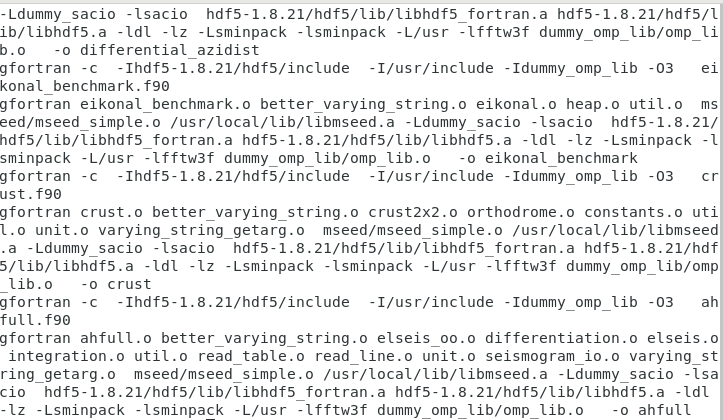
then 'make' in the folder of kiwi and the output is as belows:
kiwi installation的更多相关文章
- mysql-5.6.34 Installation from Source code
Took me a while to suffer from the first successful souce code installation of mysql-5.6.34. Just pu ...
- Create an offline installation of Visual Studio 2017 RC
Create an offline installation of Visual Studio 2017 RC 2016年12月7日 ...
- An error occurred during the installation of assembly 'Microsoft.VC90.CRT……的问题
有一段时间没有用到AnkhSvn了,今天工作需要安装了一下.结果安装到一半就无法继续了,提示An error occurred during the installation of assembly ...
- "Installation failed !" in GUI but not in CLI (/usr/bin/winusb: line 78: 18265 Terminated )
"Installation failed !" in GUI but not in CLI (/usr/bin/winusb: line 78: 18265 Terminated ...
- pymol installation
# download (1) python wget https://www.python.org/ftp/python/2.7.9/python-2.7.9.amd64.msi (2) pymol ...
- 安卓真机调试 出现Installation error: INSTALL_FAILED_UPDATE_INCOMPATIBLE....
[2016-08-20 14:38:39 - hybrid-android] Installation error: INSTALL_FAILED_UPDATE_INCOMPATIBLE[2016-0 ...
- The Installation and Compilation of OpenCASCADE
OpenCASCADE的编译 The Installation and Compilation of OpenCASCADE eryar@163.com 一. 安装OpenCASCADE 可以从Ope ...
- kali 2.0 U盘安装错误Your installation cd-rom couldn't be mounted
1.kali 2.0前天(2015.08.11)发布了.果断下载下来换掉本机的1.0版本. 2.用U盘安装的过程中,出现cd-rom无法挂载.提示错误Your installation CD-ROM ...
- linuxx virutal machine installation
1. vmplayer download: https://my.vmware.com/web/vmware/free#desktop_end_user_computing/vmware_player ...
随机推荐
- spark第四篇:Running Spark on YARN
确保HADOOP_CONF_DIR或者YARN_CONF_DIR指向hadoop集群配置文件目录.这些配置用来写数据到hdfs以及连接yarn ResourceManager.(在$SPARK_HOM ...
- shell 实现文件改名
修改文件名可以有不同的命令方式,mv 可以实现,但是使用rename 这种专业的改名字很好 对于单个的文件,可以直接使用以上的命令,那如果有大量的类似格式的文件名需要修改成其他格式的,该如何呢? 创建 ...
- Jersey统一异常处理
众所周知,java服务提供者提供给服务请求者应该是特定格式的数据,而不能出现异常栈类似信息,那么jersey中,如何添加统一的异常处理呢? 针对jersey启动如果是实现了ResourceConfig ...
- C# Uploadify 文件上传组件的使用
一.页面的构建 1.要引用的JS和CSS <link href="../css/jquery-ui.css" rel="stylesheet" type= ...
- nginx安装及优化
1.pcre及nginx安装包下载 wget http://www.pcre.org/ pcre用yum安装即可 http://nginx.org/en/download.html 2.安装 -安 ...
- DW网页制作,数学,数据库管理
数学(函数关系的建立) 函数关系:确定性现象之间的关系常常表现为函数关系,即一种现象的数量确定以后,另一种现象的数量也随之完全确定,表现为一种严格的函数关系. 如:记为y=f(x),其中x称为自变量, ...
- scss-嵌套属性
使用scss不但可以实现选择器的嵌套,属性也可以进行嵌套. 首先看一段代码实例: nav { border-style: solid; border-width: 1px; border-color: ...
- 多线程(八)~ThreadLocal、InheritableThreadLocal的使用
通过前面的学习,我们了解了在多线程+成员变量等情况下会出现线程安全的问题.那么解决线程安全问题除了使用synchronize关键字之外,还有另一种常用的解决思路,那就是使用ThreadLocal类,下 ...
- java面试题之----mysql表优化方案
本文转载自segmentfault,原文链接:https://segmentfault.com/a/1190000006158186. 当MySQL单表记录数过大时,增删改查性能都会急剧下降,可以参考 ...
- Dynamics CRM 批量新建域用户
好久没写了,今天大牛教了我偷懒的批量新建域用户的方法 是不是觉得 控制面板 =>管理工具=>用户和计算机=>Users=>新建用户,一个个建,很烦是不是,而且耗时,我上个项目 ...