
Keystone Federation Identity
转自 http://wsfdl.com/openstack/2016/01/14/Keystone-Federation-Identity.html
Keystone federation identity 涉及很多概念,安装配置复杂,官网的文档又不够清晰,下面 4 篇文章在安装配置方面阐述的非常详细。
- Configure Keystone to Keystone Federation
- Configure Keystone to Testshib Federation with SAML
- Configure Keystone federation with Kerberos
- Configure Keystone federation with multi-IDP
1. Federation Identity 简介
关于 federation identity,维基百科的定义如下:
A federated identity is the means of linking a person's electronic identity and attributes, stored across multiple distinct identity management systems(IDM).
在多个认证管理系统互相信任的基础上,federation identity 允许多个认证管理系统联邦认证各个系统的用户身份。它最重要的一个功能就是实现单点登录(Single Sign On),用户仅需认证一次,便可访问这些互相授信的资源。比如 A 公司员工需使用 AWS 公有云,出于安全考虑,不希望在 AWS 的 IAM 创建员工账户信息,通过 federation identity 打通二者之间的用户授权和认证,A 公司员工只需在本公司完成身份认证即可访问 AWS 资源。我们把 A 公司称之为 Identity Provider(IDP), AWS 称之为 Service Provider(SP)。
- Service Provider: 服务提供方,它只提供服务,依赖 Identity Provider 认证用户身份
- Identity Provider: 断言(assertion)方,用于认证用户身份
- Assertion Protocol: 认证(断言)协议,Service Provider 和 Identity Provider 完成认证用户身份所用的协议,常用有 SAML, OpenID, Oauth 等
以 SAML 协议为例,典型的认证流程分为 Redirect Bindings 和 Artifact/POST Bindings 两种。
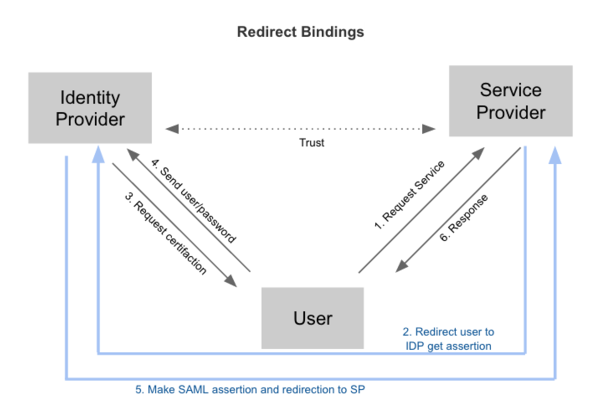
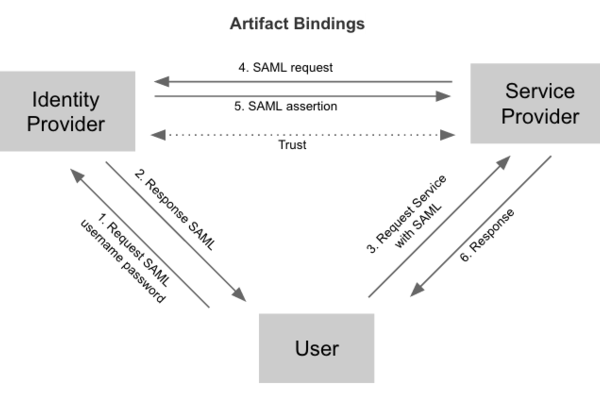
Federation identity 具有以下优点:
- 支持 SSO 单点登录
- 避免向 Service Provider 暴露用户信息,提高安全性
- 避免用户注册多个账号,增加用户负担
Keystone Federation 的原理
Federation identity 为 hybrid cloud 在用户管理层面提供了良好的解决方案。Keystone 从 Icehouse 开始逐步增加 federation identity 的功能,Icehouse 支持 Keystone 作为 Service Provider,Juno 版本新增了 Identity Provider,支持 SAML 和 OpenID 两种认证协议。OpenStack 作为云服务的解决方案,对外提供计算、存储和网络等服务,多数场景下 Keystone 常常作为服务端,对接其它的 Identity Provider,所以本节着重阐述 Service Provider 的原理和流程。首先先介绍 3 类重要的 API。
- Identity Provider API: /OS-FEDERATION/identity_providers
管理 Keystone 信任的 Identity Providers。 - Protocol API: /OS-FEDERATION/identity_providers/{idp_id}/protocols
管理 Keystone 和某个 Identity Provider 之间认证的协议,通常为 oidc(OpenID) 或 saml2(SAML)。 Mapping API: /OS-FEDERATION/mappings
管理 Identity Provider 里的用户和 Keystone 里的用户之间的映射规则,通过该 API,管理员可以管理 IDP 中用户访问 Service 的权限。比如 IDP 有用户 A,B,通过配置 mapping rule,可以允许 A 有权限而 B 无权限访问。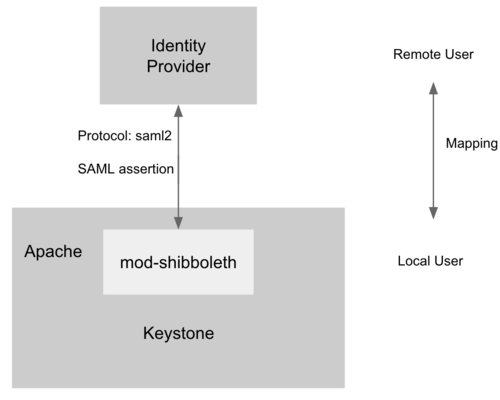
为了支持 Service Provider,Keystone 必须运行在 Apache HTTPD 上,mod-shibboleth 作为 apache plugin 支持 SAML 认证协议,完成了 Keystone 和 IDP 之间用户的身份认证,流程如下。
- 用户访问 /OS-FEDERATION/identity_providers/{identity_provider}/protocols/{protocol}/auth,Apache 捕获该 URL 并触发 mod-shibboleth 重定向至外部的 Identity Provider。
- 外部的 Identity Provider 认证用户的身份并把用户的某些身份信息返回给 Apache,Apache 再把信息传给 Keystone。
- Keystone 根据 mapping rule 把判断用户是否有访问权限,如果有访问权限,返回一个 unscoped token。用户可拿 unscoped token 查看可用的 project 并生成 scoped token,进而访问 OpenStack 的 API。
Configure Keystone as a Service Provider
本节开始介绍如何安装配置 Keystone to Keystone Federation,重点参考了 it-is-time-to-play-with-keystone-to-keystone-federation-in-kilo(原文存在 2 处配置错误,本文已给予纠正)。 我们有两个服务器,分别作为 SP 和 IDP,二者均需按照官网的手册安装 Keystone。
- Linux: Ubuntu 14.04 LTS
- OpenStack: Kilo
更新 keystone.conf 如下配置:
[auth]

methods = external,password,token,oauth1,saml2

saml2 = keystone.auth.plugins.mapped.Mapped
Apache 新增如下配置:
Listen 5000

Listen 35357

<VirtualHost *:5000>

    WSGIScriptAliasMatch ^(/v3/OS-FEDERATION/identity_providers/.*?/protocols/.*?/auth)$ /var/www/cgi-bin/keystone/main/$1

     ......

</VirtualHost>

<VirtualHost *:35357>

    WSGIScriptAliasMatch ^(/v3/OS-FEDERATION/identity_providers/.*?/protocols/.*?/auth)$ /var/www/cgi-bin/keystone/admin/$1

      ......

</VirtualHost>

<Location /Shibboleth.sso>

    SetHandler shib

</Location>

<LocationMatch /v3/OS-FEDERATION/identity_providers/.*?/protocols/saml2/auth>

    ShibRequestSetting requireSession 1

    AuthType shibboleth

    ShibExportAssertion Off

    Require valid-user

</LocationMatch>
安装 Shibboleth:
apt-get install libapache2-mod-shib2
更新 /etc/shibboleth/attribute-map.xml 的以下配置项:
<Attribute name="openstack_user" id="openstack_user"/>

<Attribute name="openstack_roles" id="openstack_roles"/>

<Attribute name="openstack_project" id="openstack_project"/>

<Attribute name="openstack_user_domain" id="openstack_user_domain"/>

<Attribute name="openstack_project_domain" id="openstack_project_domain"/>
更新 /etc/shibboleth/shibboleth2.xml 的以下配置项:
<SSO entityID="http://idp:5000/v3/OS-FEDERATION/saml2/idp">

    SAML2 SAML1

</SSO>

<MetadataProvider type="XML" uri="http://idp:5000/v3/OS-FEDERATION/saml2/metadata"/>
启动 shibboleth 并重启 apache:
shib-keygen

service apache2 restart
查看 shibboleth 是否正常运行
unbuntu@SP:~# a2enmod shib2

Module shib2 already enabled
Configure Keystone as an Identity Provider
安装 xmlsec1 和 pysaml2:
sudo apt-get install xmlsec1

sudo pip install pysaml2
更新 keystone.conf 的如下配置:
[saml]

certfile=/etc/keystone/ssl/certs/ca.pem

keyfile=/etc/keystone/ssl/private/cakey.pem

idp_entity_id=http://idp:5000/v3/OS-FEDERATION/saml2/idp

idp_sso_endpoint=http://idp:5000/v3/OS-FEDERATION/saml2/sso

idp_metadata_path=/etc/keystone/keystone_idp_metadata.xml
生成 DIP 的 metadata 并重启 apache HTTPD:
keystone-manage saml_idp_metadata > /etc/keystone/keystone_idp_metadata.xml

service apache2 restart
Test Keystone to Keystone federation
- 在 Service Provider 端执行以下脚本,创建 domain, group, mapping, idp, protocol 等。其中 idp 指向另外一个作为 Identity Provider 的 Keystone,protocol 采用了 saml2 协议,mapping 的规则为只要 IDP 中名为 bob 或者 acme 的用户都可通过认证,并且映射到 Service 端的 federated_user 用户上。
import os

from keystoneclient import session as ksc_session

from keystoneclient.auth.identity import v3

from keystoneclient.v3 import client as keystone_v3

try:

    # Used for creating the ADMIN user

    OS_PASSWORD = '123456'

    OS_USERNAME = 'admin'

    # This will vary according to the entity:

    # the IdP or the SP

    OS_AUTH_URL = 'http://sp:35357/v3'

    OS_PROJECT_NAME = 'admin'

    OS_DOMAIN_NAME = 'default'

except KeyError as e:

    raise SystemExit('%s environment variable not set.' % e)

def client_for_admin_user():

    auth = v3.Password(auth_url=OS_AUTH_URL,

                       username=OS_USERNAME,

                       password=OS_PASSWORD,

                       user_domain_name=OS_DOMAIN_NAME,

                       project_name=OS_PROJECT_NAME,

                       project_domain_name=OS_DOMAIN_NAME)

    session = ksc_session.Session(auth=auth)

    return keystone_v3.Client(session=session)

# Used to execute all admin actions

client = client_for_admin_user()

def create_domain(client, name):

    try:

         d = client.domains.create(name=name)

    except:

         d = client.domains.find(name=name)

    return d

def create_group(client, name, domain):

    try:

         g = client.groups.create(name=name, domain=domain)

    except:

         g = client.groups.find(name=name)

    return g

def create_role(client, name):

    try:

        r = client.roles.create(name=name)

    except:

        r = client.roles.find(name=name)

    return r

print('\nCreating domain1')

domain1 = create_domain(client, 'domain1')

print('\nCreating group1')

group1 = create_group(client, 'group1', domain1)

print('\nCreating role Member')

role1 = create_role(client, 'Member')

print('\nGrant role Member to group1 in domain1')

client.roles.grant(role1, group=group1, domain=domain1)

print('\nList group1 role assignments')

client.role_assignments.list(group=group1)

def create_mapping(client, mapping_id, rules):

    try:

        m = client.federation.mappings.create(

            mapping_id=mapping_id, rules=rules)

    except:

        m = client.federation.mappings.find(

            mapping_id=mapping_id)

    return m

print('\nCreating mapping')

rules = [

{

    "local": [

        {

            "user": {

                "name": "federated_user"

            },

            "group": {

                "id": group1.id

            }

        }

    ],

    "remote": [

        {

            "type": "openstack_user",

            "any_one_of": [

                "bob",

                "acme"

            ]

        }

    ]

}

]

mapping1 = create_mapping(client, mapping_id='keystone-idp-mapping', rules=rules)

def create_idp(client, id, remote_id):

    idp_ref = {'id': id,

               'remote_ids': [remote_id],

               'enabled': True}

    try:

        i = client.federation.identity_providers.create(**idp_ref)

    except:

        i = client.federation.identity_providers.find(id=id)

    return i

def create_protocol(client, protocol_id, idp, mapping):

    try:

        p = client.federation.protocols.create(protocol_id=protocol_id,

                                               identity_provider=idp,

                                               mapping=mapping)

    except:

        p = client.federation.protocols.find(protocol_id=protocol_id)

    return p

print('\nRegister keystone-idp')

idp1 = create_idp(client, id='keystone-idp',

                  remote_id='http://idp:5000/v3/OS-FEDERATION/saml2/idp')

print('\nRegister protocol')

protocol1 = create_protocol(client, protocol_id='saml2', idp=idp1,

                            mapping=mapping1)
在 IDP 端执行以下脚本,用户 bob 获得一个 unscoped token,可拿该 token 向 SP 获取 scope token 后访问 Service 端的资源。
import json

import os

import requests

from keystoneclient import session as ksc_session

from keystoneclient.auth.identity import v3

from keystoneclient.v3 import client as keystone_v3

class K2KClient(object):

    def __init__(self):

        self.sp_id = 'keystone-sp'

        self.auth_url = 'http://idp:35357/v3'

        self.project_id = '582df27a0db14149a6da375b31fce3df'

        self.username = 'bob'

        self.password = '123456'

        self.domain_id = 'default'

    def v3_authenticate(self):

        auth = v3.Password(auth_url=self.auth_url,

                           username=self.username,

                           password=self.password,

                           user_domain_id=self.domain_id,

                           project_id=self.project_id)

        self.session = ksc_session.Session(auth=auth, verify=False)

        self.session.auth.get_auth_ref(self.session)

        self.token = self.session.auth.get_token(self.session)

    def _generate_token_json(self):

        return {

            "auth": {

                "identity": {

                    "methods": [

                        "token"

                    ],

                    "token": {

                        "id": self.token

                    }

                },

                "scope": {

                    "service_provider": {

                        "id": self.sp_id

                    }

                }

            }

        }

    def _check_response(self, response):

        if not response.ok:

            raise Exception("Something went wrong, %s" % response.__dict__)

    def get_saml2_ecp_assertion(self):

        token = json.dumps(self._generate_token_json())

        url = self.auth_url + '/auth/OS-FEDERATION/saml2/ecp'

        r = self.session.post(url=url, data=token, verify=False)

        self._check_response(r)

        self.assertion = str(r.text)

    def _get_sp(self):

        url = self.auth_url + '/OS-FEDERATION/service_providers/' + self.sp_id

        r = self.session.get(url=url, verify=False)

        self._check_response(r)

        sp = json.loads(r.text)[u'service_provider']

        return sp

    def _handle_http_302_ecp_redirect(self, response, location, **kwargs):

        return self.session.get(location, authenticated=False, **kwargs)

    def exchange_assertion(self):

        """Send assertion to a Keystone SP and get token."""

        sp = self._get_sp()

        r = self.session.post(

            sp[u'sp_url'],

            headers={'Content-Type': 'application/vnd.paos+xml'},

            data=self.assertion,

            authenticated=False,

            redirect=False)

        self._check_response(r)

        r = self._handle_http_302_ecp_redirect(r, sp[u'auth_url'],

                                               headers={'Content-Type':

                                               'application/vnd.paos+xml'})

        self.fed_token_id = r.headers['X-Subject-Token']

        self.fed_token = r.text

    def list_federated_projects(self):

        url = 'http://sp:5000/v3/OS-FEDERATION/projects'

        headers = {'X-Auth-Token': self.fed_token_id}

        r = requests.get(url=url, headers=headers)

        self._check_response(r)

        return json.loads(str(r.text))

    def _get_scoped_token_json(self, project_id):

        return {

            "auth": {

                "identity": {

                    "methods": [

                        "token"

                    ],

                    "token": {

                        "id": self.fed_token_id

                    }

                },

                "scope": {

                    "project": {

                        "id": project_id

                    }

                }

            }

        }

    def scope_token(self, project_id):

        # project_id can be select from the list in the previous step

        token = json.dumps(self._get_scoped_token_json(project_id))

        url = 'http://sp:5000/v3/auth/tokens'

        headers = {'X-Auth-Token': self.fed_token_id,

                   'Content-Type': 'application/json'}

        r = requests.post(url=url, headers=headers, data=token,

                          verify=False)

        self._check_response(r)

        self.scoped_token_id = r.headers['X-Subject-Token']

        self.scoped_token = str(r.text)

def main():

    client = K2KClient()

    client.v3_authenticate()

    client.get_saml2_ecp_assertion()

    print('ECP wrapped SAML assertion: %s' % client.assertion)

    client.exchange_assertion()

    print('Unscoped token id: %s' % client.fed_token_id)

    # If you want to get a scope token, please ensure federated_user has a project

    # and uncommen below codes.

    '''

    projects = client.list_federated_projects()

    print('Federated projects: %s' % projects['projects'])

    project_id = projects['projects'][0]['id']

    project_name = projects['projects'][0]['name']

    client.scope_token(project_id)

    print('Scoped token of ' + project_name + ' : ' + client.scoped_token_id)

    '''

if __name__ == "__main__":

    main()
Reference
- https://developer.rackspace.com/blog/keystone-to-keystone-federation-with-openstack-ansible/
- https://specs.openstack.org/openstack/keystone-specs/api/v3/identity-api-v3-os-federation-ext.html
- http://blog.rodrigods.com/it-is-time-to-play-with-keystone-to-keystone-federation-in-kilo/
- https://bigjools.wordpress.com/2015/05/22/saml-federation-with-openstack/
Keystone Federation Identity的更多相关文章
- OpenStack (1) - Keystone OpenStack Identity Service
echo deb http://ubuntu-cloud.archive.canonical.com/ubuntu precise-updates/grizzly main >> /etc ...
- 使用openstackclient调用Keystone v3 API
本文内容属于个人原创,转载务必注明出处: http://www.cnblogs.com/Security-Darren/p/4138945.html 考虑到Keystone社区逐渐弃用第二版身份AP ...
- Openstack组件部署 — Keystone Install & Create service entity and API endpoints
目录 目录 前文列表 Install and configure Prerequisites 先决条件 Create the database for identity service 生成一个随机数 ...
- OpenStack Identity API v3 extensions (CURRENT)
Table Of Contents Identity API v3 extensions (CURRENT) OS-ENDPOINT-POLICY API Associate policy and e ...
- OpenStack Identity API v3
Table Of Contents OpenStack Identity API v3 What’s New in Version 3.7 What’s New in Version 3.6 What ...
- 云计算管理平台之OpenStack认证服务Keystone
一.keystone简介 keystone是openstack中的核心服务,它主要作用是实现用户认证和授权以及服务目录:所谓服务目录指所有可用服务的信息库,包含所有可用服务及其API endport路 ...
- 【OpenStack】OpenStack系列2之KeyStone详解
源码下载.依赖安装 参考:http://www.oschina.net/question/565065_66271 https://github.com/yongluo2013/osf-opensta ...
- 3. Configure the Identity Service
Controller Node: 安装认证服务: 1. sudo apt-get install keystone 2. sudo vi /etc/keystone/keystone.conf [ ...
- OpenStack:安装Keystone
>安装Keystone1. 安装# apt-get install keystone2. 创建dbcreate database keystone;grant all privileges on ...
随机推荐
- android菜鸟学习笔记25----与服务器端交互(二)解析服务端返回的json数据及使用一个开源组件请求服务端数据
补充:关于PHP服务端可能出现的问题: 如果你刚好也像我一样,用php实现的服务端程序,采用的是apache服务器,那么虚拟主机的配置可能会影响到android应用的调试!! 在android应用中访 ...
- hdu 4617 Weapon【异面直线距离——基础三维几何】
链接: http://acm.hdu.edu.cn/showproblem.php?pid=4617 Weapon Time Limit: 3000/1000 MS (Java/Others) ...
- CAS单点登录------302个没完没了
我的配置如上 背景:Shiro + Cas 进行的单点登录配置! 其实这个问题很扯淡!看代码! 我本在shiro里面配置的Sucessurl !嘿嘿!我哭了!屌用没有! 我一脸懵逼大写的WHY??? ...
- Django基础流程
软件环境: Pycharm 2018.1 Python 3.6 Django 2.0.3 1.新建项目 直接使用Pycharm的菜单来创建项目,命名为mysite. mysite mysite __i ...
- coursera 《现代操作系统》
什么是独占设备技术?为什么说 “SPOOLing不是独占设备的”? 百度百科没有解释,从教材中找到了: 第二章 取数指令 load To load a value from memory, you ...
- jQuery-PHP跨域请求数据
jQuery: //获取域名 function getDomain(url){ var a = document.createElement('a'); a.href = url; url=a.hos ...
- 【转】NAS、DAS和SAN存储的特点及主要区别
接触过存储设备的朋友应该对NAS.DAS和SAN存储不陌生,作为目前三种常见的存储方式,被广泛应用于企业存储设备中,那么NAS.DAS和SAN这三种存储分别有什么特点,又有何区别呢? 一.NAS存储特 ...
- SqlProfiler的替代品-ExpressProfiler
可以用来跟踪执行的sql语句.安装SqlServer之后SqlServerManagementStudio自带一个SqlProfiler,但是如果安装的SqlExpress,那就没有了. 项目的主页在 ...
- Python中的魔术(双下划线'__xxx__')方法详解
介绍 在Python中,所有以“__”双下划线包起来的方法,都统称为“Magic Method”,中文称『魔术方法』,例如类的初始化方法 __init__ ,Python中所有的魔术方法均在官方文档中 ...
- Dockerfile学习(二)
这节学习制作一个ssh镜像服务. 创建sshtest目录,进入到该目录中. 假如允许主机B上的root用户可以通过SSH登录到容器内部,那么首先要在B主机上通过ssh-keygen -t rsa命令生 ...