
wav 格式音频文件生成例子
wavfile is a simple sound library for use in CSE 20211. This library allows you to generate arbitrary sound waveforms in an array, then write them out to a standard WAV format file, which can then be played back by almost any kind of computer.
Note: As a courtesy to others in the course or the lab, please use headphones when working with sounds.
Digital Sound Primer
A computer generates digital sounds by creating a digital waveform. A waveform is simply a sequence of digital values that describe how a speaker is to be physically pulsed by an digital-to-analog (DAC) converter. Positive values in the waveform indicate the speaker is to be pushed slightly outward, creating positive air pressure, while negative values indicate the speaker is to be pulled slightly inward, creating negative air pressure.
The sampling rate of a digital sound indicates how many digital values are used per second of playback. The standard for CD-quality sound is a sampling rate of 44.1KHz. The volume of a digital sound is simply the amplitude of the waveform: bigger changes mean louder sounds.
The character and quality of a sound is entirely described by the shape of its waveform. Try clicking on the waveforms below to see what they sound like. A sine wave is smooth and open, like a flute. A square wave is piercing, like a smoke alarm. A triangle wave sounds rather brassy. The random wave sounds like white noise.
Sine Wave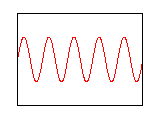 |
Square Wave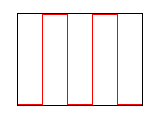 |
Triangle Wave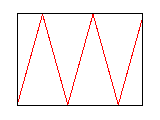 |
Random Wave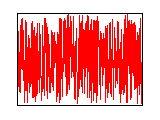 |
A sound with a regular pattern has a fundamental frequency which is the number of peaks in the waveform per second. The sine, square, and triangle waves above all have a frequency of 440Hz, which is a concert-A pitch. (Note also that the frequency is not the same as the sampling rate.)
Most sounds in the real world are not as clean and simple as the waveforms above. Instead, they are a sum of multiple waveforms at different frequencies. Musical instruments tend to produce a strong waveform at the pitch actually played. This is known as the fundamental frequency. At the same time, they also produce quieter sounds at integer multiples of the fundamental frequency, known has harmonics.
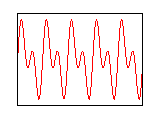
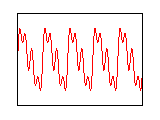
For example, click on the three sounds below. The first is a sine wave at 440Hz. The second adds a harmonic at 880Hz. The third adds another harmonic at 1760 Hz. If you listen carefully, you will see that the sounds with more harmonics are more pleasant and more realistic. (I think it sounds like a pipe organ.)
| Fundamental Frequency |
Fundamental + 1 Harmonic |
Fundamental + 2 Harmonics |
|---|---|---|
|
 |
 |
Getting Started
It is very easy to generate waveforms like those above to create digital sounds and (eventually) music. To get started, download the following files:
And compile them together as follows:
Then, run the example program:
The program creates a file called sound.wav. To play back the file on Linux, use the play command:
How it Works
The sound library only has three functions:
wavfile_open creates a new file whose name is given by the first argument. It automatically puts the standard WAV header into the file for you. If successful, it returns a pointer to a FILE object. If unsucessful, it returns null.
wavfile_write writes data to an open file. The first argument must be a pointer to a FILE object returned by wavfile_open. The second argument is an array of waveform data, and the third argument is the number of samples to write. This function may be called multiple times to add more sounds to an open wavfile.
wavfile_close completes writing to a wavfile. It is required to call wavfile_close when your sound is complete, otherwise the file will not be usable.
Finally, the header contains a constant WAVFILE_SAMPLES_PER_SECOND which indicates how many samples are in a waveform per second of playback.
Example Program
The program example.c creates a simple wavfile that plays a sine-wave for one second. It works as follows:
First, an array of shorts is created to hold a waveform that will last for two seconds:
short waveform[NUM_SAMPLES];
For clarity, we define a few variables to indicate the frequency and volume of the sound. 440Hz is a concert A pitch, and the volume of the waveform is simply the amplitude, which can be up to 32768.
int volume = 32000;
Then, we fill the array with a sine wave of the desired frequency:
for(i=0;i<NUM_SAMPLES;i++) {
double t = (double) i / WAVFILE_SAMPLES_PER_SECOND;
waveform[i] = volume*sin(frequency*t*2*M_PI);
}
Finally, we use the wavfile library to write out the waveform to a file:
wavfile_write(f,waveform,length);
wavfile_close(f);
Using the simple sound library, writing out the sound file is easy. All of the challenge lies in constructing a waveform that plays the desired sound.
转自:
https://www3.nd.edu/~dthain/courses/cse20211/fall2013/wavfile/
wav 格式音频文件生成例子的更多相关文章
- (原创)speex与wav格式音频文件的互相转换
我们的司信项目又有了新的需求,就是要做会议室.然而需求却很纠结,要继续按照原来发语音消息那样的形式来实现这个会议的功能,还要实现语音播放的计时,暂停,语音的拼接,还要绘制频谱图等等. 如果是wav,m ...
- (原创)speex与wav格式音频文件的互相转换(二)
之前写过了如何将speex与wav格式的音频互相转换,如果没有看过的请看一下连接 http://www.cnblogs.com/dongweiq/p/4515186.html 虽然自己实现了相关的压缩 ...
- c#使用SoundPlayer播放wav格式音频
1.引用System.Media名称空间下的类SoundPlayer SoundPlayer player = new SoundPlayer(); 2.方法调用Play(); public vo ...
- 调用CImg库显示WAV格式音频波形
最近在做傅里叶变换和小波变换时经常要通过显示波形来检验算法,但通过visual studio之类显示波形又显得麻烦,而且不能跨平台. CImg是一个跨平台的C++的图像处理库,提供的图像处理等功能十分 ...
- ffmpeg 合并aac格式音频文件
1:连接到一起 'ffmpeg - i "concat:D:\learn\audio\1.aac|D:\learn\audio\2.aac" - acodec copy D:\le ...
- S3C2416裸机开发系列19_Fatfs播放录像wav音频文件
S3C2416裸机开发系列19 Fatfs播放录像wav音频文件 国际象棋男孩 1048272975 多媒体资源,一般都是以文件的形式存储在固化存储器中.Fatfs所支持的fat32为windo ...
- 解析WAV音频文件----》生成WAV音频文件头
前言:请各大网友尊重本人原创知识分享,谨记本人博客:南国以南i WAV音频文件介绍: WAV文件是在PC机平台上很常见的.最经典的多媒体音频文件,最早于1991年8月出现在Windows3.1操作系统 ...
- WAV格式文件无损合并&帧头数据体解析(python)(原创)
一,百度百科 WAV为微软公司(Microsoft)开发的一种声音文件格式,它符合RIFF(Resource Interchange File Format)文件规范,用于保存Windows平台的音频 ...
- Android 音视频开发(一):PCM 格式音频的播放与采集
什么是 PCM 格式 声音从模拟信号转化为数字信号的技术,经过采样.量化.编码三个过程将模拟信号数字化. 采样 顾名思义,对模拟信号采集样本,该过程是从时间上对信号进行数字化,例如每秒采集 44100 ...
- .NET winform播放音频文件
前提:最近要求做一个在winform端做一个音频文件播放的功能,至此,总结最近搜寻的相关资料. 一.微软提供了三种方式来播放音频文件 1.通过System.Media.SoundPlayer来播放 2 ...
随机推荐
- 零基础入门Vue之皇帝的新衣——样式绑定
回顾 大致掌握了上一节的 插值语法 我已经可以把想要的数据显示到页面上,并且仅需要修改变量,页面就会跟着实时改变 但如果对于已经熟悉前端的人来说,单单有数据还是不太行,还需要css对数据进行样式的修饰 ...
- 限流设置之Nginx篇
question1:为什么用到Nginx,Nginx有什么功能? 1.反向代理(建议先看正向代理,反向代理则是同样你要与对方服务器建立连接,但是,代理服务器和目标服务器在一个LAN下,所以我们需要与代 ...
- 如何使用MBP制作Win启动盘
最近有一个需求,想给家人的一台笔记本安装一套win 10的操作系统,但是我手头上现在没有对应的启动U盘. 由于工作原因,很多年没用win了,工作电脑也都是MBP,根本没有之前使用win时熟悉的Ultr ...
- OGG-将PostgreSQL通过OGG_BigData同步到Kafka后数据存在8小时时间差
问题描述: 将PostgreSQL通过OGG_BigData同步到Kafka后数据存在8小时时间差. 问题原因: kafka.properties中的参数goldengate.userexit.tim ...
- C# 二十年语法变迁之 C# 8参考
C# 二十年语法变迁之 C# 8参考 自从 C# 于 2000 年推出以来,该语言的规模已经大大增加,我不确定任何人是否有可能在任何时候都对每一种语言特性都有深入的了解.因此,我想写一系列快速参考文章 ...
- NVME(学习笔记四)—概念解读
1. 综述 NVMe over PCIe协议,定义了NVMe协议的使用范围.指令集.寄存器配置规范等. 名词解释 1.1.1 Namespace Namespace是一定数量逻辑块(LB)的集合,属性 ...
- Reactive 简介
1. 概念 Reactive 非常适合低延迟.高吞吐量的工作负载. Reactive Processing 是一种范式(规范),它使开发人员能够构建非阻塞的.异步的应用程序,这些应用程序能够处理背压( ...
- 《系列二》-- 11、Aware是什么
目录 正文 阅读之前要注意的东西:本文就是主打流水账式的源码阅读,主导的是一个参考,主要内容需要看官自己去源码中验证.全系列文章基于 spring 源码 5.x 版本. 写在开始前的话: 阅读spri ...
- 《系列二》-- 10、initialize-初始化bean
目录 initializeBean 方法源码如下 二.重要操作 2.1 应用 Aware 2.2 applyBeanPostProcessorsBeforeInitialization: 2.3 in ...
- 【Android逆向】修改so文件方式修改程序行为
1. 还是之前的那个apk 链接:https://pan.baidu.com/s/1vKC1SevvHfeI7f0d2c6IqQ 密码:u1an 尝试使用 010Editor来修改so文件 2. 使用 ...