
BoostAsyncSocket 异步反弹通信案例
Boost 利用ASIO框架实现一个跨平台的反向远控程序,该远控支持保存套接字,当有套接字连入时,自动存储到map容器,当客户下线时自动从map容器中移除,当我们需要与特定客户端通信时,只需要指定客户端ID号即可。
AsyncTcpServer
服务端首先定义CEventHandler类并继承自CAsyncTcpServer::IEventHandler接口,该类内需要我们实现三个方法,方法ClientConnected用于在客户端连接时触发,方法ClientDisconnect则是在登录客户端离开时触发,而当客户端有数据发送过来时则ReceiveData方法则会被触发。
方法ClientConnected当被触发时自动将clientId客户端Socket套接字放入到tcp_client_id全局容器内存储起来,而当ClientDisconnect客户端退出时,则直接遍历这个迭代容器,找到序列号并通过tcp_client_id.erase将其剔除;
// 客户端连接时触发

virtual void ClientConnected(int clientId)

{

	// 将登录客户端加入到容器中

	tcp_client_id.push_back(clientId);

}

// 客户端退出时触发

virtual void ClientDisconnect(int clientId)

{

	// 将登出的客户端从容器中移除

	vector<int>::iterator item = find(tcp_client_id.begin(), tcp_client_id.end(), clientId);

	if (item != tcp_client_id.cend())

		tcp_client_id.erase(item);

}
而ReceiveData一旦收到数据,则直接将其打印输出到屏幕,即可实现客户端参数接收的目的;
// 客户端获取数据

virtual void ReceiveData(int clientId, const BYTE* data, size_t length)

{

	std::cout << std::endl;

	PrintLine(80);

	std::cout << data << std::endl;

	PrintLine(80);

	std::cout << "[Shell] # ";

}
相对于接收数据而言,发送数据则是通过同步的方式进行,当我们需要发送数据时,只需要将数据字符串放入到一个BYTE*字节数组中,并在调用tcpServer.Send时将所需参数,套接字ID,缓冲区Buf数据,以及长度传递即可实现将数据发送给指定的客户端;
// 同步发送数据到指定的线程中

void send_message(CAsyncTcpServer& tcpServer, int clientId, std::string message, int message_size)

{

	// 获取长度

	BYTE* buf = new BYTE(message_size + 1);

	memset(buf, 0, message_size + 1);

	for (int i = 0; i < message_size; i++)

	{

		buf[i] = message.at(i);

	}

	tcpServer.Send(clientId, buf, message_size);

}
AsyncTcpClient
客户端首先我们封装实现AsyncConnect类,该类内主要实现两个功能,其中aysnc_connect方法用于实现异步连接到服务端,而port_is_open方法则用于验证服务器特定端口是否开放,在调用boost::bind绑定套接字时传入&AsyncConnect::timer_handle设置一个超时等待时间。
进入到main主函数中,通过while循环让程序可以一直运行下去,并通过hander.aysnc_connect(ep, 5000) 每隔5秒验证是否连接成功,如果连接了则进入内循环,通过hander.port_is_open("127.0.0.1", 10000, 5000)验证端口是否开放,这主要是为了保证服务端断开后客户端依然能够跳转到外部循环继续等待服务端上线。
案例演示
首先运行服务端程序,接着运行多个客户端,即可实现自动上线;
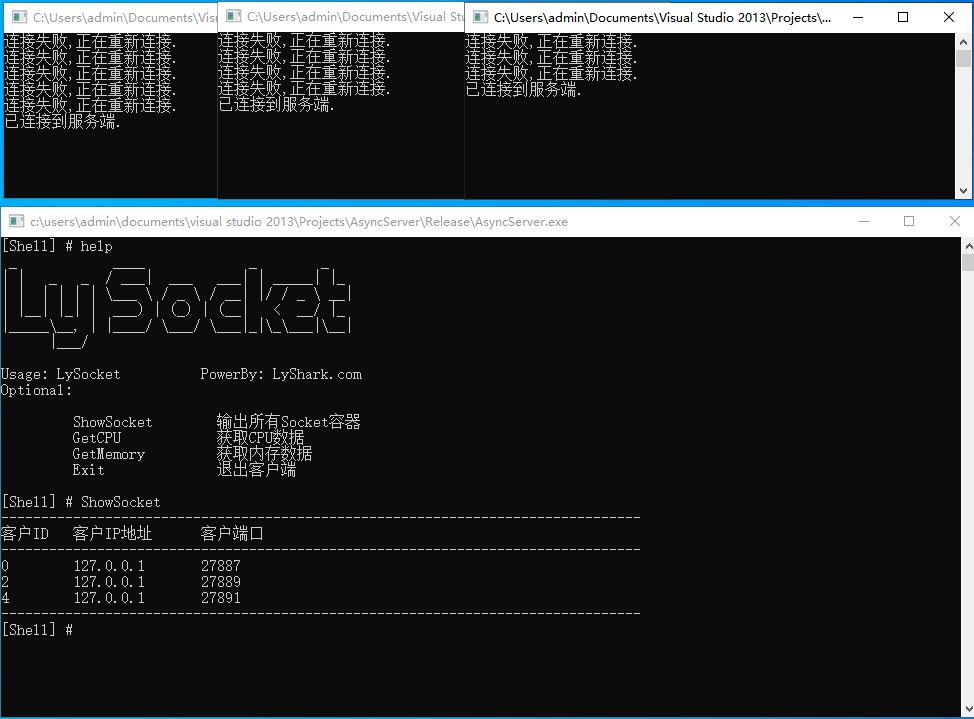
当用户需要通信时,只需要指定id序号到指定的Socket套接字编号即可;
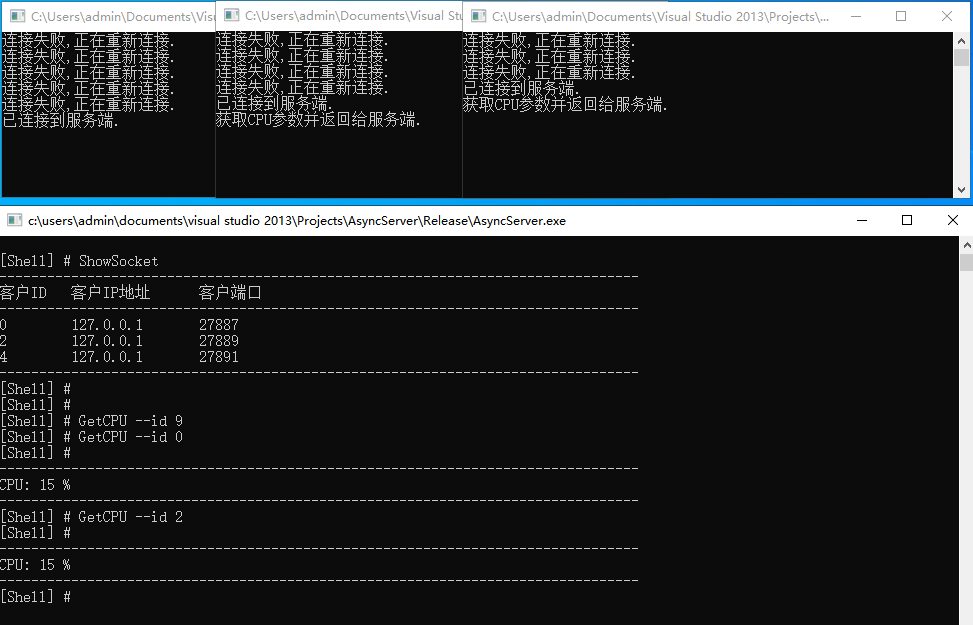
源代码
服务端代码
// 署名权

// right to sign one's name on a piece of work

// PowerBy: LyShark

// Email: me@lyshark.com

#include "AsyncTcpServer.h"

#include <string>

#include <vector>

#include <iostream>

#include <boost/tokenizer.hpp>

using namespace std;

// 存储当前客户端的ID号

std::vector<int> tcp_client_id;

// 输出特定长度的行

void PrintLine(int line)

{

	for (int x = 0; x < line; x++)

	{

		printf("-");

	}

	printf("\n");

}

class CEventHandler : public CAsyncTcpServer::IEventHandler

{

public:

	// 客户端连接时触发

	virtual void ClientConnected(int clientId)

	{

		// 将登录客户端加入到容器中

		tcp_client_id.push_back(clientId);

	}

	// 客户端退出时触发

	virtual void ClientDisconnect(int clientId)

	{

		// 将登出的客户端从容器中移除

		vector<int>::iterator item = find(tcp_client_id.begin(), tcp_client_id.end(), clientId);

		if (item != tcp_client_id.cend())

			tcp_client_id.erase(item);

	}

	// 客户端获取数据

	virtual void ReceiveData(int clientId, const BYTE* data, size_t length)

	{

		std::cout << std::endl;

		PrintLine(80);

		std::cout << data << std::endl;

		PrintLine(80);

		std::cout << "[Shell] # ";

	}

};

// 同步发送数据到指定的线程中

void send_message(CAsyncTcpServer& tcpServer, int clientId, std::string message, int message_size)

{

	// 获取长度

	BYTE* buf = new BYTE(message_size + 1);

	memset(buf, 0, message_size + 1);

	for (int i = 0; i < message_size; i++)

	{

		buf[i] = message.at(i);

	}

	tcpServer.Send(clientId, buf, message_size);

}

int main(int argc, char* argv[])

{

	CAsyncTcpServer tcpServer(10, 10000);

	CEventHandler eventHandler;

	tcpServer.AddEventHandler(&eventHandler);

	std::string command;

	while (1)

	{

		std::cout << "[Shell] # ";

		std::getline(std::cin, command);

		if (command.length() == 0)

		{

			continue;

		}

		else if (command == "help")

		{

			printf(" _            ____             _        _   \n");

			printf("| |   _   _  / ___|  ___   ___| | _____| |_  \n");

			printf("| |  | | | | \\___ \\ / _ \\ / __| |/ / _ \\ __| \n");

			printf("| |__| |_| |  ___) | (_) | (__|   <  __/ |_  \n");

			printf("|_____\\__, | |____/ \\___/ \\___|_|\\_\\___|\\__| \n");

			printf("      |___/                                 \n\n");

			printf("Usage: LySocket \t PowerBy: LyShark.com \n");

			printf("Optional: \n\n");

			printf("\t ShowSocket        输出所有Socket容器 \n");

			printf("\t GetCPU            获取CPU数据 \n");

			printf("\t GetMemory         获取内存数据 \n");

			printf("\t Exit              退出客户端 \n\n");

		}

		else

		{

			// 定义分词器: 定义分割符号为[逗号,空格]

			boost::char_separator<char> sep(", --");

			typedef boost::tokenizer<boost::char_separator<char>> CustonTokenizer;

			CustonTokenizer tok(command, sep);

			// 将分词结果放入vector链表

			std::vector<std::string> vecSegTag;

			for (CustonTokenizer::iterator beg = tok.begin(); beg != tok.end(); ++beg)

			{

				vecSegTag.push_back(*beg);

			}

			// 解析 [shell] # ShowSocket

			if (vecSegTag.size() == 1 && vecSegTag[0] == "ShowSocket")

			{

				PrintLine(80);

				printf("客户ID \t 客户IP地址 \t 客户端口 \n");

				PrintLine(80);

				for (int x = 0; x < tcp_client_id.size(); x++)

				{

					std::cout << tcp_client_id[x] << " \t "

						<< tcpServer.GetRemoteAddress(tcp_client_id[x]) << " \t "

						<< tcpServer.GetRemotePort(tcp_client_id[x]) << std::endl;

				}

				PrintLine(80);

			}

			// 解析 [shell] # GetCPU --id 100

			if (vecSegTag.size() == 3 && vecSegTag[0] == "GetCPU")

			{

				char *id = (char *)vecSegTag[2].c_str();

				send_message(tcpServer, atoi(id), "GetCPU", strlen("GetCPU"));

			}

			// 解析 [shell] # GetMemory --id 100

			if (vecSegTag.size() == 3 && vecSegTag[0] == "GetMemory")

			{

				char* id = (char*)vecSegTag[2].c_str();

				send_message(tcpServer, atoi(id), "GetMEM", strlen("GetMEM"));

			}

			// 解析 [shell] # Exit --id 100

			if (vecSegTag.size() == 3 && vecSegTag[0] == "Exit")

			{

				char* id = (char*)vecSegTag[2].c_str();

				send_message(tcpServer, atoi(id), "Exit", strlen("Exit"));

			}

		}

	}

	return 0;

}
客户端代码
// 署名权

// right to sign one's name on a piece of work

// PowerBy: LyShark

// Email: me@lyshark.com

#define BOOST_BIND_GLOBAL_PLACEHOLDERS

#include <iostream>

#include <string>

#include <boost/asio.hpp>

#include <boost/bind.hpp>

#include <boost/array.hpp>

#include <boost/date_time/posix_time/posix_time_types.hpp>

#include <boost/noncopyable.hpp>

using namespace std;

using boost::asio::ip::tcp;

// 异步连接地址与端口

class AsyncConnect

{

public:

	AsyncConnect(boost::asio::io_service& ios, tcp::socket &s)

		:io_service_(ios), timer_(ios), socket_(s) {}

	// 异步连接

	bool aysnc_connect(const tcp::endpoint &ep, int million_seconds)

	{

		bool connect_success = false;

		// 异步连接,当连接成功后将触发 connect_handle 函数

		socket_.async_connect(ep, boost::bind(&AsyncConnect::connect_handle, this, _1, boost::ref(connect_success)));

		// 设置一个定时器  million_seconds

		timer_.expires_from_now(boost::posix_time::milliseconds(million_seconds));

		bool timeout = false;

		// 异步等待 如果超时则执行 timer_handle

		timer_.async_wait(boost::bind(&AsyncConnect::timer_handle, this, _1, boost::ref(timeout)));

		do

		{

			// 等待异步操作完成

			io_service_.run_one();

			// 判断如果timeout没超时,或者是连接建立了,则不再等待

		} while (!timeout && !connect_success);

		timer_.cancel();

		return connect_success;

	}

	// 验证服务器端口是否开放

	bool port_is_open(std::string address, int port, int timeout)

	{

		try

		{

			boost::asio::io_service io;

			tcp::socket socket(io);

			AsyncConnect hander(io, socket);

			tcp::endpoint ep(boost::asio::ip::address::from_string(address), port);

			if (hander.aysnc_connect(ep, timeout))

			{

				io.run();

				io.reset();

				return true;

			}

			else

			{

				return false;

			}

		}

		catch (...)

		{

			return false;

		}

	}

private:

	// 如果连接成功了,则 connect_success = true

	void connect_handle(boost::system::error_code ec, bool &connect_success)

	{

		if (!ec)

		{

			connect_success = true;

		}

	}

	// 定时器超时timeout = true

	void timer_handle(boost::system::error_code ec, bool &timeout)

	{

		if (!ec)

		{

			socket_.close();

			timeout = true;

		}

	}

	boost::asio::io_service &io_service_;

	boost::asio::deadline_timer timer_;

	tcp::socket &socket_;

};

int main(int argc, char * argv[])

{

	try

	{

		boost::asio::io_service io;

		tcp::socket socket(io);

		AsyncConnect hander(io, socket);

		boost::system::error_code error;

		tcp::endpoint ep(boost::asio::ip::address::from_string("127.0.0.1"), 10000);

		// 循环验证是否在线

	go_:  while (1)

	{

		// 验证是否连接成功,并定义超时时间为5秒

		if (hander.aysnc_connect(ep, 5000))

		{

			io.run();

			std::cout << "已连接到服务端." << std::endl;

			// 循环接收命令

			while (1)

			{

				// 验证地址端口是否开放,默认等待5秒

				bool is_open = hander.port_is_open("127.0.0.1", 10000, 5000);

				// 客户端接收数据包

				boost::array<char, 4096> buffer = { 0 };

				// 如果在线则继续执行

				if (is_open == true)

				{

					socket.read_some(boost::asio::buffer(buffer), error);

					// 判断收到的命令是否为GetCPU

					if (strncmp(buffer.data(), "GetCPU", strlen("GetCPU")) == 0)

					{

						std::cout << "获取CPU参数并返回给服务端." << std::endl;

						socket.write_some(boost::asio::buffer("CPU: 15 %"));

					}

					// 判断收到的命令是否为GetMEM

					if (strncmp(buffer.data(), "GetMEM", strlen("GetMEM")) == 0)

					{

						std::cout << "获取MEM参数并返回给服务端." << std::endl;

						socket.write_some(boost::asio::buffer("MEM: 78 %"));

					}

					// 判断收到的命令是否为终止程序

					if (strncmp(buffer.data(), "Exit", strlen("Exit")) == 0)

					{

						std::cout << "终止客户端." << std::endl;

						return 0;

					}

				}

				else

				{

					// 如果连接失败,则跳转到等待环节

					goto go_;

				}

			}

		}

		else

		{

			std::cout << "连接失败,正在重新连接." << std::endl;

		}

	}

	}

	catch (...)

	{

		return false;

	}

	std::system("pause");

	return 0;

}
项目地址
https://github.com/lyshark/BoostAsyncSocket
BoostAsyncSocket 异步反弹通信案例的更多相关文章
- JAVA基础知识之网络编程——-基于AIO的异步Socket通信
异步IO 下面摘子李刚的<疯狂JAVA讲义> 按照POSIX标准来划分IO,分为同步IO和异步IO.对于IO操作分为两步,1)程序发出IO请求. 2)完成实际的IO操作. 阻塞IO和非阻塞 ...
- 异步tcp通信——APM.Server 消息推送服务的实现
消息推送服务 服务器推送目前流行就是私信.发布/订阅等模式,基本上都是基于会话映射,消息对列等技术实现的:高性能.分布式可以如下解决:会话映射可采用redis cluster等技术实现,消息对列可使用 ...
- 异步tcp通信——APM.ConsoleDemo
APM测试 俗话说麻雀虽小,五脏俱全.apm虽然简单,但是可以实现单机高性能消息推送(可以采用redis.kafka等改造成大型分布式消息推送服务器). 测试demo: using System; u ...
- 异步tcp通信——APM.Core 服务端概述
为什么使用异步 异步线程是由线程池负责管理,而多线程,我们可以自己控制,当然在多线程中我们也可以使用线程池.就拿网络扒虫而言,如果使用异步模式去实现,它使用线程池进行管理.异步操作执行时,会将操作丢给 ...
- 异步tcp通信——APM.Core 解包
TCP通信解包 虽说这是一个老生长谈的问题,不过网上基本很少见完整业务:或多或少都没有写完或者存在bug.接收到的数据包可以简单分成:小包.大包.跨包三种情况,根据这三种情况作相对应的拆包处理,示例如 ...
- c#之异步Socket通信
0.基于上一篇的c#之Socket(同步)通信,在几个大神评论之后,发现是有挺多地方不足的,所以写了一个改进版本的基于c#的异步Socket通信.再加深一下对Socket的使用和理解.其中客户端和服务 ...
- vue和jQuery嵌套实现异步ajax通信
<!DOCTYPE html><html lang="en"><head> <meta charset="UTF-8&qu ...
- 第4章 TCP/IP通信案例:访问Internet上的Web服务器
第4章 TCP/IP通信案例:访问Internet上的Web服务器 4.2 部署代理服务器 书中为了演示访问Internet上的Web服务器的全过程,使用了squid代理服务器程序模拟了一个代理服务器 ...
- linux 异步IO通信
一. 回顾 做java开发的,一定对BIO,NIO,AIO通信很了解了,现在再在下面罗列一下: 同步阻塞IO(JAVA BIO): 同步并阻塞,服务器实现模式为一个连接一个线程,即客户端有连接请求时 ...
- PIC18F45K80串口1和串口2异步收发通信实例
PIC18F45K80串口1和串口2异步收发通信实例 一:配置串口1初始化函数 首先打开技术手册,查看异步串口的操作流程以及配置. 需要将串口对应引脚的方向寄存器设置为输入
随机推荐
- shell 里使用 sed awk
1 在shell脚本里使用sed 需把''改为"" 2 在shell脚本里使用awk 正则里使用 变量加上单引 awk -F: '/^'$user_name'/{print $1, ...
- KMP 复习笔记
KMP 学习(复习)笔记 KMP(Knuth-Morris-Pratt)是算法竞赛中常用的字符串匹配算法之一,它可以有效地利用失配信息来使得匹配全过程中不回溯,从而在线性时间内完成匹配. 本文已有前置 ...
- Java 8 Stream原理解析
说起 Java 8,我们知道 Java 8 大改动之一就是增加函数式编程,而 Stream API 便是函数编程的主角,Stream API 是一种流式的处理数据风格,也就是将要处理的数据当作流,在管 ...
- 使用acme.sh、acme-dns自动申请ssl证书
使用acme.acme-dns实现自动申请ssl证书并实现自动替换 有些dns没有dnsapi,所以用这种方式申请只需要添加一条dns解析即可完成 以下为linux系统操作 安装acme.sh 官方源 ...
- 基于函数计算自定义运行时快速部署一个 springboot 项目 什么是函数计算?
什么是函数计算? 函数计算是事件驱动的全托管计算服务.使用函数计算,您无需采购与管理服务器等基础设施,只需编写并上传代码.函数计算为您准备好计算资源,弹性地可靠地运行任务,并提供日志查询.性能监控和报 ...
- map三层循环遍历,操作数据
let tempArr = this.oldCityList.map(item => { return { value: item.code, text: item.name, type: it ...
- Ribbon默认负载均衡规则替换为NacosRule
近期博主在参与一个 Spring Cloud 搭建,版本为 Hoxton.SR12,服务注册发现组件为 Nacos 的老项目时,发现项目负载均衡组件 Ribbon 的负载均衡规则在某些场景下不够完美, ...
- SD协议-时序02
SD Bus PAD internal card clock - 对于SD card来讲,时钟信号是一个输入 Data0-3 - inout类型,既可能是输入,又可能是输出 对于Data0-3输出的时 ...
- IDEA中无法调出中文输入法?
参考链接:idea写代码时无法切换到中文输入
- linux-帮助-man和help