
Unity - UIWidgets 2. 控件组合
UIWidgets没有提供完整文档, 称可以去看Flutter的文档 中文 \ 英文
控件(Control)在Flutter中称为"Widget", 一个界面的若干控件是通过widget的组合实现的
通过UI容器类可以组合控件
Row是其中一种容器
using System.Collections.Generic;

using Unity.UIWidgets.engine;

using Unity.UIWidgets.painting;

using Unity.UIWidgets.widgets;

using UnityEngine;

public class TestPanel : UIWidgetsPanel

{

    protected override Widget createWidget() => new Counter1();

    class Counter1 : StatelessWidget

    {

        public override Widget build(BuildContext context)

        {

            Text text = new Text(

                data: "Hello world",

                style: new TextStyle(

                    color: Unity.UIWidgets.ui.Color.white,

                    fontSize: 20,

                    fontStyle: Unity.UIWidgets.ui.FontStyle.italic

                    )

                );

            GestureDetector gestureDetector = new GestureDetector(

                child: text,

                onTap: () =>

                {

                    Debug.Log("Rua!");

                }

                );

            Text text2 = new Text(

                data: "line 2!"

            );

            Row row = new Row(

                children: new List<Widget>

                {

                    gestureDetector,

                    text2,

                }

                );

            return row;

        }

    }

}
效果如下

继承自MultiChildRenderObjectWidget的大多数UI容器类的都可以设置children属性, 如Flex, Row, Column, ListBody, Stack, Wrap, CustomMultiChildLayout等, 具体用法还需要查看Flutter文档
通过组合做一个稍复杂一点的界面
下面我打算做一个特别简单的表单, 可以输入几个值(不检验), 点击按钮可以输出一个拼接的字符串. 为了这个需求, 需要
- 查询UGUI的InputField在Flutter中对应的Widget
- 规划一下布局
- 编码\测试
使用Material风格控件
基本widgets中似乎没有按钮, 前面使用Text + GestureDetector\onTap来实现一个点击响应很反麻烦
引入Material风格控件后可以简化一些操作using using Unity.UIWidgets.material;
    RaisedButton button = new RaisedButton(

        child: new Text(

        data: "确定"

        ),

    onPressed: () =>

    {

        Debug.Log("Rua!");

    }

    );
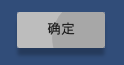
RaisedButton是带阴影的按钮, 自带点击动效, 效果不错
然后是文本输入控件....不知道要怎么做才能对, TextFormField\TextField\EditableText直接报错
之后按照material风格结构创建一下, TextFormField\TextField可以用了
using System.Collections.Generic;

using UIWidgets.Runtime.material;

using Unity.UIWidgets.animation;

using Unity.UIWidgets.engine;

using Unity.UIWidgets.foundation;

using Unity.UIWidgets.material;

using Unity.UIWidgets.painting;

using Unity.UIWidgets.rendering;

using Unity.UIWidgets.service;

using Unity.UIWidgets.ui;

using Unity.UIWidgets.widgets;

using Color = Unity.UIWidgets.ui.Color;

using UnityEngine;

public class TestPanel : UIWidgetsPanel

{

    protected override Widget createWidget()

    {

        return new MaterialApp(

            home: new MyWidget()

            );

    }

    class MyWidget : StatefulWidget

    {

        public override State createState()

        {

            return new MyState();

        }

    }

    class MyState : State<MyWidget>

    {

        public override Widget build(BuildContext context)

        {

            TextFormField text = new TextFormField(

                decoration: new InputDecoration(

                    border: new OutlineInputBorder(),

                    labelText: "hello"

                    )

                );

            RaisedButton button = new RaisedButton(

                child: new Text("confirm"),

                onPressed: () => { Debug.Log("Rua!!!"); }

                );

            Column column = new Column(

                children: new List<Widget>()

                {

                    new Padding(padding: EdgeInsets.symmetric(vertical: 20.0f)),

                    text,

                    new Padding(padding: EdgeInsets.symmetric(vertical: 10.0f)),

                    button,

                }

                );

            Center center = new Center(

                child: column

                );

            Container container = new Container(

                child: center

            );

            Scaffold scaffold = new Scaffold(

                appBar: new AppBar(

                    title: new Text("Test")

                    ),

                body: container

                );

            return scaffold;

        }

    }

}

实现简单的表单
using System.Collections.Generic;

using UIWidgets.Runtime.material;

using Unity.UIWidgets.animation;

using Unity.UIWidgets.engine;

using Unity.UIWidgets.foundation;

using Unity.UIWidgets.material;

using Unity.UIWidgets.painting;

using Unity.UIWidgets.rendering;

using Unity.UIWidgets.service;

using Unity.UIWidgets.ui;

using Unity.UIWidgets.widgets;

using Color = Unity.UIWidgets.ui.Color;

using UnityEngine;

public class TestPanel : UIWidgetsPanel

{

    protected override Widget createWidget()

    {

        return new MaterialApp(

            home: new MyWidget()

            );

    }

    class MyWidget : StatefulWidget

    {

        public override State createState()

        {

            return new MyState();

        }

    }

    class MyState : State<MyWidget>

    {

        readonly TextEditingController m_NameController = new TextEditingController();

        //readonly TextEditingController m_AgeController = new TextEditingController();

        public override void dispose()

        {

            m_NameController.dispose();

            //m_AgeController.dispose();

            base.dispose();

        }

        public override Widget build(BuildContext context)

        {

            TextFormField nameField = new TextFormField(

                controller: m_NameController,

                decoration: new InputDecoration(

                    labelText: "姓名 *",

                    hintText: "在此输入姓名(不超过十个字)"

                    ),

                maxLength: 10,

                autovalidate: true,

                validator: (text) =>

                {

                    if (string.IsNullOrEmpty(text))

                    {

                        return "名字不可为空";

                    }

                    else

                    {

                        return null;

                    }

                },

                onEditingComplete: () => { Debug.Log("编辑结束"); },

                onSaved: (text) => { Debug.Log("保存 " + text); },

                onFieldSubmitted: (text) => { Debug.Log("提交 " + text); }

                );

            //TextFormField ageField = new TextFormField(

            //    controller: m_AgeController,

            //    decoration: new InputDecoration(

            //        labelText: "年龄 *",

            //        hintText: "在此输入年龄"

            //        ),

            //    initialValue: "0",

            //    autovalidate: true,

            //    validator: (text) =>

            //    {

            //        if (!int.TryParse(text, out int age))

            //        {

            //            return "只能输入数字";

            //        }

            //        else

            //        {

            //            return null;

            //        }

            //    }

            //    );

            RaisedButton button = new RaisedButton(

                child: new Text("confirm"),

                onPressed: () =>

                {

                    Debug.Log($"名字: {nameField.controller?.text}, 年龄: ageField.controller?.text");

                }

                );

            Column column = new Column(

                children: new List<Widget>()

                {

                    nameField,

                    //ageField,

                    button,

                }

                );

            Container container = new Container(

                child: column,

                padding: EdgeInsets.all(10.0f)

                );

            Scaffold scaffold = new Scaffold(

                appBar: new AppBar(

                    title: new Text("Test")

                    ),

                body: container

                );

            return scaffold;

        }

    }

}
不知道是bug还是规定feature...在同一个State的build中用两个TextEditorController就会报错...只好去掉一个
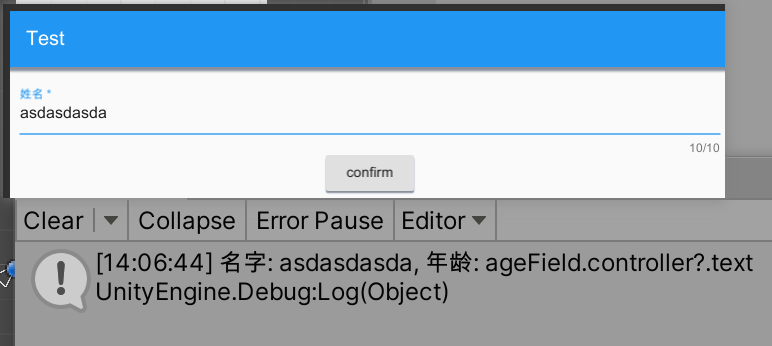
毕竟早期阶段...文档不全各种坑踩起来很难受
Unity - UIWidgets 2. 控件组合的更多相关文章
- winform利用ImageList控件和ListView控件组合制作图片文件浏览器
winform利用ImageList控件和ListView控件组合制作图片文件浏览器,见图,比较简单,实现LISTVIEW显示文件夹图片功能. 1.选择文件夹功能代码: folderBrowserDi ...
- C#程序员整理的Unity 3D笔记(十五):Unity 3D UI控件至尊–NGUI
目前,UGUI问世不过半年(其随着Unity 4.6发布问世),而市面上商用的产品,UI控件的至尊为NGUI:影响力和广度(可搜索公司招聘Unity 3D,常常能看到对NGUI关键词). NGUI虽然 ...
- Unity编辑器 - 输入控件聚焦问题
Unity编辑器整理 - 输入控件聚焦问题 EditorGUI的输入控件在聚焦后,如果在其他地方改变值,聚焦的框不会更新,而且无法取消聚焦,如下图: 在代码中取消控件的聚焦 取消聚焦的"时机 ...
- 【Unity】UGUI控件大小适配父容器
需求:需要把UGUI控件的尺寸调整到指定大小,如匹配至设计的分辨率.或者说想制定覆盖全屏的背景图片. 做法:将这个UGUI控件的RectTransform组件里的Anchor Presets设为预设的 ...
- Unity编辑器 - TreeView控件笔记
用起来有一些规则,写个简单的案例以备查阅: using System.Collections.Generic; using UnityEditor.IMGUI.Controls; using Unit ...
- Unity ugui拖动控件(地图模式与物件模式)
拖动在游戏中使用频繁,例如将装备拖动到指定的快捷栏,或者大地图中拖动以查看局部信息等. Unity的EventSystems中可以直接继承几个接口来实现拖动功能,如下: namespace Unity ...
- Unity之GUI控件
在这里就贴一个连接吧:GUI
- Andriod 自定义控件之创建可以复用的组合控件
前面已学习了一种自定义控件的实现,是Andriod 自定义控件之音频条,还没学习的同学可以学习下,学习了的同学也要去温习下,一定要自己完全的掌握了,再继续学习,贪多嚼不烂可不是好的学习方法,我们争取学 ...
- Android 自定义View 三板斧之二——组合现有控件
通常情况下,Android实现自定义控件无非三种方式. Ⅰ.继承现有控件,对其控件的功能进行拓展. Ⅱ.将现有控件进行组合,实现功能更加强大控件. Ⅲ.重写View实现全新的控件 上文说过了如何继承现 ...
- 【转】android UI进阶之自定义组合控件
[源地址]http://blog.csdn.net/notice520/article/details/6667827 好久没写博客了.实在是忙不过来,不过再不总结总结真的不行了.慢慢来吧,有好多需要 ...
随机推荐
- jar包、war包项目部署
部署 部署 jar包 部署 war包 部署 jar包 环境准备 JDK Tomcat Linux 环境 1.将jar文件上传至服务器 2.编写脚本 启动脚本放在跟jar 一起的路径下,如果不放在同一路 ...
- Jenkins主从架构的实现
一.概要 提到K8S环境下的CI/CD,可以使用的工具有很多,比如Jenkins.Gitlab CI.新兴的drone等,考虑到大多公司在VM环境下都采用 Jenkins 集群来搭建符合需求的 CI/ ...
- Python中的弱引用与基础类型支持情况探究
背景 最近有一个业务场景需要用Python自行实现一个简单的LRU cache,不可避免的接触到了弱引用这一概念,这里记录一下. 强引用 Python内存回收由垃圾回收器自动管理,当一个对象的引用计数 ...
- ch-manager.sh
[root@dev-clickhouse1 ~]# cat ch-manager.sh #!/bin/bash ch_arr=(ch1-shard1-main ch1-shard2-sub ch2-s ...
- windows配置supervisor实现nginx自启
前言 有些老项目的nginx部署在windows server上,而且服务器比较老旧,经常异常重启.鉴于个人并不熟悉windows server,因此配置supervisor自启nginx,实现win ...
- [oracle]使用impdp导入数据时卡在视图
前言 oracle 19c使用impdp的时候卡在导入视图的地方一点不动,也没啥提示.根据网上资料,oracle 19在导入视图的时候会有bug. 步骤 查看导入任务 sqlplus / as sys ...
- 基于weave实现docker跨主机网络通信
前言 IP: 192.168.0.10 192.168.0.11 系统版本:centos 7 weave版本:2.8.1,下载地址:https://git.io/weave docker版本:18.0 ...
- 【opencv】传统目标检测:Haar检测器实现人脸检测
传统目标分类器主要包括Viola Jones Detector.HOG Detector.DPM Detector,本文主要介绍VJ检测器,在VJ检测器基础上发展出了Haar检测器,Haar检测器也是 ...
- 接到一个新需求应该怎么做?(V1.0)
接到一个新需求应该怎么做?(V1.0) 1 背景 在做业务研发的时候,经常会接到一些 产品需求/技术需求, 无论需求大小,都需要一套可以重复使用的方法论,来保证整个项目的正常交付,这篇思考就是总结梳理 ...
- DeferredResult异步处理spring mvc Demo
一.概述 spring mvc同步接口在请求处理过程中一直处于阻塞状态,而异步接口可以启用后台线程去处理耗时任务.简单来说适用场景: 1.高并发: 2.高IO耗时操作. 二.Demo Spring M ...