
Springboot简单功能示例-5 使用JWT进行授权认证
springboot-sample
介绍
软件架构(当前发行版使用)
安装教程
git clone --branch 5.使用JWT进行授权认证 git@gitee.com:simen_net/springboot-sample.git功能说明
在WebSecurityConfig中配置自定义的JWT认证
/**

 * 用户验证服务 {@link JwtUserDetailsService}

 */

private final UserDetailsService userDetailsService;

/**

 * 身份验证成功处理程序 {@link JwtAuthenticationSuccessHandler}

 */

private final AuthenticationSuccessHandler authenticationSuccessHandler;

/**

 * 身份验证失败的处理程序 {@link JwtAuthenticationFailureHandler}

 */

private final AuthenticationFailureHandler authenticationFailureHandler;

/**

 * 登出成功处理程序 {@link JwtLogoutSuccessHandler}

 */

private final LogoutSuccessHandler logoutSuccessHandler;

/**

 * JWT认证入口点 {@link JwtAuthenticationEntryPoint}

 */

private final AuthenticationEntryPoint authenticationEntryPoint;

/**

 * JWT请求过滤

 */

private final JwtRequestFilter jwtRequestFilter;
发行版说明
- 完成基本WEB服务 跳转到发行版
- 完成了KEY初始化功能和全局错误处理 跳转到发行版
- 完成了基本登录验证 跳转到发行版
- 完成了自定义加密进行登录验证 跳转到发行版
- 完成了自定义加密进行登录验证 跳转到发行版 查看发行版说明
使用JWT进行授权认证
配置Config
在WebSecurityConfig.java中加入“注册验证成功/失败处理器”JwtAuthenticationSuccessHandler.java和JwtAuthenticationFailureHandler.java
// 注册验证成功处理器

httpSecurityFormLoginConfigurer.successHandler(authenticationSuccessHandler);

// 注册验证失败处理器

httpSecurityFormLoginConfigurer.failureHandler(authenticationFailureHandler);在WebSecurityConfig.java中加入“JWT认证入口点”JwtAuthenticationEntryPoint,请求无认证信息时在此处理
// 加入异常处理器

httpSecurity.exceptionHandling(httpSecurityExceptionHandlingConfigurer ->

        // 加入JWT认证入口点

        httpSecurityExceptionHandlingConfigurer.authenticationEntryPoint(authenticationEntryPoint)

);在WebSecurityConfig.java中加入“登出成功处理器”JwtLogoutSuccessHandler.java注销用户登录信息等
// 自定义登出成功处理器

httpSecurityLogoutConfigurer.logoutSuccessHandler(logoutSuccessHandler);在WebSecurityConfig.java登出过滤器之前加入“JWT请求过滤器”JwtRequestFilter.java对所有请求进行鉴权
// 在登出过滤器之前加入JWT请求过滤器

httpSecurity.addFilterBefore(jwtRequestFilter, LogoutFilter.class);在WebSecurityConfig.java中强制session无效
// 强制session无效,使用jwt认证时建议禁用,正常登录不能禁用session

httpSecurity.sessionManagement(httpSecuritySessionManagementConfigurer->

        httpSecuritySessionManagementConfigurer.sessionCreationPolicy(SessionCreationPolicy.STATELESS)

);
全局说明
在JwtUserDetails.java中增加
private Map<String, Object> mapProperties,用于保存登录用户的扩展信息,录入用户分组、用户单位等等在JwtUserDetailsService.java中模拟注入用户权限及扩展信息
listGrantedAuthority.add(new SimpleGrantedAuthority("file_read"));
mapProperties.put("扩展属性", username + " file_read");
log.info("读取到已有用户[{}],默认密码123456,file_read权限,扩展属性:[{}]", username, mapProperties); return new JwtUserDetails(username, SecurityUtils.signByUUID("123456"), false, listGrantedAuthority, mapProperties);`在SecurityUtils.java中定义全局登录信息MAP,保存用户的token和验证对象。一是防止用户伪造token,二是缓存用户验证对象
/**

 * 【系统】用户名与JWT Token对应的map

 * key:   用户登录名

 * value: JWT Token

 */

public static Map<String, String> MAP_SYSTEM_USER_TOKEN = new ConcurrentHashMap<>(8);

/**

 * 【系统】用户名与 UsernamePasswordAuthenticationToken 对应的map

 * key:   用户登录名

 * value: UsernamePasswordAuthenticationToken

 */

public static Map<String, UsernamePasswordAuthenticationToken> MAP_SYSTEM_USER_AUTHENTICATION = new ConcurrentHashMap<>(8);在SystemErrorController中重写
BasicErrorController的public ResponseEntity<Map<String, Object>> error(HttpServletRequest request),将包括JWT处理在内的各类服务异常进行统一处理@Override
public ResponseEntity<Map<String, Object>> error(HttpServletRequest request) {
HttpStatus status = this.getStatus(request);
if (status == HttpStatus.NO_CONTENT) {
return new ResponseEntity<>(status);
} else {
Map<String, Object> body = this.getErrorAttributes(request, this.getErrorAttributeOptions(request, MediaType.ALL));
log.info("非HTML请求返回错误:{}", body); // 获取http返回状态码
Integer intStatus = MapUtil.getInt(body, "status");
// 获取http返回的异常字符串
String strException = MapUtil.getStr(body, "exception");
// 返回对象的消息
String strMsg = LOGIN_ERROR;
// 返回对象的内容
String strData = null; // 直接从request中获取STR_JAKARTA_SERVLET_ERROR_EXCEPTION对象
Object objErrorException = request.getAttribute(STR_JAKARTA_SERVLET_ERROR_EXCEPTION); // 1. 使用request的STR_JAKARTA_SERVLET_ERROR_EXCEPTION值获取错误消息
// 判断异常对象是否为空
if (ObjUtil.isNotNull(objErrorException)) {
List<String> lisErrorException = StrUtil.splitTrim(objErrorException.toString(), ":");
if (lisErrorException.size() == 2) {
String strTemp = MAP_EXCEPTION_MESSAGE.get(lisErrorException.get(0));
if (StrUtil.isNotBlank(strTemp)) {
strMsg = strTemp;
strData = lisErrorException.get(1);
}
}
} // 2. 使用request的exception字符串获取错误消息
// 判断replyVO.getData()为空,且http返回的异常字符串是否为空
if (StrUtil.isBlank(strData) && StrUtil.isNotBlank(strException)) {
strData = MAP_EXCEPTION_MESSAGE.get(strException);
} // 3. 使用request的exception字符串获取错误消息
// 判断replyVO.getData()为空,且错误代码有效
if (StrUtil.isBlank(strData) && intStatus > 0) {
ReplyEnum replyEnum = EnumUtil.getBy(ReplyEnum.class,
re -> re.getCode().equals(intStatus));
// 判断错误代码获取到的枚举类是否存在
if (ObjUtil.isNotNull(replyEnum)) {
strData = replyEnum.getMsg();
}
} // 4. 使用默认错误消息
// 判断replyVO.getData()为空
if (StrUtil.isBlank(strData)) {
// 默认返回的错误内容
strData = LOGIN_ERROR_UNKNOWN;
} return new ResponseEntity<>(JSON.toMap(new ReplyVO<>(strData, strMsg, intStatus)), HttpStatus.OK);
}
}测试流程:访问 http://localhost:8080/login
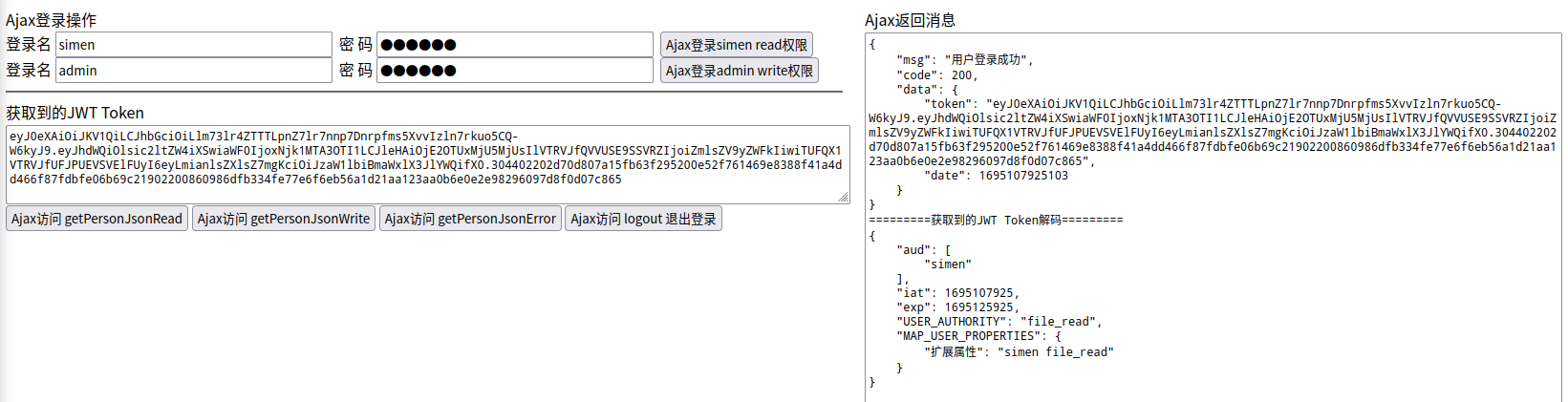
登录流程
无权限访问时,转到JWT认证入口点JwtAuthenticationEntryPoint,根据request头Accept判断请求类型是html还是json,html请求跳转到登录页面,json请求返回异常接送代码【该功能主要为演示,使用JWT时实际很少出现需要同时处理html和json请求的情况】
@Override

public void commence(HttpServletRequest request, HttpServletResponse response, AuthenticationException authException) throws IOException {

    // 从request头中获取Accept

    String strAccept = request.getHeader("Accept");

    if (StrUtil.isNotBlank(strAccept)) {

        // 对Accept分组为字符串数组

        String[] strsAccept = StrUtil.splitToArray(strAccept, ",");

        // 判断Accept数组中是否存在"text/html"

        if (ArrayUtil.contains(strsAccept, "text/html")) {

            // 存在"text/html",判断为html访问,则跳转到登录界面

            response.sendRedirect(STR_URL_LOGIN_URL);

        } else {

            // 不存在"text/html",判断为json访问,则返回未授权的json

            SecurityUtils.returnReplyJsonResponse(response, HttpServletResponse.SC_OK,

                    new ReplyVO<>(ReplyEnum.ERROR_TOKEN_EXPIRED));

        }

    }

}登录成功时,调用处理器JwtAuthenticationSuccessHandler.java,其中使用Sm2JwtSigner.java进行签名和校验。更新该用户的
MAP_SYSTEM_USER_TOKEN,删除该用户的MAP_SYSTEM_USER_AUTHENTICATION@Override
public void onAuthenticationSuccess(HttpServletRequest request, HttpServletResponse response, Authentication authentication) throws IOException {
if (!response.isCommitted() && authentication != null && authentication.getPrincipal() != null
// 获取登录用户信息对象
&& authentication.getPrincipal() instanceof JwtUserDetails userDetails) { // 获取30分钟有效的token编码
String strToken = jwtTokenUtils.getToken30Minute(
userDetails.getUsername(),
CollUtil.join(userDetails.getAuthorities(), ","),
userDetails.getMapProperties()
); // 更新系统缓存的用户JWT Token
MAP_SYSTEM_USER_TOKEN.put(userDetails.getUsername(), strToken);
// 删除系统缓存的用户身份验证对象
MAP_SYSTEM_USER_AUTHENTICATION.remove(userDetails.getUsername()); // 包装返回的JWT对象
ReplyVO<JwtResponseData> replyVO = new ReplyVO<>(
new JwtResponseData(strToken, DateUtil.date()), "用户登录成功"); // 将返回字符串写入response
SecurityUtils.returnReplyJsonResponse(response, HttpServletResponse.SC_OK, replyVO); log.info("[{}]登录成功,已缓存该用户Token", userDetails.getUsername());
}
}登录失败时,调用处理器JwtAuthenticationFailureHandler,根据抛出的异常返回对应的json
@Override

public void onAuthenticationFailure(HttpServletRequest request, HttpServletResponse response, AuthenticationException exception) throws IOException {

    String strData = LOGIN_ERROR_UNKNOWN;

    String strMessage = "LOGIN_ERROR_UNKNOWN";

    if (exception instanceof LockedException) {

        strData = LOGIN_ERROR_ACCOUNT_LOCKING;

        strMessage = exception.getMessage();

    } else if (exception instanceof CredentialsExpiredException) {

        strData = LOGIN_ERROR_PASSWORD_EXPIRED;

        strMessage = exception.getMessage();

    } else if (exception instanceof AccountExpiredException) {

        strData = LOGIN_ERROR_OVERDUE_ACCOUNT;

        strMessage = exception.getMessage();

    } else if (exception instanceof DisabledException) {

        strData = LOGIN_ERROR_ACCOUNT_BANNED;

        strMessage = exception.getMessage();

    } else if (exception instanceof BadCredentialsException) {

        strData = LOGIN_ERROR_USER_CREDENTIAL_EXCEPTION;

        strMessage = exception.getMessage();

    } else if (exception instanceof UsernameNotFoundException) {

        strData = LOGIN_ERROR_USER_NAME_NOT_FOUND;

        strMessage = exception.getMessage();

    }

    // exception.printStackTrace();

    SecurityUtils.returnReplyJsonResponse(response, HttpServletResponse.SC_OK,

            new ReplyVO<>(strData, strMessage, ReplyEnum.ERROR_USER_HAS_NO_PERMISSIONS.getCode()));

}正常请求json时,使用过滤器JwtRequestFilter.java,对每个JSON请求进行鉴权(其中使用
MAP_SYSTEM_USER_AUTHENTICATION进行缓存处理),并将相应信息放入SpringSecurity的上下文身份验证中SecurityContextHolder.getContext().setAuthentication(authenticationToken);@Override
protected void doFilterInternal(HttpServletRequest request, HttpServletResponse response, FilterChain filterChain)
throws ServletException, IOException {
// 如果不是访问登出url,且通过认证
if (!StrUtil.equals(URLUtil.getPath(request.getRequestURL().toString()), STR_URL_LOGOUT_URL) &&
SecurityContextHolder.getContext().getAuthentication() == null) {
// 获取请求头Authorization
final String strAuthorization = request.getHeader(HttpHeaders.AUTHORIZATION);
// 判断请求Authorization非空且以STR_AUTHENTICATION_PREFIX开头
if (StrUtil.isNotBlank(strAuthorization) && strAuthorization.startsWith(STR_AUTHENTICATION_PREFIX)) {
// 获取JWT Token
String strJwtToken = strAuthorization.replace(STR_AUTHENTICATION_PREFIX, "");
// 验证凭证,失败则抛出错误
jwtTokenUtils.verifyToken(strJwtToken);
// 从JWT Token中获取用户名
String strUserName = jwtTokenUtils.getAudience(strJwtToken); // 从系统MAP中获取该用户的身份验证对象
UsernamePasswordAuthenticationToken authentication = MAP_SYSTEM_USER_AUTHENTICATION.get(strUserName); // 判断身份验证对象非空
if (ObjUtil.isNotEmpty(authentication)) {
// 放入安全上下文中
SecurityContextHolder.getContext().setAuthentication(authentication);
log.info(String.format("检测到[%s]访问,从系统MAP中直接获取身份验证对象", strUserName));
} else {
// 从JWT Token中获取权限字符串
String strAuthorities = jwtTokenUtils.getAuthorities(strJwtToken); // 将用户权限放入权限列表
List<GrantedAuthority> listGrantedAuthority = new ArrayList<>();
if (StrUtil.isNotBlank(strAuthorities)) {
String[] strsAuthority = StrUtil.splitToArray(strAuthorities, ",");
for (String strAuthority : strsAuthority) {
listGrantedAuthority.add(new SimpleGrantedAuthority(strAuthority.trim()));
}
} // 构建用户登录信息实现
JwtUserDetails userDetails = new JwtUserDetails(
strUserName, // 获取用户名
"[PROTECTED]", // 屏蔽密码
jwtTokenUtils.isToRefresh(strJwtToken), // 从token获取jwt认证是否需要刷新
listGrantedAuthority, jwtTokenUtils.getUserPropertiesMap(strJwtToken));
// 构建用户认证token
UsernamePasswordAuthenticationToken authenticationToken =
new UsernamePasswordAuthenticationToken(userDetails, null, listGrantedAuthority);
authenticationToken.setDetails(new WebAuthenticationDetailsSource().buildDetails(request));
// 放入安全上下文中
SecurityContextHolder.getContext().setAuthentication(authenticationToken);
// 将身份验证对象放入系统MAP
MAP_SYSTEM_USER_AUTHENTICATION.put(strUserName, authenticationToken);
log.info(String.format("检测到[%s]访问,具有[%s]权限,缓存至系统MAP", userDetails.getUsername(), strAuthorities));
}
}
}
// 使用过滤链进行过滤
filterChain.doFilter(request, response);
}登出成功时,调用处理器JwtLogoutSuccessHandler,并清空该用户的
MAP_SYSTEM_USER_TOKEN和MAP_SYSTEM_USER_AUTHENTICATION缓存@Override
public void onLogoutSuccess(HttpServletRequest request, HttpServletResponse response, Authentication authentication) throws IOException {
// 从Request中取出授权字符串
final String strAuthorization = request.getHeader(HttpHeaders.AUTHORIZATION);
// 判断授权字符串是否以STR_AUTHENTICATION_PREFIX开头
if (StrUtil.startWith(strAuthorization, STR_AUTHENTICATION_PREFIX)) {
// 获取认证的JWT token
String strJwtToken = strAuthorization.replace(STR_AUTHENTICATION_PREFIX, "");
// 判断token是否为空
if (StrUtil.isNotBlank(strJwtToken)) {
// 验证凭证,失败则抛出错误
try {
jwtTokenUtils.verifyToken(strJwtToken);
// 从token中获取用户名
String strUserName = jwtTokenUtils.getAudience(strJwtToken);
// 断言用户名非空
Assert.notBlank(strUserName, "当前用户不存在"); // 删除系统缓存的用户JWT Token
MAP_SYSTEM_USER_TOKEN.remove(strUserName);
// 删除系统缓存的用户身份验证对象
MAP_SYSTEM_USER_AUTHENTICATION.remove(strUserName); log.info("[{}]登出成功,已清除该用户登录缓存信息", strUserName);
} catch (Exception ignored) {
log.info("登出失败");
}
}
}
// 返回登出成功信息
SecurityUtils.returnReplyJsonResponse(response, HttpServletResponse.SC_OK, new ReplyVO<>(LOGOUT_SUCCESS));
}
JWT处理
Sm2JwtSigner.java签名和校验时,将
headerBase64和payloadBase64使用STR_JWT_SIGN_SPLIT组合成字符串进行签名和校验/**
* 返回签名的Base64代码
*
* @param headerBase64 JWT头的JSON字符串的Base64表示
* @param payloadBase64 JWT载荷的JSON字符串Base64表示
* @return 签名结果Base64,即JWT的第三部分
*/
@Override
public String sign(String headerBase64, String payloadBase64) {
// 将headerBase64和payloadBase64使用STR_JWT_SIGN_SPLIT组合在一起之后进行签名
return SecurityUtils.signByUUID(headerBase64 + STR_JWT_SIGN_SPLIT + payloadBase64);
} /**
* 验签
*
* @param headerBase64 JWT头的JSON字符串Base64表示
* @param payloadBase64 JWT载荷的JSON字符串Base64表示
* @param signBase64 被验证的签名Base64表示
* @return 签名是否一致
*/
@Override
public boolean verify(String headerBase64, String payloadBase64, String signBase64) {
// 将headerBase64和payloadBase64使用STR_JWT_SIGN_SPLIT组合在一起之后进行签名校验
return SecurityUtils.verifyByUUID(headerBase64 + STR_JWT_SIGN_SPLIT + payloadBase64, signBase64);
}生成的JWT代码和解密内容
JWT Tokens 编码
eyJ0eXAiOiJKV1QiLCJhbGciOiLlm73lr4ZTTTLpnZ7lr7nnp7Dnrpfms5XvvIzln7rkuo5CQ-W6kyJ9.eyJhdWQiOlsic2ltZW4iXSwiaWF0IjoxNjk1MDIwMzUzLCJleHAiOjE2OTUwMzgzNTMsIlVTRVJfQVVUSE9SSVRZIjoiZmlsZV9yZWFkIiwiTUFQX1VTRVJfUFJPUEVSVElFUyI6eyLmianlsZXlsZ7mgKciOiJzaW1lbiBmaWxlX3JlYWQifX0.MEQCIBr7QHoMdgqt53AM+hlVJfDfSrj8Pdi+dAJ9hg3QMBQuAiAhcFbV26ESehhylWewr467GNWncKruz86NfD68CU105Q==解码后HEADER
{

    "typ": "JWT",

    "alg": "国密SM2非对称算法,基于BC库"

}
解码后PAYLOAD
{

   "aud": [

      "simen"

   ],

   "iat": 1695020353,

   "exp": 1695038353,

   "USER_AUTHORITY": "file_read",

   "MAP_USER_PROPERTIES": {

      "扩展属性": "simen file_read"

   }

}
Springboot简单功能示例-5 使用JWT进行授权认证的更多相关文章
- [转]三分钟学会.NET Core Jwt 策略授权认证
[转]三分钟学会.NET Core Jwt 策略授权认证 一.前言# 大家好我又回来了,前几天讲过一个关于Jwt的身份验证最简单的案例,但是功能还是不够强大,不适用于真正的项目,是的,在真正面对复杂而 ...
- JWT实现授权认证
目录 一. JWT是什么 二. JWT标准规范 三. 核心代码简析 四. 登录授权示例 五. JWT 使用方式 六. JWT注意事项 一. JWT是什么 JSON Web Token(JWT)是目前最 ...
- 三分钟学会.NET Core Jwt 策略授权认证
一.前言 大家好我又回来了,前几天讲过一个关于Jwt的身份验证最简单的案例,但是功能还是不够强大,不适用于真正的项目,是的,在真正面对复杂而又苛刻的客户中,我们会不知所措,就现在需要将认证授权这一块也 ...
- dubbo+zookeeper+springboot简单示例
目录 dubbo+zookeeper+springboot简单示例 zookeeper安装使用 api子模块 生产者producer 消费者consumer @(目录) dubbo+zookeeper ...
- 记录一次简单的springboot发送邮件功能
场景:经常在我们系统中有通过邮件功能找回密码,或者发送生日祝福等功能,今天记录下springboot发送邮件的简单功能 1.引入maven <!-- 邮件开发--><dependen ...
- SpringBoot整合SpringSecurity示例实现前后分离权限注解
SpringBoot 整合SpringSecurity示例实现前后分离权限注解+JWT登录认证 作者:Sans_ juejin.im/post/5da82f066fb9a04e2a73daec 一.说 ...
- 【java】org.apache.commons.lang3功能示例
org.apache.commons.lang3功能示例 package com.simple.test; import java.util.Date; import java.util.Iterat ...
- 【java开发系列】—— spring简单入门示例
1 JDK安装 2 Struts2简单入门示例 前言 作为入门级的记录帖,没有过多的技术含量,简单的搭建配置框架而已.这次讲到spring,这个应该是SSH中的重量级框架,它主要包含两个内容:控制反转 ...
- html5本地存储之localstorage 、本地数据库、sessionStorage简单使用示例
这篇文章主要介绍了html5本地存储的localstorage .本地数据库.sessionStorage简单使用示例,需要的朋友可以参考下 html5的一个非常cool的功能,就是web stora ...
- springboot简单介绍
1.springboot简单介绍 微服务架构 Spring Boot 是由 Pivotal 团队提供的全新框架,其设计目的是用来简化新 Spring 应用的初始搭建以及开发过程. 该框架使用了特定的方 ...
随机推荐
- 逍遥自在学C语言 | 枚举的那些事儿
前言 在C语言中,枚举是一种方便组织和表示一组相关常量的工具.枚举类型有助于提高代码的可读性和可维护性.本文将介绍C语言枚举的基本概念.语法和用法,以及一些高级技巧. 一.人物简介 第一位闪亮登场,有 ...
- 【whale-starry-stl】01天 list学习笔记
一.知识点 1. std::bidirectional_iterator_tag std::bidirectional_iterator_tag 是 C++ 标准库中定义的一个迭代器类型标签,用于标识 ...
- 洛谷 P8179 Tyres
滴叉题/se/se 题意 直接复制了 有 \(n\) 套轮胎,滴叉需要用这些轮胎跑 \(m\) 圈.使用第 \(i\) 套轮胎跑的第 \(j\) 圈(对每套轮胎单独计数)需要 \(a_i+b_i(j- ...
- go NewTicker 得使用
转载请注明出处: 在 Go 语言中,time.NewTicker 函数用于创建一个周期性触发的定时器.它会返回一个 time.Ticker 类型的值,该值包含一个通道 C,定时器会每隔一段时间向通道 ...
- 修改docker容器端口映射
原文地址 操作步骤如下 关闭docker systemctl stop dokcer 修改配置文件 位置一般是: /var/lib/docker/containers/containerId/host ...
- 我真的想知道,AI框架跟计算图什么关系?PyTorch如何表达计算图?
目前主流的深度学习框架都选择使用计算图来抽象神经网络计算表达,通过通用的数据结构(张量)来理解.表达和执行神经网络模型,通过计算图可以把 AI 系统化的问题形象地表示出来. 本节将会以AI概念落地的时 ...
- Pycharm:显示每一行代码的修改记录
解决方案 安装插件GitToolBox
- Trackbar调色板
我们将会建立一个简单的应用,显示我们指定的颜色.将会建立一个窗口,显示三个trackbar指定RGB三个颜色通道值.可以滑动trackbar来改变相应的颜色.默认情况下,初始颜色为黑色. cv2.ge ...
- 可不要忽视了TypeScript中函数和类的重要性
上一篇文章总结了 TypeScript的类型注解,这一篇来聊聊同样重要的函数和类 函数 以下声明了一个函数类型,通过type来定义类型别名,void 表示没有返回值 type fnType = () ...
- 新一代开源流数据湖平台Apache Paimon入门实操-下
@ 目录 实战 写表 插入和覆盖数据 更新数据 删除数据 Merge Into 查询表 批量查询 时间旅行 批量增量查询 流式查询 时间旅行 ConsumerID 查询优化 系统表 表指定系统表 分区 ...