
Springboot简单功能示例-5 使用JWT进行授权认证
springboot-sample
介绍
软件架构(当前发行版使用)
安装教程
git clone --branch 5.使用JWT进行授权认证 git@gitee.com:simen_net/springboot-sample.git功能说明
在WebSecurityConfig中配置自定义的JWT认证
/**

 * 用户验证服务 {@link JwtUserDetailsService}

 */

private final UserDetailsService userDetailsService;

/**

 * 身份验证成功处理程序 {@link JwtAuthenticationSuccessHandler}

 */

private final AuthenticationSuccessHandler authenticationSuccessHandler;

/**

 * 身份验证失败的处理程序 {@link JwtAuthenticationFailureHandler}

 */

private final AuthenticationFailureHandler authenticationFailureHandler;

/**

 * 登出成功处理程序 {@link JwtLogoutSuccessHandler}

 */

private final LogoutSuccessHandler logoutSuccessHandler;

/**

 * JWT认证入口点 {@link JwtAuthenticationEntryPoint}

 */

private final AuthenticationEntryPoint authenticationEntryPoint;

/**

 * JWT请求过滤

 */

private final JwtRequestFilter jwtRequestFilter;
发行版说明
- 完成基本WEB服务 跳转到发行版
- 完成了KEY初始化功能和全局错误处理 跳转到发行版
- 完成了基本登录验证 跳转到发行版
- 完成了自定义加密进行登录验证 跳转到发行版
- 完成了自定义加密进行登录验证 跳转到发行版 查看发行版说明
使用JWT进行授权认证
配置Config
在WebSecurityConfig.java中加入“注册验证成功/失败处理器”JwtAuthenticationSuccessHandler.java和JwtAuthenticationFailureHandler.java
// 注册验证成功处理器

httpSecurityFormLoginConfigurer.successHandler(authenticationSuccessHandler);

// 注册验证失败处理器

httpSecurityFormLoginConfigurer.failureHandler(authenticationFailureHandler);在WebSecurityConfig.java中加入“JWT认证入口点”JwtAuthenticationEntryPoint,请求无认证信息时在此处理
// 加入异常处理器

httpSecurity.exceptionHandling(httpSecurityExceptionHandlingConfigurer ->

        // 加入JWT认证入口点

        httpSecurityExceptionHandlingConfigurer.authenticationEntryPoint(authenticationEntryPoint)

);在WebSecurityConfig.java中加入“登出成功处理器”JwtLogoutSuccessHandler.java注销用户登录信息等
// 自定义登出成功处理器

httpSecurityLogoutConfigurer.logoutSuccessHandler(logoutSuccessHandler);在WebSecurityConfig.java登出过滤器之前加入“JWT请求过滤器”JwtRequestFilter.java对所有请求进行鉴权
// 在登出过滤器之前加入JWT请求过滤器

httpSecurity.addFilterBefore(jwtRequestFilter, LogoutFilter.class);在WebSecurityConfig.java中强制session无效
// 强制session无效,使用jwt认证时建议禁用,正常登录不能禁用session

httpSecurity.sessionManagement(httpSecuritySessionManagementConfigurer->

        httpSecuritySessionManagementConfigurer.sessionCreationPolicy(SessionCreationPolicy.STATELESS)

);
全局说明
在JwtUserDetails.java中增加
private Map<String, Object> mapProperties,用于保存登录用户的扩展信息,录入用户分组、用户单位等等在JwtUserDetailsService.java中模拟注入用户权限及扩展信息
listGrantedAuthority.add(new SimpleGrantedAuthority("file_read"));
mapProperties.put("扩展属性", username + " file_read");
log.info("读取到已有用户[{}],默认密码123456,file_read权限,扩展属性:[{}]", username, mapProperties); return new JwtUserDetails(username, SecurityUtils.signByUUID("123456"), false, listGrantedAuthority, mapProperties);`在SecurityUtils.java中定义全局登录信息MAP,保存用户的token和验证对象。一是防止用户伪造token,二是缓存用户验证对象
/**

 * 【系统】用户名与JWT Token对应的map

 * key:   用户登录名

 * value: JWT Token

 */

public static Map<String, String> MAP_SYSTEM_USER_TOKEN = new ConcurrentHashMap<>(8);

/**

 * 【系统】用户名与 UsernamePasswordAuthenticationToken 对应的map

 * key:   用户登录名

 * value: UsernamePasswordAuthenticationToken

 */

public static Map<String, UsernamePasswordAuthenticationToken> MAP_SYSTEM_USER_AUTHENTICATION = new ConcurrentHashMap<>(8);在SystemErrorController中重写
BasicErrorController的public ResponseEntity<Map<String, Object>> error(HttpServletRequest request),将包括JWT处理在内的各类服务异常进行统一处理@Override
public ResponseEntity<Map<String, Object>> error(HttpServletRequest request) {
HttpStatus status = this.getStatus(request);
if (status == HttpStatus.NO_CONTENT) {
return new ResponseEntity<>(status);
} else {
Map<String, Object> body = this.getErrorAttributes(request, this.getErrorAttributeOptions(request, MediaType.ALL));
log.info("非HTML请求返回错误:{}", body); // 获取http返回状态码
Integer intStatus = MapUtil.getInt(body, "status");
// 获取http返回的异常字符串
String strException = MapUtil.getStr(body, "exception");
// 返回对象的消息
String strMsg = LOGIN_ERROR;
// 返回对象的内容
String strData = null; // 直接从request中获取STR_JAKARTA_SERVLET_ERROR_EXCEPTION对象
Object objErrorException = request.getAttribute(STR_JAKARTA_SERVLET_ERROR_EXCEPTION); // 1. 使用request的STR_JAKARTA_SERVLET_ERROR_EXCEPTION值获取错误消息
// 判断异常对象是否为空
if (ObjUtil.isNotNull(objErrorException)) {
List<String> lisErrorException = StrUtil.splitTrim(objErrorException.toString(), ":");
if (lisErrorException.size() == 2) {
String strTemp = MAP_EXCEPTION_MESSAGE.get(lisErrorException.get(0));
if (StrUtil.isNotBlank(strTemp)) {
strMsg = strTemp;
strData = lisErrorException.get(1);
}
}
} // 2. 使用request的exception字符串获取错误消息
// 判断replyVO.getData()为空,且http返回的异常字符串是否为空
if (StrUtil.isBlank(strData) && StrUtil.isNotBlank(strException)) {
strData = MAP_EXCEPTION_MESSAGE.get(strException);
} // 3. 使用request的exception字符串获取错误消息
// 判断replyVO.getData()为空,且错误代码有效
if (StrUtil.isBlank(strData) && intStatus > 0) {
ReplyEnum replyEnum = EnumUtil.getBy(ReplyEnum.class,
re -> re.getCode().equals(intStatus));
// 判断错误代码获取到的枚举类是否存在
if (ObjUtil.isNotNull(replyEnum)) {
strData = replyEnum.getMsg();
}
} // 4. 使用默认错误消息
// 判断replyVO.getData()为空
if (StrUtil.isBlank(strData)) {
// 默认返回的错误内容
strData = LOGIN_ERROR_UNKNOWN;
} return new ResponseEntity<>(JSON.toMap(new ReplyVO<>(strData, strMsg, intStatus)), HttpStatus.OK);
}
}测试流程:访问 http://localhost:8080/login
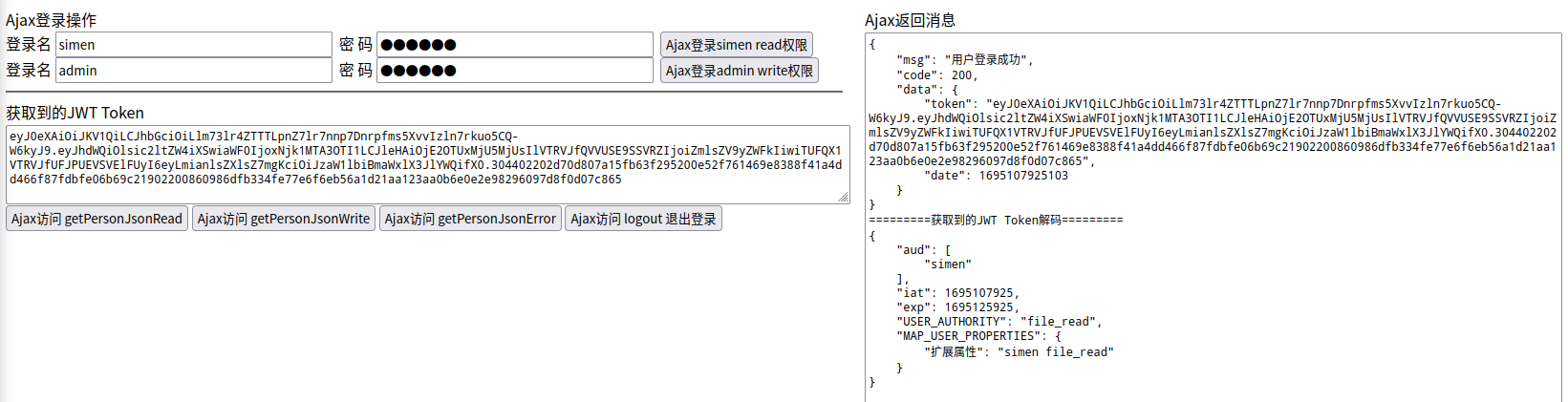
登录流程
无权限访问时,转到JWT认证入口点JwtAuthenticationEntryPoint,根据request头Accept判断请求类型是html还是json,html请求跳转到登录页面,json请求返回异常接送代码【该功能主要为演示,使用JWT时实际很少出现需要同时处理html和json请求的情况】
@Override

public void commence(HttpServletRequest request, HttpServletResponse response, AuthenticationException authException) throws IOException {

    // 从request头中获取Accept

    String strAccept = request.getHeader("Accept");

    if (StrUtil.isNotBlank(strAccept)) {

        // 对Accept分组为字符串数组

        String[] strsAccept = StrUtil.splitToArray(strAccept, ",");

        // 判断Accept数组中是否存在"text/html"

        if (ArrayUtil.contains(strsAccept, "text/html")) {

            // 存在"text/html",判断为html访问,则跳转到登录界面

            response.sendRedirect(STR_URL_LOGIN_URL);

        } else {

            // 不存在"text/html",判断为json访问,则返回未授权的json

            SecurityUtils.returnReplyJsonResponse(response, HttpServletResponse.SC_OK,

                    new ReplyVO<>(ReplyEnum.ERROR_TOKEN_EXPIRED));

        }

    }

}登录成功时,调用处理器JwtAuthenticationSuccessHandler.java,其中使用Sm2JwtSigner.java进行签名和校验。更新该用户的
MAP_SYSTEM_USER_TOKEN,删除该用户的MAP_SYSTEM_USER_AUTHENTICATION@Override
public void onAuthenticationSuccess(HttpServletRequest request, HttpServletResponse response, Authentication authentication) throws IOException {
if (!response.isCommitted() && authentication != null && authentication.getPrincipal() != null
// 获取登录用户信息对象
&& authentication.getPrincipal() instanceof JwtUserDetails userDetails) { // 获取30分钟有效的token编码
String strToken = jwtTokenUtils.getToken30Minute(
userDetails.getUsername(),
CollUtil.join(userDetails.getAuthorities(), ","),
userDetails.getMapProperties()
); // 更新系统缓存的用户JWT Token
MAP_SYSTEM_USER_TOKEN.put(userDetails.getUsername(), strToken);
// 删除系统缓存的用户身份验证对象
MAP_SYSTEM_USER_AUTHENTICATION.remove(userDetails.getUsername()); // 包装返回的JWT对象
ReplyVO<JwtResponseData> replyVO = new ReplyVO<>(
new JwtResponseData(strToken, DateUtil.date()), "用户登录成功"); // 将返回字符串写入response
SecurityUtils.returnReplyJsonResponse(response, HttpServletResponse.SC_OK, replyVO); log.info("[{}]登录成功,已缓存该用户Token", userDetails.getUsername());
}
}登录失败时,调用处理器JwtAuthenticationFailureHandler,根据抛出的异常返回对应的json
@Override

public void onAuthenticationFailure(HttpServletRequest request, HttpServletResponse response, AuthenticationException exception) throws IOException {

    String strData = LOGIN_ERROR_UNKNOWN;

    String strMessage = "LOGIN_ERROR_UNKNOWN";

    if (exception instanceof LockedException) {

        strData = LOGIN_ERROR_ACCOUNT_LOCKING;

        strMessage = exception.getMessage();

    } else if (exception instanceof CredentialsExpiredException) {

        strData = LOGIN_ERROR_PASSWORD_EXPIRED;

        strMessage = exception.getMessage();

    } else if (exception instanceof AccountExpiredException) {

        strData = LOGIN_ERROR_OVERDUE_ACCOUNT;

        strMessage = exception.getMessage();

    } else if (exception instanceof DisabledException) {

        strData = LOGIN_ERROR_ACCOUNT_BANNED;

        strMessage = exception.getMessage();

    } else if (exception instanceof BadCredentialsException) {

        strData = LOGIN_ERROR_USER_CREDENTIAL_EXCEPTION;

        strMessage = exception.getMessage();

    } else if (exception instanceof UsernameNotFoundException) {

        strData = LOGIN_ERROR_USER_NAME_NOT_FOUND;

        strMessage = exception.getMessage();

    }

    // exception.printStackTrace();

    SecurityUtils.returnReplyJsonResponse(response, HttpServletResponse.SC_OK,

            new ReplyVO<>(strData, strMessage, ReplyEnum.ERROR_USER_HAS_NO_PERMISSIONS.getCode()));

}正常请求json时,使用过滤器JwtRequestFilter.java,对每个JSON请求进行鉴权(其中使用
MAP_SYSTEM_USER_AUTHENTICATION进行缓存处理),并将相应信息放入SpringSecurity的上下文身份验证中SecurityContextHolder.getContext().setAuthentication(authenticationToken);@Override
protected void doFilterInternal(HttpServletRequest request, HttpServletResponse response, FilterChain filterChain)
throws ServletException, IOException {
// 如果不是访问登出url,且通过认证
if (!StrUtil.equals(URLUtil.getPath(request.getRequestURL().toString()), STR_URL_LOGOUT_URL) &&
SecurityContextHolder.getContext().getAuthentication() == null) {
// 获取请求头Authorization
final String strAuthorization = request.getHeader(HttpHeaders.AUTHORIZATION);
// 判断请求Authorization非空且以STR_AUTHENTICATION_PREFIX开头
if (StrUtil.isNotBlank(strAuthorization) && strAuthorization.startsWith(STR_AUTHENTICATION_PREFIX)) {
// 获取JWT Token
String strJwtToken = strAuthorization.replace(STR_AUTHENTICATION_PREFIX, "");
// 验证凭证,失败则抛出错误
jwtTokenUtils.verifyToken(strJwtToken);
// 从JWT Token中获取用户名
String strUserName = jwtTokenUtils.getAudience(strJwtToken); // 从系统MAP中获取该用户的身份验证对象
UsernamePasswordAuthenticationToken authentication = MAP_SYSTEM_USER_AUTHENTICATION.get(strUserName); // 判断身份验证对象非空
if (ObjUtil.isNotEmpty(authentication)) {
// 放入安全上下文中
SecurityContextHolder.getContext().setAuthentication(authentication);
log.info(String.format("检测到[%s]访问,从系统MAP中直接获取身份验证对象", strUserName));
} else {
// 从JWT Token中获取权限字符串
String strAuthorities = jwtTokenUtils.getAuthorities(strJwtToken); // 将用户权限放入权限列表
List<GrantedAuthority> listGrantedAuthority = new ArrayList<>();
if (StrUtil.isNotBlank(strAuthorities)) {
String[] strsAuthority = StrUtil.splitToArray(strAuthorities, ",");
for (String strAuthority : strsAuthority) {
listGrantedAuthority.add(new SimpleGrantedAuthority(strAuthority.trim()));
}
} // 构建用户登录信息实现
JwtUserDetails userDetails = new JwtUserDetails(
strUserName, // 获取用户名
"[PROTECTED]", // 屏蔽密码
jwtTokenUtils.isToRefresh(strJwtToken), // 从token获取jwt认证是否需要刷新
listGrantedAuthority, jwtTokenUtils.getUserPropertiesMap(strJwtToken));
// 构建用户认证token
UsernamePasswordAuthenticationToken authenticationToken =
new UsernamePasswordAuthenticationToken(userDetails, null, listGrantedAuthority);
authenticationToken.setDetails(new WebAuthenticationDetailsSource().buildDetails(request));
// 放入安全上下文中
SecurityContextHolder.getContext().setAuthentication(authenticationToken);
// 将身份验证对象放入系统MAP
MAP_SYSTEM_USER_AUTHENTICATION.put(strUserName, authenticationToken);
log.info(String.format("检测到[%s]访问,具有[%s]权限,缓存至系统MAP", userDetails.getUsername(), strAuthorities));
}
}
}
// 使用过滤链进行过滤
filterChain.doFilter(request, response);
}登出成功时,调用处理器JwtLogoutSuccessHandler,并清空该用户的
MAP_SYSTEM_USER_TOKEN和MAP_SYSTEM_USER_AUTHENTICATION缓存@Override
public void onLogoutSuccess(HttpServletRequest request, HttpServletResponse response, Authentication authentication) throws IOException {
// 从Request中取出授权字符串
final String strAuthorization = request.getHeader(HttpHeaders.AUTHORIZATION);
// 判断授权字符串是否以STR_AUTHENTICATION_PREFIX开头
if (StrUtil.startWith(strAuthorization, STR_AUTHENTICATION_PREFIX)) {
// 获取认证的JWT token
String strJwtToken = strAuthorization.replace(STR_AUTHENTICATION_PREFIX, "");
// 判断token是否为空
if (StrUtil.isNotBlank(strJwtToken)) {
// 验证凭证,失败则抛出错误
try {
jwtTokenUtils.verifyToken(strJwtToken);
// 从token中获取用户名
String strUserName = jwtTokenUtils.getAudience(strJwtToken);
// 断言用户名非空
Assert.notBlank(strUserName, "当前用户不存在"); // 删除系统缓存的用户JWT Token
MAP_SYSTEM_USER_TOKEN.remove(strUserName);
// 删除系统缓存的用户身份验证对象
MAP_SYSTEM_USER_AUTHENTICATION.remove(strUserName); log.info("[{}]登出成功,已清除该用户登录缓存信息", strUserName);
} catch (Exception ignored) {
log.info("登出失败");
}
}
}
// 返回登出成功信息
SecurityUtils.returnReplyJsonResponse(response, HttpServletResponse.SC_OK, new ReplyVO<>(LOGOUT_SUCCESS));
}
JWT处理
Sm2JwtSigner.java签名和校验时,将
headerBase64和payloadBase64使用STR_JWT_SIGN_SPLIT组合成字符串进行签名和校验/**
* 返回签名的Base64代码
*
* @param headerBase64 JWT头的JSON字符串的Base64表示
* @param payloadBase64 JWT载荷的JSON字符串Base64表示
* @return 签名结果Base64,即JWT的第三部分
*/
@Override
public String sign(String headerBase64, String payloadBase64) {
// 将headerBase64和payloadBase64使用STR_JWT_SIGN_SPLIT组合在一起之后进行签名
return SecurityUtils.signByUUID(headerBase64 + STR_JWT_SIGN_SPLIT + payloadBase64);
} /**
* 验签
*
* @param headerBase64 JWT头的JSON字符串Base64表示
* @param payloadBase64 JWT载荷的JSON字符串Base64表示
* @param signBase64 被验证的签名Base64表示
* @return 签名是否一致
*/
@Override
public boolean verify(String headerBase64, String payloadBase64, String signBase64) {
// 将headerBase64和payloadBase64使用STR_JWT_SIGN_SPLIT组合在一起之后进行签名校验
return SecurityUtils.verifyByUUID(headerBase64 + STR_JWT_SIGN_SPLIT + payloadBase64, signBase64);
}生成的JWT代码和解密内容
JWT Tokens 编码
eyJ0eXAiOiJKV1QiLCJhbGciOiLlm73lr4ZTTTLpnZ7lr7nnp7Dnrpfms5XvvIzln7rkuo5CQ-W6kyJ9.eyJhdWQiOlsic2ltZW4iXSwiaWF0IjoxNjk1MDIwMzUzLCJleHAiOjE2OTUwMzgzNTMsIlVTRVJfQVVUSE9SSVRZIjoiZmlsZV9yZWFkIiwiTUFQX1VTRVJfUFJPUEVSVElFUyI6eyLmianlsZXlsZ7mgKciOiJzaW1lbiBmaWxlX3JlYWQifX0.MEQCIBr7QHoMdgqt53AM+hlVJfDfSrj8Pdi+dAJ9hg3QMBQuAiAhcFbV26ESehhylWewr467GNWncKruz86NfD68CU105Q==解码后HEADER
{

    "typ": "JWT",

    "alg": "国密SM2非对称算法,基于BC库"

}
解码后PAYLOAD
{

   "aud": [

      "simen"

   ],

   "iat": 1695020353,

   "exp": 1695038353,

   "USER_AUTHORITY": "file_read",

   "MAP_USER_PROPERTIES": {

      "扩展属性": "simen file_read"

   }

}
Springboot简单功能示例-5 使用JWT进行授权认证的更多相关文章
- [转]三分钟学会.NET Core Jwt 策略授权认证
[转]三分钟学会.NET Core Jwt 策略授权认证 一.前言# 大家好我又回来了,前几天讲过一个关于Jwt的身份验证最简单的案例,但是功能还是不够强大,不适用于真正的项目,是的,在真正面对复杂而 ...
- JWT实现授权认证
目录 一. JWT是什么 二. JWT标准规范 三. 核心代码简析 四. 登录授权示例 五. JWT 使用方式 六. JWT注意事项 一. JWT是什么 JSON Web Token(JWT)是目前最 ...
- 三分钟学会.NET Core Jwt 策略授权认证
一.前言 大家好我又回来了,前几天讲过一个关于Jwt的身份验证最简单的案例,但是功能还是不够强大,不适用于真正的项目,是的,在真正面对复杂而又苛刻的客户中,我们会不知所措,就现在需要将认证授权这一块也 ...
- dubbo+zookeeper+springboot简单示例
目录 dubbo+zookeeper+springboot简单示例 zookeeper安装使用 api子模块 生产者producer 消费者consumer @(目录) dubbo+zookeeper ...
- 记录一次简单的springboot发送邮件功能
场景:经常在我们系统中有通过邮件功能找回密码,或者发送生日祝福等功能,今天记录下springboot发送邮件的简单功能 1.引入maven <!-- 邮件开发--><dependen ...
- SpringBoot整合SpringSecurity示例实现前后分离权限注解
SpringBoot 整合SpringSecurity示例实现前后分离权限注解+JWT登录认证 作者:Sans_ juejin.im/post/5da82f066fb9a04e2a73daec 一.说 ...
- 【java】org.apache.commons.lang3功能示例
org.apache.commons.lang3功能示例 package com.simple.test; import java.util.Date; import java.util.Iterat ...
- 【java开发系列】—— spring简单入门示例
1 JDK安装 2 Struts2简单入门示例 前言 作为入门级的记录帖,没有过多的技术含量,简单的搭建配置框架而已.这次讲到spring,这个应该是SSH中的重量级框架,它主要包含两个内容:控制反转 ...
- html5本地存储之localstorage 、本地数据库、sessionStorage简单使用示例
这篇文章主要介绍了html5本地存储的localstorage .本地数据库.sessionStorage简单使用示例,需要的朋友可以参考下 html5的一个非常cool的功能,就是web stora ...
- springboot简单介绍
1.springboot简单介绍 微服务架构 Spring Boot 是由 Pivotal 团队提供的全新框架,其设计目的是用来简化新 Spring 应用的初始搭建以及开发过程. 该框架使用了特定的方 ...
随机推荐
- V8是如何执行JavaScript代码的?
前言 一般来讲,电脑是不能直接运行我们的javascript代码的,它需要一个翻译程序将人类能够理解的编程语言 JavaScript,翻译成机器能够理解的机器语言.目前市面上有很多种 JavaScri ...
- CSS3实现3D效果的图片墙
先来看一下效果:http://39.105.101.122/myhtml/CSS/transform_3D/img_3D.html 目前没有做IE的兼容,在谷歌浏览器里面可以看到效果 布局结构: &l ...
- C++面试八股文:用过STL吗?
某日二师兄参加XXX科技公司的C++工程师开发岗位第21面: 面试官:用过STL吗? 二师兄:(每天都用好吗..)用过一些. 面试官:你知道STL是什么? 二师兄:STL是指标准模板库(Standar ...
- Apple、AWS 这些科技巨头,已悄然入局隐私计算
随着数字化时代的到来,数据已经成为企业竞争的重要资源.然而,与此同时,数据隐私泄露的风险也在不断增加,这已经成为了公共安全和个人权利保护的重要问题.为了解决这个问题,科技巨头谷歌.苹果.亚马逊纷纷入局 ...
- FTL没有映射管理,跟上班没有钱有什么区别
大家好,我是五月. 前言 FTL(Flash Translation Layer),即闪存转换层,是各种存储设备的核心算法,作用是将Host传下来的逻辑地址转换成物理地址,也就是映射. 可以说,地址映 ...
- 性能_3 jmeter连接数据库jdbc(sql server举例)
一.下载第三方工具包驱动数据库 1. 因为JMeter本身没有提供链接数据库的功能,所以我们需要借助第三方的工具包来实现. (有这个jar包之后,jmeter可以发起jdbc请求,没有这个jar包, ...
- ABP - 本地事件总线
1. 事件总线 在我们的一个应用中,经常会出现一个逻辑执行之后要跟随执行另一个逻辑的情况,例如一个用户创建了后续还需要发送邮件进行通知,或者需要初始化相应的权限等.面对这样的情况,我们当然可以顺序进行 ...
- 使用GoEasy快速实现Android原生app中的websocket消息推送
摘要: GoEasy带来了一项令开发者振奋的消息:全面支持Android原生平台!现在,您可以在Android应用中使用最酷炫的实时通信功能,借助GoEasy轻松实现消息的发送和接收.本文将带您领略G ...
- 零基础实现Java直播(一):集成
从泛娱乐的秀场直播,到直播带货潮流中的电商直播,直播已经成为2020年最热的应用技术之一,越来越多的产品希望加入直播功能.下面我们基于即构Express Video SDK,来分享如何从零实现线上直播 ...
- 2023-07-13 C#深拷贝功能以及推荐使用方式
C#深拷贝功能以及推荐使用方式 [作者]长生 深拷贝 深拷贝是用于在对引用对象进行复制时的一种操作方式.平常我们新建一个对象,然后直接赋值,只是对地址引用的赋值,在修改新建的对象时,也会对我们复制的对 ...