
MySQL【二】---数据库查询详细教程{查询、排序、聚合函数、分组}
1.数据准备、基本的查询(回顾一下)
创建数据库
create database python_test charset=utf8;查看数据库:
show databases;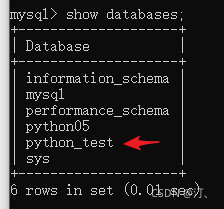
使用数据库:
use python_test;显示当前使用那个数据库:
select database();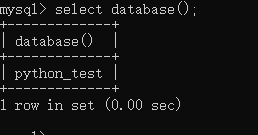
创建一个数据表:
create table student( id int unsigned primary key auto_increment not null, name varchar(20) default '', age tinyint unsigned default 0, height decimal (5,2), gender enum('男', '女', '中性', '保密') default '保密', cls_id int unsigned default 0, is_delete bit default 0 );create table classes( id int unsigned auto_increment primary key not null, name varchar(30) not null );查看数据表:
show tables;显示如何创建的:
show create table student;插入数据:
insert into studuent values (0,'小明',18,168.00,2,1,0), (0,'小黄',17,175.00,1,2,0), (0,'小红',14,177.00,2,3,0), (0,'小汉',11,180.00,3,4,0), (0,'小八',12,187.00,3,5,0), (0,'小九',13,182.00,4,6,0), (0,'小十',18,188.00,3,7,0), (0,'小之',17,186.00,2,8,0), (0,'小一',10,188.00,2,9,0), (0,'小二',15,182.00,3,9,0), (0,'小三',18,184.00,2,6,0), (0,'小四',19,185.00,4,4,0), (0,'小五',13,190.00,2,3,0), (0,'小六',14,189.00,2,4,0), (0,'小七',15,178.00,2,5,0), (0,'十一',15,167.00,1,7,0), (0,'十二',18,176.00,1,2,0);insert into classes values (0, "python01期"), (0, "python02期"), (0, "python04期");分别得到student和classes的数据库:
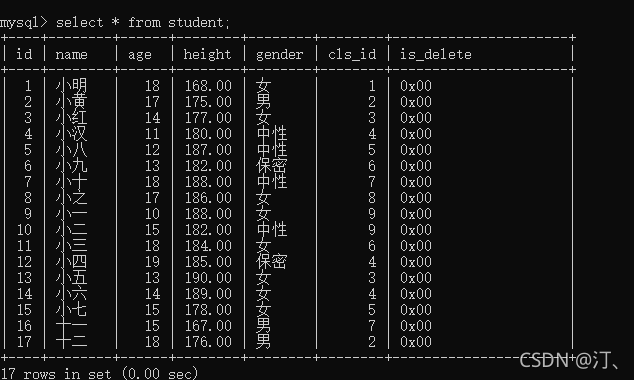
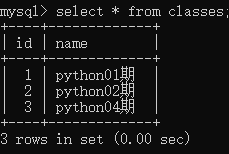
自定义查询:
select id as 序号,name as 姓名,height as 身高 from student;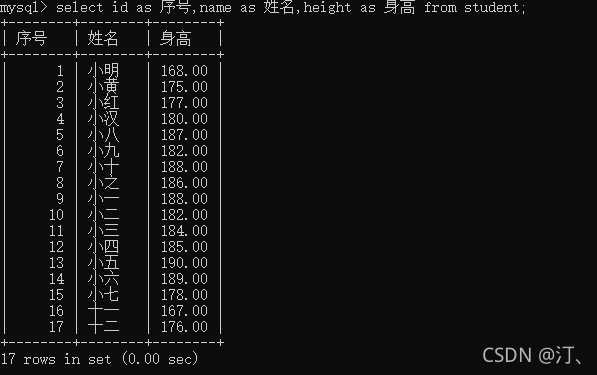
同时可以通过as给表起名:达到一样的效果
select s.name,s.age from student as s;消除重复行:distinct 字段,以查询性别为例:
select distinct gender from student;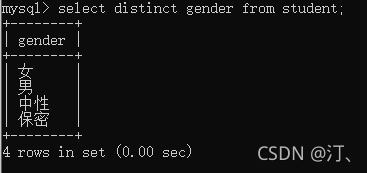
2. 条件查询
当数据量比较大的时候,千万别用 select * from student;会占用太多内存;因此采用条件查询;
2.1比较运算符
语法:select .... from 表名 where ....
其中,比较运算符
>>=<=都可以
查询大于18岁的信息
select * from student where age>18;

select name,gender from student where age>18;
等于符号要注意一下:=
select * from student where age=18;2.2逻辑运算符
逻辑运算符 and or not
18-28岁的学生信息

select * from students where age>18 and age<28;

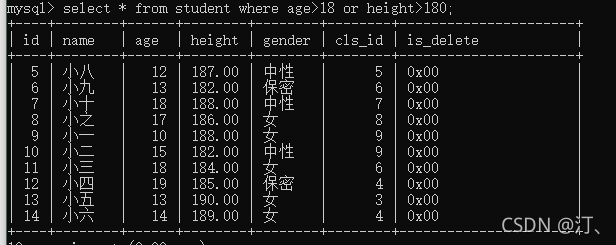
18岁以上或者身高超过180的

select * from students where age>18 or height>180;

不在18岁以上的女性

select * from students where not (age>18 and gender='女');

select * from students where not (age>18 and gender=2);

不在18岁以上并且是女性

select * from students where not age>18 and gender='女';
其中一个例子:
2.3 模糊查询
模糊查询 like rlike
like: %替换1个或多个 ;_替换1个 【效率比较低】
查找以小开始的姓名
select name from student where name like "小%";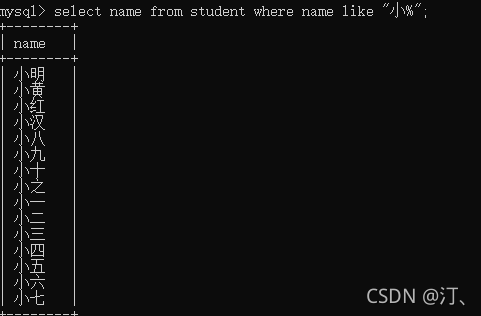
查询姓名中有 小的所有名字
select name from student where name like "%小%";结果和上述相同;
查询有两个字的名字:两个下划线
select name from students where name like "__"查询有三个字的名字:三个下划线
select name from students where name like "___"查询至少两个字的名字
select name from student where name like "__%"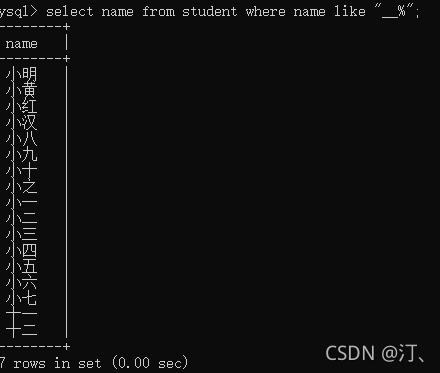
rlike:正则表达查找
查找以小开始的姓名:^表示开头中间使用.*
select name from students where name rlike "^小.*";查找以周开头伦结尾的姓名:结尾使用$
select name from student where name rlike "^周.*伦$";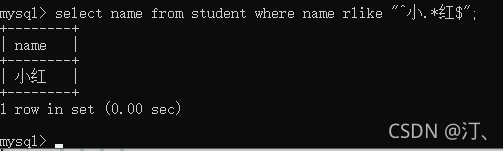
2.4 范围查询(不连续查询)
查找年龄为12、18、34的名字
select name from student where age=12 or age=18 or age=34;

select name from student where age in (12,18,34);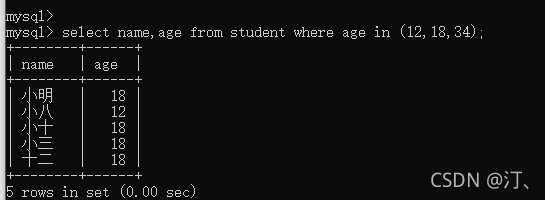
不是12、18、34的名字
select name from students where age not in (12,18,34);连续查询between and
--查找年龄为18~34岁的名字

select name from student where age between 18 and 34;

--查找年龄不为18~34岁的名字

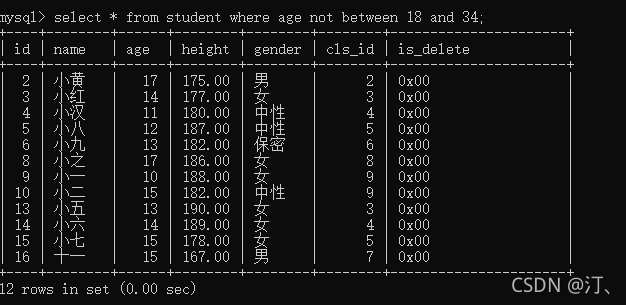
select name from student where age not between 18 and 34;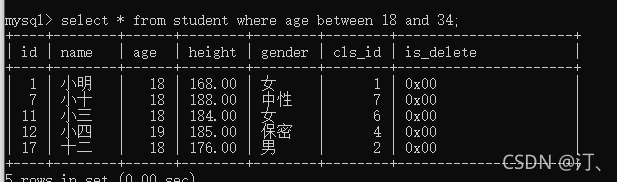
空判断
判断身高为空的信息
select * from student where height is null;3.排序
order by 字段【默认是按照组件排序】
asc从小到大 升序(默认)ascend
desc从大到小 降序descend
查询年龄在18-34岁之间的男性,按照年龄从小到大排序。
select * from student where (age between 18 and 34) and gender=1;

select * from student where (age between 18 and 34) and gender=1 order by age desc;
查询年龄在18-34岁之间的女性,按照身高从大到小排序。
select * from student where (age between 18 and 34) and gender=2 order by height desc;当值相同时,还是按照主键(id)asc排;
order by 多个字段
查询年龄在18-34的女性,身高从高到矮,如果身高相同的情况下按照年龄从小到大排序。如果年龄也相同按照id从大到小
select * from student where (age between 18 and 34) and gender=2 order by height desc,age asc,id desc;
前面相同情况下再看后续;
按照年龄从小到大,身高从高到矮;
select * from student order by age asc, height desc;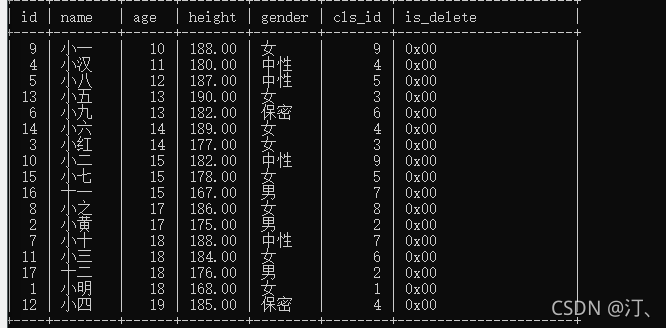
4.聚合函数
总数count
查询男性有多少人
select count(*) as 男性人数 from student where gender=1;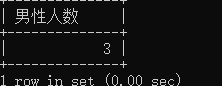
最大值max,min通用
查询年龄最大的是谁
select max(age) from student;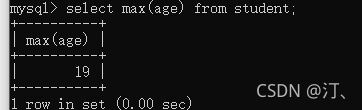
查询女性最高身高
select max(height) from student where gender=2;求和:sum
求所有人年龄之和
select sum(age) from student;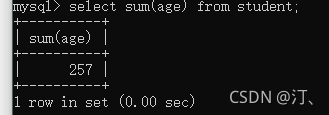
求平均值
求所有人年龄的平均值。
select avg(age) from student;等于 avg(age) sum(age)/count(*)
四舍五入round(data,2)保留两位
求所有人年龄的平均值。
select round(avg(age),2) from student;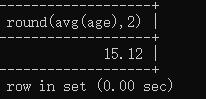
对于有小数存储,建议乘以100等扩大到整数,确保精度
5.分组
group by 语法:分组数据查询先分组再查询
select gender,count(*) from students group by gender;按照性别分组,统计处各个性别的人数分配。
select gender,count(*) from student group by gender;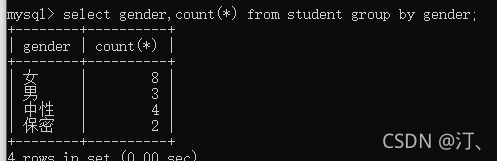
按照性别分组,统计处各个性别有哪些人。
group_concat(name,age...)可以查看多种
select gender,group_concat(name) from student group by gender;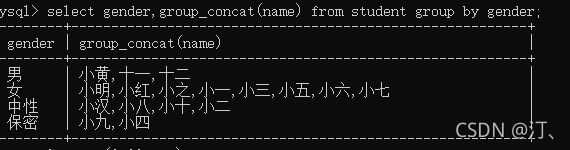
按照性别分组,统计处各个性别的年龄分配.
select gender,avg(age) from students group by gender;男性的详细信息
select gender,group_concat(name,' ',age,'',id) from student where gender=1 group by gender;
having:对分组进行条件判断:
查询平均年龄超过30岁的性别,以及姓名。
select gender,group_concat(name) from student group by gender having avg(age)>16;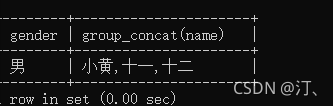
只显示分组平均年龄大于16的分组
查询每种性别中的人数多于两个的信息。
select gender,group_concat(name) from student group by gender having count(*)>2;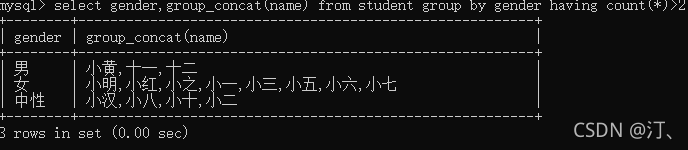
where 和 having的区别:
- where使用分组前的筛选
- having 用于分组后的筛选
MySQL【二】---数据库查询详细教程{查询、排序、聚合函数、分组}的更多相关文章
- 18 12 06 sql 的 基本语句 查询 条件查询 逻辑运算符 模糊查询 范围查询 排序 聚合函数 分组 分页 连接查询 自关联 子查询
-- 数据的准备 -- 创建一个数据库 create database python_test charset=utf8; -- 使用一个数据库 use python_test; -- 显示使用的当前 ...
- MySQL/MariaDB数据库的多表查询操作
MySQL/MariaDB数据库的多表查询操作 作者:尹正杰 版权声明:原创作品,谢绝转载!否则将追究法律责任. 一.单表查询小试牛刀 [root@node105.yinzhengjie.org.cn ...
- Mysql慢查询-Mysql慢查询详细教程
一.简介开启慢查询日志,可以让MySQL记录下查询超过指定时间的语句,通过定位分析性能的瓶颈,才能更好的优化数据库系统的性能.二.参数说明slow_query_log 慢查询开启状态slow_quer ...
- 基于 MySQL 的数据库实践(基本查询)
首先根据准备工作中的操作导入大学模式,打开数据库连接后进入到 MySQL 的交互界面,再使用命令 use db-book; 切换到 db-book 数据库. 单关系查询 SQL 查询的基本结构由三个子 ...
- java:Hibernate框架3(使用Myeclipse逆向工程生成实体和配置信息,hql语句各种查询(使用hibernate执行原生SQL语句,占位符和命名参数,封装Vo查询多个属性,聚合函数,链接查询,命名查询),Criteria)
1.使用Myeclipse逆向工程生成实体和配置信息: 步骤1:配置MyEclipse Database Explorer: 步骤2:为项目添加hibernate的依赖: 此处打开后,点击next进入 ...
- Mysql训练:where后不可以进行聚合函数的判断,而having可以进行聚合函数的判断
力扣题目:查找重复的电子邮箱 编写一个 SQL 查询,查找 Person 表中所有重复的电子邮箱. +----+---------+ | Id | Email | +----+---------+ | ...
- mysql之数据库添加索引优化查询效率
项目中如果表中的数据过多的话,会影响查询的效率,那么我们需要想办法优化查询,通常添加索引就是我们的选择之一: 1.添加PRIMARY KEY(主键索引) mysql>ALTER TABLE `t ...
- MySQL(二) 数据库数据类型详解
序言 今天去健身了,感觉把身体练好还是不错的,闲话不多说,把这个数据库所遇到的数据类型今天统统在这里讲清楚了,以后在看到什么数据类型,咱度应该认识,对我来说,最不熟悉的应该就是时间类型这块了.但是通过 ...
- MySQL二:数据库操作
阅读目录 一 知识储备 二 初识SQL语言 三 系统数据库 四 创建数据库 五 数据库相关操作 一 知识储备 MySQL数据库基本操作知识储备 数据库服务器:一台计算机(对内存要求比较高) 数据库管理 ...
- MySQL 安装及卸载详细教程
本文采用最新版MySQL8版本作为安装教程演示,本人亲试过程,准确无误.可供读者参考. 下载 官网下载 --> 社区免费服务版下载. 下载Windows安装程序MySQL Installer M ...
随机推荐
- 0.o?让我看看怎么个事儿之SpringBoot自动配置
学习 SpringBoot 自动配置之前我们需要一些前置知识点: Java注解,看完就会用 学会@ConfigurationProperties月薪过三千 不是银趴~是@Import! @Condit ...
- 工程开发 | CMake工程目录结构和多线程
CMake工程目录结构 lib: 生成的库文件 src: 源文件(.cpp .cc) include: 头文件(.h .hpp) build: 一般在这个文件夹下执行cmake ..(..之前有一个空 ...
- 汇编 | 8086 DEBUG调试学习笔记
在8086汇编中DEBUG是个非常实用的工具,并且可以非常明了的查看每一步指令每一个段的相对状态,有利于学习.下面列举一下DEBUG的一些使用方法: -A:可以开始在相应位置编写代码,其中后面可以接一 ...
- C++实现简单的日期正则表达式
简单的日期正则表达式 一个简单的日期解析程序,从yyyy-mm-dd格式的日期字符串中,分别获取年月日. 先设置一个简单的正则表达式,4位数字的"年",1-2位数字的"月 ...
- 【每日一题】40. 旅游 (树形DP解决树的最大独立集)
补题链接:Here 算法涉及:树形DP寻找树上最大独立集 一开始想到是利用 树形DP 找树的直径问题,但这里由于可以利用走过的点衍生,所以不符合树的直径问题 查询了一下资料这道题是属于: 树的最大独立 ...
- 服务降级,限流等--sentinel(SpringCloud Alibaba)
一. 介绍Sentinel,中文翻译为哨兵,是为微服务提供流量控制.熔断降级的功能,它和Hystrix提供的功能一样,可以有效的解决微服务调用产生的"雪崩"效应,为微服务系统提供了 ...
- 四、redis增加密码验证
系列导航 一.redis单例安装(linux) 二.redis主从环境搭建 三.redis集群搭建 四.redis增加密码验证 五.java操作redis 一.登录redis[root@minio4 ...
- 一、mysql5.7 rpm 安装(单机)
一.下载需要的rpm包mysql-community-client-5.7.26-1.el6.x86_64.rpmmysql-community-common-5.7.26-1.el6.x86_64. ...
- 解决刷新页面丢失vuex数据
- 凸优化 | Lagrange 对偶:极大极小不等式的证明
背景: Lagrange 对偶:对于优化问题 \[\begin{aligned} &\mathrm{minimize} ~~ &f_0(x) \\ &\mathrm{subje ...