
IDEA整合Spring+Struts+Hibernate项目
新手使用idea整合Spring+Struts+Hibernate项目
项目所需jar下载:
https://download.csdn.net/download/weixin_44906002/12505287
1、如图,使用idea新建一个struts的web项目,点击next,编辑项目名称,点击finish
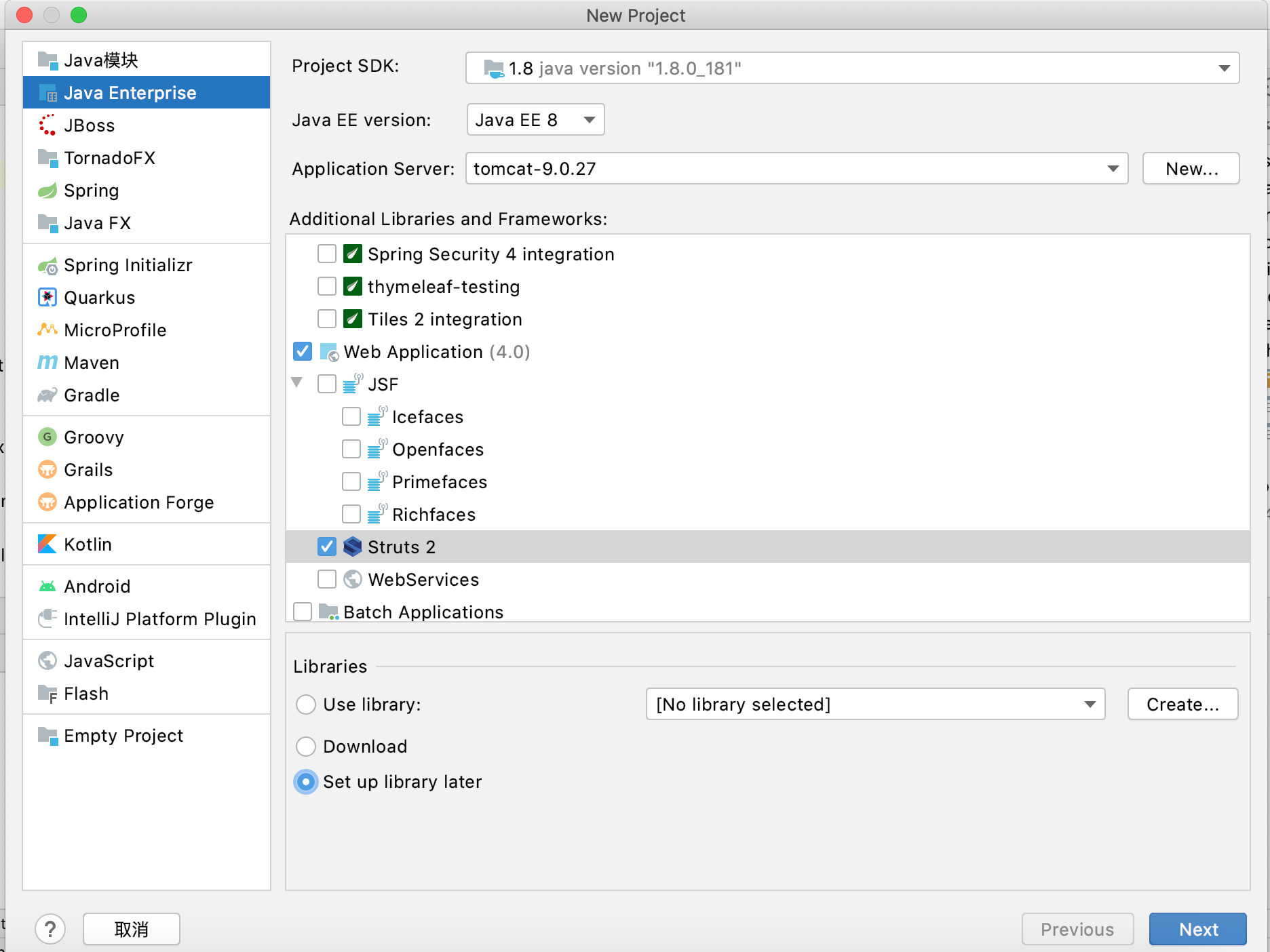
2、在web/WEB-INF下创建lib文件夹,导入下载好的jar包,然后鼠标右键点击lib,选择添加为库
3、构建如下图的项目结构:

4、编辑beans.xml,该配置文件可以创建项目的时候选择spring项目,自动创建,路径随意,一般自动创建的applicationContext.xml在web/WEB-INF文件夹下面。
对beans.xml做如下配置
1 <?xml version="1.0" encoding="UTF-8"?>
2 <beans xmlns="http://www.springframework.org/schema/beans"
3 xmlns:xsi="http://www.w3.org/2001/XMLSchema-instance"
4 xmlns:context="http://www.springframework.org/schema/context"
5 xmlns:tx="http://www.springframework.org/schema/tx"
6 xmlns:aop="http://www.springframework.org/schema/aop"
7 xsi:schemaLocation="http://www.springframework.org/schema/beans
8 http://www.springframework.org/schema/beans/spring-beans.xsd
9 http://www.springframework.org/schema/context
10 http://www.springframework.org/schema/context/spring-context-4.1.xsd
11 http://www.springframework.org/schema/cache
12 http://www.springframework.org/schema/cache/spring-cache.xsd
13 http://www.springframework.org/schema/aop
14 http://www.springframework.org/schema/aop/spring-aop.xsd
15 http://www.springframework.org/schema/tx
16 http://www.springframework.org/schema/tx/spring-tx.xsd">
17 <!--开启包扫描-->
18 <context:component-scan base-package="com.cheng.*"/>
19 <!--配置数据源,这里使用的是c3p0连接池-->
20 <bean id="dataSource" class="com.mchange.v2.c3p0.ComboPooledDataSource">
21 <property name="driverClass" value="com.mysql.cj.jdbc.Driver"/>
22 <property name="jdbcUrl" value="jdbc:mysql://localhost:3306/shape?userUnicode=true&characterEncoding=utf-8"/>
23 <property name="user" value="root"/>
24 <property name="password" value="lijc19980218"/>
25 </bean>
26 <!--配置Hibernate的会话工厂bean-->
27 <bean id="sessionFactory" class="org.springframework.orm.hibernate5.LocalSessionFactoryBean">
28 <!--注入数据源-->
29 <property name="dataSource" ref="dataSource"/>
30 <!--Hibernate配置文件位置-->
31 <property name="configLocation" value="classpath:hibernate.cfg.xml"/>
32 </bean>
33
34 <!--配置事务管理器,将事务管理交给spring-->
35 <bean id="txManger" class="org.springframework.orm.hibernate5.HibernateTransactionManager">
36 <property name="sessionFactory" ref="sessionFactory"/>
37 </bean>
38 <!--定义事务通知-->
39 <tx:advice id="txAdvice" transaction-manager="txManger">
40 <tx:attributes>
41 <!--事务方法-->
42 <tx:method name="save*" propagation="REQUIRED"/>
43 <tx:method name="add*" propagation="REQUIRED"/>
44 <!--...-->
45 </tx:attributes>
46 </tx:advice>
47
48 <!--配置AOP-->
49 <aop:config>
50 <aop:pointcut id="service" expression="execution(* com.cheng.service..*.*(..))"/>
51 <aop:advisor advice-ref="txAdvice" pointcut-ref="service"/>
52 </aop:config>
53
54 </beans>
5、配置hibernate.cfg.xml文件
 1 <?xml version='1.0' encoding='utf-8'?>

 2 <!DOCTYPE hibernate-configuration PUBLIC

 3         "-//Hibernate/Hibernate Configuration DTD//EN"

 4         "http://www.hibernate.org/dtd/hibernate-configuration-3.0.dtd">

 5 <hibernate-configuration>

 6     <session-factory>

 7         <!--映射文件-->

 8         <mapping resource="com/cheng/bean/circle.hbm.xml"/>

 9     </session-factory>

10 </hibernate-configuration>
6、配置struts.xml,让spring融合struts
 1 <?xml version="1.0" encoding="UTF-8"?>

 2

 3 <!DOCTYPE struts PUBLIC

 4         "-//Apache Software Foundation//DTD Struts Configuration 2.5//EN"

 5         "http://struts.apache.org/dtds/struts-2.5.dtd">

 6

 7 <struts>

 8     <!--配置struts为开发模式-->

 9     <constant name="struts.devMode" value="true"/>

10     <!--配置主题为简单主题-->

11     <constant name="struts.ui.theme" value="simple"/>

12     <!--配置请求后缀-->

13     <constant name="struts.action.extension" value="do"/>

14     <!--使用Spring的对象工厂-->

15     <constant name="struts.objectFactory" value="spring"/>

16     <package name="default" extends="struts-default" namespace="/">

17

18     </package>

19 </struts>
7、配置web.xml
 1 <?xml version="1.0" encoding="UTF-8"?>

 2 <web-app xmlns="http://xmlns.jcp.org/xml/ns/javaee"

 3          xmlns:xsi="http://www.w3.org/2001/XMLSchema-instance"

 4          xsi:schemaLocation="http://xmlns.jcp.org/xml/ns/javaee http://xmlns.jcp.org/xml/ns/javaee/web-app_4_0.xsd"

 5          version="4.0">

 6     <context-param>

 7         <param-name>contextConfigLocation</param-name>

 8         <param-value>classpath:beans.xml</param-value>

 9     </context-param>

10     <listener>

11         <listener-class>org.springframework.web.context.ContextLoaderListener</listener-class>

12     </listener>

13     <filter>

14         <filter-name>struts2</filter-name>

15         <filter-class>org.apache.struts2.dispatcher.filter.StrutsPrepareAndExecuteFilter</filter-class>

16     </filter>

17     <filter-mapping>

18         <filter-name>struts2</filter-name>

19         <url-pattern>/*</url-pattern>

20     </filter-mapping>

21 </web-app>
<context-param></context-param>存放的是beans.xm配置文件路径,添加监听以便于在部署Web项目时,启动和初始化Spring容器。
8、hibernate映射文件,例如:
 1 <?xml version='1.0' encoding='UTF-8'?>

 2 <!DOCTYPE hibernate-mapping PUBLIC

 3         "-//Hibernate/Hibernate Mapping DTD 3.0//EN"

 4         "http://hibernate.sourceforge.net/hibernate-mapping-3.0.dtd">

 5

 6 <hibernate-mapping>

 7     <class name="完全限定类名" table="映射数据库表名">

 8         <id name="主键">

 9             <generator class="assigned"></generator>

10         </id>

11

12         <property name="其他字段"></property>

13

14     </class>

15

16 </hibernate-mapping>
然后爽一波试试好不好使
IDEA整合Spring+Struts+Hibernate项目的更多相关文章
- 整合spring和hibernate框架
一)整合spring和hibernate框架整合要点:(1)数据源配置在Spring的配置文件中,供Spring和Hibernate框架共同使用:(2)不再需要hibernate.hbm.xml配置文 ...
- Spring+Struts+Hibernate 简介(转)
http://blog.csdn.net/slnqnd/article/details/1772910/ Struts2.0 +Hibernate 3.2 +Spring 2.0 一. ...
- Spring + Spring MVC + Hibernate项目开发集成(注解)
在自己从事的项目中都是使用xml配置的方式来进行的,随着项目的越来越大,会发现配置文件会相当的庞大,这个不利于项目的进行和后期的维护.于是考虑使用注解的方式来进行项目的开发,前些日子就抽空学习了一下. ...
- MyEclipse — Maven+Spring+Struts+Hibernate 整合 [学习笔记-1]
示例数据库test,用户信息表
- spring+struts+hibernate整合
spring整合: 1:添加配置文件和相应的spring jar包(记得一定要加上commons-logging的jar包,有坑****) 2:创建date对象,如果成功则spring的环境ok
- MyEclipse — Maven+Spring+Struts+Hibernate 整合 [学习笔记-5]
测试项目 目录结构
- MyEclipse — Maven+Spring+Struts+Hibernate 整合 [学习笔记-4]
引入Hibernate 在pom.xml中加入jar包引用 <!-- hibernate4 --> <dependency> <groupId>org.hibern ...
- MyEclipse — Maven+Spring+Struts+Hibernate 整合 [学习笔记-3]
引入Struts2 在pom.xml中加入jar包 <!-- struts2 --> <dependency> <groupId>org.apache.struts ...
- MyEclipse — Maven+Spring+Struts+Hibernate 整合 [学习笔记-2]
引入Spring 修改 pox.xml 文件 添加jar包引用 <!-- spring3 --> <dependency> <groupId>org.springf ...
- 声明式事务-整合Spring、Hibernate
编程式事务:通过编码的方式,让事务处理的代码侵入到核心的业务代码中. 声明式事务:完成了事务处理的代码和业务核心代码的解耦合.提供事务处理代码的复用性和降低维护成本. 声明式事务:aop最典型的应用. ...
随机推荐
- 莫烦tensorflow学习记录 (6)卷积神经网络 CNN (Convolutional Neural Network)
卷积 和 神经网络 莫烦大佬的原文章https://mofanpy.com/tutorials/machine-learning/tensorflow/intro-CNN/ 我的理解就是千层饼,鸡蛋烧 ...
- nginx知识点汇总
- mkfs.xfs报错 mkfs.xfs: /dev/new/new_box appears to contain an existing filesystem (ext4). mkfs.xfs: Use the -f option to force overwrite.
在设置逻辑卷文件类型时候报错 mkfs.xfs: /dev/new/new_box appears to contain an existing filesystem (ext4). mkfs.xfs ...
- NOIP 2023 三值逻辑
problem 我们定义 \(\text{T}\) 对应 \(n + 1\),\(\text{U}\) 对应 \(n + 2\),\(\text{F}\) 就是 \(-\text{T}\). 现在我们 ...
- C++常用模板
常用模板: 数学: 1. 组合数 组合数 #include<bits/stdc++.h> using namespace std; #define ll long long const l ...
- C#.NET 使用HttpWebRequest发送JSON
方法: public static string HttpPostJson(string url, string postStr, int timeOut, string charset) { Htt ...
- gradle dependencies 查找jar导入OR解决jar冲突
在gradle项目中,使用gradle dependencies先查询jar包的导入关系.然后找到导入的jar加入到项目中来.解决jar冲突等问题. 类似格式如下: annotationProcess ...
- idea如何快速找到项目中待处理的TODO注释
idea如何快速找到项目中待处理的TODO注释 idea菜单栏 View -> Tool Windows,可以打开TODO窗口
- 【译】向您介绍改版的 Visual Studio 资源管理器
随着最近 Visual Studio 的资源管理器的改进,开发人员将得到一种全新的享受!我们非常激动地宣布重新设计的 Visual Studio 资源管理器,相信我们,它将改变游戏规则. 在 Visu ...
- 08-Linux计划任务
什么是计划任务 周期性或者定时执行某个命令或者脚本. crontab 安装 yum install crontabs #安装crontabs systemctl enable crond #开机启动 ...