
TypeScript – Get Started Advanced (Work with SystemJS)
更新
我本来想 skip 掉 bundler (webpack), 感觉单侧不需要搞那么复杂, 所以用了 TypeScript 自带的 bundle (outFile) + SystemJS. 谁知道这技术早就落后 n 年了. 真的是太久没有玩前端了.
想 bundle TypeScript 用 esbuild 是最好的, 又快又简单. 看这篇 TypeScript – Work with JavaScript Library (using esbuild).
前言
之前写的 TypeScript – Get Started 太简单了, 想依赖个 library 都做不到. 于是就有了这篇进阶版本.
这已经是尽可能不依赖 bundler (e.g. Webpack) 情况下, 让它跑起来了.
TypeScript 有基本的 bundler 功能, 配上 SystemJS 就可以做到模块化单元测试了.
参考
medium – TypeScript: Start a Browser-based Project Using the System.js
Youtube – SystemJS Explaination
SystemJS 介绍
在 JavaScript – Modular 有提到过 SystemJS, 前端模块 AMD (RequireJS) > UMD (SystemJS) > ES Module
它属于现阶段最好的过渡方案.
bundle 会把多个 .js 模块变成一个, 这时 ES Module 的 import 就失效了. 所以就要有另一个模块方案. SystemJS 主要就是干这些.
另外, ES Module import 只能写 path (importmap 目前许多 browser 都不支持), 但是我们更希望写名字, 比如 import $ from 'jquery',
SystemJS 的其中一个功能就是 importmap 的 polyfill.
启动项目
mkdir play-typescript

cd play-typescript

yarn init

tsc --init
yarn add typescript --dev
HTML
<!DOCTYPE html>

<html lang="en">

  <head>

    <meta charset="UTF-8" />

    <meta http-equiv="X-UA-Compatible" content="IE=edge" />

    <meta name="viewport" content="width=device-width, initial-scale=1.0" />

    <title>Document</title>

    <!-- SystemJS -->

    <script

      src="https://cdn.jsdelivr.net/npm/systemjs@6.12.1/dist/s.min.js"

      defer

    ></script>

    <script

      src="https://cdn.jsdelivr.net/npm/systemjs@6.12.1/dist/extras/named-register.min.js"

      defer

    ></script>

    <script

      src="https://cdn.jsdelivr.net/npm/systemjs@6.12.1/dist/extras/amd.min.js"

      defer

    ></script>

    <!-- importmap -->

    <script type="systemjs-importmap">

      {

        "imports": {

          "lodash": "https://cdn.jsdelivr.net/npm/lodash@4.17.21/lodash.min.js",

          "jquery": "https://cdn.jsdelivr.net/npm/jquery@3.6.0/dist/jquery.min.js"

        }

      }

    </script>

    <!-- bundle.js -->

    <script type="systemjs-module" src="./bundle.js"></script>

  </head>

  <body>

    <h1>Hello World</h1>

  </body>

</html>
首先是 3 个 SystemJS 的 files
然后是项目依赖的 Library (jquery 和 lodash) importmap
最后是 TypeScript bundle 出来的 bundle.js
注: 都加了 defer 哦
tsconfig
{

  "compilerOptions": {

    "target": "es2016",

    "module": "System", // 关键

    "outFile": "./bundle.js", // 关键

    "esModuleInterop": true,

    "forceConsistentCasingInFileNames": true,

    "strict": true,

    "skipLibCheck": true

  }

}
关键就是 module 和 outFile
Typescript
先添加依赖 Library
yarn add jquery

yarn add @types/jquery --dev

yarn add lodash

yarn add @types/lodash --dev
jquery 和 lodash 都没有默认的 .d.ts, 所以需要另外添加 @types
module.ts
import $ from "jquery";

import _ from "lodash";

export function myFunction() {

  $("h1").css("color", "blue");

  _.forEach([1, 2, 3], (index) => $("body").append($(`<h1>${index}</h1>`)));

}
index.ts
import { myFunction } from "./module";

myFunction();
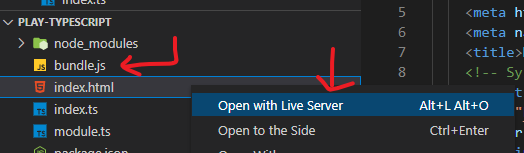
运行 tsc and Open with Live Server
运行 command tsc

然后开启 Live Server
效果

坑
TypeScript bundle 出来的 .js 会包含所有的 module, 全部都被 System.register
而最后一个 System.register 会走位 entry point. 这个是 SystemJS 的规则.
视乎没有办法指定 entry point. 这个很麻烦丫. 于是我决定不用 SystemJS, 改用 esbuild bundler.
TypeScript – Get Started Advanced (Work with SystemJS)的更多相关文章
- Dynamics AX7 materials
Dynamics AX community https://community.dynamics.com/ax Dynamics AX Wiki https://ax.help.dynamics.co ...
- [TypeScript] Using Lodash in TypeScript with Typings and SystemJS
One of the most confusing parts of getting started with TypeScript is figuring out how to use all th ...
- [TypeScript] Loading Compiled TypeScript Files in Browser with SystemJS
TypeScript outputs JavaScript, but what are you supposed to do with it? This lesson shows how to tak ...
- TypeScript & Advanced Types
TypeScript & Advanced Types https://www.typescriptlang.org/docs/handbook/advanced-types.html#typ ...
- [译]Angular2 和TypeScript -- 一次简要的预览
原文链接:https://www.infoq.com/articles/Angular2-TypeScript-High-Level-Overview 作者: Yakov Fain Posted o ...
- 转载:《TypeScript 中文入门教程》 7、模块
版权 文章转载自:https://github.com/zhongsp 建议您直接跳转到上面的网址查看最新版本. 关于术语的一点说明: 请务必注意一点,TypeScript 1.5里术语名已经发生了变 ...
- TypeScript & JavaScript
http://www.typescriptlang.org/docs/tutorial.html handbook: Basic Types Variable Declarations Interfa ...
- Angular2+typescript+webpack2(支持aot, tree shaking, lazy loading)
概述 Angular2官方推荐的应该是使用systemjs加载, 但是当我使用到它的tree shaking的时候,发现如果使用systemjs+rollup,只能打包成一个文件,然后lazy loa ...
- 如何在ASP.NET 5上搭建基于TypeScript的Angular2项目
一.前言 就在上月,公司的一个同事建议当前的前端全面改用AngularJs进行开发,而我们采用的就是ASP.NET 5项目,原本我的计划是采用TypeScript直接进行Angular2开发.所以借用 ...
- Nodejs生态圈的TypeScript+React
基于Nodejs生态圈的TypeScript+React开发入门教程 基于Nodejs生态圈的TypeScript+React开发入门教程 概述 本教程旨在为基于Nodejs npm生态圈的前端程 ...
随机推荐
- 解决方案 | tk.entry数字验证(输入框如何保证只能输入数字)
from tkinter import * root = Tk() # 创建文本框 entry = Entry(root) entry.pack() # 设置文本框只能输入数字 entry.confi ...
- SELECT *问题
1.mysql拿到一条命令,会去解析命令.优化查询,然后去存储引擎执行查找.SELECT * 语句取出表中的所有字段,会解析更多的 对象,字段,权限,属性相关,不论该字段的数据对调用的应用程序是否有用 ...
- ElementUI Dialog 结合Vue实现对话框body“二分”布局
Dialog 结合Vue实现对话框body"二分"布局 需求描述 如下图, 把对话框body内容部分,分成上下两部分,其中上部分高度根据窗口大小动态调整,如果内容过多,则出现滚动条 ...
- Python 按分类样本数占比生成并随机获取样本数据
按分类样本数占比生成并随机获取样本数据 By:授客 QQ:1033553122 开发环境 win 10 python 3.6.5 需求 已知样本分类,每种分类的样本占比数,及样本总数,需要随机获取这些 ...
- .NET 控件转图片
Windows应用开发有很多场景需要动态获取控件显示的图像,即控件转图片,用于其它界面的显示.传输图片数据流.保存为本地图片等用途. 下面分别介绍下一些实现方式以及主要使用场景 RenderTarge ...
- hbuilderx打正式包所需的私钥证书的创建方法
现在使用uniapp作为底层框架来开发app应用已经成为了很多公司的事实标准,而uniapp的开发工具hbuilderx云打包的时候,需要私钥证书和证书profile文件. 而且还需要将打包好的ipa ...
- windows server dhcp与AD域
创建两台windows server 2016 同一个网络适配器 windows1 配置window1手动网络 安装域 设置密码下一步下一步 重启 完成域安装后创建用户 配置windows1 dhcp ...
- 制约国产深度学习框架发展的根本原因 —— AI芯片的无法自主生产或量产
秉着没事就胡言乱语的宗旨,这里在接着胡说八道一下. 国外的深度学习框架如TensorFlow.pytorch.Jax打的如火如荼,按照以往惯例我们是不应该去做自主研发软件系统的,毕竟硬件不在掌握之下, ...
- pygame游戏:python版本的贪吃蛇游戏 —— Python 贪吃蛇魔改大赛
在网上找python版本的贪吃蛇游戏,看到一个Gitee Community / Python 贪吃蛇魔改大赛,感觉还不错,这里收藏下. 一等奖 1名 Snake Quest 蛇蛇闯关: jeffya ...
- WSL启动nvidia-docker镜像:报错libnvidia-ml.so.1- file exists- unknown
参考: https://blog.csdn.net/xujiamin0022016/article/details/124782913 https://zhuanlan.zhihu.com/p/361 ...