
Could not find com.android.tools.build:aapt2:3.2.1-4818971.
Could not find com.android.tools.build:aapt2:3.2.-.

Searched in the following locations:

    file:/H:/Android/android-sdk/extras/m2repository/com/android/tools/build/aapt2/3.2.-/aapt2-3.2.-.pom

    file:/H:/Android/android-sdk/extras/m2repository/com/android/tools/build/aapt2/3.2.-/aapt2-3.2.--windows.jar

    file:/H:/Android/android-sdk/extras/google/m2repository/com/android/tools/build/aapt2/3.2.-/aapt2-3.2.-.pom

    file:/H:/Android/android-sdk/extras/google/m2repository/com/android/tools/build/aapt2/3.2.-/aapt2-3.2.--windows.jar

    file:/H:/Android/android-sdk/extras/android/m2repository/com/android/tools/build/aapt2/3.2.-/aapt2-3.2.-.pom

    file:/H:/Android/android-sdk/extras/android/m2repository/com/android/tools/build/aapt2/3.2.-/aapt2-3.2.--windows.jar

    https://jcenter.bintray.com/com/android/tools/build/aapt2/3.2.1-4818971/aapt2-3.2.1-4818971.pom

    https://jcenter.bintray.com/com/android/tools/build/aapt2/3.2.1-4818971/aapt2-3.2.1-4818971-windows.jar

    https://jitpack.io/com/android/tools/build/aapt2/3.2.1-4818971/aapt2-3.2.1-4818971.pom

    https://jitpack.io/com/android/tools/build/aapt2/3.2.1-4818971/aapt2-3.2.1-4818971-windows.jar

Required by:

    project :mnvideoplayerlibrary
在project的gradle文件中,将 google()添加到jcenter()前面或后面。
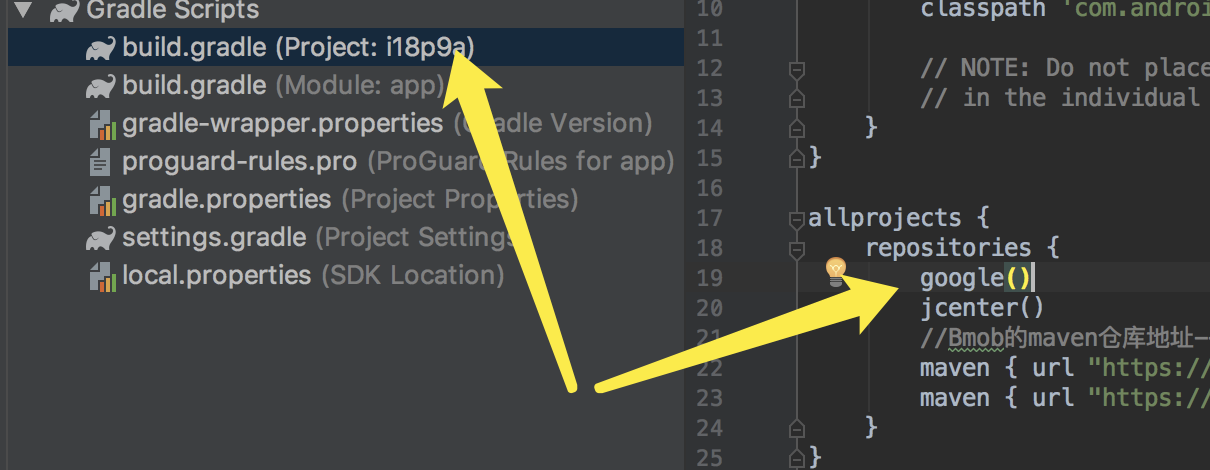
再次同步即可!
Could not find com.android.tools.build:aapt2:3.2.1-4818971.的更多相关文章
- android studio升级之后项目报错Could not find com.android.tools.build:aapt2:3.2.1-4818971
导致问题的原因为源代码根目录下的build.gradle中缺少对于google源服务器的配置(话说,貌似以前版本的都在jcenter中可以找到,最新版本的,好像没有上传到jcenter服务器了,估计是 ...
- Could not find com.android.tools.build:aapt2:3.2.0-alpha14-4748712.
https://blog.csdn.net/lx6101989/article/details/80334232 android studio 升级到了3.0 取消了apt 报了这个错 在最上级的bu ...
- 解决 Could not find com.android.tools.build:gradle 问题
今天拉同事最新的代码,编译时老是报如下错误: Error:Could not find com.android.tools.build:gradle:2.2.0.Searched in the fol ...
- Could not find com.android.tools.build:gradle:1.3.0.
* What went wrong: A problem occurred configuring project ':TZYJ_Android'.> Could not re ...
- Failed to apply plugin [id 'com.android.application'] 和 Could not find com.android.tools.build:gradle:2.XX的最正确的解决方法
发现android studio是真的可爱啊,上一秒还没问题可以build运行,下一秒就出错...好,你任性,你牛逼.. 说下今天又遇到的两个问题:Failed to apply plugin [id ...
- 解决 Could not resolve com.android.tools.build:gradle:3.1.3
android studio 升级到3.1.3后总会遇到莫名其妙的错误,前几天刚解决了项目 dependencies报错的问题. 解决android studio 升级到3.0+之后 项目 dep ...
- GET 'https://dl.google.com/dl/android/maven2/com/android/tools/build/gradle/3.1.2/gradle-3
Could not GET 'https://dl.google.com/dl/android/maven2/com/android/tools/build/gradle/3.1.2/gradle-3 ...
- Error:Could not find com.android.tools.build:gradle:3.0.0
Error:Could not find com.android.tools.build:gradle:3.0.Searched in the following locations: file ...
- Android Studio下“Error:Could not find com.android.tools.build:gradle:2.2.1”的解决方法
ref from: Android Studio下“Error:Could not find com.android.tools.build:gradle:2.2.1”的解决方法http://blog ...
随机推荐
- [转载]window.location.href的用法(动态输出跳转)
无论在静态页面还是动态输出页面中window.location.href都是不错的用了跳转的实现方案 javascript中的location.href有很多种用法,主要如下. self.loca ...
- NoSql Cassandra
我们为什么要使用NOSQL非关系数据库? 随着互联网web2.0网站的兴起,非关系型的数据库现在成了一个极其热门的新领域,非关系数据库产品的发展非常迅速.而传统的关系数据库在应付web2.0网站,特别 ...
- 如何用nginx在本地把9000端口转发到80端口上
起因看到一个用java写的轻博客,于是就兴致冲冲的试用一下.由于是lnmp的环境,Nginx占用了80端口,新博客只能用其他的端口,这里选择了9000端口,本地测试没问题.总不能访问了域名然后在加上端 ...
- Kattis之旅——Eight Queens
In the game of chess, the queen is a powerful piece. It can attack by moving any number of spaces in ...
- Git 常用命令列表
1 常用 $ git remote add origin git@github.com:yeszao/dofiler.git # 配置远程git版本库 $ git pull origin master ...
- Oracle与MySQL区别
MyBatis中模糊查询,mysql可以用concat,而oracle用"||"; 另外,mysql支持主键自增,而oracle不支持主键自增.
- thinkphp 检测验证码
/** * 检测验证码 * @param integer $id 验证码ID * @return boolean 检测结果 */function check_verify($code, $id = 1 ...
- PyTorch 中,nn 与 nn.functional 有什么区别?
作者:infiniteft链接:https://www.zhihu.com/question/66782101/answer/579393790来源:知乎著作权归作者所有.商业转载请联系作者获得授权, ...
- Linux学习笔记之CentOS7配置***SS
0x00 概述 最近安装K8S,镜像在国内不可达,只能通过科学方法获取. 0x01 安装配置Shadowsocks客户端 1.1 安装Sha.dows.ocks客户端 安装epel扩展源 采用Pyth ...
- Centos7.3+uwsgi+Nginx部署Django程序
1. 安装Python,这里我用的是阿里云的centos7.3,自带python2,所以,此步略过,具体安装Python可Google. 2. 安装uwsgi,如果安装失败的话首先,我的Python解 ...