
win7安装mysql-8.0.13-winx64
这里展示一下,由于需要安装一个版本测试一下数据,其实就是超简单的啦。
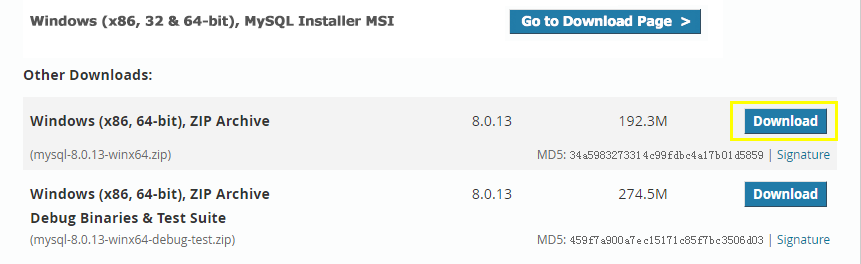
下包
注:https://dev.mysql.com/downloads/mysql/
解压与配置
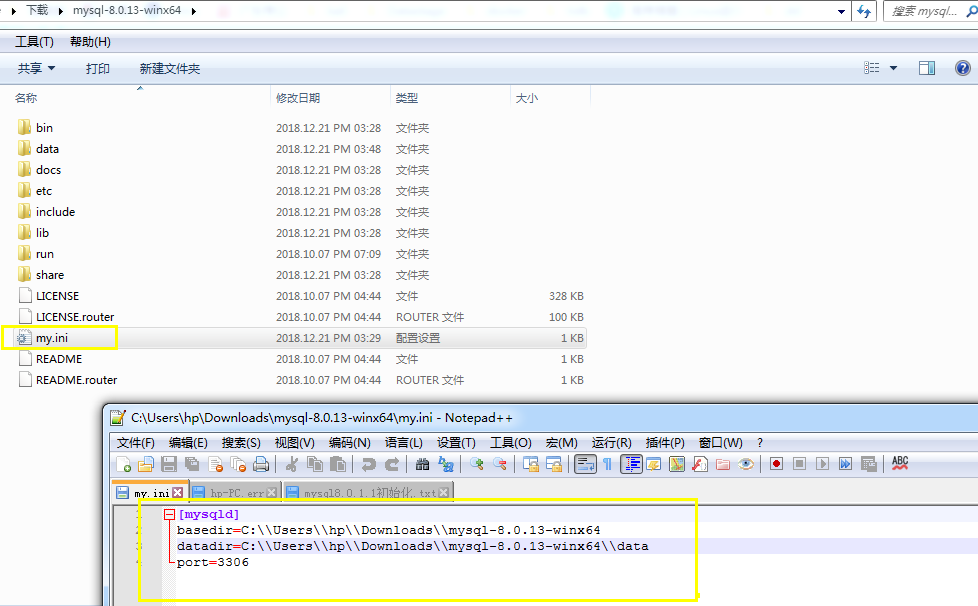
[mysqld]

basedir=C:\\Users\\hp\\Downloads\\mysql-8.0.13-winx64

datadir=C:\\Users\\hp\\Downloads\\mysql-8.0.13-winx64\\data

port=3306
初始化、安装、与启动
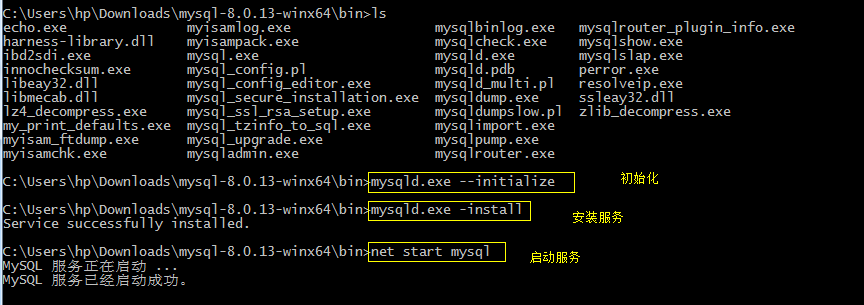
C:\Users\hp\Downloads\mysql-8.0.13-winx64\bin>mysqld.exe --initialize

C:\Users\hp\Downloads\mysql-8.0.13-winx64\bin>mysqld.exe -install

Service successfully installed.

C:\Users\hp\Downloads\mysql-8.0.13-winx64\bin>net start mysql

MySQL 服务正在启动 ...

MySQL 服务已经启动成功。
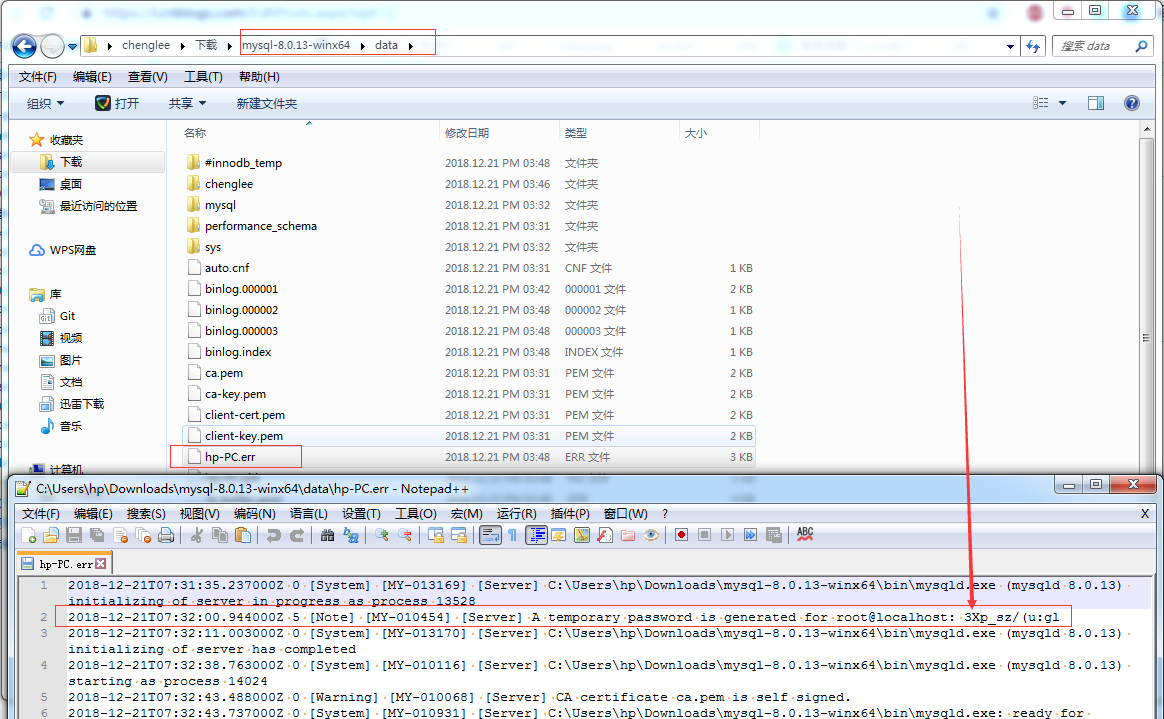
修改初始密码
注:在data目录下.err后缀名的就是日志, 日志里面记录了初始化的信息
登录与修改密码
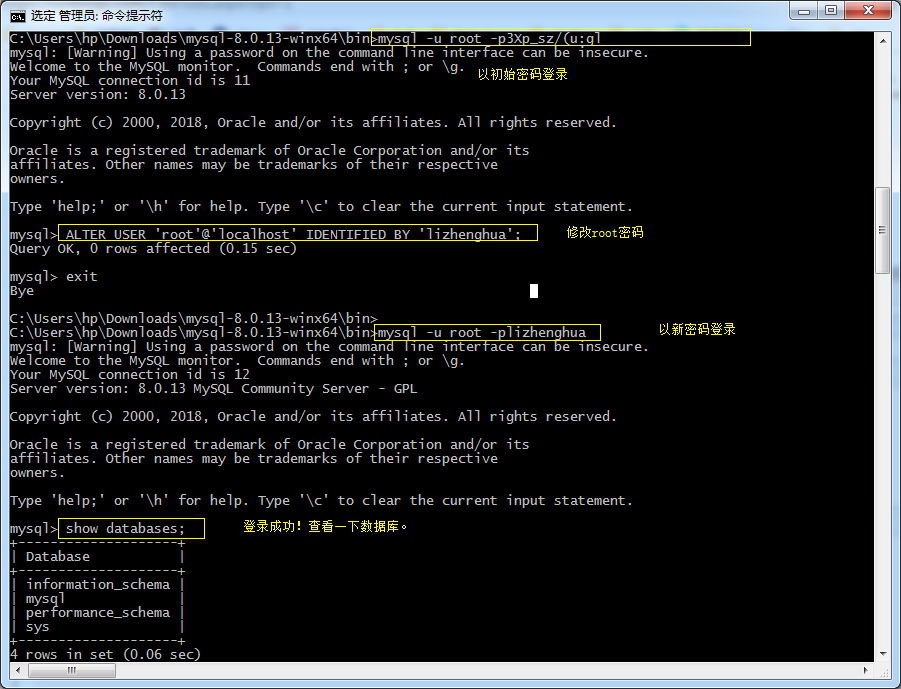
C:\Users\hp\Downloads\mysql-8.0.13-winx64\bin>mysql -u root -p3Xp_sz/(u:gl

mysql: [Warning] Using a password on the command line interface can be insecure.

Welcome to the MySQL monitor.  Commands end with ; or \g.

Your MySQL connection id is 11

Server version: 8.0.13

Copyright (c) 2000, 2018, Oracle and/or its affiliates. All rights reserved.

Oracle is a registered trademark of Oracle Corporation and/or its

affiliates. Other names may be trademarks of their respective

owners.

Type 'help;' or '\h' for help. Type '\c' to clear the current input statement.

mysql> ALTER USER 'root'@'localhost' IDENTIFIED BY 'lizhenghua';

Query OK, 0 rows affected (0.15 sec)

mysql> exit

Bye

C:\Users\hp\Downloads\mysql-8.0.13-winx64\bin>

C:\Users\hp\Downloads\mysql-8.0.13-winx64\bin>mysql -u root -plizhenghua

mysql: [Warning] Using a password on the command line interface can be insecure.

Welcome to the MySQL monitor.  Commands end with ; or \g.

Your MySQL connection id is 12

Server version: 8.0.13 MySQL Community Server - GPL

Copyright (c) 2000, 2018, Oracle and/or its affiliates. All rights reserved.

Oracle is a registered trademark of Oracle Corporation and/or its

affiliates. Other names may be trademarks of their respective

owners.

Type 'help;' or '\h' for help. Type '\c' to clear the current input statement.

mysql> show databases;

+--------------------+

| Database           |

+--------------------+

| information_schema |

| mysql              |

| performance_schema |

| sys                |

+--------------------+

4 rows in set (0.06 sec)

mysql> exit

Bye
重启服务

C:\Users\hp\Downloads\mysql-8.0.13-winx64\bin>net stop mysql

MySQL 服务正在停止.

MySQL 服务已成功停止。

C:\Users\hp\Downloads\mysql-8.0.13-winx64\bin>net start mysql

MySQL 服务正在启动 ..

MySQL 服务已经启动成功。
查看进程与端口
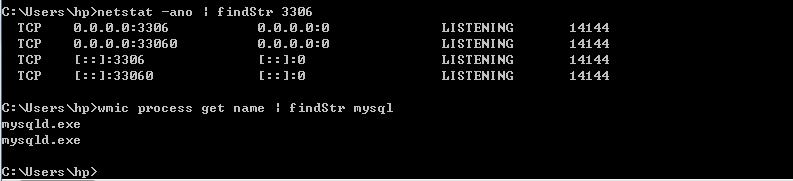
C:\Users\hp>netstat -ano | findStr 3306

  TCP    0.0.0.0:3306           0.0.0.0:0              LISTENING       14144

  TCP    0.0.0.0:33060          0.0.0.0:0              LISTENING       14144

  TCP    [::]:3306              [::]:0                 LISTENING       14144

  TCP    [::]:33060             [::]:0                 LISTENING       14144

C:\Users\hp>wmic process get name | findStr mysql

mysqld.exe

mysqld.exe

C:\Users\hp>
win7安装mysql-8.0.13-winx64的更多相关文章
- MySQL 8.0.13安装修改密码的一个问题,记录一下。
https://blog.csdn.net/qq_37350706/article/details/81707862 关于安装MySQL 8.0.13,本人就不多说了,上面这个链接讲的非常详细 请参考 ...
- centos 8及以上安装mysql 8.0
本文适用于centos 8及以上安装mysql 8.0,整体耗时20分钟内,不需要FQ 1.环境先搞好 systemctl stop firewalld //关闭防火墙 systemctl disab ...
- 在Ubuntu 18.04 安装 MySQL 8.0
在Ubuntu 18.04 安装 MySQL 8.0 ① 登入 mysql 官网,在官网中下载 deb 包,点击该链接,即可下载. https://dev.mysql.com/downloads/re ...
- windows 系统如何安装 mysql 8.0.15 数据库?
windows 系统如何安装 mysql 8.0.15 数据库? 1. 下载安装包 下载地址:https://cdn.mysql.com//Downloads/MySQL-8.0/mysql-8.0. ...
- win10 安装mysql 8.0.18 解决Navicat初次连接报错
win10 安装mysql 8.0.18 解决Navicat初次连接报错 win10 安装mysql 8.0.18-winx64 一,先去官网下载mysql 安装包 https://dev.mysql ...
- 安装Mysql 8.0的艰难体验
背景: Mysql 8.0 以后版本,在性能等方面有了很大提升,而且在自动编号.Timestamp等字段的设置上有了很方便的进步,因此在一年前即开始将原有的基于5.5版本的服务器逐渐向8.0转移.但转 ...
- CentOS 7 下安装 MySQL 8.0
前言 本篇文章主要介绍在 CentOS 7 环境下安装 MySQL 8.0. 正文 1. 配置yum源 首先在 https://dev.mysql.com/downloads/repo/yum/ 找到 ...
- Ubuntu18 安装 MySQL 8.0.22
Ubuntu18 安装 MySQL 8.0.22 网上教程都比旧,也不是第一次安装了,但依然还是花了比较多的时间,特此记录本次安装过程.因是安装完毕后回忆记录,或有错漏. 第一步: 下载 mysql ...
- 在 CentOS 7.5 64位上使用 yum 安装 MySQL 8.0
前段时间在 CentOS 7.5 64位上安装 MySQL 8.0.查了些资料,在这里记录一下详细的安装和设置步骤. 一.安装 使用yum安装MySQL之前需要先下载对应的.rpm文件,下载方法: 去 ...
- 超级简单!CentOS-8 安装 MySQL 8.0,比喝水还简单
中国人不骗中国人 果然是系统和MySQL的版本越高安装越便利了 在阿里云的 CentOS-8 比喝开水还简单的安装 MySQL 8.0,开始~ 1.以 root 用户通过 CentOS 软件包管理器来 ...
随机推荐
- 适用于 Windows 7 SP1、Windows Server 2008 R2 SP1 和 Windows Server 2008 SP2 的 .NET Framework 4.5.2 仅安全更新说明:2017 年 9 月 12 日
https://support.microsoft.com/zh-cn/help/4040960/description-of-the-security-only-update-for-the-net ...
- ODS与DW之间的关系
1.什么是数据仓库? 数据仓库是面向主题的.集成的.相对稳定的.反应历史变化的数据集合,主要用于决策支持和信息的全局共享. 时效:T+1 2.什么是ODS? ODS全称为Operational Dat ...
- MongoDB--编译文件
-j 加你的cpu核数来加速编译过程 编译出错可以自行安装所需依赖. 或者去官网直接下载编译好的二进制,直接执行. 编译好之后查看文件: mongod:mongodb的执行程序,数据库部署也用这个程序 ...
- 再次 WebAssembly 技术探讨
上次说到你可以将C代码编译成web调用的js文件,当时,很兴奋.哈哈,我也误以为是系统级别的C编程呢! 哎,今天,告诉你一个残酷的事实是,只是C语言级别,不是系统级别.因为WebAssembly目标是 ...
- MVC5 您不能调用控制器“xx”上的操作方法“xx”,因为该方法是一种泛型方法
在 MVC5 中当使用 routes.MapMvcAttributeRoutes() 添加路由属性是导致在控制器创建的泛型方法调用错误: Cannot call action method 'Sy ...
- UGUI之Image使用以及技能释放CD
顾名思义:Image就是用来显示图片的 Image中Image组件中有一个重要的熟悉:Image type
- 第二章:Opencv核心類Mat
Opecv就是做計算機視覺,就是讲图片转换成计算机所能识别的数据 Mat类中由大量的内联函数,主要就是用于提高速度. 一般类型都用rgb,存的时候用CV_8UC3.create函数一般会把原来的空间释 ...
- LeetCode8.字符串转整数(atoi)
题目链接:https://leetcode-cn.com/problems/string-to-integer-atoi/ 实现 atoi,将字符串转为整数. 该函数首先根据需要丢弃任意多的空格字符, ...
- Struts2自定义Field级别的错误提示信息
自定义Field级别的错误提示信息步骤: 在action包中新建一个以Action命名的properties文件,如:RegisterAction.properties 2. 然后在该属性文件中指定每 ...
- c# Tuple新特性
class Operation { internal Tuple<int, int> FindMinMax(List<int> list) ...