
H5+JS生成验证码
效果图如下:
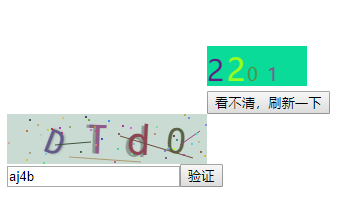
<canvas id="canvas1"  style="margin-left: 200px;"></canvas><br />

<button id="btnRefresh" style="position: relative;left: 200px;">看不清,刷新一下</button>

<script>

    /*定义函数生成随机颜色*/

    function colorRandom(){

        var r = Math.floor(Math.random()*256);

        var g = Math.floor(Math.random()*256);

        var b = Math.floor(Math.random()*256);

        return "rgb("+ r + ","+ g +","+ b+")";

    }

    /*生成随机数*/

    var canvas,context;

    function getYZ(){

        canvas = document.getElementById("canvas1");

        context = canvas.getContext('2d');

        canvas.width = 200;

        canvas.height = 100;

        context.beginPath();

        context.fillStyle = colorRandom();//显示验证码区域的背景色

        context.rect(0,55,100,40);

        context.fill();

        for(var i = 0;i<4;i++){

            context.font =( Math.random()*20+16)+"px 微软雅黑";//数字随机大小

            context.fillStyle = colorRandom();//数字颜色

            context.fillText(parseInt(Math.random()*9), 20*i,90);   //0-9的随机数

        }

    }

    /*实现*/

    window.onload = function(){

        getYZ();

        document.getElementById("btnRefresh").onclick = function(){

            getYZ();

        }

    }

</script>

<!DOCTYPE html>

<html>

<head>

    <meta charset="UTF-8">

    <title>图形验证码</title>

</head>

<body>

<div id="v_container" style="width: 200px;height: 50px;"></div>

<input type="text" id="code_input" value="" placeholder="请输入验证码"/><button id="my_button">验证</button>

</body>

<script>

    !(function(window, document) {

        function GVerify(options) { //创建一个图形验证码对象,接收options对象为参数

            this.options = { //默认options参数值

                id: "", //容器Id

                canvasId: "verifyCanvas", //canvas的ID

                width: "100", //默认canvas宽度

                height: "30", //默认canvas高度

                type: "blend", //图形验证码默认类型blend:数字字母混合类型、number:纯数字、letter:纯字母

                code: ""

            }

            if(Object.prototype.toString.call(options) == "[object Object]"){//判断传入参数类型

                for(var i in options) { //根据传入的参数,修改默认参数值

                    this.options[i] = options[i];

                }

            }else{

                this.options.id = options;

            }

            this.options.numArr = "0,1,2,3,4,5,6,7,8,9".split(",");

            this.options.letterArr = getAllLetter();

            this._init();

            this.refresh();

        }

        GVerify.prototype = {

            /**版本号**/

            version: '1.0.0',

            /**初始化方法**/

            _init: function() {

                var con = document.getElementById(this.options.id);

                var canvas = document.createElement("canvas");

                this.options.width = con.offsetWidth > 0 ? con.offsetWidth : "100";

                this.options.height = con.offsetHeight > 0 ? con.offsetHeight : "30";

                canvas.id = this.options.canvasId;

                canvas.width = this.options.width;

                canvas.height = this.options.height;

                canvas.style.cursor = "pointer";

                canvas.innerHTML = "您的浏览器版本不支持canvas";

                con.appendChild(canvas);

                var parent = this;

                canvas.onclick = function(){

                    parent.refresh();

                }

            },

            /**生成验证码**/

            refresh: function() {

                this.options.code = "";

                var canvas = document.getElementById(this.options.canvasId);

                if(canvas.getContext) {

                    var ctx = canvas.getContext('2d');

                }else{

                    return;

                }

                ctx.textBaseline = "middle";

                ctx.fillStyle = randomColor(180, 240);

                ctx.fillRect(0, 0, this.options.width, this.options.height);

                if(this.options.type == "blend") { //判断验证码类型

                    var txtArr = this.options.numArr.concat(this.options.letterArr);

                } else if(this.options.type == "number") {

                    var txtArr = this.options.numArr;

                } else {

                    var txtArr = this.options.letterArr;

                }

                for(var i = 1; i <= 4; i++) {

                    var txt = txtArr[randomNum(0, txtArr.length)];

                    this.options.code += txt;

                    ctx.font = randomNum(this.options.height/2, this.options.height) + 'px SimHei'; //随机生成字体大小

                    ctx.fillStyle = randomColor(50, 160); //随机生成字体颜色

                    ctx.shadowOffsetX = randomNum(-3, 3);

                    ctx.shadowOffsetY = randomNum(-3, 3);

                    ctx.shadowBlur = randomNum(-3, 3);

                    ctx.shadowColor = "rgba(0, 0, 0, 0.3)";

                    var x = this.options.width / 5 * i;

                    var y = this.options.height / 2;

                    var deg = randomNum(-30, 30);

                    /**设置旋转角度和坐标原点**/

                    ctx.translate(x, y);

                    ctx.rotate(deg * Math.PI / 180);

                    ctx.fillText(txt, 0, 0);

                    /**恢复旋转角度和坐标原点**/

                    ctx.rotate(-deg * Math.PI / 180);

                    ctx.translate(-x, -y);

                }

                /**绘制干扰线**/

                for(var i = 0; i < 4; i++) {

                    ctx.strokeStyle = randomColor(40, 180);

                    ctx.beginPath();

                    ctx.moveTo(randomNum(0, this.options.width), randomNum(0, this.options.height));

                    ctx.lineTo(randomNum(0, this.options.width), randomNum(0, this.options.height));

                    ctx.stroke();

                }

                /**绘制干扰点**/

                for(var i = 0; i < this.options.width/4; i++) {

                    ctx.fillStyle = randomColor(0, 255);

                    ctx.beginPath();

                    ctx.arc(randomNum(0, this.options.width), randomNum(0, this.options.height), 1, 0, 2 * Math.PI);

                    ctx.fill();

                }

            },

            /**验证验证码**/

            validate: function(code){

                var code = code.toLowerCase();

                var v_code = this.options.code.toLowerCase();

                console.log(v_code);

                if(code == v_code){

                    return true;

                }else{

                    this.refresh();

                    return false;

                }

            }

        }

        /**生成字母数组**/

        function getAllLetter() {

            var letterStr = "a,b,c,d,e,f,g,h,i,j,k,l,m,n,p,q,r,s,t,u,v,w,x,y,z,A,B,C,D,E,F,G,H,I,J,K,L,M,N,O,P,Q,R,S,T,U,V,W,X,Y,Z";

            return letterStr.split(",");

        }

        /**生成一个随机数**/

        function randomNum(min, max) {

            return Math.floor(Math.random() * (max - min) + min);

        }

        /**生成一个随机色**/

        function randomColor(min, max) {

            var r = randomNum(min, max);

            var g = randomNum(min, max);

            var b = randomNum(min, max);

            return "rgb(" + r + "," + g + "," + b + ")";

        }

        window.GVerify = GVerify;

    })(window, document);

</script>

<script>

    var verifyCode = new GVerify("v_container");

    document.getElementById("my_button").onclick = function(){

        var res = verifyCode.validate(document.getElementById("code_input").value);

        if(res){

            alert("验证正确");

        }else{

            alert("验证码错误");

        }

    }

</script>

</html>
H5+JS生成验证码的更多相关文章
- node.js生成验证码及图片
示例代码: var svgCaptcha = require('svg-captcha'); var fs = require('fs'); var codeConfig = { size: 5,// ...
- 纯js生成验证码
实现代码: <html xmlns="http://www.w3.org/1999/xhtml"> <head runat="server"& ...
- js生成验证码并检验
<html> <head> <title>验证码</title> <style type="text/css"> #co ...
- js生成验证码并验证
前台代码: <%@ Page Language="C#" AutoEventWireup="true" CodeFile="Default.as ...
- js生成验证码并且判断
<style type="text/css"> .code { font-family: Arial; ...
- js生成验证码并且验证
<html> <head> <title>验证码</title> <style type="text/css"> #co ...
- js生成验证码并验证的登录页面
<!Doctype html> <html> <head> <meta charset="utf-8"/> <title> ...
- js生成验证码
<!DOCTYPE html PUBLIC "-//W3C//DTD XHTML 1.0 Transitional//EN" "http://www.w3.org/ ...
- js生成[n,m]的随机数
一.预备知识 Math.ceil(); //向上取整. Math.floor(); //向下取整. Math.round(); //四舍五入. Math.random(); //0.0 ~ 1 ...
随机推荐
- Java 基础 常用API ( 正则表达式,Date类,DateFormat类,Calendar类 )
正则表达式 正则表达式的概念 正则表达式(英语:Regular Expression,在代码中常简写为regex). 正则表达式是一个字符串,使用单个字符串来描述.用来定义匹配规则,匹配一系列符合某个 ...
- 对k8s service的一些理解
服务service service是一个抽象概念,定义了一个服务的多个pod逻辑合集和访问pod的策略,一般把service称为微服务 举个例子一个a服务运行3个pod,b服务怎么访问a服务的pod, ...
- zabbix 监控 ElasticSearch
ElasticSearch 可以直接使用zabbix官方的模板 模板地址: https://github.com/mkhpalm/elastizabbix 通过zabbix server 直接监控 ...
- U盘复制文件到最后5秒会卡住怎么办解决
现在的U盘容量已经非常大了,一般都有16G以上,为了能放单文件大于4G的数据大多数时候我们都是把U盘格式化为ntfs格式的,所以会出现不管是大文件还是小文件,当你往U盘里复制文件或者使用发送到U盘功能 ...
- Kotlin 范型约束
官方的示意及其简约,该说的一概没说 我在这里给大家一个完整的例子 //test.kt fun <T> cloneWhenGreater(list: List<T>, thres ...
- Dart- move html element
今天给出一个例程,像是个小游戏!哈哈 一 html //anagram.html <!DOCTYPE HTML> <html> <head> <title&g ...
- UVALi 3263 That Nice Euler Circuit(几何)
That Nice Euler Circuit [题目链接]That Nice Euler Circuit [题目类型]几何 &题解: 蓝书P260 要用欧拉定理:V+F=E+2 V是顶点数; ...
- 关于hibernate一级缓冲和二级缓冲
关于一级缓冲和二级缓冲的内容,在面试的时候被问起来了,回答的不是很满意,所以有专门找了些有关这方面的文章加以理解 出自:http://blog.csdn.net/zdp072/article/deta ...
- ob
可以利用ob_get_contens生成静态页面,应用场景 后台生成商品的时候 可以生成对应的前台页面,其他页面直接调用. $result = $goods->create(); if ($re ...
- mongodb中直接根据某个字段更新另外一个字段值
表:tblCard 要更新的字段:tPAFlow 值字段: pFlow 过滤 条件:{"lCycle":2} db.tblCard.find({"lCycle" ...