
Pthon Matplotlib 画图
一、普通绘图
 import matplotlib.pyplot as plt

 import numpy as np

 # 绘制普通图像

 x = np.linspace(-1, 1, 50)

 y1 = 2 * x + 1

 y2 = x**2

 plt.figure()

 # 在绘制时设置lable, 逗号是必须的

 l1, = plt.plot(x, y1, label = 'line')

 l2, = plt.plot(x, y2, label = 'parabola', color = 'red', linewidth = 1.0, linestyle = '--')

 # 设置坐标轴的取值范围

 plt.xlim((-1, 1))

 plt.ylim((0, 2))

 # 设置坐标轴的lable

 plt.xlabel('X axis')

 plt.ylabel('Y axis')

 # 设置x坐标轴刻度, 原来为0.25, 修改后为0.5

 plt.xticks(np.linspace(-1, 1, 5))

 # 设置y坐标轴刻度及标签, $$是设置字体

 plt.yticks([0, 0.5], ['$minimum$', 'normal'])

 # 设置legend

 plt.legend(handles = [l1, l2,], labels = ['a', 'b'], loc = 'best')

 plt.show()
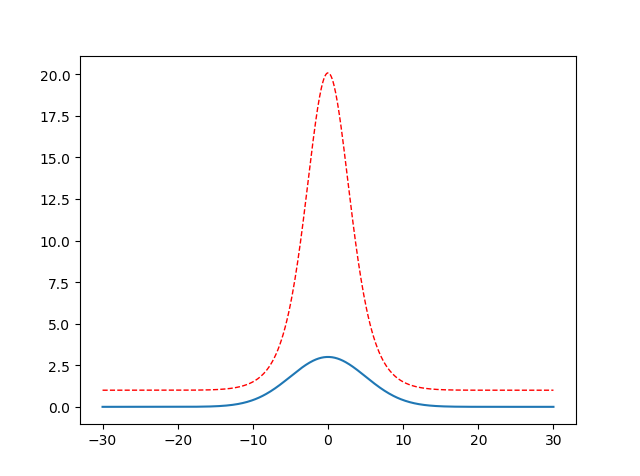
二、自定义单峰函数
 import math

 import numpy as np

 import matplotlib.pyplot as plt

 x = np.linspace(-30, 30, 500)

 y = []

 y2 = []

 a = 3

 b = 0

 c = 25

 for i in x :

     # 类似高斯函数,a 代表峰值, b对称轴位置,c方差

     temp = a * math.exp(-(i-b)**2 / (2 * c))

     y.append(temp)

     #对上一个单峰函数值进行放大处理,红色虚线部分

     y2.append(math.exp(temp))

 plt.figure()

 l1= plt.plot(x, y, label = 'line')

 l2, = plt.plot(x, y2, label = 'parabola', color = 'red', linewidth = 1.0, linestyle = '--')

 plt.show()
三、画subplot子图(2 x 2 为例)
     import matplotlib.pyplot as plt

     t=np.arange(0.0,2.0,0.1)

     s=np.sin(t*np.pi)

     plt.subplot(2,2,1) #要生成两行两列,这是第一个图plt.subplot('行','列','编号')

     plt.plot(t,s,'b--')

     plt.ylabel('y1')

     plt.subplot(2,2,2) #两行两列,这是第二个图

     plt.plot(2*t,s,'r--')

     plt.ylabel('y2')

     plt.subplot(2,2,3)#两行两列,这是第三个图

     plt.plot(3*t,s,'m--')

     plt.subplot(2,2,4)#两行两列,这是第四个图

     plt.plot(4*t,s,'k--')

     plt.show()

点图和线图
fig = plt.figure()

ax = fig.add_subplot(221, projection='3d')

ax.plot(array_normal[:,0],array_normal[:,1],array_normal[:,2])

plt.subplot(2,2,2)

plt.plot(np.arange(0,sample_len,1), signal_normal)

normal_pow = array_normal[:,2]

ax3 = fig.add_subplot(223, projection='3d')

ax3.plot(array_anomaly[:,0],array_anomaly[:,1],array_anomaly[:,2])

anomaly_pow = array_anomaly[:,2]

plt.subplot(2,2,4)

plt.scatter(np.arange(0,sample_len,1), signal_anomaly)

plt.show()

【Reference】
[1] https://www.jianshu.com/p/de223a79217a
[2] https://www.cnblogs.com/xingshansi/p/6777945.html
Pthon Matplotlib 画图的更多相关文章
- python matplotlib画图产生的Type 3 fonts字体没有嵌入问题
ScholarOne's 对python matplotlib画图产生的Type 3 fonts字体不兼容,更改措施: 在程序中添加如下语句 import matplotlib matplotlib. ...
- 使用python中的matplotlib 画图,show后关闭窗口,继续运行命令
使用python中的matplotlib 画图,show后关闭窗口,继续运行命令 在用python中的matplotlib 画图时,show()函数总是要放在最后,且它阻止命令继续往下运行,直到1.0 ...
- matplotlib 画图
matplotlib 画图 1. 画曲线图 Tompson = np.array([0, 0, 0, 0, 0.011, 0.051, 0.15, 0.251, 0.35, 0.44, 0 ...
- matplotlib画图
matplotlib画图 import numpy as np import matplotlib.pyplot as plt x1=[20,33,51,79,101,121,132,145,162, ...
- python3 使用matplotlib画图出现中文乱码的情况
python3使用matplotlib画图,因python3默认使用中unicode编码,所以在写代码时不再需要写 plt.xlabel(u’人数’),而是直接写plt.xlabel(‘人数’). 注 ...
- matplotlib画图实例:pyplot、pylab模块及作图參数
http://blog.csdn.net/pipisorry/article/details/40005163 Matplotlib.pyplot画图实例 {使用pyplot模块} matplotli ...
- python使用matplotlib画图
python使用matplotlib画图 matplotlib库是python最著名的画图库.它提供了一整套和matlab类似的命令API.十分适合交互式地进行制图. 先介绍了怎样使用matplotl ...
- matplotlib画图报错This figure includes Axes that are not compatible with tight_layout, so results might be incorrect.
之前用以下代码将实验结果用matplotlib show出来 plt.plot(np.arange(len(aver_reward_list)), aver_reward_list) plt.ylab ...
- matplotlib画图出现乱码情况
python3使用matplotlib画图,因python3默认使用中unicode编码,所以在写代码时不再需要写 plt.xlabel(u’人数’),而是直接写plt.xlabel(‘人数’). 注 ...
随机推荐
- Go语言之高级篇beego框架之请求数据处理
1.Controller中数据参数处理 获取参数:我们经常需要获取用户传递的数据,包括 Get.POST 等方式的请求,beego 里面会自动解析这些数据,你可以通过如下方式获取数据: GetStri ...
- SpringMVC项目配置欢迎页面为index.html
一.问题 在web.xml中添加如下配置无效 <welcome-file-list> <welcome-file>index.html</welcome-file> ...
- 《Unix&Linux大学教程》学习笔记四:标准I/O 与 过滤器
1:标准IO Unix中的标准IO主要包括:标准输入.标准输出(正常输出).标准错误(异常信息) 2:重定向输出 内容 > 文件名 :将内容输出到文件,并且覆盖文件原来内容:文件不存在则新建 内 ...
- .NET 同步与异步之锁(ReaderWriterLockSlim)(八)
本随笔续接:.NET 同步与异步之锁(Lock.Monitor)(七) 由于锁 ( lock 和 Monitor ) 是线程独占式访问的,所以其对性能的影响还是蛮大的,那有没有一种方式可是实现:允许多 ...
- 基于Centos搭建 Discuz 论坛
系统要求:CentOS 6.8 64 位操作系统 搭建 Discuz 论坛 准备 LAMP 环境 LAMP 是 Linux.Apache.MySQL 和 PHP 的缩写,是 Discuz 论坛系统依赖 ...
- Swift 模式匹配
前言 在 Swift 中模式匹配是个重要的概念. 最常用的模式匹配是 switch 语法. 模式匹配非常灵活,在使用 switch 进行一轮模式匹配时,不需要所有的 case 都是同一种风格. let ...
- Atitit mysql数据库统计信息
Atitit mysql数据库统计信息 SELECT table_name, table_rows, index_length, data_length, auto_increment, create ...
- Socket网络编程--小小网盘程序(1)
这个系列是准备讲基于Linux Socket进行文件传输.简单的文件传输就是客户端可以上传文件,可以从服务器端下载文件.就这么两个功能如果再加上身份验证,就成了FTP服务器了,如果对用户的操作再加上一 ...
- 每帧创建一个item
-- 加载列表测试 function UIBagController:onLoadTest() self.goodsprop = DB.getTable("goodsprop"); ...
- lua -- 物品的配置文件,表的形式保存
do local goodsprop= { RECORDS={ []={ BuyGold= , RecoverPrice= , Value= , Param2= , UseTimesPerDay= , ...