
11gr2 RAC安装INS-35354问题一例
转自:http://www.askmaclean.com/archives/11gr2-rac安装ins-35354问题一例.html
今天在安装一套11.2.0.2 RAC数据库时出现了INS-35354的问题: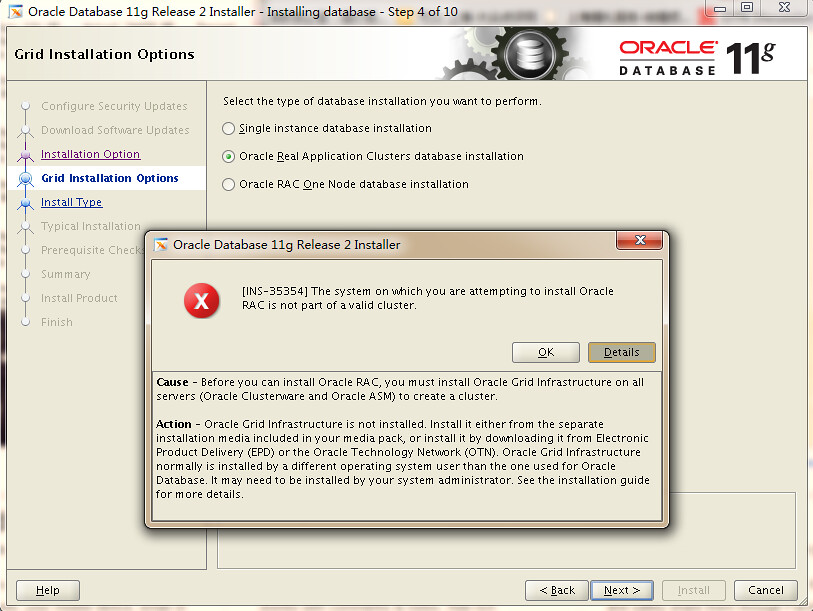
因为之前已经成功安装了11.2.0.2的GI,而且Cluster的一切状态都正常,出现这错误都少有点意外:
[grid@vrh1 ~]$ crsctl check crs

CRS-4638: Oracle High Availability Services is online

CRS-4537: Cluster Ready Services is online

CRS-4529: Cluster Synchronization Services is online

CRS-4533: Event Manager is online
去MOS搜了一圈,发现有可能是oraInventory中的inventory.xml更新不正确导致的:
Applies to:

Oracle Server - Enterprise Edition - Version: 11.2.0.1 to 11.2.0.2 - Release: 11.2 to 11.2

Information in this document applies to any platform.

Symptoms

Installing 11gR2 database software in a Grid Infrastrsucture environment fails with the error INS-35354:

The system on which you are attempting to install Oracle RAC is not part of a valid cluster.

Grid Infrastructure (Oracle Clusterware) is running on all nodes in the cluster which can be verified with:

crsctl check crs

Changes

This is a new install.

Cause

As per 11gR2 documentation the error description is:

INS-35354: The system on which you are attempting to install Oracle RAC is not part of a valid cluster.

Cause: Prior to installing Oracle RAC, you must create a valid cluster.

This is done by deploying Grid Infrastructure software,

which will allow configuration of Oracle Clusterware and Automatic Storage Management.

However, the problem at hand may be that the central inventory is missing the "CRS=true" flag

(for the Grid Infrastructure Home).

<inventory.xml>

-------------

<HOME_LIST>

<HOME NAME="Ora11g_gridinfrahome1" LOC="/u01/grid" TYPE="O" IDX="1">

<NODE_LIST>

<NODE NAME="node1"/>

<NODE NAME="node2"/>

</NODE_LIST>

 -------------

From the inventory.xml, we see that the HOME NAME line is missing the CRS="true" flag.

The error INS-35354 will occur when the central inventory entry for the Grid Infrastructure

home is missing the flag that identifies it as CRS-type home.

Solution

Use the -updateNodeList option for the installer command to fix the the inventory.

The full syntax is:

./runInstaller -updateNodeList "CLUSTER_NODES={node1,node2}"

ORACLE_HOME="" ORACLE_HOME_NAME="" LOCAL_NODE="Node_Name" CRS=[true|false]

Execute the command on any node in the cluster.

Examples:

For a two-node RAC cluster on UNIX:

Node1:

cd /u01/grid/oui/bin

./runInstaller -updateNodeList "CLUSTER_NODES={node1,node2}" ORACLE_HOME="/u01/crs"

ORACLE_HOME_NAME="GI_11201" LOCAL_NODE="node1" CRS=true

For a 2-node RAC cluster on Windows:

Node 1:

cd e:\app\11.2.0\grid\oui\bin

e:\app\11.2.0\grid\oui\bin\setup -updateNodeList "CLUSTER_NODES={RACNODE1,RACNODE2}"

ORACLE_HOME="e:\app\11.2.0\grid" ORACLE_HOME_NAME="OraCrs11g_home1" LOCAL_NODE="RACNODE1" CRS=true
我环境中的inventory.xml内容如下:
[grid@vrh1 ContentsXML]$ cat inventory.xml

<?xml version="1.0" standalone="yes" ?>

<!-- Copyright (c) 1999, 2010, Oracle. All rights reserved. -->

<!-- Do not modify the contents of this file by hand. -->

<INVENTORY>

<VERSION_INFO>

   <SAVED_WITH>11.2.0.2.0</SAVED_WITH>

   <MINIMUM_VER>2.1.0.6.0</MINIMUM_VER>

</VERSION_INFO>

<HOME_LIST>

<HOME NAME="Ora11g_gridinfrahome1" LOC="/g01/11.2.0/grid" TYPE="O" IDX="1" >

   <NODE_LIST>

      <NODE NAME="vrh1"/>

      <NODE NAME="vrh2"/>

   </NODE_LIST>

</HOME>

</HOME_LIST>

</INVENTORY>
显然是在<HOME NAME这里缺少了CRS=”true”的标志,导致OUI安装界面在检测时认为该节点没有安装GI。
解决方案其实很简单只要加入CRS=”true”在重启runInstaller即可,不需要如文档中介绍的那样使用runInstaller -updateNodeList的复杂命令组合。
[grid@vrh1 ContentsXML]$ cat /g01/oraInventory/ContentsXML/inventory.xml

<?xml version="1.0" standalone="yes" ?>

<!-- Copyright (c) 1999, 2010, Oracle. All rights reserved. -->

<!-- Do not modify the contents of this file by hand. -->

<INVENTORY>

<VERSION_INFO>

   <SAVED_WITH>11.2.0.2.0</SAVED_WITH>

   <MINIMUM_VER>2.1.0.6.0</MINIMUM_VER>

</VERSION_INFO>

<HOME_LIST>

<HOME NAME="Ora11g_gridinfrahome1" LOC="/g01/11.2.0/grid" TYPE="O" IDX="1" CRS="true">

   <NODE_LIST>

      <NODE NAME="vrh1"/>

      <NODE NAME="vrh2"/>

   </NODE_LIST>

</HOME>

</HOME_LIST>

</INVENTORY>
如上修改后问题解决,安装界面正常: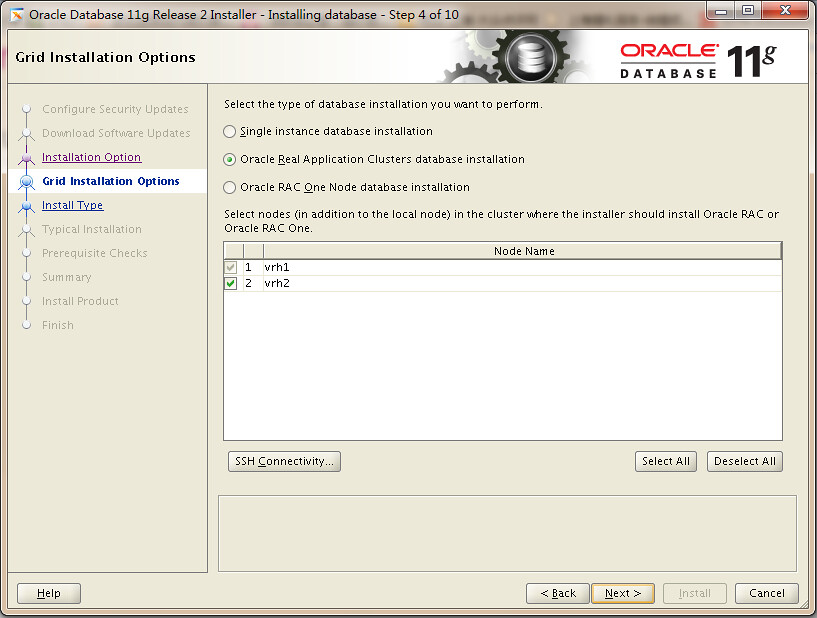
相关文章 | Related posts:
11gr2 RAC安装INS-35354问题一例的更多相关文章
- Linux平台 Oracle 11gR2 RAC安装Part1:准备工作
一.实施前期准备工作 1.1 服务器安装操作系统 1.2 Oracle安装介质 1.3 共享存储规划 1.4 网络规范分配 二.安装前期准备工作 2.1 各节点系统时间校对 2.2 各节点关闭防火墙和 ...
- Linux平台 Oracle 11gR2 RAC安装Part2:GI安装
三.GI(Grid Infrastructure)安装 3.1 解压GI的安装包 3.2 安装配置Xmanager软件 3.3 共享存储LUN的赋权 3.4 使用Xmanager图形化界面安装GI 3 ...
- Linux平台 Oracle 11gR2 RAC安装Part3:DB安装
四.DB(Database)安装 4.1 解压DB的安装包 4.2 DB软件安装 4.3 ASMCA创建磁盘组 4.4 DBCA建库 4.5 验证crsctl的状态 Linux平台 Oracle 11 ...
- oracle 11gR2 RAC安装手册
--oracle 11gR2 RAC安装手册 -----------------------------2013/10/29 参考三思笔记 http://files.cnblogs.com/jackh ...
- Oracle 11gR2 RAC 安装配置
1. 简介 Oracle RAC,全称real application clusters,译为"实时应用集群", 是Oracle新版数据库中采用的一项新技术,是高可用性的一种, ...
- 一步一步搭建11gR2 rac+dg之安装rac出现问题解决(六)【转】
一步一步在RHEL6.5+VMware Workstation 10上搭建 oracle 11gR2 rac + dg 之安装rac出现的问题 (六) 本文转自 一步一步搭建11gR2 rac+dg之 ...
- 【Oracle RAC】Linux系统Oracle11gR2 RAC安装配置详细过程V3.1(图文并茂)
[Oracle RAC]Linux系统Oracle11gR2 RAC安装配置详细过程V3.1(图文并茂) 2 Oracle11gR2 RAC数据库安装准备工作2.1 安装环境介绍2.2 数据库安装软件 ...
- 【Oracle RAC】Linux系统Oracle12c RAC安装配置详细记录过程V2.0(图文并茂)
[Oracle RAC]Linux系统Oracle12c RAC安装配置详细过程V2.0(图文并茂) 2 Oracle12c RAC数据库安装准备工作2.1 安装环境介绍2.2 数据库安装软件下载3 ...
- Oracle 11gR2 RAC 新特性说明
最近接触了一下Oracle 11g R2 的RAC,发现变化很大. 所以在自己动手做实验之前还是先研究下它的新特性比较好. 一. 官网介绍 先看一下Oracle 的官网文档里对RAC 新特性的一 ...
随机推荐
- POJ - 3080 Blue Jeans 【KMP+暴力】(最大公共字串)
<题目链接> 题目大意: 就是求k个长度为60的字符串的最长连续公共子串,2<=k<=10 限制条件: 1. 最长公共串长度小于3输出 no significant co ...
- Linux文本处理三剑客之grep
简介 grep命令,用于在一个文本文件中或者从STDIN中,根据用户给出的模式(pattern)过滤出所需要的信息. grep以及三剑客中的另外两个工具sed和awk都是基于行处理的,它们会一行行读入 ...
- SpringMVC中ModelAndView对象与“视图解析器”
摘要: spring MVC这个环境中,Spring MVC会依据controller(或者你叫它handler)中处理方法的返回值,进行解析,解析之后提供一个视图,作为响应. 标注了@Control ...
- MyBatis之ResultMap标签
ResultMap标签基本作用:建立SQL查询结果字段与实体属性的映射关系信息 在深入ResultMap标签前,我们需要了解从SQL查询结果集到JavaBean或POJO实体的过程. 1. 通过JDB ...
- golang 反向代理
服务器 package main import ( "bytes" "encoding/base64" "encoding/json" &q ...
- 每日踩坑 2019-04-08 VS2015未能找到路径“…\bin\roslyn\csc.exe”的解决方案
使用 Nuget 安装 Microsoft.CodeDom.Providers.DotNetCompilerPlatform 包即可. VS2017都是用 roslyn 编译, VS2015原本的编译 ...
- 转载:Gitlab备份和恢复操作记录
转载:Gitlab备份和恢复操作记录 包含了备份和数据恢复的操作记录,实验可行 前面已经介绍了Gitlab环境部署记录,这里简单说下Gitlab的备份和恢复操作记录: 1)Gitlab的备份目录路径设 ...
- python:函数的高级特性
很多语言中,都允许把函数本身做为参数,传递给其它参数:即所谓的高阶函数.python中也有类似特性: 一.map/reduce.filter.sorted hadoop里的map-reduce思想在p ...
- C#高级编程----错误和异常的总结
错误和异常的总结 因为总结吗,,可能概念啥的比较多,大家要学着适应. 首先是C#中的异常用老处理系统级和用户级的错误状态,是一种结构化,统一的类型安全的处理机制. 因为鄙人开始想走C++的道路,所以搞 ...
- yum离线安装rpm包
CentOS利用yum下载好rpm包,并离线安装 1.联网安装好rpm包,并将下载好的包备好 #yum install --downloadonly --downloaddir=/home/sam ...