
centos7数据库连接使用127.0.0.1报permission denied,使用localhost报No such file or directory
安装lamp环境后,测试数据库连接。
当host使用127.0.0.1时,报错:(HY000/2002): Permission denied。
把host换成localhost后,又报错:SQLSTATE[HY000] [2002] No such file or directory。
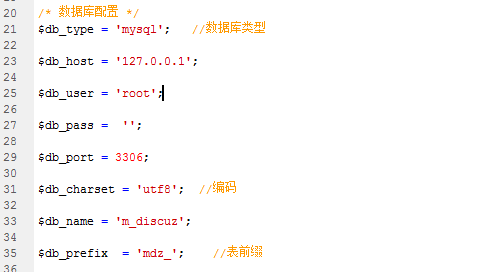
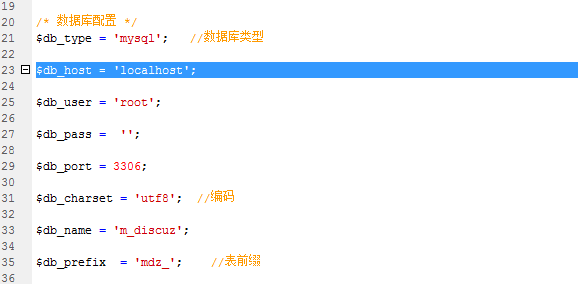
最后发现是因为没有关闭selinux,通常情况下载安装完CentOS7后,默认情况下SElinux是启用状态。
[root@rdo ~]# sestatus

SELinux status:                 enabled

SELinuxfs mount:                /sys/fs/selinux

SELinux root directory:         /etc/selinux

Loaded policy name:             targeted

Current mode:                   enforcing

Mode from config file:          enforcing

Policy MLS status:              enabled

Policy deny_unknown status:     allowed

Max kernel policy version:      28
如果要临时关闭,可以执行:
setenforce 0此时状态如下:
[root@rdo ~]# sestatus

SELinux status:                 enabled

SELinuxfs mount:                /sys/fs/selinux

SELinux root directory:         /etc/selinux

Loaded policy name:             targeted

Current mode:                   permissive

Mode from config file:          enforcing

Policy MLS status:              enabled

Policy deny_unknown status:     allowed

Max kernel policy version:      28
如果要永久关闭,可以修改配置文件/etc/selinux/config,将SELINU置为disabled。
[root@rdo ~]# cat /etc/selinux/config

# This file controls the state of SELinux on the system.

# SELINUX= can take one of these three values:

#     enforcing - SELinux security policy is enforced.

#     permissive - SELinux prints warnings instead of enforcing.

#     disabled - No SELinux policy is loaded.

#SELINUX=enforcing

SELINUX=disabled

# SELINUXTYPE= can take one of three two values:

#     targeted - Targeted processes are protected,

#     minimum - Modification of targeted policy. Only selected processes are protected.

#     mls - Multi Level Security protection.

SELINUXTYPE=targeted
修改该配置文件也可以执行下面的命令来完成:
sed -i '/SELINUX/s/enforcing/disabled/' /etc/selinux/config
修改完成后,保存重启,重启后状态如下:
[root@rdo ~]# sestatus

SELinux status:                 disabled
文章本人亲测有效。
文章转载:https://blog.csdn.net/eclothy/article/details/48265445
centos7数据库连接使用127.0.0.1报permission denied,使用localhost报No such file or directory的更多相关文章
- 解决nginx报错:nginx: [emerg] bind() to 0.0.0.0:8088 failed (13: Permission denied)
报错描述: nginx: [emerg] bind() to 0.0.0.0:8088 failed (13: Permission denied) 通过ansible远程给主机更换端口并重新启动ng ...
- Ubuntu nginx: [emerg] bind() to 0.0.0.0:80 failed (13: Permission denied)
在Ubuntu 12中启动刚安装好的Nginx,报错: nginx: [emerg] bind() to 0.0.0.0:80 failed (13: Permission denied) 原因如下: ...
- Starting nginx: nginx: [emerg] bind() to 0.0.0.0:8088 failed (13: Permission denied) nginx 启动失败
Starting nginx: nginx: [emerg] bind() to 0.0.0.0:8088 failed (13: Permission denied) nginx 启动失败 ...
- 解决Mac nginx问题 [emerg] 54933#0: bind() to 0.0.0.0:80 failed (13: Permission denied)
brew services restart nginx Stopping nginx... (might take a while) ==> Successfully stopped nginx ...
- TP连接数据库报错:SQLSTATE[HY000] [2002] No such file or directory
连接数据库报错:“SQLSTATE[HY000] [2002] No such file or directory”. 出现这个问题的原因是PDO无法找到mysql.sock或者mysqld.soc ...
- git push是报Permission denied (publickey)错误解决
今天晕了半天了,搞了个git工程到github上,以为很简单,因为之前也弄过,那知道搞了大半天都搞不好,一直报如下错误 D:\javawork\ee-0.0.1-SNAPSHOT>git pus ...
- cnmp安装失败,报错npm ERR! enoent ENOENT: no such file or directory,
1.cnmp安装失败 2.提示如下: bogon:node_modules liangjingming$ sudo npm install cnpm -g --registry=https://reg ...
- github提交代码时,报permission denied publickey
在像github提交代码时,报permission denied publickey. 查找了一下,可能是因为github的key失效了. 按照以下步骤,重新生成key. ssh-keygen 一路默 ...
- Windows下使用ssh-add报错 Error connecting to agent: No such file or directory
Windows下使用ssh-add报错 Error connecting to agent: No such file or directory 环境信息 操作系统:windows 10 终端:Win ...
随机推荐
- day 67 django orm的基础
django项目 安装: 创建项目 配置(setting,static,csrf) 创建app,python manage.py startapp app1 三部分 urls.py路由配置 1,普通正 ...
- select语句的高级应用及实例
本文介绍的select高级应用主要包括:联合查询.分组查询.嵌套查询和限定查询数目等,与实例对照演示,所使用数据库为sqlite3. 部门表(dept) CREATE TABLE dept( id I ...
- spring boot热启动
<dependency> <groupId>org.springframework.boot</groupId> <artifactId>spring- ...
- each的break
$.each var arr = [1, 2, 'test', 3, 4, 5, 6] // break $.each(arr, function(index, value) { if (value ...
- 纯C:url base64
纯代码,来自互联网 base64.h #ifndef __BASE64_H__ #define __BASE64_H__ #ifdef __cplusplus extern "C" ...
- sudo: sorry, you must have a tty to run sudo
使用ssh进行无密访问,并发送执行命令的时候遇到了如题的错误 执行命令ssh user@host "sudo rm /data/test,txt" sudo: sorry, you ...
- CodeForces - 441D: Valera and Swaps(置换群)
A permutation p of length n is a sequence of distinct integers p1, p2, ..., pn (1 ≤ pi ≤ n). A permu ...
- vmware NAT 网络出现问题的解决方法
nat 网络的配制: 用nat网络相对来说,以后网段出现改变,都不会有大的影响,方便以后做实验. 用dhclient 来获取IP dhclent -r 是用来关闭获取IP的. 自动获取IP,也可以改成 ...
- difference among String,StringBuilder,StringBuffer
difference among String,StringBuilder,StringBuffer String常用构造函数 String(byte[] bytes) String(byte[] b ...
- C++学习(十五)(C语言部分)之 数组二
数组大纲 多维数组 二维数组 重点 (三位以上基本不会用到) 都是用来存数据 一个班有20个人 可以用一维数组存20个人的年龄 int age[20]; 一个年级10个班 每个班20人 int age ...