
centos7数据库连接使用127.0.0.1报permission denied,使用localhost报No such file or directory
安装lamp环境后,测试数据库连接。
当host使用127.0.0.1时,报错:(HY000/2002): Permission denied。
把host换成localhost后,又报错:SQLSTATE[HY000] [2002] No such file or directory。
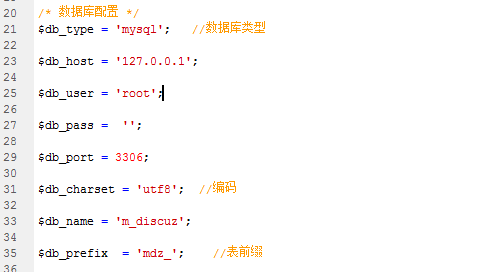
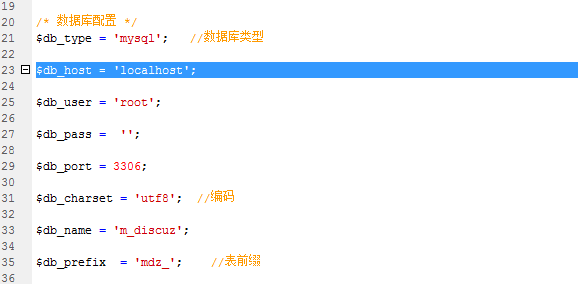
最后发现是因为没有关闭selinux,通常情况下载安装完CentOS7后,默认情况下SElinux是启用状态。
[root@rdo ~]# sestatus

SELinux status:                 enabled

SELinuxfs mount:                /sys/fs/selinux

SELinux root directory:         /etc/selinux

Loaded policy name:             targeted

Current mode:                   enforcing

Mode from config file:          enforcing

Policy MLS status:              enabled

Policy deny_unknown status:     allowed

Max kernel policy version:      28
如果要临时关闭,可以执行:
setenforce 0此时状态如下:
[root@rdo ~]# sestatus

SELinux status:                 enabled

SELinuxfs mount:                /sys/fs/selinux

SELinux root directory:         /etc/selinux

Loaded policy name:             targeted

Current mode:                   permissive

Mode from config file:          enforcing

Policy MLS status:              enabled

Policy deny_unknown status:     allowed

Max kernel policy version:      28
如果要永久关闭,可以修改配置文件/etc/selinux/config,将SELINU置为disabled。
[root@rdo ~]# cat /etc/selinux/config

# This file controls the state of SELinux on the system.

# SELINUX= can take one of these three values:

#     enforcing - SELinux security policy is enforced.

#     permissive - SELinux prints warnings instead of enforcing.

#     disabled - No SELinux policy is loaded.

#SELINUX=enforcing

SELINUX=disabled

# SELINUXTYPE= can take one of three two values:

#     targeted - Targeted processes are protected,

#     minimum - Modification of targeted policy. Only selected processes are protected.

#     mls - Multi Level Security protection.

SELINUXTYPE=targeted
修改该配置文件也可以执行下面的命令来完成:
sed -i '/SELINUX/s/enforcing/disabled/' /etc/selinux/config
修改完成后,保存重启,重启后状态如下:
[root@rdo ~]# sestatus

SELinux status:                 disabled
文章本人亲测有效。
文章转载:https://blog.csdn.net/eclothy/article/details/48265445
centos7数据库连接使用127.0.0.1报permission denied,使用localhost报No such file or directory的更多相关文章
- 解决nginx报错:nginx: [emerg] bind() to 0.0.0.0:8088 failed (13: Permission denied)
报错描述: nginx: [emerg] bind() to 0.0.0.0:8088 failed (13: Permission denied) 通过ansible远程给主机更换端口并重新启动ng ...
- Ubuntu nginx: [emerg] bind() to 0.0.0.0:80 failed (13: Permission denied)
在Ubuntu 12中启动刚安装好的Nginx,报错: nginx: [emerg] bind() to 0.0.0.0:80 failed (13: Permission denied) 原因如下: ...
- Starting nginx: nginx: [emerg] bind() to 0.0.0.0:8088 failed (13: Permission denied) nginx 启动失败
Starting nginx: nginx: [emerg] bind() to 0.0.0.0:8088 failed (13: Permission denied) nginx 启动失败 ...
- 解决Mac nginx问题 [emerg] 54933#0: bind() to 0.0.0.0:80 failed (13: Permission denied)
brew services restart nginx Stopping nginx... (might take a while) ==> Successfully stopped nginx ...
- TP连接数据库报错:SQLSTATE[HY000] [2002] No such file or directory
连接数据库报错:“SQLSTATE[HY000] [2002] No such file or directory”. 出现这个问题的原因是PDO无法找到mysql.sock或者mysqld.soc ...
- git push是报Permission denied (publickey)错误解决
今天晕了半天了,搞了个git工程到github上,以为很简单,因为之前也弄过,那知道搞了大半天都搞不好,一直报如下错误 D:\javawork\ee-0.0.1-SNAPSHOT>git pus ...
- cnmp安装失败,报错npm ERR! enoent ENOENT: no such file or directory,
1.cnmp安装失败 2.提示如下: bogon:node_modules liangjingming$ sudo npm install cnpm -g --registry=https://reg ...
- github提交代码时,报permission denied publickey
在像github提交代码时,报permission denied publickey. 查找了一下,可能是因为github的key失效了. 按照以下步骤,重新生成key. ssh-keygen 一路默 ...
- Windows下使用ssh-add报错 Error connecting to agent: No such file or directory
Windows下使用ssh-add报错 Error connecting to agent: No such file or directory 环境信息 操作系统:windows 10 终端:Win ...
随机推荐
- linux 设置用户自动登出时间
对所有用户设置自动注销功能: 首先,以root用户登录系统,输入 vi /etc/profile 命令,编辑profile文件. 查找TMOUT,若没有,则可以在文件最后添加如下语句: TMOUT=3 ...
- python 爬虫数据存入csv格式方法
python 爬虫数据存入csv格式方法 命令存储方式:scrapy crawl ju -o ju.csv 第一种方法:with open("F:/book_top250.csv" ...
- encodeURI和encodeURIComponent区别
参考:https://www.jianshu.com/p/075f5567c9a1 这两个函数功能上面比较接近,但是有一些区别. encodeURI:不会进行编码的字符有82个 :!,#,$,& ...
- [转]An Intuitive Explanation of Convolutional Neural Networks
An Intuitive Explanation of Convolutional Neural Networks https://ujjwalkarn.me/2016/08/11/intuitive ...
- python 实现图的深度优先和广度优先搜索
在介绍 python 实现图的深度优先和广度优先搜索前,我们先来了解下什么是"图". 1 一些定义 顶点 顶点(也称为"节点")是图的基本部分.它可以有一个名称 ...
- python发送HTTP POST请求
1. 127.0.0.1和0.0.0.0 127.0.0.1是一个回送地址,指本地机,一般用来本机测试使用,使用127.0.0.1启的服务只能在本地机器上访问,使用0.0.0.0启的服务可以在其他机器 ...
- 检测IP地址冲突的shell脚本-check_server_ip_conflict.sh
check_server_ip_conflict.sh 使用arping获取对应IP地址的MAC地址,如果和预料的不一致则报警: #!/bin/bash epg_addr_01="00:50 ...
- [LeetCode&Python] Problem 860. Lemonade Change
At a lemonade stand, each lemonade costs $5. Customers are standing in a queue to buy from you, and ...
- 远程办公的GitLab开源的员工手册:涵盖了公司价值观,内部沟通交流指南,开发流程,如何开会,写作风格指南,如何报销,如何请假,线上办公工具推荐等方方面面
原文 :https://docs.gitlab.com.cn/ce/ 英文 :https://about.gitlab.com/handbook/ GitLab Community Edition G ...
- 再回首 基本数据类型和 if语句
一 变量:(使用变量是不能加引号,要不就变成字符串了) 变量的命名规则: 1.数字,字母,下划线组成. 2.变量不能是数字开头 3.区分大小写 4.不要使用中文或者拼音 5.要有相应的意义 6.不能使 ...