
MVC07
1. 讲解ASP.net MVC的I/O操作
新建一个控制台程序,输入代码如下
using System;

using System.IO;

namespace IO

{

    class Program

    {

        static void Main(string[] args)

        {

            // 判断文件是否存在

            Console.WriteLine(File.Exists(@"C:\Users\ASUS\Desktop\memo\a.txt"));

            // 判断目录是否存在

            Console.WriteLine(Directory.Exists(@"C:\"));

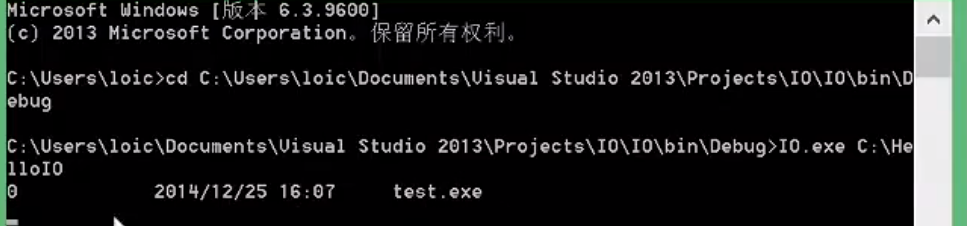
            // 下面例子将展示如何查找某一目录下所有exe文件的信息

            // . 表示当前目录

            string path = ".";

            if (args.Length > )

            {

                // 如果需要在其他目录执行则打开控制行,之后进入项目下的Debug目录,见下图

                path = args[];

            }

            else

            {

                Console.WriteLine("Directory not found");

            }

            DirectoryInfo dir = new DirectoryInfo(path);

            foreach(FileInfo f in dir.GetFiles("*.exe"))

            {

                string name = f.Name;

                long size = f.Length;

                DateTime creationTime = f.CreationTime;

                Console.WriteLine(name);

                Console.WriteLine(size);

                Console.WriteLine(creationTime);

                Console.WriteLine("------------");

            }

        }

    }

}
File,Directory为一个静态的Class,无法实例化。
2.写入文件
using System;

using System.IO;

namespace IO

{

    class Program

    {

        private const string FILE_NAME = "a.txt";

        static void Main(string[] args)

        {

            if (File.Exists(FILE_NAME))

            {

                Console.WriteLine("already exists.");

                return;

            }

            FileStream fs = new FileStream(FILE_NAME, FileMode.Create);

            BinaryWriter w = new BinaryWriter(fs);

            for(int i = ; i < ; i++)

            {

                w.Write("a");

            }

            w.Close();

            fs.Close();

        }

    }

}
如果文件已存在,我们需要覆盖内容到里面怎么办?
using System;

using System.IO;

namespace IO

{

    class Program

    {

        private const string FILE_NAME = "a.txt";

        static void Main(string[] args)

        {

            using(StreamWriter w = File.AppendText("test.txt"))

            {

                Log("Hi,is me.", w);

                Log("how are u", w);

                w.Close();

            }

        }

        // 方法,用于写入数据

        public static void Log(string logMessage,TextWriter w)

        {

            w.Write("\r\nLog Entry");

            w.WriteLine(":{0}", logMessage);

            w.Flush();

        }

    }

}
using 内代码执行完毕后会自动释放资源,常用于读写文件以及连接数据库
2.读取文件
using System;

using System.IO;

namespace IO

{

    class Program

    {

        private const string FILE_NAME = "a.txt";

        static void Main(string[] args)

        {

            if (!File.Exists(FILE_NAME))

            {

                Console.WriteLine("{0} does not exist!",FILE_NAME);

                return;

            }

            // 路径,操作类别,权限

            FileStream fs = new FileStream(FILE_NAME, FileMode.Open, FileAccess.Read);

            BinaryReader r = new BinaryReader(fs);
       // 读取前5个字符

            for(int i = ; i < ; i++)

            {

                Console.WriteLine(r.ReadString());

            }

            r.Close();

            fs.Close();

        }

    }

}
完整读取某一文件:
using System;

using System.IO;

namespace IO

{

    class Program

    {

        private const string FILE_NAME = "test.txt";

        static void Main(string[] args)

        {

            if (!File.Exists(FILE_NAME))

            {

                Console.WriteLine("{0} does not exist!",FILE_NAME);

                return;

            }

            using(StreamReader sr = File.OpenText(FILE_NAME))

            {

                string input;

                while((input = sr.ReadLine())!=null)

                {

                    Console.WriteLine(input);

                }

                Console.WriteLine("ended");

                sr.Close();

            }

        }

    }

}
MVC07的更多相关文章
- 快速入门系列--MVC--07与HTML5移动开发的结合
现在移动互联网的盛行,跨平台并兼容不同设备的HTML5越来越盛行,很多公司都在将自己过去的非HTML5网站应用渐进式的转化为HTML5应用,使得一套代码可以兼容不同的物理终端设备和浏览器,极大的提高了 ...
- MVC-07 案例1
>>>>>ContosoUniversity网站 ------------------------------------------- 一.并发冲突 1. 为什么会并发 ...
- MVC-07 案例2
二.电子商务网站 掌握该网站的开发流程和设计思路,并为数据模型中商品.商品分类,这两个类编写代码. 1.需求分析 2.数据模型规划 (1)商品类别 (2)商品信息 (3)会员信息 (4)购物车项目 ( ...
- MVC-07数据库
部分6:添加数据库. 创建数据库 Visual Web Developer带有免费的SQL数据库,名为SQL Server Compact. 数据库创建: 1.右键点击解决方案资源管理器中的App_D ...
- 快速入门系列--MVC--01概述
虽然使用MVC已经不少年,相关技术的学习进行了多次,但是很多技术思路的理解其实都不够深入.其实就在MVC框架中有很多设计模式和设计思路的体现,例如DependencyResolver类就包含我们常见的 ...
- 快速入门系列--MVC--02路由
现在补上URL路由的学习,至于蒋老师自建的MVC小引擎和相关案例就放在论文提交后再实践咯.通过ASP.NET的路由系统,可以完成请求URL与物理文件的分离,其优点是:灵活性.可读性.SEO优化.接下来 ...
随机推荐
- i春秋web作业2.25
Web安全工程师(入门班) [全国线上入门班53期]课后作业 2020-2-25 DorinXL 请思考:XXE漏洞的原理的是什么?有哪些危害? XXE漏洞全称XML External Ent ...
- Linux基础篇九:用户管理
查看当前用户的ID信息(也可以查看其他用户的ID信息) 每个进程都会有一个用户身份运行 cat /etc/passwd 账号的操作: useradd (新建用户) 例题: groupadd s ...
- mysql计算时间差-本例为计算分钟差然后/60计算小时保留一位小数,由于直接得小时只会取整
-- ORDER_TIME datetime NOT NULL(字段类型)SELECTso.`ID`,so.`ORDER_TIME`,NOW(),CONCAT(ROUND(TIMESTAMPDIFF( ...
- 吴裕雄--天生自然C语言开发:结构体
struct tag { member-list member-list member-list ... } variable-list ; struct Books { ]; ]; ]; int b ...
- java实现线程交替打印1-52和A-Z
题目: 1.开启两个线程,一个线程打印A-Z,两一个线程打印1-52的数据. 2.实现交替打印,输出结果为12A34B...........5152Z. 3.请用多线程方式实现. 实现思路:通过锁(s ...
- logstash output kafka ip 设置的坑
原设置 output { kafka { acks => " enable_metric => false codec => "json" topic_ ...
- scala编程(四)——类和对象
类,字段和方法 在scala里定义一个典型的类,代码如下: class ChecksumAccumulator { private var sum = 0 def add(b: Byte): Uni ...
- LNOI 2019 旁观记
真.懵逼. 退役选手进队了......我忽然后悔自己没去摸鱼...... 但是想一想毕竟有三分之一限制,我也搞不过那帮大佬...... 毕竟zhx还提前一周复习了一下呢 挂一个zhx大佬的博客 传送门 ...
- python练习题——猜数字游戏
增加了按照对半找数的方法来计算最短几次就可以猜到随机数,决定到游戏结束共猜数的次数: from random import * import numpy as np from numpy import ...
- [LC] 169. Majority Element
Given an array of size n, find the majority element. The majority element is the element that appear ...