
C#小游戏—钢铁侠VS太空侵略者
身为漫威迷,最近又把《钢铁侠》和《复仇者联盟》系列又重温了一遍,真的是印证了那句话:“读书百遍,其意自现”。看电影一个道理,每看一遍,都有不懂的感受~ 不知道大伙是不是也有同样的感受,对于好的电影,真的是回味无穷!
本篇博文也是因《复仇者联盟1》的启发,C#语言实现的一个小游戏,所以游戏命名就叫“钢铁侠VS太空侵略者》了!
先上一个游戏原型图:
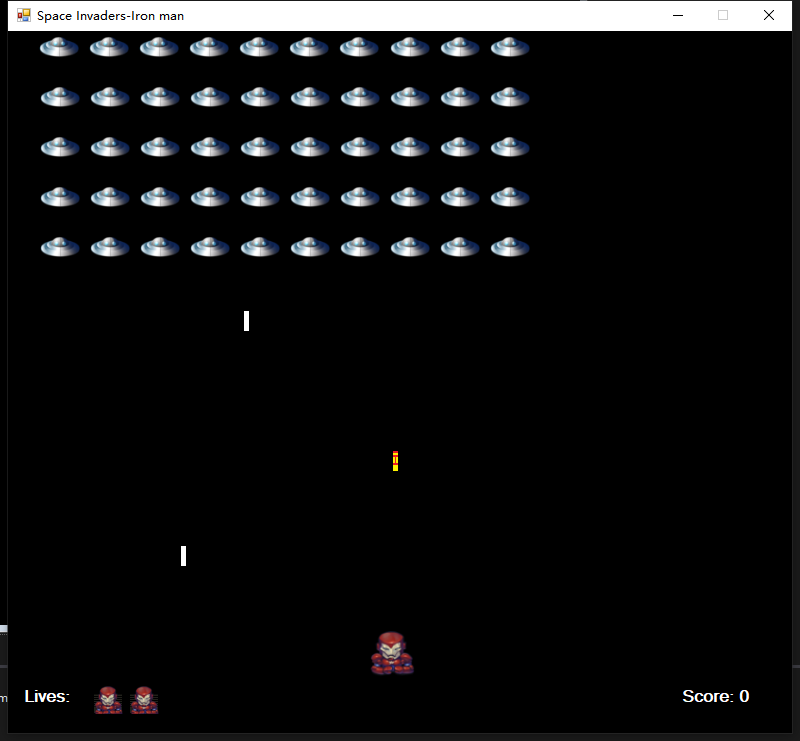
Talk is Cheap,Show me the Code!
代码方面没有太难的操作,主要依赖于Timer控件:

分别用来监控游戏中Iron man 子弹移动,侵略者左右移动,往下移动,侵略者子弹移动,子弹碰撞,以及观察者监控(主要校验生命值),具体代码如下:
侵略者界面生成:
private void CreateControl(Form p)

{

    PictureBox pb = new PictureBox();

    pb.Location = new Point(x, y);

    pb.Size = new Size(width, height);

    pb.BackgroundImage = Properties.Resources.invader;

    pb.BackgroundImageLayout = ImageLayout.Stretch;

    pb.Name = "Alien";

    p.Controls.Add(pb);

}

public void CreateSprites(Form p)

{

    for(int i = ; i < rows; i++)

    {

        for(int j = ; j < columns; j++)

        {

            CreateControl(p);

            x += width + space;

        }

        y += height + space;

        x = ;

    }

}
键盘事件绑定:
private void Pressed(object sender, KeyEventArgs e)

{

    if (e.KeyCode == Keys.A || e.KeyCode == Keys.Left)

    {

        moveLeft = true;

    }

    else if (e.KeyCode == Keys.D || e.KeyCode == Keys.Right)

    {

        moveRight = true;

    }

    else if (e.KeyCode == Keys.Space && game && !fired)

    {

        Missile();

        fired = true;

    }

}

private void Released(object sender, KeyEventArgs e)

{

    if (e.KeyCode == Keys.A || e.KeyCode == Keys.Left)

    {

        moveLeft = false;

    }

    else if (e.KeyCode == Keys.D || e.KeyCode == Keys.Right)

    {

        moveRight = false;

    }

    else if (e.KeyCode == Keys.Space)

    {

        fired = false;

    }

}
Iron man 左右移动:
private void PlayerMove(object sender, EventArgs e)

  {

      if (moveLeft && Player.Location.X >= )

      {

          Player.Left--;

      }

      else if (moveRight && Player.Location.X <= limit)

      {

          Player.Left++;

      }

  }
子弹发射:
 private void FireBullet(object sender, EventArgs e)

{

    foreach (Control c in this.Controls)

    {

        if (c is PictureBox && c.Name == "Bullet")

        {

            PictureBox bullet = (PictureBox)c;

            bullet.Top -= ;

            if (bullet.Location.Y <= )

            {

                this.Controls.Remove(bullet);

            }

            foreach(Control ct in this.Controls)

            {

                if (ct is PictureBox && ct.Name == "Laser")

                {

                    PictureBox laser = (PictureBox)ct;

                    if (bullet.Bounds.IntersectsWith(laser.Bounds))

                    {

                        this.Controls.Remove(bullet);

                        this.Controls.Remove(laser);

                        pts++;

                        Score(pts);

                    }

                }

            }

            foreach(Control ctrl in this.Controls)

            {

                if (ctrl is PictureBox && ctrl.Name == "Alien")

                {

                    PictureBox alien = (PictureBox)ctrl;

                    if (bullet.Bounds.IntersectsWith(alien.Bounds) && !Touched(alien))

                    {

                        this.Controls.Remove(bullet);

                        this.Controls.Remove(alien);

                        aliens.Remove(alien);

                        pts += ;

                        Score(pts);

                        CheckForWinner();

                    }

                    else if (bullet.Bounds.IntersectsWith(alien.Bounds) && Touched(alien))

                    {

                        this.Controls.Remove(bullet);

                        this.Controls.Remove(alien);

                        delay.Add(alien);

                        pts += ;

                        Score(pts);

                        CheckForWinner();

                    }

                }

            }

        }

    }

}
子弹
private void Missile()

{

    PictureBox bullet = new PictureBox();

    bullet.Location = new Point(Player.Location.X +

    Player.Width / , Player.Location.Y - );

    bullet.Size = new Size(, );

    bullet.BackgroundImage = Properties.Resources.bullet;

    bullet.BackgroundImageLayout = ImageLayout.Stretch;

    bullet.Name = "Bullet";

    this.Controls.Add(bullet);

}
侵略者移动:
private void AlienMove()

{

    foreach(PictureBox alien in aliens)

    {

        alien.Location = new Point(alien.Location.X + left,

        alien.Location.Y + top);

        SetDirection(alien);

        Collided(alien);

    }

}

private void Collided(PictureBox a)

{

    if (a.Bounds.IntersectsWith(Player.Bounds))

    {

        gameOver();

    }

}
子弹移动效果:
 private void Beam(PictureBox a)

{

    PictureBox laser = new PictureBox();

    laser.Location = new Point(a.Location.X + a.Width / ,

     a.Location.Y + );

    laser.Size = new Size(, );

    laser.BackgroundImage = Properties.Resources.laser;

    laser.BackgroundImageLayout = ImageLayout.Stretch;

    laser.Name = "Laser";

    this.Controls.Add(laser);

}

private void StrikeSpan(object sender, EventArgs e)

{

    Random r = new Random();

    int pick;

    if (aliens.Count > )

    {

        pick = r.Next(aliens.Count);

        Beam(aliens[pick]);

    }

}

private void DetectLaser(object sender, EventArgs e)

{

    foreach(Control c in this.Controls)

    {

        if (c is PictureBox && c.Name == "Laser")

        {

            PictureBox laser = (PictureBox)c;

            laser.Top += ;

            if (laser.Location.Y >= limit)

            {

                this.Controls.Remove(laser);

            }

            if (laser.Bounds.IntersectsWith(Player.Bounds))

            {

                this.Controls.Remove(laser);

                LoseLife();

            }

        }

    }

}
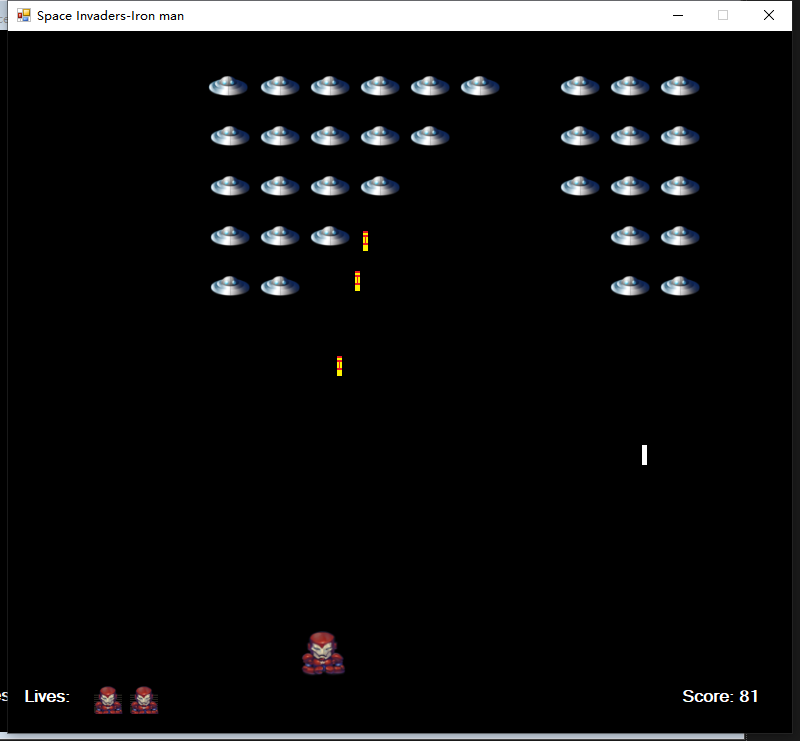
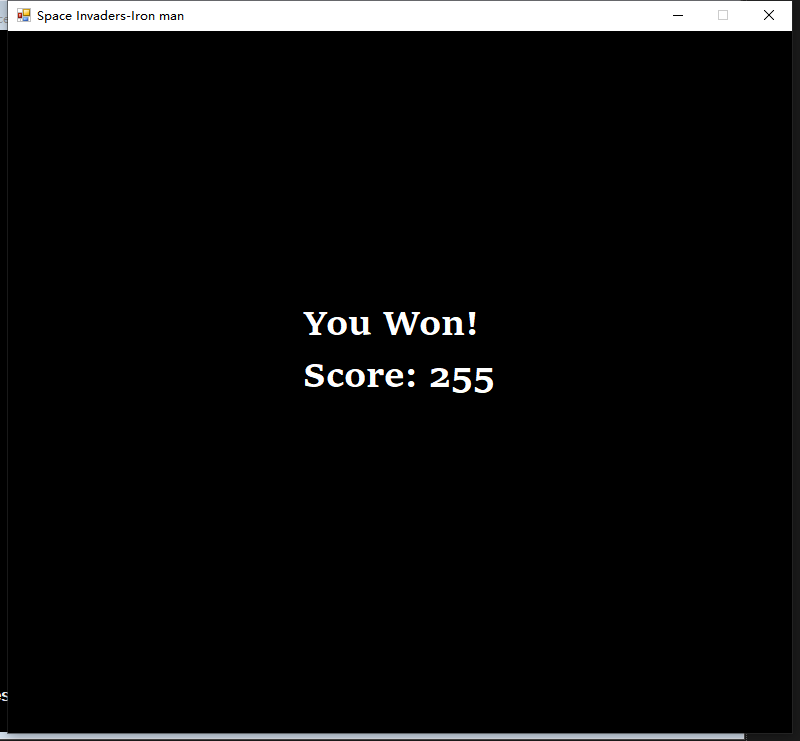
主要核心代码如上,下面看下运行效果图:
何以解忧唯有撸码,欢迎有兴趣的朋友,联系我一起探讨。
最后感谢您的耐心观看,赠人玫瑰,手留余香,觉得本文有些许意思和启发的,记得关注博主公众号(内附源码链接),您的支持,就是我写作莫大的动力!

C#小游戏—钢铁侠VS太空侵略者的更多相关文章
- Delphi的几个跨平台小游戏例子。
Embarcadero开源了几个FireMonkey的小游戏,支持Windows, Android,Ios, MacOS等. 源码地址: https://github.com/EmbarcaderoP ...
- 小游戏大智慧,10 个让人眼前一亮的 JavaScript 游戏
摘要: JS还可以这么玩~ Fundebug经授权转载,版权归原作者所有. 这是一篇有趣的文章,我们精选了 JS13K 游戏编程挑战的优秀作品,与大家分享.JS13K 是专为 JavaScript 开 ...
- jQuery实践-网页版2048小游戏
▓▓▓▓▓▓ 大致介绍 看了一个实现网页版2048小游戏的视频,觉得能做出自己以前喜欢玩的小游戏很有意思便自己动手试了试,真正的验证了这句话-不要以为你以为的就是你以为的,看视频时觉得看懂了,会写了, ...
- 拼图小游戏之计算后样式与CSS动画的冲突
先说结论: 前几天写了几个非常简单的移动端小游戏,其中一个拼图游戏让我郁闷了一段时间.因为要获取每张图片的位置,用`<style>`标签写的样式,直接获取计算后样式再用来交换位置,结果就悲 ...
- 推荐10款超级有趣的HTML5小游戏
HTML5的发展速度比任何人的都想像都要更快.更加强大有效的和专业的解决方案已经被开发......甚至在游戏世界中!这里跟大家分享有10款超级趣味的HTML5游戏,希望大家能够喜欢! Kern Typ ...
- 如何开发一个简单的HTML5 Canvas 小游戏
原文:How to make a simple HTML5 Canvas game 想要快速上手HTML5 Canvas小游戏开发?下面通过一个例子来进行手把手教学.(如果你怀疑我的资历, A Wiz ...
- JavaScript版拼图小游戏
慕课网上准备开个新的jQuery教程,花了3天空闲时间写了一个Javascript版的拼图小游戏,作为新教程配套的分析案例 拼图游戏网上有不少的实现案例了,但是此源码是我自己的实现,所以不做太多的比较 ...
- C语言-纸牌计算24点小游戏
C语言实现纸牌计算24点小游戏 利用系统时间设定随机种子生成4个随机数,并对4个数字之间的运算次序以及运算符号进行枚举,从而计算判断是否能得出24,以达到程序目的.程序主要功能已完成,目前还有部分细节 ...
- Cocos2d-x 版本小游戏 《是男人就下100层》 项目开源
这个是很久就开始动手写的一个小游戏了,直到最近才把它收尾了,拖拖拉拉的毛病总是很难改啊. 项目是基于 cocos2d-x v2.2 版本 ,目前只编译到了 Win8 平台上,并且已经上传到了商店,支持 ...
随机推荐
- 28)PHP,数据库连接类
PHP代码展示: <?php //类名,也习惯上(推荐)使用跟文件名相似的名字 //定义一个类,该类可以连接mysql数据库 //并连接后返回资源(或失败就终止) class mysqlDB{ ...
- WxProperties WxConfig
package org.linlinjava.litemall.core.config; import org.springframework.boot.context.properties.Conf ...
- JacksonConfig
package org.linlinjava.litemall.core.config; import com.fasterxml.jackson.annotation.JsonInclude; im ...
- centos telnet
yum install telnet yum install telnet-server
- 数学中的距离distance(未完成)
manhattan distance(曼哈顿距离) euclidean distance(欧几里得距离) cosine distance(cosine距离) 闵式距离 切比雪夫距离
- Docker系列六: 使用Docker官方公共仓库和私有仓库
使用公共仓库 登陆官方网站:https://hub.docker.com/ 注册账号和密码 在Docker hub中创建一个资源, create respositories, 创建后会提示 ...
- Dangal 观影感受,(摘录)
===================================================================================== 引用: https://ww ...
- wsdl中含ref="s:schema"时处理
转载地址:http://ljhzzyx.blog.163.com/blog/static/38380312201471375946602/
- Smarty使用-模版中编写js
在smarty模版中编写js使用literal标签, Literal 标签区域内的数据将被当作文本处理,此时模板将忽略其内部的所有字符信息. 该特性用于显示有可能包含大括号等字符信息的 javas ...
- 吴裕雄--天生自然python学习笔记:python的Bokeh 基本绘图
使用 Bokeh 绘图时,其大部分绘图功能是由 bokeh plotting 完成的,所以我们一 般至少要导入自gure 及 show 这两个函数 : Bokeh 绘制的图形是在浏览器中显示的, 创建 ...