
svg教程
实例
<html>

<body>

<h1>My first SVG</h1>

<svg style="border: 1px solid; margin-left: 20px;">

	<circle r="20" stroke-width="2" fill="red" cx="100" cy="50" />

</svg>

</body>

</html>
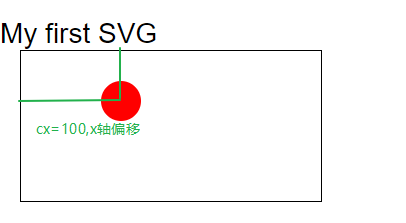
(cx, cy):圆心坐标
stroke和stroke-width:控制如何绘制轮廓
在HTML中,embed,object
使用embed标签
<embed src="circle1.svg" type="image/svg+xml" />
使用object标签
<object data="circle1.svg" type="image/svg+xml"></object>
使用iframe标签
<iframe src="circle1.svg"></iframe>
直接嵌入svg标签
<svg xmlns="http://www.w3.org/2000/svg" version="1.1">

   <circle cx="100" cy="50" r="40" stroke="black" stroke-width="2" fill="red" />

</svg>
矩形
<svg xmlns="http://www.w3.org/2000/svg" version="1.1">

	<rect width="300" height="100"

		  style="fill:rgb(0,0,255);stroke-width:1;stroke:rgb(0,0,0);fill-opacity:0.1;"/>

</svg>
style/属性
fill 填充颜色
strok-width 轮廓宽度
stroke 轮廓颜色
fill-opacity: 填充颜色的不透明度
stroke-opacity:轮廓颜色不透明度
opacity:整个元素的不透明度
width
height
rx,ry :产生圆角
x,y:坐标原点,偏移
圆形
<svg xmlns="http://www.w3.org/2000/svg" version="1.1">

  <circle cx="100" cy="50" r="40" stroke="black"

  stroke-width="2" fill="red"/>

</svg>
style/属性
- cx,cy:圆心
- r:半径
椭圆
<svg xmlns="http://www.w3.org/2000/svg" version="1.1" style="width:500px">

  <ellipse cx="300" cy="80" rx="100" ry="50"

  style="fill:yellow;stroke:purple;stroke-width:2"/>

</svg>
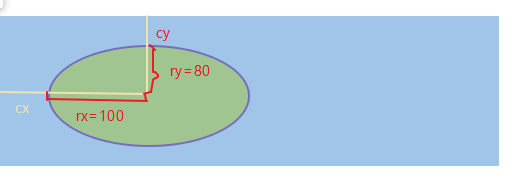
style/属性
- cx,cy:椭圆圆心
- rx,ry:半径
直线
<svg xmlns="http://www.w3.org/2000/svg" version="1.1">

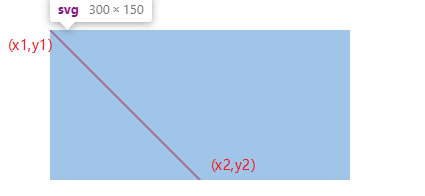
	<line x1="0" y1="0" x2="200" y2="200"

		  style="stroke:rgb(255,0,0);stroke-width:2"/>

</svg>
多边形
<svg xmlns="http://www.w3.org/2000/svg" version="1.1">

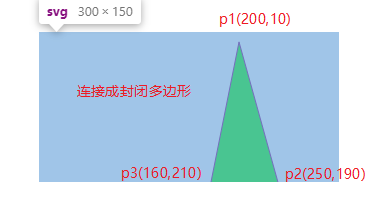
	<polygon points="200,10 250,190 160,210"

			 style="fill:lime;stroke:purple;stroke-width:1"/>

</svg>
<svg xmlns="http://www.w3.org/2000/svg" version="1.1">

	<polygon points="100,10 40,180 190,60 10,60 160,180"

			 style="fill:lime;stroke:purple;stroke-width:5;fill-rule:nonzero;" />

</svg>
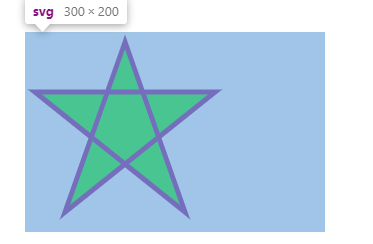
- fill-rule:nonzero:
<svg xmlns="http://www.w3.org/2000/svg" version="1.1" style="height: 200px">

	<polygon points="100,10 40,180 190,60 10,60 160,180"

			 style="fill:lime;stroke:purple;stroke-width:5;fill-rule:evenodd;" />

</svg>
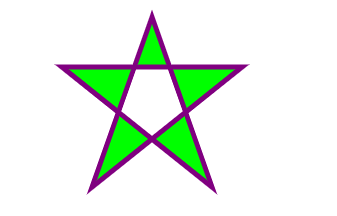
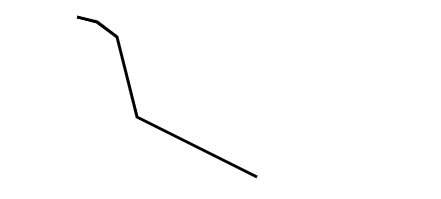
折线
<svg xmlns="http://www.w3.org/2000/svg" version="1.1" height="200px">

	<polyline points="20,20 40,25 60,40 80,120 120,140 200,180"

			  style="fill:none;stroke:black;stroke-width:3" />

</svg>
路径- path
<svg xmlns="http://www.w3.org/2000/svg" version="1.1">

    <path d="M150 0 L75 200 L225 200 Z" />

</svg>
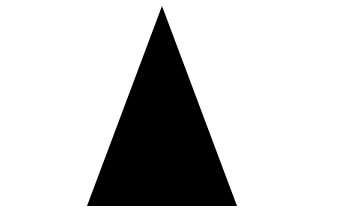
- M = moveto
- L = lineto
- H = horizontal lineto
- V = vertical lineto
- C = curveto
- S = smooth curveto
- Q = quadratic Bézier curve 方贝塞尔曲线
- T = smooth quadratic Bézier curveto
- A = elliptical Arc
- Z = closepath
svg教程的更多相关文章
- [翻译svg教程]svg学习系列 开篇
目录 [翻译svg教程]svg学习系列 开篇 [翻译svg教程 ]svg 的坐标系统 [翻译svg教程]svg 中的g元素 [翻译svg教程]svg中矩形元素 rect [翻译svg教程]svg中的c ...
- SVG 教程
SVG 意为可缩放矢量图形(Scalable Vector Graphics). SVG 使用 XML 格式定义图像. 现在开始学习 SVG! <html> <body> &l ...
- [翻译svg教程]Path元素 svg中最神奇的元素!
先看一个实例 <svg xmlns="http://www.w3.org/2000/svg" xmlns:xlink="http://www.w3.org/1999 ...
- [翻译svg教程]svg中的circle元素
svg中的<circle> 元素,是用来绘制圆形的,例如 <svg xmlns="http://www.w3.org/2000/svg" xmlns:xlink= ...
- [翻译svg教程]svg中矩形元素 rect
svg 元素<rect> 是一个矩形元素,用这个元素,可以你可以绘制矩形,设置矩形宽高,边框的宽度颜色,矩形的填充颜色,是否用圆角等 rect 示例 <svg xmlns=" ...
- [翻译svg教程]svg 中的g元素
svg 中的<g>元素用来组织svg元素.如果一组svg元素被g元素包裹了,你可以通过对g元素进行变换(transform),被g元素包裹的元素也将被变换,就好这些被svg包裹的元素是一个 ...
- 【翻译svg教程 】svg 的坐标系统
http://tutorials.jenkov.com/svg/svg-coordinate-system.html svg的坐标系统(和大多数计算机绘图的坐标系统)和数学中绘图系统有点不一样 数学/ ...
- 非常不错的svg教程
介绍的非常详细,也很有调理,内容很详细 适合于初学者学习 http://www.softwhy.com/qiduan/SVG_source/
- SVG坐标系统
SVG的画布.画布视区(viewBox).浏览器视窗的概念 画布 画布是绘制SVG内容的一块区域,理论上在所有维度上都是无限的.(也有人称为"SVG世界",但我觉得叫画布比较合适) ...
随机推荐
- javaBean、EJB、POJO
1.JavaBean 最初是由 Sun 公司提出的一种规范,主要包含以下要求: ----类是 public 的,并且有一个无参数的构造函数 ----属性修饰符为:private,并通过 get 和 s ...
- POJ - 1061 青蛙的约会 (扩展欧几里得求同余式)
题意:两只青蛙在网上相识了,它们聊得很开心,于是觉得很有必要见一面.它们很高兴地发现它们住在同一条纬度线上,于是它们约定各自朝西跳,直到碰面为止.可是它们出发之前忘记了一件很重要的事情,既没有问清楚对 ...
- k8s 各种网络方案【转】
网络模型有了,如何实现呢? 为了保证网络方案的标准化.扩展性和灵活性,Kubernetes 采用了 Container Networking Interface(CNI)规范. CNI 是由 Core ...
- Vue - 定义使用组件
import Card from './components/Card.vue' Vue.component('m-card',Card) // component是注册全局组件,在实例化VUE前 ...
- Linux-Journal
Linux-Journal 1. 日志简介 2. 日志的优先级和分类 2.1 优先级 2.2 设施分类 3. 命令帮助 4. 日志查看示例 5. 日志大小限制 6. 手动清理日志文件 1. 日志简介 ...
- docker学习笔记-02:docker常用命令
一.帮助命令: 1.查看版本:docker version 2.查看信息:docker info 3.查看帮助信息:docker --help 二.镜像命令: (一).查看已有镜像: 1.命令:doc ...
- ionic实现滑动的三种方式
在移动端受屏幕大小所限,展示内容很多的时候,就要使部分区域进行滑动.本文展示项目中所有到的几种方式,大家可以看自己的需求选择合适的滑动方式.实现滑动的基本原理,有两个容器A.B,假如A在外层,B在内层 ...
- 028、Java中的关系运算符
01.代码如下: package TIANPAN; /** * 此处为文档注释 * * @author 田攀 微信382477247 */ public class TestDemo { public ...
- MQTT 协议学习:008-在STM32上移植MQTT
前言 通过前面了解MQTT有关概念.分析了有关的报文,我们对于这个协议也有了更深的认识.但纸上谈来终觉浅,绝知此事要躬行. 本文参考:<STM32+W5500+MQTT+Android实现远程数 ...
- P 1041 考试座位号
P 1041 考试座位号 转跳点: