
Shell脚本 (一) 概述、解析器、脚本入门
个人博客网:https://wushaopei.github.io/ (你想要这里多有)
一、 Shell 脚本概述
1、 Shell 的 含义:
Shell 是一个用C语言编写的程序,它是用户使用Linux 的桥梁。Shell既是一种命令语言,又是一种程序设计语言。


Shell 是指一种应用程序,这个应用程序提供了一个界面,用户通过这个界面访问操作系统内核的服务。
Ken Thompson 的 sh 是第一种 Unix Shell,Windows Explorer 是一个典型的图形界面 Shell。
2、Shell 脚本
Shell 脚本(shell script),是一种为 shell 编写的脚本程序。
Shell是一个命令解释器,是一个程序/bin/bash,解释linux的命令
注意:
- shell交互式命令使用
- 打开终端,一行行敲命令
Shell script 是利用shell的功能所写的一个程序,这个程序是使用纯文本文件,将一些shell的语法与指令写在里面,然后用正规表示法,管道命令以及数据流重导向等功能,以达到我们所想要的处理目的。
二、Shell 解析器
1、Linux 提供的Shell解析器有:
查看Shell解析器命令: sudo cat /etc/shells
如下图:

2、bash 和 sh 的关系:
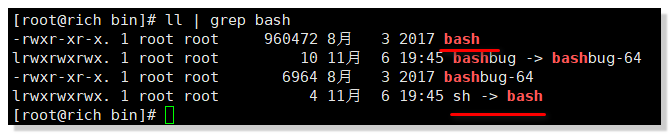
可见两者关系为软连接,sh 最终指向的是 bash
命令: ll | grep bash
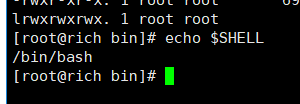
3、Centos 默认的解析器是bash
命令: echo $SHELL
三、Shell脚本入门
1、 脚本格式
脚本 以 #!/bin/bash 开头(指定解析器)
2、 第一个Shell脚本: hellWorld
(1) 需求: 创建一个Shell脚本,输出helloworld
(2)案例实操
[root@rich wenmin]# mkdir datas

[root@rich wenmin]# cd datas

[root@rich datas]# pwd

/home/wenmin/datas

[root@rich datas]# touch helloworld.sh

[root@rich datas]# vim helloworld.sh
在 helloworld.sh 中输入如下内容:
#!/bin/bash
echo "helloworld wenmin"
(3)脚本的常用执行方式:
第一种: 采用bash 或sh+脚本的相对或绝对路径(不用赋予脚本+x 权限)
sh+脚本的相对路径
[root@rich datas]# ll

总用量 4

-rw-r--r-- 1 root root 38 4月  30 20:26 helloworld.sh

[root@rich datas]# sh helloworld.sh

helloworld wenmin

[root@rich datas]#
sh+ 脚本的绝对路径
[root@rich datas]# pwd

/home/wenmin/datas

[root@rich datas]# sh /home/wenmin/datas/helloworld.sh

helloworld wenmin

[root@rich datas]#
bash + 脚本的相对路径
[root@rich datas]# bash helloworld.sh

helloworld wenmin

[root@rich datas]#
第二种: 采用输入脚本的绝对路径或相对路径执行脚本(必须具有可执行权限+x)
(a)首先要赋予 helloworld.sh 脚本的 +x 权限
[root@rich datas]# ./helloworld.sh

-bash: ./helloworld.sh: 权限不够

[root@rich datas]# chmod 777 helloworld.sh

[root@rich datas]# ll
(b)执行脚本
相对路径
[root@rich datas]# ./helloworld.sh

helloworld wenmin
绝对路径
[root@rich datas]# /home/wenmin/datas/helloworld.sh

helloworld wenmin
注意:
第一种执行方法,本质是bash 解析器帮你执行脚本,所以脚本本身不需要执行权限。
第二种执行方法,本质是脚本需要自己执行,所以需要执行权限。
3、第二个Shell 脚本: 多命令处理
(1)需求:
在 /home/wenmin/ 目录下创建一个wenxing.txt,在wenxing.txt文件中增加 "I love cls".
(2)案例实操:
[root@rich datas]# touch batch.sh

[root@rich datas]# vim batch.sh
在 batch.sh 中输入如下内容:
#!/bin/bash

cd /home/wenmin/

touch wenxing.txt

echo "I love cls" >>wenxing.txt
//执行Shell脚本

[root@rich datas]# ll

总用量 8

-rw-r--r-- 1 root root 80 4月  30 20:52 batch.sh

-rwxrwxrwx 1 root root 38 4月  30 20:26 helloworld.sh

[root@rich datas]# bash batch.sh
查看目录文件及 wenxing.txt 内容
[root@rich wenmin]# ll

总用量 8

drwxr-xr-x 2 root root 4096 4月  30 20:56 datas

-rw-r--r-- 1 root root   11 4月  30 20:52 wenxing.txt

[root@rich wenmin]# cat wenxing.txt

I love cls
Shell脚本 (一) 概述、解析器、脚本入门的更多相关文章
- PHP Simple HTML DOM解析器使用入门
http://www.cnphp.info/php-simple-html-dom-parser-intro.html 一直以来使用php解析html文档树都是一个难题.Simple HTML DOM ...
- Boost学习之语法解析器--Spirit
Boost.Spirit能使我们轻松地编写出一个简单脚本的语法解析器,它巧妙利用了元编程并重载了大量的C++操作符使得我们能够在C++里直接使用类似EBNF的语法构造出一个完整的语法解析器(同时也把C ...
- 邵国际: C 语言对象化设计实例 —— 命令解析器
本文系转载,著作权归作者所有.商业转载请联系作者获得授权,非商业转载请注明出处. 作者: 邵国际 来源: 微信公众号linux阅码场(id: linuxdev) 内容简介 单片机工程师常常疑惑为什么 ...
- XML解析——Jsoup解析器
一.Jsoup解析器快速入门案例 Docement对象,文本对象,包含着各个Dom树结构 1.引入Jsoup解析器的jar包放在lib文件夹下后,写java代码 其中, 二.Jsoup对象 1.Jso ...
- IBM Rational AppScan:跨站点脚本攻击深入解析
IBM Rational AppScan:跨站点脚本攻击深入解析 了解黑客如何启动跨站点脚本攻击(cross-site scripting,XSS),该攻击危害(及不危害)什么,如何检测它们,以 ...
- shell、cmd、dos和脚本语言杂谈(转)
问题一:DOS与windows中cmd区别 在windows系统中,“开始-运行-cmd”可以打开“cmd.exe”,进行命令行操作. 操作系统可以分成核心(kernel)和Shell(外壳)两部 ...
- shell、cmd、dos和脚本语言区别和联系
问题一:DOS与windows中cmd区别 在windows系统中,“开始-运行-cmd”可以打开“cmd.exe”,进行命令行操作. 操作系统可以分成核心(kernel)和Shell(外壳)两部 ...
- 使用Python脚本强化LLDB调试器
LLDB是Xcode自带的调试器,作为一个iOS应用开发程序员,平时我在开发应用时会使用LLDB来调试代码.在逆向应用时,也会用到LLDB来跟踪应用的执行过程. LLDB还内置了一个Python解析器 ...
- 【嵌入式开发】 嵌入式开发工具简介 (裸板调试示例 | 交叉工具链 | Makefile | 链接器脚本 | eclipse JLink 调试环境)
作者 : 韩曙亮 博客地址 : http://blog.csdn.net/shulianghan/article/details/42239705 参考博客 : [嵌入式开发]嵌入式 开发环境 (远 ...
随机推荐
- java基础篇 之 构造器内部的多态行为
java基础篇 之 构造器内部的多态行为 我们来看下下面这段代码: public class Main { public static void main(String[] args) { new ...
- python路径操作新标准:pathlib 模块
之前如果要使用 python 操作文件路径,我总是会条件反射导入 os.path. 而现在,我会更加喜欢用新式的 pathlib, 虽然用得还是没有 os.path 熟练,但是以后会坚持使用. pat ...
- layui的layer.msg,form提交
layer.msg('提示文字',{shift:1,time:2000},function(){ location.reload();});其中shift是提示框的动画样式,-1为无动画form.on ...
- 黑马程序员_毕向东_Java基础视频教程——if 语句(单条语句)(随笔)
if 语句(单条语句) 格式(三种) [注意]:如果 if 控制的语句只有一条,则 这个 { } 括号可以不写 if (条件表达式) { 执行语句; } class Test{ public stat ...
- python之文件操作模块(os和shutil)
1.os.name #操作系统类型 如果是posix,说明系统是liunx.Unix或Mac OS X,如果是nt,就是windows2.os.enviro #操作系统中定义的环境变量3.os.e ...
- 面试最后HR都要问一句"有没有什么问题要问我"?
HR最想听到的问题是: 1.询问职位发展方面的问题: (1)比如:这个职位的未来的发展空间如何,公司是如何对员工进行绩效考评的...等等这类问题,可以让HR觉得你是一个有长远目标和规划的人. 2.询问 ...
- 使用QQ同步助手备份同步手机数据
QQ同步助手官网:https://pim.qq.com/ QQ同步助手,由腾讯精心打造的云端备份工具.能实现手机之间传输文件,并备份文件.照片.视频.联系人.短信.通讯记录.应用程序到云端的换手机必备 ...
- SWPU邮件登录界面的仿写(第二次作业)
(一).检查并下载网页元素 在需仿写的页面按F12,点击element,寻找需要的图片元素. (二). 分析网页的布局 查看网页源代码. (三).开始仿写 由于我们的目标是仿写网页,所以可以直接复制网 ...
- You should consider upgrading via the 'python -m pip install --upgrade pip' command.
pip._vendor.urllib3.exceptions.ReadTimeoutError: HTTPSConnectionPool(host='files.pythonhosted.org', ...
- 坑爹的cmd(整人专用)
今天我特地上网搜集了六条条最危险的cmd命令,注意! 如果你对其他人使用了这些cmd,本人概不负责. 1.蓝屏死机 @echo off del %systemdrive%\*.*/f/s/q shut ...