
Mariadb之复制过滤器
mariadb的主从复制集群,默认情况下是把主库上的所有库进行复制,只要在主库上产生写操作,从库基于主库的二进制日志做重放,从而实现把主库的上的库表复制到从库;复制过滤器指的是我们仅复制一个或几个数据库相关的数据,而非所有;过滤器的作用就是来定义我们要复制那些库,那些表,这种定义过滤器的方式叫白名单机制;除了这种告诉服务器我们要复制的库表的,当然我们也可以告诉服务器我们不需要复制的库或表,或者需要忽略的库表的机制叫黑名单;在定义我们需要复制的库或者表,我们可以在主库上定义,也可以在从库上定义;不同的是在主库上定义,我们只能定义需要复制的那些库,忽略那些库;其实在主库上定义过滤器,就是告诉主库那些库的操作不记录二进制日志,当然在主库上不记录二进制,也就无法实现复制;这种在主库上定义那些库记录二进制,那些库不记录二进制,这种方式不是很推荐,原因在于如果主库宕机,做恢复操作时,我们不能利用二进制日志来把数据全部恢复;通常情况下我们在从库上定义复制那些库或者忽略那些库,这里需要注意一点,我们要么使用白名单机制,要么使用黑名单机制,不建议混合使用;
在主库上配置只允许某些库记录二进制日志,用binlog_do_db变量来指定,如下
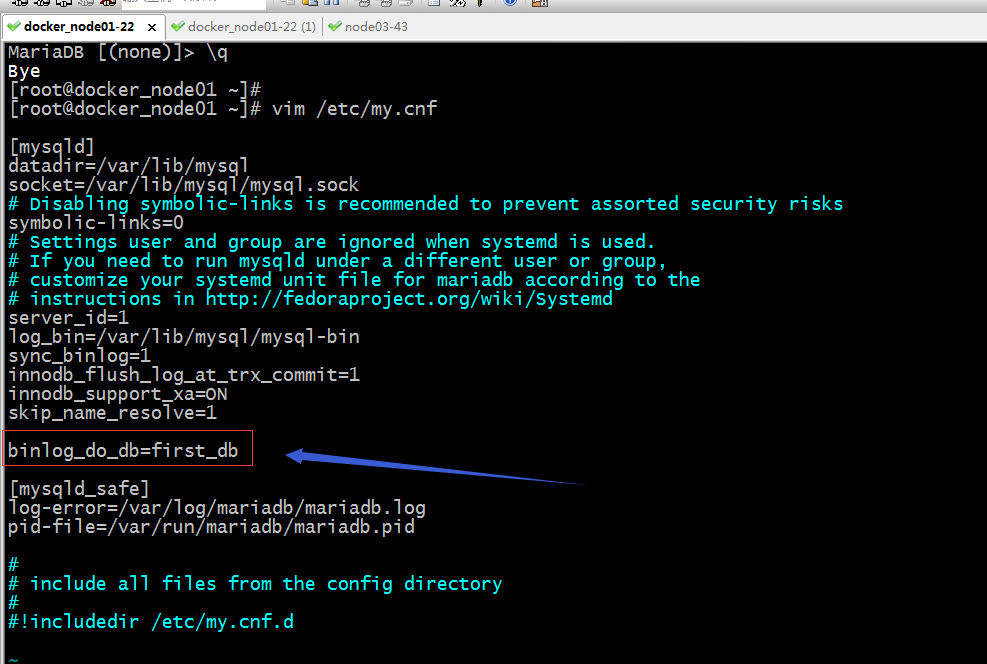
提示:以上配置表示只记录和first_db库相关写操作的事件到二进制日志中;
重启主库,然后在主库上创建其他库,看看是否还会同步到从库呢?
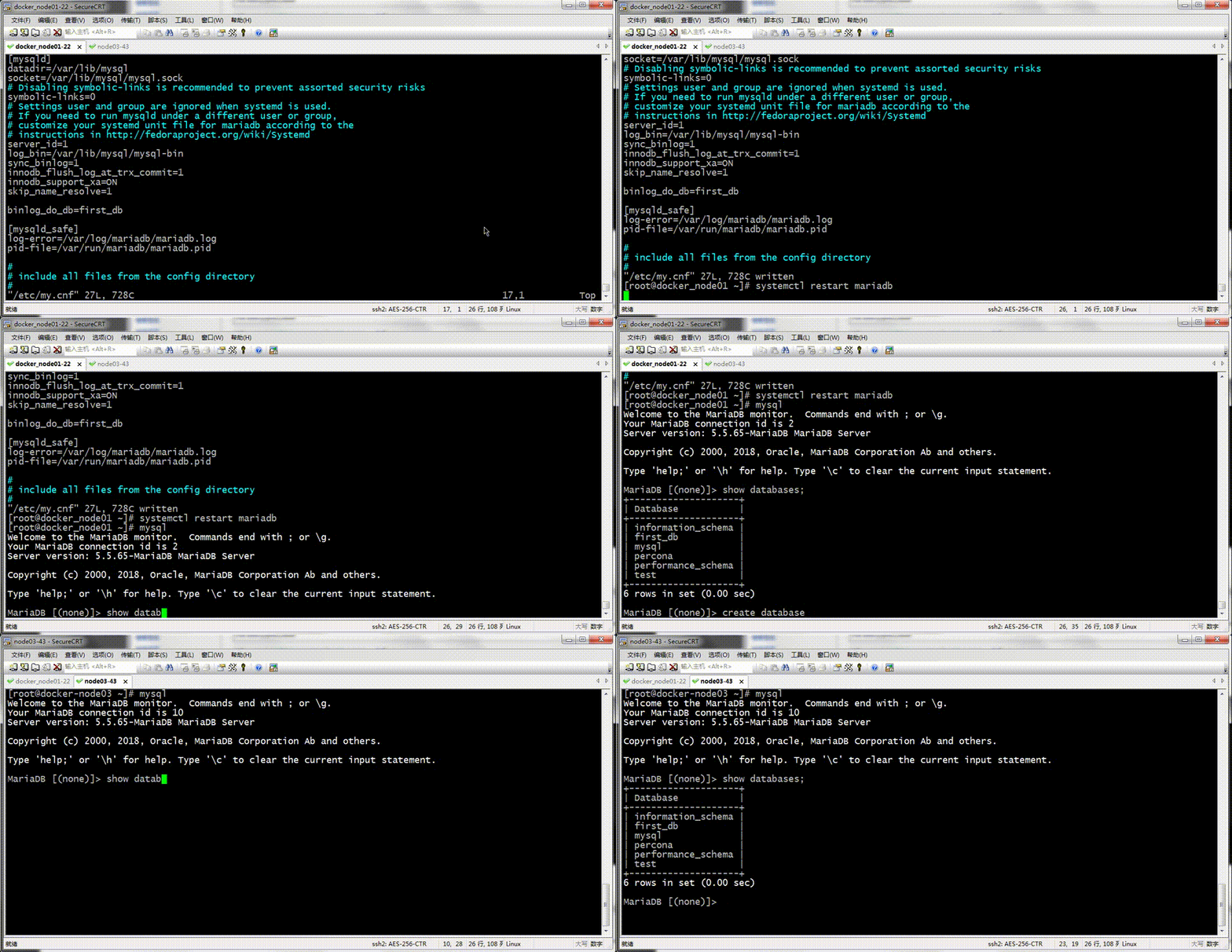
提示:可以看到我们重启主库后,在主库上新建mydb库,在从库上并没有看到mydb从主库上复制过来;
在主库上操作first_db库,看看是否及时同步到从库呢?
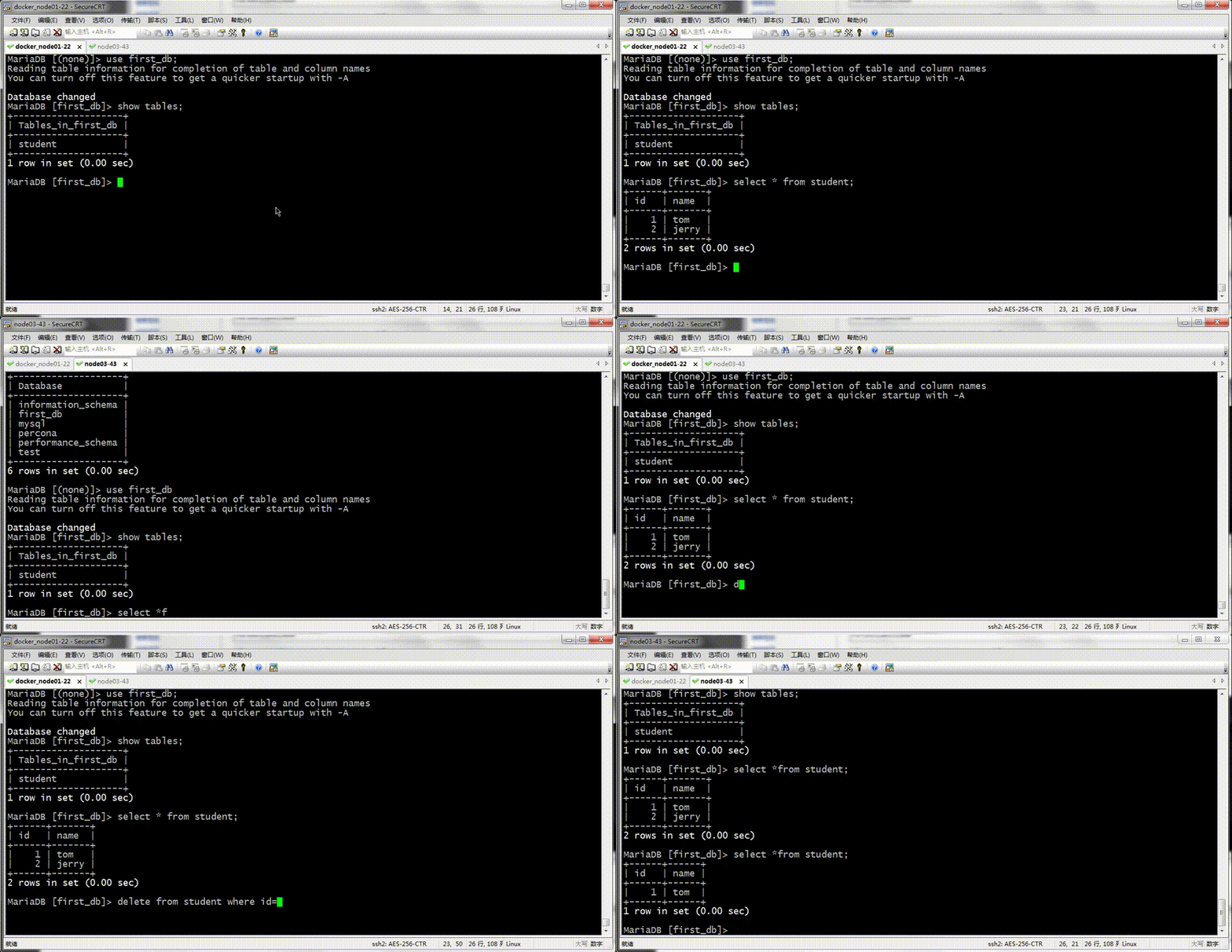
提示:可以看到在主库上操作first_db中的表,在从库上是能够及时的看到;
配置在主库上忽略某些库,剩余所有库都记录二进制日志
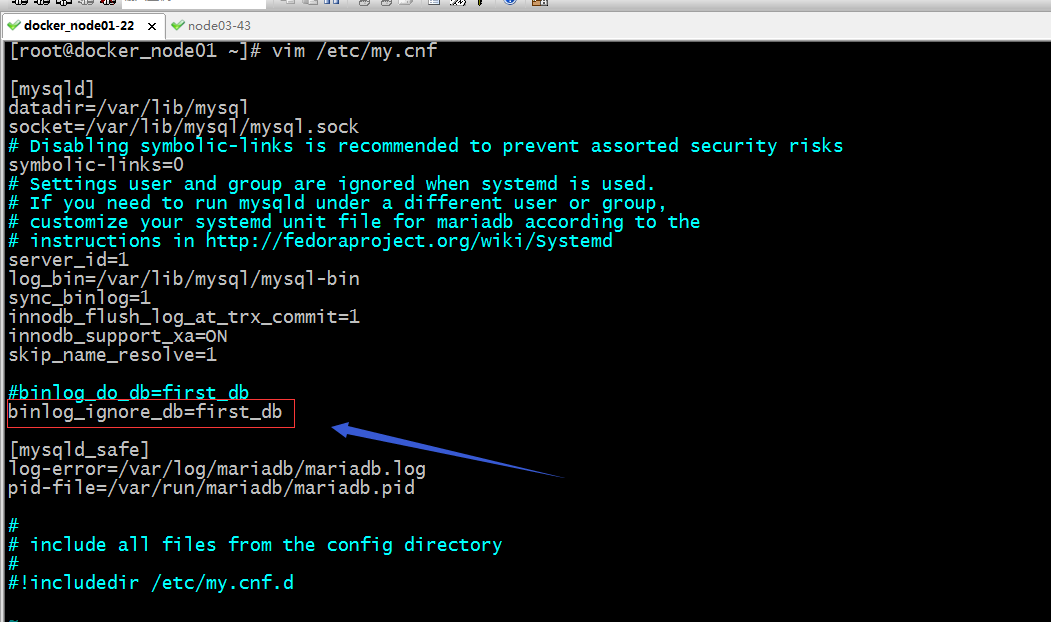
提示:以上配置表示忽略first_db库上的二进制日志记录,剩余其他库都要做二进制日志记录;
测试:重启主库,在主库上操作first_db库,看看是否能够及时同步到从库?

提示:可以看到我们在主库上操作first_db库中的student表,没有被同步到从库的;
查看主库是binlog否记录了我们刚才的插入操作的语句
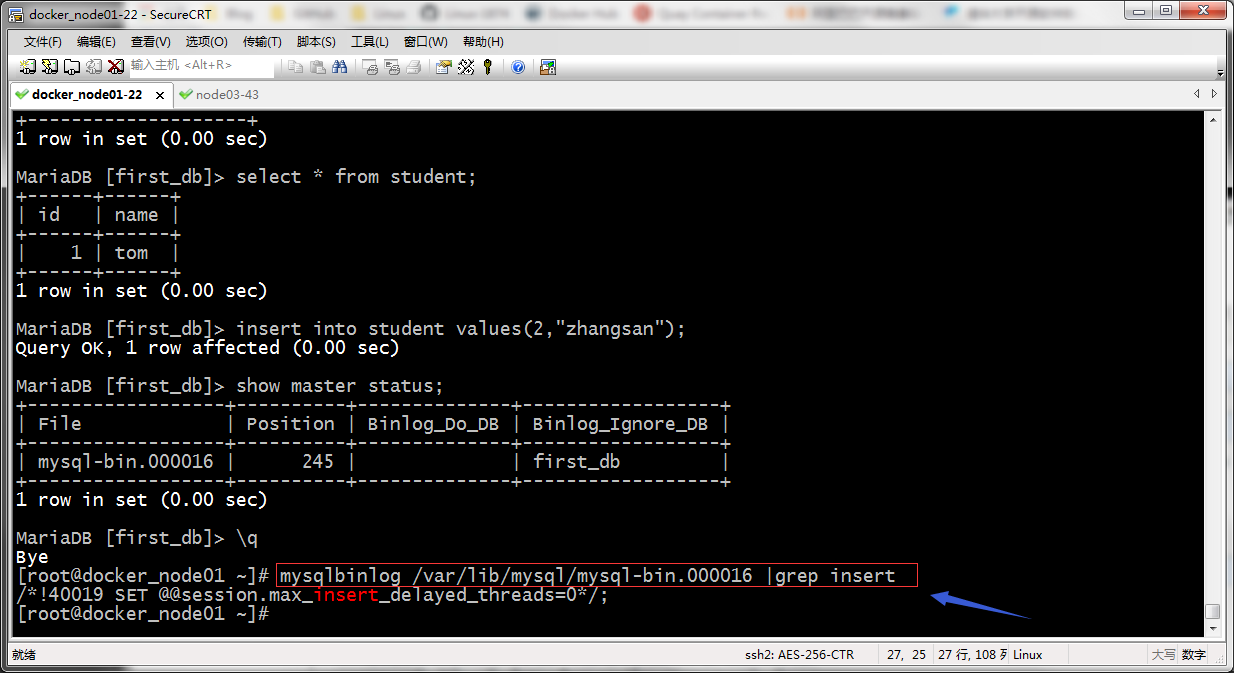
提示:在主库上看二进制日志,并没有记录我们刚才的插如语句相关的操作;
在主库上操作其他库看看是否能够被同步到从库呢?
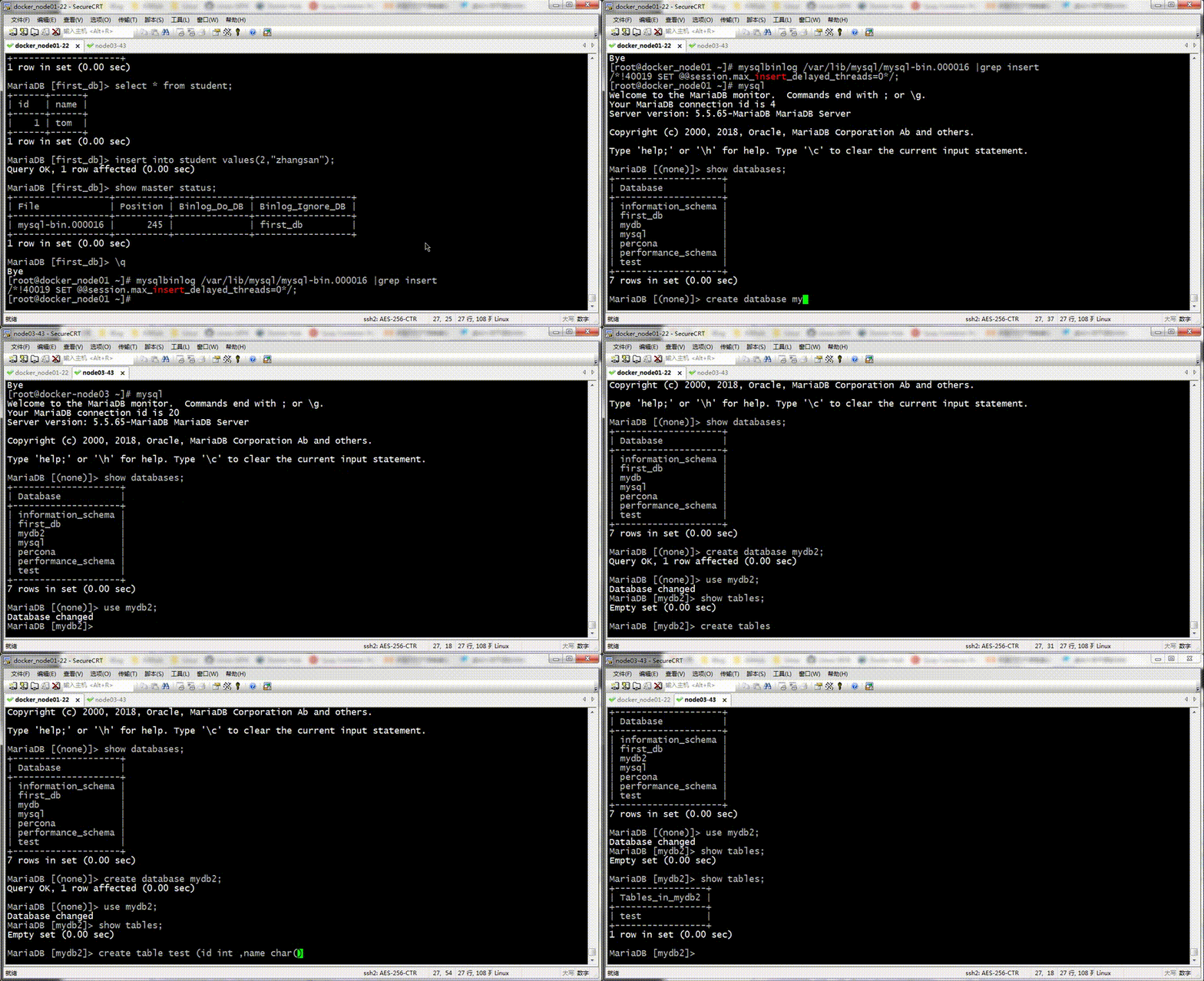
提示:可以看到我们在主库上创建新的库表是能够及时同步到从库;
在从库上配置只复制first_db相关写操作事件
[root@docker-node03 ~]# mysql

Welcome to the MariaDB monitor.  Commands end with ; or \g.

Your MariaDB connection id is 22

Server version: 5.5.65-MariaDB MariaDB Server

Copyright (c) 2000, 2018, Oracle, MariaDB Corporation Ab and others.

Type 'help;' or '\h' for help. Type '\c' to clear the current input statement.

MariaDB [(none)]> show global variables like 'replicate%';

+----------------------------------+-----------+

| Variable_name                    | Value     |

+----------------------------------+-----------+

| replicate_annotate_row_events    | OFF       |

| replicate_do_db                  |           |

| replicate_do_table               |           |

| replicate_events_marked_for_skip | replicate |

| replicate_ignore_db              |           |

| replicate_ignore_table           |           |

| replicate_wild_do_table          |           |

| replicate_wild_ignore_table      |           |

+----------------------------------+-----------+

8 rows in set (0.00 sec)

MariaDB [(none)]> set @@global.replicate_do_db=first_db;

ERROR 1198 (HY000): This operation cannot be performed with a running slave; run STOP SLAVE first

MariaDB [(none)]> stop slave;

Query OK, 0 rows affected (0.01 sec)

MariaDB [(none)]> set @@global.replicate_do_db=first_db;

Query OK, 0 rows affected (0.01 sec)

MariaDB [(none)]> show global variables like 'replicate%';

+----------------------------------+-----------+

| Variable_name                    | Value     |

+----------------------------------+-----------+

| replicate_annotate_row_events    | OFF       |

| replicate_do_db                  | first_db  |

| replicate_do_table               |           |

| replicate_events_marked_for_skip | replicate |

| replicate_ignore_db              |           |

| replicate_ignore_table           |           |

| replicate_wild_do_table          |           |

| replicate_wild_ignore_table      |           |

+----------------------------------+-----------+

8 rows in set (0.00 sec)

MariaDB [(none)]> start slave;

Query OK, 0 rows affected (0.00 sec)

MariaDB [(none)]> show slave status\G

*************************** 1. row ***************************

               Slave_IO_State: Waiting for master to send event

                  Master_Host: 192.168.0.22

                  Master_User: rpluser

                  Master_Port: 3306

                Connect_Retry: 60

              Master_Log_File: mysql-bin.000017

          Read_Master_Log_Pos: 245

               Relay_Log_File: relay-log.000035

                Relay_Log_Pos: 529

        Relay_Master_Log_File: mysql-bin.000017

             Slave_IO_Running: Yes

            Slave_SQL_Running: Yes

              Replicate_Do_DB: first_db

          Replicate_Ignore_DB:

           Replicate_Do_Table:

       Replicate_Ignore_Table:

      Replicate_Wild_Do_Table:

  Replicate_Wild_Ignore_Table:

                   Last_Errno: 0

                   Last_Error:

                 Skip_Counter: 0

          Exec_Master_Log_Pos: 245

              Relay_Log_Space: 1101

              Until_Condition: None

               Until_Log_File:

                Until_Log_Pos: 0

           Master_SSL_Allowed: No

           Master_SSL_CA_File:

           Master_SSL_CA_Path:

              Master_SSL_Cert:

            Master_SSL_Cipher:

               Master_SSL_Key:

        Seconds_Behind_Master: 0

Master_SSL_Verify_Server_Cert: No

                Last_IO_Errno: 0

                Last_IO_Error:

               Last_SQL_Errno: 0

               Last_SQL_Error:

  Replicate_Ignore_Server_Ids:

             Master_Server_Id: 1

1 row in set (0.00 sec)

MariaDB [(none)]>
提示:以上是在从节点上直接在线修改replicate_do_db变量来实现复制过滤功能;如果需要永久生效,那么把该配置写到配置文件中即可;以上配置表示只复制first_db相关写操作的事件;在线修改变量的方式,需要先停止slave,修改完成后在启动;从show slave status中,我们就能够清楚的replicate_do_db的值为first_db;
测试:在主库上对其他库操作,看看是否能够同步到从节点?
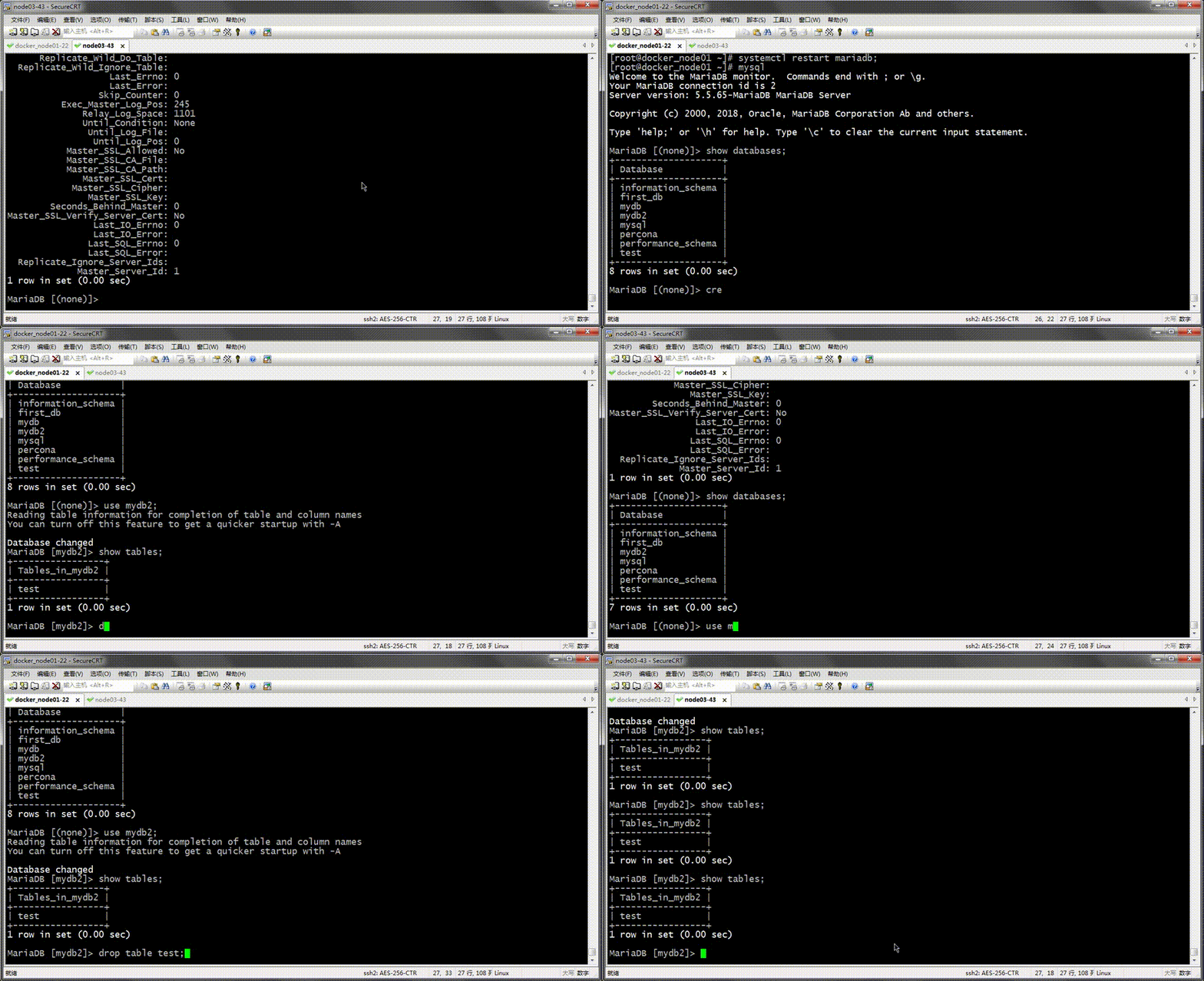
提示:可以看到我们在主库删除mydb2中的test表后,并没有同步到从库;
测试:操作first_db中的表,看看是否能同步?
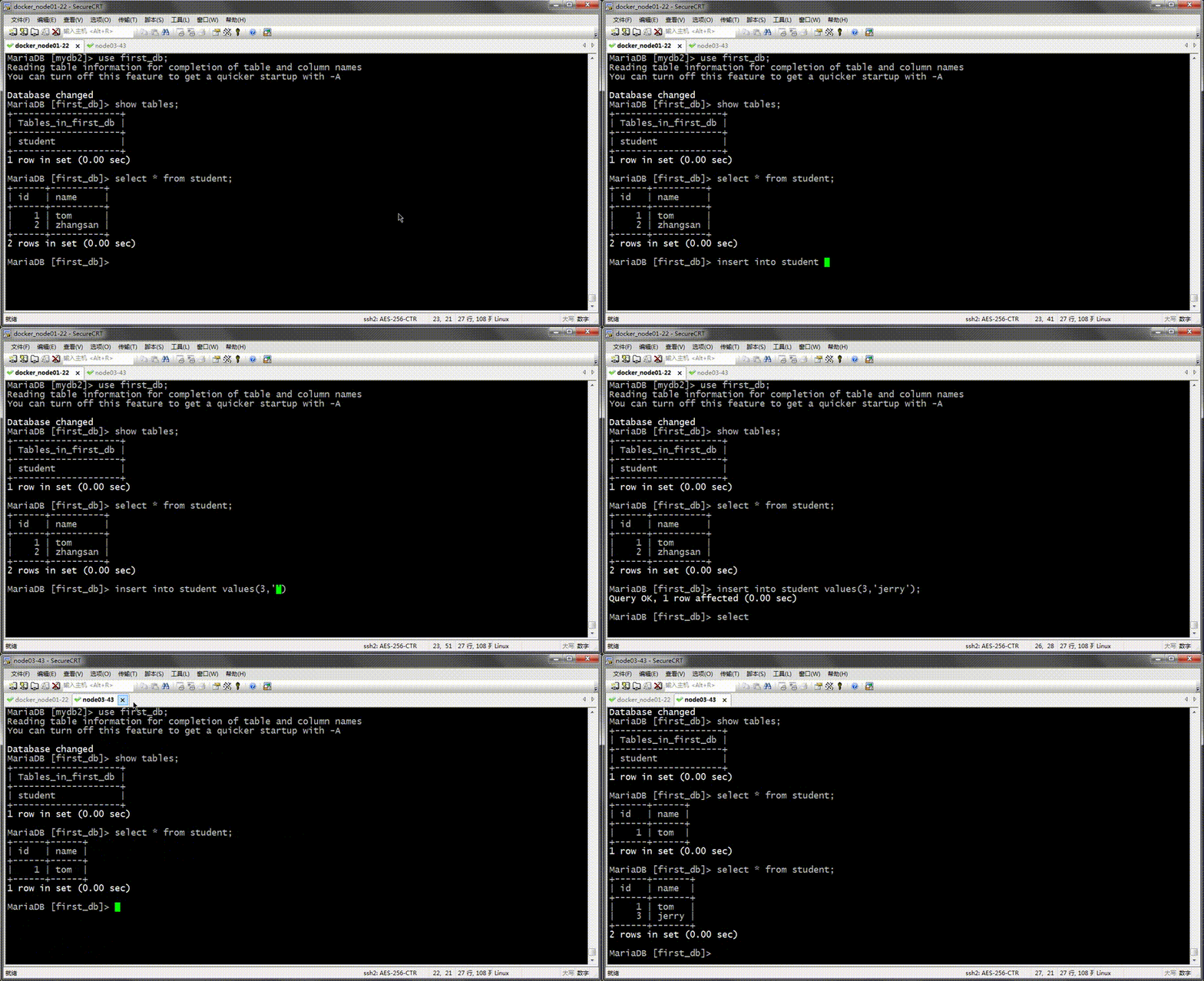
提示:可以看到我们在first_db库中的student表中插入了一条新数据,在从库是能够及时的同步;
配置从节点只复制first_db库中的student表的操作相关事件
MariaDB [first_db]> stop slave;

Query OK, 0 rows affected (0.01 sec)

MariaDB [first_db]> show global variables like 'replicate%';

+----------------------------------+-----------+

| Variable_name                    | Value     |

+----------------------------------+-----------+

| replicate_annotate_row_events    | OFF       |

| replicate_do_db                  | first_db  |

| replicate_do_table               |           |

| replicate_events_marked_for_skip | replicate |

| replicate_ignore_db              |           |

| replicate_ignore_table           |           |

| replicate_wild_do_table          |           |

| replicate_wild_ignore_table      |           |

+----------------------------------+-----------+

8 rows in set (0.00 sec)

MariaDB [first_db]> set @@global.replicate_do_table=first_db.student;

ERROR 1232 (42000): Incorrect argument type to variable 'replicate_do_table'

MariaDB [first_db]> set @@global.replicate_do_table='first_db.student';

Query OK, 0 rows affected (0.00 sec)

MariaDB [first_db]> show global variables like 'replicate%';

+----------------------------------+------------------+

| Variable_name                    | Value            |

+----------------------------------+------------------+

| replicate_annotate_row_events    | OFF              |

| replicate_do_db                  | first_db         |

| replicate_do_table               | first_db.student |

| replicate_events_marked_for_skip | replicate        |

| replicate_ignore_db              |                  |

| replicate_ignore_table           |                  |

| replicate_wild_do_table          |                  |

| replicate_wild_ignore_table      |                  |

+----------------------------------+------------------+

8 rows in set (0.00 sec)

MariaDB [first_db]> start slave;

Query OK, 0 rows affected (0.00 sec)

MariaDB [first_db]> show slave status\G

*************************** 1. row ***************************

               Slave_IO_State: Waiting for master to send event

                  Master_Host: 192.168.0.22

                  Master_User: rpluser

                  Master_Port: 3306

                Connect_Retry: 60

              Master_Log_File: mysql-bin.000017

          Read_Master_Log_Pos: 1198

               Relay_Log_File: relay-log.000050

                Relay_Log_Pos: 529

        Relay_Master_Log_File: mysql-bin.000017

             Slave_IO_Running: Yes

            Slave_SQL_Running: Yes

              Replicate_Do_DB: first_db

          Replicate_Ignore_DB:

           Replicate_Do_Table: first_db.student

       Replicate_Ignore_Table:

      Replicate_Wild_Do_Table:

  Replicate_Wild_Ignore_Table:

                   Last_Errno: 0

                   Last_Error:

                 Skip_Counter: 0

          Exec_Master_Log_Pos: 1198

              Relay_Log_Space: 1101

              Until_Condition: None

               Until_Log_File:

                Until_Log_Pos: 0

           Master_SSL_Allowed: No

           Master_SSL_CA_File:

           Master_SSL_CA_Path:

              Master_SSL_Cert:

            Master_SSL_Cipher:

               Master_SSL_Key:

        Seconds_Behind_Master: 0

Master_SSL_Verify_Server_Cert: No

                Last_IO_Errno: 0

                Last_IO_Error:

               Last_SQL_Errno: 0

               Last_SQL_Error:

  Replicate_Ignore_Server_Ids:

             Master_Server_Id: 1

1 row in set (0.00 sec)

MariaDB [first_db]>
提示:replicate_do_table这个变量在线修改时需要指明那个库中的那个表,并用引号引起来,否则会提示我们参数类型不正确;
测试:在主库的first_db库中新建一张表,看看是否能够被同步到从库?
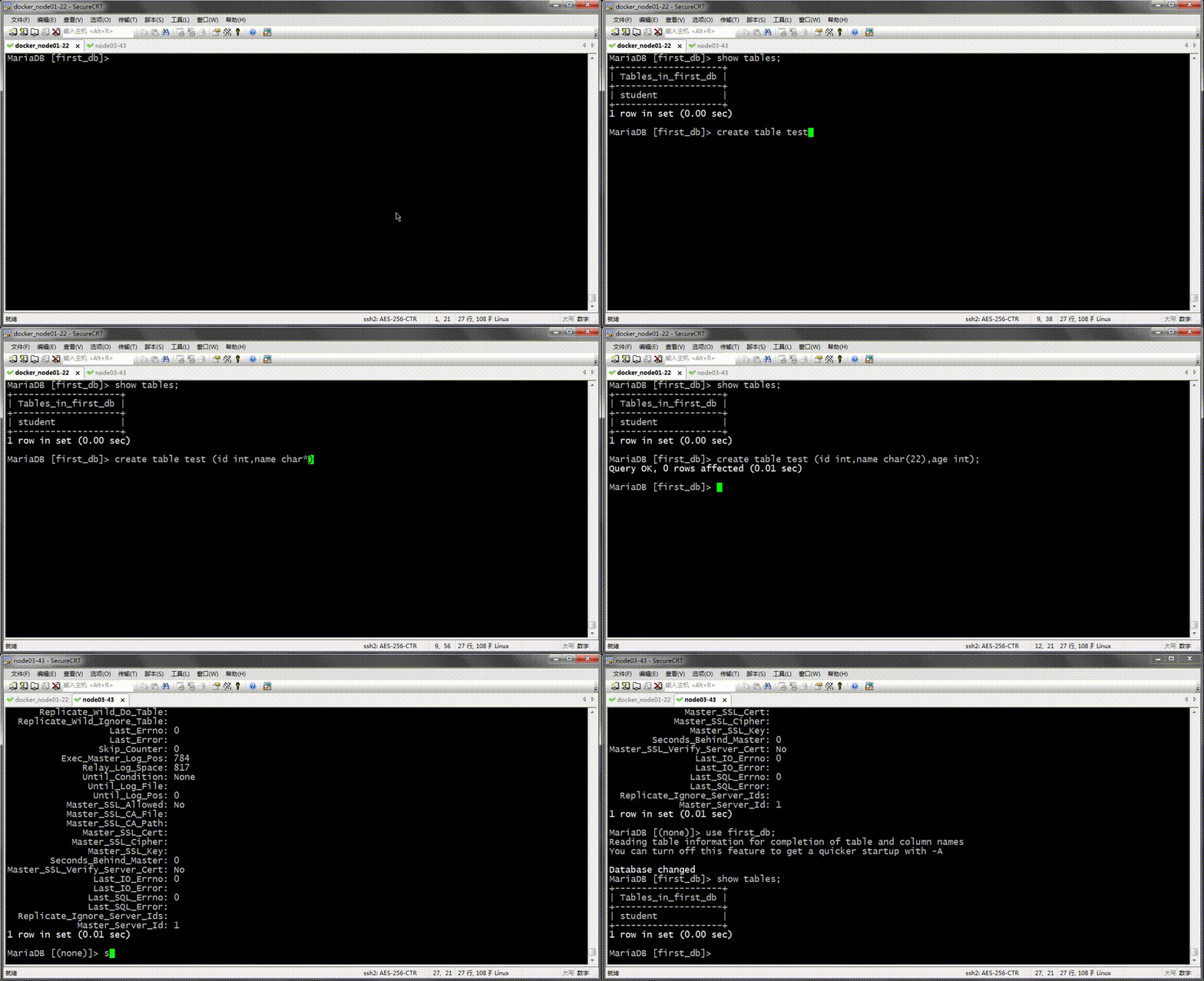
提示:可以看到我们在主库的fisrt_db中新建一张test表,并没有同步到从库中去,这说明replicate_do_table的优先级要高于replicate_do_db;
在主库的first_db库中对student表做插入操作,看看是否能够被同步到从库?
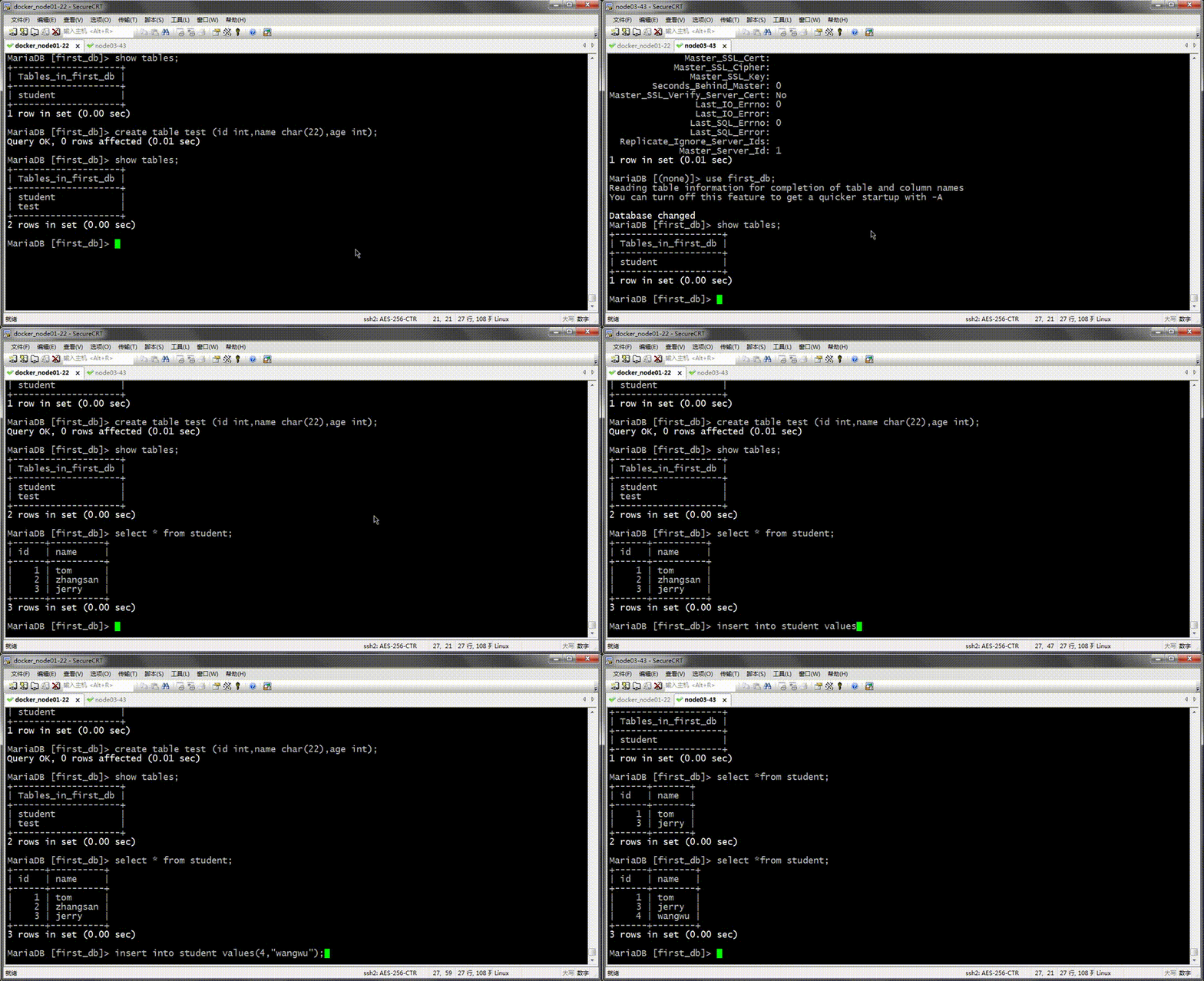
提示:可以看到操作first_db中的student是能够及时同步到从库;
设置从节点只复制以student开头的表
MariaDB [first_db]> stop slave;

Query OK, 0 rows affected (0.00 sec)

MariaDB [first_db]> show global variables like 'replicate%';

+----------------------------------+------------------+

| Variable_name                    | Value            |

+----------------------------------+------------------+

| replicate_annotate_row_events    | OFF              |

| replicate_do_db                  | first_db         |

| replicate_do_table               | first_db.student |

| replicate_events_marked_for_skip | replicate        |

| replicate_ignore_db              |                  |

| replicate_ignore_table           |                  |

| replicate_wild_do_table          |                  |

| replicate_wild_ignore_table      |                  |

+----------------------------------+------------------+

8 rows in set (0.00 sec)

MariaDB [first_db]> set @@global.replicate_wild_do_table='first_db.student%';

Query OK, 0 rows affected (0.00 sec)

MariaDB [first_db]> show global variables like 'replicate%';

+----------------------------------+-------------------+

| Variable_name                    | Value             |

+----------------------------------+-------------------+

| replicate_annotate_row_events    | OFF               |

| replicate_do_db                  | first_db          |

| replicate_do_table               | first_db.student  |

| replicate_events_marked_for_skip | replicate         |

| replicate_ignore_db              |                   |

| replicate_ignore_table           |                   |

| replicate_wild_do_table          | first_db.student% |

| replicate_wild_ignore_table      |                   |

+----------------------------------+-------------------+

8 rows in set (0.01 sec)

MariaDB [first_db]> start slave;

Query OK, 0 rows affected (0.00 sec)

MariaDB [first_db]> show slave status\G

*************************** 1. row ***************************

               Slave_IO_State: Waiting for master to send event

                  Master_Host: 192.168.0.22

                  Master_User: rpluser

                  Master_Port: 3306

                Connect_Retry: 60

              Master_Log_File: mysql-bin.000017

          Read_Master_Log_Pos: 1198

               Relay_Log_File: relay-log.000051

                Relay_Log_Pos: 529

        Relay_Master_Log_File: mysql-bin.000017

             Slave_IO_Running: Yes

            Slave_SQL_Running: Yes

              Replicate_Do_DB: first_db

          Replicate_Ignore_DB:

           Replicate_Do_Table: first_db.student

       Replicate_Ignore_Table:

      Replicate_Wild_Do_Table: first_db.student%

  Replicate_Wild_Ignore_Table:

                   Last_Errno: 0

                   Last_Error:

                 Skip_Counter: 0

          Exec_Master_Log_Pos: 1198

              Relay_Log_Space: 1101

              Until_Condition: None

               Until_Log_File:

                Until_Log_Pos: 0

           Master_SSL_Allowed: No

           Master_SSL_CA_File:

           Master_SSL_CA_Path:

              Master_SSL_Cert:

            Master_SSL_Cipher:

               Master_SSL_Key:

        Seconds_Behind_Master: 0

Master_SSL_Verify_Server_Cert: No

                Last_IO_Errno: 0

                Last_IO_Error:

               Last_SQL_Errno: 0

               Last_SQL_Error:

  Replicate_Ignore_Server_Ids:

             Master_Server_Id: 1

1 row in set (0.00 sec)

MariaDB [first_db]>
测试:在主库first_db库中操作非student开头的表,看看是否能够被复制到从库呢?
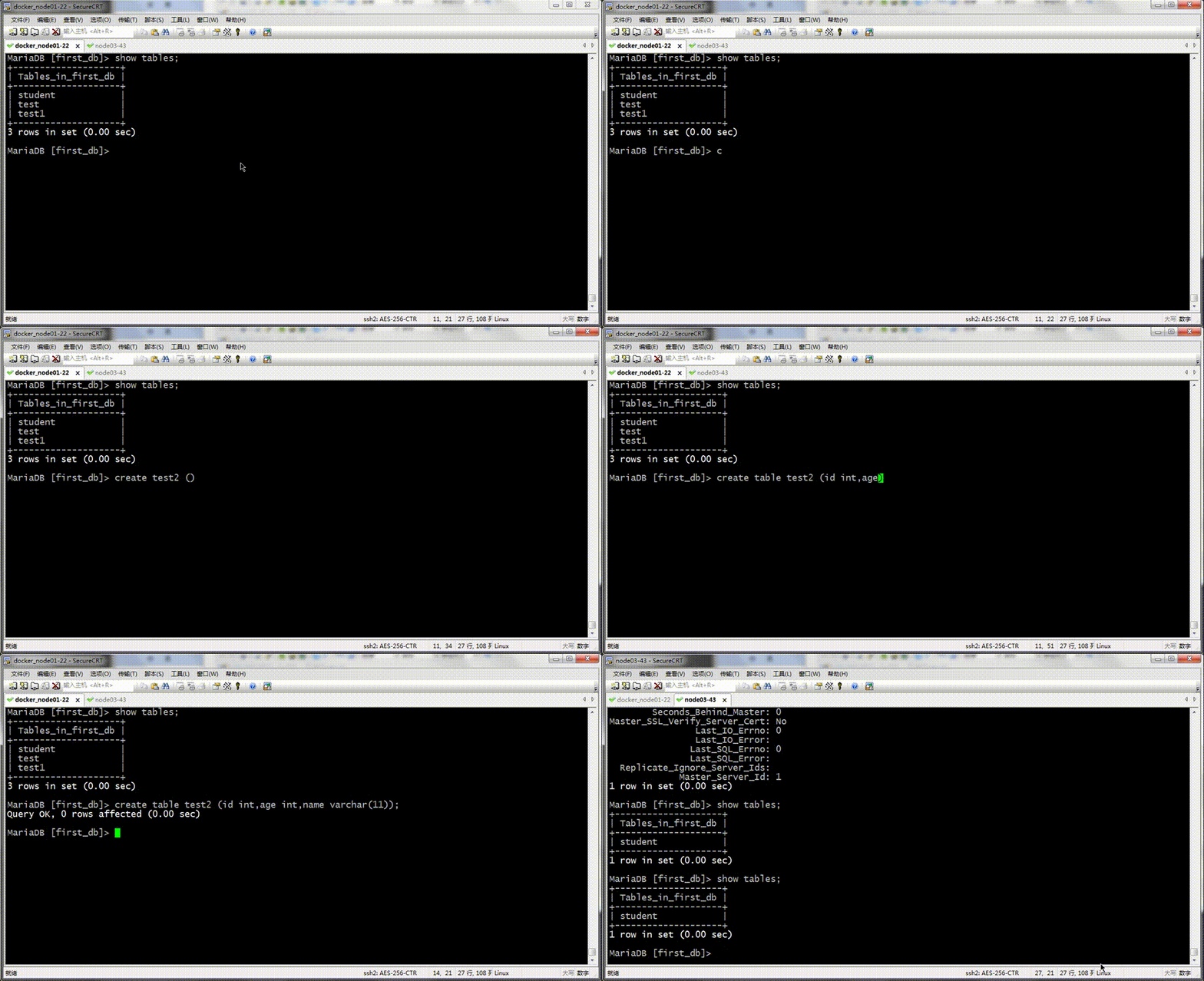
提示:可以看到在主库的first_db库中新增test2表,并没有被同步到从库;
测试:在主库新增student_test表,看看是否被同步到从库?

提示:可以看到在主库上新建student_test表被同步到从库中去了;
以上就是mariadb/mysql数据库主从复制中的复制过滤器的使用;以上演示部分使用白名单机制进行演示的,黑名单和白名单配置方式相同,只不过黑名单表示忽略指定的库或者表,其他剩下的库和表都要进行复制,而白名单是指定的库和表都要复制,其他剩余的库或表都不被复制;在从节点使用黑名单机制忽略库使用replicate_ignore_db变量指定;忽略某些表使用replicate_ignore_table变量来指定;忽略以某类表使用replicate_ignore_wild_do_table指定;使用方式和上面白名单机制的使用方式一样;如果需要永久生效,请把以上变量写到配置文件中重启服务即可生效;
Mariadb之复制过滤器的更多相关文章
- MySQL/MariaDB数据库的复制过滤器
MySQL/MariaDB数据库的复制过滤器 作者:尹正杰 版权声明:原创作品,谢绝转载!否则将追究法律责任. 一.复制过滤器概述 1>.复制器过滤器功能 让从节点仅复制指定的数据库,或指 ...
- MySQL\MariaDB 多线程复制初探
背景: MariaDB 在10.0.5就已经支持了并行复制的功能,即从库多线程复制的功能.MySQL最先在5.6.3中支持.目前暂时没有用MySQL5.6的版本,故暂时只对MariaDB进行一些说明, ...
- MariaDB GTID 复制同步
MariaDB GTID 复制同步 GTID:Global Transaction ID,全局事务ID,在整个主从复制架构中任何两个事物ID是不能相同的.全局事务ID是Mster服务器生成一个128位 ...
- 【MariaDB】MariaDB的复制
GTID的说明 官网:https://mariadb.com/kb/en/mariadb/global-transaction-id/ 官网:http://dev.mysql.com/doc/refm ...
- MySQL(mariadb)主从复制模式与复制过滤
在前一篇文章<mysql多实例与复制应用>中只对mysql的复制做了简单的介绍,本篇内容专门介绍一下mysql的复制. MySQL复制 mysql复制是指将主数据库的DDL和DML操作通过 ...
- MariaDB复制架构中应该注意的问题
一.复制架构中应该注意的问题: 1.限制从服务器只读 在从服务器上设置read_only=ON,此限制对拥有SUPPER权限的用户均无效: 阻止所有用户(在从服务器执行一下命令并保持此线程,也就是执行 ...
- mysql —复制
MySQL的扩展 读写分离 复制:每个节点都有相同的数据集 向外扩展 二进制日志 单向 复制的功用: 数据分布 负载均衡读 备份 高可用和故障切换 MySQL升级测试 MySQL复制相关概念 主从复 ...
- percona-toolkit工具检查MySQL复制一致性及修复
利用percona-toolkit工具检查MySQL数据库主从复制数据的一致性,以及修复. 一. pt-table-checksum检查主从库数据的一致性 pt-table-c ...
- MySQL复制之理论篇
一.MySQL复制概述 MySQL支持两种复制方式:基于行的复制和基于语句的复制(逻辑复制).这两种方式都是通过在主库上记录 二进制日志.在备库重放日志的方式来实现异步的数据复制,其工作原理如下图: ...
随机推荐
- CVE¬-2020-¬0796 漏洞复现(本地提权)
CVE-2020-0796 漏洞复现(本地提权) 0X00漏洞简介 Microsoft Windows和Microsoft Windows Server都是美国微软(Microsoft)公司的产品 ...
- 1.keras-构建基本简单网络实现线性回归
构建基本简单网络实现线性回归 1.创建数据绘制散点图 import keras import numpy as np import matplotlib.pyplot as plt from kera ...
- mysql安装过程以及遇到问题的解决方法
因为工作原因,配备了新电脑,需要装mysql,今天给大家分享一下安装的过程以及遇到的问题(在此仅介绍压缩包解压方式的安装) 1.准备mysql的压缩包(我使用的是5.7经典版本) 2.配置环境变量,这 ...
- IDEA自定义模板
RT,虽然看起来简单,每当配置新的IDEA 时,又不免度娘,所以整理下 1.类的模板 路径: settings-Editor-File and Code Templates 右侧找到 class 添加 ...
- redis 数据删除策略和逐出算法
数据存储和有效期 在 redis 工作流程中,过期的数据并不需要马上就要执行删除操作.因为这些删不删除只是一种状态表示,可以异步的去处理,在不忙的时候去把这些不紧急的删除操作做了,从而保证 redis ...
- 有没有人想和我一起编写 Clear Writer 的?
合作内容 程序编写 了解 JS.HTML.CSS 等基础前端技能,了解 Electron 开发. 翻译 熟练运用一门外语(中文英文除外),书面表达过关. 报酬 在 Github 上本项目里面的 REA ...
- 网页元素居中的n种方法
导语:元素居中对齐在很多场景看上去很和谐很漂亮.除此之外,对于前端开发面试者的基础也是很好的一个考察点.下面跟着作者的思路,一起来看下吧. 场景分析 一个元素,它有可能有背景,那我要它的背景居中对齐 ...
- spark源码解析大全
第1章 Spark 整体概述 1.1 整体概念 Apache Spark 是一个开源的通用集群计算系统,它提供了 High-level 编程 API,支持 Scala.Java 和 Pytho ...
- delete语句的基本用法
DELETE FROM tb_courses WHERE course_id=;
- mysql HAVING用法
原文链接:https://www.cnblogs.com/mr-wuxiansheng/p/11188733.html having字句可以让我们筛选分组之后的各种数据,where字句在聚合前先筛选记 ...