
Ansible-1 基本认识及清单与模块
ansible
一、常用的自动化运维工具
1、puppet
基于ruby开发,采用c/s架构,扩展性强,基于ssl,远程命令执行相对较弱,
2、saltstack
基于python开发,采用C/S架构,相对puppet更轻量级,配置语法使用YMAL,使得配置脚本更简单
3、ansible
基于python paramiko开发,无需客户端,轻量级,配置语法使用YMAL及jinjia2模板语言,更强的远程命令执行操作
https://docs.ansible.com/ansible/latest/index.html
二、ansible能做什么
1、ansible能做什么
完成一些批量任务,或者是重复性工作。
例子1
在100台服务器上部署nginx服务并且安装后启动。
例子2
在100台服务器上创建账户,拷贝文件
2、脚本vs ansible
有些脚本也可以满足例子1、2,但是ansible还支持一些优秀的特性,如幂等性(例子,拷贝文件到某主机目录上,但是不确定存不存在)ansible会自定判断是否存在此文件,所以ansible是以结果为导向判断当前状态是不是目标状态一致,如果不一致就改为目标状态,一致就不进行操作,这个就是ansible的幂等性。
3、ansible依赖ssh即可工作
用过puppet的一定知道,puppet客户端需要装agent才可以配合master工作,而ansible只需要依赖ssh即可
三、ansible工作机制
ansible在管理节点将ansible模块通过SSH协议(或者kerberos、LDAP)推送到被管理端执行,执行之后自动删除,可以使用SVN等来管理自定义模块及编排
1、架构图示
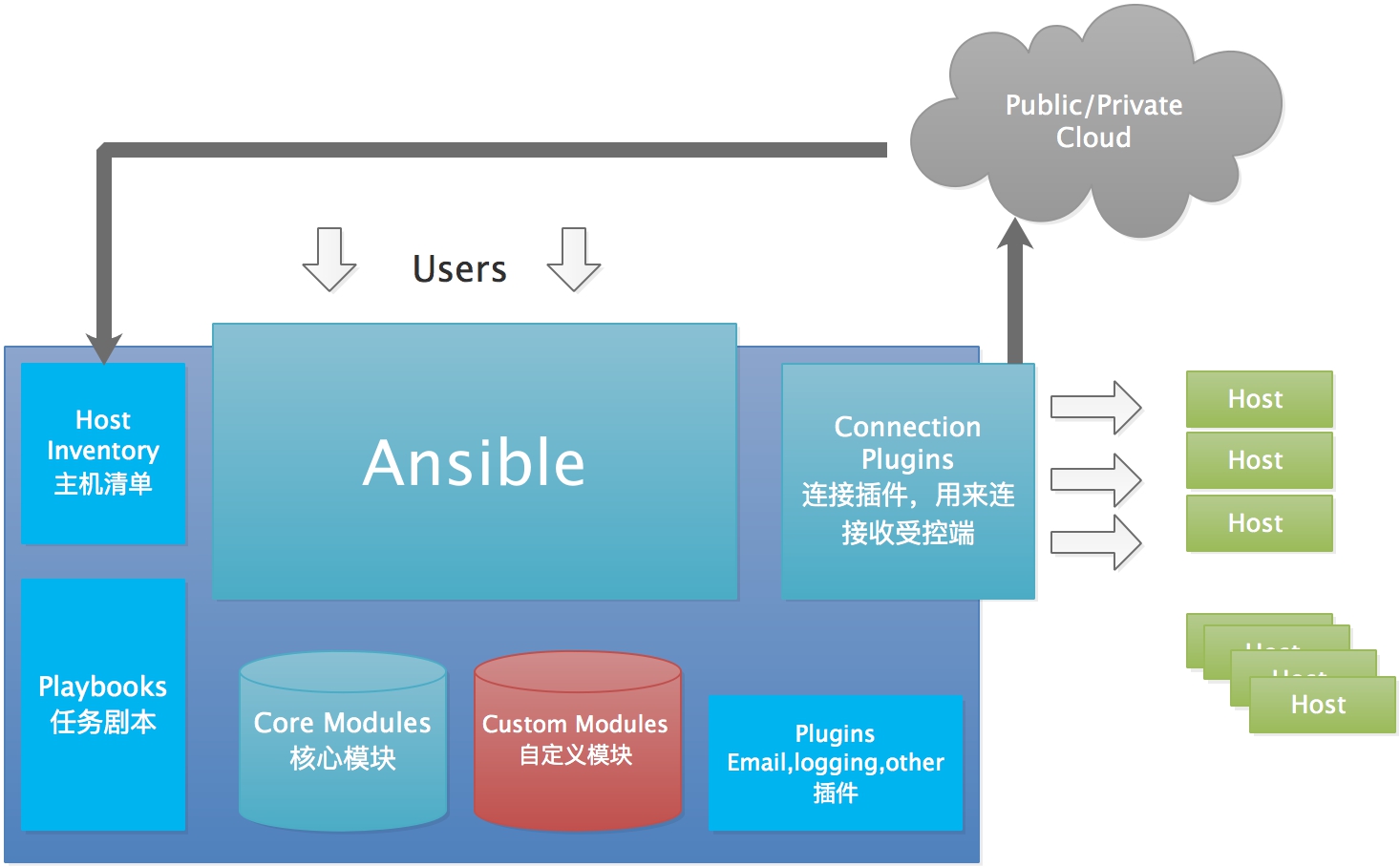
2、组成
ansible:核心
modules:包括ansible自带的核心模块及自定义模块
plugins:完成模块功能的补充,包括连接插件、邮件插件等
playbooks:一般翻译为剧本,可以理解为编排,是定义ansible多任务配置文件,由ansible自行执行
inventory:定义ansible管理主机的清单
四、ansible安装
1、环境
| 主机名 | IP | 系统版本 | 备注 |
|---|---|---|---|
| ansible | 10.211.55.5 | centos-7.6 | ansible-2.9.3 |
| test1 | 10.211.55.6 | centos-7.6 | |
| Test2 | 10.211.55.7 | centos-7.6 |
2、安装软件
yum install epel-release

yum install ansible
安装了如下依赖:
Dependencies Resolved

===============================================================================

 Package                              Arch    Version            Repository

                                                                          Size

===============================================================================

Installing:

 ansible                              noarch  2.9.3-1.el7        epel     17 M

Installing for dependencies:

 PyYAML                               x86_64  3.10-11.el7        base    153 k

 libyaml                              x86_64  0.1.4-11.el7_0     base     55 k

 python-babel                         noarch  0.9.6-8.el7        base    1.4 M

 python-backports                     x86_64  1.0-8.el7          base    5.8 k

 python-backports-ssl_match_hostname  noarch  3.5.0.1-1.el7      base     13 k

 python-cffi                          x86_64  1.6.0-5.el7        base    218 k

 python-enum34                        noarch  1.0.4-1.el7        base     52 k

 python-httplib2                      noarch  0.9.2-1.el7        extras  115 k

 python-idna                          noarch  2.4-1.el7          base     94 k

 python-ipaddress                     noarch  1.0.16-2.el7       base     34 k

 python-jinja2                        noarch  2.7.2-4.el7        base    519 k

 python-markupsafe                    x86_64  0.11-10.el7        base     25 k

 python-paramiko                      noarch  2.1.1-9.el7        base    269 k

 python-ply                           noarch  3.4-11.el7         base    123 k

 python-pycparser                     noarch  2.14-1.el7         base    104 k

 python-setuptools                    noarch  0.9.8-7.el7        base    397 k

 python-six                           noarch  1.9.0-2.el7        base     29 k

 python2-cryptography                 x86_64  1.7.2-2.el7        base    502 k

 python2-jmespath                     noarch  0.9.0-3.el7        extras   39 k

 python2-pyasn1                       noarch  0.1.9-7.el7        base    100 k

 sshpass                              x86_64  1.06-2.el7         extras   21 k

Transaction Summary

===============================================================================

Install  1 Package (+21 Dependent packages)
3、配置主机清单-添加ssh信息的方式
ansible 通过读取默认的主机清单配置/etc/ansible/hosts,可以同时连接到多个远程主机上执行任务默认路径可以通过修改ansible.cfg的hostfile参数指定的路径。
1)添加主机
配置文件/etc/ansible/hosts
cat /etc/ansible/hosts |grep 10.211*
vim /etc/ansible/hosts
......

10.211.55.6 ansible_port=22 ansible_user=root ansible_ssh_pass=111111

......
注意:这里还可以添加别名的方法:test1 ansible_host=10.211.55.6 ansible_port=22 ansible_user=root ansible_ssh_pass=111111
2)执行查看返回结果
ansible 10.211.55.6 -m ping
10.211.55.6 | SUCCESS => {

    "ansible_facts": {

        "discovered_interpreter_python": "/usr/bin/python"

    },

    "changed": false,

    "ping": "pong"

}
3)如ssh不同则是
ansible 10.211.55.6 -m ping
The authenticity of host '10.211.55.6 (10.211.55.6)' can't be established.

ECDSA key fingerprint is SHA256:m1VnZbagJ8pJphMISxwjZSwJ7YhdEwA1nC7awJXJ6t0.

ECDSA key fingerprint is MD5:27:b6:32:8b:fd:d7:e7:af:a6:75:c3:bc:4c:0b:68:b2.

Are you sure you want to continue connecting (yes/no)? yes

10.211.55.6 | UNREACHABLE! => {

    "changed": false,

    "msg": "Failed to connect to the host via ssh: Warning: Permanently added '10.211.55.6' (ECDSA) to the list of known hosts.\r\nPermission denied (publickey,gssapi-keyex,gssapi-with-mic,password).",

    "unreachable": true

}
4、配置主机清单-ssh免密登录方式
ssh认证方式可以是密码认证和秘钥认证,为了提高安全性,通常使用秘钥认证,可以在管理机中生成秘钥,然后通过公钥认证的方式连接到对应的受管主机。
1)、执行ssh-keygen命令
ssh-keygen -t rsa //生成秘钥对,也就是私钥与公钥
例子:
ssh-keygen -t rsa

Generating public/private rsa key pair.

Enter file in which to save the key (/root/.ssh/id_rsa):

Enter passphrase (empty for no passphrase):

Enter same passphrase again:

Your identification has been saved in /root/.ssh/id_rsa.

Your public key has been saved in /root/.ssh/id_rsa.pub.

The key fingerprint is:

SHA256:hwxorgSBRIj3a0zOdXUJWnhjY8f7ZzQT4hMVHjfUIRE root@ansible

The key's randomart image is:

+---[RSA 2048]----+

|Bo       .oo E=B=|

|+..  .  .oB =oo.=|

|.. .o . .= =..o..|

| . oo .o..  .o o.|

|  .=.o .S .  ...o|

| . .*    .    . o|

|  ..           o |

|                 |

|                 |

+----[SHA256]-----+
2)、拷贝文件
scp /root/.ssh/id_rsa.pub root@10.211.55.6:/root/.ssh/authorized_keys
5、还可以将生成公钥加入55.6的认证列表里
ssh-copy-id -i /root/.ssh/id_rsa.pub root@10.211.55.6
6、修改配置文件并进行测试
配置文件
vim /etc/ansible/hosts
10.211.55.6 ansible_port=22 //因为已经进行免密登录,这里指定主机ip及端口即可
cat /etc/ansible/hosts |grep 10.211
测试
ansible 10.211.55.6 -m ping
10.211.55.6 | SUCCESS => {

    "ansible_facts": {

        "discovered_interpreter_python": "/usr/bin/python"

    },

    "changed": false,

    "ping": "pong"

}
7、清单分组功能
还可以为一个组指定变量,组内每个主机都可以使用,相同主机可以分配到不同的组,可以按照功能、系统、等进行分类,便于对某些主机货者某一组功能相同的主机进行操作
vim /etc/ansible/hosts
[test-a]

10.211.55.6 ansible_port=22

[test-b]

10.211.55.7 ansible_port=22

[test]

10.211.55.6

10.211.55.7
测试
ansible test -m ping
[DEPRECATION WARNING]: The TRANSFORM_INVALID_GROUP_CHARS settings is set to allow bad characters in group names by default, this will change, but still be user

configurable on deprecation. This feature will be removed in version 2.10. Deprecation warnings can be disabled by setting deprecation_warnings=False in ansible.cfg.

[WARNING]: Invalid characters were found in group names but not replaced, use -vvvv to see details

10.211.55.6 | SUCCESS => {

    "ansible_facts": {

        "discovered_interpreter_python": "/usr/bin/python"

    },

    "changed": false,

    "ping": "pong"

}

10.211.55.7 | SUCCESS => {

    "ansible_facts": {

        "discovered_interpreter_python": "/usr/bin/python"

    },

    "changed": false,

    "ping": "pong"

}
8、使用YAML语言的配置语法书写hosts
什么是YAML语言那,就是"YAML Ain't a Markup Language",他不是一种标记语言但是如果掌握XML这用标记语言也是可以很快学会YAML
1)使用YAML语言书写hosts
vim hosts

all:

 children:

  test:

   children:

    testA:

     hosts:

      10.211.55.6:

    testB:

     hosts:

      10.211.55.7:
2)拆分主机和组专用数据
当host和group定义一些比较复杂的变量时,可以用单独文件保存host和group变量,以YAML格式书写变量,避免都写在hosts文件比较混乱
二、ansible模块使用
1、查看使用方法
比如刚才的ping就需要使用ping模块,ansible还提供很多模块,可以通过命令查看有哪些?
ansible-doc -l //查看ansible都有哪些模块
ansible-doc -s ping //获取ping模块的详细使用方法
ansible-doc -s fetch //获取fetch拉取模块的详细使用方法
- name: Fetch files from remote nodes

  fetch:

      dest:                  # (required) A directory to save the file into.

                               For example, if

                               the `dest'

                               directory is

                               `/backup' a `src'

                               file named

                               `/etc/profile' on

                               host `host.exampl

                               e.com', would be

                               saved into `/back

                               up/host.example.c

                               om/etc/profile'.

                               The host name is

                               based on the

                               inventory name.

      fail_on_missing:       # When set to `yes', the task will fail if the

                               remote file

                               cannot be read

                               for any reason.

                               Prior to Ansible

                               2.5, setting this

                               would only fail

                               if the source

                               file was missing.

                               The default was

                               changed to `yes'

                               in Ansible 2.5.

      flat:                  # Allows you to override the default behavior of

                               appending hostnam

                               e/path/to/file to

                               the destination.

                               If `dest' ends

                               with '/', it will

                               use the basename

                               of the source

                               file, similar to

                               the copy module.

                               This can be
2、Files modules-fetch
ansible testA -m fetch -a "src=/etc/fstab dest=/testdir/ansible/"
注意:运行两次就可以看到ansible幂等性,第一遍为黄色-修改后,第二遍为绿色-成功changed字段有变化,如果是红色-代表失败
10.211.55.6 | CHANGED => {

    "changed": true,

    "checksum": "1e4b62ac91bdadeb0d07b8b2f7d8dc184f807fd6",

    "dest": "/testdir/ansible/10.211.55.6/etc/fstab",

    "md5sum": "19a888135cfae98fa7fc0d21ea8ef848",

    "remote_checksum": "1e4b62ac91bdadeb0d07b8b2f7d8dc184f807fd6",

    "remote_md5sum": null

}
10.211.55.6 | SUCCESS => {

    "changed": false,

    "checksum": "1e4b62ac91bdadeb0d07b8b2f7d8dc184f807fd6",

    "dest": "/testdir/ansible/10.211.55.6/etc/fstab",

    "file": "/etc/fstab",

    "md5sum": "19a888135cfae98fa7fc0d21ea8ef848"
检查文件的目录
tree /testdir/ansible
/testdir/ansible

└── 10.211.55.6

    └── etc

        └── fstab

2 directories, 1 file
3、Files modules-copy
使用方法:
- name: Copy files to remote locations

  copy:

      attributes:

      backup:创建一个包含时间戳的备份文件,这样,如果某种方式错误地处理了原始文件,就可以重新获得原始文件

      checksum:传输的文件校验和,用于验证文件的副本是否成功

      content:当不适用src时,将文件内容直接设置为指定的值,只有当’dest‘是一个文件时才能工作,如果文件不存在,就创建改文件

      decrypt:使用vault控制源文件的自动解密

      dest:文件复制到远程绝对路径

      directory_mode:进行递归复制时,设置目录的模式,如果没有则使用默认

      follow:如果目标文件系统链接存在就遵循他们

      force:影响远程文件是否必须总是被替换。如果是,当内容与源文件不同时,远程文件将被替换。如果是“否”,则只有在目的地不存在的情况下才会传输文件。

      group:指定文件属组,远程主机上必须有对应的组

      local_follow:遵循源文件系统链接

      mode:指定文件拷贝到远程主机后的权限,如果想讲权限设置为“rw-rw--r--”,就可以使用mode=0664,也可以使用mode=u+x表示

      owner:指定文件拷贝到远程主机的属主,远程主机上必须有对应的用户

      remote_src:

      selevel:

      serole:

      setype:

      seuser:

      src:用于指定需要copy的文件或目录

      unsafe_writes:

      validate:
ansible testA -m copy -a 'content="aaa\nbbb\n" dest=/opt/test'
10.211.55.6 | CHANGED => {

    "ansible_facts": {

        "discovered_interpreter_python": "/usr/bin/python"

    },

    "changed": true,

    "checksum": "90c206af0bfefa95541d3e724efe1dbc1ed3877f",

    "dest": "/opt/test",

    "gid": 0,

    "group": "root",

    "md5sum": "8b652b8c79f357694a04bd793f533c96",

    "mode": "0644",

    "owner": "root",

    "size": 8,

    "src": "/root/.ansible/tmp/ansible-tmp-1581719905.88-143348935084249/source",

    "state": "file",

    "uid": 0

}
转载请注明出处: https://www.cnblogs.com/zhangxingeng/p/12503376.html
Ansible-1 基本认识及清单与模块的更多相关文章
- Ansible自动化运维工具及其常用模块
Ansible自动化运维工具及其常用模块 目录 Ansible自动化运维工具及其常用模块 一.Ansible简介 1. Ansible概述 2. Ansible作用 3. Ansible的工作模块 4 ...
- ansible笔记(4):常用模块之文件操作
前文中,我们已经介绍了怎样使用模块,而且我们知道,ansible有很多模块,每个模块都有自己的功能,"模块"涉及到的方向比较多,所以对于个人来说,并没有必要了解所有的模块,我们只需 ...
- Ansible 系列之 Inventory 资源清单介绍
一.Inventory 库存清单文件 1.Inventory 作用 Ansible 可以在同一时间针对多个系统设施进行管理工作.它通过选择Ansible 资源清单文件中列出的系统,该清单文件默认是在/ ...
- ansible学习(二)- 清单配置详解
出处:http://www.zsythink.net/archives/2509 上一篇文章介绍了ansible的基本概念,以及相关的基础配置,我们已经知道,如果想要管理受管主机,则需要将受管主机添加 ...
- 运维自动化之ansible的安装与使用(包括模块与playbook使用)(转发)
原文 http://dl528888.blog.51cto.com/2382721/1435415 我使用过puppet(地址是http://dl528888.blog.51cto.com/2382 ...
- Ansible系列(二):选项和常用模块
html { font-family: sans-serif } body { margin: 0 } article,aside,details,figcaption,figure,footer,h ...
- ansible笔记(7):常用模块之系统类模块
ansible笔记():常用模块之系统类模块 cron模块 cron模块可以帮助我们管理远程主机中的计划任务,功能相当于crontab命令. 在了解cron模块的参数之前,先写出一些计划任务的示例,示 ...
- ansible笔记(8):常用模块之系统类模块(二)
ansible笔记():常用模块之系统类模块(二) user模块 user模块可以帮助我们管理远程主机上的用户,比如创建用户.修改用户.删除用户.为用户创建密钥对等操作. 此处我们介绍一些user模块 ...
- ansible笔记(9):常用模块之包管理模块
ansible笔记():常用模块之包管理模块 yum_repository模块 yum_repository模块可以帮助我们管理远程主机上的yum仓库. 此处我们介绍一些yum_repository模 ...
随机推荐
- 2015-09-14-C++基础
声明与定义 声音与定义的区别在于,声明没有给变量分配空间,而定义则给变量分配了空间:定义也是声明. extern int i; // 声明但未定义 int i ; //声明且定义 extern dou ...
- URL与URI与URN的区别与联系
1.什么是URL? 统一资源定位符(或称统一资源定位器/定位地址.URL地址等[1],英语:Uniform Resource Locator,常缩写为URL),有时也被俗称为网页地址(网址).如同在网 ...
- angular jspaf
import { Component, OnInit } from '@angular/core'; import * as jsPDF from 'jspdf'; import html2canva ...
- 将js进行到底:node学习1
废话:自高中以来一直对编程充满激情,磨剑五年,如今要毕业了,我不想用我已经擅长的知识敷衍,而想以一个全新的领域去面向我的毕设--是时候学习一下node.js node.js基础 对于JavaScrip ...
- 吴裕雄--天生自然 python开发学习笔记:pycharm无法使用ctrl+c/v复制粘贴的问题
在使用pycharm的时候发现不能正常使用ctrl+c/v进行复制粘贴,也无法使用tab键对大段代码进行整体缩进.后来发现是因为安装了vim插件的问题,在setting里找到vim插件,取消勾选即可解 ...
- O2O疯狂烧钱路:止血还是放血好
在国内,无论是互联网巨头还是创业者,很多都将O2O领域当做下一个金矿.而对于很多O2O项目来说,市场规模.用户基数.发展潜力等传统指数依然被当做硬性指标.而为了抢夺用户,很多O2O项目都只能疯狂烧钱, ...
- mingster.com
Good to Great: Why Some Companies Make the Leap... and Others Don'tby Jim Collinshttp://rcm.amazon.c ...
- 微软亚洲研究院开源图数据库GraphView
我们很高兴地宣布,由微软亚洲研究院系统算法组开发的图数据库GraphView通过GitHub平台开源.GraphView是一款中间件软件,方便用户使用关系数据库SQL Server 或Azure SQ ...
- 5G将会是量变到质变的新科技时代
马斯洛需求分为5层,最底层的需求是温饱,过去几十年都无人反驳,但随着科技的发展,人类最基本最底层的需求已经不再是温饱,而是手机和WIFI,当然,这只是网友的调侃罢了,但也从侧面反映出了手机和WFI网 ...
- linux 的uuid码
在提到这个之前,有个概念,就是什么是uuid呢? UUID码全称是通用唯一识别码 (Universally Unique Identifier, UUID),它 是一个软件建构的标准,亦为自由软件基金 ...