
阿里云ECS服务器CentOS7配置vsftps及其问题解决
前言
之前只在虚拟机中配过FTP服务器,今天买了云服务器,发现安装vsftpd后就是连不上,通过搜索了很多资料,最后找到了解决办法,系统是CentOS7,服务器类型是ECS
阿里云安全组配置
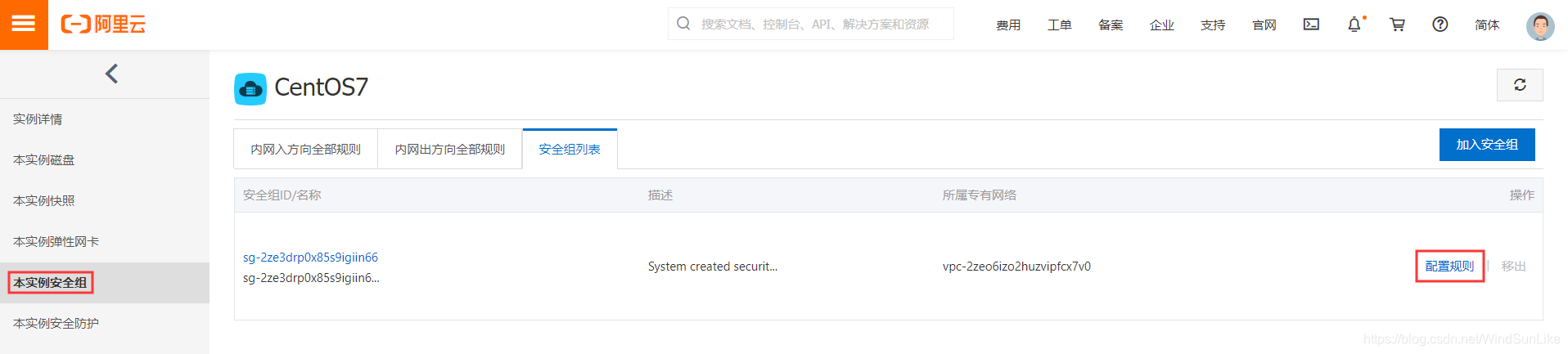
首先进入你的阿里云控制台,找到你的服务器实例,找到本实例安全组,然后点击配置规则
然后添加安全组策略,将端口20/21,1024/65535添加到白名单
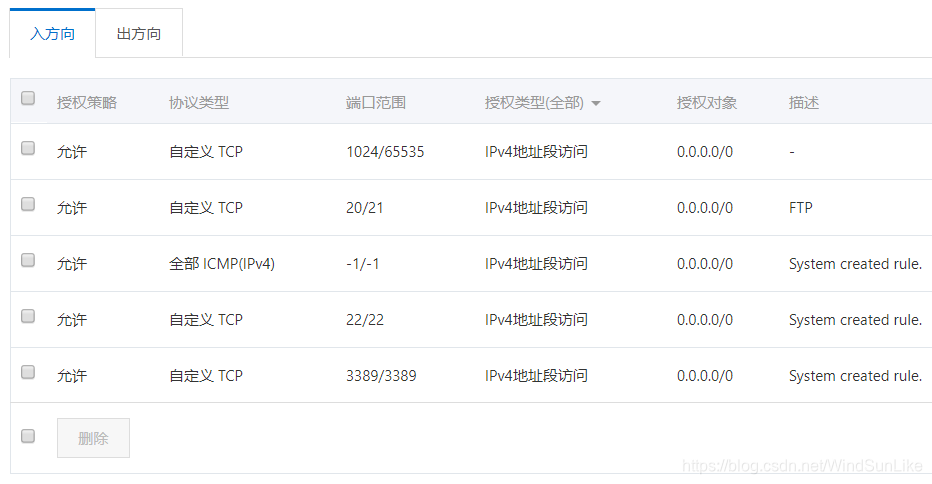
例如:
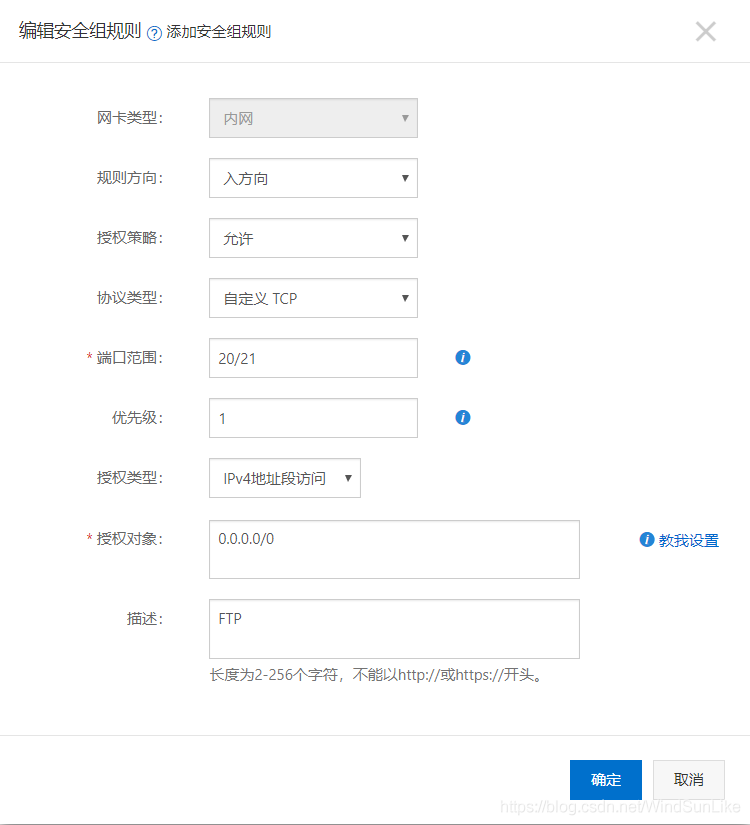
完了后,控制台配置这里没有什么问题了,现在安装vsftpd
安装/配置Vsftpd
关闭防火墙以及SeLinux
阿里云的防火墙和SeLinux默认是关闭的,如果打开了最好先关闭这两个
防火墙
查看防火墙状态:
firewall-cmd --state
停止防火墙
syatemctl stop firewalld.service
禁止开机启动firewall
systemctl disable firewalld.service
SeLinux
查看
/usr/sbin/sestatus -v
禁止
vim /etc/selinux/config

将SELINUX=enforce改成SELINUX=disabled

保存,重启
安装vsftpd
yum -y install vsftpd
然后先备份配置文件
cp /etc/vsftpd/vsftpd.conf /etc/vsftpd/vsftpd.conf.backup
在打开配置文件
/etc/vsftpd/vsftpd.conf
阿里云的镜像默认配置基本不用更改什么,默认配置如下:
# Example config file /etc/vsftpd/vsftpd.conf

#

# The default compiled in settings are fairly paranoid. This sample file

# loosens things up a bit, to make the ftp daemon more usable.

# Please see vsftpd.conf.5 for all compiled in defaults.

#

# READ THIS: This example file is NOT an exhaustive list of vsftpd options.

# Please read the vsftpd.conf.5 manual page to get a full idea of vsftpd's

# capabilities.

#

# Allow anonymous FTP? (Beware - allowed by default if you comment this out).

anonymous_enable=YES

#

# Uncomment this to allow local users to log in.

# When SELinux is enforcing check for SE bool ftp_home_dir

local_enable=YES

#

# Uncomment this to enable any form of FTP write command.

write_enable=YES

#

# Default umask for local users is 077. You may wish to change this to 022,

# if your users expect that (022 is used by most other ftpd's)

local_umask=022

#

# Uncomment this to allow the anonymous FTP user to upload files. This only

# has an effect if the above global write enable is activated. Also, you will

# obviously need to create a directory writable by the FTP user.

# When SELinux is enforcing check for SE bool allow_ftpd_anon_write, allow_ftpd_full_access

#anon_upload_enable=YES

#

# Uncomment this if you want the anonymous FTP user to be able to create

# new directories.

#anon_mkdir_write_enable=YES

#

# Activate directory messages - messages given to remote users when they

# go into a certain directory.

dirmessage_enable=YES

#

# Activate logging of uploads/downloads.

xferlog_enable=YES

#

# Make sure PORT transfer connections originate from port 20 (ftp-data).

connect_from_port_20=YES

#

# If you want, you can arrange for uploaded anonymous files to be owned by

# a different user. Note! Using "root" for uploaded files is not

# recommended!

#chown_uploads=YES

#chown_username=whoever

#

# You may override where the log file goes if you like. The default is shown

# below.

#xferlog_file=/var/log/xferlog

#

# If you want, you can have your log file in standard ftpd xferlog format.

# Note that the default log file location is /var/log/xferlog in this case.

xferlog_std_format=YES

#

# You may change the default value for timing out an idle session.

#idle_session_timeout=600

#

# You may change the default value for timing out a data connection.

#data_connection_timeout=120

#

# It is recommended that you define on your system a unique user which the

# ftp server can use as a totally isolated and unprivileged user.

#nopriv_user=ftpsecure

#

# Enable this and the server will recognise asynchronous ABOR requests. Not

# recommended for security (the code is non-trivial). Not enabling it,

# however, may confuse older FTP clients.

#async_abor_enable=YES

#

# By default the server will pretend to allow ASCII mode but in fact ignore

# the request. Turn on the below options to have the server actually do ASCII

# mangling on files when in ASCII mode. The vsftpd.conf(5) man page explains

# the behaviour when these options are disabled.

# Beware that on some FTP servers, ASCII support allows a denial of service

# attack (DoS) via the command "SIZE /big/file" in ASCII mode. vsftpd

# predicted this attack and has always been safe, reporting the size of the

# raw file.

# ASCII mangling is a horrible feature of the protocol.

#ascii_upload_enable=YES

#ascii_download_enable=YES

#

# You may fully customise the login banner string:

#ftpd_banner=Welcome to blah FTP service.

#

# You may specify a file of disallowed anonymous e-mail addresses. Apparently

# useful for combatting certain DoS attacks.

#deny_email_enable=YES

# (default follows)

#banned_email_file=/etc/vsftpd/banned_emails

#

# You may specify an explicit list of local users to chroot() to their home

# directory. If chroot_local_user is YES, then this list becomes a list of

# users to NOT chroot().

# (Warning! chroot'ing can be very dangerous. If using chroot, make sure that

# the user does not have write access to the top level directory within the

# chroot)

#chroot_local_user=YES

#chroot_list_enable=YES

# (default follows)

#chroot_list_file=/etc/vsftpd/chroot_list

#

# You may activate the "-R" option to the builtin ls. This is disabled by

# default to avoid remote users being able to cause excessive I/O on large

# sites. However, some broken FTP clients such as "ncftp" and "mirror" assume

# the presence of the "-R" option, so there is a strong case for enabling it.

#ls_recurse_enable=YES

#

# When "listen" directive is enabled, vsftpd runs in standalone mode and

# listens on IPv4 sockets. This directive cannot be used in conjunction

# with the listen_ipv6 directive.

listen=NO

#

# This directive enables listening on IPv6 sockets. By default, listening

# on the IPv6 "any" address (::) will accept connections from both IPv6

# and IPv4 clients. It is not necessary to listen on *both* IPv4 and IPv6

# sockets. If you want that (perhaps because you want to listen on specific

# addresses) then you must run two copies of vsftpd with two configuration

# files.

# Make sure, that one of the listen options is commented !!

listen_ipv6=YES

pam_service_name=vsftpd

userlist_enable=YES

tcp_wrappers=YES
保存配置之后,重启Vsftpd
systemctl start vsftpd.service
设置开机自动启动
systemctl enable vsftpd.service
查看vsftpd状态
systemctl status vsftpd.service
root用户链接vsftpd
在/etc/vsftpd/ftpusers和/etc/vsftpd/user_list两个文件中的用户是无法链接ftp的,必须打开文件将对应的用户删除
比如:root用户需要链接ftp,打开这两个文件后,分别注释掉root用户,然后再重启服务器,就可以登陆了
阿里云ECS服务器CentOS7配置vsftps及其问题解决的更多相关文章
- 阿里云ECS服务器CentOS7.2安装Python2.7.13
阿里云ECS服务器CentOS7.2安装Python2.7.13 yum中最新的也是Python 2.6.6,只能下载Python 2.7.9的源代码自己编译安装. 操作步骤如下: 检查CentOS7 ...
- 阿里云ECS服务器源配置
前段时间领取了阿里云ECS免费试用6个月的福利,此处记录一下服务器源配置过程和服务器用户创建过程. 一.CentOS源配置 1.备份 mv /etc/yum.repos.d/CentOS-Base.r ...
- 阿里云ECS服务器相关配置以及操作---上(初学者)
最近买了一台阿里云的ECS服务器 linux系统 centos镜像,把我相关的一些操作记录下来,供大家参考,不足之处欢迎指正. 首先买的过程就不用介绍了,根据自己的实际需要选择自己想要的配置,点击付钱 ...
- 阿里云ECS服务器Ubuntu配置MySQL远程访问
root账户登录服务器Ubuntu16.04 apt-get update apt-get install mysql-server mysql-client; 安装时会让你设置root密码,输入2次 ...
- 阿里云ECS服务器Linux环境下配置php服务器(二)--phpMyAdmin篇
上一篇讲了PHP服务器的基本配置,我们安装了apache,php,还有MySQL,最后还跑通了一个非常简单的php页面,有兴趣的朋友可以看我的这篇博客: 阿里云ECS服务器Linux环境下配置php服 ...
- 阿里云ECS服务器(G5)安装配置docker
镜像下载.域名解析.时间同步请点击 阿里云开源镜像站 前言 服务器配置:阿里云ECS服务器(G5服务器3年2核8G内存80G云盘),安装的是CentOS,内核信息:5.10.60-9.al8.x86_ ...
- 阿里云ECS服务器windows环境下配置redis
一.下载解压redis github下载地址:https://github.com/MSOpenTech/redis/tags 下载的是Redis-x64-3.2.100版本,Redis-x64-3. ...
- 阿里云ECS服务器环境搭建——ubuntu16.04图形界面的安装
阿里云ECS服务器环境搭建——ubuntu16.04图形界面的安装 最近琢磨着想在服务器上搭建一个hexo博客,于是就在阿里云上买了一个云服务器ECS,远程接入后默认给的是一个命令窗口,没有图形界面, ...
- 阿里云ECS服务器自定义端口无法访问问题记录
记住阿里云ECS服务器有个安全组!!! 购买了阿里云服务器的时候,购买界面那里是可以勾选默认的几个端口是否开启的,服务器默认勾了22端口,使用户能登录服务器. 当我们在服务器里面配置nginx,开启自 ...
随机推荐
- mysql - 拼接多个字段
方法介绍 concat_ws(分隔符,需要拼接在一起的字段) 实例 SELECT day_catering.S_ID, day_catering.S_DAY_WEEKS_CAPTION, concat ...
- C#设计模式学习笔记:设计原则
本笔记摘抄自:https://www.cnblogs.com/PatrickLiu/p/8287784.html,记录一下学习过程以备后续查用. 写代码也是有原则的,我们之所以使用设计模式,主要是为了 ...
- cc.fade.fade
用cc.fadeIn之前要先把setOpacity(0),笑哭,啊啊啊啊啊.因为这个东西卡了好久,啊啊啊
- LeetCode 160. 相交链表 (找出两个链表的公共结点)
题目链接:https://leetcode-cn.com/problems/intersection-of-two-linked-lists/ 编写一个程序,找到两个单链表相交的起始节点. 如下面的两 ...
- 摇一摇—微信7.0.8版本audio无法自动播放问题
近日有一个项目出现audio无法自动播放,查看原因才发现是微信版本更新为7.0.8版本,需要有交互行为,第一次播放需要用户手动点击一下,无法使用DOM中的play()进行直接播放操作,那怎么办呢? 通 ...
- 2020牛客寒假算法基础集训营1 I-nico和niconiconi
#include <bits/stdc++.h> #define dbg(x) cout << #x << "=" << x < ...
- Mapped Statements collection does not contain value for xxx
这是我第二次遇到的这个问题了,总结下. 第一次的问题是 mybatis的sqlSessionFactory的mapperLocations,配置的是这个路径下的所有映射文件,但是我没写的没有在该路径下 ...
- vue页面加载前显示{{代码}}的原因及解决办法
进入正题,简单说说自己对html中出现{{}}的原因及解决办法: 这样写的话,就会出现{{}}一闪的情况: 原因:html的加载顺序: 解析html结构 -> 加载外部脚本和样式表文件 -> ...
- Vuex项目实战store
首先简单了解一下什么是Vuex? Vuex是一个专为Vue.js应用程序开发的状态管理模式.采用集中式存储来管理应用所有组件的状态. 以下是对vuex的使用的简单介绍: 一.安装 npm i vuex ...
- [CF1304D] Shortest and Longest LIS - 贪心
看样例,>><>><,要构造 LIS 最短的,我们需要找最小链划分的方案,即包含最少的下降列 很容易想到把连续 < 的看成一段,比如样例就是 .|.|. .| ...