
SprintBoot学习(三)
Thymeleaf模板引擎
1、thymeleaf是一个Java类库,,他是xml/xhtml/html5的模板引擎可以作为view层
2、themeleaf基本语法
- 引入thymeleaf
<!--引入Thymeleaf-->

<html xmlns:th="http://www.thymeleaf.org">
将镜头页面转换成动态的视图,要进行动态处理的元素将使用“th:”为前缀
- 访问model中的数据
<div class="panel-body">

        <!--通过${}访问model中的属性-->

        <span th:text="${singlePerson.name}"></span>

    </div>
需要处理的动态内容需要加上“th:”前缀
- model中的数据迭代
<div class="panel-body">

    <ul class="list-group">

        <!--通过th:each 来迭代数据-->

        <li class="list-grop-item" th:each="person:${people}">

            <span th:text="${person.name}"></span>

            <span th:text="${person.age}"></span>

        </li>

    </ul>

</div>
person做为迭代元素来使用,然后像上面一样访问迭代元素中的属性
- 数据判断
<!--通过${not #lists.isEmpty(people)} 来判断数据。Thymeleaf 支持> 、<、>=、<=、  == 、!= 作为比较条件,同时也支持将Spring EL表达式语言用于条件中-->

<div th:if="${not #lists.isEmpty(people)}">
Thymeleaf 支持> 、<、>=、<=、 == 、!= 作为比较条件,同时也支持将Spring EL表达式语言用于条件中
3、测试案例:
- 新建spring-boot项目

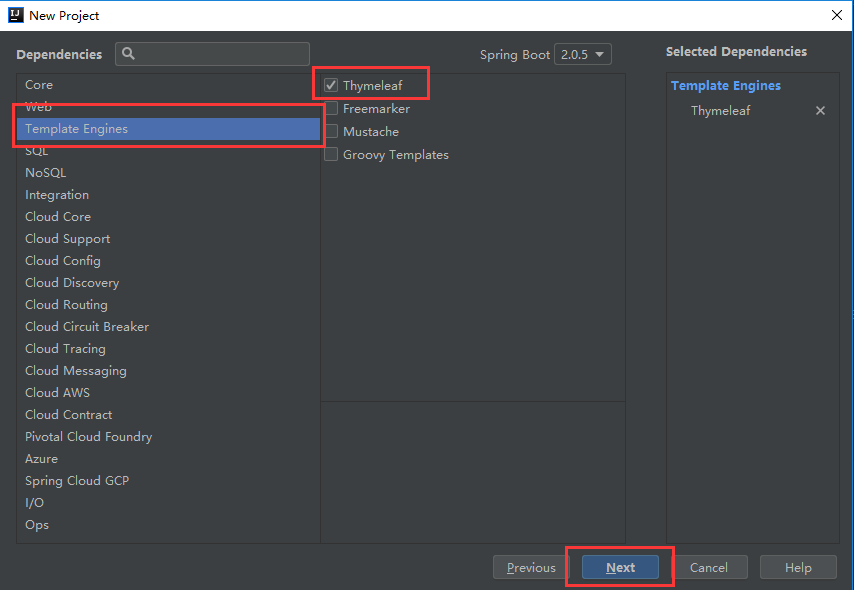
- 新建一个JavaBean
package com.example.spring_boot_thymeleaf_test.entity;

/**

 * @Author: Amy

 * @Date: 2018/10/16

 * @Time: 17:23

 * Description:

 */

public class Person {

    private  String name ;

    private  Integer age;

    public Person(){

        super();

    }

    public Person(String name , Integer age ){

        super();

        this.age=age;

        this.name=name;

    }

    public String getName() {

        return name;

    }

    public void setName(String name) {

        this.name = name;

    }

    public Integer getAge() {

        return age;

    }

    public void setAge(Integer age) {

        this.age = age;

    }

} - 启动类(controller和启动类在同一个类中)
package com.example.spring_boot_thymeleaf_test;

import com.example.spring_boot_thymeleaf_test.entity.Person;

import org.springframework.boot.SpringApplication;

import org.springframework.boot.autoconfigure.SpringBootApplication;

import org.springframework.stereotype.Controller;

import org.springframework.ui.Model;

import org.springframework.web.bind.annotation.RequestMapping;

import java.util.ArrayList;

import java.util.List;

@Controller

@SpringBootApplication

public class SpringBootThymeleafTestApplication {

    public static void main(String[] args) {

        SpringApplication.run(SpringBootThymeleafTestApplication.class, args);

    }

    @RequestMapping("/")

    public String index(Model model){

        Person single = new Person("Amy",21);

        List<Person> people = new ArrayList<Person>();

        Person p1 = new Person("旋涡鸣人",12);

        Person p2 = new Person("佐助",12);

        people.add(p1);

        people.add(p2);

        model.addAttribute("singlePerson",single);

        model.addAttribute("people",people);

        return  "index";

    }

}
当启动类和controller在同一个类的时候,要使用@controller注解
- controller类(controller和启动类不在同一个类中)
package com.example.spring_boot_thymeleaf_test;

import com.example.spring_boot_thymeleaf_test.entity.Person;

import org.springframework.stereotype.Controller;

import org.springframework.ui.Model;

import org.springframework.web.bind.annotation.RequestMapping;

import org.springframework.web.servlet.ModelAndView;

import java.util.ArrayList;

import java.util.List;

/**

 * @Author: Amy

 * @Date: 2018/10/17

 * @Time: 17:12

 * Description:

 */

@Controller

@RequestMapping("/test")

public class TestController {

   /* @RequestMapping("/index")

    public String index(Model model){

        Person single = new Person("Amy",21);

        List<Person> people = new ArrayList<Person>();

        Person p1 = new Person("旋涡鸣人",12);

        Person p2 = new Person("佐助",12);

        people.add(p1);

        people.add(p2);

        model.addAttribute("singlePerson",single);

        model.addAttribute("people",people);

        return  "index";

    }*/

    @RequestMapping("/index")

    public ModelAndView index(){

        ModelAndView model = new ModelAndView("/index");

        Person single = new Person("Amy",21);

        List<Person> people = new ArrayList<Person>();

        Person p1 = new Person("旋涡鸣人",12);

        Person p2 = new Person("佐助",12);

        people.add(p1);

        people.add(p2);

        model.addObject("singlePerson",single);

        model.addObject("people",people);

        return model;

    }

}
当启动类和controller不在同一个类的时候,启动类要放在根目录下,启动类上使用了注解@SpringBootApplication会默认扫描启动类的所在的包和子包下面所有的注解;如果controller和启动类不在同一个包需要使用注解@ComponentScan来指定扫描的包
- index页面
<!DOCTYPE html>

<!--将镜头页面转换成动态的视图,要进行动态处理的元素将使用“th:”为前缀-->

<!--引入Thymeleaf-->

<html xmlns:th="http://www.thymeleaf.org">

<head>

    <meta charset="UTF-8">

    <title>Title</title>

    <!--引入Bootstrap-->

    <link rel="stylesheet" href="//cdn.bootcss.com/bootstrap/3.3.5/css/bootstrap.min.css">

    <link rel="stylesheet" href="//cdn.bootcss.com/bootstrap/3.3.5/css/bootstrap-theme.min.css">

</head>

<!--通过@{}引用web静态资源,引入jQuery-->

<script th:src="@{jquery-3.3.1.min.js}" type="text/javascript"></script>

<body>

<div class="panel panel-primary">

    <div class="panel-heading">

        <h3 class="panel-title">访问model</h3>

    </div>

    <div class="panel-body">

        <!--通过${}访问model中的属性-->

        <span th:text="${singlePerson.name}"></span>

    </div>

</div>

<!--通过${not #lists.isEmpty(people)} 来判断数据。Thymeleaf 支持> 、<、>=、<=、  == 、!= 作为比较条件,同时也支持将Spring EL表达式语言用于条件中-->

<div th:if="${not #lists.isEmpty(people)}">

    <div class="panel panel-primary">

        <div class="panel-heading">

            <h3 class="panel-title">列表</h3>

        </div>

        <div class="panel-body">

            <ul class="list-group">

                <!--通过th:each 来迭代数据-->

                <li class="list-grop-item" th:each="person:${people}">

                    <span th:text="${person.name}"></span>

                    <span th:text="${person.age}"></span>

                </li>

            </ul>

        </div>

    </div>

</div>

</body>

</html> - 运行结果,浏览器访问http://localhost:8080/test/index 或者http://localhost:8080/ 页面如下
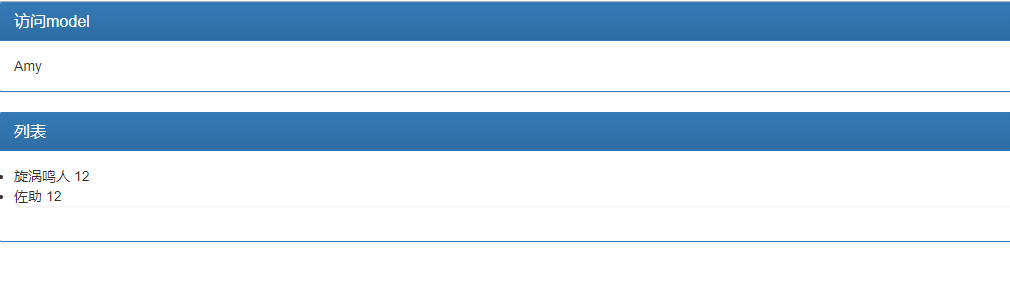
Servlet、Filter、Listener的注册
1、直接注册Bean
- Servlet注册测试
package com.example.spring_boot_thymeleaf_test.servlet;

import javax.servlet.ServletException;

import javax.servlet.http.HttpServlet;

import javax.servlet.http.HttpServletRequest;

import javax.servlet.http.HttpServletResponse;

import java.io.IOException;

import java.io.PrintWriter;

/**

 * @Author: Amy

 * @Date: 2018/12/5

 * @Time: 17:10

 * Description:

 */public class HelloServlet extends HttpServlet {

    @Override

    protected void doGet(HttpServletRequest request, HttpServletResponse response) throws ServletException, IOException {

        System.out.println("GET");

        request.setCharacterEncoding("UTF-8");

        response.setCharacterEncoding("UTF-8");

        // 向客户端生成响应数据

        response.setContentType("text/html;charset=UTF-8");

        PrintWriter w = response.getWriter();

        w.println("<h1 style='text-align:center;color:blue;'>Hello, Servlet!</h1>");

    }

}
配置类
@Configuration
public class WebCofig {
@Bean
public HelloServlet helloServlet(){
return new HelloServlet();
} } - Filter注册测试
package com.example.spring_boot_thymeleaf_test.filter;

import javax.servlet.*;

import java.io.IOException;

/**

 * @Author:Amy

 * @Date: 2018/12/5

 * @Time: 17:32

 * Description:

 */public class HelloFilter implements Filter {

    @Override

    public void init(FilterConfig filterConfig) throws ServletException {

        System.out.println( "Filter Init" );

    }

    @Override

    public void doFilter(ServletRequest servletRequest, ServletResponse servletResponse, FilterChain filterChain) throws IOException, ServletException {

        System.out.println( "Hello" );

        filterChain.doFilter( servletRequest, servletResponse );

        System.out.println( "Filter" );

    }

    @Override

    public void destroy() {

        System.out.println("Filter Destroy");

    }

}
配置类
 @Bean

    public HelloFilter helloFilter(){

        return new HelloFilter();

} - Listener注册测试
package com.example.spring_boot_thymeleaf_test.listener;

import javax.servlet.DispatcherType;

import javax.servlet.ServletRequest;

import javax.servlet.ServletRequestEvent;

import javax.servlet.ServletRequestListener;

import javax.servlet.http.HttpServletRequest;

/**

 * @Author: Amy

 * @Date: 2018/12/5

 * @Time: 17:38

 * Description:

 */

public class RequestLifecycleListener implements ServletRequestListener {

    @Override

    public void requestDestroyed(ServletRequestEvent event) {

        ServletRequest req = event.getServletRequest();

        HttpServletRequest request = (HttpServletRequest) req ;

        String uri = request.getRequestURI();

        DispatcherType type = request.getDispatcherType();

        String name = req.getLocalName();

        System.out.println(  "来自"+name+"请求类型为"+type + " ,请求路径是 " + uri +"的请求结束");

    }

    @Override

    public void requestInitialized(ServletRequestEvent event) {

        ServletRequest req = event.getServletRequest();

        HttpServletRequest request = (HttpServletRequest) req ;

        String uri = request.getRequestURI();

        DispatcherType type = request.getDispatcherType();

        String name = req.getLocalName();

        System.out.println( "接收到请求:来自" +name+"的请求,请求类型为"+type + " ,请求路径是 " + uri );

    }

}
配置类
@Bean

    public RequestLifecycleListener requestLifecycleListener(){

        return  new RequestLifecycleListener();

    }
2、通过RegistrationBean
- Servlet注册配置文件
@Bean

    public ServletRegistrationBean servletRegistrationBean(){

        return  new ServletRegistrationBean(new HelloServlet(),"/hello/*");

} - Filter注册配置文件
  @Bean

    public FilterRegistrationBean filterRegistrationBean(){

        FilterRegistrationBean filterRegistrationBean = new FilterRegistrationBean();

        filterRegistrationBean.addUrlPatterns("/hello");

        filterRegistrationBean.setFilter(new HelloFilter());

        return  filterRegistrationBean;

} - Listener注册配置文件
  @Bean

    public ServletListenerRegistrationBean servletListenerRegistrationBean(){

        return new ServletListenerRegistrationBean(new RequestLifecycleListener());

    }
3、使用注解
- Servlet注册
@WebServlet("/hello/*")启动类增加@ServletComponentScan注解,会扫描到相关组件
- Filter注册
@WebFilter("/hello") - Listener注册
@WebListener
配置Tomcat
1、使用配置文件进行配置
####配置servlet容器

#修改端口号

server.port=8080

#修改访问路径,默认是/

server.servlet.context-path=/springboot

####配置Tomcat

#配置Tomcat的编码

server.tomcat.uri-encoding=utf-8
2、使用配置类进行配置
package com.example.spring_boot_thymeleaf_test;

import org.apache.catalina.connector.Connector;

import org.apache.coyote.http11.Http11NioProtocol;

import org.springframework.boot.web.embedded.tomcat.TomcatConnectorCustomizer;

import org.springframework.boot.web.embedded.tomcat.TomcatServletWebServerFactory;

import org.springframework.boot.web.server.WebServerFactory;

import org.springframework.boot.web.server.WebServerFactoryCustomizer;

/**

 * @Author: Amy

 * @Date: 2018/12/5

 * @Time: 19:01

 * Description:

 */

public class ServletContainerConfig implements WebServerFactoryCustomizer {

    @Override

    public void customize(WebServerFactory factory) {

        ((TomcatServletWebServerFactory)factory).addConnectorCustomizers(new TomcatConnectorCustomizer() {

            @Override

            public void customize(Connector connector) {

                Http11NioProtocol protocol = (Http11NioProtocol) connector.getProtocolHandler();

                protocol.setPort(8081);

            }

        });

    }

}
Spring Boot2.0以上使用WebServerFactoryCustomizer接口替换EmbeddedServletContainerCustomizer组件完成对嵌入式Servlet容器的配置。
替换Tomcat
1、替换为jetty
     <dependency>

            <groupId>org.springframework.boot</groupId>

            <artifactId>spring-boot-starter-web</artifactId>

            <exclusions>

                <exclusion>

                    <groupId>org.springframework.boot</groupId>

                    <artifactId>spring-boot-starter-tomcat</artifactId>

                </exclusion>

            </exclusions>

        </dependency>

        <dependency>

            <groupId>org.springframework.boot</groupId>

            <artifactId>spring-boot-starter-jetty</artifactId>

            <version>2.0.6.RELEASE</version>

        </dependency>
2、替换为Undertow
       <dependency>

            <groupId>org.springframework.boot</groupId>

            <artifactId>spring-boot-starter-web</artifactId>

            <exclusions>

                <exclusion>

                    <groupId>org.springframework.boot</groupId>

                    <artifactId>spring-boot-starter-tomcat</artifactId>

                </exclusion>

            </exclusions>

        </dependency>

        <dependency>

            <groupId>org.springframework.boot</groupId>

            <artifactId>spring-boot-starter-undertow</artifactId>

            <version>2.0.6.RELEASE</version>

        </dependency>
推荐博客
https://blog.csdn.net/pml18710973036/article/details/60764496
https://blog.csdn.net/caychen/article/details/80351936
https://blog.csdn.net/Hard__ball/article/details/81281898
转载请于明显处标明出处
https://www.cnblogs.com/AmyZheng/p/9799262.html
SprintBoot学习(三)的更多相关文章
- HTTP学习三:HTTPS
HTTP学习三:HTTPS 1 HTTP安全问题 HTTP1.0/1.1在网络中是明文传输的,因此会被黑客进行攻击. 1.1 窃取数据 因为HTTP1.0/1.1是明文的,黑客很容易获得用户的重要数据 ...
- TweenMax动画库学习(三)
目录 TweenMax动画库学习(一) TweenMax动画库学习(二) TweenMax动画库学习(三) ...
- Struts2框架学习(三) 数据处理
Struts2框架学习(三) 数据处理 Struts2框架框架使用OGNL语言和值栈技术实现数据的流转处理. 值栈就相当于一个容器,用来存放数据,而OGNL是一种快速查询数据的语言. 值栈:Value ...
- 4.机器学习——统计学习三要素与最大似然估计、最大后验概率估计及L1、L2正则化
1.前言 之前我一直对于“最大似然估计”犯迷糊,今天在看了陶轻松.忆臻.nebulaf91等人的博客以及李航老师的<统计学习方法>后,豁然开朗,于是在此记下一些心得体会. “最大似然估计” ...
- DjangoRestFramework学习三之认证组件、权限组件、频率组件、url注册器、响应器、分页组件
DjangoRestFramework学习三之认证组件.权限组件.频率组件.url注册器.响应器.分页组件 本节目录 一 认证组件 二 权限组件 三 频率组件 四 URL注册器 五 响应器 六 分 ...
- [ZZ] 深度学习三巨头之一来清华演讲了,你只需要知道这7点
深度学习三巨头之一来清华演讲了,你只需要知道这7点 http://wemedia.ifeng.com/10939074/wemedia.shtml Yann LeCun还提到了一项FAIR开发的,用于 ...
- SVG 学习<三>渐变
目录 SVG 学习<一>基础图形及线段 SVG 学习<二>进阶 SVG世界,视野,视窗 stroke属性 svg分组 SVG 学习<三>渐变 SVG 学习<四 ...
- Android JNI学习(三)——Java与Native相互调用
本系列文章如下: Android JNI(一)——NDK与JNI基础 Android JNI学习(二)——实战JNI之“hello world” Android JNI学习(三)——Java与Nati ...
- day91 DjangoRestFramework学习三之认证组件、权限组件、频率组件、url注册器、响应器、分页组件
DjangoRestFramework学习三之认证组件.权限组件.频率组件.url注册器.响应器.分页组件 本节目录 一 认证组件 二 权限组件 三 频率组件 四 URL注册器 五 响应器 六 分 ...
- Django基础学习三_路由系统
今天主要来学习一下Django的路由系统,视频中只学了一些皮毛,但是也做下总结,主要分为静态路由.动态路由.二级路由 一.先来看下静态路由 1.需要在project中的urls文件中做配置,然后将匹配 ...
随机推荐
- php设计模式之单例实例代码
<?php header("Content-type:text/html;charset=utf-8"); /** * 第一步,分别实例化 */ /*class Single ...
- (c#)亲密字符串
题目 解
- python+selenium:浏览器webdriver操作(1)--基本对象定位
1.简单对象的定位-----自动化测试的核心 对象的定位应该是自动化测试的核心,要想操作一个对象,首先应该识别这个对象.一个对象就是一个人一样,他会有各种的特征(属性),如比我们可以通过一个人的身份证 ...
- .NET知识梳理——2.反射
1. 反射 1.1 DLL-IL-Metadata-反射 DLL:程序集,包含IL 和Metadada IL:面向对象中间语言(不太好阅读) Metadata描述了dll.exe中的各种 ...
- 对C#面向对象三大特性的一点总结
一.三大特性 封装: 把客观事物封装成类,并把类内部的实现隐藏,以保证数据的完整性 继承:通过继承可以复用父类的代码 多态:允许将子对象赋值给父对象的一种能力 二.[封装]特性 把类内部的数据隐藏,不 ...
- 静态方法使用synchronized修饰.
package seday10;/** * @author xingsir * 静态方法若使用synchronized修饰,这个方法一定具有同步效果.静态方法上使用的同步监视器对象为这个类的" ...
- 题解【洛谷P5019】[NOIP2018]铺设道路
题目描述 春春是一名道路工程师,负责铺设一条长度为 \(n\) 的道路. 铺设道路的主要工作是填平下陷的地表.整段道路可以看作是 \(n\) 块首尾相连的区域,一开始,第 \(i\) 块区域下陷的深度 ...
- Spring AOP编程(一)-AOP介绍
1. AOP介绍 l 在软件业,AOP为Aspect Oriented Programming的缩写,意为:面向切面编程,通过预编译方式和运行期动态代理实现程序功能的统一维护的一种技术 ...
- 【 SSH 配置参考】
applicationContext.xml <?xml version="1.0" encoding="UTF-8"?> <beans xm ...
- springboot无法查询到后台的数据
问题:springbooot中,整合mybatis时,在IUserMapper接口中, @Select("select * from user where name like '%李%'&q ...