
UITableViewController和XML解析还有地图的简单结合
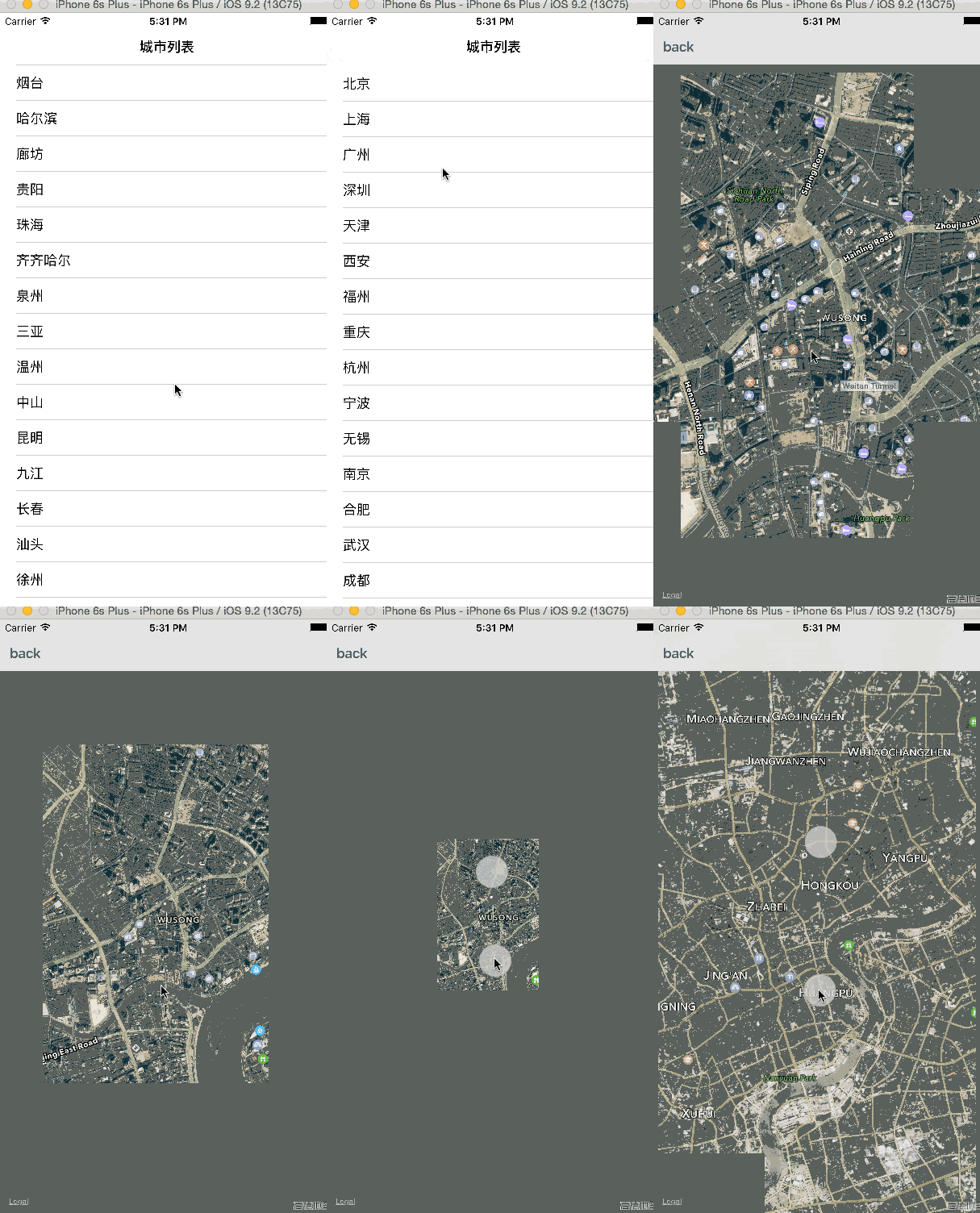

然后我的代码就按照上面的这个顺序输出。
#import <Foundation/Foundation.h>

#import <MapKit/MapKit.h>

@interface MapAnnotation : NSObject<MKAnnotation>

@property(nonatomic,readwrite) CLLocationCoordinate2D coordinate;

@property(nonatomic,strong) NSString* titler;

-(id)initWithTirle:(NSString *)titler andCoordinate:(CLLocationCoordinate2D)coordinate2d;

@end
#import "MapAnnotation.h"

@implementation MapAnnotation

-(id)initWithTirle:(NSString *)titler andCoordinate:(CLLocationCoordinate2D)coordinate2d

{

    self.titler=titler;

    self.coordinate=coordinate2d;

    return self;

}

@end
#import <UIKit/UIKit.h>

#import "RootTableViewController.h"

@interface AppDelegate : UIResponder <UIApplicationDelegate>

@property (strong, nonatomic) UIWindow *window;

@end
#import "AppDelegate.h"

@interface AppDelegate ()

@end

@implementation AppDelegate

- (BOOL)application:(UIApplication *)application didFinishLaunchingWithOptions:(NSDictionary *)launchOptions {

    self.window.rootViewController=[[UINavigationController alloc] initWithRootViewController:[[RootTableViewController alloc]initWithStyle:UITableViewStylePlain]];

    return YES;

}
#import <UIKit/UIKit.h>

#import <MapKit/MapKit.h>

#import <CoreLocation/CoreLocation.h>

@interface ViewController : UIViewController<MKMapViewDelegate>

@property(strong,nonatomic)NSString *latitude;

@property(strong,nonatomic)NSString *longitude;

@end
#import "ViewController.h"

#import "MapAnnotation.h"

@interface ViewController ()

@end

@implementation ViewController

- (void)viewDidLoad {

    [super viewDidLoad];

    //初始化你的地图在手机上的大小

    MKMapView *mapView=[[MKMapView alloc] initWithFrame:self.view.frame];

    //遵循协议

    mapView.delegate = self;

    //当前地图以坐标为中心点扩散

     mapView.centerCoordinate=CLLocationCoordinate2DMake([self.latitude doubleValue], [self.longitude doubleValue]);

    //地图类型

    mapView.mapType=MKMapTypeHybrid;

    //创建位置

    CLLocationCoordinate2D location;

    //位置的经度纬度

    location.latitude=[self.latitude doubleValue];

    location.longitude=[self.longitude doubleValue];

    //用大头针来接收你所在的位置

    MapAnnotation *newAnnotation=[[MapAnnotation alloc] initWithTirle:@"Apple Head quaters" andCoordinate:location];

    //添加到你的地图上

    [mapView addAnnotation:newAnnotation];

     //把地图添加你的页面上

    [self.view addSubview:mapView];

    self.navigationItem.leftBarButtonItem=[[UIBarButtonItem alloc] initWithTitle:@"back" style:2 target:self action:@selector(backPage)];

}

- (void)mapView:(MKMapView *)mv didAddAnnotationViews:(NSArray *)views

{

    MKAnnotationView *annotationView=[views objectAtIndex:0];

    //代理属性    调用方法

    id<MKAnnotation>mp=[annotationView annotation];

    //缩放你所看到的的X轴和Y轴

    MKCoordinateRegion region=MKCoordinateRegionMakeWithDistance([mp coordinate], 1500, 1500);

    //mv 是否实现缩放

    [mv setRegion:region animated:YES];

    //mv  是否实现mp

    [mv selectAnnotation:mp animated:YES];

}

-(void)backPage

{

    [self.navigationController popToRootViewControllerAnimated:YES];

}

- (void)didReceiveMemoryWarning {

    [super didReceiveMemoryWarning];

    // Dispose of any resources that can be recreated.

}

@end
#import <UIKit/UIKit.h>

#import "ViewController.h"

@interface RootTableViewController : UITableViewController<NSXMLParserDelegate>

@property(strong,nonatomic)NSMutableArray *arr;

@property(strong,nonatomic)NSMutableDictionary *dic;

@property(strong,nonatomic)NSString *str;

@end
#import "RootTableViewController.h"

@interface RootTableViewController ()

@end

@implementation RootTableViewController

- (void)viewDidLoad {

    [super viewDidLoad];

    self.title=@"城市列表";

    NSURL *url=[NSURL URLWithString:@"http://www.meituan.com/api/v1/divisions?mtt=1.help%2Fapi.0.0.im7coqq1"];

    NSData *data=[NSData dataWithContentsOfURL:url];

    NSXMLParser *parser=[[NSXMLParser alloc]initWithData:data];

    parser.delegate=self;

    BOOL bol=[parser parse];

    NSLog(@"%d",bol);

    [self.tableView registerClass:[UITableViewCell class] forCellReuseIdentifier:@"reuseIdentifier"];

}

- (void)parserDidStartDocument:(NSXMLParser *)parser

{

    self.arr=[NSMutableArray array];

}

- (void)parserDidEndDocument:(NSXMLParser *)parser

{

    NSLog(@"%@",self.arr);

}

-(void)parser:(NSXMLParser *)parser didStartElement:(NSString *)elementName namespaceURI:(nullable NSString *)namespaceURI qualifiedName:(nullable NSString *)qName attributes:(NSDictionary<NSString *, NSString *> *)attributeDict

{

    if ([elementName isEqualToString:@"division"]) {

        self.dic=[NSMutableDictionary dictionary];

        [self.dic setDictionary:attributeDict];

    }

}

- (void)parser:(NSXMLParser *)parser didEndElement:(NSString *)elementName namespaceURI:(nullable NSString *)namespaceURI qualifiedName:(nullable NSString *)qName

{

    if ([elementName isEqualToString:@"name"]||[elementName isEqualToString:@"latitude"]||[elementName isEqualToString:@"longitude"]) {

        [self.dic setObject:self.str forKey:elementName];

    }

    else if ([elementName isEqualToString:@"division"])

    {

        [self.arr addObject:self.dic];

    }

}

- (void)parser:(NSXMLParser *)parser foundCharacters:(NSString *)string

{

    self.str=string;

}

- (void)didReceiveMemoryWarning {

    [super didReceiveMemoryWarning];

    // Dispose of any resources that can be recreated.

}

#pragma mark - Table view data source

- (NSInteger)numberOfSectionsInTableView:(UITableView *)tableView {

    return 1;

}

- (NSInteger)tableView:(UITableView *)tableView numberOfRowsInSection:(NSInteger)section {

    return self.arr.count;

}

- (UITableViewCell *)tableView:(UITableView *)tableView cellForRowAtIndexPath:(NSIndexPath *)indexPath {

    UITableViewCell *cell = [tableView dequeueReusableCellWithIdentifier:@"reuseIdentifier" forIndexPath:indexPath];

      cell.textLabel.text=self.arr[indexPath.row][@"name"];

    return cell;

}

-(void)tableView:(UITableView *)tableView didSelectRowAtIndexPath:(NSIndexPath *)indexPath

{

    NSLog(@"%@",self.arr[indexPath.row]);

    ViewController *viewvc=[[ViewController alloc] init];

    viewvc.longitude=self.arr[indexPath.row][@"longitude"];

    viewvc.latitude=self.arr[indexPath.row][@"latitude"];

    [self.navigationController pushViewController:viewvc animated:YES];

}
UITableViewController和XML解析还有地图的简单结合的更多相关文章
- glib简单记录包括字符串,主循环,回调函数和xml解析
一.将最近用到的glib字符串功能整理了下直接用程序记录比较好看懂 #define MAX_LEN 100gchar * demo (char* msg, ...){ gchar * pcfgf ...
- 非常简单的XML解析(SAX解析、pull解析)
这里只是把解析的数据当日志打出来了 非常简单的xml解析方式 package com.example.demo.service; import java.io.IOException; import ...
- iOS-Gdata XML解析配置和简单使用
简单介绍使用废话少说直接上图就能看明白... 导入libxml2,使用第三方AFNetworking网络请求,第三方XML解析GData GData需要的配置 Build Settings 里搜索,添 ...
- 单例模式、简单工厂模式、XML解析
单例模式: 什么是单例模式? 针对特定问题提出的特定解决方案 为什么使用设计模式? 让程序有更好的可扩展性 在哪里使用? 一般情况下,开发中真正使用设计模式的地方,JVM(虚拟机)底层机制模式 usi ...
- 史上最最靠谱,又双叒叒简单的基于MSXML的XML解析指南-C++
目录 史上最最靠谱,又双叒叒简单的基于MSXML的XML解析指南 流程设计 xml信息有哪几种读取形式(xml文件或wchar) 如何选取节点,and取节点属性有哪些方法? IXMLDOMNode与I ...
- Gdata XML解析配置和简单使用
导入libxml2,使用第三方AFNetworking网络请求,第三方XML解析GData GData需要的配置 Build Settings 里搜索,添加如下
- 关于XML解析中的CDATA的简单介绍
所有 XML 文档中的文本均会被解析器解析. 只有 CDATA 区段(CDATA section)中的文本会被解析器忽略. PCDATA PCDATA 指的是被解析的字符数据(Parsed Chara ...
- xml解析技术
本文总结Dom,sax解析, 使用Java作为工具解析xml文档. 1 Dom 综述:Dom解析xml通常也称为xmlDom (和htmlDom技术差不多),将xml文档封装成树,好处就是xml中的 ...
- JSON解析和XML解析对比
JSON解析和XML解析是较为普遍的两种解析方式,其中JSON解析的市场分额更大.本文系统的分析两种解析方式的区别,为更好地处理数据作准备.由于目前阶段主要是做移动开发,所以本文所描述的JSON解析和 ...
随机推荐
- Restore Volume 操作 - 每天5分钟玩转 OpenStack(60)
前面我们 backup 了 voluem,今天我们将讨论如何 restore volume. restore 的过程其实很简单,两步走: 在存储节点上创建一个空白 volume. 将 backup 的 ...
- C#多任务并行阶段控制—— Threading.Barrier
有一种场景:4个人同时做某项任务,该任务分为3个阶段,必须要4个人都完成第一阶段后才可以进入第二阶段,都完成第二阶段后才可以进入第三阶段. 此时就需要对多个并行的任务做进度控制. Threading. ...
- 在web上逐行输出较大的txt文件
在某些场景下,需要在web上展示一些日志文件,这些日志文件是放在文件服务器上的一些txt. 当日志文件很大时,下载日志会导致页面长时间卡住,一直在loading状态,而且下载完日志之后分析日志并生成d ...
- scikit-learn 朴素贝叶斯类库使用小结
之前在朴素贝叶斯算法原理小结这篇文章中,对朴素贝叶斯分类算法的原理做了一个总结.这里我们就从实战的角度来看朴素贝叶斯类库.重点讲述scikit-learn 朴素贝叶斯类库的使用要点和参数选择. 1. ...
- react+redux教程(四)undo、devtools、router
上节课,我们介绍了一些es6的新语法:react+redux教程(三)reduce().filter().map().some().every()....展开属性 今天我们通过解读redux-undo ...
- PHP中的__toString方法(实现JS里的链式操作)
_toString方法是在打印对象时自动调用的魔术方法,如果不声明会报以下错 Catchable fatal error: Object of class String could not be co ...
- TF-IDF提取行业关键词
1. TF-IDF简介 TF-IDF(Term Frequency/Inverse Document Frequency)是信息检索领域非常重要的搜索词重要性度量:用以衡量一个关键词\(w\)对于查询 ...
- “全能”选手—Django 1.10文档中文版Part2
第一部分传送门 第三部分传送门 第四部分传送门 3.2 模型和数据库Models and databases 3.2.2 查询操作making queries 3.3.8 会话sessions 目录 ...
- JavaScript的作用域和块级作用域概念理解
作用域 作用域永远都是任何一门编程语言中的重中之重,因为它控制着变量与参数的可见性与生命周期.说到这里我们需要理解两个概念:块级作用域与函数作用域. 函数作用域 这个应该好理解,函数作用域就是说定义在 ...
- 如何设计一个优秀的API(转载)
最近在整理框架的一些 API,觉得很有必要总结一下 API 兼容性的设计.下图是我自己当下的一些总结,慢慢维护: 网上搜索了一下,一个多月前,“标点符”已经发布了下面这篇文章,觉得写得非常不错,转载于 ...