
zip压缩工具类
java将有关zip压缩的内容都封装在java.util.zip宝中,用java实现zip压缩,不用考虑压缩算法,java已经将这些进行了封装
实际上用java实现zip压缩涉及的就是一个“输入输出流”的概念
用java实现一个文件的zip压缩,过程可以简单地表示为:
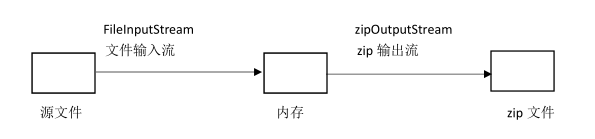
当然具体实现要比这个复杂一点,比如要先像zip文件中写入目录进入点。。如果要压缩文件夹中的内容要遍历文件夹中的文件和子文件夹。
/**
 * @author: hxp
 * @date: 2019/3/30 18:09
 * @description:zip压缩工具
 */
public class ZipCompress {
    /**
     * 目的地Zip文件
     */
    private String zipFileName;
    /**
     * 源文件(待压缩的文件或文件夹)
     */
    private String sourceFileName;

    public ZipCompress(String zipFileName,String sourceFileName)
    {
        this.zipFileName=zipFileName;
        this.sourceFileName=sourceFileName;
    }

    public void zip() throws Exception
    {
        System.out.println("压缩中...");
        File file = new File(zipFileName);
        if(!file.exists()){
            File fileParent = file.getParentFile();
            if(!fileParent.exists()){
                fileParent.mkdirs();
            }
        }
        //创建zip输出流
        ZipOutputStream out = new ZipOutputStream(new FileOutputStream(zipFileName));

        //创建缓冲输出流
        BufferedOutputStream bos = new BufferedOutputStream(out);

        File sourceFile = new File(sourceFileName);

        //调用函数
        compress(out,bos,sourceFile,sourceFile.getName());

        bos.close();
        out.close();
        System.out.println("压缩完成");

    }

    public void compress(ZipOutputStream out,BufferedOutputStream bos,File sourceFile,String base) throws Exception
    {
        //如果路径为目录(文件夹)
        if(sourceFile.isDirectory())
        {

            //取出文件夹中的文件(或子文件夹)
            File[] list = sourceFile.listFiles();

            //如果文件夹为空,则只需在目的地zip文件中写入一个目录进入点
            if(list.length==0)
            {
                System.out.println(base+"/");
                out.putNextEntry(  new ZipEntry(base+"/") );
            }
            else//如果文件夹不为空,则递归调用compress,文件夹中的每一个文件(或文件夹)进行压缩
            {
                for(int i=0;i<list.length;i++)
                {
                    compress(out,bos,list[i],base+"/"+list[i].getName());
                }
            }
        }
        else//如果不是目录(文件夹),即为文件,则先写入目录进入点,之后将文件写入zip文件中
        {
            out.putNextEntry( new ZipEntry(base) );
            FileInputStream fos = new FileInputStream(sourceFile);
            BufferedInputStream bis = new BufferedInputStream(fos);

            int tag;
            System.out.println(base);
            //将源文件写入到zip文件中
            while((tag=bis.read())!=-1)
            {
                bos.write(tag);
            }
            bis.close();
            fos.close();

        }
    }
}
zip压缩工具类的更多相关文章
- 【C#】依赖于SharpZipLib的Zip压缩工具类
上班第二天下班,课外作业,实现一个ZIP压缩的工具类.本来想用Package,但是写完了才发现不能解压其他工具压缩的zip包,比较麻烦,因此本工具类依赖了第三方的库(SharpZipLib vers ...
- 最近工作用到压缩,写一个zip压缩工具类
package test; import java.io.BufferedOutputStream;import java.io.File;import java.io.FileInputStream ...
- 压缩工具类 - ZipUtils.java
压缩工具类,提供压缩文件.解压文件的方法. 源码如下:(点击下载 - ZipUtils.java .FolderUtils.java.ant-1.7.0.jar.commons-io-2.4.jar. ...
- Java 实现文件压缩工具类
package com.wdxc.util; import java.io.BufferedInputStream; import java.io.File; import java.io.FileI ...
- php ZIP压缩类实例分享
php ZIP压缩类实例分享 <?php $zipfiles =array("/root/pooy/test1.txt","/root/pooy/test2.txt ...
- zip压缩工具 tar打包 打包并压缩
6.5 zip压缩工具 6.6 tar打包 6.7 打包并压缩 zip压缩工具 xz,bzip2,gzip都不支持压缩目录 zip可以压缩目录 压缩文件 zip 2.txt.zip 2.txt [ ...
- zip压缩工具,unzip解压缩工具
zip压缩工具,unzip解压缩工具=================== [root@aminglinux tmp]# yum install -y zip[root@aminglinux tmp] ...
- Zip压缩工具、tar打包、打包并压缩
第5周第2次课(4月17日) 课程内容: 6.5 zip压缩工具6.6 tar打包6.7 打包并压缩 6.5 zip压缩工具 Zip压缩工具最大的特点就是可以支持压缩目录,也能够压缩文件,Window ...
- Linux centosVMware zip压缩工具、tar打包、打包并压缩
一. zip压缩工具 可以用来压缩文件和目录,压缩目录是需要指定目录下的文件. [root@davery tmp]# cp 1.txt davery/[root@davery tmp]# du -sh ...
随机推荐
- Android开发 ImageView开发记录
改变图片的着色 默认是这个方法 /** * 为图像设置着色选项. Assumes * {@link PorterDuff.Mode#SRC_ATOP} blending mode. * * @para ...
- CF773E Blog Post Rating
题意:有一篇博客.一共有n个人,心中有他们期望该博客得到的赞数a[i].当某个时刻该博客的获赞数<a[i],则该人会使得赞数+1,当赞数>a[i],该人会使得赞数-1,当赞数=a[i],不 ...
- layui实现已知被选中的option,怎样渲染
在项目中用到layui实现第几个option 实现,在select中渲染出需要展示的option 代码: $("#period option[value="+res.data.se ...
- Java 对系统信号的通知获取
主要介绍Java 如何对系统信号通知进行获取和处理.直接上demo @SuppressWarnings("restriction")public class Test1 imple ...
- C++仿函数和回调函数的异同
C++回调函数(callback)与仿函数(functor)的异同 c++仿函数 functor C++仿函数和回调函数的异同
- csp-s模拟测试80(b)
csp-s模拟测试80(b) 水题没什么可写的. $T1SB$规律题正解调了仨小时就过了. $T2SBDp$题颓完题解就秒了. $T3SB$数据结构考场想到正解就弃了,考后太懒一半正解一发随机化就A了 ...
- Activity详解三 启动activity并返回结果 转载 https://www.cnblogs.com/androidWuYou/p/5886991.html
首先看演示: 1 简介 .如果想在Activity中得到新打开Activity 关闭后返回的数据,需要使用系统提供的startActivityForResult(Intent intent, int ...
- reboot与shutdown -r now 区别与联系(又收集了init和halt的小知识)
在linux命令中reboot是重新启动,shutdown -r now是立即停止然后重新启动,都说他们两个是一样的,其实是有一定的区别的. shutdown命令可以安全地关闭或重启Linux系统,它 ...
- Web中常见的绕过和技巧
SQL注入 十六进制绕过引号 slect table_name from information_schema.table where table_schema="sqli"; s ...
- 数据库连接JDBC
#=======================mysql============================= #jdbc.driverClassName=com.mysql.jdbc.Driv ...