
WLC license管理
关于控制器的license,可以参考对应平台的Datasheet:
- Cisco 2504 WLC
- Cisco 3504 WLC
- Cisco 5508 WLC
- Cisco 5520 WLC
- Cisco Flex 7510 WLC
- Cisco 8540 WLC
- Cisco Virtual WLC
其他文档:
- Special Notes for Licensed Data Payload Encryption on Cisco Wireless Controllers
- Smart Licensing Deployment Guide
1、license类型和状态
- license type (permanent, evaluation, or extension)
- The status of the license (in use, not in use, inactive, or EULA not accepted)
2、安装license
在GUI界面选择Management > Software Activation > Commands ,选择Install License。
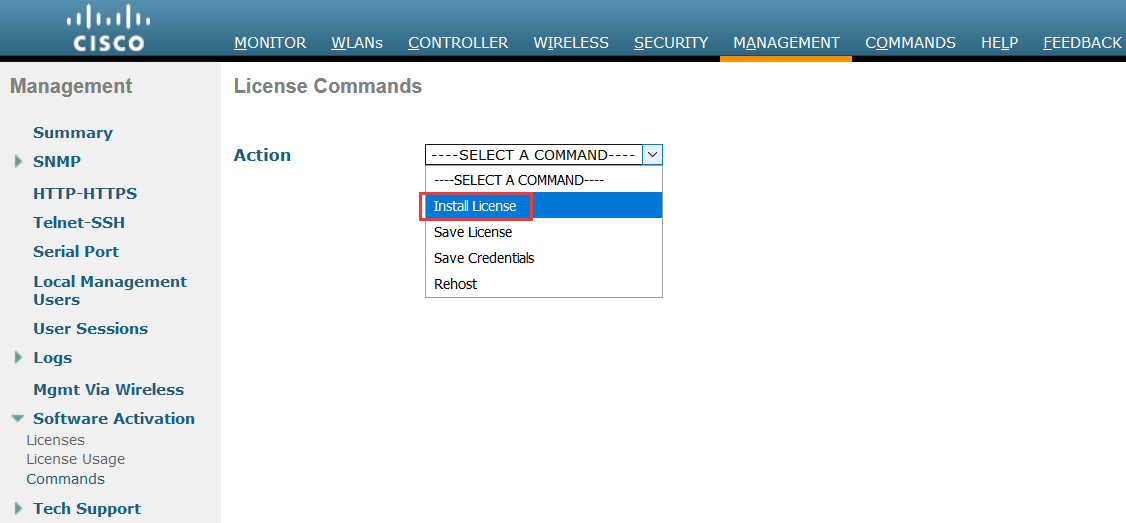
注意tftp-url: tftp://server_ip/path/filename
e.g:tftp://10.0.0.1/cmm/standard.lic
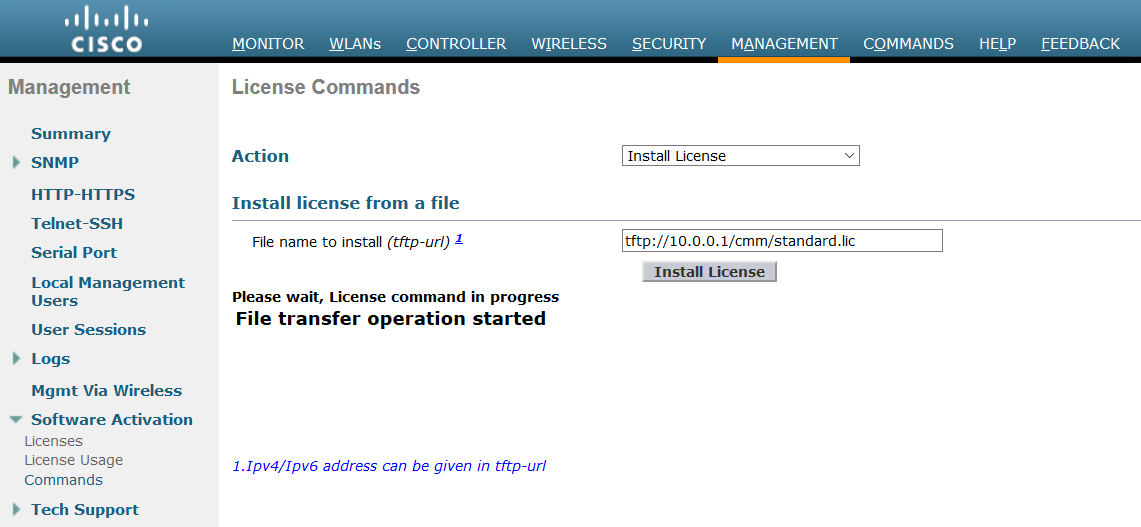
end-user license agreement (EULA)需要Accept !
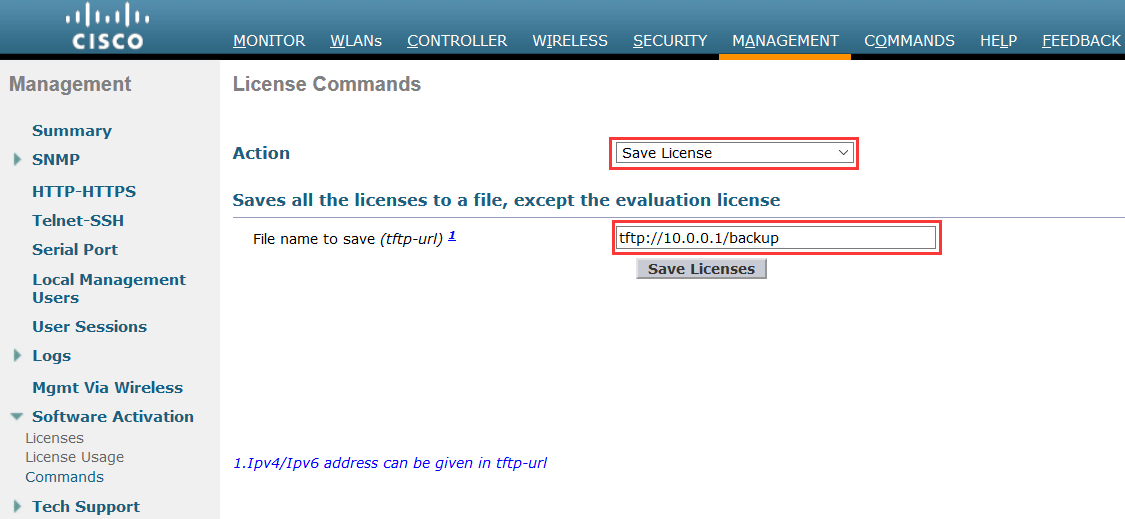
至于保存所有安装的license的备份,通过如下操作完成:
From the Action drop-down list, choose Save License.
In the File Name to Save text box, enter the path on the TFTP server where you want the licenses to be saved.
Note:You cannot save evaluation licenses.Click Save Licenses.
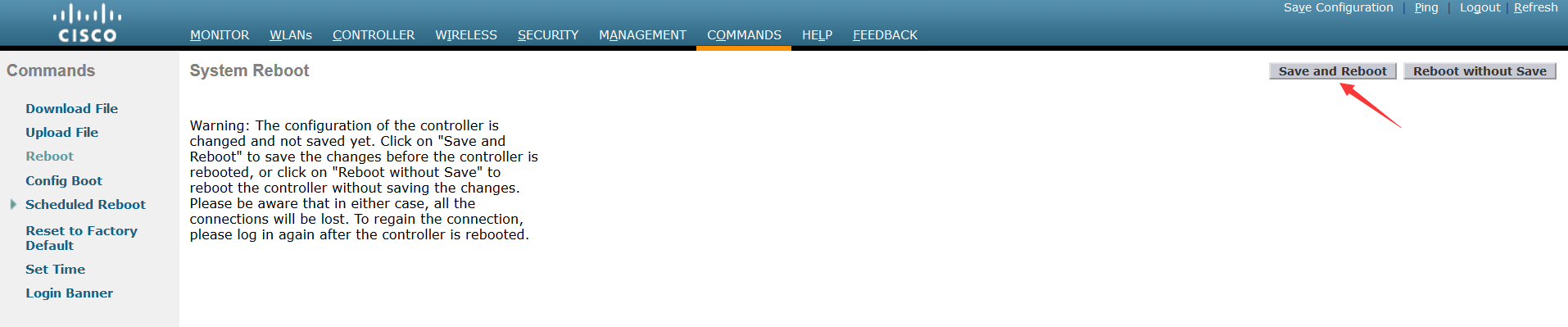
然后重启WLC
如果通过CLI去安装license:
- license install url <<<< tftp://server_ip /path /filename 如果需要移除license文件,使用命令:license clear license_name
license comment {add | delete} license_name comment_string
license save url
- reset system
eg:
(Test-vWLC) >license install tftp://<server ip>/<path>/<filename>
(Test-vWLC) >license comment add <license-name> <string>
(Test-vWLC) >license save tftp://<server ip>/<path>/<filename>
(Test-vWLC) >reset system
The system has unsaved changes.
Would you like to save them now? (y/N)
3、激活评估license
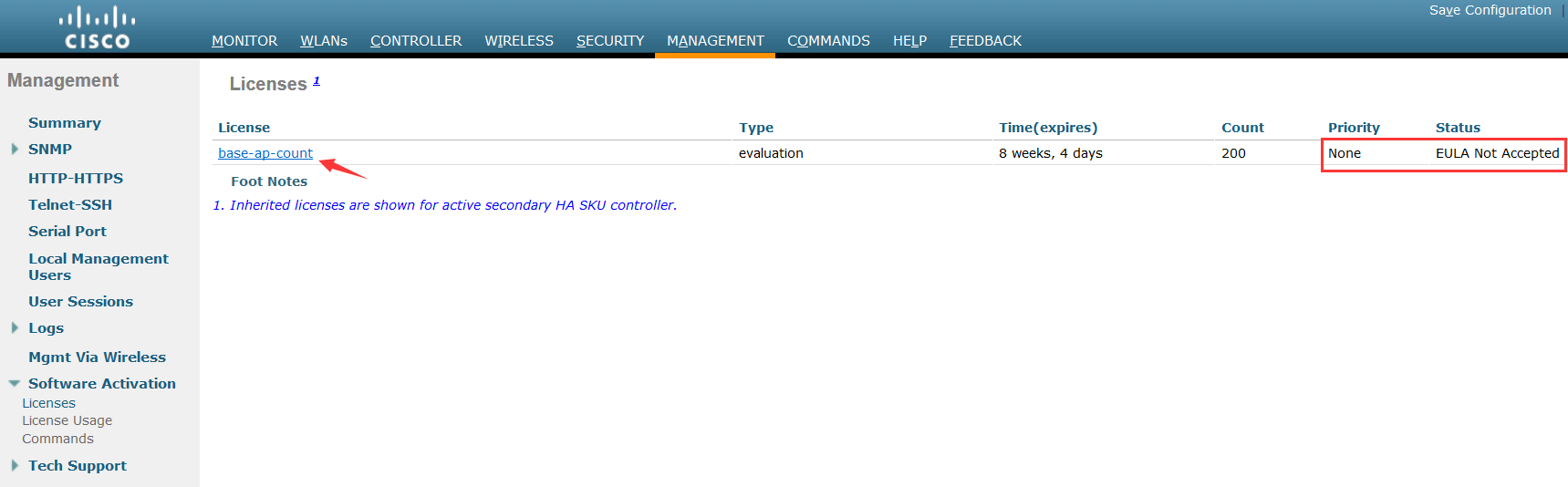
你需要将评估license的优先级别调高,以便激活它。
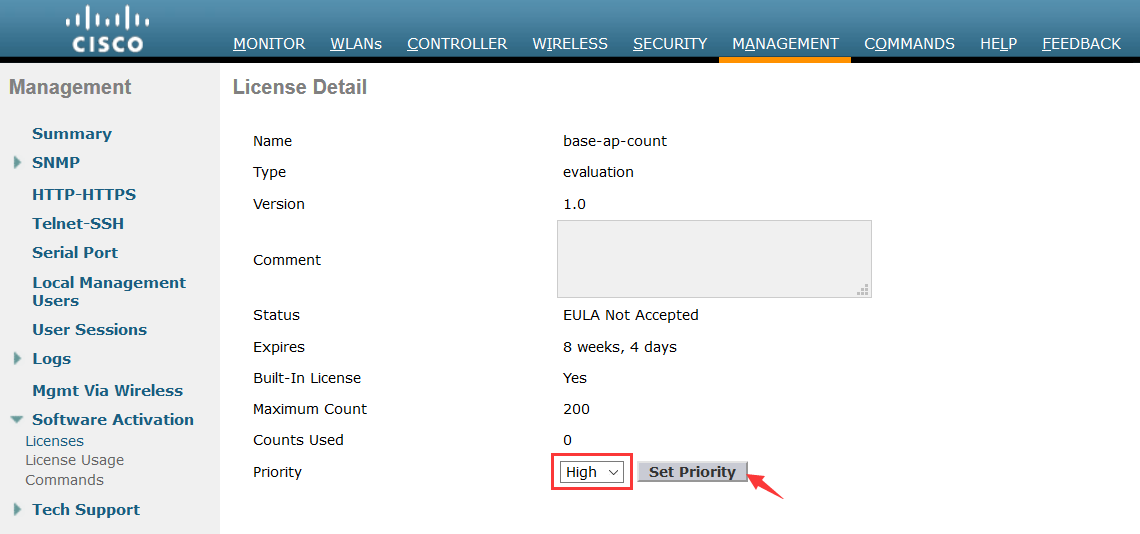
接着你会被要求接受EULA,你需要选择Accept

之后再查看,你可以看到目前已经是in use状态了。

CLI配置:
确认好license的名字:
(Test-vWLC) >show license all
License Store: Evaluation License Storage
StoreIndex: 0 Feature: base-ap-count Version: 1.0
License Type: Evaluation
License State: Active, In Use
Evaluation total period: 8 weeks 4 days
Evaluation period left: 8 weeks 3 days
Expiry date: Sun Nov 17 20:58:04 2019
License Count: 200 /200 (Active/In-use)
License Priority: High
(Test-vWLC) >license modify priority base-ap-count high
Feature: base-ap-count
Index: 1 License type: Evaluation
Lock type : Not Locked
License Count : 200
License Priority: High
Evaluation licenses are being activated in the device for the following feature(s):
Feature Name: base-ap-count
PLEASE READ THE FOLLOWING TERMS CAREFULLY. INSTALLING THE LICENSE OR
LICENSE KEY PROVIDED FOR ANY CISCO PRODUCT FEATURE OR USING SUCH
PRODUCT FEATURE CONSTITUTES YOUR FULL ACCEPTANCE OF THE FOLLOWING
TERMS. YOU MUST NOT PROCEED FURTHER IF YOU ARE NOT WILLING TO BE BOUND
BY ALL THE TERMS SET FORTH HEREIN.
You hereby acknowledge and agree that the product feature license
is terminable and that the product feature enabled by such license
may be shut down or terminated by Cisco after expiration of the
applicable term of the license (e.g., 30-day trial period). Cisco
reserves the right to terminate or shut down any such product feature
electronically or by any other means available. While alerts or such
messages may be provided, it is your sole responsibility to monitor
your terminable usage of any product feature enabled by the license
and to ensure that your systems and networks are prepared for the shut
down of the product feature. You acknowledge and agree that Cisco will
not have any liability whatsoever for any damages, including, but not
limited to, direct, indirect, special, or consequential damages related
to any product feature being shutdown or terminated. By clicking the
"accept" button or typing "yes" you are indicating you have read and
agree to be bound by all the terms provided herein.
ACCEPT? [y/n]: y
(Test-vWLC) >
然后可以reset system !
4、Smart license
思科启动了通过构建思科智能软件管理器门户来简化客户许可管理的计划。它可以帮助客户了解他们购买的许可证以及他们使用的许可证。 其他各种思科产品已经启用Smart Enabled,随着此版本的推出,Smart Licensing现在将在以下平台上提供:
Cisco 5520 WLC (AIR-CT5520-K9)
Cisco 8540 WLC (AIR-CT8540-K9)
Cisco vWLC (L-AIR-CTVM-5-K9)
Cisco 3504 WLC (AIR-CT3504-K9)
你需要注册你自己的Smart Account !
如何查看license?
show license capacity
show license summary
show license all
show license detail license_name
show license {expiring | evaluation | permanent | in-use}
排查license的问题:
debug license core {all | errors | events} {enable | disable}
debug license errors {enable | disable}
debug license events {enable | disable}
WLC license管理的更多相关文章
- FLEXNET License管理
之前的程序License管理是我自己手撸的一个非常简单的东东,根据用户机器的MAC地址生成一个字串,程序执行的时候去比较这个字串.当时只是追求一个最简单的实现,像证书过期.功能点证书自然没有.这次新版 ...
- 32. ClustrixDB License管理
一.许可的概述 ClustrixDB必须拥有有效的许可证才能运行.本授权指定: 集群中允许的最大节点数 ClustrixDB将使用的最大核数 在裸金属系统上,ClustrixDB将尝试启用与已授权的物 ...
- C#实现软件授权,限定MAC运行(软件license管理,简单软件注册机制)
一个绿色免安装软件,领导临时要求加个注册机制,不能让现场工程师随意复制.事出突然,只能在现场开发(离开现场软件就不受我们控了).花了不到两个小时实现了简单的注册机制,稍作整理. 基本原理:1.软件一运 ...
- C#软件license管理(简单软件注册机制)
最近做了一个绿色免安装软件,领导临时要求加个注册机制,不能让现场工程师随意复制.事出突然,只能在现场开发(离开现场软件就不受我们控了).花了不到两个小时实现了简单的注册机制,稍作整理. ...
- 达索CATIA许可证(License)管理使用和优化
现下主流的V6版本CATIA,是由达索公司提供授权的浮动型License,其客户端通过企业内网从许可证服务器获得许可证,最少要有一个服务器端DS License Server提供一定数量的Licens ...
- 软件License认证方案的设计思路
销售license是商业软件的贯用商业模式.用户向商家购买软件安装盘搭载license许可,才可以使用该软件.我们作为软件开发者,为了保护自身的权益,在软件开发过程中也不可避免的会设计license管 ...
- LoadRunner中运行场景时提示"You do not have a license for this Vuser type."
LoadRunner中运行场景时提示"You do not have a license for this Vuser type." 2012-06-15 17:09:07| 分 ...
- 软件License设计
如何保护软件版权,最常用的办法就是设计一套license验证框架. 1.我们的常规需求如下: .可以限制软件只能在一台机器上使用: 目前很多软件都是一机一码的销售,软件换一台机器则不能使用,想要几台机 ...
- NVIDIA vGPU License服务器搭建详解
当配置有vGPU虚拟机发起License授权请求,授权服务器会根据License中所包含的GRID License版本,加载不同的vGPU驱动(普通驱动和专业Quodra卡驱动).目前vPC和vApp ...
随机推荐
- wamp 增加mongodb拓展 安装
安装环境: windows 7 64bit php 5.5.12 确认环境参数: 1.在phpinfo() 中查看compiler 2.在phpinfo() 中查看thread safety,线程是否 ...
- Linux异常 时间戳 2018-10-08 11:17:22 是未来的 5288025.776562967 秒之后
原因:系统时间不对,有可能落后当前实际时间
- 文件分割合并DOS版
这个从163邮箱里翻出来的程序,2004年的修改日期,放这另存一下. 当时拿了一本C++的书来学,学了一阵就琢磨着做一个东东,然后就想起一个以前印象深刻的软件,叫做笨笨狗分割器. 当时主要还是靠3.5 ...
- Bayer Pattern
在刚加入工作的时候,听到最多的就是RGGB Bayer Pattern.在之前的接触中,一直默认一张图片的每个像素点有RGB三个分量,那“RGGB Bayer Pattern”究竟是什么意思.在网上查 ...
- 用阿里fastJson解析Json字符串
一下总结来自工作代码: 1.第一种情况: 通过服务器端发送http请求获取的接送字符串. String jsonStr = HttpRequestUtil.sendGet(config.getAddr ...
- css实现移动端滚动条隐藏仍然可以滚动内容
.g-panel { height: calc(100% - 112px); overflow: auto; &::-webkit-scrollbar { display: none; // ...
- Web服务与应用
一.Apache 1.1 简介 Apache是一个高稳定,商业级别开源的Web服务器 1.2 下载镜像 DockerHub官方提供Apache镜像不带PHP环境,也就是不是动态网页页面,只能生成静态的 ...
- Virtual Judge POJ 3278 Catch That Cow
#include<iostream> #include<cstdio> #include<cstring> #include<cmath> #inclu ...
- ajax post
前端 $.post("url",JSON.stringify({ a:a, ... }), function(data){ }, 'json'); 后端 @PostMapping( ...
- Python(二):做题函数记录
一,10进制 转 2,8,16进制 bin(<int>) ,oct(<int>),hex(<int>) 输出示例 '0b10011010010' '0o2322' ...