
NDK(23) 使用CMake 构建 c/c++代码库
1.官网
https://developer.android.com/studio/projects/add-native-code.html
2.android studio 安装相关工具
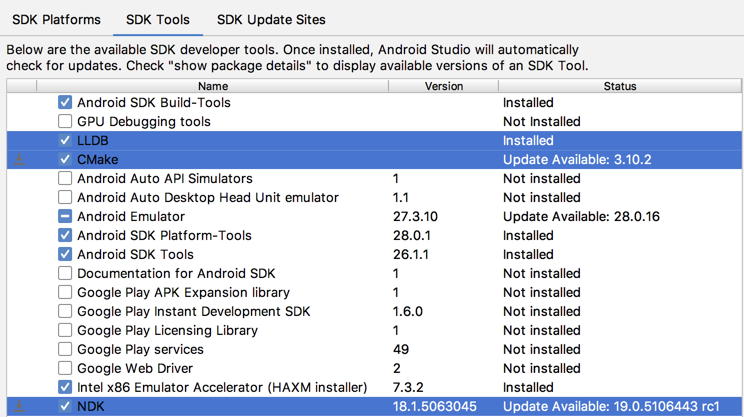
- 在打开的项目中,从菜单栏选择 Tools > Android > SDK Manager。
- 点击 SDK Tools 标签。
- 选中 LLDB、CMake 和 NDK 旁的复选框,如图所示.
3.新建支持c/c++的项目
- 在android studio 3.4.1 新建向导里选 Native C++ 模板.
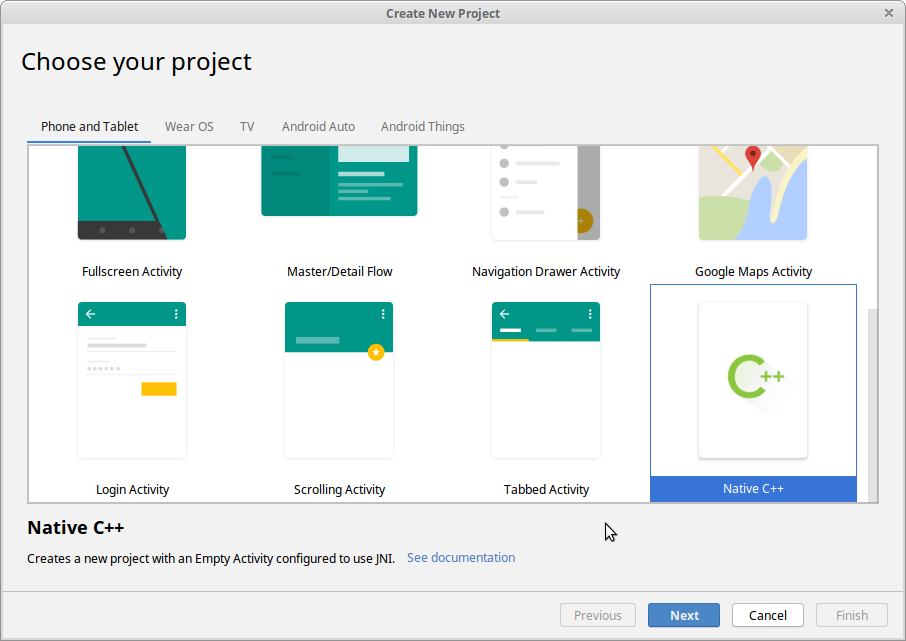
2.选择想要使用的c++标准,如C++14.
3.最后 生成的项目如下:
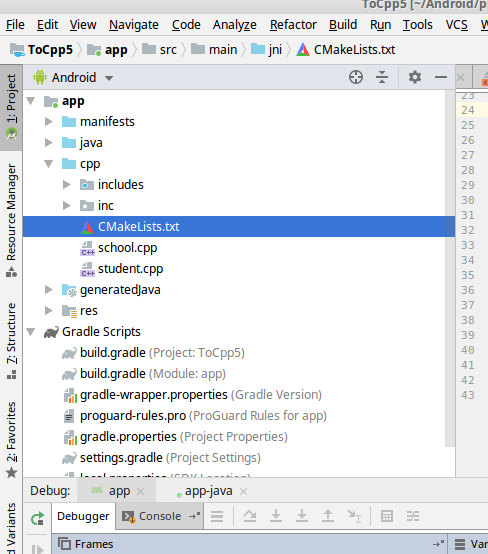
其中:
- CMakeLists.txt 是cmake构建工程要用的项目配置文件,类似android.mk.
- native-lib.cpp是源文件
4.编辑代码,使用本地程序....
4.在现有项目中添加 c/c++库
4.1 创建 jni目录
项目名(或者File) ---> 右键 ---> New ---> Folder ---> JNI Folder
4.2 创建 CMakeLists.txt文件
在上一步上创建的jni目录(当前版本目录名是cpp) 右键 ---> New ---> File 输入CMakeLists.txt
4.3 配置CMakeLists.txt 文件
 # Sets the minimum version of CMake required to build your native library.

 # This ensures that a certain set of CMake features is available to

 # your build.

 cmake_minimum_required(VERSION 3.4.1)

 # Specifies a library name, specifies whether the library is STATIC or

 # SHARED, and provides relative paths to the source code. You can

 # define multiple libraries by adding multiple add.library() commands,

 # and CMake builds them for you. When you build your app, Gradle

 # automatically packages shared libraries with your APK.

 add_library( # Specifies the name of the library.

              # 本地库名

              student-lib

              # Sets the library as a shared library.

              # 本地库的类型

              SHARED

              # Provides a relative path to your source file(s).

              # 要编译的源文件 ,多个之间用空格.

              student.cpp school.cpp)

 # Specifies a path to native header files.

 include_directories(inc)

 #添加本地代码依赖的其它系统库.

 find_library( # Defines the name of the path variable that stores the

               # location of the NDK library.

               log-lib

               # Specifies the name of the NDK library that

               # CMake needs to locate.

               log )

 # Links your native library against one or more other native libraries.

 target_link_libraries( # Specifies the target library.

                        student-lib

                        # Links the log library to the target library.

                        ${log-lib} )
- 注意CMakeLists.txt中源文件和include的路径引用问题,这里是和源文件同级.
- CMakeLists.txt 常用函数含义
- 下面是常用的cmake命令.
cmake命令官网 : https://cmake.org/cmake/help/latest/manual/cmake-commands.7.html
|
add_library() |
向您的 CMake 构建脚本添加源文件或库 add_library( # Specifies the name of the library. |
|
include_directories |
指定头文件的路径 add_library(...) # Specifies a path to native header files. |
| find_library() |
添加引用的NDK 库 find_library( # Defines the name of the path variable that stores the |
| target_link_libraries() |
链接多个库 target_link_libraries( native-lib imported-lib app-glue ${log-lib} )
|
| add_library() |
将其它源代码编译到本地库中. add_library( app-glue |
|
set_target_properties 和 IMPORTED |
IMPORTED不是个函数,只是add_library的参数,添加其他预构建的本地库 然后,您需要使用 set_target_properties() 命令指定库的路径. |
4.4 关联Gradle与 CMakeLists.txt
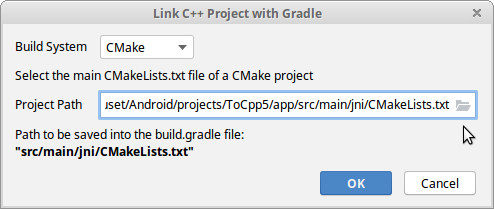
右键点击您想要关联的模块(例如 app 模块),并从菜单中选择 Link C++ Project with Gradle。关联到之前创建的CMakeLists.txt,点OK.
4.5 完成本地的c/c++代码工作
MainActivity.java
 public class MainActivity extends AppCompatActivity {

     // Used to load the 'native-lib' library on application startup.

     static {

         System.loadLibrary("native-lib");

     }

     @Override

     protected void onCreate(Bundle savedInstanceState) {

         super.onCreate(savedInstanceState);

         setContentView(R.layout.activity_main);

         // Example of a call to a native method

         TextView tv = findViewById(R.id.sample_text);

         tv.setText(stringFromJNI());

     }

     /**

      * A native method that is implemented by the 'native-lib' native library,

      * which is packaged with this application.

      */

     public native String stringFromJNI();

 }
native-lib.cpp
 #include <jni.h>

 #include <string>

 extern "C" JNIEXPORT jstring JNICALL

 Java_com_example_cpp14_MainActivity_stringFromJNI(

         JNIEnv* env,

         jobject /* this */) {

     std::string hello = "Hello from C++";

     return env->NewStringUTF(hello.c_str());

 }
5.在 Gradle 中使用 CMake 变量
https://developer.android.com/ndk/guides/cmake.html#variables
 android {

   ...

   defaultConfig {

     ...

     // This block is different from the one you use to link Gradle

     // to your CMake or ndk-build script.

     externalNativeBuild {

       // For ndk-build, instead use ndkBuild {}

       cmake {

         // Passes optional arguments to CMake.

         arguments "-DANDROID_ARM_NEON=TRUE", "-DANDROID_TOOLCHAIN=clang"

         // Sets optional flags for the C compiler.

         cFlags "-D_EXAMPLE_C_FLAG1", "-D_EXAMPLE_C_FLAG2"

         // Sets a flag to enable format macro constants for the C++ compiler.

         cppFlags "-D__STDC_FORMAT_MACROS"

       }

     }

   }

   buildTypes {...}

     ...

 }
6.指定本地库的cpu架构
默认情况下,Gradle 会针对 NDK 支持的 ABI 将您的原生库构建到单独的 .so 文件中,并将其全部打包到您的 APK 中。如果您希望 Gradle 仅构建和打包原生库的特定 ABI 配置,您可以在模块级 build.gradle 文件中使用 ndk.abiFilters 标志指定这些配置.
 apply plugin: 'com.android.application'

 android {

     compileSdkVersion 28

     defaultConfig {

         applicationId "com.example.tocpp5"

         minSdkVersion 15

         targetSdkVersion 28

         versionCode 1

         versionName "1.0"

         testInstrumentationRunner "androidx.test.runner.AndroidJUnitRunner"

         // This block is different from the one you use to link Gradle

         // to your CMake or ndk-build script.

         externalNativeBuild {

             // For ndk-build, instead use ndkBuild {}

             cmake {

                 // Passes optional arguments to CMake.

                 arguments "-DANDROID_ARM_NEON=TRUE", "-DANDROID_TOOLCHAIN=clang"

                 // Sets optional flags for the C compiler.

                 cFlags "-D_EXAMPLE_C_FLAG1", "-D_EXAMPLE_C_FLAG2"

                 // Sets a flag to enable format macro constants for the C++ compiler.

                 cppFlags "-D__STDC_FORMAT_MACROS"

                 abiFilters 'armeabi-v7a','arm64-v8a'

             }

         }

30         ndk {

31             // Specifies the ABI configurations of your native

32             // libraries Gradle should build and package with your APK.

33             abiFilters 'x86', 'x86_64', 'armeabi-v7a','arm64-v8a'

34         }

     }

     buildTypes {

         release {

             minifyEnabled false

             proguardFiles getDefaultProguardFile('proguard-android-optimize.txt'), 'proguard-rules.pro'

         }

     }

     externalNativeBuild {

         cmake {

             path file('src/main/jni/CMakeLists.txt')

         }

     }

 }

 dependencies {

     implementation fileTree(dir: 'libs', include: ['*.jar'])

     implementation 'androidx.appcompat:appcompat:1.0.2'

     implementation 'androidx.constraintlayout:constraintlayout:1.1.3'

     testImplementation 'junit:junit:4.12'

     androidTestImplementation 'androidx.test:runner:1.2.0'

     androidTestImplementation 'androidx.test.espresso:espresso-core:3.2.0'

 }
在 defaultConfig.externalNativeBuild.cmake {} 块
或
defaultConfig.externalNativeBuild.ndkBuild {} 块
中配置另一个 abiFilters 标志。Gradle 会构建defaultConfig.ndk中的 ABI 配置,不过仅会打包在 defaultConfig. 块中指定的配置。cmake或者{}ndkBuild
NDK(23) 使用CMake 构建 c/c++代码库的更多相关文章
- 构建自己的代码库在Code-Google上
多年工作的代码,有不少可以抽象出来作为工具类的.如果每次都把项目的工具类存放到U盘.必然会造成维护的问题.主要是你不可能天天的带u盘 去代码里复制粘贴.去code.google.com建立自己的代码库 ...
- CMake 构建项目教程-简介
CMake 构建项目教程-简介 Linux 平台构建项目,选择了CLion作为C++的IDE,而CLion默认就是使用CMake构建项目,所以这里记录了CMake在构建项目过程的一些小知识. 1. 项 ...
- 在 linux 下使用 CMake 构建应用程序
学习cmake http://xwz.me/wiki/doku.php?id=cmake 碰到的一些问题: 1.You have changed variables that require your ...
- 【经验分享】win10 cmake 构建 Tengine 工程
欢迎关注我的公众号 [极智视界],回复001获取Google编程规范 O_o >_< o_O O_o ~_~ o_O 本教程详细记录了在 win10 环境中 ...
- Jenkins+PMD构建自动化静态代码检测
前言:软件缺陷是不可避免的,要尽量减少错误并提高软件质量,主要有两在类技术,即缺陷预防和缺陷检测 缺陷预防包括编写更好的设计规范.实施代码审核制度.运行代码静态分析工具.运行单元测试等 PMD是一种开 ...
- mac book pro macOS10.13.3安装qt、qt creator C++开发环境,qt5.11.1,并解决cmake构建:qt mac this file is not part of any project the code
因为之前在Ubuntu下使用的是qtcreator开发,现在想在mac上装一个系统,因为许久未装了,还是花了点时间,不如写个博客,下次就更快安装了.在Mac OS X下使用Qt开发,需要配置Qt库和编 ...
- AndroidStudio2.2 Preview3中NDK开发之CMake和传统 JNI在目录结构和配置文件上的区别(转载)
自从AndroidStudio更新到2.2,就有了CMake和传统JNI两种开发NDK的方法,主要就是在目录结构和build.gradle上的区别,下面我们将分别介绍目录区别和build.gradle ...
- 在linux下使用CMake构建应用程序
本文介绍了一个跨平台的自动化构建系统 CMake 在 linux 上的使用方法. CMake 是一个比 automake 更加容易使用的工具,能够使程序员从复杂的编译连接过程中解脱出来.文中通过一些例 ...
- 在 linux 下使用 CMake 构建应用程序【转】
本文转载自:https://www.ibm.com/developerworks/cn/linux/l-cn-cmake/index.html CMake 简介 CMake 是一个跨平台的自动化建构系 ...
随机推荐
- eclipse-帮助文档
Eclipse开发环境配置 1. java环境 安装 本系统使用java6开发,老师使用1.6.0 _45版本开发,如下图所示: “开发工具”目录提供了1.6.0 _45版本32位和6 ...
- UBOOT命令简写说明
所以命令都可以简写,只要命令前面的一部分不会跟其它命令相同,就可以不用写全整个命令. save 命令 CRANE2410 # sa Saving Environment to Flash... Un- ...
- JS规则 我还有其它用途( +号操作符)例如,算术操作符(+、-、*、/等),比较操作符(<、>、>=、<=等),逻辑操作符(&&、||、!)
我还有其它用途( +号操作符) 操作符是用于在JavaScript中指定一定动作的符号. (1)操作符 看下面这段JavaScript代码. sum = numa + numb; 其中的"= ...
- Python-线程(1)
目录 什么是线程 进程与线程的区别 开启线程 为什么要使用线程 线程之间数据是共享的 什么是线程 线程与进程都是虚拟单位,目的是为了更好的描述某种事物 进程与线程的区别 进程:资源单位 线程:执行单位 ...
- 树形dp——cf1029E
题解给出的是带log的,,我自己写了个on的.. #include<bits/stdc++.h> #include<vector> using namespace std; # ...
- Centos--swoole平滑重启服务
平滑重启: 已经打开的服务: 首先在server服务中为进程添加名字: /** * @param $server */ public function onStart($server) { swool ...
- 19-11-12-Aftern-℘
我饿死了,于是写写博客安慰一下即将退役的自己. ZJ: T1. 三种颜色,想到一道神奇的‘天空龙’. 于是觉得此题可做. 那好了. 于是切掉,还拿了一个暴力对拍.疯狂A. 啊dfs慢的要死了 T2一眼 ...
- 菜鸟nginx源码剖析数据结构篇(二) 双向链表ngx_queue_t[转]
nginx源码剖析数据结构篇(二) 双向链表ngx_queue_t Author:Echo Chen(陈斌) Email:chenb19870707@gmail.com Blog:Blog.csdn. ...
- PKU--2184 Cow Exhibition (01背包)
题目http://poj.org/problem?id=2184 分析:给定N头牛,每头牛都有各自的Si和Fi 从这N头牛选出一定的数目,使得这些牛的 Si和Fi之和TS和TF都有TS>=0 F ...
- HDU--2602(0-1背包)
题目:http://acm.hdu.edu.cn/showproblem.php?pid=2602 分析:一个0-1背包问题.记得<背包九讲>的方法. dp[j]=max{dp[j],d ...