
Android学习11
Android存储概念
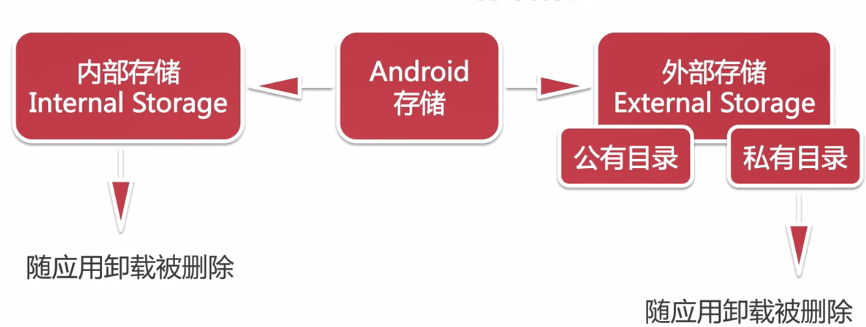
File内部存储
通过file=openFileOutput()获得,将数据存储在data/data/+包名+files下面。
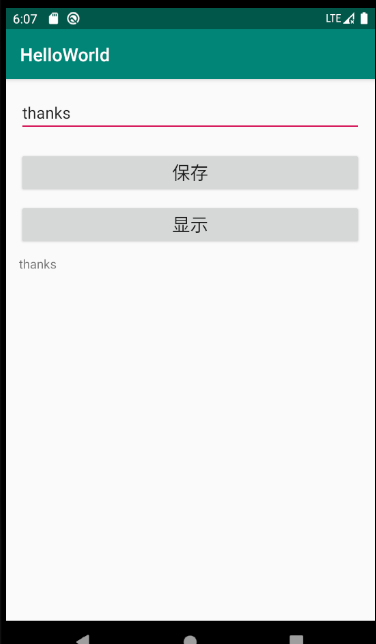
layout布局文件:
<?xml version="1.0" encoding="utf-8"?>

<LinearLayout xmlns:android="http://schemas.android.com/apk/res/android"

    android:layout_width="match_parent"

    android:layout_height="match_parent"

    android:orientation="vertical"

    android:padding="15dp">

    <EditText

        android:id="@+id/et_name"

        android:layout_width="match_parent"

        android:layout_height="wrap_content"

        android:hint="输入内容"/>

    <Button

        android:id="@+id/btn_save"

        android:layout_width="match_parent"

        android:layout_height="wrap_content"

        android:layout_marginTop="20dp"

        android:text="保存"

        android:textSize="20sp"/>

    <Button

        android:id="@+id/btn_show"

        android:layout_width="match_parent"

        android:layout_height="wrap_content"

        android:layout_marginTop="10dp"

        android:text="显示"

        android:textSize="20sp"/>

    <TextView

        android:id="@+id/tv_content"

        android:layout_width="match_parent"

        android:layout_height="wrap_content"

        android:layout_marginTop="10dp"/>

</LinearLayout>
activity_file
Activity:
package com.example.helloworld.datastorage;

import androidx.appcompat.app.AppCompatActivity;

import android.os.Bundle;

import android.view.View;

import android.widget.Button;

import android.widget.EditText;

import android.widget.TextView;

import com.example.helloworld.R;

import java.io.FileInputStream;

import java.io.FileOutputStream;

import java.io.IOException;

public class FileActivity extends AppCompatActivity {

    private EditText mEtName;

    private Button mBtnSave,mBtnShow;

    private TextView mTvContent;

    private final String mFileName = "test.txt";

    @Override

    protected void onCreate(Bundle savedInstanceState) {

        super.onCreate(savedInstanceState);

        setContentView(R.layout.activity_file);

        mEtName = findViewById(R.id.et_name);

        mBtnSave = findViewById(R.id.btn_save);

        mBtnShow = findViewById(R.id.btn_show);

        mTvContent = findViewById(R.id.tv_content);

        mBtnSave.setOnClickListener(new View.OnClickListener() {

            @Override

            public void onClick(View v) {

                save(mEtName.getText().toString());

            }

        });

        mBtnShow.setOnClickListener(new View.OnClickListener() {

            @Override

            public void onClick(View v) {

                mTvContent.setText(read());

            }

        });

    }

    //存储数据

    private void save(String content){

        FileOutputStream fileOutputStream = null;

        try {

            fileOutputStream = openFileOutput(mFileName,MODE_PRIVATE);

            fileOutputStream.write(content.getBytes());

        } catch (IOException e) {

            e.printStackTrace();

        } finally {

            if(fileOutputStream != null){

                try{

                    fileOutputStream.close();

                } catch (IOException e) {

                    e.printStackTrace();

                }

            }

        }

    }

    //读取数据

    private String read(){

        FileInputStream fileInputStream = null;

        try {

            fileInputStream = openFileInput(mFileName);

            byte[] buff = new byte[1024];

            //用StringBuilder来实现字符串拼接

            StringBuilder sb = new StringBuilder();

            int len = 0;

            while((len = fileInputStream.read(buff)) > 0){

                sb.append(new String(buff,0,len));

            }

            return sb.toString();

        } catch (IOException e) {

            e.printStackTrace();

        }finally {

            if(fileInputStream != null){

                try{

                    fileInputStream.close();

                } catch (IOException e) {

                    e.printStackTrace();

                }

            }

        }

        return null;

    }

}
FileActivity
Android学习11的更多相关文章
- android学习11——Handler,Looper,MessageQueue工作原理
Message是Handler接收和处理的消息对象. 每个线程只能拥有一个Looper.它的loop方法读取MessageQueue中的消息,读到消息之后就把消息交给发送该消息的Handler进行处理 ...
- Android学习系列(11)--App列表之拖拽ListView(下)
接着上篇Android学习系列(10)--App列表之拖拽ListView(上)我们继续实现ListView的拖拽效果. 7.重写onTouchEvent()方法. 在这个方法中我们主要是处理 ...
- 【转】Pro Android学习笔记(二三):用户界面和控制(11):其他控件
目录(?)[-] Chronometer计时器控件 倒计时CountDownTimer Switch控件 Space控件 其他控件 Android提供了很多控件,基本上都是view的扩展. Chron ...
- Android学习路线总结,绝对干货
title: Android学习路线总结,绝对干货 tags: Android学习路线,Android学习资料,怎么学习android grammar_cjkRuby: true --- 一.前言 不 ...
- Android学习——windows下搭建Cygwin环境
在上一篇博文<Android学习——windows下搭建NDK_r9环境>中,我们详细的讲解了在windows下进行Android NDK开发环境的配置,我们也讲到了在NDk r7以后,我 ...
- [转]Android 学习资料分享(2015 版)
转 Android 学习资料分享(2015 版) 原文地址:http://www.jianshu.com/p/874ff12a4c01 目录[-] 我是如何自学Android,资料分享(2015 版) ...
- Android学习系列(37)--App调试内存泄露之Context篇(下)
接着<Android学习系列(36)--App调试内存泄露之Context篇(上)>继续分析. 5. AsyncTask对象 我N年前去盛大面过一次试,当时面试官极力推荐我使用AsyncT ...
- Android – 学习操作NFC – 2
在<Android – 学习操作NFC – 1>说明了Android在处理NFC tag的机制.tag dispatch system的运作流程,以及三种ACTION_NDEF_DISCO ...
- android学习系列:jercy——AI3 的博客
[android学习之十七]——特色功能2:桌面组件(快捷方式,实时文件夹) 二.桌面组件 1.快捷方式 Android手机上得快捷方式的意思可以以我们实际PC机器上程序的快捷方式来理解.而andro ...
随机推荐
- 微信小程序scroll-view去除滚动条
css代码: .father{ //父元素 width: 100vw; height: 100vh; overflow-x: hidden; overflow-y: auto; } //隐藏滚动条 : ...
- C# 修改/新建判断
//查询有无重复(新建用) public List<bloodBreedDetailsEntity> CodeList(string code) { var expression = Ex ...
- jqgrid中分页和搜索,jqgrid loadonce:true后trigger("reloadGrid")无效
第一次接触jqgrid,发现项目中好多地方都用到. jqgrid是典型的B/S架构(浏览器/服务器模式),服务器端只需提供数据管理,浏览器只需负责数据显示. jqGrid是用ajax实现对 ...
- 【转载】17个新手常见Python运行时错误
转自:http://www.cnblogs.com/smile-ls/archive/2013/05/20/3088393.html 当初学 Python 时,想要弄懂 Python 的错误信息的含义 ...
- 关于wget安装mysql的过程
鄙人才疏学浅,写此文章是为了帮助我那些刚入门的朋友一点心意 第一步 安装yum源 安装mysql的yum源:wget https://dev.mysql.com/get/mysql80-commun ...
- LaTeX 文字带边框
1.使用framed宏包 \usepackage{framed} 可以使用verb|...|和verbatim环境而不使用cprotect宏包的cprotect命令 \begin{framed} \v ...
- 题解【洛谷P3958】[NOIP2017]奶酪
题面 题解 我们考虑使用一个并查集维护空洞之间的关系. 如果两个空洞能相互到达,那么它们的祖先也是相同的. 枚举从哪一个空洞开始,能否到达奶酪的上表面. 如果能到达就输出Yes,否则输出No. 注意开 ...
- html 动态生成
function func_creatediv(item, index, input) { var ip = document.createElement("div"); ip.n ...
- linux中的oracle数据库
安装orcal http://www.cnblogs.com/nucdy/p/5603998.html 搭建Linux操作系统+Oracle数据库的环境 https://blog.csdn.net/p ...
- python3练习100题——012
今天继续,答案都通过py3测试. 原题链接:http://www.runoob.com/python/python-exercise-example12.html 题目:判断101-200之间有多少个 ...