
[Jenkins] TestComplete 使用Jenkins进行持续集成测试
1.安装正确的TestComplete插件
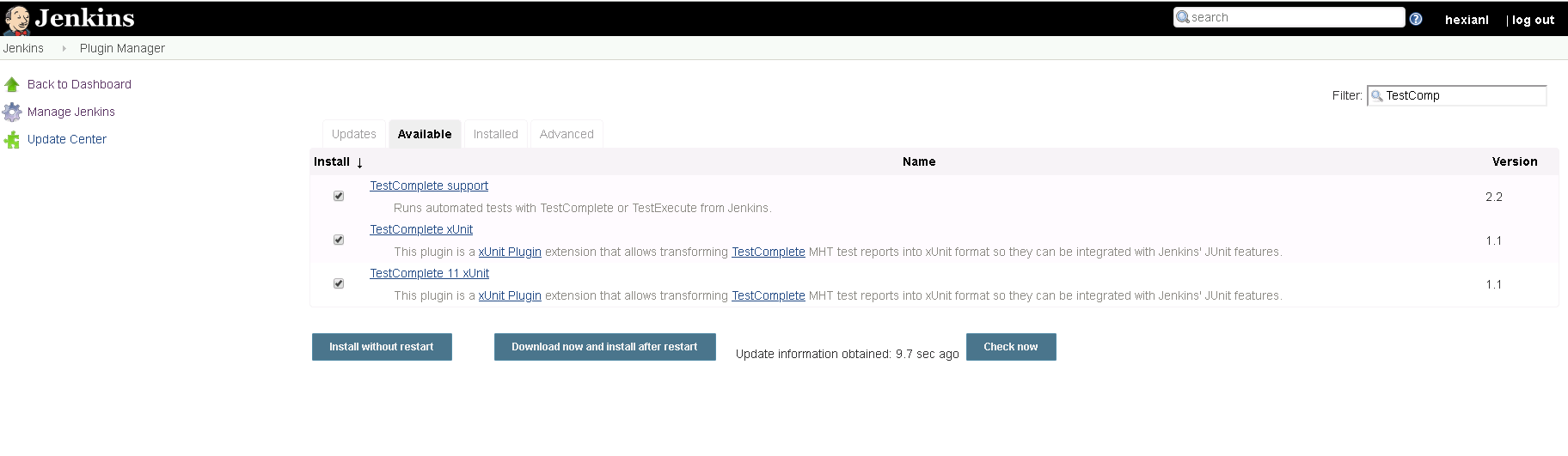
在Jenkins里面搜索TestComplete,找到正确的插件然后安装,可以重启jenkins或者选择不重启
在Install Tab 下面可以查看到正确的安装插件信息
2.安装插件以后,就可以新建一个Job
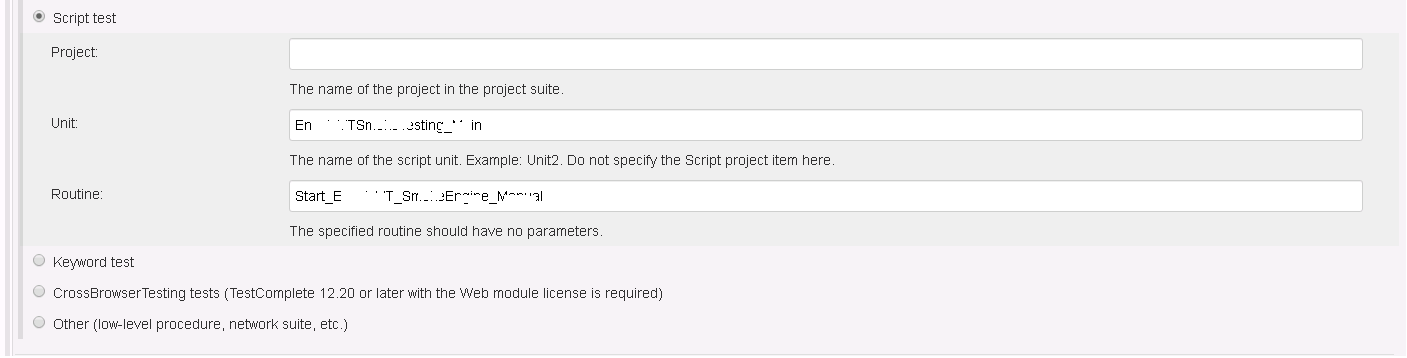
创建新的Build - TestComplete Test,根据工程不同,选择对应的测试方式,由于我们工程比较适合Script Test.所以根据Project,Unit,Routine进行配置
具体的配置信息可以查看URL:
Select the test of the project suite to be run:
Entire suite – runs the entire project suite.
Project test – runs a specified project in the project suite.
Script test – runs a script routine.
Keyword test – runs a keyword test.
Other – runs the specified project item. Enter the name of the project to the Project field and the full path to the project item to the Test name field. Use vertical bars (|) as separators. For example, enter Script|Unit1|foo to run the foo routine from the Unit1 script unit.
CrossBrowserTesting tests (TestComplete 12.20 or later with the Web module license is required) – runs tests in CrossBrowserTesting environments.
Your slave nodes must have TestComplete installed. TestExecute cannot run tests in CrossBrowserTesting environments.
TestComplete on your slave nodes must be able to access the CrossBrowserTesting cloud, and your project suite must include environments and tests assigned to them.
To learn more, see Prepare Jenkins Nodes to Run Tests in CrossBrowserTesting Environments.
3.执行TestCompele需要使用的账号权限设置
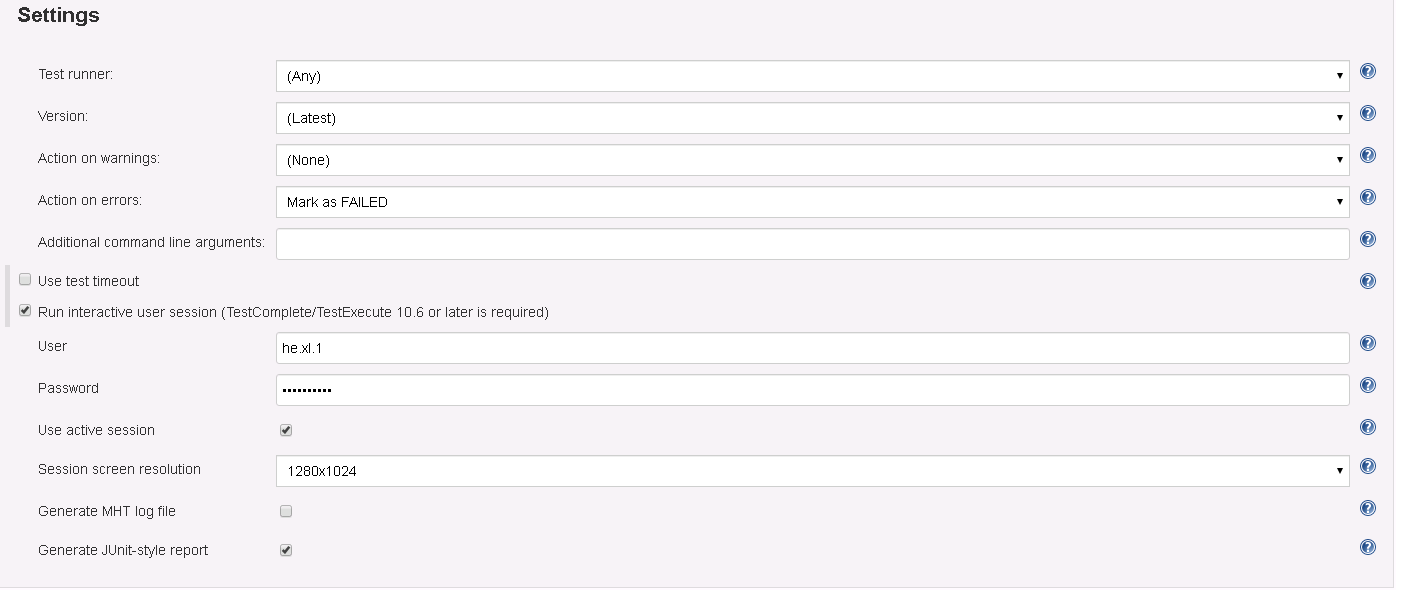
权限设置是由于TC版本超过12,就需要设置是用什么账号执行脚本,如果没有这个设置的过程,就无法正确的开展脚本执行过程。
具体设置可以参考以下内容:
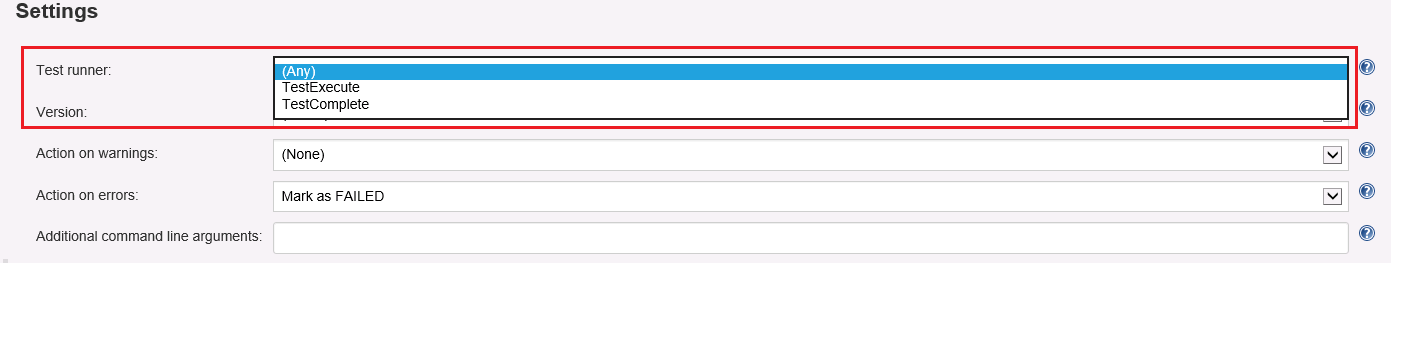
Test runner – Specifies whether the step will use TestComplete or TestExecute for the test run. If both are installed and (Any) is selected, TestExecute is run.
Notes:
The selected product must be installed on the node. If the 64-bit version of the product is available on the node, it will be used to run tests. Otherwise, the 32-bit version will be used.
To run tests in CrossBrowserTesting environments, select TestComplete.
Version – Specifies the TestComplete or TestExecute version to be used in case you have several versions of these products installed on the node. Jenkins uses the latest installed version by default.
Action on warnings – Specifies whether Jenkins should mark the entire build as failed or unstable when the TestComplete test log contains warnings.
Action on errors – Specifies whether Jenkins should mark the entire build as failed or unstable when the TestComplete test log contains errors.
Additional command-line arguments – Specifies arbitrary command-line arguments to be passed to TestComplete. To learn more about the TestComplete command line, see TestComplete Command Line.
Use test timeout – Specifies the maximum test execution time in seconds.
The timeout includes both the startup time of TestComplete (TestExecute) and the test run time. If you run tests in the CrossBrowserTesting cloud, the timeout will also include the startup time of CrossBrowserTesting environments.
If the test is not finished until the specified period elapses, Jenkins will mark the entire build as failed.
Run interactive user session – Specifies whether your TestComplete test will run in an interactive session.
This option is effective only if you use TestComplete or TestExecute 10.60 or later.
If this option is disabled and Jenkins is running as a service, your TestComplete tests will fail.
For information on when you need to use this option, see Requirements.
User – The user profile that will be used to run the test.
Password – The password used to log in to the user account.
Use active session – Specifies whether an existing user session will be used to run a TestComplete test. If it is selected, TestComplete will run in the current session. Otherwise, Jenkins will close all the applications, terminate the currently active session, start a new session under the specified user account and then start the test.
Note: Jenkins will not stop the user session if another user is logged on.
Session screen resolution - Select a screen resolution for the user session in which your TestComplete test will run. The default value is 1280×1024.
If you use a TestComplete version earlier than 12.30, the specified screen resolution will be ignored and the default screen resolution (1280×1024) will be used.
If the Use active session option is enabled, the specified screen resolution will be ignored and the actual screen resolution of the corresponding user session will be used.
Note: The maximum resolution that can be set for a user session depends on the operating system version and on the Remote Desktop Protocol version installed on the target computer. To learn more, see Remote Desktop Protocol Maximum Supported Resolutions.
Generate MHT log file – If this option is enabled, TestComplete exports test results to a .mht file after the build is over. You can download this file from the Jenkins page displaying test results.
If this option is disabled, TestComplete does not export test results in the MHT format, but you can still examine results in Jenkins. See Viewing TestComplete Test Results in Jenkins.
Generate JUnit-style report – Specifies whether Jenkins will generate JUnit-style reports. For more information on how JUnit reports are represented in Jenkins, see Viewing TestComplete Test Results in Jenkins.
4.设置执行的工具是TestComplet or TestExecution
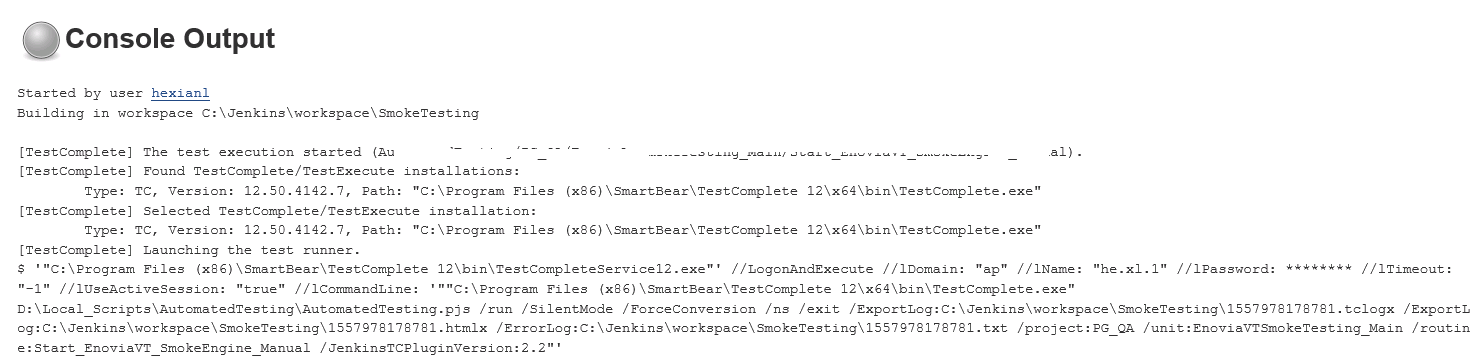
5.开始执行job
[Jenkins] TestComplete 使用Jenkins进行持续集成测试的更多相关文章
- Jenkins+Maven+Jmeter接口自动化持续集成测试
在上一篇<利用xsltproc转换jtl报告到html报告>中,解决了html报告的问题.本篇主要还是利用Jenkins来做持续集成测试. Jenkins需要安装的插件 Maven Int ...
- jenkins+gitlab+sonar+testng构建持续集成测试环境(配置干货篇)
几个工具的安装部分就不在此介绍了! jenkins配置: 1.插件安装 2.root私钥配置 3.构建job配置 4.部署job配置 5.测试job配置 7.jenkins全局工具配置 8.jenki ...
- 如何使用Jenkins进行持续集成测试
如何使用Jenkins进行持续集成测试: 安装Java环境: 安装Jenkins:两种方式,直接运行文件:使用tomcat运行: 创建一个job,构建的时候选择 execute Windows bat ...
- jmeter+jenkins+ant部署持续集成测试
原文地址:http://blog.csdn.net/kaluman/article/details/74535495 开头的注意事项: 1.所有的环境变量和代码,都需要使用英文的符号,变量之间都需要英 ...
- 使用Maven+Nexus+Jenkins+Svn+Tomcat+Sonar搭建持续集成环境(二)
前言 上一篇随笔Maven+Nexus+Jenkins+Svn+Tomcat+Sonar搭建持续集成环境(一)介绍maven和nexus的环境搭建,以及如何使用maven和nexus统一管理库 ...
- Jenkins+Maven+SVN快速搭建持续集成环境
http://www.cnblogs.com/sunzhenchao/archive/2013/01/30/2883289.htmlhttp://blog.csdn.net/pein_zero/art ...
- Jenkins+maven+git+sonar 系统持续集成&代码单測管理
Jenkins+maven+git+sonar 系统持续集成&代码单測管理 Jenkins的安装 Jenkins是基于Java开发的一种持续集成工具,用于监控持续反复的工作.功能包含: 1.持 ...
- Maven+Nexus+Jenkins+Svn+Tomcat+Sonar搭建持续集成环境(二)
上一篇随笔Maven+Nexus+Jenkins+Svn+Tomcat+Sonar搭建持续集成环境(一)介绍maven和nexus的环境搭建,以及如何使用maven和nexus统一管理库文件和版本,以 ...
- Jenkins+Gitlab CE+Robot Framework持续集成
环境 Ubuntu 14.04.3 LTS Desktop 前提 1.在本地能执行测试脚本(pybot yourTestSuit.txt),本文不讲解如何学习使用RF框架 2.已有Gitlab环境,本 ...
随机推荐
- C# Timer 控件的用法
一.主要的属性 在 Windows 窗体应用程序中,定时器控件(Timer)与其他的控件略有不同,它并不直接显示在窗体上,而是与其他控件连用. Enabled 属性: 用于设置该Timer控件是否可用 ...
- 杭电oj 2072————统计单词数(java)
problem:统计单词数 思路:利用HashMap的特性——不能反复存储同一个键得数据,所以可以保证map里边儿的元素都是不重复的,存储完毕之后直接输出size就好了 注意事项: 1.利用strin ...
- [CF467C] George and Job - DP,前缀和
简单dp + 前缀和 你谷这乱标难度的风气真是-- #include <bits/stdc++.h> using namespace std; #define int long long ...
- C++-Typedef结构体遇上指针
继Typedef遇上结构体数组后,我们又产生了新的疑问. 上一期地址:https://www.cnblogs.com/lemaden/p/10122929.html 昨天一位朋友又问我了,说结构体数组 ...
- hadoop学习笔记(八):hadoop2.x的高可用环境搭建
本文原创,转载请注明作者及原文链接 高可用集群的搭建: 几个集群的启动顺序问题: 1.先启动zookeeper --->zkServer.sh start 2.启动journalNodes集群 ...
- makecert 产出证书
C:\Program Files (x86)\Microsoft SDKs\Windows\v7.1A\Bin>makecert -r -n // -e // -sv mymuse.pvk my ...
- 使用webpack搭建vue环境
1.安装node.js,在官网下载,直接下一步,完成.nodejs里默认包含npm环境.国内安装包的速度太慢,建议使用cnpm淘宝镜像. npm install -g cnpm --registry= ...
- CLR处理损坏状态的异常
你有没有写过不太正确但足够接近的代码?当一切顺利的时候,你是否不得不编写运行良好的代码,但是你不太确定当出了问题时会发生什么?有一个简单的.不正确的语句可能位于您编写或必须维护的代码中:catch ( ...
- 边双连通分量 jarjan (poj 3177)
大意:给定一个无向连通图,判断至少加多少的边,才能使任意两点之间至少有两条的独立的路(没有公共的边,但可以经过同一个中间的顶点). 思路:在同一个双连通分量里的所有的点可以看做一个点,收缩后,新图是一 ...
- MXnet的使用
关于MXnet的介绍: MXNet: A flexible and efficient library for deep learning. 这是MXNet的官网介绍,“MXNet是灵活且高效的深度学 ...