
Getting started with 3G | ip.access nano3G+OpenBSC+Osmocom-bb Part 1
English Version could be find at Osmocom.org
https://osmocom.org/projects/cellular-infrastructure/wiki/Accelerate3g5_--_unicornteam
0x01环境搭建
PC:Ubuntu16.04
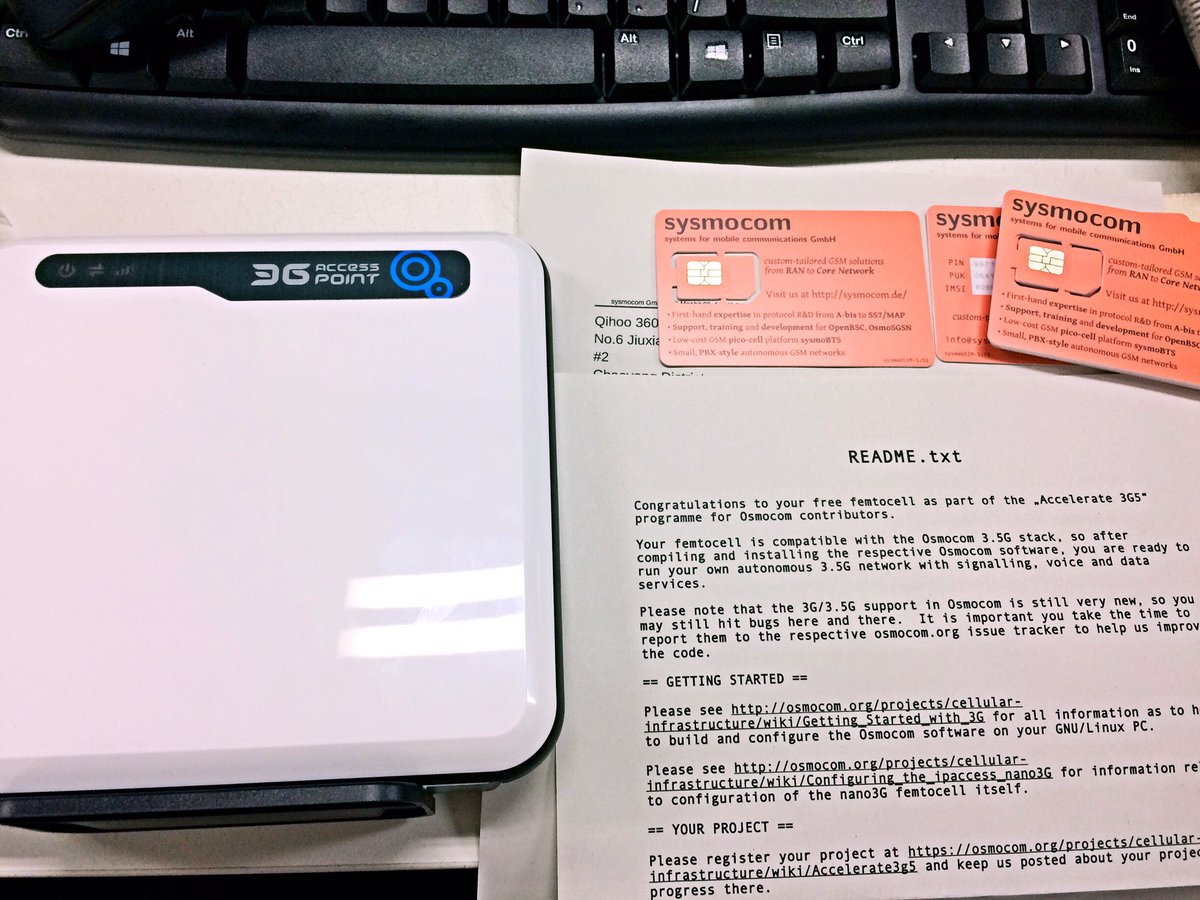
HardWare:ip.access nano3G
SoftWare:Osmocom
1.1 安装交叉编译环境
sudo apt-get update

sudo apt-get install libtool shtool autoconf git-core pkg-config make gcc build-essential libgmp3-dev libmpfr-dev libx11- libx11-dev texinfo flex bison libncurses5 libncurses5-dbg libusb-0.1- libpcsclite1 libccid pcscd libncurses5-dev libncursesw5 libncursesw5-dbg libncursesw5-dev zlibc zlib1g-dev libmpfr4 libmpc-dev libpcsclite-dev

sudo ldconfig

mkdir osm

cd osm

mkdir build install src

wget http://bb.osmocom.org/trac/raw-attachment/wiki/GnuArmToolchain/gnu-arm-build.3.sh

cd src

wget http://ftp.gnu.org/gnu/gcc/gcc-4.8.2/gcc-4.8.2.tar.bz2

wget http://ftp.gnu.org/gnu/binutils/binutils-2.21.1a.tar.bz2

wget ftp://sources.redhat.com/pub/newlib/newlib-1.19.0.tar.gz

cd ..

chmod +x gnu-arm-build..sh

sudo bash gnu-arm-build..sh
1.2 设置交叉编译环境变量
cd install/bin

pwd

vi ~/./.bashrc

export PATH=$PATH:/home/$username(change this to your name)/osm/install/bin

#save and quit

source ~/.bashrc
0x02 源码编译CalypsoBTS
2.1 编译libosmo-dsp
git clone git://git.osmocom.org/libosmo-dsp.git

cd libosmo-dsp/

autoreconf -i

./configure

make

sudo make install

cd ..
2.2 编译osmocom-bb
git clone git://git.osmocom.org/osmocom-bb.git trx

cd trx/

git checkout jolly/testing

cd src/

# 需要 TX 功能支持

# 取消target/firmware/Makefile代码中'CFLAGS += -DCONFIG_TX_ENABLE' 前边的注释

# 并在make时启用transceiver功能支持

make HOST_layer23_CONFARGS=--enable-transceiver
2.3 安装依赖包
sudo apt-get install sqlite3 libdbi-dev libdbd-sqlite3 libsctp-dev
2.4 编译 Ortp
wget http://download.savannah.gnu.org/releases/linphone/ortp/sources/ortp-0.22.0.tar.gz

tar -xvf ortp-0.22..tar.gz

cd ortp-0.22./

./configure

make

sudo make install

sudo ldconfig

cd ..
2.5 编译libosmo-abis
git clone git://git.osmocom.org/libosmo-abis.git

cd libosmo-abis

autoreconf -i

./configure

make

sudo make install

sudo ldconfig

cd ..
2.6 编译libosmo-netif
git clone git://git.osmocom.org/libosmo-netif.git

cd libosmo-netif/

autoreconf -i

./configure

make

sudo make install

sudo ldconfig

cd ..
2.7 编译openbsc
编译Openbsc时需用到PCAP库文件,编译前先搜索&安装依赖包:
apt-cache search PCAP

sudo pat-get install libpcap-dev libpcap0. libpcap0.-dbg libpcap0.-dev

sudo ldconfig

git clone git://git.osmocom.org/openbsc.git

cd openbsc/openbsc/

autoreconf -i

./configure

make

sudo make install

cd ../..
git clone git://git.osmocom.org/openbsc.git

cd openbsc/openbsc/

autoreconf -i

./configure

make

sudo make install

cd ../..
2.8 编译osmo-bts
git clone git://git.osmocom.org/osmo-bts.git

cd osmo-bts

autoreconf -i

./configure --enable-trx

make

sudo make install

cd ..
2.9 创建OpenBSC配置文件
#如果配置文件不存在需要先创建 Create the configuration folder if it isn't exist yet

mkdir ~/.osmocom

cd ~/.osmocom

touch ~/.osmocom/open-bsc.cfg

touch ~/.osmocom/osmo-bts.cfg
0x03 源码编译Cellular Infrastructure
3.1 克隆源码
git clone git://git.osmocom.org/libosmocore

git clone git://git.osmocom.org/libosmo-abis

git clone git://git.osmocom.org/openbsc

git clone git://git.osmocom.org/libosmo-netif

git clone git://git.osmocom.org/libosmo-sccp

git clone git://git.osmocom.org/libsmpp34

git clone git://git.osmocom.org/openggsn
3.2 下载&执行自动编译脚本
wget https://osmocom.org/attachments/download/2438/build_2G.sh

chmod   build_2G.sh

sudo bash build_2G.sh
0x04 配置OpenBSC
4.1 启动BTS
终端1:
osmo-nitb -c ~/.osmocom/open-bsc.cfg -l ~/.osmocom/hlr.sqlite3 -P -C --debug=DRLL:DCC:DMM:DRR:DRSL:DNM
终端2:
telnet localhost

4.2 配置IP
PC
IP:192.168.31.147 (通过WiFi连接)
路由器
IP:192.168.31.1
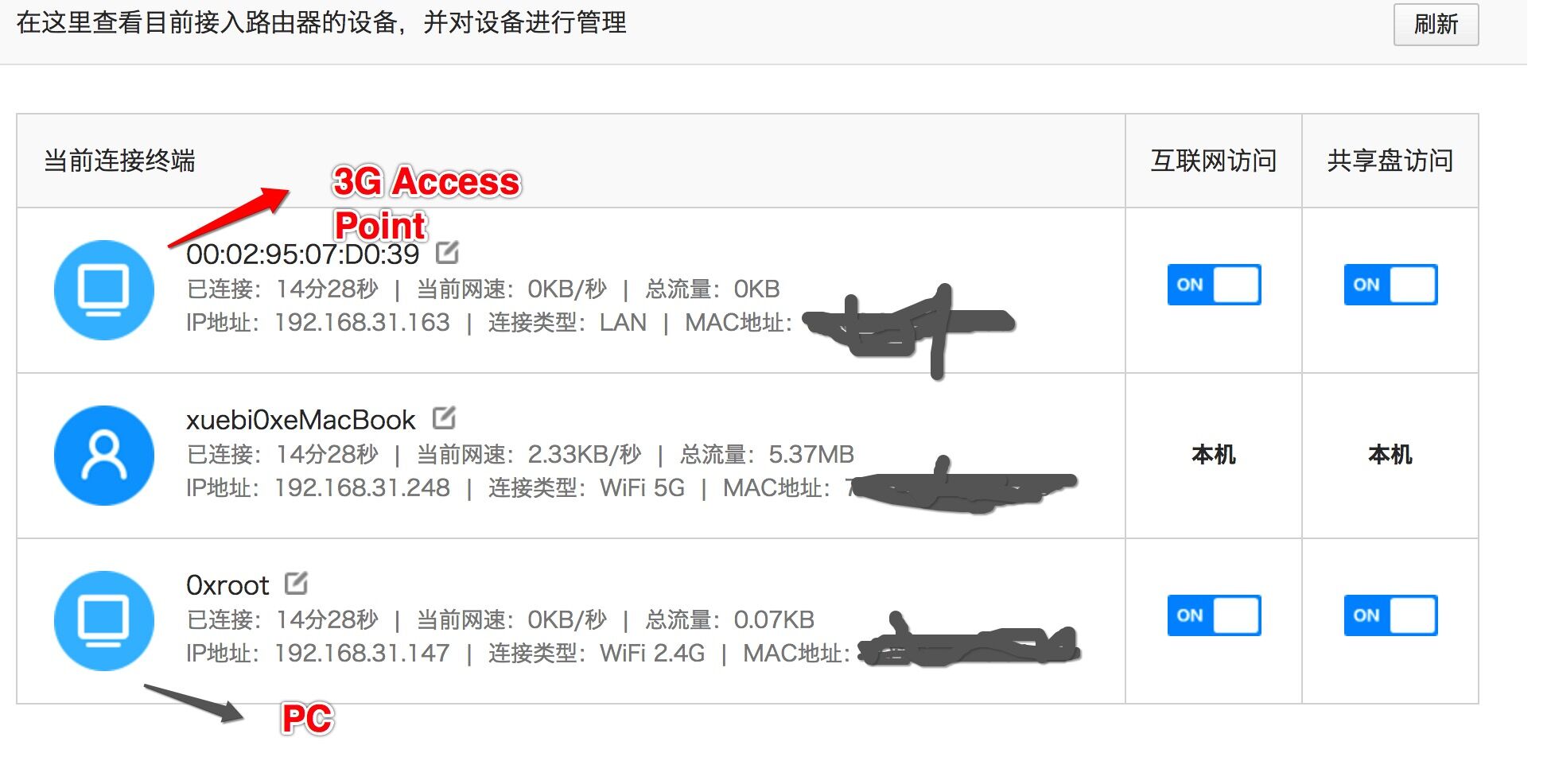
3G Access Point
IP:未知
方法1:进入路由后台,查找3G Access Point IP
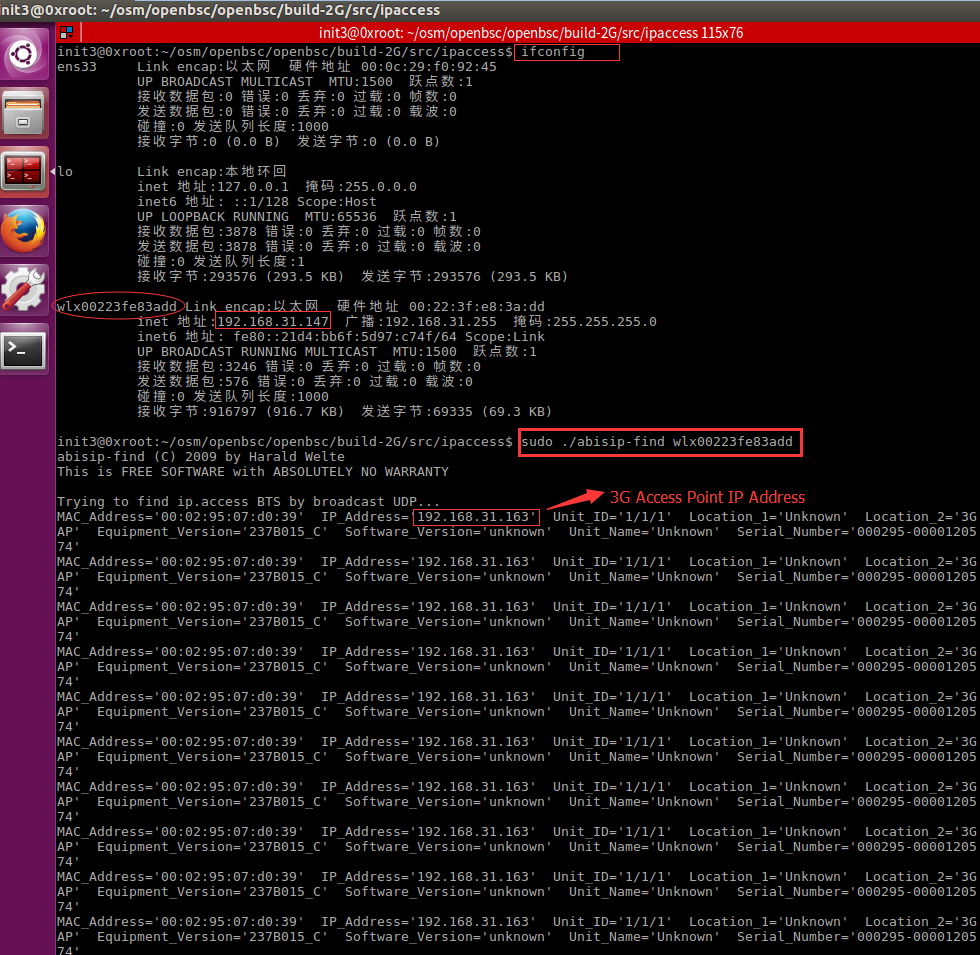
方法2:通过abissip-find找到3G Access Point IP
cd openbsc/openbsc/src/ipaccess

#or

cd openbsc/openbsc/build-2G/src/ipaccess

sudo ./abisip-find
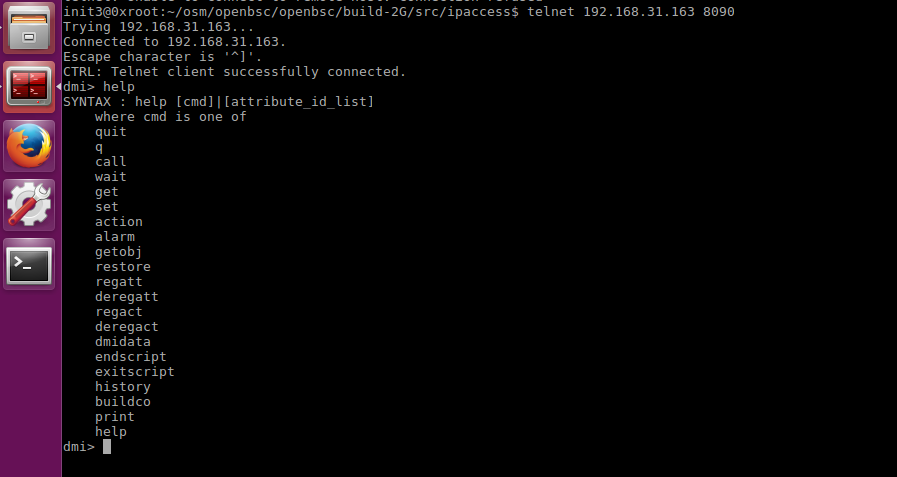
4.3 Telnet连入3G Access Point
telnet 3G Access Point's IP 8090
4.4 SSH连入
ssh -oKexAlgorithms=+diffie-hellman-group1-sha1 root@192.168.31.136

password:newsys

ipaccess-config
init3@0xroot:~/osm/openbsc/openbsc/src/ipaccess$ ./ipaccess-config --help

ipaccess-config (C) - by Harald Welte and others

This is FREE SOFTWARE with ABSOLUTELY NO WARRANTY

Usage: ipaccess-config IP_OF_BTS

Commands for writing to the BTS:

  -u --unit-id UNIT_ID        Set the Unit ID of the BTS

  -o --oml-ip IP        Set primary OML IP (IP of your BSC)

  -i --ip-address IP/MASK    Set static IP address + netmask of BTS

  -g --ip-gateway IP        Set static IP gateway of BTS

  -r --restart            Restart the BTS (after other operations)

  -n --nvram-flags FLAGS/MASK    Set NVRAM attributes

  -S --nvattr-set FLAG    Set one additional NVRAM attribute

  -U --nvattr-unset FLAG    Set one additional NVRAM attribute

  -l --listen TESTNR        Perform specified test number

  -L --Listen TEST_NAME        Perform specified test

  -s --stream-id ID        Set the IPA Stream Identifier for OML

  -d --software FIRMWARE    Download firmware into BTS

Miscellaneous commands:

  -h --help            this text

  -H --HELP            Print parameter details.

  -f --firmware FIRMWARE    Provide firmware information

  -w --write-firmware        This will dump the firmware parts to the filesystem. Use with -f.

  -p --loop            Loop the tests executed with the --listen command.
ipaccess-proxy
init3@0xroot:~/osm/openbsc/openbsc/src/ipaccess$ ./ipaccess-proxy --help

Usage: ipaccess-proxy [options]

 ipaccess-proxy is a proxy BTS.

 -h --help. This help text.

 -l --listen IP. The ip to listen to.

 -b --bsc IP. The BSC IP address.

 -g --gprs IP. Take GPRS NS from that IP.

 -s --disable-color. Disable the color inside the logging message.

 -e --log-level number. Set the global loglevel.

 -T --timestamp. Prefix every log message with a timestamp.

 -V --version. Print the version of OpenBSC.
0x05 Reference
https://osmocom.org/projects/cellular-infrastructure/wiki/Build_from_Source
http://osmocom.org/projects/baseband/wiki/CalypsoBTS
https://osmocom.org/projects/cellular-infrastructure/wiki/Getting_Started_with_3G
https://osmocom.org/projects/osmocscn/wiki/Osmocom_3G_-_Getting_Started/3
https://osmocom.org/projects/cellular-infrastructure/wiki/Configuring_the_ipaccess_nano3G
原文链接:https://cn0xroot.com/2017/04/11/getting-started-with-3g-ip-access-nano3gopenbscosmocom-bb-part-1/
Getting started with 3G | ip.access nano3G+OpenBSC+Osmocom-bb Part 1的更多相关文章
- AFNetworking 原作者都无法解决的问题: 如何使用ip直接访问https网站?
背景 最近App似乎有报异常是DNS无法解析,尝试解决此问题.搜集到的资料很少,甚至连AFN原作者都判定这可能是一个无解的问题,参见: https://github.com/AFNetworking/ ...
- iOS开发:获取设备IP地址
一.导入头文件 //首先导入头文件信息 #include <ifaddrs.h> #include <arpa/inet.h> #include <net/if.h> ...
- 使用Python 统计nginx日志前十ip访问量并以柱状图显示
脚本内容: import matplotlib.pyplot as plt # nginx_file = '10.6.11.91_access.log-2018-12-27' ip = {} #筛选n ...
- 访问控制技术- 标准IP访问列表
1.设置pc IP 网关 192.168.1.1 192.168.1.254 192.168.1.2 192.168.1.254 192.168.3.1 192.168.3.254 2.设置交换机借 ...
- ccna 闫辉单臂路由 和 acl access control list
ccna 闫辉单臂路由 和 acl access control list 一单臂路由 当前园区网设计很少用到 成本低 小型的.局域网可用 二ACL acc ...
- iptables脚本封ip
##自动封IP:分析web或应用日志或者网络连接状态封掉垃圾IP #!/bin/sh /bin/netstat -na|grep ESTABLISHED|awk |grep -v -E '192.16 ...
- Java分布式IP限流和防止恶意IP攻击方案
前言 限流是分布式系统设计中经常提到的概念,在某些要求不严格的场景下,使用Guava RateLimiter就可以满足.但是Guava RateLimiter只能应用于单进程,多进程间协同控制便无能为 ...
- DNS服务器安全---通过ipset对DNS异常解析流量的源IP地址进行管控
ipset介绍 ipset是iptables的扩展,它允许你创建 匹配整个地址集合的规则.而不像普通的iptables链只能单IP匹配, ip集合存储在带索引的数据结构中,这种结构即时集合比较大也可以 ...
- MySQL+Amoeba实现数据库主从复制和读写分离
MySQL读写分离是在主从复制的基础上进一步通过在master上执行写操作,在slave上执行读操作来实现的.通过主从复制,master上的数据改动能够同步到slave上,从而保持了数据的一致性.实现 ...
随机推荐
- 在线linux 平台
1.http://www.shiyanlou.com/[实验楼] 2.http://bellard.org/jslinux/[大牛平台]
- python记录_day06
一.小数据池 注意大前提!!!! 小数据池只针对整数.字符串和bool值,因为这些数据是不可变的,这样数据的共享才安全 小数据池也称为小整数缓存机制或驻留机制,是指在不同代码块创建部分小数据对象(具体 ...
- css 选择器三
2.4.10 浮动 浮动是css里面布局最多的一个属性,也是很重要的一个属性. float:表示浮动的意思.它有四个值. none: 表示不浮动,默认 left: 表示左浮动 right:表示右浮动 ...
- P4238 【模板】多项式求逆 ntt
题意:求多项式的逆 题解:多项式最高次项叫度deg,假设我们对于多项式\(A(x)*B(x)\equiv 1\),已知A,求B 假设度为n-1,\(A(x)*B(x)\equiv 1(mod x^{\ ...
- 谈一谈Vector类
一.关于Vector类的注意事项 1.从 Java 2 平台 v1.2 开始,vector类改进为实现 List 接口,成为 Java Collections Framework 的成员:所以vect ...
- jq回车触发绑定点击事件
//jq绑定回车事件触发点击事件<script> $(function(){ $(document).keyup(function(event){ if(event.keyCode ==1 ...
- 十九、Spring框架(注解方式测试)
一.注解方式测试 1.注解方式测试使用junit.使用junit-4.12.jar和hamcrest-all-1.3.jar(单元测试包) 把这两个jar包,导入到lib文件夹下. 2.TestSpr ...
- LSTM UEBA异常检测——deeplog里其实提到了,就是多分类LSTM算法,结合LSTM预测误差来检测异常参数
结合CNN的可以参考:http://fcst.ceaj.org/CN/article/downloadArticleFile.do?attachType=PDF&id=1497 除了行为,其他 ...
- SpringBoot与docker
1.简介 Docker是一个开源的应用容器引擎: Docker支持将软件编译成一个镜像:然后在镜像中各种软件做好配置,将镜像发布出去,其它使用者开源直接使用这个镜像: 运行中的这个镜像称为容器,容器启 ...
- MySql查询最近一个月,一周,一天
最近一个月 SELECT * FROM table WHERE DATE_SUB(CURDATE(), INTERVAL 1 MONTH) <= date(time); 本月.当前月 SELEC ...